radio HONDA PILOT 2013 2.G Owner's Manual
[x] Cancel search | Manufacturer: HONDA, Model Year: 2013, Model line: PILOT, Model: HONDA PILOT 2013 2.GPages: 488, PDF Size: 10.18 MB
Page 224 of 488
223
uuAudio System Basic OperationuPlaying the XM® Radio
Continued
Features
Playing the XM® Radio
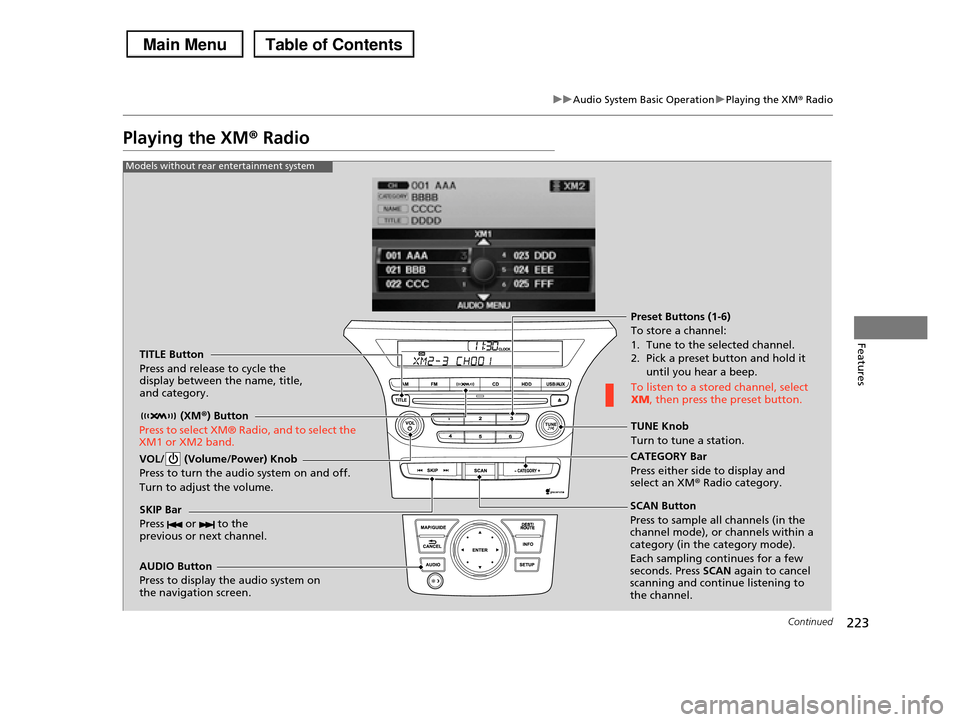
TITLE Button
Press and release to cycle the display between the name, title, and category.
(XM®) Button
Press to select XM® Radio, and to select the XM1 or XM2 band.
VOL/ (Volume/Power) Knob
Press to turn the audio system on and off.
Turn to adjust the volume.
SKIP Bar
Press or to the previous or next channel.
CATEGORY Bar
Press either side to display and select an XMr Radio category.
TUNE Knob
Turn to tune a station.
Preset Buttons (1-6)
To store a channel:
1. Tune to the selected channel. 2. Pick a preset button and hold it
until you hear a beep.
To listen to a stored channel, select XM, then press the preset button.
SCAN Button
Press to sample all channels (in the channel mode), or channels within a category (in the category mode).
Each sampling continues for a few seconds. Press SCAN again to cancel scanning and continue listening to the channel.
Models without rear entertainment system
AUDIO Button
Press to display the audio system on the navigation screen.
Page 225 of 488
224
uuAudio System Basic OperationuPlaying the XM® Radio
Features
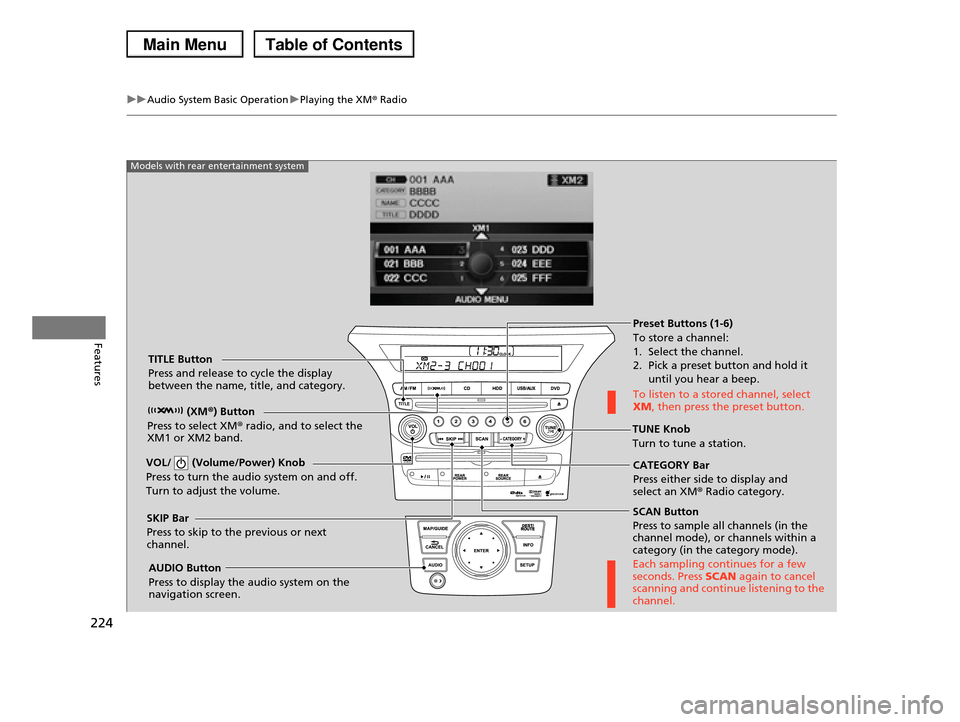
SCAN Button
Press to sample all channels (in the channel mode), or channels within a category (in the category mode).
Each sampling continues for a few seconds. Press SCAN again to cancel scanning and continue listening to the channel.
VOL/ (Volume/Power) Knob
Press to turn the audio system on and off.
Turn to adjust the volume.
Preset Buttons (1-6)
To store a channel:
1. Select the channel. 2. Pick a preset button and hold it
until you hear a beep.
To listen to a stored channel, select XM, then press the preset button.
SKIP Bar
Press to skip to the previous or next channel.
CATEGORY Bar
Press either side to display and select an XM® Radio category.
TITLE Button
Press and release to cycle the display between the name, title, and category.
(XM®) Button
Press to select XM® radio, and to select the XM1 or XM2 band.TUNE Knob
Turn to tune a station.
AUDIO Button
Press to display the audio system on the navigation screen.
Models with rear entertainment system
Page 226 of 488
225
uuAudio System Basic OperationuPlaying the XM® Radio
Features
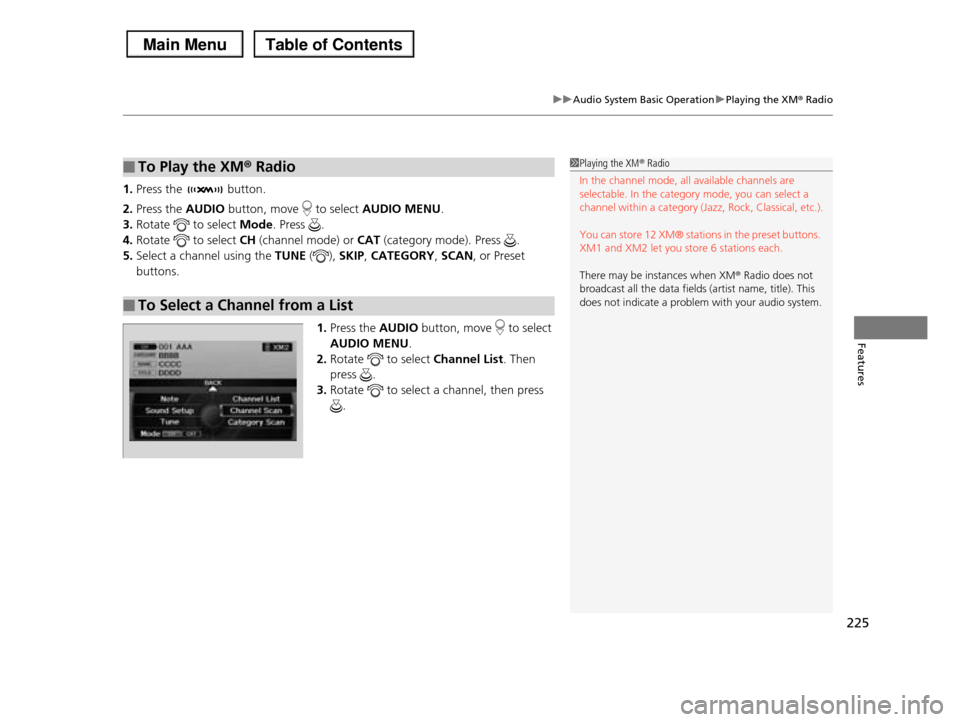
1.Press the button.
2.Press the AUDIO button, move to select AUDIO MENU.
3.Rotate to select Mode. Press .
4.Rotate to select CH (channel mode) or CAT (category mode). Press .
5.Select a channel using the TUNE (), SKIP, CATEGORY, SCAN, or Preset
buttons.
1.Press the AUDIO button, move to select
AUDIO MENU.
2.Rotate to select Channel List. Then
press .
3.Rotate to select a channel, then press
.
■To Play the XM® Radio
■To Select a Channel from a List
1Playing the XM® Radio
In the channel mode, all available channels are selectable. In the category mode, you can select a
channel within a category (Jazz, Rock, Classical, etc.).
You can store 12 XM® stations in the preset buttons.
XM1 and XM2 let you store 6 stations each.
There may be instances when XM® Radio does not
broadcast all the data fields (artist name, title). This
does not indicate a problem with your audio system.
Page 252 of 488
251Continued
Features
Rear Entertainment System*
Allows the rear passengers to enjoy a different entertainment source, such as DVD,
CD, CD Library*, HDD*, and radio, than the front passengers.
The rear seat passengers can listen to audio from the rear entertainment system by
a wireless headphone that comes with your vehicle.
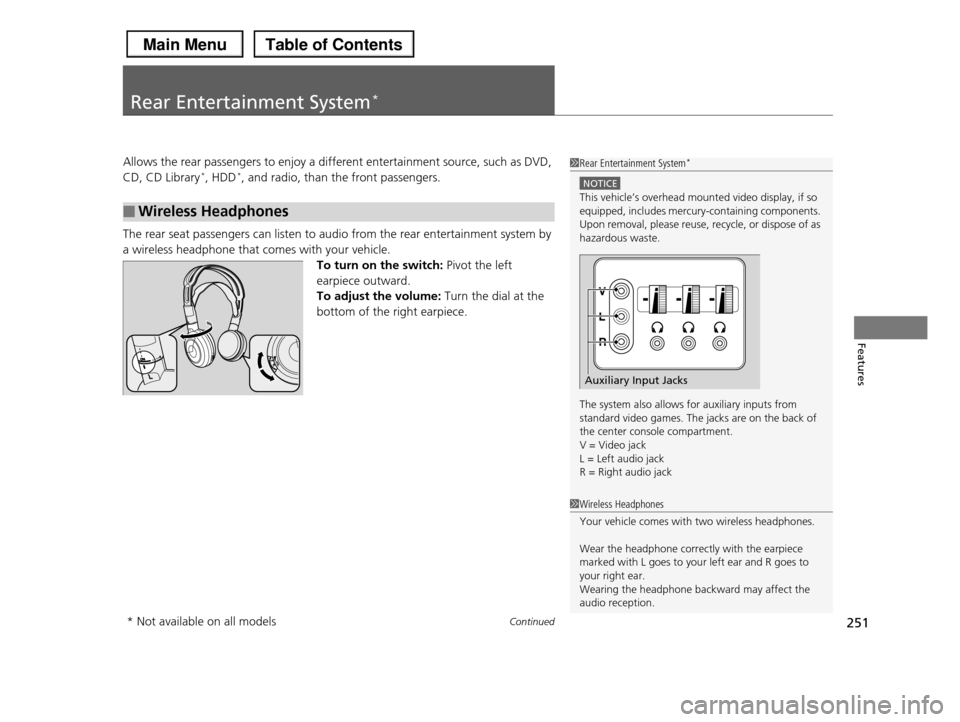
To turn on the switch: Pivot the left
earpiece outward.
To adjust the volume: Turn the dial at the
bottom of the right earpiece.
■Wireless Headphones
1Rear Entertainment System*
NOTICE
This vehicle’s overhead mounted video display, if so equipped, includes mercury-containing components.
Upon removal, please reuse, recycle, or dispose of as
hazardous waste.
The system also allows for auxiliary inputs from standard video games. The jacks are on the back of
the center console compartment.
V = Video jack L = Left audio jack
R = Right audio jack
Auxiliary Input Jacks
1Wireless Headphones
Your vehicle comes with two wireless headphones.
Wear the headphone correctly with the earpiece marked with L goes to your left ear and R goes to
your right ear.
Wearing the headphone backward may affect the audio reception.
* Not available on all models
Page 262 of 488
261
uuRear Entertainment System*uOperating the System
Continued
Features
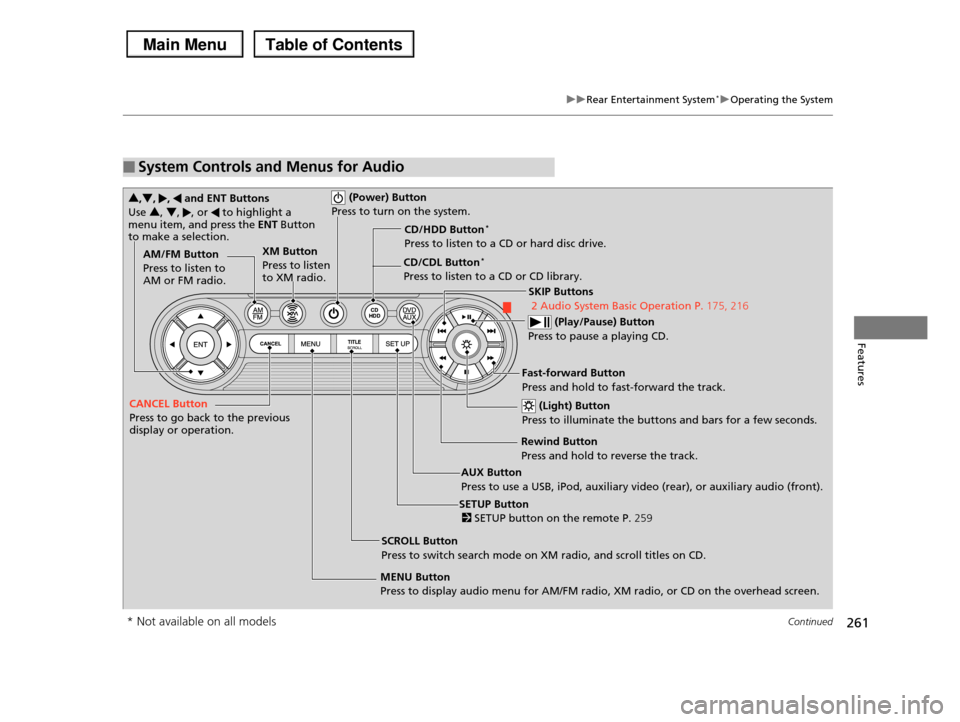
■System Controls and Menus for Audio
(Power) Button
Press to turn on the system.
AUX Button
Press to use a USB, iPod, auxiliary video (rear), or auxiliary audio (front).
(Light) Button
Press to illuminate the buttons and bars for a few seconds.
SKIP Buttons
2 Audio System Basic Operation P.175, 216
(Play/Pause) Button
Press to pause a playing CD.
SCROLL Button
Press to switch search mode on XM radio, and scroll titles on CD.
CANCEL Button
Press to go back to the previous display or operation.
3,4, , and ENT Buttons
Use 3, 4, , or to highlight a menu item, and press the ENT Button to make a selection.
CD/CDL Button*
Press to listen to a CD or CD library.
AM/FM Button
Press to listen to AM or FM radio.
SETUP Button
2 SETUP button on the remote P.259
XM Button
Press to listen to XM radio.
MENU Button
Press to display audio menu for AM/FM radio, XM radio, or CD on the overhead screen.
CD/HDD Button*
Press to listen to a CD or hard disc drive.
Rewind Button
Press and hold to reverse the track.
Fast-forward Button
Press and hold to fast-forward the track.
* Not available on all models
Page 263 of 488
uuRear Entertainment System*uOperating the System
262
Features
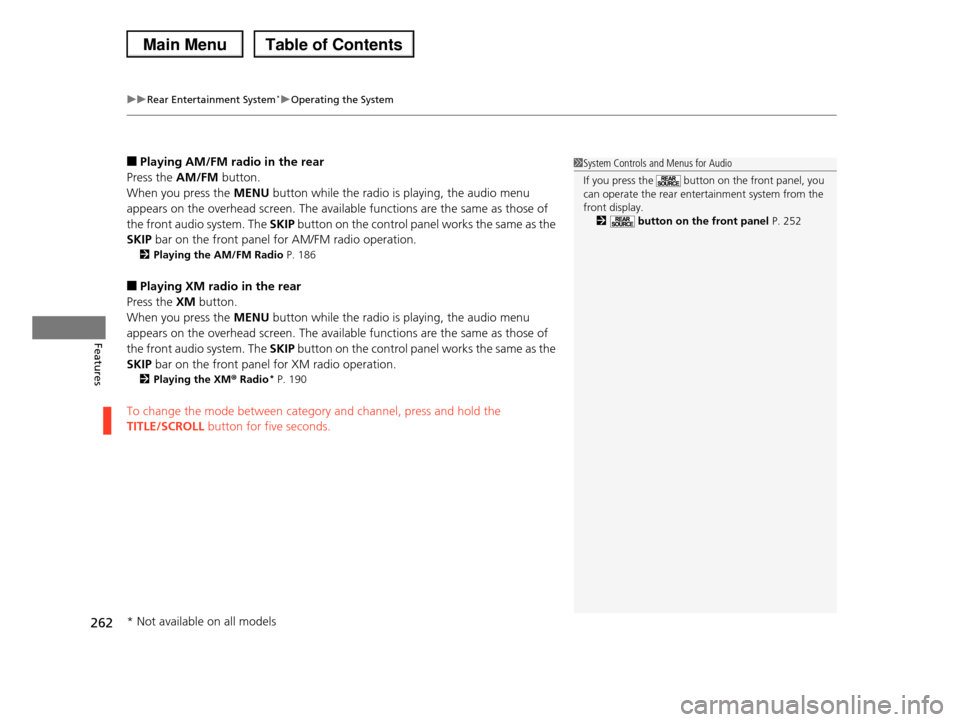
■Playing AM/FM radio in the rear
Press the AM/FM button.
When you press the MENU button while the radio is playing, the audio menu
appears on the overhead screen. The available functions are the same as those of
the front audio system. The SKIP button on the control panel works the same as the
SKIP bar on the front panel for AM/FM radio operation.
2Playing the AM/FM Radio P. 186
■Playing XM radio in the rear
Press the XM button.
When you press the MENU button while the radio is playing, the audio menu
appears on the overhead screen. The available functions are the same as those of
the front audio system. The SKIP button on the control panel works the same as the
SKIP bar on the front panel for XM radio operation.
2Playing the XM® Radio* P. 190
To change the mode between category and channel, press and hold the
TITLE/SCROLL button for five seconds.
1System Controls and Menus for Audio
If you press the button on the front panel, you can operate the rear entertainment system from the
front display.
2 button on the front panel P. 252
* Not available on all models
Page 265 of 488
264
uuRear Entertainment System*uAudio Sources for Front and Rear Seats
Features
Audio Sources for Front and Rear Seats
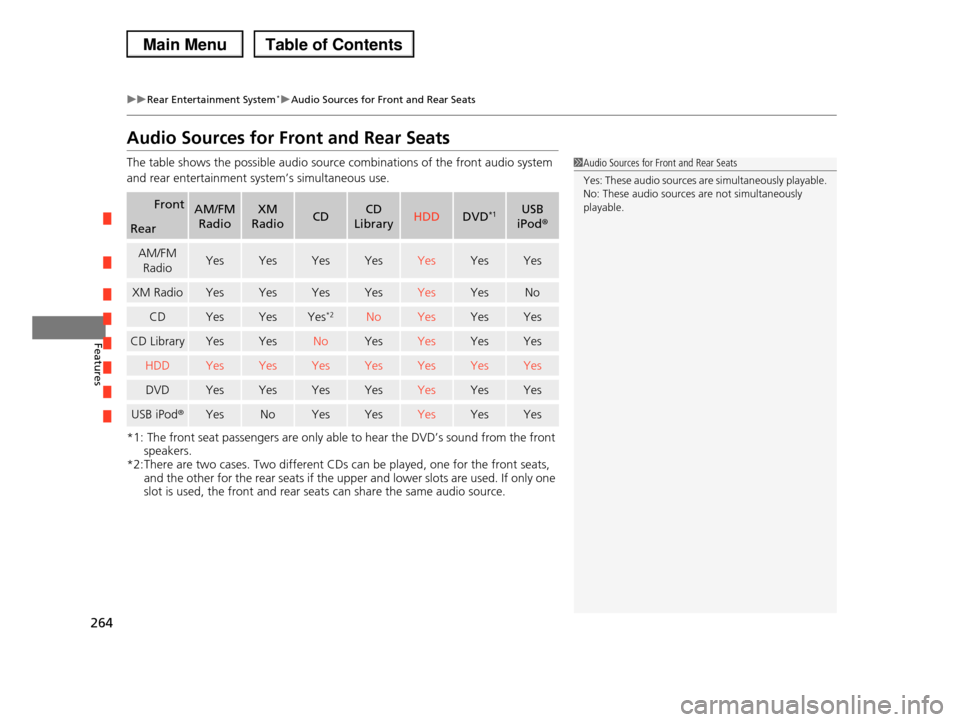
The table shows the possible audio source combinations of the front audio system
and rear entertainment system’s simultaneous use.
*1: The front seat passengers are only able to hear the DVD’s sound from the front
speakers.
*2:There are two cases. Two different CDs can be played, one for the front seats, and the other for the rear seats if the upper and lower slots are used. If only one
slot is used, the front and rear seats can share the same audio source.
FrontAM/FM
Radio
XM
RadioCDCD
LibraryHDDDVD*1USB
iPod®Rear
AM/FM
RadioYesYesYesYesYesYesYes
XM RadioYesYesYesYesYesYesNo
CDYesYesYes*2NoYesYesYes
CD LibraryYesYesNoYesYesYesYes
HDDYesYesYesYesYesYesYes
DVDYesYesYesYesYesYesYes
USB iPod®YesNoYesYesYesYesYes
1Audio Sources for Front and Rear Seats
Yes: These audio sources are simultaneously playable.
No: These audio sources are not simultaneously
playable.
Page 273 of 488
272
Features
General Information on the Audio System
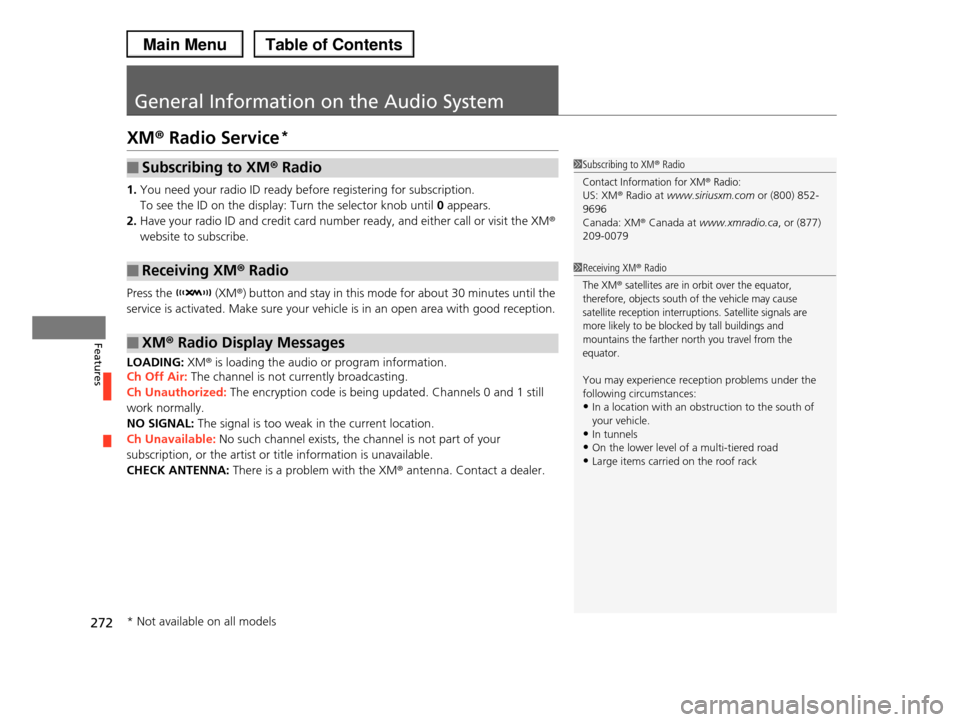
XM® Radio Service*
1.You need your radio ID ready before registering for subscription.
To see the ID on the display: Turn the selector knob until 0 appears.
2.Have your radio ID and credit card number ready, and either call or visit the XM®
website to subscribe.
Press the (XM®) button and stay in this mode for about 30 minutes until the
service is activated. Make sure your vehicle is in an open area with good reception.
LOADING: XM® is loading the audio or program information.
Ch Off Air: The channel is not currently broadcasting.
Ch Unauthorized: The encryption code is being updated. Channels 0 and 1 still
work normally.
NO SIGNAL: The signal is too weak in the current location.
Ch Unavailable: No such channel exists, the channel is not part of your
subscription, or the artist or title information is unavailable.
CHECK ANTENNA: There is a problem with the XM® antenna. Contact a dealer.
■Subscribing to XM® Radio
■Receiving XM® Radio
■XM® Radio Display Messages
1Subscribing to XM® Radio
Contact Information for XM® Radio:US: XM® Radio at www.siriusxm.com or (800) 852-
9696
Canada: XM® Canada at www.xmradio.ca, or (877) 209-0079
1Receiving XM® Radio
The XM® satellites are in orbit over the equator, therefore, objects south of the vehicle may cause
satellite reception interruptions. Satellite signals are
more likely to be blocked by tall buildings and mountains the farther north you travel from the
equator.
You may experience reception problems under the
following circumstances:
•In a location with an obstruction to the south of your vehicle.
•In tunnels
•On the lower level of a multi-tiered road•Large items carried on the roof rack
* Not available on all models
Page 455 of 488
454
Handling the Unexpected
Fuses
Fuse Locations
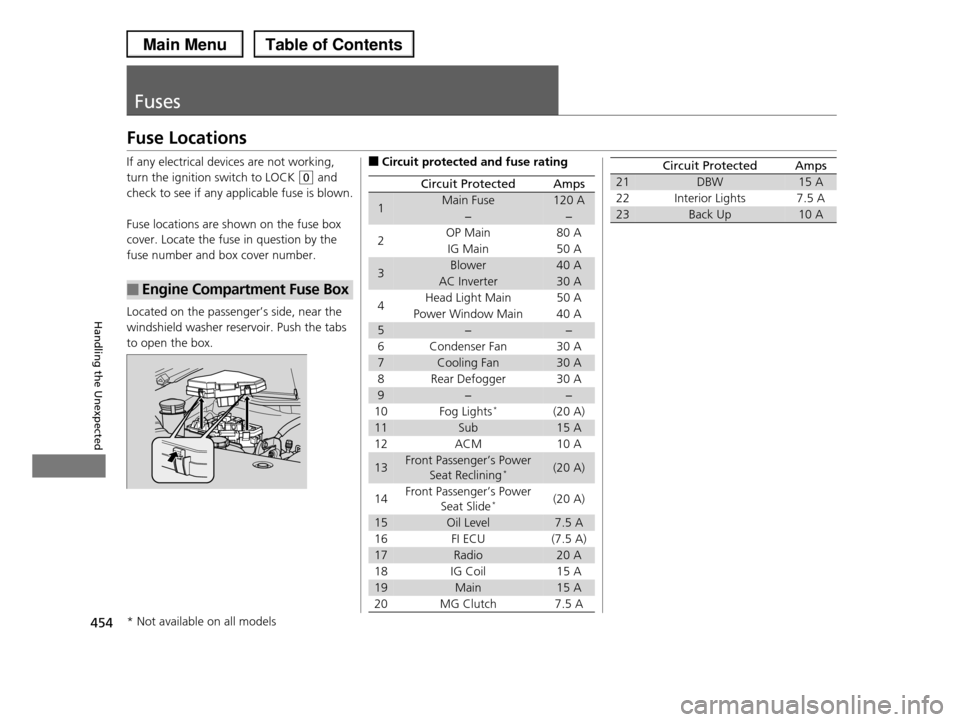
If any electrical devices are not working,
turn the ignition switch to LOCK (0 and
check to see if any applicable fuse is blown.
Fuse locations are shown on the fuse box
cover. Locate the fuse in question by the
fuse number and box cover number.
Located on the passenger’s side, near the
windshield washer reservoir. Push the tabs
to open the box.
■Engine Compartment Fuse Box
■Circuit protected and fuse rating
Circuit ProtectedAmps
1Main Fuse120 A
−−
2OP Main80 A
IG Main50 A
3Blower40 A
AC Inverter30 A
4Head Light Main 50 A
Power Window Main 40 A
5−−
6 Condenser Fan 30 A
7Cooling Fan30 A
8 Rear Defogger 30 A
9−−
10 Fog Lights*(20 A)
11Sub15 A
12 ACM 10 A
13Front Passenger’s Power
Seat Reclining*(20 A)
14Front Passenger’s Power
Seat Slide*(20 A)
15Oil Level7.5 A
16 FI ECU (7.5 A)
17Radio20 A
18 IG Coil 15 A
19Main15 A
20 MG Clutch 7.5 A
21DBW15 A
22 Interior Lights 7.5 A
23Back Up10 A
Circuit ProtectedAmps
* Not available on all models
Page 464 of 488
463
Information
This chapter includes your vehicle's specifications, locations of identification numbers, and other
information required by regulation.
Specifications.................................... 464
Identification Numbers
Vehicle Identification Number (VIN)...... 466
Engine Number and Transmission
Number...................................... 466
Devices that Emit Radio Waves....... 467
Reporting Safety Defects................. 469
Emissions Testing
Testing of Readiness Codes.............. 470
Warranty Coverages........................ 472
Authorized Manuals......................... 474
Customer Service Information......... 475
Gracenote® End User License
Agreement................................... 476