service HONDA PILOT 2013 2.G Owner's Manual
[x] Cancel search | Manufacturer: HONDA, Model Year: 2013, Model line: PILOT, Model: HONDA PILOT 2013 2.GPages: 488, PDF Size: 10.18 MB
Page 388 of 488
387
uuMaintenance Minder™uTo Use Maintenance MinderTM
Continued
Maintenance
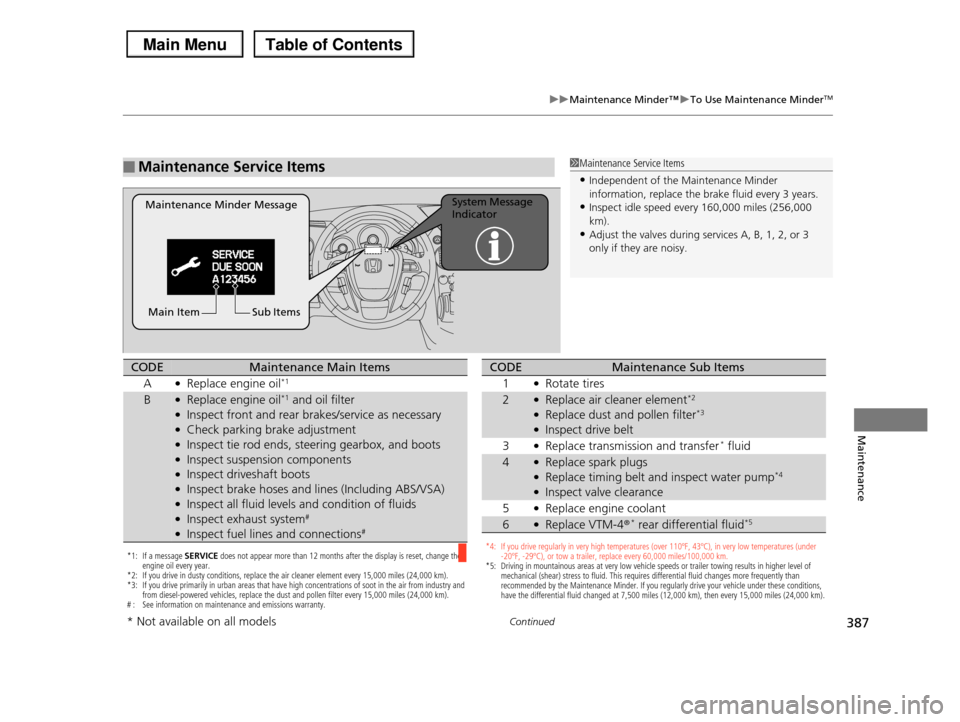
■Maintenance Service Items1Maintenance Service Items
•Independent of the Maintenance Minder information, replace the brake fluid every 3 years.
•Inspect idle speed every 160,000 miles (256,000
km).•Adjust the valves during services A, B, 1, 2, or 3
only if they are noisy.
Maintenance Minder MessageSystem Message Indicator
Sub ItemsMain Item
*1: If a message SERVICE does not appear more than 12 months after the display is reset, change the engine oil every year.*2: If you drive in dusty conditions, replace the air cleaner element every 15,000 miles (24,000 km). *3: If you drive primarily in urban areas that have high concentrations of soot in the air from industry and from diesel-powered vehicles, replace the dust and pollen filter every 15,000 miles (24,000 km).# : See information on maintenance and emissions warranty.
CODEMaintenance Main Items
A●Replace engine oil*1
B●Replace engine oil*1 and oil filter●Inspect front and rear brakes/service as necessary●Check parking brake adjustment●Inspect tie rod ends, steering gearbox, and boots●Inspect suspension components●Inspect driveshaft boots●Inspect brake hoses and lines (Including ABS/VSA)●Inspect all fluid levels and condition of fluids●Inspect exhaust system#
●Inspect fuel lines and connections#
*4: If you drive regularly in very high temperatures (over 110ºF, 43ºC), in very low temperatures (under -20ºF, -29ºC), or tow a trailer, replace every 60,000 miles/100,000 km.*5: Driving in mountainous areas at very low vehicle speeds or trailer towing results in higher level of mechanical (shear) stress to fluid. This requires differential fluid changes more frequently than recommended by the Maintenance Minder. If you regularly drive your vehicle under these conditions, have the differential fluid changed at 7,500 miles (12,000 km), then every 15,000 miles (24,000 km).
CODEMaintenance Sub Items
1●Rotate tires
2●Replace air cleaner element*2
●Replace dust and pollen filter*3
●Inspect drive belt
3●Replace transmission and transfer* fluid
4●Replace spark plugs●Replace timing belt and inspect water pump*4
●Inspect valve clearance
5●Replace engine coolant
6●Replace VTM-4r* rear differential fluid*5
* Not available on all models
Page 389 of 488
uuMaintenance Minder™uTo Use Maintenance MinderTM
388
Maintenance
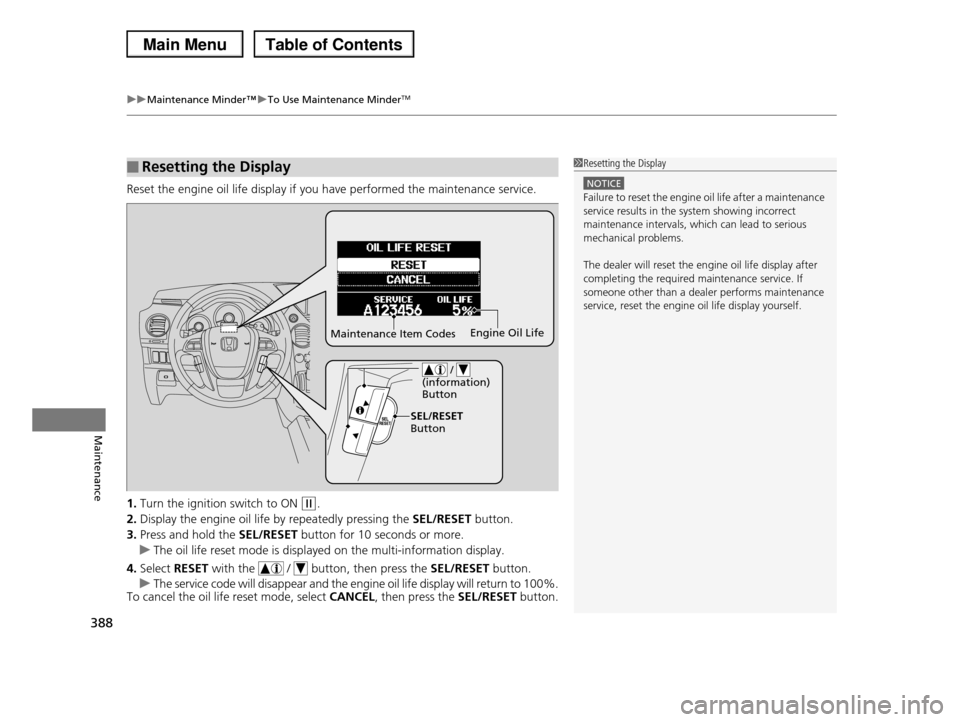
Reset the engine oil life display if you have performed the maintenance service.
1.Turn the ignition switch to ON (w.
2.Display the engine oil life by repeatedly pressing the SEL/RESET button.
3.Press and hold the SEL/RESET button for 10 seconds or more.
uThe oil life reset mode is displayed on the multi-information display.
4.Select RESET with the / button, then press the SEL/RESET button.
uThe service code will disappear and the engine oil life display will return to 100%.To cancel the oil life reset mode, select CANCEL, then press the SEL/RESET button.
■Resetting the Display1Resetting the Display
NOTICE
Failure to reset the engine oil life after a maintenance service results in the system showing incorrect
maintenance intervals, which can lead to serious
mechanical problems.
The dealer will reset the engine oil life display after
completing the required maintenance service. If someone other than a dealer performs maintenance
service, reset the engine oil life display yourself.
Maintenance Item CodesEngine Oil Life
/ (information) Button
SEL/RESET Button
Page 418 of 488
417
uuChecking and Maintaining TiresuDOT Tire Quality Grading (U.S. Vehicles)
Continued
Maintenance
DOT Tire Quality Grading (U.S. Vehicles)
The tires on your vehicle meet all U.S. Federal Safety
Requirements. All tires are also graded for treadwear, traction,
and temperature performance according to Department of
Transportation (DOT) standards. The following explains these
gradings.
Quality grades can be found where applicable on the tire sidewall
between tread shoulder and maximum section width.
The treadwear grade is a comparative rating based on the wear
rate of the tire when tested under controlled conditions on a
specified government test course. For example, a tire graded 150
would wear one and one-half (1 1/2) times as well on the
government course as a tire graded 100. The relative performance
of tires depends upon the actual conditions of their use, however,
and may depart significantly from the norm due to variations in
driving habits, service practices and differences in road
characteristics and climate.
■Uniform Tire Quality Grading
■Treadwear
1Uniform Tire Quality Grading
For example:
Treadwear 200
Traction AA
Temperature A
All passenger car tires must conform
to Federal Safety Requirements in
addition to these grades.
Page 420 of 488
419
uuChecking and Maintaining TiresuWear Indicators
Maintenance
Wear Indicators
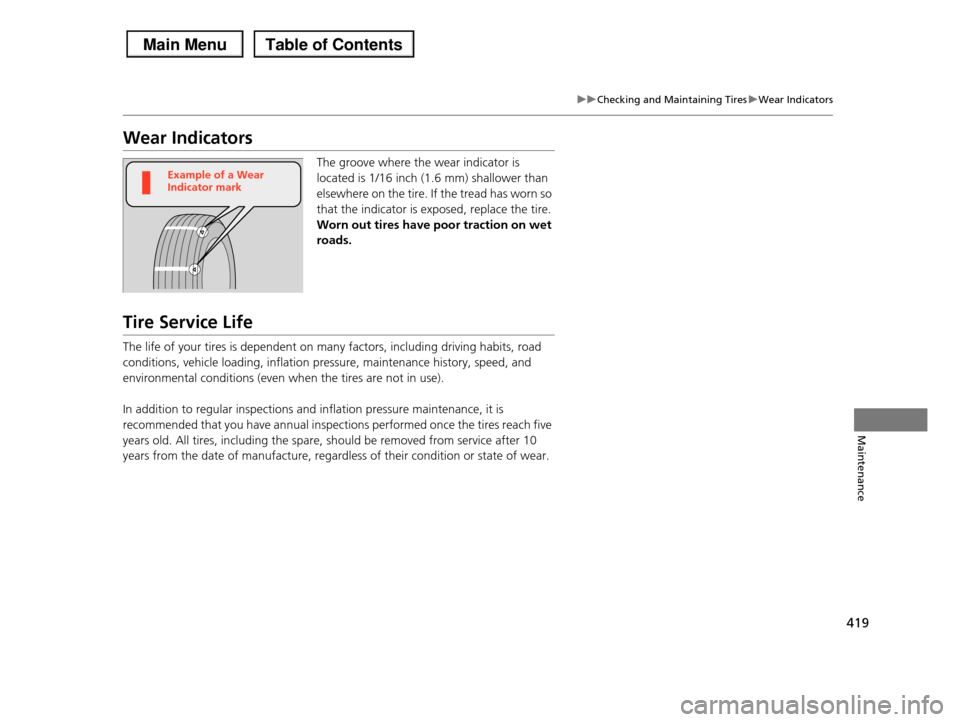
The groove where the wear indicator is
located is 1/16 inch (1.6 mm) shallower than
elsewhere on the tire. If the tread has worn so
that the indicator is exposed, replace the tire.
Worn out tires have poor traction on wet
roads.
Tire Service Life
The life of your tires is dependent on many factors, including driving habits, road
conditions, vehicle loading, inflation pressure, maintenance history, speed, and
environmental conditions (even when the tires are not in use).
In addition to regular inspections and inflation pressure maintenance, it is
recommended that you have annual inspections performed once the tires reach five
years old. All tires, including the spare, should be removed from service after 10
years from the date of manufacture, regardless of their condition or state of wear.
Example of a Wear Indicator mark
Page 447 of 488
446
uuJump Startingu
Handling the Unexpected
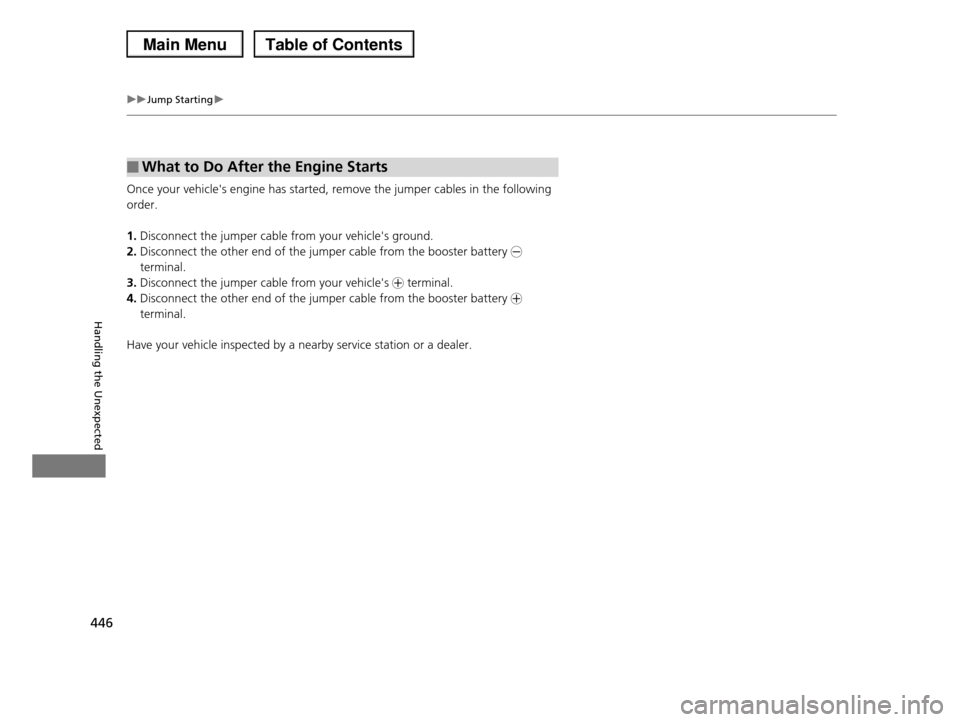
Once your vehicle's engine has started, remove the jumper cables in the following
order.
1.Disconnect the jumper cable from your vehicle's ground.
2.Disconnect the other end of the jumper cable from the booster battery -
terminal.
3.Disconnect the jumper cable from your vehicle's + terminal.
4.Disconnect the other end of the jumper cable from the booster battery +
terminal.
Have your vehicle inspected by a nearby service station or a dealer.
■What to Do After the Engine Starts
Page 460 of 488
459
Handling the Unexpected
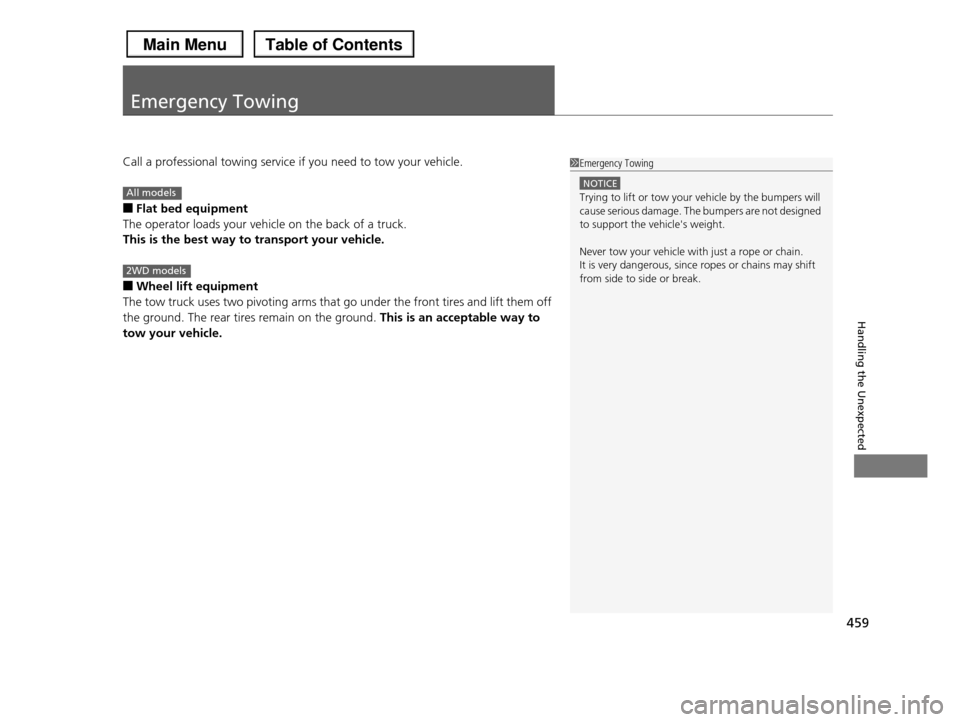
Emergency Towing
Call a professional towing service if you need to tow your vehicle.
■Flat bed equipment
The operator loads your vehicle on the back of a truck.
This is the best way to transport your vehicle.
■Wheel lift equipment
The tow truck uses two pivoting arms that go under the front tires and lift them off
the ground. The rear tires remain on the ground. This is an acceptable way to
tow your vehicle.
1Emergency Towing
NOTICE
Trying to lift or tow your vehicle by the bumpers will cause serious damage. The bumpers are not designed
to support the vehicle's weight.
Never tow your vehicle with just a rope or chain.
It is very dangerous, since ropes or chains may shift
from side to side or break.
All models
2WD models
Page 464 of 488
463
Information
This chapter includes your vehicle's specifications, locations of identification numbers, and other
information required by regulation.
Specifications.................................... 464
Identification Numbers
Vehicle Identification Number (VIN)...... 466
Engine Number and Transmission
Number...................................... 466
Devices that Emit Radio Waves....... 467
Reporting Safety Defects................. 469
Emissions Testing
Testing of Readiness Codes.............. 470
Warranty Coverages........................ 472
Authorized Manuals......................... 474
Customer Service Information......... 475
Gracenote® End User License
Agreement................................... 476
Page 475 of 488
474
Information
Authorized Manuals
■For U.S. Owners:
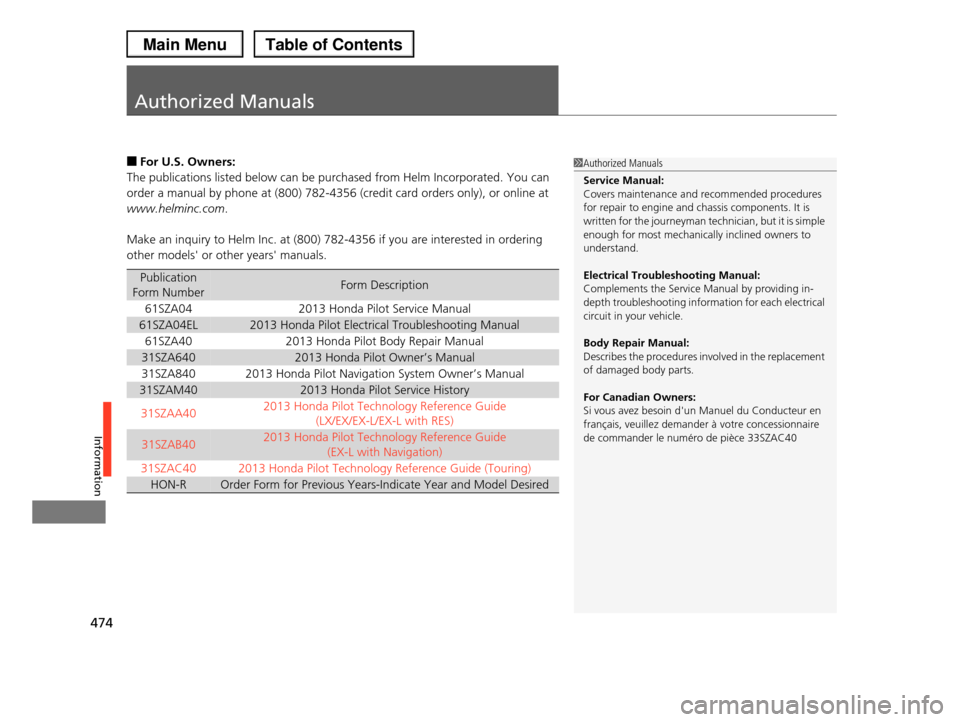
The publications listed below can be purchased from Helm Incorporated. You can
order a manual by phone at (800) 782-4356 (credit card orders only), or online at
www.helminc.com.
Make an inquiry to Helm Inc. at (800) 782-4356 if you are interested in ordering
other models' or other years' manuals.
Publication
Form NumberForm Description
61SZA042013 Honda Pilot Service Manual
61SZA04EL2013 Honda Pilot Electrical Troubleshooting Manual
61SZA402013 Honda Pilot Body Repair Manual
31SZA6402013 Honda Pilot Owner’s Manual
31SZA8402013 Honda Pilot Navigation System Owner’s Manual
31SZAM402013 Honda Pilot Service History
31SZAA402013 Honda Pilot Technology Reference Guide
(LX/EX/EX-L/EX-L with RES)
31SZAB402013 Honda Pilot Technology Reference Guide
(EX-L with Navigation)
31SZAC40 2013 Honda Pilot Technology Reference Guide (Touring)
HON-ROrder Form for Previous Years-Indicate Year and Model Desired
1Authorized Manuals
Service Manual: Covers maintenance and recommended procedures
for repair to engine and chassis components. It is
written for the journeyman technician, but it is simple enough for most mechanically inclined owners to
understand.
Electrical Troubleshooting Manual:
Complements the Service Manual by providing in-
depth troubleshooting information for each electrical circuit in your vehicle.
Body Repair Manual: Describes the procedures involved in the replacement
of damaged body parts.
For Canadian Owners:
Si vous avez besoin d'un Manuel du Conducteur en
français, veuillez demander à votre concessionnaire
de commander le numéro de pièce 33SZAC40
Page 476 of 488
475
Information
Customer Service Information
Honda dealership personnel are trained professionals.
They should be able to answer all your questions. If you encounter a problem that
your dealership does not solve to your satisfaction, please discuss it with the
dealership's service manager or general manager. If you are dissatisfied with the
decision made by the dealership's management, contact Honda Customer Services.
U.S. Owners:
American Honda Motor Co., Inc.
Honda Automobile Customer Services
Mail Stop 500-2N-7A
1919 Torrance Blvd.
Torrance, CA 90501-2746
Tel: (800) 999-1009
Canadian Owners:
Honda Canada Inc.
Customer Relations
180 Honda Boulevard
Markham, ON
L6C 0H9
Tel: 1-888-9-HONDA-9
Fax: 1-877-939-0909
E-mail: [email protected]
In Puerto Rico and the U.S. Virgin
Islands:
Bella International
P.O. Box 190816
San Juan, PR 00919-0816
Tel: (787) 620-7546
1Customer Service Information
When you call or write, please give us the following information:
•Vehicle Identification Number
2Vehicle Identification Number (VIN) P. 466
•Date of purchase
•Odometer reading of your vehicle•Your name, address, and telephone number
•A detailed description of the problem
•Name of the dealer who sold the vehicle to you
Page 477 of 488
476
Information
Gracenote® End User License Agreement
This application or device contains software from Gracenote, Inc. of Emeryville,
California (“Gracenote”). The software from Gracenote (the “Gracenote Software”)
enables this application to perform disc and/or file identification and obtain music-
related information, including name, artist, track, and title information (“Gracenote
Data”) from online servers or embedded databases (collectively, “Gracenote
Servers”) and to perform other functions. You may use Gracenote Data only by
means of the intended End-User functions of this application or device.
You agree that you will use Gracenote Data, the Gracenote Software, and
Gracenote Servers for your own personal non-commercial use only.
You agree not to assign, copy, transfer or transmit the Gracenote Software or any
Gracenote Data to any third party. YOU AGREE NOT TO USE OR EXPLOIT
GRACENOTE DATA, THE GRACENOTE SOFTWARE, OR GRACENOTE SERVERS,
EXCEPT AS EXPRESSLY PERMITTED HEREIN.
You agree that your non-exclusive license to use the Gracenote Data, the Gracenote
Software, and Gracenote Servers will terminate if you violate these restrictions. If
your license terminates, you agree to cease any and all use of the Gracenote Data,
the Gracenote Software, and Gracenote Servers. Gracenote reserves all rights in
Gracenote Data, the Gracenote Software, and the Gracenote Servers, including all
ownership rights. Under no circumstances will Gracenote become liable for any
payment to you for any information that you provide. You agree that Gracenote,
Inc. may enforce its rights under this Agreement against you directly in its own
name.
1Gracenote® End User License Agreement
Gracenote Music Recognition Service (CDDB)
Music recognition technology and related data are
provided by Gracenote®. Gracenote is the industry standard in music recognition technology and related
content delivery. For more information, please visit
www. gracenote.com.
When music is recorded to the HDD from a CD,
information such as the recording artist and track name are retrieved from the Gracenote Database and
displayed (when available). Gracenote may not
contain information for all albums.
Gracenote is an internet-based music recognition
service that allows artist, album, and track
information from CDs to display on the HDD. More information about Gracenote is available at
www.honda.com/ (in U.S.) or www.honda.ca (in
Canada).
CD and music-related data from Gracenote, Inc.,
copyright© 2000 to present Gracenote.