buttons HONDA PILOT 2014 2.G Owner's Manual
[x] Cancel search | Manufacturer: HONDA, Model Year: 2014, Model line: PILOT, Model: HONDA PILOT 2014 2.GPages: 488, PDF Size: 12.11 MB
Page 260 of 488
Continued259
uu Rear Entertainment System * u Operating the System
Features
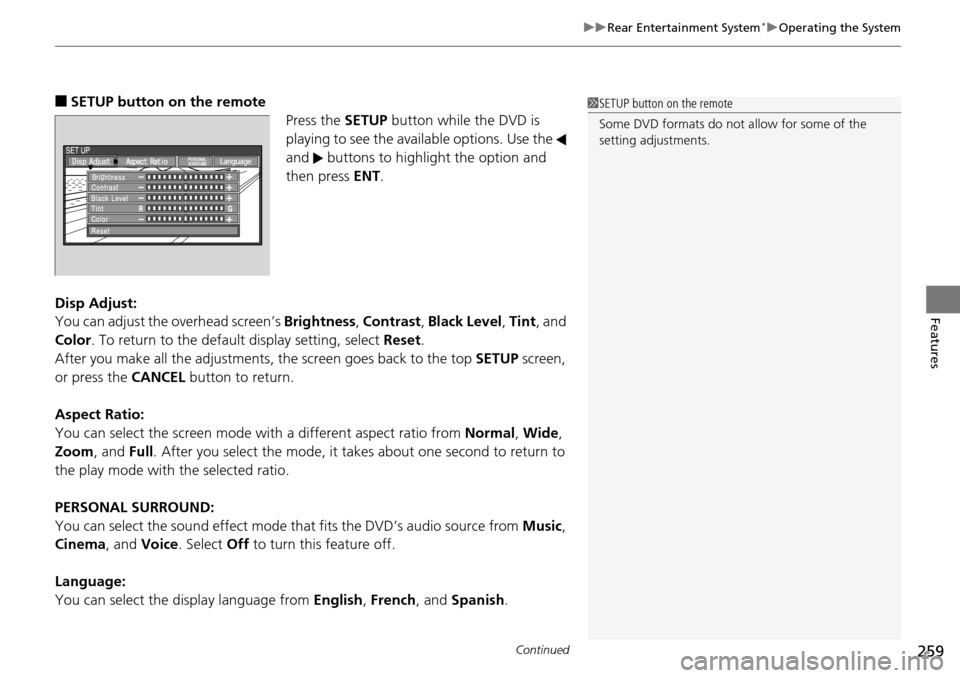
■SETUP button on the remote
Press the SE
TUP button while the DVD is
playing to see the avai lable options. Use the
and buttons to highlight the option and
then press ENT.
Disp Adjust:
You can adjust the overhe
ad screen’s Brightness , Contrast , Black Level , Tint , and
Color . To return to the default display setting, select Reset.
After you make all the adjustments, the screen goes back to the top SET
UP screen,
or press the CANCEL button to return.
Aspect Ratio:
You can select the screen mode wi th
a different aspect ratio from Normal, Wide ,
Zoom , and Full. After you select the mode, it t akes about one second to return to
the play mode with the selected ratio.
PERSONAL SURROUND:
You can select the sound effect mode th at
fits the DVD’s audio source from Music,
Cinema , and Voice . Select Off to turn this feature off.
Language:
You can select the display language from En
glish, French , and Spanish .
1SETUP button on the remote
Some DVD formats do not allow for some of the
setting adjustments.
Page 262 of 488
261
uu Rear Entertainment System * u Operating the System
Continued
Features
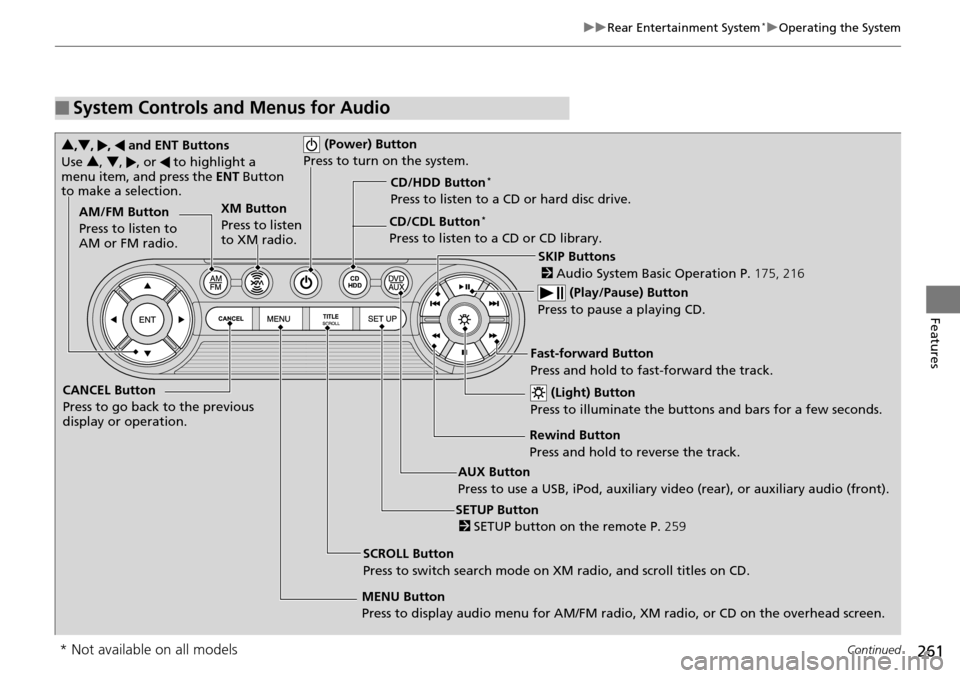
■System Controls and Menus for Audio
(Power) Button
Press to turn on the system.
AUX Button
Press to use a USB, iPod, auxiliary video (rear), or auxiliary audio (front). (Light) Button
Press to illuminate the buttons and bars for a few seconds.
SKIP Buttons
2 Audio System Basic Operation P. 175, 216
(Play/Pause) Button
Press to pause a playing CD.
SCROLL Button
Press to switch search mode on XM radio, and scroll titles on CD.
CANCEL Button
Press to go back to the previous
display or operation.
3
,4 , , and ENT Buttons
Use 3, 4 , , or to highlight a
menu item, and press the ENT Button
to make a selection.
CD/CDL Button *
Press to listen to a CD or CD library.
AM/FM Button
Press to listen to
AM or FM radio.
SETUP Button
2 SETUP button on the remote P. 259
XM Button
Press to listen
to XM radio.
MENU Button
Press to display audio menu for AM/FM radio, XM radio, or CD on the overhead screen.CD/HDD Button
*
Press to listen to a CD or hard disc drive.
Rewind Button
Press and hold to reverse the track.Fast-forward Button
Press and hold to fast-forward the track.
* Not available on all models
Page 277 of 488
276
Features
HomeLink® Universal Transceiver *
The HomeLink ® Universal Transceiver can be pr ogrammed to operate up to three
remote controlled devices around your home , such as garage doors, lighting, or
home security systems.
Refer to the safety information that comes wi th you
r garage door opener to test that
the safety features are functioning properly. If you do not have the safety
information, contac t the manufacturer.
Before programming HomeLink, make sure th at
people and objects are out of the
way of the garage or gate to prevent potential injury or damage.
When programming a garage door opener, park
just outside the garage door’s
path.
Training HomeLink
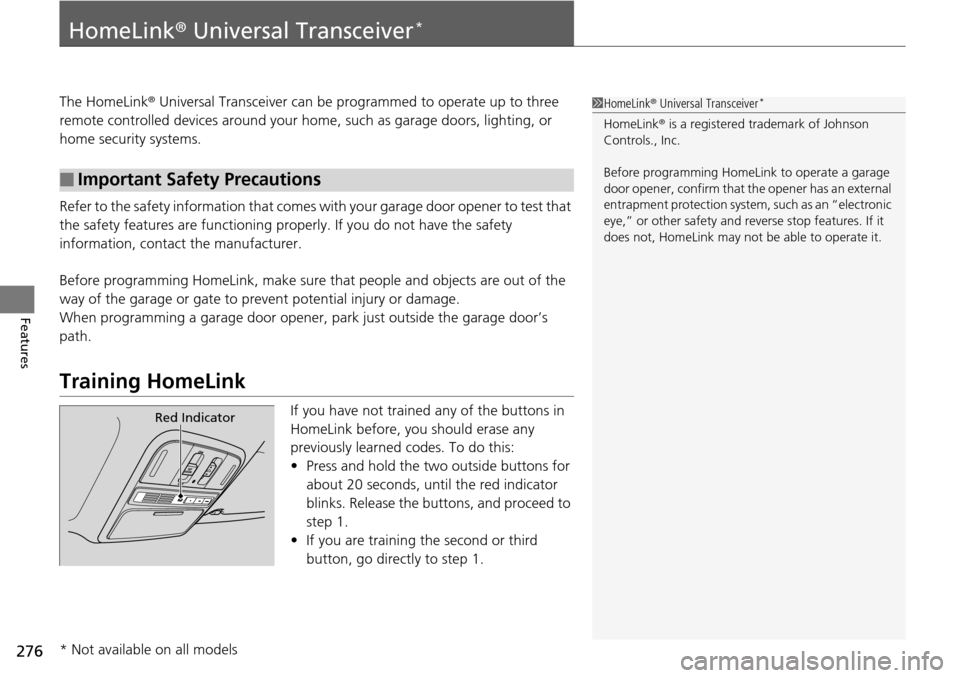
If you have not trained any of the buttons in
HomeLink before, you should erase any
previously learned codes. To do this:
• Press and
hold the two outside buttons for
about 20 seconds, until the red indicator
blinks. Release the bu ttons, and proceed to
step 1.
• If y
ou are training the second or third
button, go directly to step 1.
■Important Safety Precautions
1HomeLink ® Universal Transceiver *
HomeLink® is a registered tra demark of Johnson
Controls., Inc.
Before programming HomeLi nk to operate a garage
door opener, confirm that the opener has an external
entrapment protection system, such as an “electronic
eye,” or other safety and reverse stop features. If it
does not, HomeLink may not be able to operate it.
Red Indicator
* Not available on all models
Page 278 of 488
277
uu HomeLink ® Universal Transceiver * u Training HomeLink
Features
■Training a Button1 Training a Button
Retraining a Button
If you want to retrain a programmed button for a
new device, you do not ha ve to erase all button
memory. You can replace the existing memory code
using this procedure.
Erasing Codes
To erase all the codes, press and hold the two outside
buttons until the HomeLink i ndicator begins to blink
(about 10 to 20 secs). You should erase all codes
before selling the vehicle.
If you have any problems, see the device’s
instructions, visit www.homelink.com , or call
HomeLink at (800) 355-3515.
1. Press and hold the desired HomeLink button until
the HomeLink indicator begins to blink.
2. Continue to hold the HomeLink button and follow
steps 1 - 3 under “Training a Button.”
Indicator remains on
for about 25 secs.Standard transmitterIndicator blinks rapidly for
two secs, then remains on
for about 23 secs.Rolling code transmitter
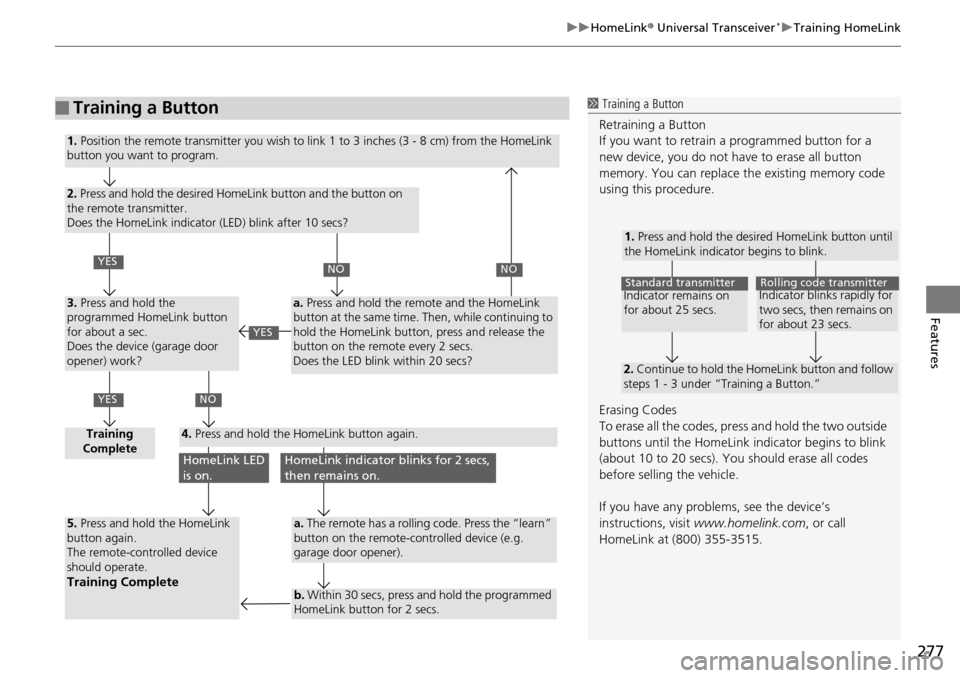
1. Position the remote transmitter you wish to link 1 to 3 inches (3 - 8 cm) from the HomeLink
button you want to program.
2. Press and hold the desired HomeLink button and the button on
the remote transmitter.
Does the HomeLink indicator (LED) blink after 10 secs?
3. Press and hold the
programmed HomeLink button
for about a sec.
Does the device (garage door
opener) work?
Training
Complete4. Press and hold the HomeLink button again.
5. Press and hold the HomeLink
button again.
The remote-controlled device
should operate.
Training Complete
a. Press and hold the remote and the HomeLink
button at the same time. Then, while continuing to
hold the HomeLink button, press and release the
button on the remote every 2 secs.
Does the LED blink within 20 secs?
a. The remote has a rolling code. Press the “learn”
button on the remote-controlled device (e.g.
garage door opener).
b. Within 30 secs, press and hold the programmed
HomeLink button for 2 secs.
YES
YES
NONO
NO
HomeLink LED
is on.HomeLink indicator blinks for 2 secs,
then remains on.
YES
Page 279 of 488
278
Features
Bluetooth® HandsFreeLink ®
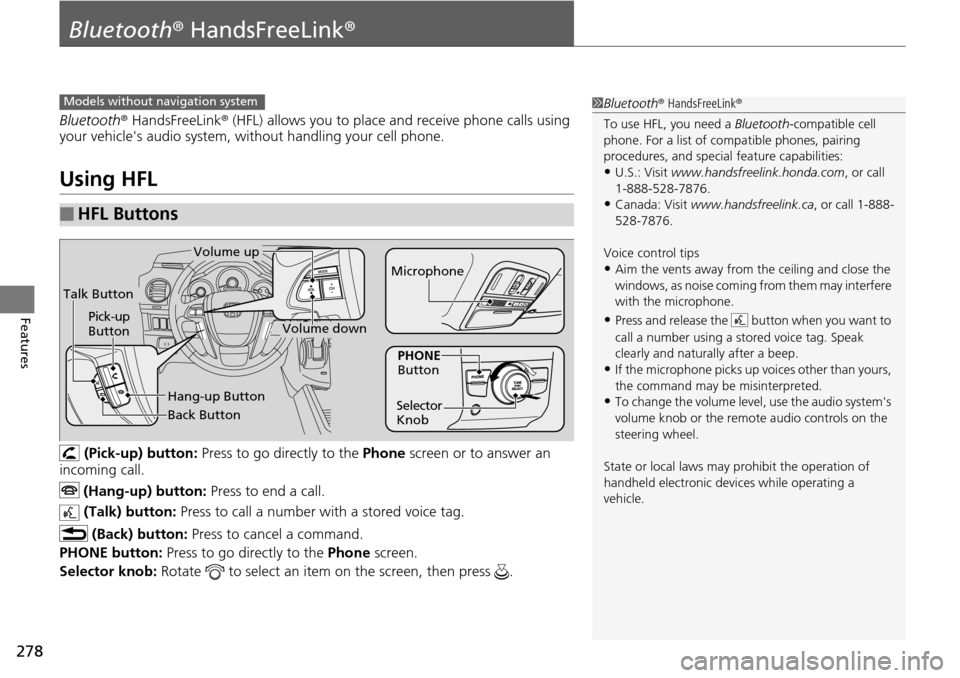
Bluetooth® HandsFreeLink ® (HFL) allows you to place and receive phone calls using
your vehicle's audio system, without handling your cell phone.
Using HFL
(Pick-up) button: Press to go directly to the Phone screen or to answer an
incoming call.
(Hang-up) button: Press to end a call.
(Talk) button: Press to call a number with a stored voice tag.
(Back) button: Press to cancel a command.
PHONE button: Press to go directly to the Ph
one screen.
Selector knob: Rotate to select an item on the screen, then press .
■HFL Buttons
1Bluetooth ® HandsFreeLink ®
To use HFL, you need a Bluetooth-compatible cell
phone. For a list of compatible phones, pairing
procedures, and special feature capabilities:
•U.S.: Visit www.handsfreelink.honda.com , or call
1-888-528-7876.
•Canada: Visit www.handsfreelink.ca , or call 1-888-
528-7876.
Voice control tips
•Aim the vents away from the ceiling and close the
windows, as noise coming fr om them may interfere
with the microphone.
•Press and release the button when you want to
call a number using a st ored voice tag. Speak
clearly and naturally after a beep.
•If the microphone picks up vo ices other than yours,
the command may be misinterpreted.
•To change the volume level, use the audio system's
volume knob or the remote audio controls on the
steering wheel.
State or local laws may pr ohibit the operation of
handheld electronic devices while operating a
vehicle.
Models without navigation system
Talk Button
Volume up
Microphone
Hang-up Button
Pick-up
Button
Volume down
Selector
KnobPHONE
Button
Back Button
Page 299 of 488
uu Bluetooth ® HandsFreeLink ® u HFL Menus
298
Features
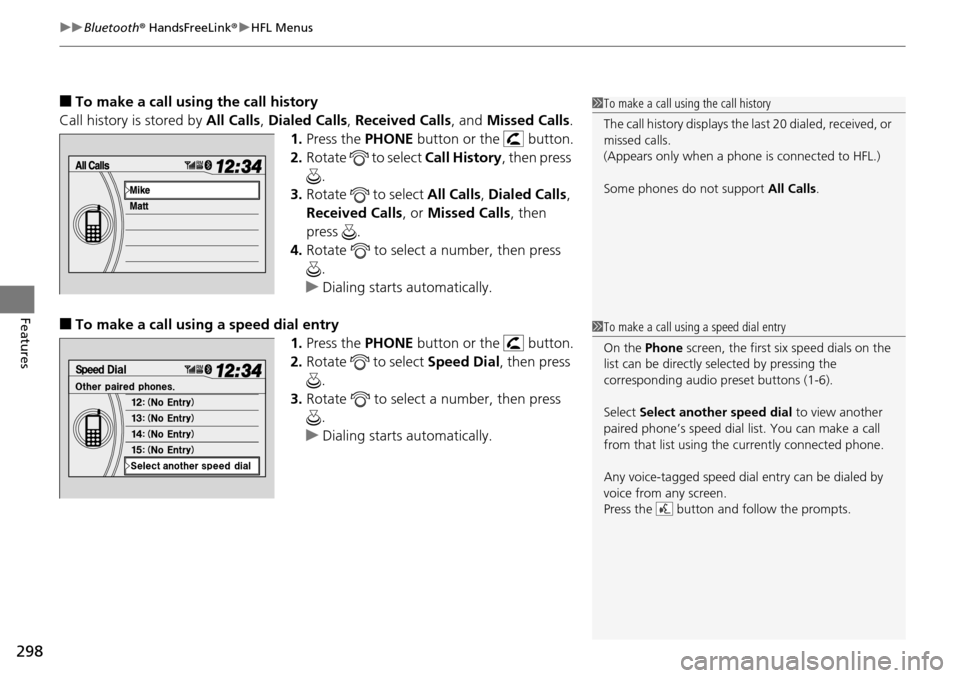
■To make a call usin g the call history
Call history is stored by All Ca
lls, Dialed Calls , Received Calls , and Missed Calls .
1. Press the PH
ONE button or the button.
2. Ro
tate to select Call History, then press
.
3. Ro
tate to select All Call s, Dialed Calls ,
Received Calls , or Mi
ssed Calls, then
press .
4. Ro
tate to select a number, then press
.
u Dialing sta
rts automatically.
■To make a call using a speed dial entry
1.Press the PH
ONE button or the button.
2. Ro
tate to select Speed Dial, then press
.
3. Ro
tate to select a number, then press
.
u Dialing sta
rts automatically.
1To make a call using the call history
The call history disp lays the last 20 dialed, received, or
missed calls.
(Appears only when a phone is connected to HFL.)
Some phones do not support All Calls.
1To make a call using a speed dial entry
On the Phone screen, the first six speed dials on the
list can be directly selected by pressing the
corresponding audio preset buttons (1-6).
Select Select another speed dial to view another
paired phone’s speed dial list. You can make a call
from that list using th e currently connected phone.
Any voice-tagged speed dial entry can be dialed by
voice from any screen.
Press the button and follow the prompts.
Page 302 of 488
301Continued
Features
Bluetooth® HandsFreeLink ®
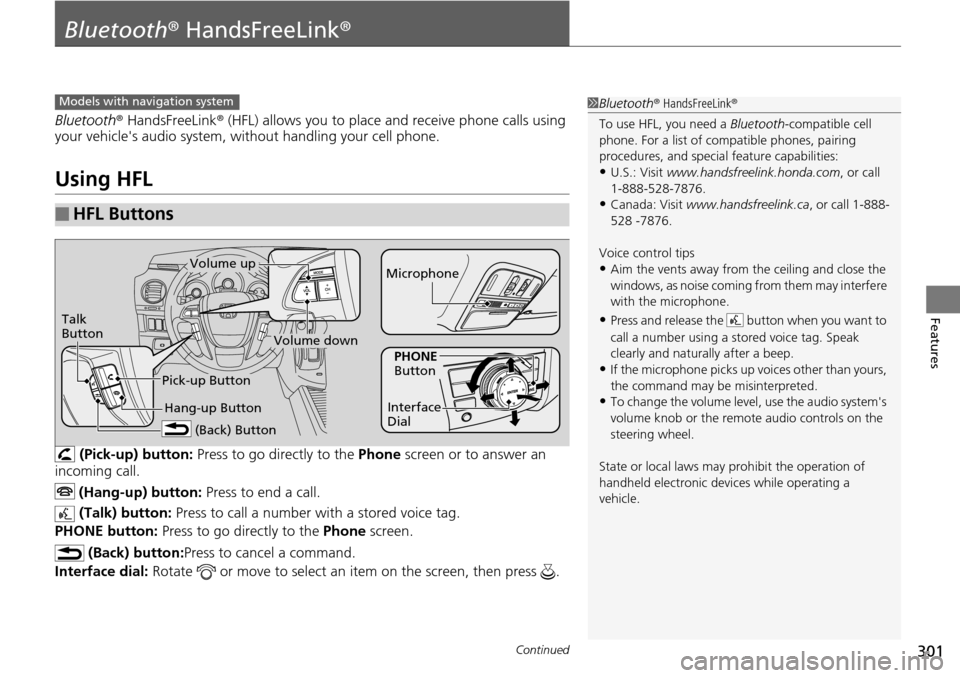
Bluetooth® HandsFreeLink ® (HFL) allows you to place and receive phone calls using
your vehicle's audio system, without handling your cell phone.
Using HFL
(Pick-up) button: Press to go directly to the Ph one screen or to answer an
incoming call.
(Hang-up) button: Press to end a call.
(Talk) button: Press to call a number with
a stored voice tag.
PHONE button: Press to go directly to the Ph
one screen.
(Back) button: Press to cancel a command.
Interface dial: Rotate or move to select an item on the screen, then press .
■HFL Buttons
1Bluetooth ® HandsFreeLink ®
To use HFL, you need a Bluetooth-compatible cell
phone. For a list of compatible phones, pairing
procedures, and special feature capabilities:
•U.S.: Visit www.handsfreelink.honda.com , or call
1-888-528-7876.
•Canada: Visit www.handsfreelink.ca , or call 1-888-
528 -7876.
Voice control tips
•Aim the vents away from the ceiling and close the
windows, as noise coming fr om them may interfere
with the microphone.
•Press and release the button when you want to
call a number using a st ored voice tag. Speak
clearly and naturally after a beep.
•If the microphone picks up vo ices other than yours,
the command may be misinterpreted.
•To change the volume level, use the audio system's
volume knob or the remote audio controls on the
steering wheel.
State or local laws may pr ohibit the operation of
handheld electronic devices while operating a
vehicle.
Models with navigation system
Talk
Button
Volume up Microphone
Hang-up Button
Pick-up Button
Volume down
Interface
Dial
PHONE
Button
(Back) Button
Page 351 of 488
uu When Driving u Cruise Control
350
Driving
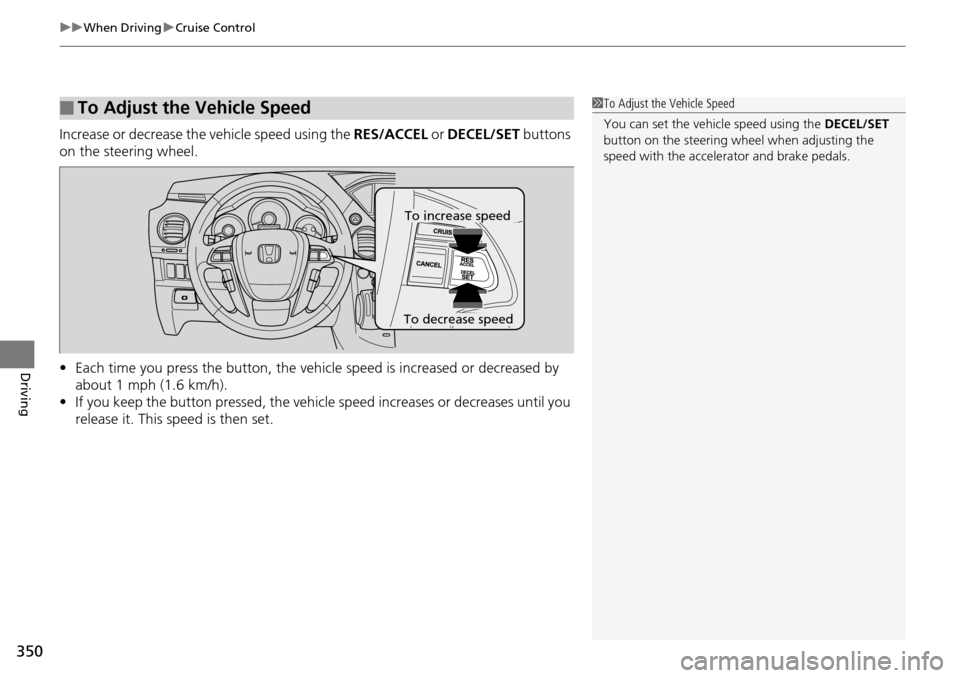
Increase or decrease the vehicle speed using the RES/ACCEL or DECEL/SET buttons
on the steering wheel.
• Each time you press the button, the vehicl e speed is increased or decreased by
about 1 mph (1.6 km/h).
• If
you keep the button pressed, the vehicl e speed increases or decreases until you
release it. This speed is then set.
■To Adjust the Vehicle Speed1 To Adjust the Vehicle Speed
You can set the vehicle speed using the DECEL/SET
button on the steering wheel when adjusting the
speed with the accelera tor and brake pedals.
To decrease speed
To increase speed
Page 426 of 488
425Continued
Maintenance
Remote Control and Wireless Headphone Care *
Replacing the Battery
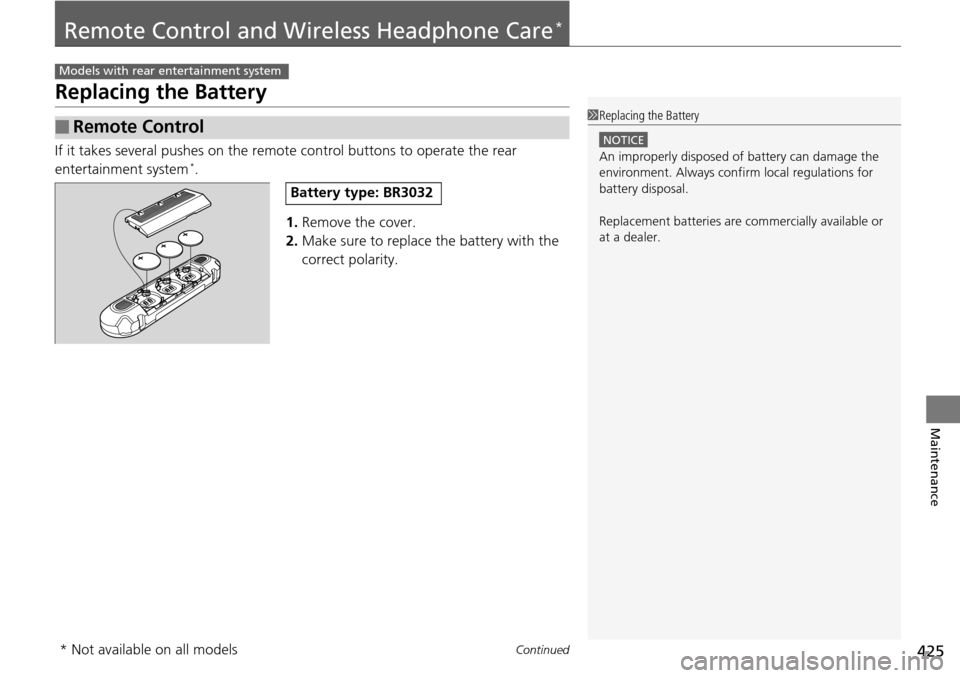
If it takes several pushes on the remote control buttons to operate the rear
entertainment system *.
1.Remove the
cover.
2. Make sure to replace
the battery with the
correct polarity.
■Remote Control
Models with rear entertainment system
1 Replacing the Battery
NOTICE
An improperly disposed of battery can damage the
environment. Always conf irm local regulations for
battery disposal.
Replacement batteries are commercially available or
at a dealer.
Battery type: BR3032
* Not available on all models
Page 482 of 488
481
Index
Glass (care)............................................... 431
Glove Box................................................. 152
H
Halogen Bulbs .................................. 402, 403
Handling the Unexpected ....................
... 433
HandsFreeLink ® (H
FL)...................... 278, 301
Automatic Answering ............................. 289
Automatic Import of Ce llular Ph
onebook and
Call History ................................... 291, 312
Automatic Transferring ................... 289, 311
HFL Buttons .................................... 278, 301
HFL Menus...................................... 280, 303
HFL Status Display ........................... 279, 302
Making a Call ................................. 295, 316
Options During a Call...................... 300, 319
Phone Setup ................................... 283, 305
Receiving a Call............................... 299, 319
Speed Dial ...................................... 292, 313
To Clear the System ........................ 290, 312
To Create a Security PIN .................. 288, 310
Hazard Warning Button ..
............................ 2
Head Restraints ................
........................ 141
Headlights ...
............................................. 125
Aiming.................................................... 402
Automatic Operation .............................. 126
Dimming......................................... 125, 127
Operating ............................................... 125
Heaters (Seat) ...................
........................ 162
HFL (HandsFreeLink ®) ......
................ 278, 301High Beam Indicator
...........
....................... 75
Hill Start Assist System ........
..................... 343
I
Identification Numbers............................ 466
Engine and Transmission ......................... 466
Vehicle Identification ............................... 466
Ignition Switch .....................
..................... 124
Illumination Control ............
..................... 130
Knob ....................................................... 130
Immobilizer System .............
..................... 118
Indicator .................................................... 76
Indicators ........
............................................ 68
A/T Temperature ....................................... 73
ABS (Anti-lock Brake System) ..................... 71
Charging System ............................... 69, 450
CRUISE CONTROL .............................. 77, 349
CRUISE MAIN .................................... 77, 348
Door Open .......................................... 28, 72
Fog Light ................................................... 75
Fuel Economy ............................................ 76
High Beam ................................................ 75
Immobilizer System .................................... 76
Lights On ................................................... 75
Low Fuel .................................................... 70
Low Oil Pressure ................................ 68, 450
Low Tire Pressure ....................... 74, 355, 357
Low Tire Pressure/TPMS ..................... 74, 355
Maintenance Minder ......................... 77, 381
Malfunction Indicator Lamp ............... 69, 451 Parking Brake and Brake System ........
68, 452
Power Tailgate .......................................... 77
Seat Belt Reminder .............................. 30, 70
Security System Alarm ............................... 76
Shift Lever Position .................................... 69
Side Airbag Off ................................... 50, 75
Starter System ........................................... 76
Supplemental Restraint System ............ 48, 71
System Message ........................................ 73
Tailgate Open............................................ 72
TPMS ................................................ 74, 358
Transmission ............................................. 70
Turn Signal ................................................ 75
VSA ® (Ve
hicle Stability Assist)
System ............................................ 72, 352
VSA ® OFF
.......................................... 72, 353
VTM-4 ® Sy
stem ................................. 71, 354
Washer Level ............................................. 77
Information .......
....................................... 463
Information Display ...............
.................... 81
Instant Fuel Economy .............
.............. 82, 88
Instrument Panel ....................
.................... 67
Brightness Control................................... 130
Integrated Sunshades ............
.................. 164
Interior Lights ....
....................................... 150
Interior Rearview Mirror ........
.................. 135
iPod ®..................
....................................... 240