audio HONDA PILOT 2014 2.G Owner's Guide
[x] Cancel search | Manufacturer: HONDA, Model Year: 2014, Model line: PILOT, Model: HONDA PILOT 2014 2.GPages: 488, PDF Size: 12.11 MB
Page 195 of 488
194
uu Audio System Basic Operation u Playing a CD
Features
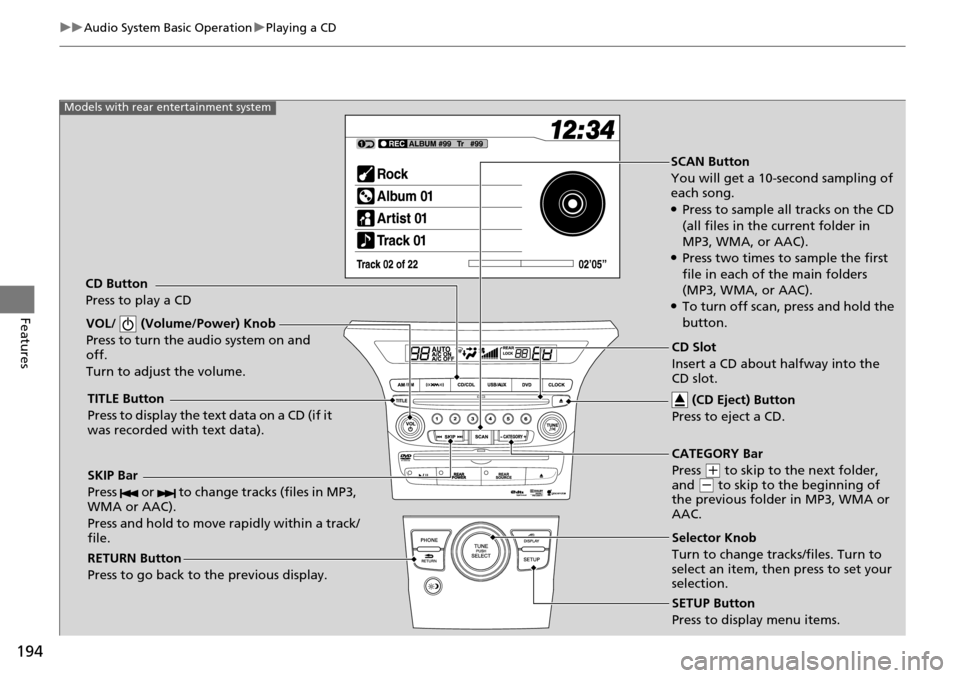
SCAN Button
You will get a 10-second sampling of
each song.
●Press to sample all tracks on the CD
(all files in the current folder in
MP3, WMA, or AAC).
●Press two times to sample the first
file in each of the main folders
(MP3, WMA, or AAC).
●To turn off scan, press and hold the
button.
VOL/ (Volume/Power) Knob
Press to turn the audio system on and
off.
Turn to adjust the volume.
SKIP Bar
Press or to change tracks (files in MP3,
WMA or AAC).
Press and hold to move rapidly within a track/
file.
TITLE Button
Press to display the text data on a CD (if it
was recorded with text data).
RETURN Button
Press to go back to the previous display.
SETUP Button
Press to display menu items.
Models with rear entertainment system
CD Button
Press to play a CD
Selector Knob
Turn to change tracks/files. Turn to
select an item, then press to set your
selection. CD Slot
Insert a CD about halfway into the
CD slot. (CD Eject) Button
Press to eject a CD.
CATEGORY Bar
Press
(
+
to skip to the next folder,
and (
-
to skip to the beginning of
the previous folder in MP3, WMA or
AAC.
Page 196 of 488
Continued195
uu Audio System Basic Operation u Playing a CD
Features
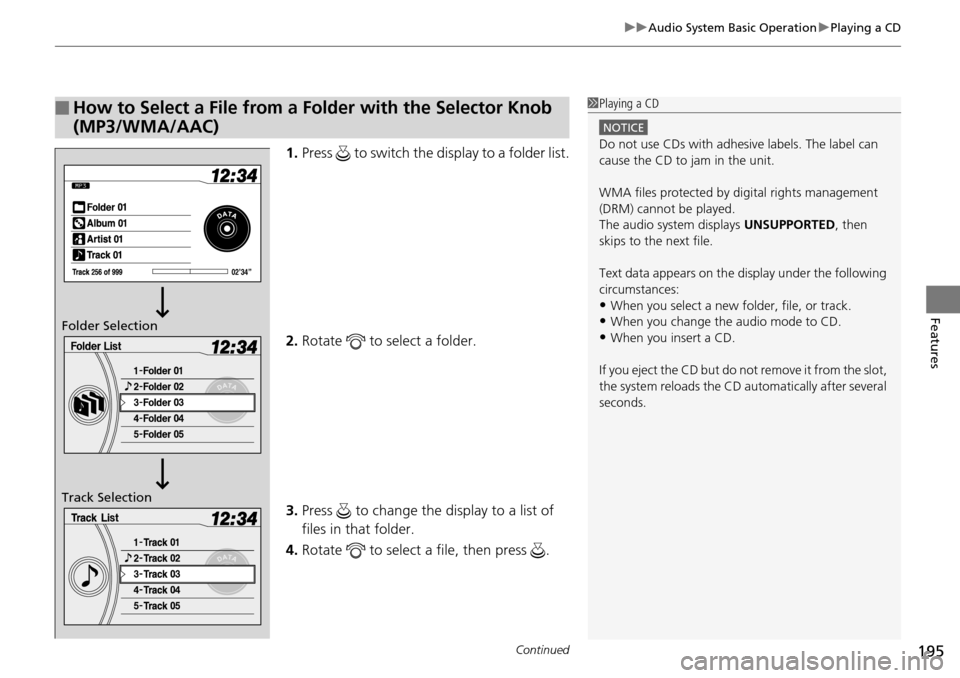
1. Press to switch the display to a folder list.
2. Ro
tate to select a folder.
3. Press to change the display to a list of
files in that folder.
4. Ro
tate to select a file, then press .
■How to Select a File from a Folder with the Selector Knob
(MP3/WMA/AAC)1Playing a CD
NOTICE
Do not use CDs with adhesive labels. The label can
cause the CD to jam in the unit.
WMA files protected by di gital rights management
(DRM) cannot be played.
The audio system displays UNSUPPORTED, then
skips to the next file.
Text data appears on the di splay under the following
circumstances:
•When you select a new folder, file, or track.
•When you change the audio mode to CD.
•When you insert a CD.
If you eject the CD but do not remove it from the slot,
the system reloads the CD automatically after several
seconds.Folder Selection
Track Selection
Page 197 of 488
uu Audio System Basic Operation u Playing a CD
196
Features
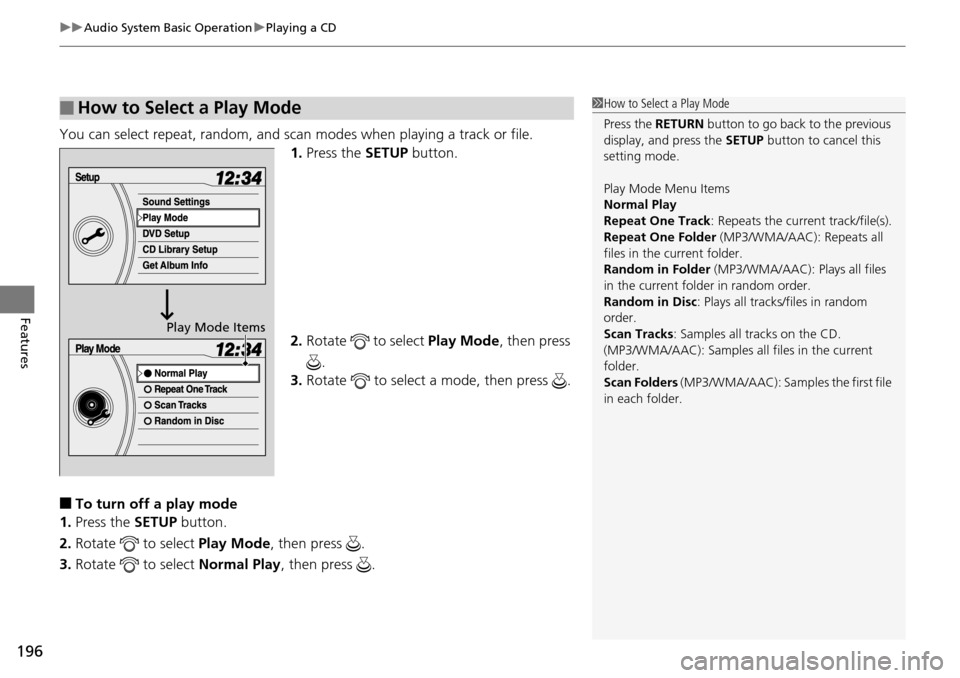
You can select repeat, random, and scan modes when playing a track or file.
1.Press the SETUP button.
2. Ro
tate to select Play Mode , then press
.
3. Ro
tate to select a mode, then press .
■To turn off a play mode
1. Press the SET
UP button.
2. Rotate
to select Play Mode , then press .
3. Rotate
to select Norma l Play, then press .
■How to Select a Play Mode1How to Select a Play Mode
Press the RETURN button to go back to the previous
display, and press the SETUP button to cancel this
setting mode.
Play Mode Menu Items
Normal Play
Repeat One Track : Repeats the current track/file(s).
Repeat One Folder (MP3/WMA/AAC): Repeats all
files in the current folder.
Random in Folder (MP3/WMA/AAC): Plays all files
in the current folder in random order.
Random in Disc : Plays all tracks/files in random
order.
Scan Tracks : Samples all tracks on the CD.
(MP3/WMA/AAC): Samples al l files in the current
folder.
Scan Folders (MP3/WMA/AAC): Samples the first file
in each folder.
Play Mode Items
Page 198 of 488
197
uu Audio System Basic Operation u Playing CD Library
Continued
Features
Playing CD Library
The songs on music CDs can be recorded to the flash memory. You can then play
the songs directly from your vehicle’s audio system.
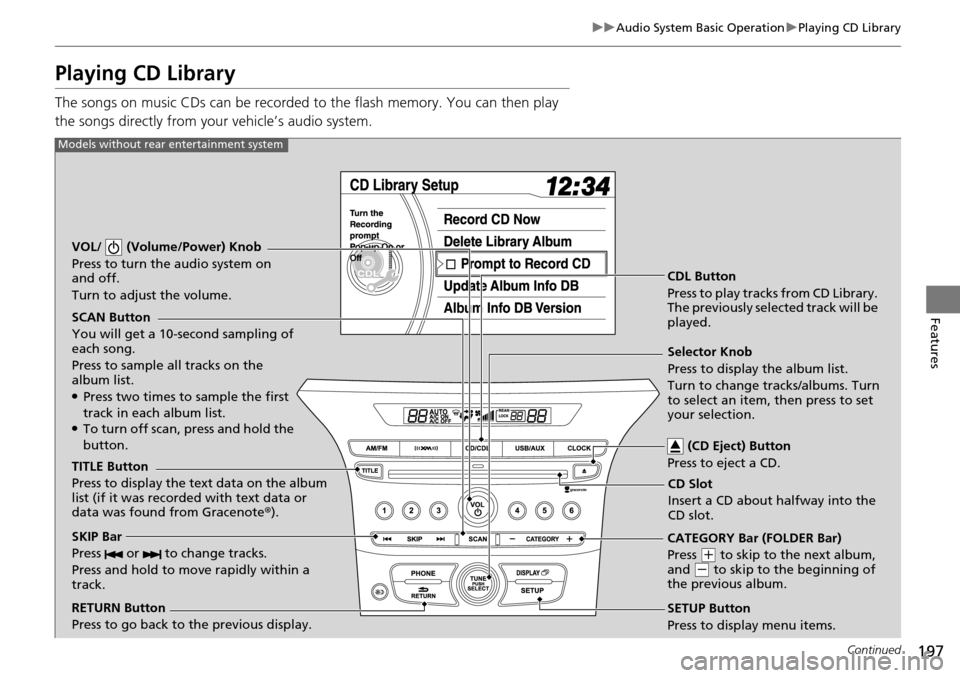
SCAN Button
You will get a 10-second sampling of
each song.
Press to sample all tracks on the
album list.
●Press two times to sample the first
track in each album list.
●To turn off scan, press and hold the
button.
VOL/ (Volume/Power) Knob
Press to turn the audio system on
and off.
Turn to adjust the volume.
CDL Button
Press to play tracks from CD Library.
The previously selected track will be
played.
TITLE Button
Press to display the text data on the album
list (if it was recorded with text data or
data was found from Gracenote ®).
RETURN Button
Press to go back to the previous display. Selector Knob
Press to display the album list.
Turn to change tracks/albums. Turn
to select an item, then press to set
your selection.
SETUP Button
Press to display menu items.
Models without rear entertainment system
CD Slot
Insert a CD about halfway into the
CD slot. (CD Eject) Button
Press to eject a CD.
SKIP Bar
Press or to change tracks.
Press and hold to move rapidly within a
track.CATEGORY Bar (FOLDER Bar)
Press
(
+
to skip to the next album,
and (
-
to skip to the beginning of
the previous album.
Page 199 of 488
198
uu Audio System Basic Operation u Playing CD Library
Features
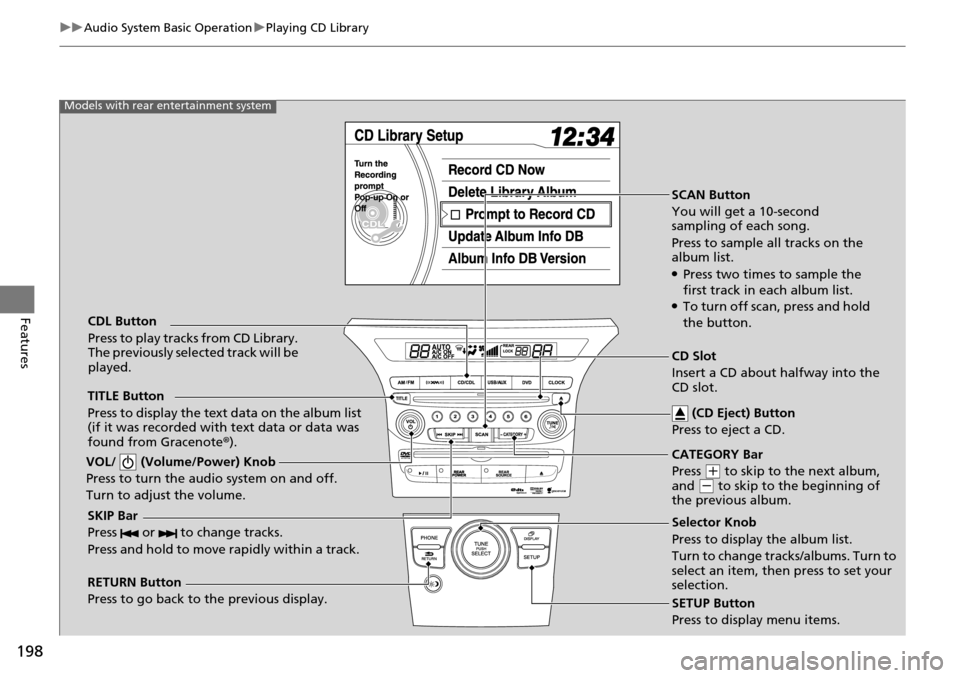
SCAN Button
You will get a 10-second
sampling of each song.
Press to sample all tracks on the
album list.
●Press two times to sample the
first track in each album list.
●To turn off scan , press and hold
the button.
VOL/ (Volume/Power) Knob
Press to turn the audio system on and off.
Turn to adjust the volume.
SKIP Bar
Press or to change tracks.
Press and hold to move rapidly within a track.
TITLE Button
Press to display the text data on the album list
(if it was recorded with text data or data was
found from Gracenote ®).
RETURN Button
Press to go back to the previous display. SETUP Button
Press to display menu items.
Models with rear entertainment system
CDL Button
Press to play tracks from CD Library.
The previously selected track will be
played.
Selector Knob
Press to display the album list.
Turn to change tracks/albums. Turn to
select an item, then press to set your
selection. CD Slot
Insert a CD about halfway into the
CD slot. (CD Eject) Button
Press to eject a CD.
CATEGORY Bar
Press
(
+
to skip to the next album,
and (
-
to skip to the beginning of
the previous album.
Page 200 of 488
Continued199
uu Audio System Basic Operation u Playing CD Library
Features
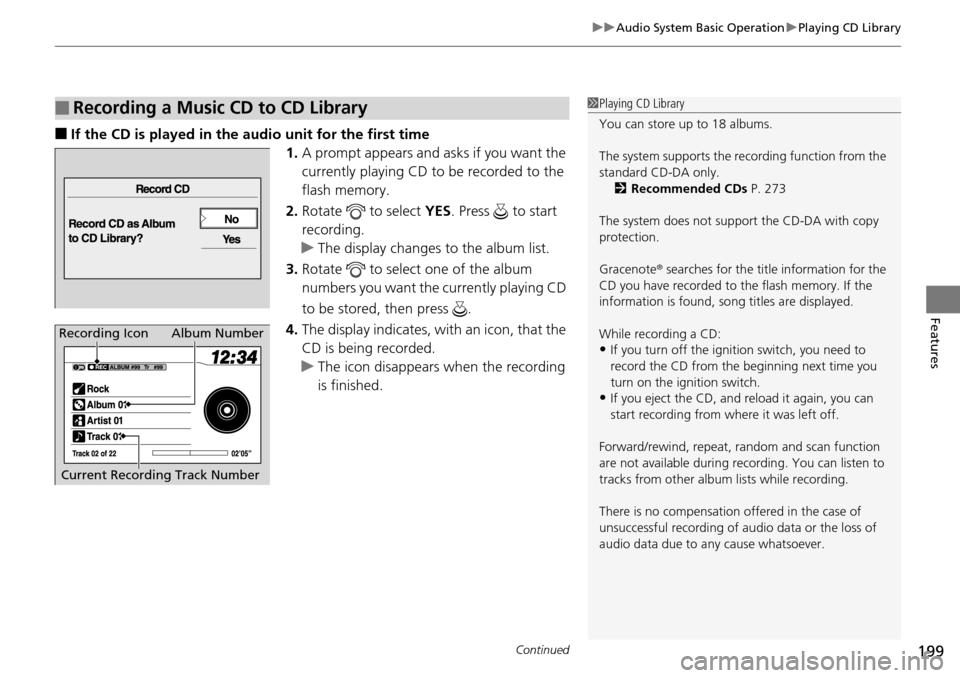
■If the CD is played in the audio unit for the first time
1.A prompt ap
pears and asks if you want the
currently playing CD to be recorded to the
flash memory.
2. Ro
tate to select YES. Pre ss to start
recording.
u The
display changes to the album list.
3. Ro
tate to select one of the album
numbers you want the currently playing CD
to be stored,
then press .
4. The display indicates,
with an icon, that the
CD is being recorded.
u Th
e icon disappears wh en the recording
is finished.
■Recording a Music CD to CD Library1 Playing CD Library
You can store up to 18 albums.
The system supports the re cording function from the
standard CD-DA only. 2 Recommended CDs P. 273
The system does not support the CD-DA with copy
protection.
Gracenote ® searches for the title information for the
CD you have recorded to the flash memory. If the
information is found, so ng titles are displayed.
While recording a CD:
•If you turn off the ignition switch, you need to
record the CD from the beginning next time you
turn on the ignition switch.
•If you eject the CD, and reload it again, you can
start recording from where it was left off.
Forward/rewind, repeat, ra ndom and scan function
are not available during recording. You can listen to
tracks from other album lists while recording.
There is no compensation offered in the case of
unsuccessful recording of au dio data or the loss of
audio data due to any cause whatsoever.
Album Number
Current Recording Track NumberRecording Icon
Page 201 of 488
200
uu Audio System Basic Operation u Playing CD Library
Features
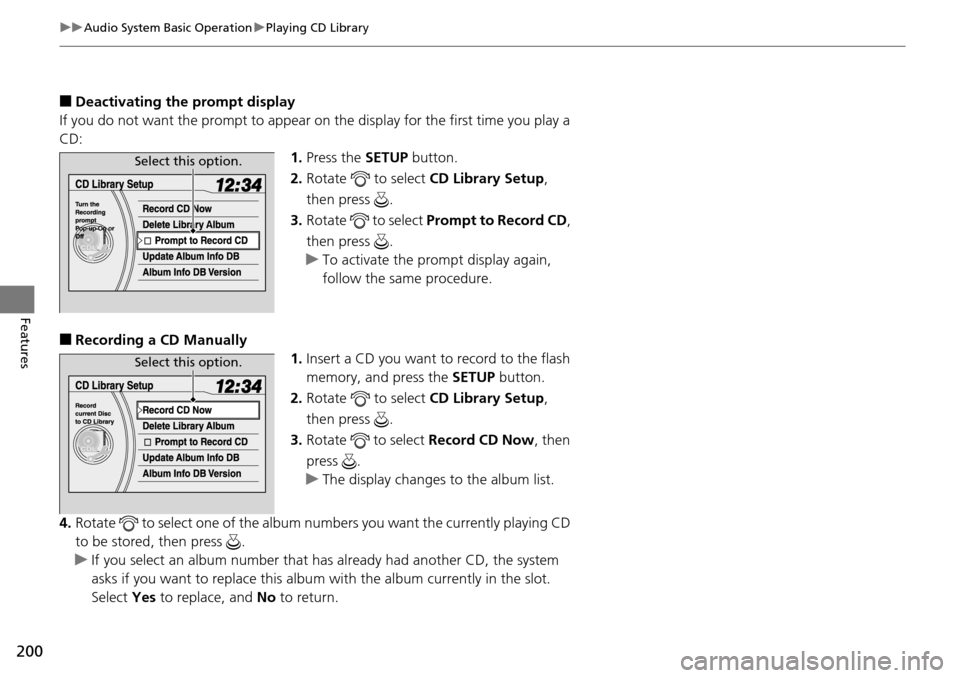
■Deactivating the prompt display
If you do not want the prompt to appear on the display for the first time you play a
CD: 1.Press the SET
UP button.
2. Ro
tate to select CD L ibrary Setup,
then press .
3. Ro
tate to select Prompt to Record CD ,
then press .
u T
o activate the prompt display again,
follow the same procedure.
■Recording a CD Manually 1.Insert a CD
you want to record to the flash
memory, and press the SETUP button.
2. Ro
tate to select CD L ibrary Setup,
then press .
3. Ro
tate to select Re cord CD Now , then
press .
u T
he display changes to the album list.
4. Rotate
to select one of the album numbers you want the currently playing CD
to be stored, then press .
u If y
ou select an album number that ha s already had another CD, the system
asks if you want to replace this albu m with the album currently in the slot.
Select Yes to replace, and No to return.
Select this option.
Select this option.
Page 202 of 488
Continued201
uu Audio System Basic Operation u Playing CD Library
Features
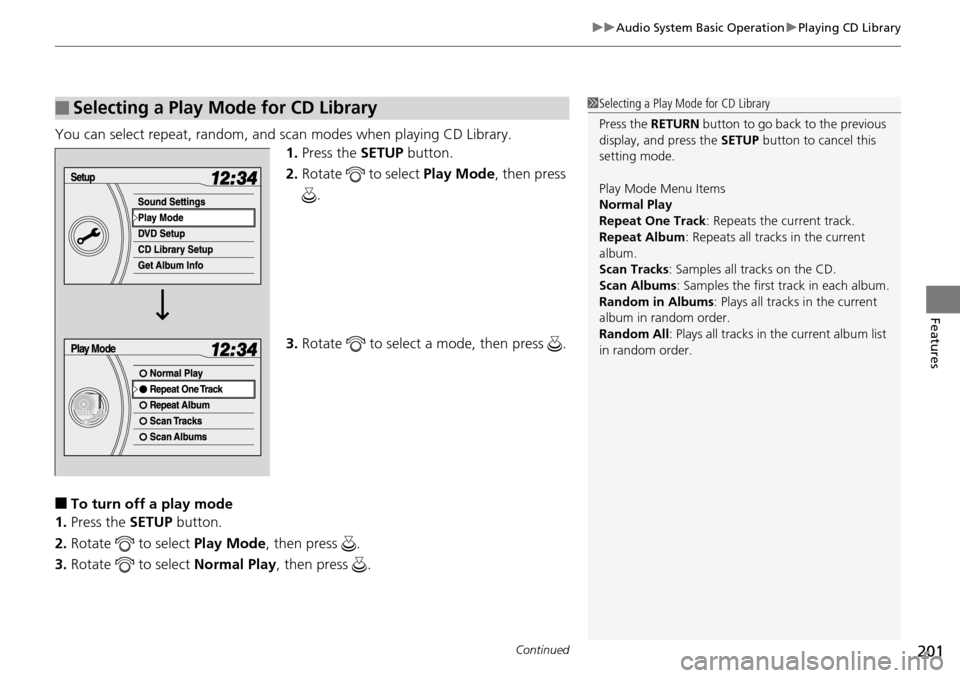
You can select repeat, random, and scan modes when playing CD Library.
1.Press the SETUP button.
2. Ro
tate to select Play Mode, then press
.
3. Ro
tate to select a mode, then press .
■To turn off a play mode
1. Press the SETU
P button.
2. Rota
te to select Play Mode, then press .
3. Rota
te to select Normal Play , t hen press .
■Selecting a Play Mode for CD Library1Selecting a Play Mode for CD Library
Press the RETURN button to go back to the previous
display, and press the SETUP button to cancel this
setting mode.
Play Mode Menu Items
Normal Play
Repeat One Track: Repeats the current track.
Repeat Album : Repeats all tracks in the current
album.
Scan Tracks : Samples all tracks on the CD.
Scan Albums : Samples the first track in each album.
Random in Albums : Plays all tracks in the current
album in random order.
Random All : Plays all tracks in the current album list
in random order.
Page 203 of 488
uu Audio System Basic Operation u Playing CD Library
202
Features
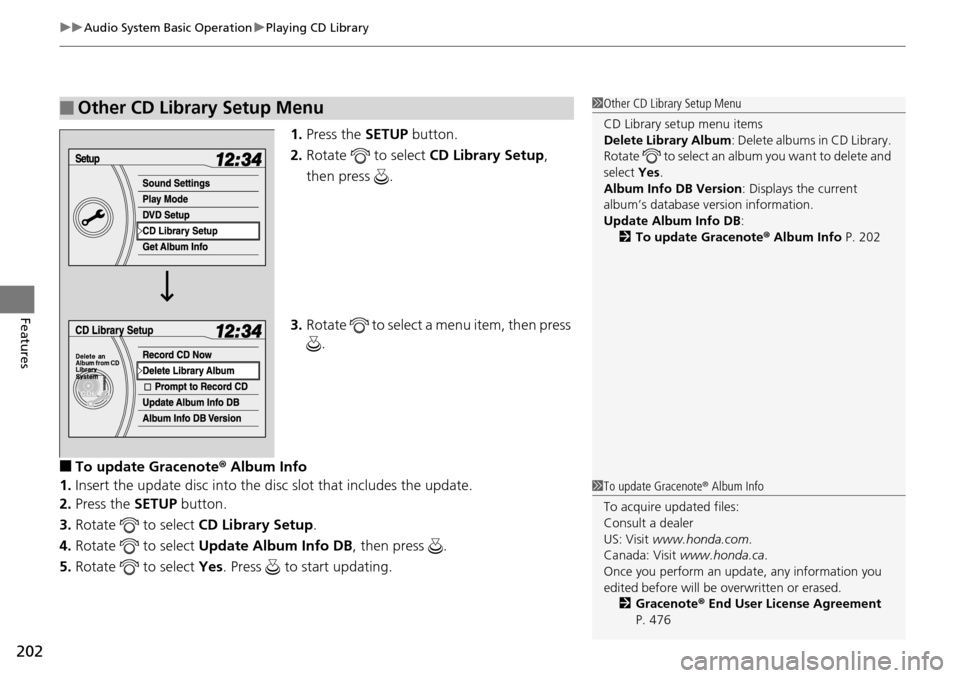
1. Press the SETUP button.
2.Rotate to select CD L ibrary Setup,
then press .
3. Ro
tate to select a menu item, then press
.
■To update Gracenote ® Album Info
1. Insert the
update disc into the di sc slot that includes the update.
2. Press the SET
UP button.
3. Rotate
to select CD L ibrary Setup.
4. Rotate
to select Upda te Album Info DB , then press .
5. Rotate
to select Yes. Press to start updating.
■Other CD Library Setup Menu1Other CD Library Setup Menu
CD Library setup menu items
Delete Library Album : Delete albums in CD Library.
Rotate to select an album you want to delete and
select Yes.
Album Info DB Version : Displays the current
album’s database ve rsion information.
Update Album Info DB :
2 To update Gracenote ® Album Info P. 202
1To update Gracenote ® Album Info
To acquire updated files:
Consult a dealer
US: Visit www.honda.com .
Canada: Visit www.honda.ca .
Once you perform an update, any information you
edited before will be overwritten or erased.
2 Gracenote ® End User License Agreement
P. 476
Page 204 of 488
203
uu Audio System Basic Operation u Playing an iPod ®
Continued
Features
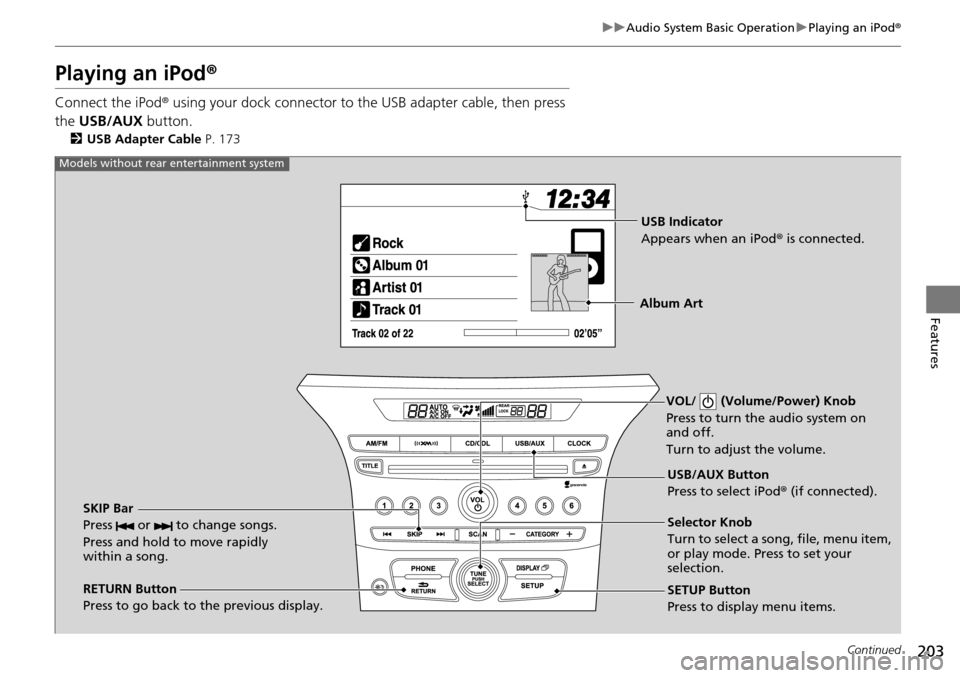
Playing an iPod ®
Connect the iPod ® using your dock connector to the USB adapter cable, then press
the USB/AUX button.
2USB Adapter Cable P. 173
VOL/ (Volume/Power) Knob
Press to turn the audio system on
and off.
Turn to adjust the volume.
RETURN Button
Press to go back to the previous display. Selector Knob
Turn to select a song, file, menu item,
or play mode. Press to set your
selection.
SETUP Button
Press to display menu items. USB/AUX Button
Press to select iPod
® (if connected).
SKIP Bar
Press or to change songs.
Press and hold to move rapidly
within a song.
Models without rear entertainment system
USB Indicator
Appears when an iPod ® is connected.
Album Art