brake light HONDA PILOT 2014 2.G Owners Manual
[x] Cancel search | Manufacturer: HONDA, Model Year: 2014, Model line: PILOT, Model: HONDA PILOT 2014 2.GPages: 488, PDF Size: 12.11 MB
Page 7 of 488
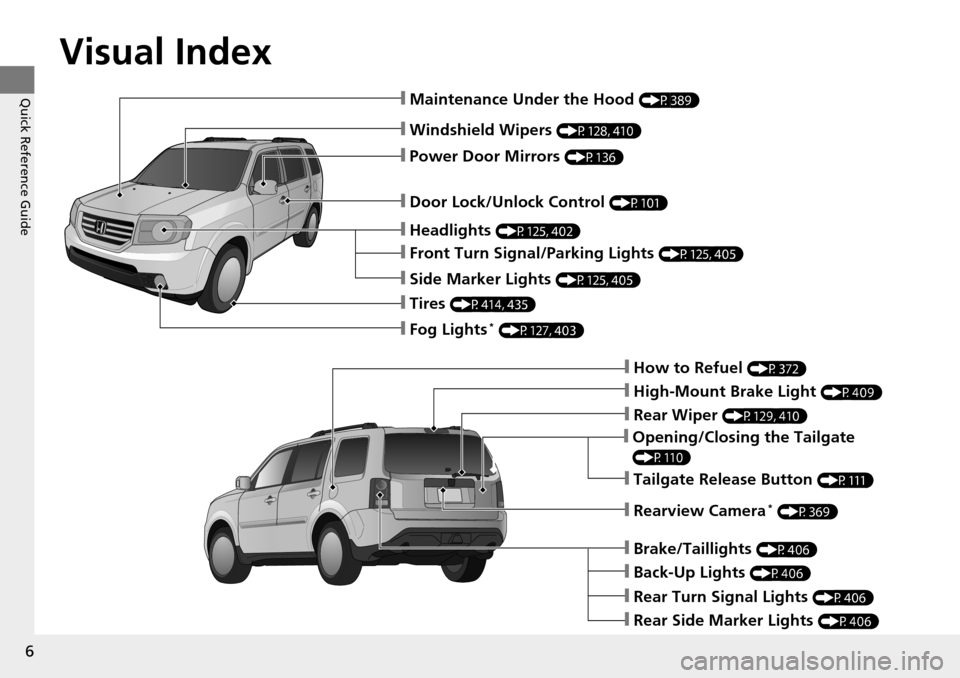
Visual Index
6
Quick Reference Guide
❙Windshield Wipers (P128, 410)
❙Door Lock/Unlock Control (P101)
❙How to Refuel (P372)
❙High-Mount Brake Light (P409)
❙Opening/Closing the Tailgate
(P110)
❙Rear Wiper (P129, 410)
❙Back-Up Lights (P406)
❙Brake/Taillights (P406)
❙Rear Turn Signal Lights (P406)
❙Rear Side Marker Lights (P406)
❙Power Door Mirrors (P136)
❙Maintenance Under the Hood (P389)
❙Fog Lights * (P127, 403)
❙Rearview Camera * (P369)
❙Front Turn Signal/Parking Lights (P125, 405)
❙Side Marker Lights (P125, 405)
❙Tires (P414, 435)
❙Headlights (P125, 402)
❙Tailgate Release Button (P111)
Page 9 of 488
8
Quick Reference Guide
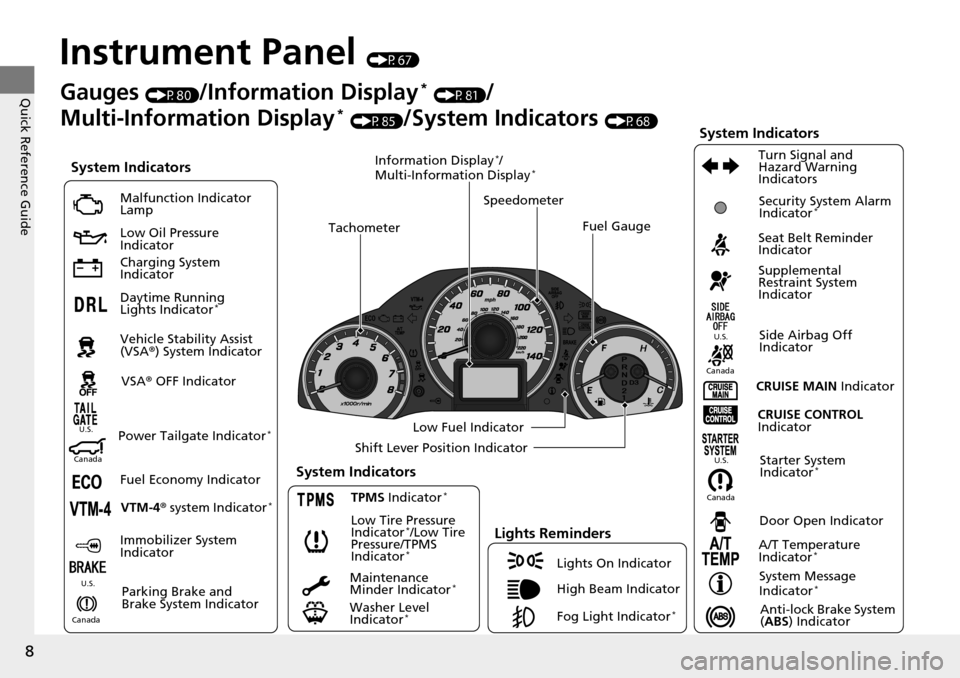
Instrument Panel (P67)
System Indicators
Malfunction Indicator
Lamp
Low Oil Pressure
Indicator
Charging System
Indicator
Daytime Running
Lights Indicator
*
Vehicle Stability Assist
(VSA® ) System Indicator
VSA ® OFF Indicator
Low Tire Pressure
Indicator
*/Low Tire
Pressure/TPMS
Indicator
*
Lights Reminders
Lights On Indicator
High Beam Indicator
Fog Light Indicator
*
Immobilizer System
Indicator Seat Belt Reminder
Indicator
System Indicators
CRUISE CONTROL
Indicator
Parking Brake and
Brake System Indicator Supplemental
Restraint System
Indicator
Side Airbag Off
Indicator
Door Open Indicator
CRUISE MAIN
Indicator
Tachometer
Speedometer
Fuel Gauge
Low Fuel Indicator
Shift Lever Position Indicator
System Message
Indicator
*
Gauges (P80)/Information Display * (P81)/
Multi-Information Display
* (P85)/System Indicators (P68)
Fuel Economy Indicator VTM-4 r system Indicator
*TPMS Indicator *
Maintenance
Minder Indicator *
Washer Level
Indicator *
A/T Temperature
Indicator *
Turn Signal and
Hazard Warning
Indicators
Starter System
Indicator *System Indicators
CanadaU.S.
Canada
U.S.
Anti-lock Brake System
(
ABS ) Indicator
Power Tailgate Indicator *
Security System Alarm
Indicator *
Information Display */
Multi-Information Display *
Canada U.S.
CanadaU.S.
Page 17 of 488
16
Quick Reference Guide
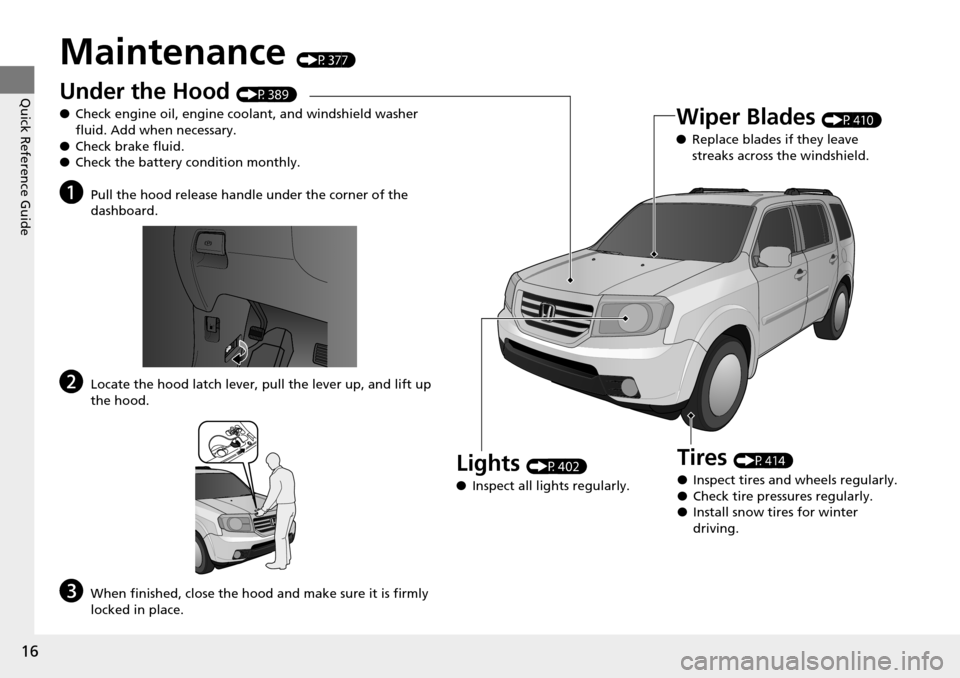
Maintenance (P377)
Under the Hood (P389)
● Check engine oil, engine coolant, and windshield washer
fluid. Add when necessary.
● Check brake fluid.
● Check the battery condition monthly.
aPull the hood release handle under the corner of the
dashboard.
bLocate the hood latch lever, pull the lever up, and lift up
the hood.
cWhen finished, close the hood and make sure it is firmly
locked in place.
Lights (P402)
● Inspect all lights regularly.
Wiper Blades (P410)
● Replace blades if they leave
streaks across the windshield.
Tires (P414)
● Inspect tires and wheels regularly.
● Check tire pressures regularly.
● Install snow tires for winter
driving.
Page 19 of 488
18
Quick Reference Guide
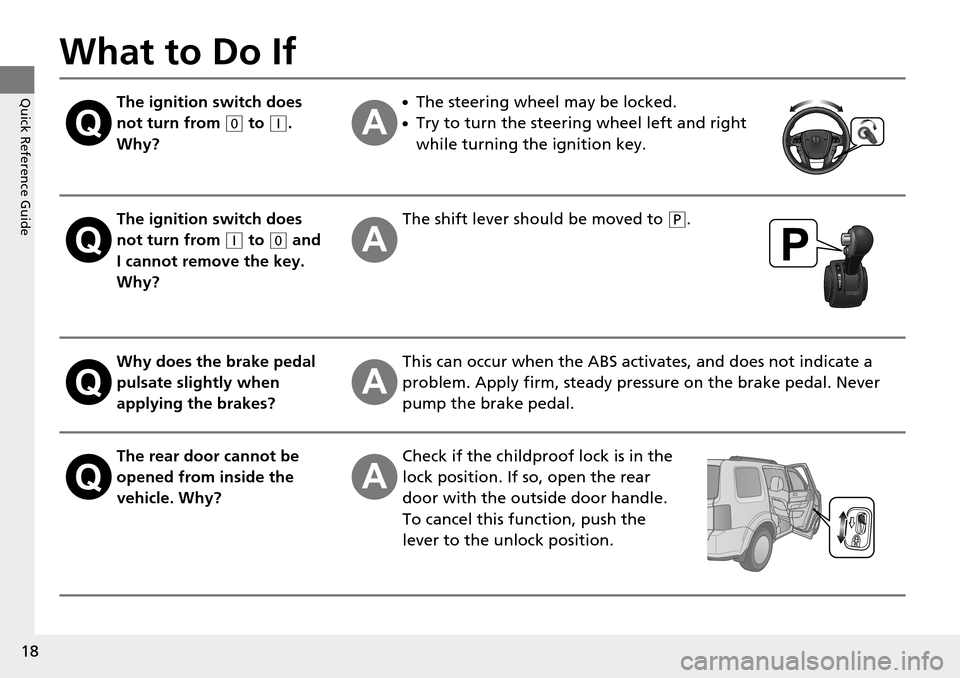
What to Do If
The ignition switch does
not turn from
(0
to (q
.
Why?
●The steering wheel may be locked.
●Try to turn the steering wheel left and right
while turning the ignition key.
The ignition switch does
not turn from
(q
to (0
and
I cannot remove the key.
Why?
The shift lever should be moved to (P
.
Why does the brake pedal
pulsate slightly when
applying the brakes?This can occur when the ABS activates, and does not indicate a
problem. Apply firm, steady pressure on the brake pedal. Never
pump the brake pedal.
The rear door cannot be
opened from inside the
vehicle. Why?Check if the childproof lock is in the
lock position. If so, open the rear
door with the outside door handle.
To cancel this function, push the
le
ver to the unlock position.
Page 20 of 488
19
Quick Reference Guide
Why do the doors lock
after I unlocked the doors
using a remote
transmitter?If you do not open the doors within 30 seconds, the doors are
relocked automatically for security.
Why does the beeper
sound when I open the
driver's door?The beeper sounds when:
●The key is left in the ignition switch.
●The exterior lights are left on.
Why does the beeper
sound when I start driving?The beeper sounds when:
●Driver and/or front passenger are not wearing their seat belts.
●The parking brake lever is not fully released.
Why do I hear a screeching
sound when I apply the
brake pedal?The brake pads may need to be replaced. Have your vehicle
inspected by a dealer.
Page 128 of 488
127
uu Operating the Switches Around the Steering Wheel u Fog Lights *
Controls
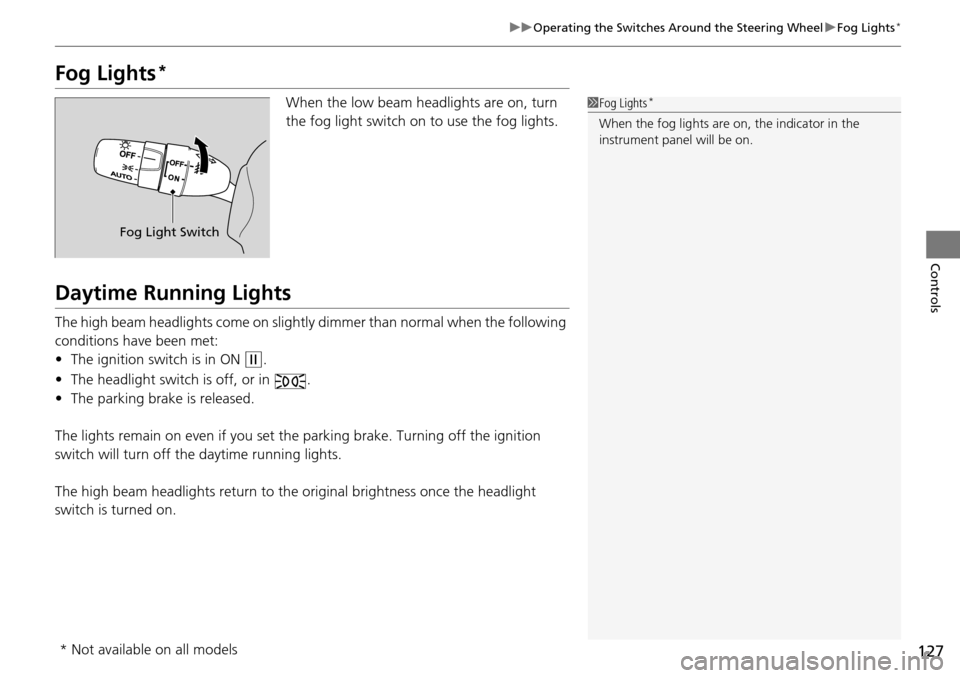
Fog Lights *
When the low beam headlights are on, turn
the fog light switch on to use the fog lights.
Daytime Running Lights
The high beam headlights come on slightly dimmer than normal when the following
conditions have been met:
• The ign
ition switch is in ON (w
.
• The headlight switch is
off, or in .
• The parking
brake is released.
The lights remain on even if you set th e
parking brake. Turning off the ignition
switch will turn off the daytime running lights.
The high beam headlights return to the o
riginal brightness once the headlight
switch is turned on.
1 Fog Lights *
When the fog lights are on, the indicator in the
instrument pane l will be on.
Fog Light Switch
* Not available on all models
Page 134 of 488
133
uu Operating the Switches Around the Steering Wheel u Driving Position Memory System *
Controls
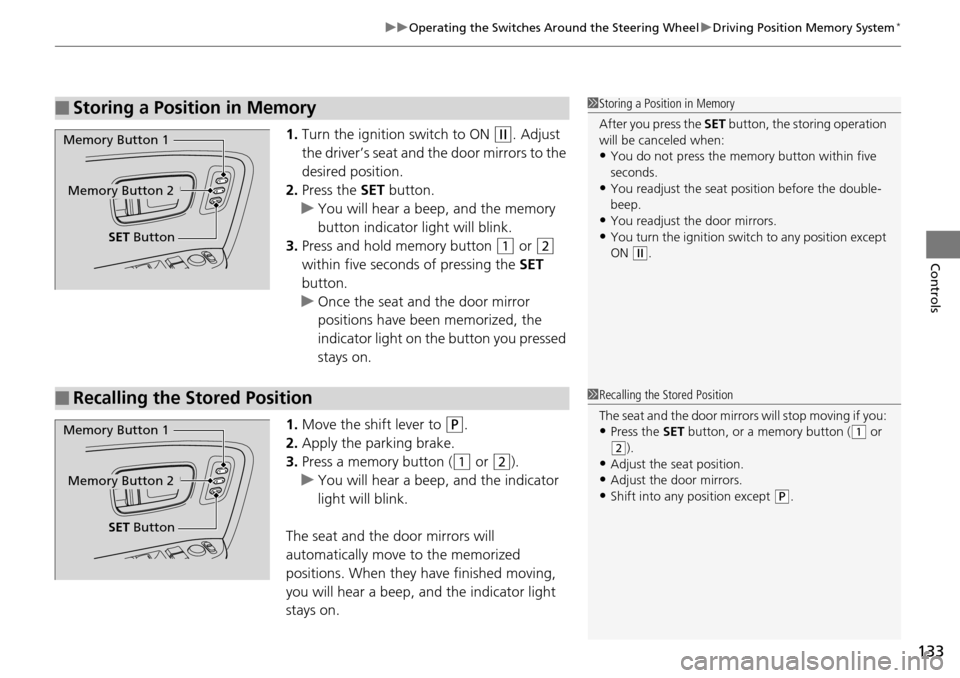
1. Turn the ignition switch to ON (w
. Adjust
the driver’s seat and the door mirrors to the
desired position.
2. Press the SET bu
tton.
u You will hear a
beep, and the memory
button indicator light will blink.
3. Press and ho
ld memory button (1
or (2
within five seconds of pressing the SET
button.
u Once the seat
and the door mirror
positions have been memorized, the
indicator light on the button you pressed
stays on.
1. Move the shift lever
to (P
.
2. Apply the parking brake.
3. Press
a memory button ( (1
or (2
).
u You will hear a
beep, and the indicator
light will blink.
The seat and the door mirrors will
automatically move to the m
emorized
positions. When they have finished moving,
you will hear a beep, and the indicator light
stays on.
■Storing a Position in Memory1 Storing a Position in Memory
After you press the SET button, the storing operation
will be canceled when:
•You do not press the memory button within five
seconds.
•You readjust the seat position before the double-
beep.
•You readjust the door mirrors.•You turn the ignition switch to any position except
ON
(
w
.
Memory Button 1
Memory Button 2
SET Button
■Recalling the Stored Position1Recalling the Stored Position
The seat and the door mirror s will stop moving if you:
•Press the SET button, or a memory button ( (
1
or
(
2
).
•Adjust the seat position.
•Adjust the door mirrors.•Shift into any position except (
P
.
Memory Button 1
Memory Button 2
SET Button
Page 326 of 488
Continued325
uu Before Driving u Driving Preparation
Driving
• Store or secure all items on board properly.
u Carrying too much cargo, or improperly storing it, can affect your vehicle's
handling, stability, sto pping distance, and tires, and make it unsafe.
2Maximum Load Limit P. 327
• Do not pile items higher than the seat height.
u Th
ey can block your view and may be thrown forward in the event of sudden
braking.
• Do not pla
ce anything in the front seat footwells. Make sure to secure the floor
mat.
u An object or unsecured floor m
at can interfere with your brake and accelerator
pedal operation while driving.
• If yo
u have any animals on board, do not let them move around in the vehicle.
u Th
ey may interfere with driving and a crash could occur.
• Secure
ly close and lock al l doors and the tailgate.
2Locking/Unlocking the Doors from the Inside P. 103
• Adjust your seating position properly.
u Adjust the head re
straint, too.
2Adjusting the Seats P. 137
2 Adjusting the Head Restraints P. 141
•Adjust the mirrors and steering wh eel properly for your driving.
u Ad
just them while sitting in the proper driving position.
2 Adjusting the Steering Wheel P. 134
2 Adjusting the Mirrors P. 135
■Interior Checks1Interior Checks
The headlight aim is set by the factory, and does not
need to be adjusted. Howeve r, if you regularly carry
heavy items in the cargo area or tow a trailer, have
the aiming readjusted at a dealer or by a qualified
technician.
Page 334 of 488
Continued333
uu Towing a Trailer u Towing Preparation
Driving
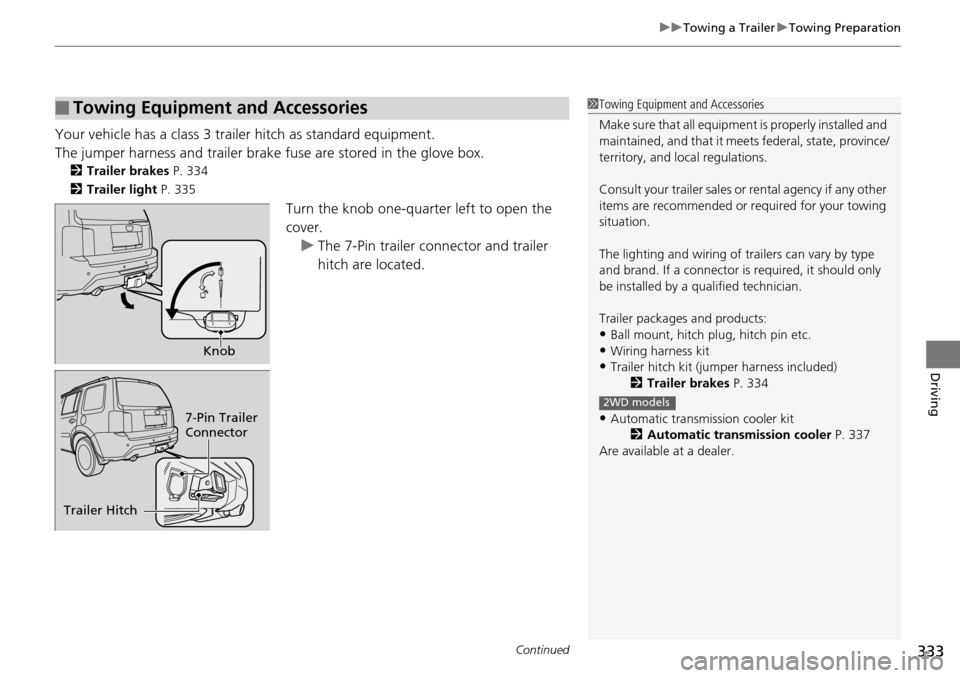
Your vehicle has a class 3 trailer hitch as standard equipment.
The jumper harness and trailer brake fuse are stored in the glove box.
2Trailer brakes P. 334
2 Trailer light P. 335
Turn the knob one-quarter left to open the
cover.
u Th
e 7-Pin trailer connector and trailer
hitch are located.
■Towing Equipment and Accessories1Towing Equipment and Accessories
Make sure that all equipment is properly installed and
maintained, and that it meets federal, state, province/
territory, and lo cal regulations.
Consult your traile r sales or rental agency if any other
items are recommended or required for your towing
situation.
The lighting and wiring of tra ilers can vary by type
and brand. If a connector is required, it should only
be installed by a qua lified technician.
Trailer packages and products:
•Ball mount, hitch plug, hitch pin etc.
•Wiring harness kit•Trailer hitch kit (jum per harness included)
2 Trailer brakes P. 334
•Automatic transmission cooler kit
2Automatic transmission cooler P. 337
Are available at a dealer.
2WD models
Knob
7-Pin Trailer
Connector
Trailer Hitch
Page 335 of 488
uu Towing a Trailer u Towing Preparation
334
Driving
■Trailer brakes
Recommended for any trailer with a total weight of 1,000 lbs (450 kg) or more:
There are two common types of trailer brake s:
surge and electric. Surge brakes are
common for boat trailers, since the brakes will get wet.
If you choose electric brakes, be sure they
are electronically actuated. Do not
attempt to attach trailer brakes to your ve hicle's hydraulic system, as it will lower
braking effectiveness and create a potential hazard.
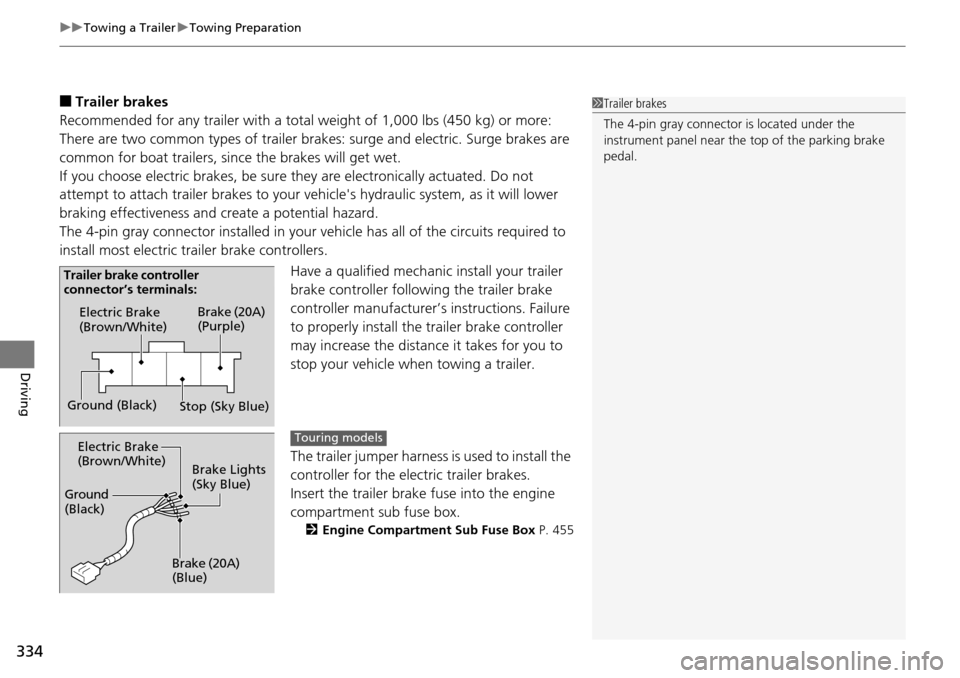
The 4-pin gray connector installed in your vehicle has all of the circuits required to
install m
ost electric trailer brake controllers.
Have a qualified mechanic install your trailer
brake controller following
the trailer brake
controller manufacturer’s instructions. Failure
to properly install the trailer brake controller
may increase the distance it takes for you to
stop your vehicle when towing a trailer.
The trailer jumper harness i
s used to install the
controller for the electric trailer brakes.
Insert the trailer brake fuse into the engine
co
mpartment sub fuse box.
2 Engine Compartment Sub Fuse Box P. 455
1Trailer brakes
The 4-pin gray connector is located under the
instrument panel near the top of the parking brake
pedal.
Electric Brake
(Brown/White)
Ground (Black) Brake (20A)
(Purple)
Stop (Sky Blue)
Trailer brake controller
connector’s terminals:
Electric Brake
(Brown/White)
Ground
(Black)
Brake (20A)
(Blue)Brake Lights
(Sky Blue)Touring models