key info HONDA PILOT 2014 2.G Owners Manual
[x] Cancel search | Manufacturer: HONDA, Model Year: 2014, Model line: PILOT, Model: HONDA PILOT 2014 2.GPages: 488, PDF Size: 12.11 MB
Page 77 of 488
76
uu Indicators u
Instrument Panel
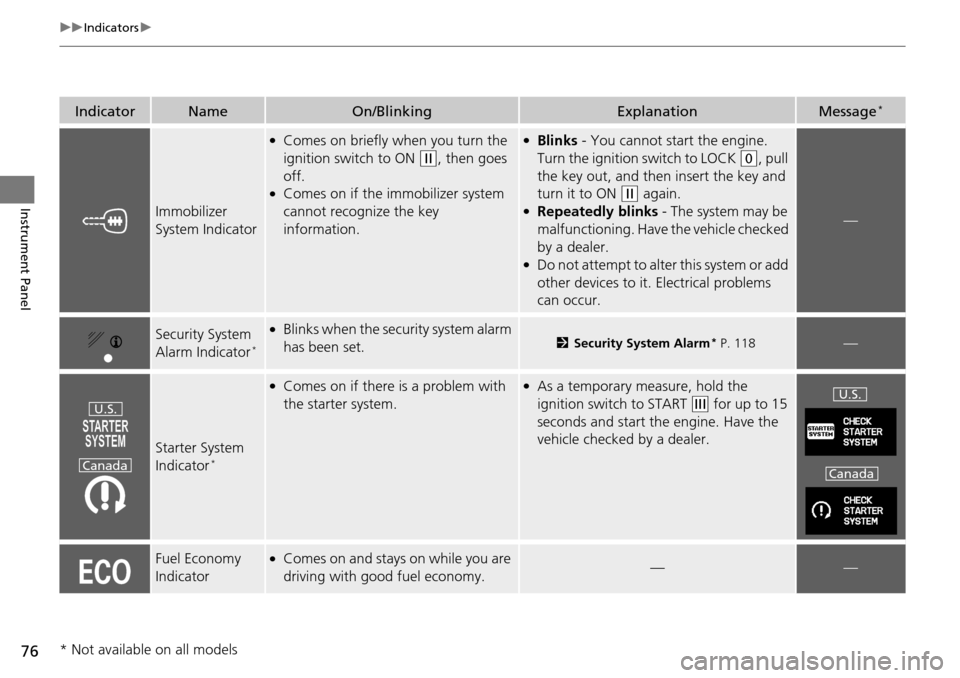
IndicatorNameOn/BlinkingExplanationMessage *
Immobilizer
System Indicator
●Comes on briefly when you turn the
ignition switch to ON
(w
, then goes
off.
●Comes on if the immobilizer system
cannot recognize the key
information.
●Blinks - You cannot start the engine.
Turn
the ignition switch to LOCK
(0
, pull
the key out, and then insert the key and
turn it to ON
(w
again.●Repeatedly blinks - The system may be
malfu
nctioning. Have the vehicle checked
by a dealer.
●Do not attempt to alter this system or add
other devices to it. Electrical problems
can occur.
—
Security System
Alarm Indicator *
●Blinks when the secu rity system alarm
has been set.2 Security System Alarm * P. 118—
Starter System
Indicator *
●Comes on if there is a problem with
the starter system.●As a temporary measure, hold the
ignition switch to START
(e
for up to 15
seconds and start the engine. Have the
vehicle checked by a dealer.
Fuel Economy
Indicator●Comes on and stays on while you are
driving with good fuel economy.——
U.S.
CanadaU.S.
Canada
* Not available on all models
Page 79 of 488
78
uu Indicators u Multi-Information Display Warn ing and Information Messages *
Instrument Panel
Multi-Information Display Warn ing and Information Messages *
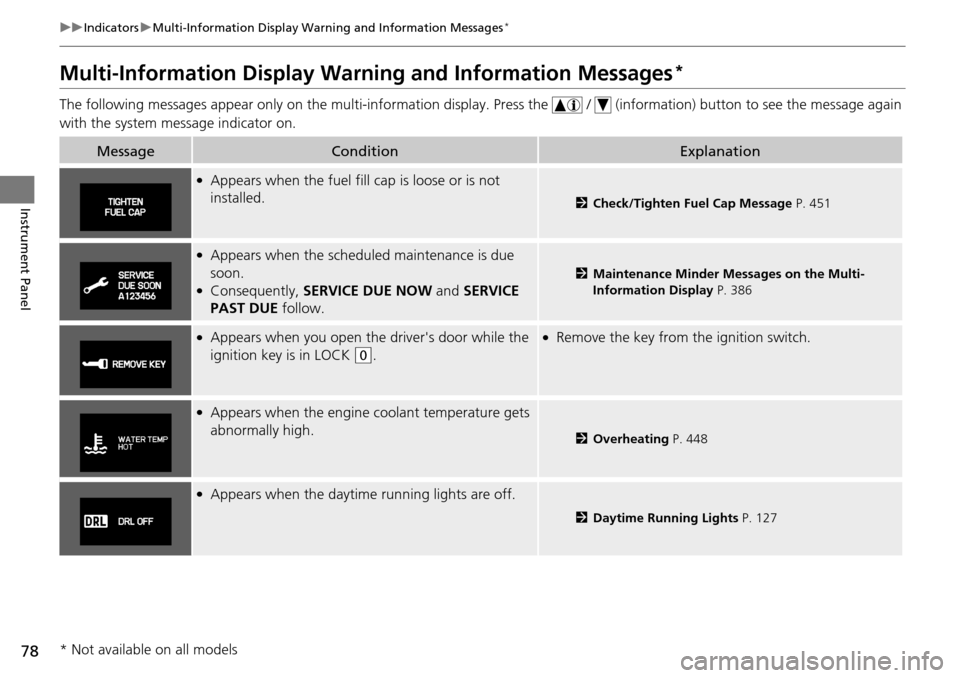
The following messages appear only on the multi-information display. Press the / (information) button to see the message again
with the system me ss
age indicator on.
MessageConditionExplanation
●Appears when the fuel fill cap is loose or is not
installed.
2Check/Tighten Fuel Cap Message P. 451
●Appears when the schedul ed maintenance is due
soon.
●Consequently, SERVICE DUE NOW and SERVICE
PAST DUE follow.
2Maintenance Minder Messages on the Multi-
Information Display P.
386
●Appears when you open the driver's door while the
ignition key is in LOCK
(0
.
●Remove the key from the ignition switch.
●Appears when the engine coolant temperature gets
abnormally high.
2 Overheating P. 448
●Appears when the daytime running lights are off.
2 Daytime Running Lights P. 127
* Not available on all models
Page 92 of 488
91
uu Gauges and Displays u Multi-Informat ion Display *
Continued
Instrument Panel
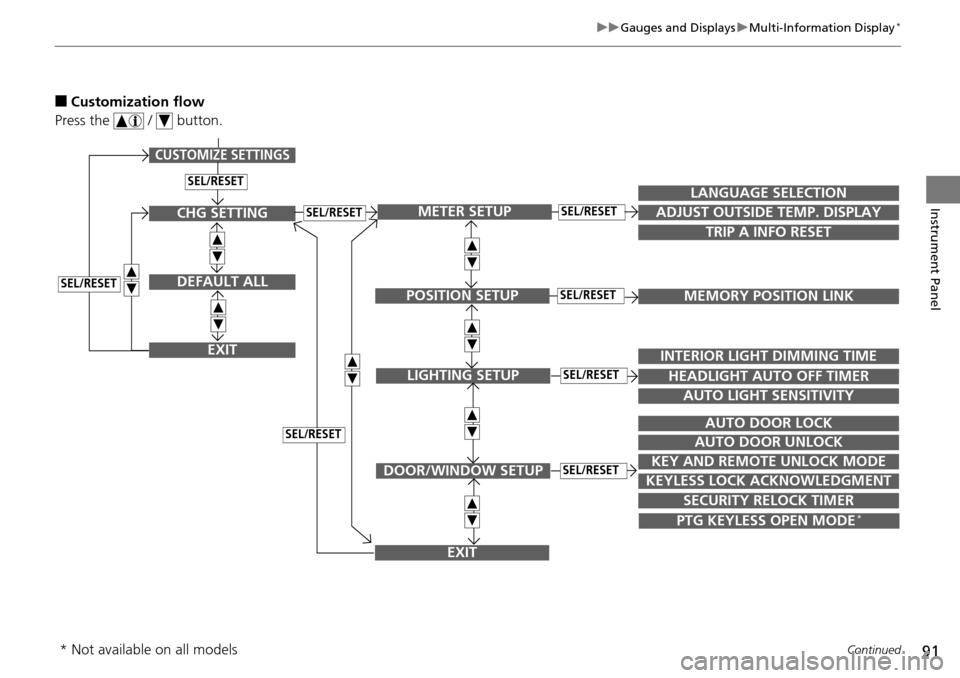
■Customization flow
Press the / button.
SEL/RESET
CUSTOMIZE SETTINGS
SECURITY RELOCK TIMER
TRIP A INFO RESET
LANGUAGE SELECTION
ADJUST OUTSIDE TEMP. DISPLAY
MEMORY POSITION LINK
INTERIOR LIGHT DIMMING TIME
HEADLIGHT AUTO OFF TIMER
AUTO LIGHT SENSITIVITY
AUTO DOOR LOCK
AUTO DOOR UNLOCK
KEY AND REMOTE UNLOCK MODE
KEYLESS LOCK ACKNOWLEDGMENT
METER SETUP
POSITION SETUP
LIGHTING SETUP
DOOR/WINDOW SETUP
SEL/RESET
SEL/RESET
SEL/RESET
SEL/RESET
PTG KEYLESS OPEN MODE *
EXIT
CHG SETTING
DEFAULT ALL
EXIT
SEL/RESET
SEL/RESET
SEL/RESET
* Not available on all models
Page 94 of 488
93
uu Gauges and Displays u Multi-Informat ion Display *
Continued
Instrument Panel
*1:Not available on all models
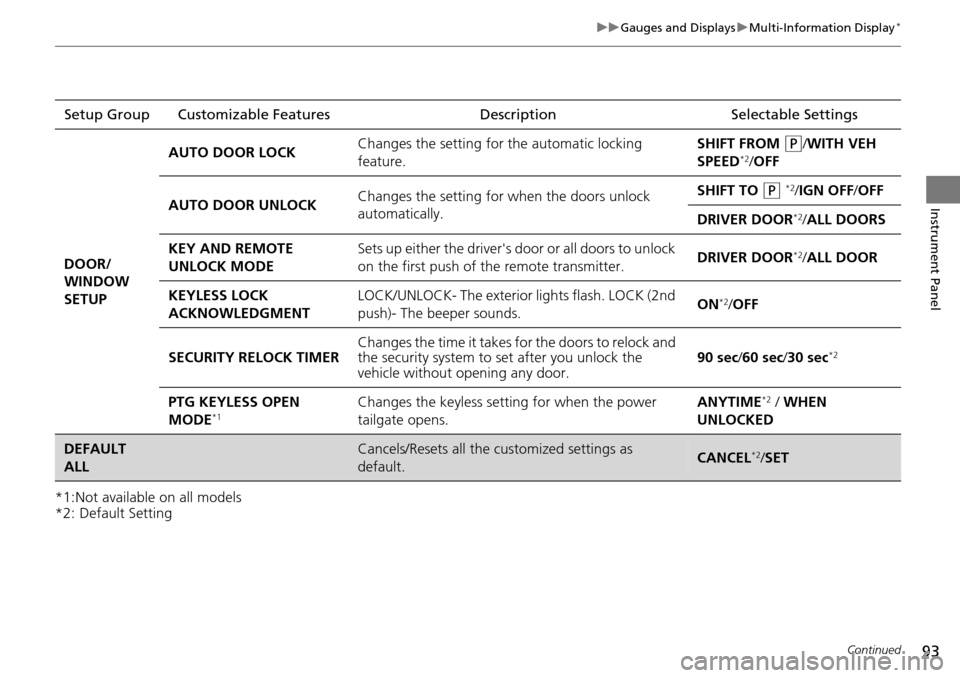
*2: Default SettingSetup Group
Customizable Features DescriptionSelectable Settings
DOOR/
WINDOW
SE
TUP AUTO DOOR LOCK
Changes the setting for
the automatic
locking
feature. SHIFT FROM
(P
/WITH VEH
SPEED*2/ OFF
AUTO DOOR UNLOCK Changes the setting for when the doors unlock
automatica
lly. SHIFT TO
(P
*2/IGN OFF /OFF
DRIVER DOOR
*2/ ALL DOORS
KEY AND REMOTE
UNLOCK MODE Sets up either the driver's door or all doors to unlock
on the first push
of the remote transmitter. DRIVER DOOR*2/
ALL DOOR
KEYLESS LOCK
ACKN
OWLEDGMENT LOCK/UNLOCK- The exterior
ligh ts flash. LOCK (2nd
push)- The beeper sounds. ON*2/
OFF
SECURITY RELOCK TIMER Changes the time it takes for the doors to relock and
the secur
ity system to set after you unlock the
vehicle without opening any door. 90 sec
/60 sec/ 30 sec*2
PTG KEYLESS OPEN
MODE*1Changes the keyless setting for when the power
tailgate opens. ANYTIME*2 / WHEN
UNLOCKED
DEFAULT
ALLCancels/Resets all the customized settings as
default.CANCEL*2/ SET
Page 103 of 488
uu Locking and Unlocking the Doors u Locking/Unlocking the Doors from the Outside
102
Controls
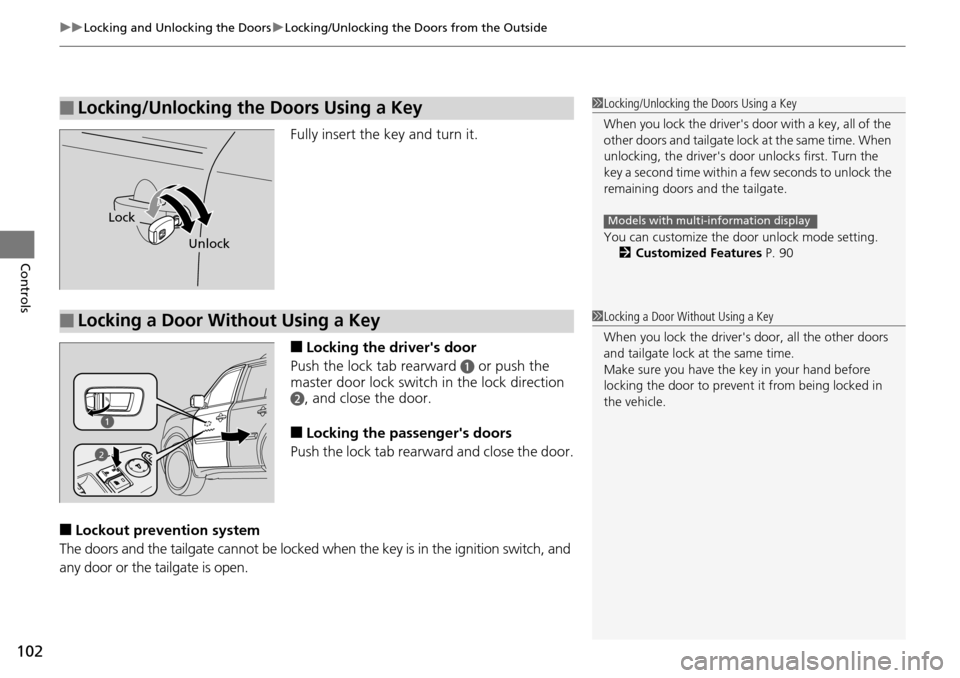
Fully insert the key and turn it.
■Locking the driver's door
Push the lock tab rearward
a or push the
master door lock switch in the lock direction
b, and close the door.
■Locking the passenger's doors
Push the lock tab rear ward and
close the door.
■Lockout prevention system
The doors and the tailgate cannot be locked whe
n the key is in the ignition switch, and
any door or the tailgate is open.
■Locking/Unlocking the Doors Using a Key1 Locking/Unlocking the Doors Using a Key
When you lock the driver's door with a key, all of the
other doors and tail g a t e l o c k a t t h e s a m e t i m e . W h e n
unlocking, the driver's door unlocks first. Turn the
key a second time within a few seconds to unlock the
remaining doors a nd the tailgate.
You can customize the door unlock mode setting. 2 Customized Features P. 90
Models with multi-information displayLock
Unlock
■Locking a Door Without Using a Key1Locking a Door Without Using a Key
When you lock the driver's door, all the other doors
and tailgate lock at the same time.
Make sure you have the key in your hand before
locking the door to prevent it from being locked in
the vehicle.
2
Page 125 of 488
124
Controls
Operating the Switches Around the Steering Wheel
Ignition Switch
1Ignition Switch
You cannot take the key out unless the shift lever is
in
(
P
.
If you open the driver's door when the key is in LOCK
(
0
or ACCESSORY (
q
, a warning buzzer will sound
to remind you to take the key out.
When this happens, the following messages appear
on the multi-information display
*:
•In LOCK (
0
: REMOVE KEY
•In ACCESSORY (
q
: REMOVE KEY The buzzer will
stop when you take the key out.
If the key won't turn from LOCK
(
0
to ACCESSORY
(
q
, turn the key while moving the steering wheel left
and right. The steering wh eel will unlock, allowing
the key to turn.
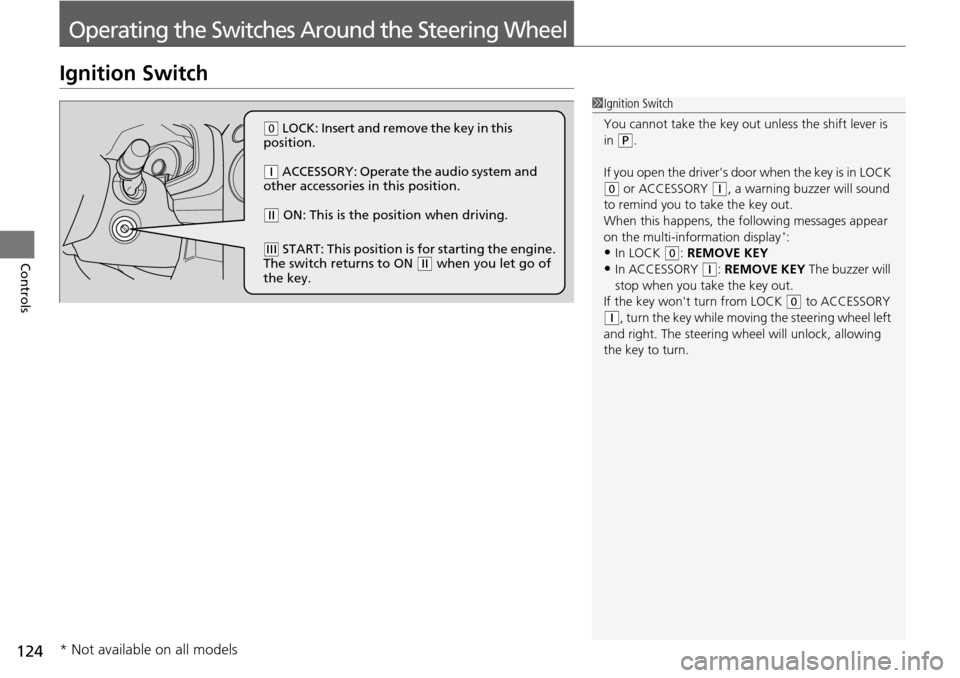
(
0
LOCK: Insert and remove the key in this
position.
(
q
ACCESSORY: Operate the audio system and
other accessories in this position.
(
w
ON: This is the position when driving.
(
e
START: This position is for starting the engine.
The switch returns to ON (
w
when you let go of
the key.
* Not available on all models
Page 151 of 488
150
Controls
Interior Lights/Interior Convenience Items
Interior Lights
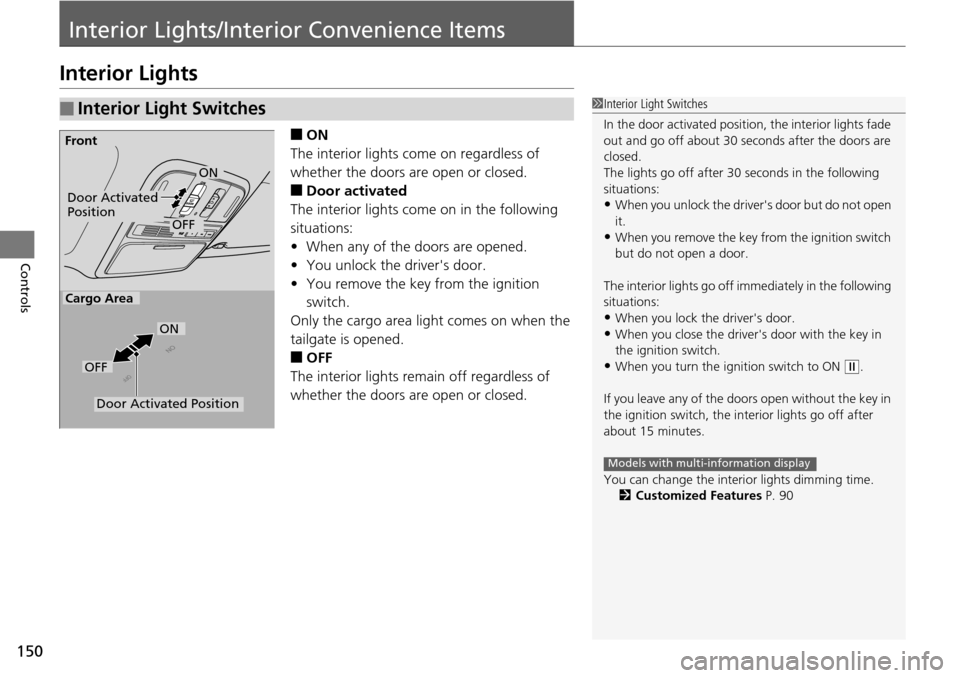
■ON
The interior lights come on regardless of
whet
her the doors are open or closed.
■Door activated
The interior lights come on in the following
situ
ations:
• W
hen any of the doors are opened.
•You un
lock the driver's door.
•You remove the k
ey from the ignition
switch.
Only the cargo area light comes on when the
tailgate is ope
ned.
■OFF
The interior lights remain off regardless of
whet
her the doors are open or closed.
■Interior Light Switches1Interior Light Switches
In the door activated position, the interior lights fade
out and go off about 30 se conds after the doors are
closed.
The lights go off after 30 seconds in the following
situations:
•When you unlock the driver's door but do not open
it.
•When you remove the key from the ignition switch
but do not open a door.
The interior lights go off i mmediately in the following
situations:
•When you lock the driver's door.
•When you close the driver's door with the key in
the ignition switch.
•When you turn the ignition switch to ON (
w
.
If you leave any of the doors open without the key in
the ignition switch, the interior lights go off after
about 15 minutes.
You can change the interi or lights dimming time.
2 Customized Features P. 90
Models with multi-information display
Door Activated
Position
OFF
Front
Door Activated Position
ON
OFF
Cargo Area
ON
Page 304 of 488
303
uu Bluetooth ® HandsFreeLink ® u HFL Menus
Continued
Features
HFL Menus
The ignition switch mu st be in ACCESSORY (q
or ON (w
to use HFL.
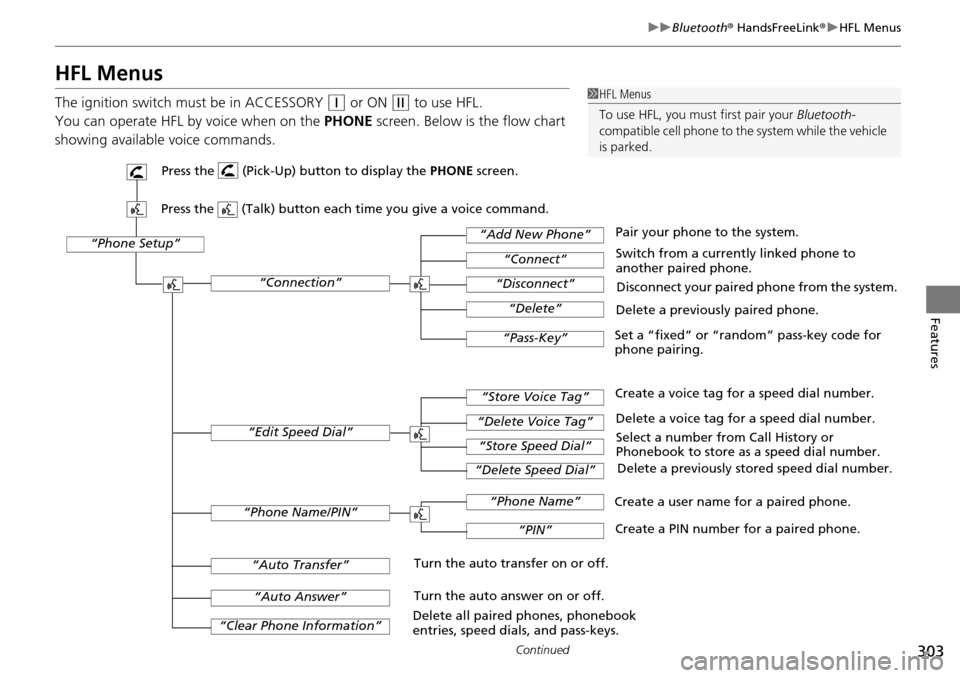
You can operate HFL by voice when on
the PHONE screen. Below is the flow chart
showing available voice commands.
1 HFL Menus
To use HFL, you must first pair your Bluetooth-
compatible cell phone to th e system while the vehicle
is parked.
“Phone Setup”
Delete a previously paired phone.
Switch from a currently linked phone to
another paired phone.
Pair your phone to the system.
Disconnect your paired phone from the system.
Set a “fixed” or “random” pass-key code for
phone pairing.
“Connection”
“Add New Phone”
“Connect”
“Disconnect”
“Delete”
“Pass-Key”
Delete a voice tag for a speed dial number.
Create a voice tag for a speed dial number.
Select a number from Call History or
Phonebook to store as a speed dial number. Delete a previously stored speed dial number.
“Edit Speed Dial”
“Store Voice Tag”
“Delete Voice Tag”
“Store Speed Dial”
“Delete Speed Dial”
Create a PIN number for a paired phone.
Create a user name for a paired phone.
“Phone Name/PIN”
“Phone Name”
“PIN”
“Clear Phone Information”
“Auto Answer”
“Auto Transfer”Turn the auto transfer on or off.
Turn the auto answer on or off.
Delete all paired phones, phonebook
entries, speed dials, and pass-keys.
Press the (Pick-Up) button to display the PHONE screen.
Press the (Talk) button each time you give a voice command.
Page 313 of 488
uu Bluetooth ® HandsFreeLink ® u HFL Menus
312
Features
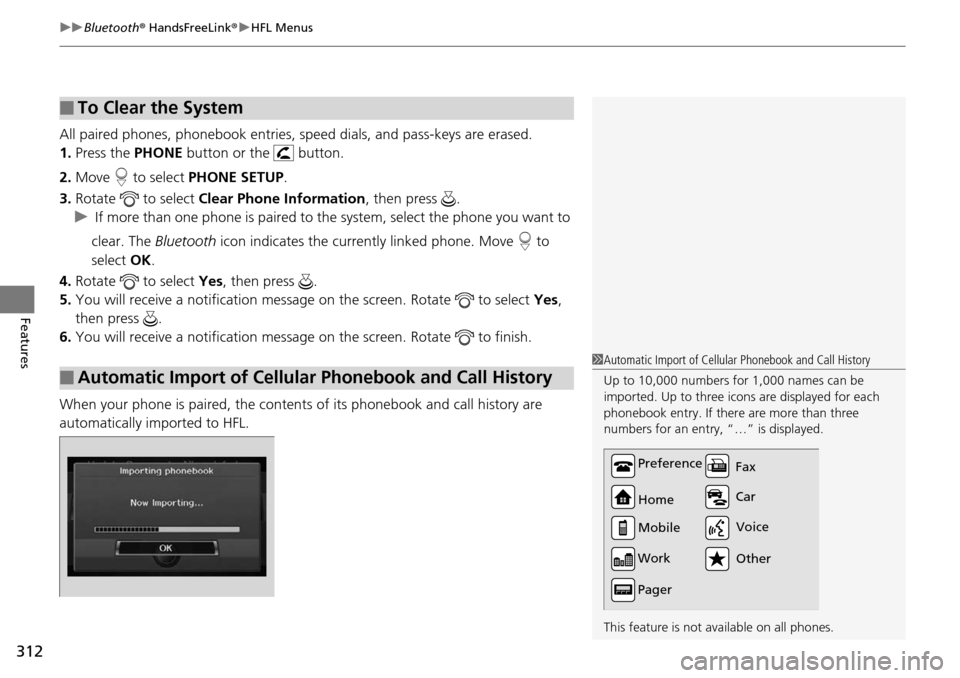
All paired phones, phonebook entries, sp eed dials, and pass-keys are erased.
1.Press the PHONE button or the button.
2. Mo
ve to select PH ONE SETUP.
3. Rotate
to select Cle ar Phone Information , then press .
u I
f more than one phone is paired to the system, select the phone you want to
clear. The Bluetooth icon indicates the currently linked phone. Move to
select OK.
4. Rotate
to select Yes, then pr ess .
5. You will receive
a notification message on the screen. Rotate to select Ye s,
then press .
6. You will receive
a notification message on the screen. Rotate to finish.
When your phone is paired, the contents of its phonebook and call history are
automatically importe
d to HFL.
■To Clear the System
■Automatic Import of Cellular Phonebook and Call History
1Automatic Import of Cellular Phonebook and Call History
Up to 10,000 numbers for 1,000 names can be
imported. Up to three icons are displayed for each
phonebook entry. If there are more than three
numbers for an entry, “…” is displayed.
This feature is not available on all phones.
Preference
Home
Mobile
Work
Pager Car Fax
Other Voice
Page 480 of 488
479
Index
Brake System............................................ 360
Anti-lock Brake System (ABS) .................. 362
Brake Assist System................................. 363
Fluid ....................................................... 400
Foot Brake .............................................. 361
Indicator ........................................... 68, 452
Parking Brake.......................................... 360
Brightness Control (Instrument Panel) ...
130
Bulb Replacement ............
........................ 402
Brake Light, Tailligh t, Back-Up Light,
Rear Turn Signal Light and
Rear Side Marker Light .......................... 406
Fog Lights ............................................... 403
Front Turn Signal/ Parking Light and
Front Side Marker Light ......................... 405
Headlights .............................................. 402
High-Mount Brake Light.......................... 409
Rear License Plate Light ........................... 408
Side Turn Signal/
Emergency Indicator Light ..................... 404
Bulb Specifications ...........
........................ 464
C
Carbon Monoxide Gas............................... 65
Cargo Hook .
............................................. 160
Cargo Net ....
............................................. 159
Carrying Cargo .................
................ 325, 327
CD Library ....
............................................. 197
CD Player .....
..................................... 193, 226
Certification Label ...........
........................ 466Changing Bulbs
....................
..................... 402
Charging System Indicator ..
............... 69, 450
Child Safety .....
............................................ 52
Childproof Door Locks ............................. 104
Child Seat ........
............................................ 52
Booster Seats ............................................. 64
Child Seat for Infants ................................. 54
Child Seat for Small Children ..................... 55
Installing a Child Seat with a Lap/
Shoulder Seat Belt ................................... 60
Larger Children .......................................... 63
Rear-facing Child Seat ............................... 54
Selecting a Child Seat ................................ 56
Childproof Door Locks ........
..................... 104
Cleaning the Exterior ..........
..................... 430
Cleaning the Interior ...........
..................... 428
Climate Control System .......
..................... 165
Changing the Mode ................................ 165
Defrosting the Windshield and
Windows ............................................... 166
Dust and Pollen Filter ............................... 427
Recirculation/Fresh Air Mode ................... 165
Sensors .................................................... 170
Synchronized Mode ................................. 167
Using Automatic Climate Control ............ 165
Clock ................
............................................ 98
Coat Hook .......
.......................................... 159
Compact Spare Tire .............
............. 435, 465
Console Compartment ........
..................... 152
Controls ...........
............................................ 97 Coolant (Engine)
....................
.................. 397
Adding to the Radiator ............................ 398
Adding to the Reserve Tank..................... 397
Overheating ............................................ 448
Creeping (Automatic Transmission) ........
345
Cruise Control ....
....................................... 348
Indicator.................................................... 77
Cup Holders .......
....................................... 154
Customer Service Information .................
475
Customized Features ..............
.................... 90
D
Daytime Running Lights.......................... 127
Dead Battery ......
....................................... 445
Defrosting the Windshield and
Windows ..........
....................................... 166
Detachable Anchor ................
.................... 34
Devices that Emit Radio Waves ...............
467
Dimming Headlights ............................................... 125
Rearview Mirror....................................... 135
Dipstick (Engine Oil) ...............
.................. 393
Directional Signals (Turn Signal) .............
125
Display/Information Button ...
.................... 85
Door Mirrors ......
....................................... 136
Doors ..................
......................................... 99
Auto Door Locking .................................. 105
Auto Door Unlocking .............................. 105
Door Open Indicator............................ 28, 72
Keys .......................................................... 99