AUX HONDA PILOT 2015 2.G User Guide
[x] Cancel search | Manufacturer: HONDA, Model Year: 2015, Model line: PILOT, Model: HONDA PILOT 2015 2.GPages: 488, PDF Size: 11.34 MB
Page 213 of 488
212
uuAudio System Basic Operation uPlaying Bluetooth ® Audio
Features
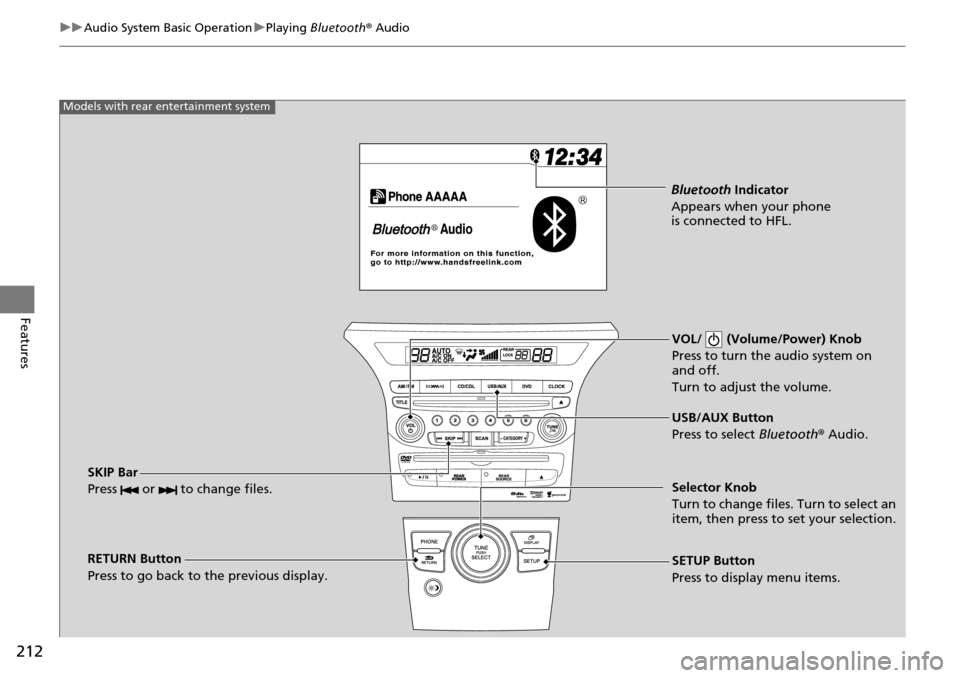
VOL/ (Volume/Power) Knob
Press to turn the audio system on
and off.
Turn to adjust the volume.
RETURN Button
Press to go back to the previous display. Selector Knob
Turn to change files. Turn to select an
item, then press to set your selection.
SETUP Button
Press to display menu items. USB/AUX Button
Press to select
Bluetooth® Audio.
SKIP Bar
Press or to change files.
Models with rear entertainment system
Bluetooth Indicator
Appears when your phone
is connected to HFL.
Page 214 of 488
Continued213
uuAudio System Basic Operation uPlaying Bluetooth ® Audio
Features
1. Make sure that your phone is paired and linked to HFL.
2. Press the USB/AUX button.
If the phone is not recognized, anothe r HFL-compatible phone, which is not
compatible for Bluetooth® Audio, may be already linked.
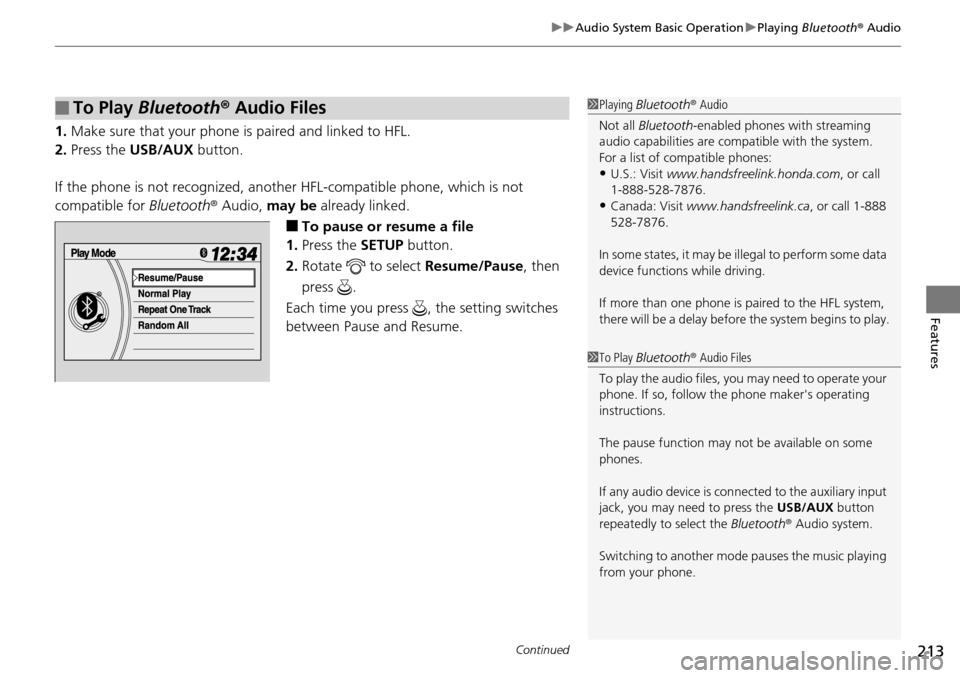
■To pause or resume a file
1. Press the SETUP button.
2. Rotate to select Resume/Pause, then
press .
Each time you press , the setting switches
between Pause and Resume.
■To Play Bluetooth ® Audio Files1 Playing Bluetooth ® Audio
Not all Bluetooth -enabled phones with streaming
audio capabilities are compatible with the system.
For a list of compatible phones:
•U.S.: Visit www.handsfreelink.honda.com , or call
1-888-528-7876.
•Canada: Visit www.handsfreelink.ca , or call 1-888
528-7876.
In some states, it may be il legal to perform some data
device functions while driving.
If more than one phone is paired to the HFL system,
there will be a delay before the system begins to play.
1To Play Bluetooth ® Audio Files
To play the audio files, y ou may need to operate your
phone. If so, follow the phone maker's operating
instructions.
The pause function may no t be available on some
phones.
If any audio device is conne cted to the auxiliary input
jack, you may need to press the USB/AUX button
repeatedly to select the Bluetooth® Audio system.
Switching to another mode pauses the music playing
from your phone.
Page 218 of 488
217
uuAudio System Basic Operation uAudio Remote Controls
Features
Audio Remote Controls
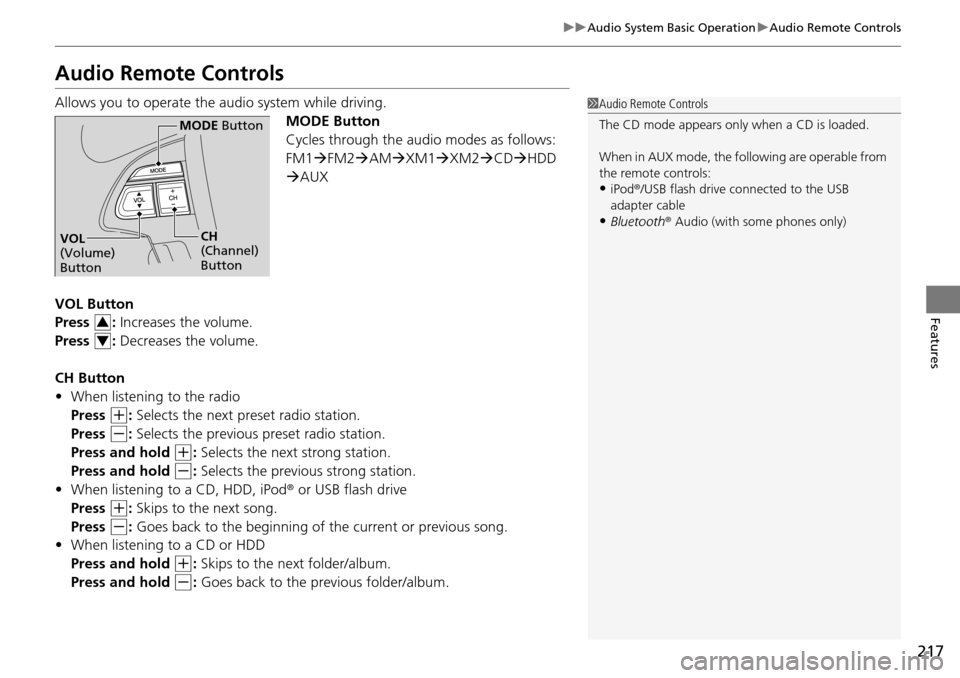
Allows you to operate the audio system while driving.
MODE Button
Cycles through the audio modes as follows:
FM1FM2 AM XM1 XM2 CD HDD
AUX
VOL Button
Press : Increases the volume.
Press : Decreases the volume.
CH Button
• When listening to the radio
Press
(+: Selects the next preset radio station.
Press
(-: Selects the previous preset radio station.
Press and hold
(+: Selects the next strong station.
Press and hold
(-: Selects the previous strong station.
• When listening to a CD, HDD, iPod ® or USB flash drive
Press
(+: Skips to the next song.
Press
(-: Goes back to the beginning of the current or previous song.
• When listening to a CD or HDD
Press and hold
(+: Skips to the next folder/album.
Press and hold
(-: Goes back to the previous folder/album.
1 Audio Remote Controls
The CD mode appears only when a CD is loaded.
When in AUX mode, the following are operable from
the remote controls:
•iPod ®/USB flash drive connected to the USB
adapter cable
•Bluetooth ® Audio (with some phones only)
MODE Button
CH
(Channel)
ButtonVOL
(Volume)
Button
3
4
Page 219 of 488
218
uuAudio System Basic Operation uAdjusting the Sound
Features
Adjusting the Sound
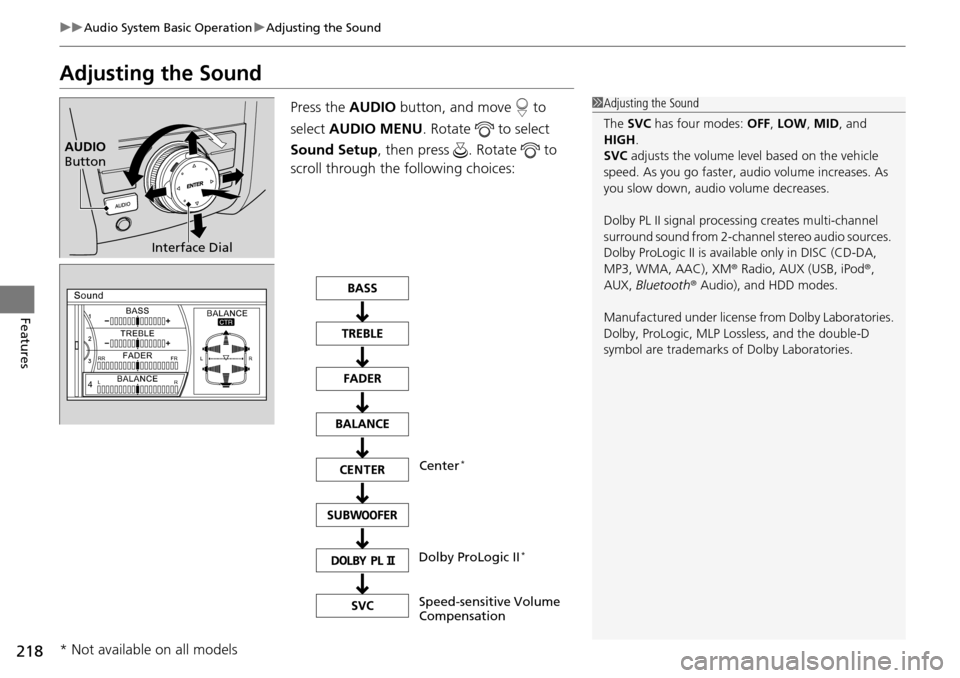
Press the AUDIO button, and move to
select AUDIO MENU . Rotate to select
Sound Setup , then press . Rotate to
scroll through the following choices:1 Adjusting the Sound
The SVC has four modes: OFF, LOW, MID, and
HIGH .
SVC adjusts the volume level based on the vehicle
speed. As you go faster, audio volume increases. As
you slow down, audi o volume decreases.
Dolby PL II signal processi ng creates multi-channel
surround sound from 2-channe l stereo audio sources.
Dolby ProLogic II is availa ble only in DISC (CD-DA,
MP3, WMA, AAC), XM r Radio, AUX (USB, iPod r,
AUX, Bluetooth r Audio), and HDD modes.
Manufactured under license from Dolby Laboratories.
Dolby, ProLogic, MLP Lossless, and the double-D
symbol are trademarks of Dolby Laboratories.
Interface Dial
AUDIO
Button
Speed-sensitive Volume
Compensation Center
*
Dolby ProLogic II*
* Not available on all models
Page 241 of 488
240
uuAudio System Basic Operation uPlaying an iPod ®
Features
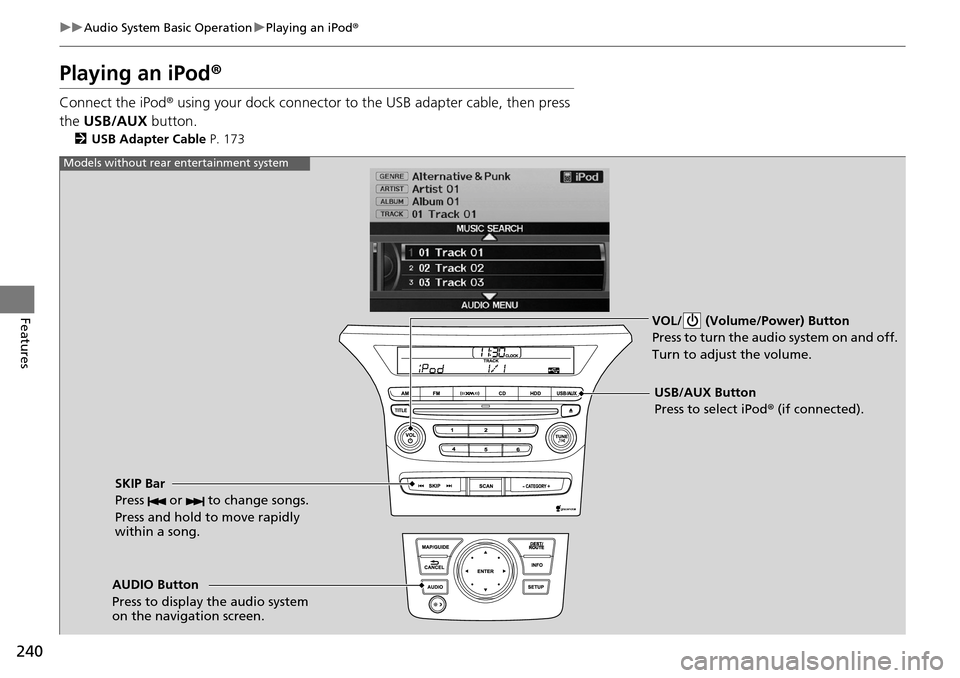
Playing an iPod ®
Connect the iPod ® using your dock connector to th e USB adapter cable, then press
the USB/AUX button.
2USB Adapter Cable P. 173
VOL/ (Volume/Power) Button
Press to turn the audio system on and off.
Turn to adjust the volume.
SKIP Bar
Press or to change songs.
Press and hold to move rapidly
within a song.
USB/AUX Button
Press to select iPod® (if connected).
Models without rear entertainment system
AUDIO Button
Press to display the audio system
on the navigation screen.
Page 242 of 488
241
uuAudio System Basic Operation uPlaying an iPod ®
Continued
Features
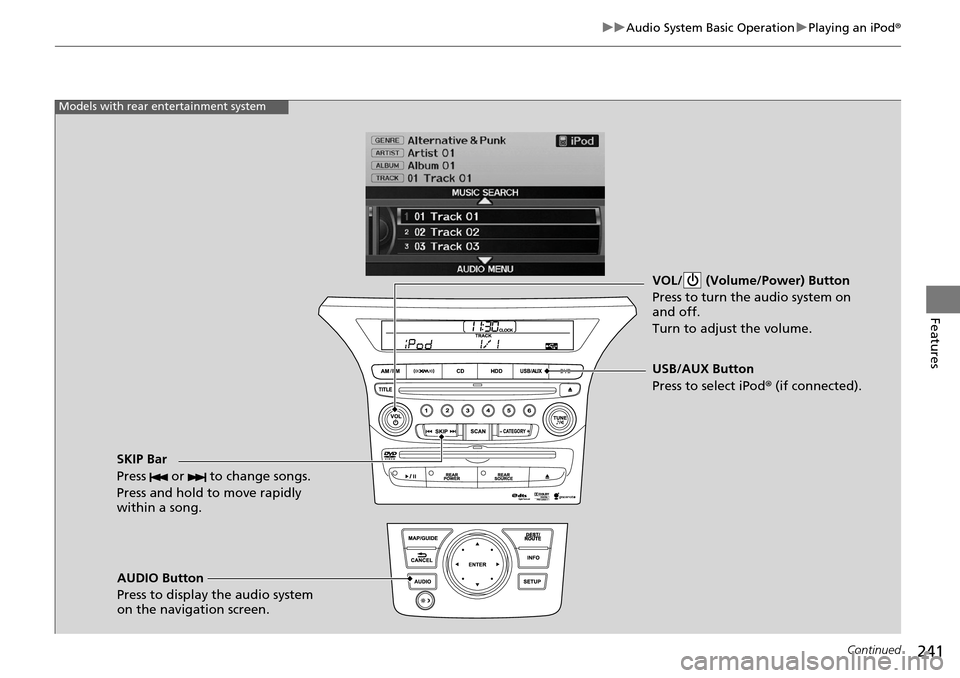
VOL/ (Volume/Power) Button
Press to turn the audio system on
and off.
Turn to adjust the volume.
SKIP Bar
Press or to change songs.
Press and hold to move rapidly
within a song.
AUDIO Button
Press to display the audio system
on the navigation screen. USB/AUX Button
Press to select iPod
® (if connected).
Models with rear entertainment system
Page 245 of 488
244
uuAudio System Basic Operation uPlaying a USB Flash Drive
Features
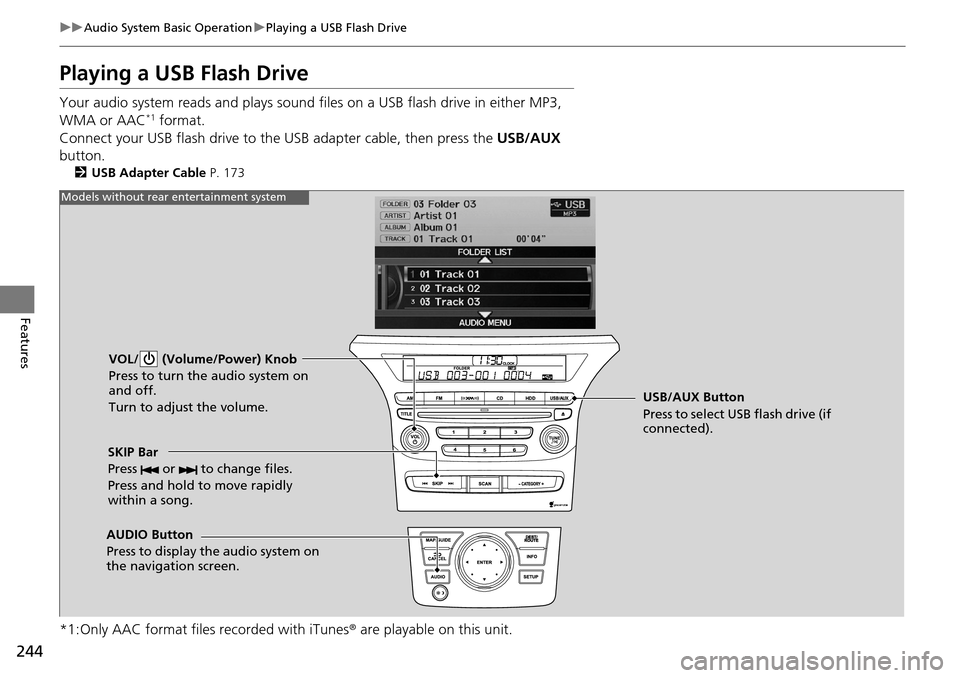
Playing a USB Flash Drive
Your audio system reads and plays sound files on a USB flash drive in either MP3,
WMA or AAC*1 format.
Connect your USB flash drive to the USB adapter cable, then press the USB/AUX
button.
2 USB Adapter Cable P. 173
*1:Only AAC format files recorded with iTunes ® are playable on this unit.
VOL/ (Volume/Power) Knob
Press to turn the audio system on
and off.
Turn to adjust the volume.
SKIP Bar
Press or to change files.
Press and hold to move rapidly
within a song.
AUDIO Button
Press to display the audio system on
the navigation screen. USB/AUX Button
Press to select USB flash drive (if
connected).
Models without rear entertainment system
Page 246 of 488
245
uuAudio System Basic Operation uPlaying a USB Flash Drive
Continued
Features
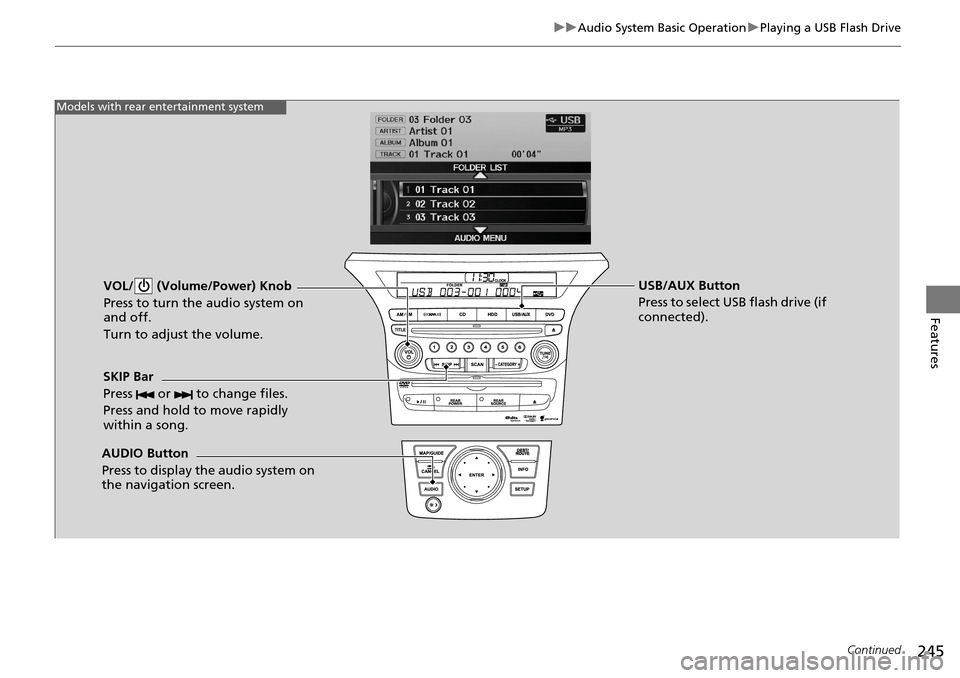
VOL/ (Volume/Power) Knob
Press to turn the audio system on
and off.
Turn to adjust the volume.
SKIP Bar
Press or to change files.
Press and hold to move rapidly
within a song.
AUDIO Button
Press to display the audio system on
the navigation screen. USB/AUX Button
Press to select USB flash drive (if
connected).
Models with rear entertainment system
Page 249 of 488
248
uuAudio System Basic Operation uPlaying Bluetooth ® Audio
Features
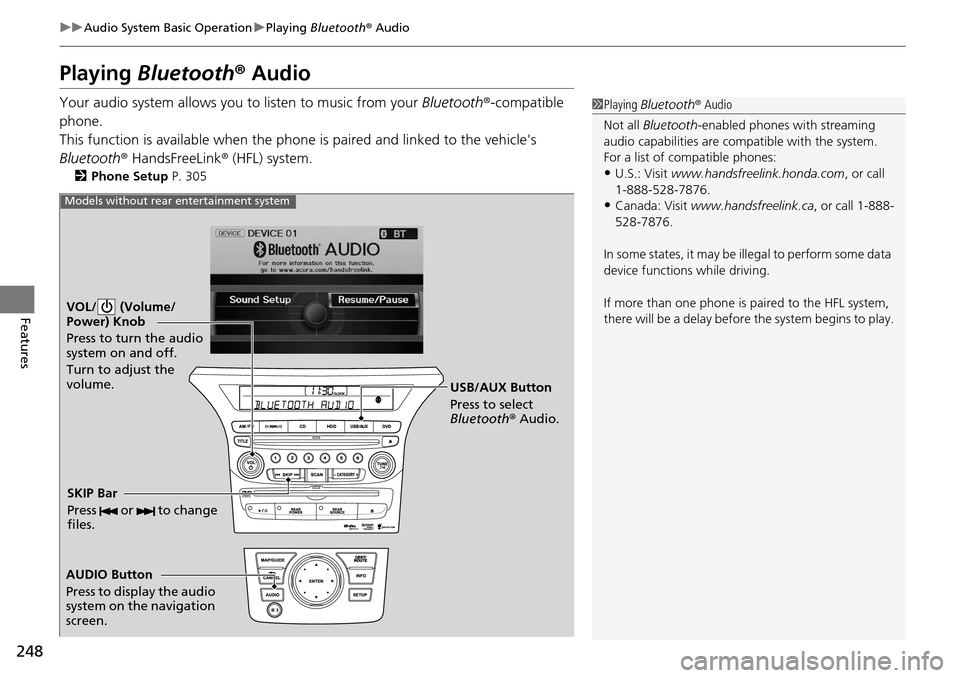
Playing Bluetooth ® Audio
Your audio system allows you to listen to music from your Bluetooth®-compatible
phone.
This function is available when the phone is paired a nd linked to the vehicle's
Bluetooth ® HandsFreeLink ® (HFL) system.
2 Phone Setup P. 305
1Playing Bluetooth ® Audio
Not all Bluetooth -enabled phones with streaming
audio capabilities are compatible with the system.
For a list of compatible phones:
•U.S.: Visit www.handsfreelink.honda.com , or call
1-888-528-7876.
•Canada: Visit www.handsfreelink.ca , or call 1-888-
528-7876.
In some states, it may be il legal to perform some data
device functions while driving.
If more than one phone is paired to the HFL system,
there will be a delay before the system begins to play.
VOL/ (Volume/
Power) Knob
Press to turn the audio
system on and off.
Turn to adjust the
volume.
AUDIO Button
Press to display the audio
system on the navigation
screen. USB/AUX Button
Press to select
Bluetooth
® Audio.
SKIP Bar
Press or to change
files.
Models without rear entertainment system
Page 250 of 488
249
uuAudio System Basic Operation uPlaying Bluetooth ® Audio
Continued
Features
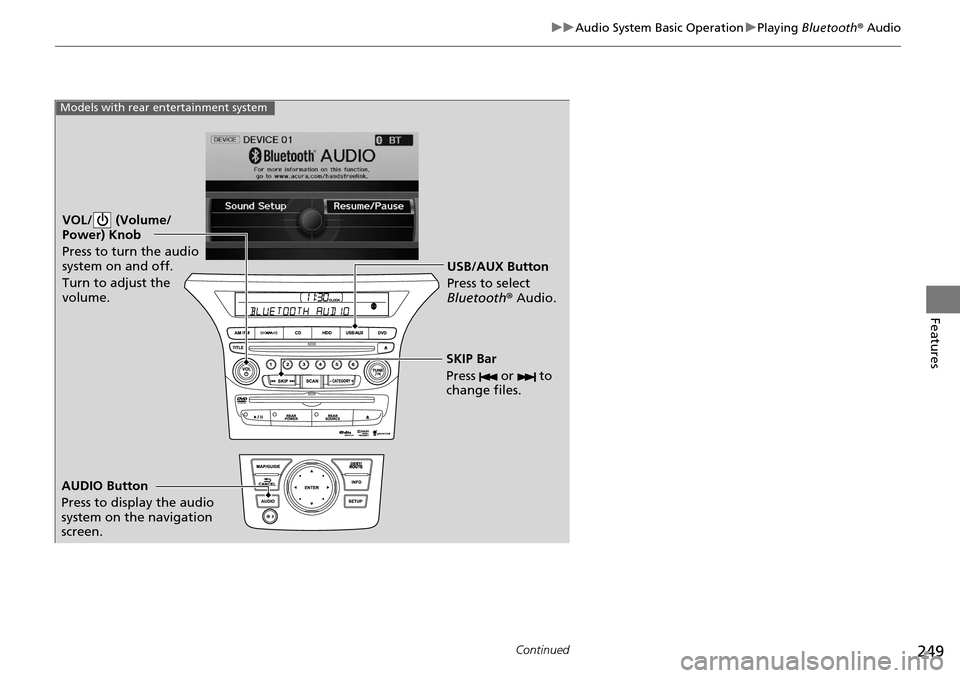
VOL/ (Volume/
Power) Knob
Press to turn the audio
system on and off.
Turn to adjust the
volume.
AUDIO Button
Press to display the audio
system on the navigation
screen. USB/AUX Button
Press to select
Bluetooth
® Audio.
SKIP Bar
Press or to
change files.
Models with rear entertainment system