phone HONDA PILOT 2015 2.G Workshop Manual
[x] Cancel search | Manufacturer: HONDA, Model Year: 2015, Model line: PILOT, Model: HONDA PILOT 2015 2.GPages: 488, PDF Size: 11.34 MB
Page 316 of 488
315
uuBluetooth ® HandsFreeLink ®u HFL Menus
Continued
Features
■To delete a voice tag
1. Press the PHONE button or the button.
2. Move to select PHONE SETUP.
3. Rotate to select Edit Speed Dial, then press .
4. Rotate to select Delete Voice Tag. Press .
5. Rotate to select the number you want to delete the voice tag for. Move to
select OK.
■To delete a speed dial number
1. Press the PHONE button or the button.
2. Move to select PHONE SETUP.
3. Rotate to select Edit Speed Dial, then press .
4. Rotate to select Delete Speed Dial. Press .
5. Rotate to select the entry you want to delete. Move to select OK.
Page 317 of 488
uuBluetooth ® HandsFreeLink ®u HFL Menus
316
Features
You can make calls by inpu tting any phone number, or by using the imported
phonebook, call history, or speed dial entries.
■Making a Call1 Making a Call
You can control the HFL system using voice
commands.
2 HFL Menus P. 303
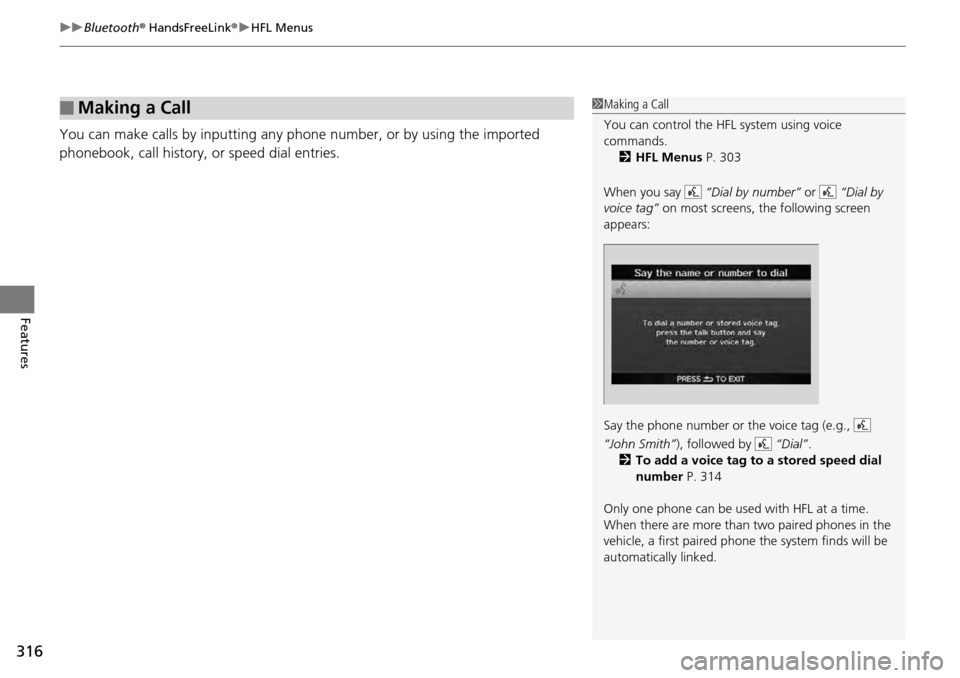
When you say “Dial by number” or “Dial by
voice tag” on most screens, the following screen
appears:
Say the phone number or the voice tag (e.g.,
“John Smith” ), followed by “Dial”.
2 To add a voice tag to a stored speed dial
number P. 314
Only one phone can be used with HFL at a time.
When there are more than two paired phones in the
vehicle, a first paired phone the system finds will be
automatically linked.
Page 318 of 488
Continued317
uuBluetooth ® HandsFreeLink ®u HFL Menus
Features
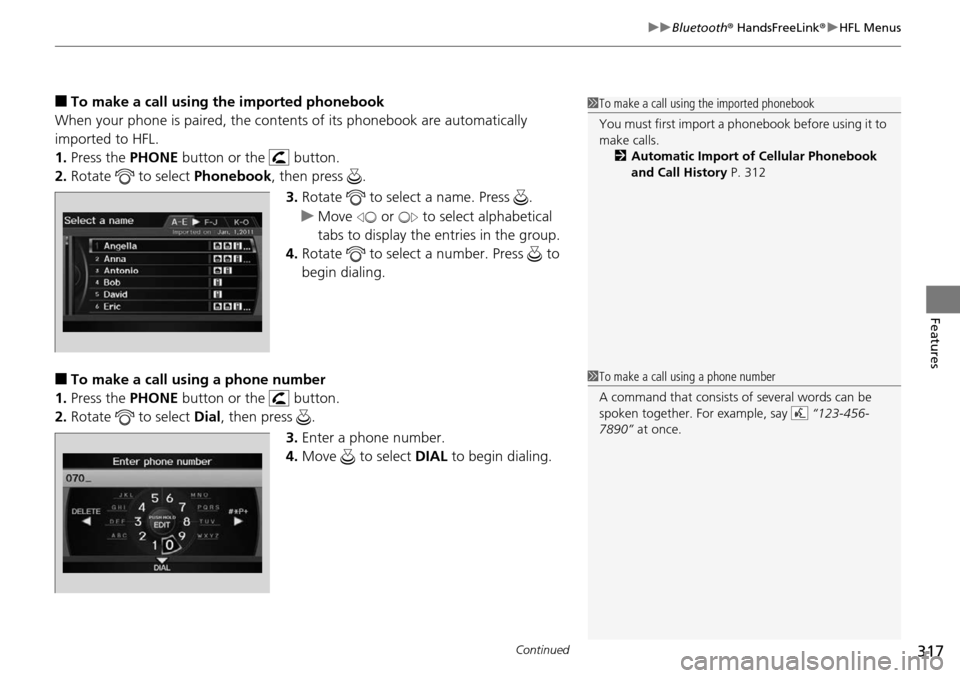
■To make a call using the imported phonebook
When your phone is paired, the conten ts of its phonebook are automatically
imported to HFL.
1. Press the PHONE button or the button.
2. Rotate to select Phonebook, then press .
3. Rotate to select a name. Press .
u Move or to select alphabetical
tabs to display the entries in the group.
4. Rotate to select a number. Press to
begin dialing.
■To make a call using a phone number
1. Press the PHONE button or the button.
2. Rotate to select Dial, then press .
3.Enter a phone number.
4. Move to select DIAL to begin dialing.
1To make a call using the imported phonebook
You must first import a phonebook before using it to
make calls.
2 Automatic Import of Cellular Phonebook
and Call History P. 312
1To make a call using a phone number
A command that consists of several words can be
spoken together. For example, say “123-456-
7890” at once.
Page 319 of 488
uuBluetooth ® HandsFreeLink ®u HFL Menus
318
Features
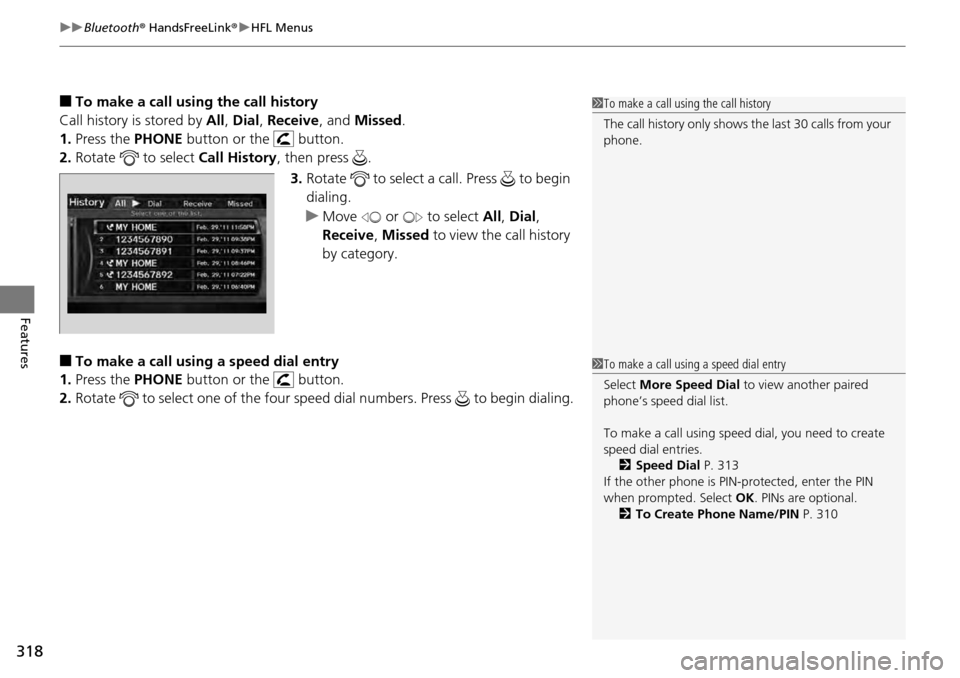
■To make a call usin g the call history
Call history is stored by All, Dial , Receive , and Missed .
1. Press the PHONE button or the button.
2. Rotate to select Call History, then press .
3. Rotate to select a call. Press to begin
dialing.
u Move or to select All, Dial ,
Receive , Missed to view the call history
by category.
■To make a call using a speed dial entry
1. Press the PHONE button or the button.
2. Rotate to select one of the four speed dial numbers. Press to begin dialing.
1To make a call using the call history
The call history only shows th e last 30 calls from your
phone.
1 To make a call using a speed dial entry
Select More Speed Dial to view another paired
phone’s speed dial list.
To make a call using speed dial, you need to create
speed dial entries. 2 Speed Dial P. 313
If the other phone is PIN- protected, enter the PIN
when prompted. Select OK. PINs are optional.
2 To Create Phone Name/PIN P. 310
Page 320 of 488
319
uuBluetooth ® HandsFreeLink ®u HFL Menus
Features
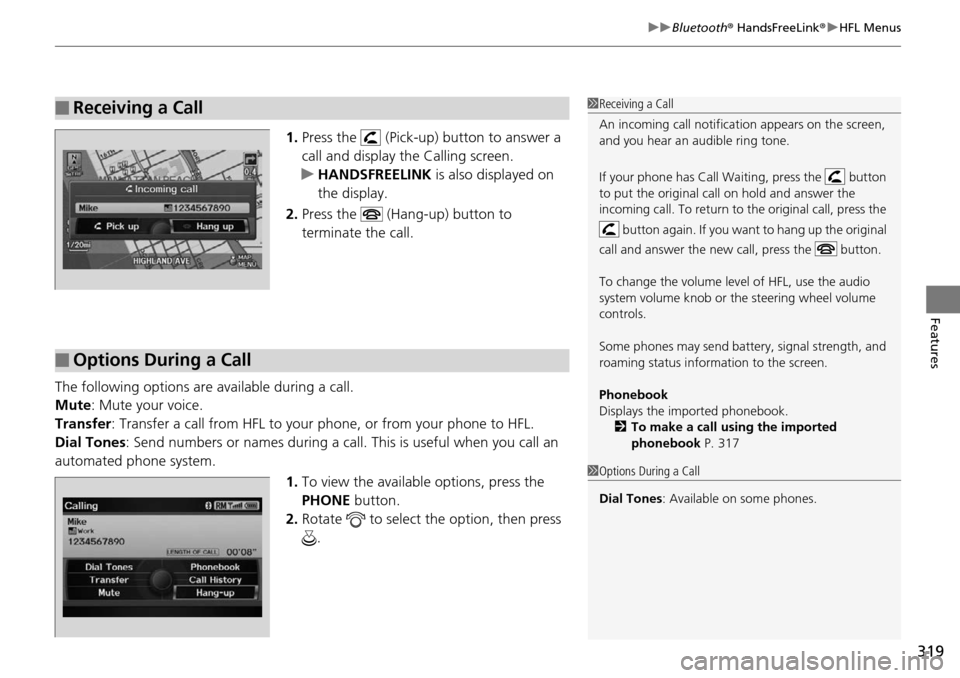
1. Press the (Pick-up) button to answer a
call and display the Calling screen.
u HANDSFREELINK is also displayed on
the display.
2. Press the (Hang-up) button to
terminate the call.
The following options are available during a call.
Mute : Mute your voice.
Transfer: Transfer a call from HFL to your phone, or from your phone to HFL.
Dial Tones : Send numbers or names during a call. This is useful when you call an
automated phone system.
1.To view the availabl e options, press the
PHONE button.
2. Rotate to select the option, then press
.
■Receiving a Call1Receiving a Call
An incoming call notificat ion appears on the screen,
and you hear an audible ring tone.
If your phone has Call Wa iting, press the button
to put the original call on hold and answer the
incoming call. To return to the original call, press the
button again. If you want to hang up the original
call and answer the new call, press the button.
To change the volume level of HFL, use the audio
system volume knob or the steering wheel volume
controls.
Some phones may send batter y, signal strength, and
roaming status information to the screen.
Phonebook
Displays the imported phonebook. 2 To make a call using the imported
phonebook P. 317
■Options During a Call
1Options During a Call
Dial Tones : Available on some phones.
Page 378 of 488
377
Maintenance
This chapter discusses basic maintenance.
Before Performing MaintenanceInspection and Maintenance ............ 378
Safety When Performing Maintenance..... 379Parts and Fluids Used in Maintenance Service ........................................... 380
Maintenance Minder™ .................... 381
Maintenance Under the Hood
Maintenance Items Under the Hood ..... 389Opening the Hood ........................... 390
Recommended Engine Oil ................ 392
Oil Check ......................................... 393
Adding Engine Oil ............................ 394
Changing the Engine Oil and Oil Filter ..... 395
Engine Coolant ................................ 397
Transmission Fluid ............................ 399
Brake Fluid ....................................... 400
Power Steering Fluid ........................ 400
Refilling Window Washer Fluid......... 401
Replacing Light Bulbs ....................... 402
Checking and Maintaining Wiper Blades.... 410Checking and Maintaining Tires
Checking Tires ................................. 414
Tire and Loading Information Label ...... 415Tire Labeling .................................... 415DOT Tire Quality Grading (U.S. Vehicles)....... 417Wear Indicators................................ 419 Tire Service Life ................................ 419
Tire and Wheel Replacement ........... 420
Tire Rotation .................................... 421
Winter Tires ..................................... 422
Battery ............................................... 423
Remote Transmitter Care
Replacing the Button Battery ........... 424
Remote Control and Wireless Headphone Care
*........................... 425Climate Control System Maintenance..... 427Cleaning
Interior Care .................................... 428
Exterior Care.................................... 430
* Not available on all models
Page 426 of 488
425Continued
Maintenance
Remote Control and Wireless Headphone Care*
Replacing the Battery
If it takes several pushes on the remo te control buttons to operate the rear
entertainment system*.
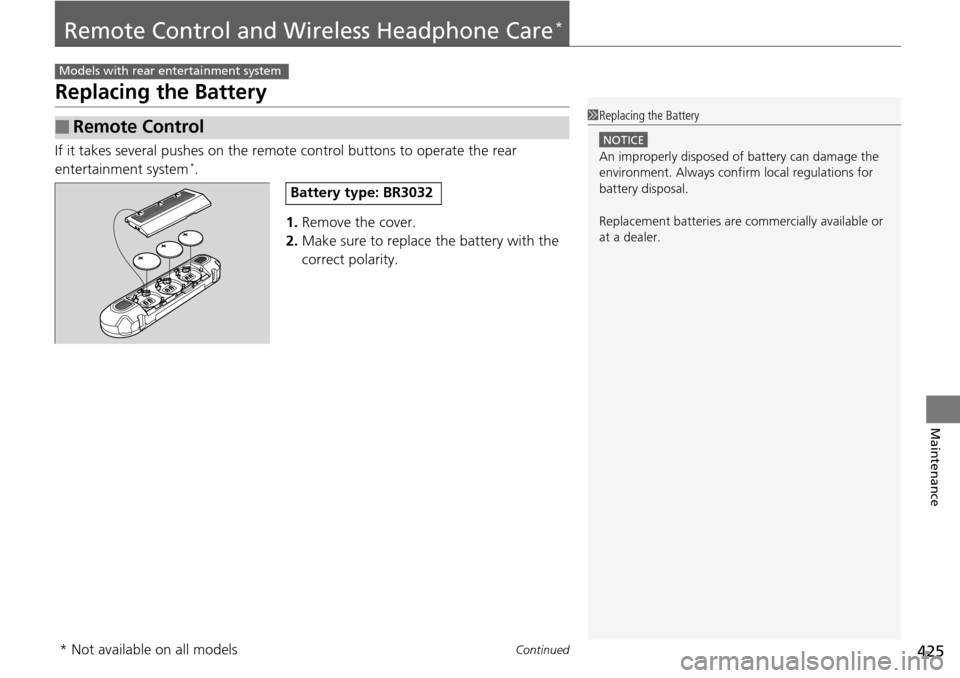
1.Remove the cover.
2. Make sure to replace the battery with the
correct polarity.
■Remote Control
Models with rear entertainment system
1Replacing the Battery
NOTICE
An improperly disposed of battery can damage the
environment. Always conf irm local regulations for
battery disposal.
Replacement batteries are commercially available or
at a dealer.
Battery type: BR3032
* Not available on all models
Page 427 of 488
426
uuRemote Control and Wireless Headphone Care*uReplacing the Battery
Maintenance
If there is no sound coming from th e wireless headphone, replace the battery.
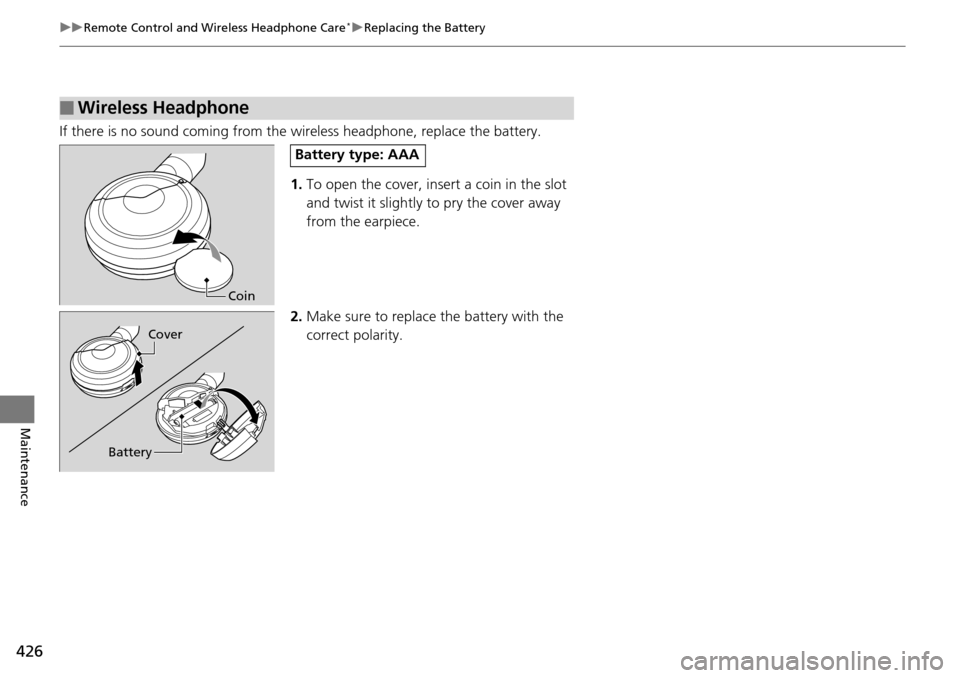
1. To open the cover, inse rt a coin in the slot
and twist it slightly to pry the cover away
from the earpiece.
2. Make sure to replace the battery with the
correct polarity.
■Wireless Headphone
Coin
Battery type: AAA
Battery Cover
Page 475 of 488
474
Information
Authorized Manuals
■Service Express
For electronic copies of service publications, you can purchase a subscription to
Service Express. Visit www.techinfo.honda.com for pricing and options.
■For U.S. Owners:
Manuals can be purchased from Helm Incorporated. You can order a manual by
phone at (800) 782-4356 (credit card orders only), or online at www.helminc.com.
1Authorized Manuals
Service Manual:
Covers maintenance and recommended procedures
for repair to engine and chassis components. It is
written for the journeyman te chnician, but it is simple
enough for most mechanically inclined owners to
understand.
Electrical Troubleshooting Manual:
Complements the Service Manual by providing in-
depth troubleshooting inform ation for each electrical
circuit in your vehicle.
Body Repair Manual:
Describes the procedures involved in the replacement
of damaged body parts.
For Canadian Owners:
Please contact a dealer to order any manuals that you
may require.
Page 476 of 488
475
Information
Customer Service Information
Honda dealership personnel are trained professionals.
They should be able to answer all your questions. If you encounter a problem that
your dealership does not solve to your satisfaction, please discuss it with the
dealership's service manager or general ma nager. If you are dissatisfied with the
decision made by the dealership's mana gement, contact Honda Customer Services.
U.S. Owners:
American Honda Motor Co., Inc.
Honda Automobile Customer Services
Mail Stop 500-2N-7A
1919 Torrance Blvd.
Torrance, CA 90501-2746
Tel: (800) 999-1009 Canadian Owners:
Honda Canada Inc.
Customer Relations
180 Honda Boulevard
Markham, ON
L6C 0H9
Tel: 1-888-9-HONDA-9
Fax: 1-877-939-0909
E-mail: [email protected]
In Puerto Rico and the U.S. Virgin
Islands:
Bella International
P.O. Box 190816
San Juan, PR 00919-0816
Tel: (787) 620-75461 Customer Service Information
When you call or write, pl ease give us the following
information:
•Vehicle Identification Number
2Vehicle Identification Number (VIN),
Engine Number and Transmission
Number P. 466
•Date of purchase•Odometer reading of your vehicle
•Your name, address, and telephone number
•A detailed description of the problem•Name of the dealer who sold the vehicle to you