lock HONDA PILOT 2016 3.G Owners Manual
[x] Cancel search | Manufacturer: HONDA, Model Year: 2016, Model line: PILOT, Model: HONDA PILOT 2016 3.GPages: 661, PDF Size: 37.79 MB
Page 611 of 661
610
uuIf a Tire Goes Flat uChanging a Flat Tire
Handling the Unexpected
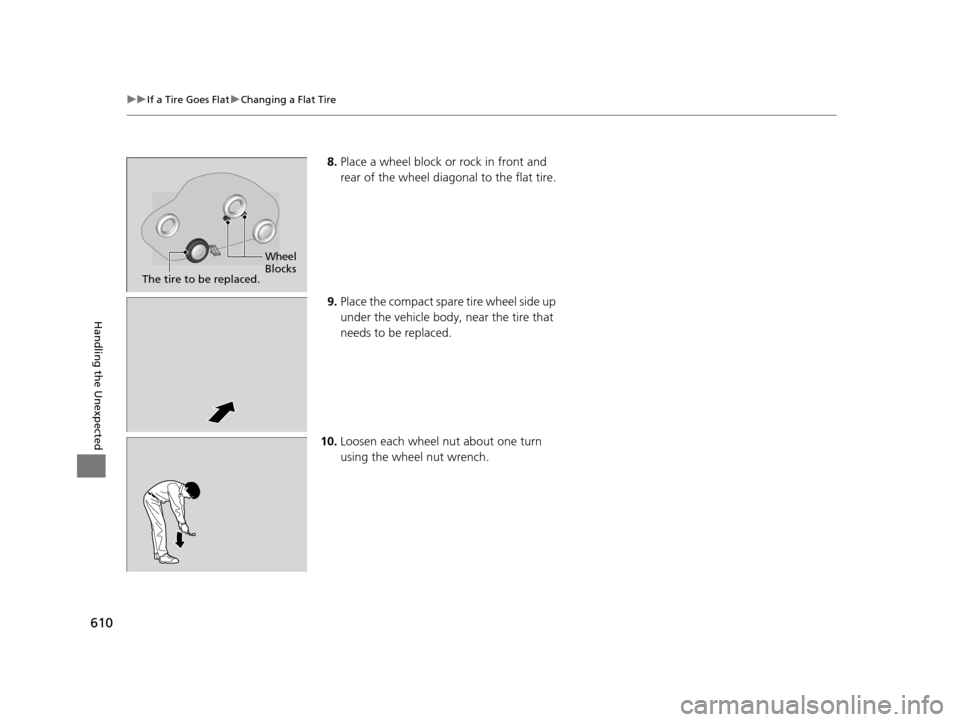
8. Place a wheel block or rock in front and
rear of the wheel diagonal to the flat tire.
9. Place the compact spare tire wheel side up
under the vehicle body, near the tire that
needs to be replaced.
10. Loosen each wheel nut about one turn
using the wheel nut wrench.
Wheel
Blocks
The tire to be replaced.
16 PILOT-31TG76000.book 610 ページ 2015年6月15日 月曜日 午前11時30分
Page 614 of 661
Continued613
uuIf a Tire Goes Flat uChanging a Flat Tire
Handling the Unexpected
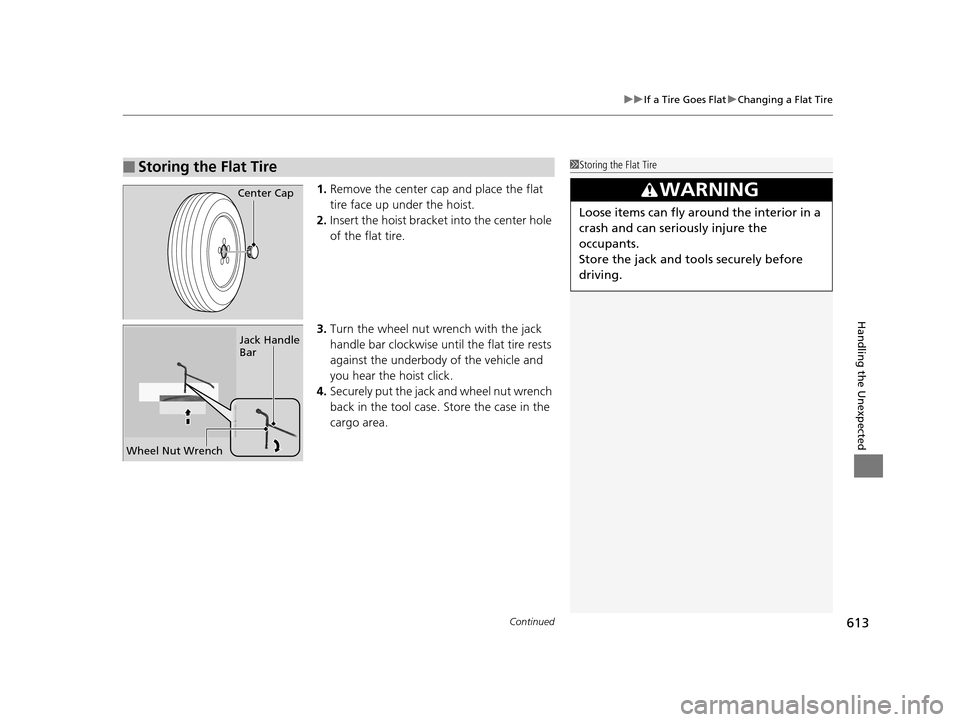
1. Remove the center cap and place the flat
tire face up under the hoist.
2. Insert the hoist bracke t into the center hole
of the flat tire.
3. Turn the wheel nut wrench with the jack
handle bar clockwise until the flat tire rests
against the underbody of the vehicle and
you hear the hoist click.
4. Securely put the jack and wheel nut wrench
back in the tool case. Store the case in the
cargo area.
■Storing the Flat Tire1Storing the Flat Tire
3WARNING
Loose items can fly around the interior in a
crash and can seriously injure the
occupants.
Store the jack and tools securely before
driving.
Center Cap
Wheel Nut Wrench Jack Handle
Bar
16 PILOT-31TG76000.book 613 ページ 2015年6月15日 月曜日 午前11時30分
Page 618 of 661
617
uuEngine Does Not Start uEmergency Engine Stop
Handling the Unexpected
Emergency Engine Stop
The ENGINE START/STOP button may be used to stop the engine due to an
emergency situation even while driving. If you must stop the engine, do either of the
following operations:
• Press and hold the ENGINE START/STOP button for about two seconds.
• Firmly press the ENGINE START/STOP button twice.
The steering wheel will not lock. However, because turning off the engine disables
the power assist the engine provides to the steering and braking systems, it will
require significantly more physical effort an d time to steer and slow the vehicle. Use
both feet on the brake pedal to slow down the vehicle and stop immediately in a
safe place.
The gear position auto matically changes to
(P after the vehicle comes to a complete
stop. Then, the power mode changes to VEHICLE OFF.
The gear position auto matically changes to
(P after the vehicle comes to a complete
stop. Then press the ENGINE START/STOP button twice without depressing the
brake pedal to change the mode VEHICLE OFF.
The power mode is in ACCESSORY when the engine is stopped.
To change the mode to VEHICLE OF F, change the gear position to
(P after the
vehicle comes to a complete stop.
Then press the ENGINE START/STOP button twice without depressing the brake
pedal.
1 Emergency Engine Stop
Do not press the button while driving unless it is
absolutely necessary for th e engine to be switched
off.
Automatic transmission models with electronic gear selector for U.S. models
Automatic transmission models with elec tronic gear selector for Canadian models
Automatic transmission models with shift lever
Automatic transmission models with shift lever for Canadian models
16 PILOT-31TG76000.book 617 ページ 2015年6月15日 月曜日 午前11時30分
Page 619 of 661
618
Handling the Unexpected
Shift Lever Does Not Move*
Follow the procedure below if you cannot move the shift lever out of the (P
position.
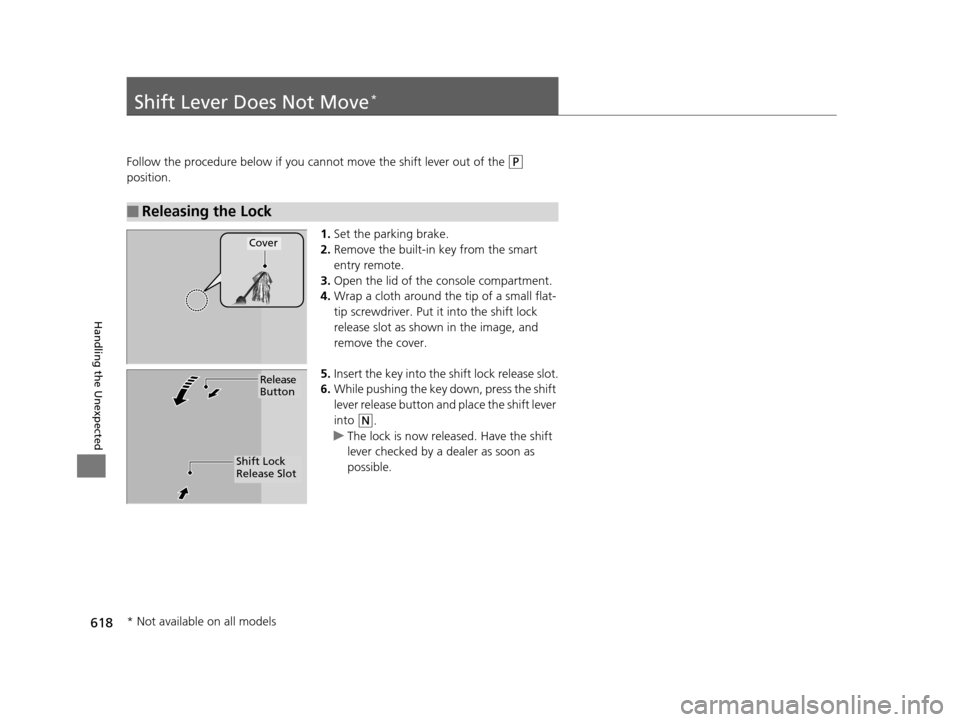
1.Set the parking brake.
2. Remove the built-in key from the smart
entry remote.
3. Open the lid of the console compartment.
4. Wrap a cloth around the tip of a small flat-
tip screwdriver. Put it into the shift lock
release slot as shown in the image, and
remove the cover.
5. Insert the key into the sh ift lock release slot.
6. While pushing the key down, press the shift
lever release button and place the shift lever
into
(N.
u The lock is now released. Have the shift
lever checked by a dealer as soon as
possible.
■Releasing the Lock
Cover
Release
Button
Shift Lock
Release Slot
* Not available on all models
16 PILOT-31TG76000.book 618 ページ 2015年6月15日 月曜日 午前11時30分
Page 629 of 661
628
Handling the Unexpected
Fuses
Fuse Locations
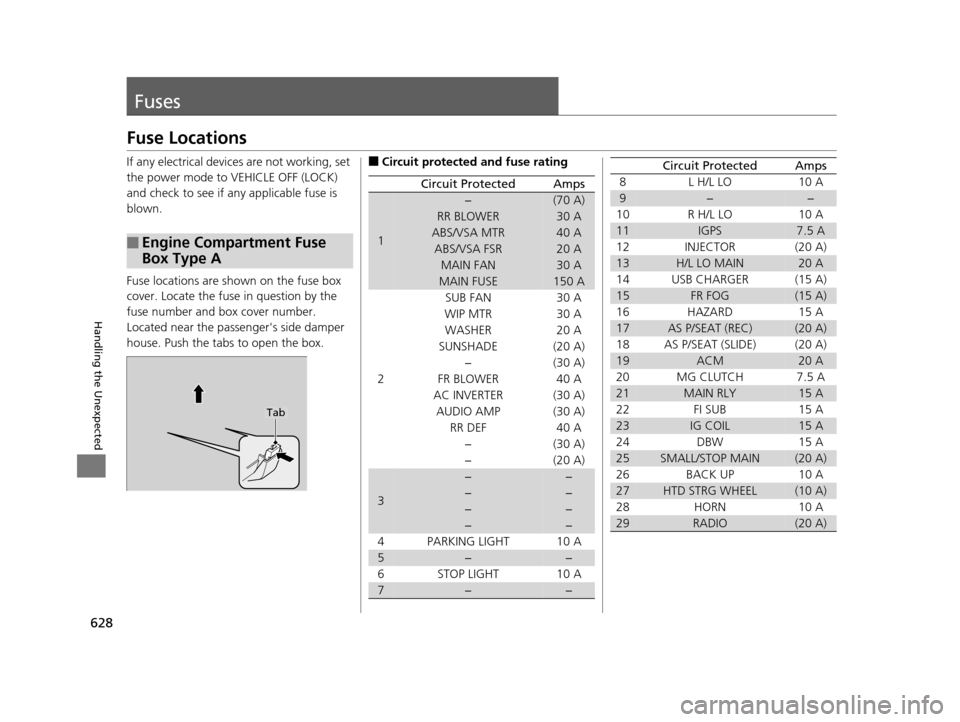
If any electrical devices are not working, set
the power mode to VEHICLE OFF (LOCK)
and check to see if any applicable fuse is
blown.
Fuse locations are shown on the fuse box
cover. Locate the fuse in question by the
fuse number and box cover number.
Located near the passenger's side damper
house. Push the tabs to open the box.
■Engine Compartment Fuse
Box Type A
Tab
■Circuit protected and fuse rating
Circuit ProtectedAmps
1
−(70 A)
RR BLOWER30 A
ABS/VSA MTR40 A
ABS/VSA FSR20 A
MAIN FAN30 A
MAIN FUSE150 A
2
SUB FAN30 A
WIP MTR30 A
WASHER20 A
SUNSHADE(20 A)
−(30 A)
FR BLOWER40 A
AC INVERTER(30 A)
AUDIO AMP(30 A)
RR DEF40 A
−(30 A)
−(20 A)
3
−−
−−
−−
−−
4 PARKING LIGHT 10 A
5−−
6 STOP LIGHT 10 A
7−−
8 L H/L LO 10 A
9−−
10 R H/L LO 10 A
11IGPS7.5 A
12 INJECTOR (20 A)
13H/L LO MAIN20 A
14 USB CHARGER (15 A)
15FR FOG(15 A)
16 HAZARD 15 A
17AS P/SEAT (REC)(20 A)
18 AS P/SEAT (SLIDE) (20 A)
19ACM20 A
20 MG CLUTCH 7.5 A
21MAIN RLY15 A
22 FI SUB 15 A
23IG COIL15 A
24 DBW 15 A
25SMALL/STOP MAIN(20 A)
26 BACK UP 10 A
27HTD STRG WHEEL(10 A)
28 HORN 10 A
29RADIO(20 A)
Circuit ProtectedAmps
16 PILOT-31TG76000.book 628 ページ 2015年6月15日 月曜日 午前11時30分
Page 631 of 661
630
uuFuses uFuse Locations
Handling the Unexpected
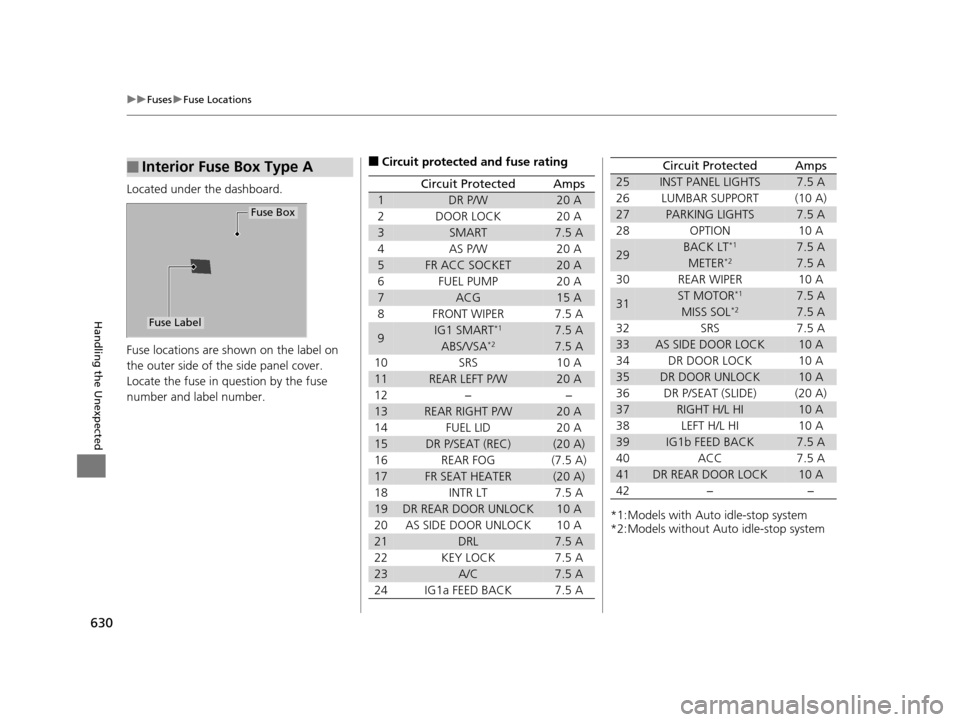
Located under the dashboard.
Fuse locations are shown on the label on
the outer side of the side panel cover.
Locate the fuse in question by the fuse
number and label number.
■Interior Fuse Box Type A
Fuse Box
Fuse Label
■Circuit protected and fuse rating
Circuit ProtectedAmps
1DR P/W20 A
2DOOR LOCK20 A
3SMART7.5 A
4AS P/W20 A
5FR ACC SOCKET20 A
6FUEL PUMP20 A
7ACG15 A
8FRONT WIPER7.5 A
9IG1 SMART*17.5 A
ABS/VSA*27.5 A
10SRS10 A
11REAR LEFT P/W20 A
12−−
13REAR RIGHT P/W20 A
14FUEL LID20 A
15DR P/SEAT (REC)(20 A)
16REAR FOG(7.5 A)
17FR SEAT HEATER(20 A)
18INTR LT7.5 A
19DR REAR DOOR UNLOCK10 A
20AS SIDE DOOR UNLOCK10 A
21DRL7.5 A
22KEY LOCK7.5 A
23A/C7.5 A
24IG1a FEED BACK7.5 A
*1:Models with Auto idle-stop system
*2:Models without Auto idle-stop system
25INST PANEL LIGHTS7.5 A
26LUMBAR SUPPORT(10 A)
27PARKING LIGHTS7.5 A
28OPTION10 A
29BACK LT*17.5 A
METER*27.5 A
30REAR WIPER10 A
31ST MOTOR*17.5 A
MISS SOL*27.5 A
32SRS7.5 A
33AS SIDE DOOR LOCK10 A
34DR DOOR LOCK10 A
35DR DOOR UNLOCK10 A
36DR P/SEAT (SLIDE)(20 A)
37RIGHT H/L HI10 A
38LEFT H/L HI10 A
39IG1b FEED BACK7.5 A
40ACC7.5 A
41DR REAR DOOR LOCK10 A
42−−
Circuit ProtectedAmps
16 PILOT-31TG76000.book 630 ページ 2015年6月15日 月曜日 午前11時30分
Page 633 of 661
632
uuFuses uInspecting and Changing Fuses
Handling the Unexpected
Inspecting and Changing Fuses
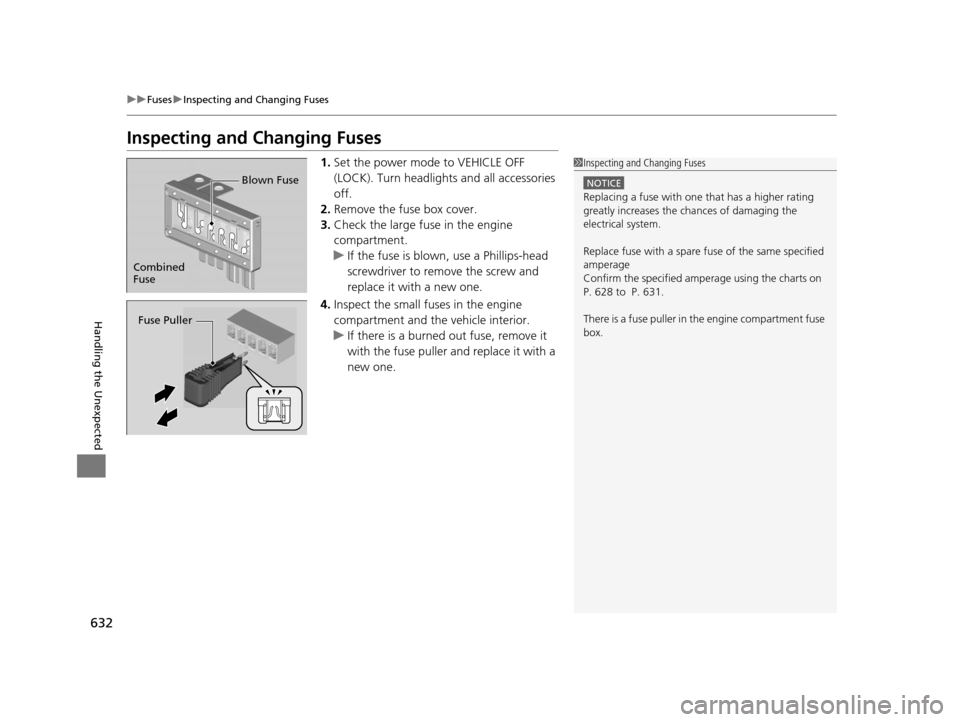
1. Set the power mode to VEHICLE OFF
(LOCK). Turn headlight s and all accessories
off.
2. Remove the fuse box cover.
3. Check the large fuse in the engine
compartment.
u If the fuse is blown, use a Phillips-head
screwdriver to remo ve the screw and
replace it with a new one.
4. Inspect the small fuses in the engine
compartment and the vehicle interior.
u If there is a burned out fuse, remove it
with the fuse puller and replace it with a
new one.1Inspecting and Changing Fuses
NOTICE
Replacing a fuse with on e that has a higher rating
greatly increases the chances of damaging the
electrical system.
Replace fuse with a spare fuse of the same specified
amperage
Confirm the specified amperage using the charts on
P. 628 to P. 631.
There is a fuse puller in the engine compartment fuse
box.
Combined
Fuse Blown Fuse
Fuse Puller
16 PILOT-31TG76000.book 632 ページ 2015年6月15日 月曜日 午前11時30分
Page 635 of 661
634
Handling the Unexpected
When You Cannot Unlock the Fuel Fill Door
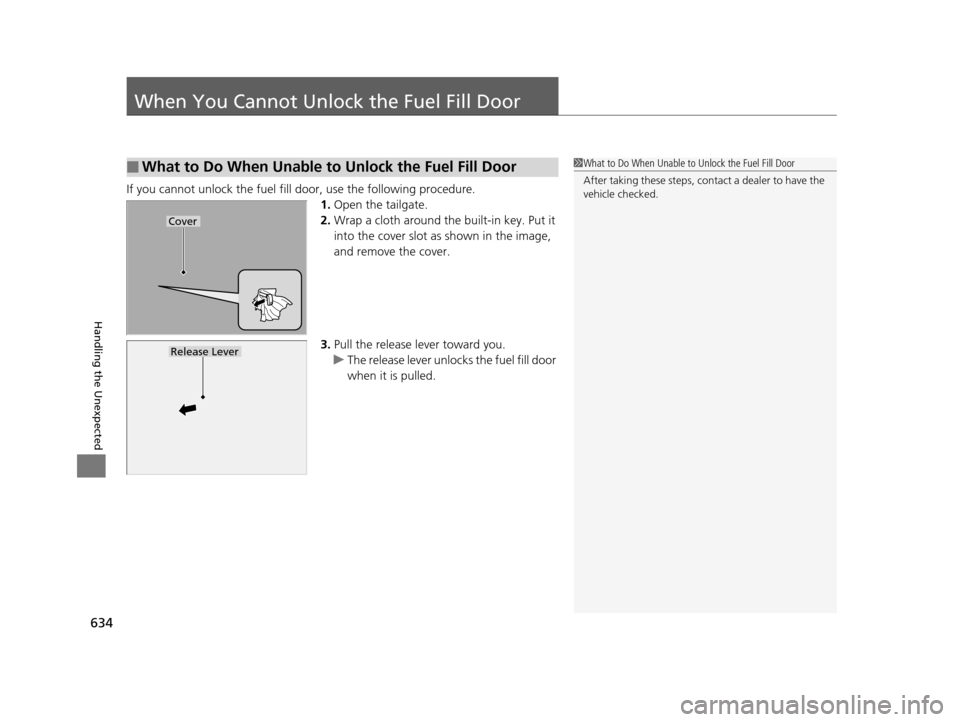
If you cannot unlock the fuel fill door, use the following procedure.1.Open the tailgate.
2. Wrap a cloth around the built-in key. Put it
into the cover slot as shown in the image,
and remove the cover.
3. Pull the release lever toward you.
u The release lever unlocks the fuel fill door
when it is pulled.
■What to Do When Unable to Unlock the Fuel Fill Door1What to Do When Unable to Unlock the Fuel Fill Door
After taking these steps, cont act a dealer to have the
vehicle checked.
Cover
Release Lever
16 PILOT-31TG76000.book 634 ページ 2015年6月15日 月曜日 午前11時30分
Page 650 of 661
Index
649
Index
Index
A
ABS (Anti-lock Brake System).................. 529
AC Power Outlet ...................................... 197
Accessories and Modifications ................ 553
Accessory Power Sockets ......................... 196
Adaptive Cruise Control (ACC) ................ 491
Indicator ................................................... 92
Adaptive Cruise Control (ACC) with Low
Speed Follow (LSF) Indicator ................................................... 92
Additives
Coolant .................................................. 571
Engine Oil ............................................... 566
Washer ................................................... 574
Additives, Engine Oil ............................... 566
Adjusting Armrest .................................................. 186
Front Seats.............................................. 174
Head Restraints ....................... 179, 180, 181
Mirrors.................................................... 171
Rear Seats ............................................... 183
Second Row Seat .................................... 176
Steering Wheel ....................................... 170
Temperature ........................................... 116
Agile Handling Assist System .................. 517
Aha
TM........................................................ 290
Air Conditioning System (Climate Control System) .................................................... 210
Changing the Mode................................ 211
Defrosting the Windshield and Windows .............................................. 211 Dust and Pollen Filter ............................... 599
Recirculation/Fresh Air Mode ................... 211
Sensor ..................................................... 216
Synchronized Mode ................................. 213
Using Automatic Climate Control ............ 210
Air Conditioning System (Heating and Cooling System) ...................................... 205
Cooling ................................................... 207
Defrosting the Windshield and Windows ............................................... 208
Heating ................................................... 206
Air Pressure ....................................... 586, 639
Airbags ........................................................ 45
Advanced Airbags ..................................... 51
After a Collision ......................................... 49
Airbag Care ............................................... 57
Event Data Recorder .................................... 0
Front Airbags (SRS) .................................... 48
Indicator .............................................. 55, 83
Passenger Airbag Off Indicator .................. 56
Sensors ...................................................... 45
Side Airbags .............................................. 52
Side Curtain Airbags .................................. 54
All-wheel drive (AWD) Indicator ............... 89
AM/FM Radio .................................... 231, 265
Anti-lock Brake System (ABS) .................. 529
Indicator .................................................... 83
Armrest ..................................................... 186
Audio Remote Controls ............................ 222
Audio System .................................... 218, 242
Adjusting the Sound ........................ 229, 258 Audio/Information Screen................ 225, 243
Auxiliary Input Jack.................................. 220
Changing the Home Screen Icon Layout .. 247
Closing Apps ........................................... 257
Display Setup .................................. 230, 259
Error Messages ........................................ 304
General Information ................................ 308
Home Screen........................................... 250
Limitations for Manual Operation ............ 260
MP3/WMA/AAC ...................... 236, 278, 291
Playing a CD............................................ 278
Reactivating ............................................ 221
Recommended CDs ................................. 309
Remote Controls ..................................... 222
Security Code .......................................... 221
Selecting an Audio Source ....................... 260
Status Area ............................................. 256
Theft Protection ...................................... 221
USB Flash Drives ...................................... 311
USB Port.................................................. 219
Wallpaper Setup.............................. 227, 248
Audio/Information Screen ............... 225, 243
Authorized Manuals ................................ 647
Auto Door Locking/Unlocking ................. 134
Customize ............................................... 367
Auto High-Beam System .......................... 159
Auto high-beam system Indicator............. 87
Auto Idle-stop ........................................... 479
OFF Button .............................................. 479
Auto Idle-stop In dicator (Green)............... 90
16 PILOT-31TG76000.book 649 ページ 2015年6月15日 月曜日 午前11時30分
Page 651 of 661
650
Index
Auto Idle-stop System Indicator (Amber) ..................................................... 90
Automatic Intermittent Wipers ............... 164
Automatic Lighting .................................. 156
Automatic Transmission ........................... 468
Creeping ................................................. 468
Fluid ........................................................ 573
Kickdown ................................................ 468
Operating the Shift Button....................... 473
Shift Lever Does Not Move....................... 618
Shift Lever Operation ............................... 470
Shifting............................................ 469, 471
Auxiliary Input Jack .................................. 220
Average Fuel Economy ............................. 116
B
Back-Up Light............................................ 580
Battery ....................................................... 594
Charging System Indicator ................. 79, 624
Jump Starting .......................................... 619
Maintenance (Checking the Battery) ........ 594
Belts (Seat) .................................................. 37
Beverage Holders ...................................... 194
Blind spot information (BSI) System ........ 518
Indicator .................................................... 94
Bluetooth ® Audio ............................. 239, 294
Bluetooth ® HandsFreeLink ®............. 381, 406
Blu-ray/DVD Rear Entertainment System ...................................................... 313
Audio Sources for Front and Rear Seats ... 334 Auxiliary Console Panel ........................... 314
DVD or Blu-ray
TM Player Error Messages ... 341
Front Control Panel Operation ................. 327
HDMI
TM Port ............................................ 315
Initial Settings.......................................... 325
Operating the Blu-ray/DVD rear entertainment system ................................................... 327
Operating the System .............................. 316
Overhead Screen ..................................... 316
Playable Disc Region Codes ..................... 339
Playable Disc Types .................................. 339
Playable Discs .......................................... 335
Playing a Disc in the Rear......................... 333
Playing a DVD/Blu-ray
TM........................... 317
Playing AM/FM Radio in the Rear............. 332
Playing an iPod and a USB Flash Drive in the Rear ...................................................... 333
Playing Audio .......................................... 331
Playing SiriusXM ® Radio in the Rear ......... 332
Rear DVD or Blu-ray
TM Menu ................... 318
Rear System Setup................................... 328
Recommended Discs ............................... 340
Screen and Surround Settings.................. 321
Selecting the Audio Sour ce using Front Control
Panel ..................................................... 327
Setting the DVD or Blu-ray
TM Menu ......... 329
System Controls .............................. 317, 331
USB Ports ................................................ 315
Wireless Headphones .............................. 313
Booster Seats (For Children) ...................... 73Brake System
............................................ 527
Anti-lock Brake System (ABS) .................. 529
Brake Assist System................................. 530
Brake System Indicator .............................. 78
Fluid ....................................................... 574
Foot Brake .............................................. 528
Indicator ........................................... 78, 626
Parking Brake.......................................... 527
Brake System (Amber) Indicator ................................................... 78
Brake System (Red)
Indicator ........................................... 78, 626
Brightness Control (Instrument Panel) ... 166
Bulb Replacement .................................... 575
Back-Up Light ......................................... 580
Brake Light and Turn Signal Light ............ 579
Daytime Running Light............................ 577
Headlights .............................................. 575
High-Mount Brake Light.......................... 580
Rear License Plate Light ........................... 580
Side Turn Signal/Emergency Indicator Light ..................................................... 578
Taillight and Rear Si de Marker Light ........ 579
Bulb Specifications ................................... 638C
Car Wash Mode........................................ 475
Carbon Monoxide Gas ............................... 74
Carrying Cargo ................................. 443, 445
CD Player .................................................. 278
16 PILOT-31TG76000.book 650 ページ 2015年6月15日 月曜日 午前11時30分