ESP HONDA PILOT 2016 3.G User Guide
[x] Cancel search | Manufacturer: HONDA, Model Year: 2016, Model line: PILOT, Model: HONDA PILOT 2016 3.GPages: 661, PDF Size: 37.79 MB
Page 239 of 661
uuAudio System Basic Operation uPlaying a USB Flash Drive
238
Features
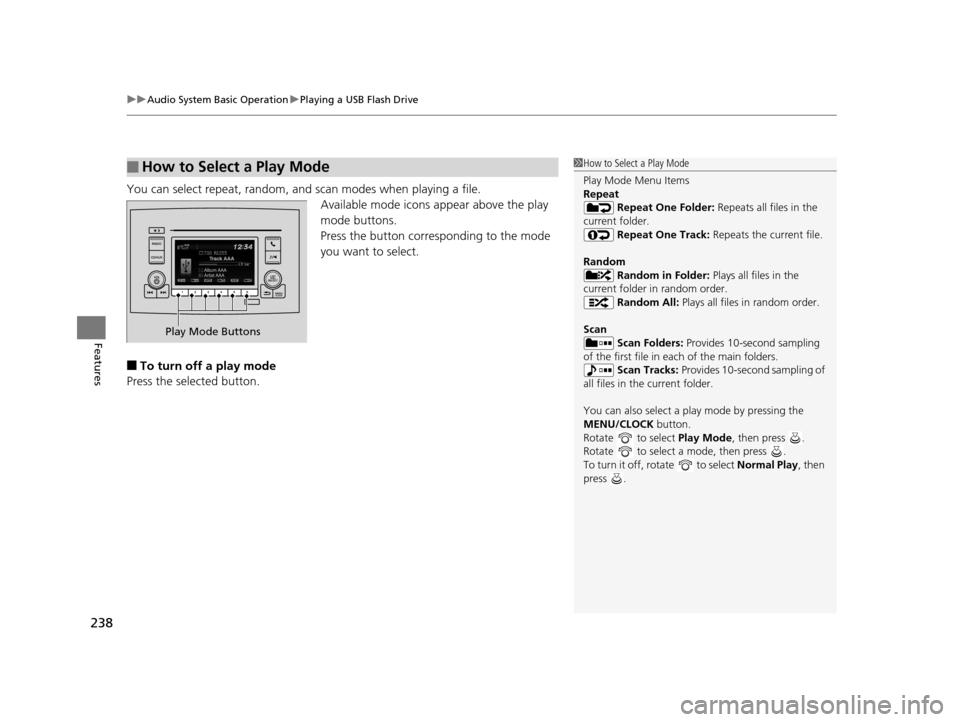
You can select repeat, random, and scan modes when playing a file.
Available mode icons appear above the play
mode buttons.
Press the button corresponding to the mode
you want to select.
■To turn off a play mode
Press the selected button.
■How to Select a Play Mode1 How to Select a Play Mode
Play Mode Menu Items
Repeat
Repeat One Folder: Repeats all files in the
current folder. Repeat One Track: Repeats the current file.
Random Random in Folder: Plays all files in the
current folder in random order. Random All: Plays all files in random order.
Scan Scan Folders: Provides 10-second sampling
of the first file in each of the main folders.
Scan Tracks: Provides 10-second sampling of
all files in the current folder.
You can also select a pl ay mode by pressing the
MENU/CLOCK button.
Rotate to select Play Mode, then press .
Rotate to select a mode, then press .
To turn it off, rotate to select Normal Play, then
press .
Play Mode Buttons
16 PILOT-31TG76000.book 238 ページ 2015年6月15日 月曜日 午前11時30分
Page 245 of 661
uuAudio System Basic Operation uAudio/Information Screen
244
Features
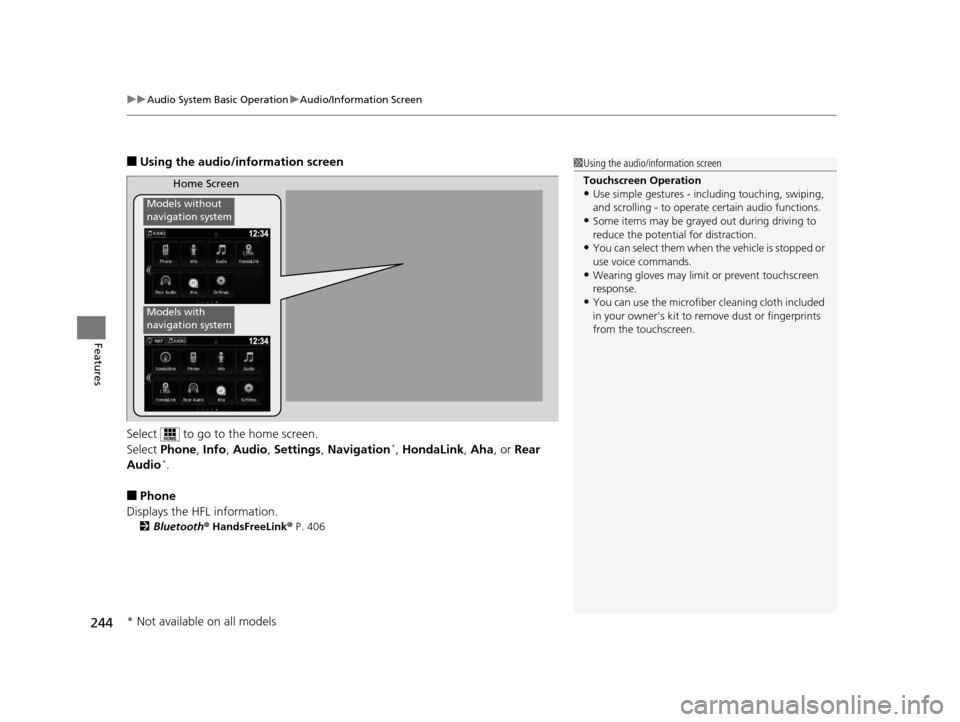
■Using the audio/information screen
Select to go to the home screen.
Select Phone, Info, Audio , Settings , Navigation
*, HondaLink , Aha , or Rear
Audio*.
■Phone
Displays the HFL information.
2 Bluetooth® HandsFreeLink ® P. 406
1 Using the audio/in formation screen
Touchscreen Operation
•Use simple gestures - in cluding touching, swiping,
and scrolling - to operate certain audio functions.
•Some items may be grayed out during driving to
reduce the potential for distraction.
•You can select them when the vehicle is stopped or
use voice commands.
•Wearing gloves may limit or prevent touchscreen
response.
•You can use the microfiber cleaning cloth included
in your owner's kit to remo ve dust or fingerprints
from the touchscreen.
Home Screen
Models without
navigation system
Models with
navigation system
* Not available on all models
16 PILOT-31TG76000.book 244 ページ 2015年6月15日 月曜日 午前11時30分
Page 308 of 661
307
uuAudio Error Messages uAndroid/Apps
Features
Android/Apps
If an error occurs while using the audio system or apps, you may see the following
error messages. If you cannot clear the error message, contact a dealer.
*1:****part is variable characters, and will change depending upon where an error
occurs.
Error MessageSolution
Unfortunately, **** has
stopped.Error has occurred within app, select OK on the screen to close the app.
**** is not responding.
Would you like to close it?
App is not responding.
Select Wait if you can wait for a response from app a little lo nger. If it does not respond even if you keep
waiting, select OK to close the app and start it up. If the error message continues, perform Factory Data
Reset .
2Defaulting All the Settings P. 377
Models with Display Audio
16 PILOT-31TG76000.book 307 ページ 2015年6月15日 月曜日 午前11時30分
Page 339 of 661
338
uuBlu-ray/DVD Rear Entertainment System*uPlayable Discs
Features
■OSS
This product contains software licensed under GNU General Public License (GPL) or GNU Lesser General Public License (LGPL), etc.
You have the right of acquisition, modification, and distribution of the source code of the GPL/LGPL software. You may download Source
Code from the following website at no charge.
URL: http://www.embedded -carmultimedia.jp/linux/oss/download/MP_632_34W913
The website provides the Source Code “As Is” and without warrant y of any kind. By downloading Source Code, you expressly assume all
risk and liability associated with downloadin g and using the Source Code and complying with the user agreements that accompany each
Source Code.
Please note that we cannot respond to an y inquiries regarding the source code.
Software List
■ FDA
-Caution-
Use of controls or adjustments or performance of procedures othe r than those specified herein may result in hazardous radiation exposure.
kernel2.6.16.29/FreeType2 2.2.1gcc sh4eb-3.4.5glibc-2.3.5boot_loader sh-ipl+g
libgcc_s-3.4.5bash-3.0-31busybox-1.00v2lin 0.1module-init-tools-3.1.0
libtermcap-2.0.8mtd-utils-20050619initscripts-8.11.1-1libstdc++-3.4.5-10libiconv-1.11
coreutils-6.9dosfstools-2.10-3directfb 1.0.0-rc1kxml 1.21binutils-sh4eb-2.16.91.0.2
16 PILOT-31TG76000.book 338 ページ 2015年6月15日 月曜日 午前11時30分
Page 383 of 661
uuBluetooth ® HandsFreeLink ®u Using HFL
382
Features
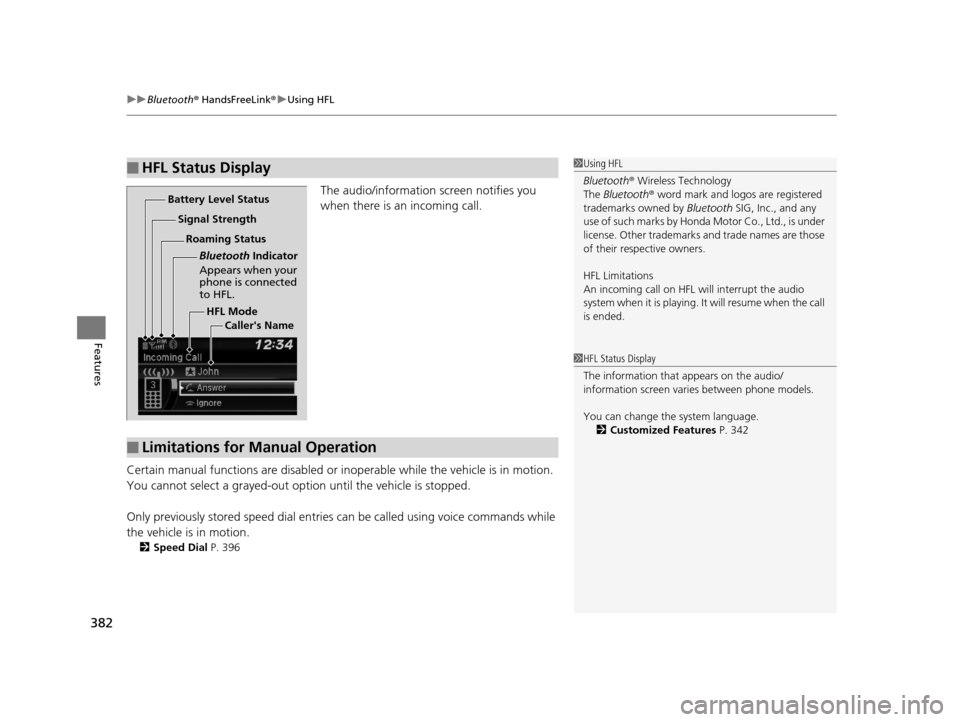
The audio/information screen notifies you
when there is an incoming call.
Certain manual functions are disabled or inoperable while the ve hicle is in motion.
You cannot select a grayed-out option until the vehicle is stopped.
Only previously stored speed dial entries can be called using voice commands while
the vehicle is in motion.
2 Speed Dial P. 396
■HFL Status Display1Using HFL
Bluetooth ® Wireless Technology
The Bluetooth ® word mark and logos are registered
trademarks owned by Bluetooth SIG, Inc., and any
use of such marks by Honda Motor Co., Ltd., is under
license. Other trademarks and trade names are those
of their respective owners.
HFL Limitations
An incoming call on HFL will interrupt the audio
s y s te m wh e n it is p la y i n g . It wi ll re s u m e w h en t h e c a l l
is ended.
HFL Mode
Battery Level Status
Signal Strength
Bluetooth Indicator
Appears when your
phone is connected
to HFL.
Roaming Status
Caller's Name
■Limitations for Manual Operation
1HFL Status Display
The information that appears on the audio/
information screen vari es between phone models.
You can change the system language. 2 Customized Features P. 342
16 PILOT-31TG76000.book 382 ページ 2015年6月15日 月曜日 午前11時30分
Page 384 of 661
383
uuBluetooth ® HandsFreeLink ®u HFL Menus
Continued
Features
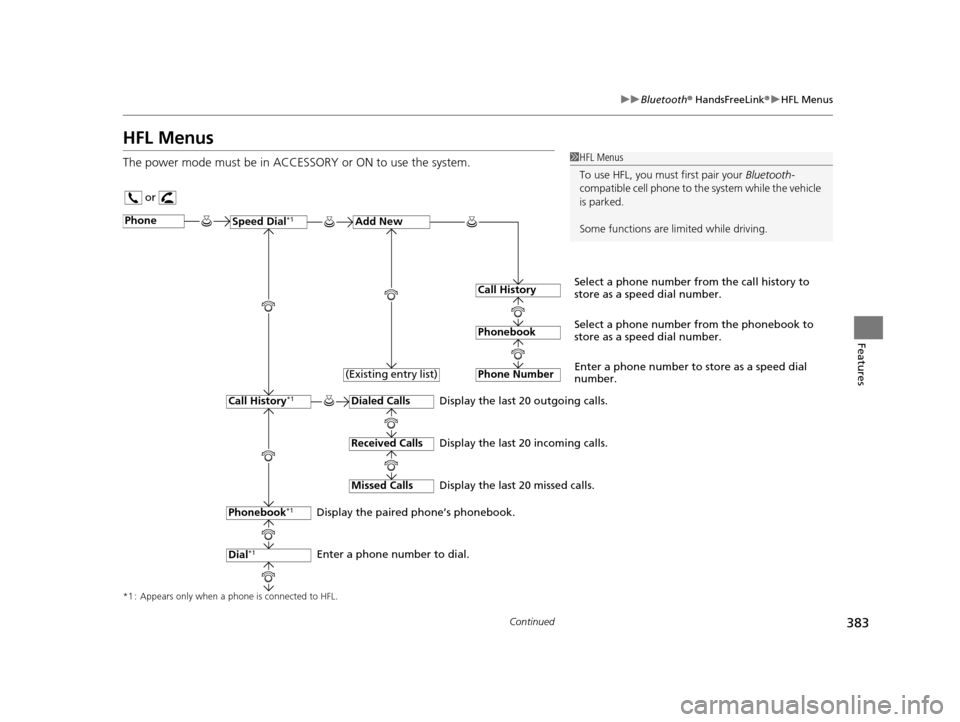
HFL Menus
The power mode must be in ACCESSO RY or ON to use the system.1HFL Menus
To use HFL, you must first pair your Bluetooth-
compatible cell phone to th e system while the vehicle
is parked.
Some functions are li mited while driving.
or
Display the last 20 outgoing calls.
Display the last 20 incoming calls.
Display the last 20 missed calls.
*1 : Appears only when a phone is connected to HFL.
PhoneSpeed Dial*1Add New
Select a phone number from the call history to
store as a speed dial number.
Call History
PhonebookSelect a phone number from the phonebook to
store as a speed dial number.
Phone Number
Enter a phone number to store as a speed dial
number.
Dialed Calls
Received Calls
Missed Calls
Phonebook*1
Dial*1
Call History*1
Display the paired phone’s phonebook.
Enter a phone number to dial. (Existing entry list)
16 PILOT-31TG76000.book 383 ページ 2015年6月15日 月曜日 午前11時30分
Page 408 of 661
Continued407
uuBluetooth ® HandsFreeLink ®u Using HFL
Features
(Pick-up) button: Press to go directly to the pho ne screen, or to answer an
incoming call.
(Hang-up/back) button: Press to end a call, go back to the previous
command, or cancel a command.
(Talk) button: Press to call a number with a stored voice tag.
(Menu) button: Press to display Speed Dial, Call History , or Redial on the
phone screen.
(+ (- button: Press to select an item displayed on the phone screen.
SOURCE button: Press to call a number listed in the selected item on the phone
screen.
To go to the Phone menu screen:
1. Select .
2. Select Phone to switch the displa y to the phone screen.
3. Select .
1Bluetooth ® HandsFreeLink ®
Bluetooth ® Wireless Technology
The Bluetooth ® word mark and logos are registered
trademarks owned by Bluetooth SIG, Inc., and any
use of such marks by Honda Motor Co., Ltd., is under
license. Other trademarks and trade names are those
of their respective owners.
HFL Limitations
An incoming call on HFL will interrupt the audio
system when it is playing. It will resume when the call
is ended.
16 PILOT-31TG76000.book 407 ページ 2015年6月15日 月曜日 午前11時30分
Page 469 of 661
468
uuWhen Driving uAutomatic Transmission
Driving
Automatic Transmission
The engine runs at a higher id le speed and creeping increases.
Keep the brake pedal firmly depressed when stopped.
Quickly depressing the accelerator pedal while driving uphill may cause the
transmission to drop to a lower gear, unex pectedly increasing vehicle speed. Depress
the accelerator pedal carefully, especi ally on slippery roads and curves.
■Creeping
■Kickdown
1Driving Guidelines for Your Utility Vehicle
Failure to operate your vehicle correctly might result
in a crash or a rollover. 2 Important Handling Information
* P. 34
2 Precautions While Driving P. 467
* Not available on all models
16 PILOT-31TG76000.book 468 ページ 2015年6月15日 月曜日 午前11時30分
Page 475 of 661
uuWhen Driving uShifting
474
Driving
In freezing or sub-freezing conditions, the electronic gear selector response may be
slow.
Always depress the brake pedal before changing the gear position to
(P, and
confirm that
(P is shown on the gear position in dicator before releasing the brake.
■When opening the driver’s door
If you open the driver’s door under the following conditions, the gear position
automatically changes to
(P.
• The vehicle is stationary with the engine running, or moving at 1 mph (2 km/h) or
slower.
• The transmission is in other than
(P.
• You have unfastened the driver side seat belt.
u If you manually change the gear position from
(P with the brake pedal
depressed, the gear position will automatically return to
(P once you release
the brake pedal.
■When turning off the power mode
If you turn the engine off wh ile the vehicle is stationary, and the transmission is in
other than
(P, the gear position automatically changes to (P.
1 When opening the driver’s door
You should always select
(P before opening the
driver’s door.
Make sure to park the vehicle in a safe place. 2 When Stopped P. 540
If you want to drive the ve hicle after the gear position
has automatically changed to
( P under the described
conditions, close the door, fasten the seat belt,
depress the brake pedal, then change the gear
position.
If you leave the vehicle, tu rn off the engine and lock
the doors.
16 PILOT-31TG76000.book 474 ページ 2015年6月15日 月曜日 午前11時30分
Page 503 of 661
502
uuWhen Driving uRoad Departure Mitigation (RDM) System*
Driving
Road Departure Mitigation (RDM) System*
Alerts and helps to assist you when the system determines a possibility of your
vehicle unintentionally crossing over detected lane markings.
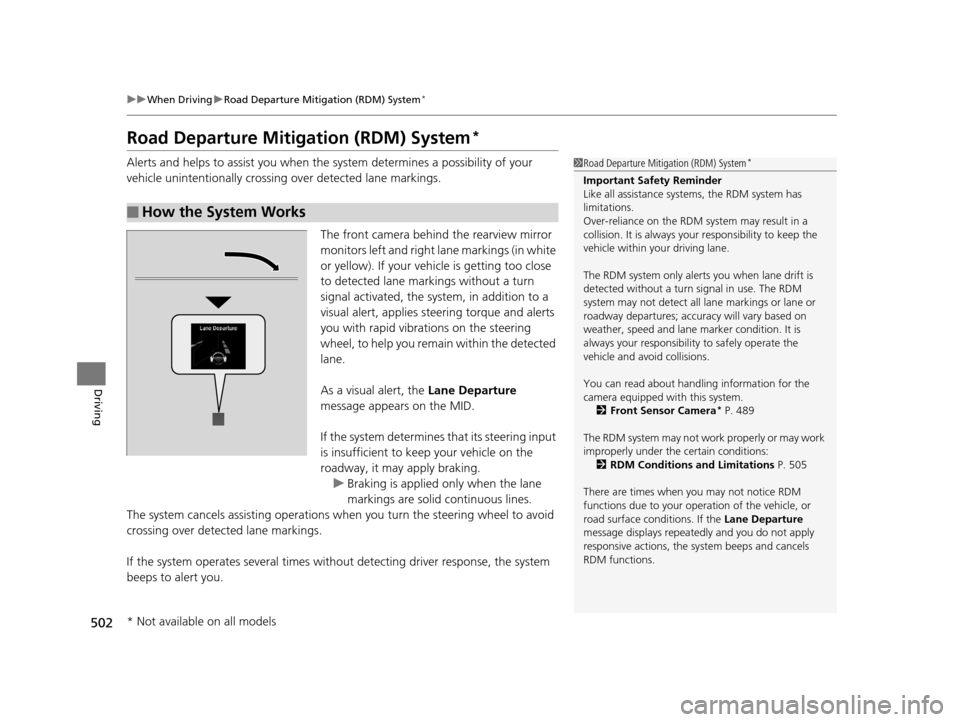
The front camera behind the rearview mirror
monitors left and right lane markings (in white
or yellow). If your vehicle is getting too close
to detected lane markings without a turn
signal activated, the system, in addition to a
visual alert, applies st eering torque and alerts
you with rapid vibrations on the steering
wheel, to help you remain within the detected
lane.
As a visual alert, the Lane Departure
message appears on the MID.
If the system determines that its steering input
is insufficient to keep your vehicle on the
roadway, it may apply braking. u Braking is applied only when the lane
markings are solid continuous lines.
The system cancels assisting operations when you turn th e steering wheel to avoid
crossing over detected lane markings.
If the system operates several times without detecting driver response, the system
beeps to alert you.
■How the System Works
1 Road Departure Mitigation (RDM) System*
Important Safety Reminder
Like all assistance systems, the RDM system has
limitations.
Over-reliance on the RDM system may result in a
collision. It is always your responsibility to keep the
vehicle within your driving lane.
The RDM system only alerts you when lane drift is
detected without a turn signal in use. The RDM
system may not detect all la ne markings or lane or
roadway departures; accu racy will vary based on
weather, speed and lane marker condition. It is
always your responsibilit y to safely operate the
vehicle and avoid collisions.
You can read about handling information for the
camera equipped with this system.
2 Front Sensor Camera
* P. 489
The RDM system may not wo rk properly or may work
improperly under the certain conditions: 2 RDM Conditions and Limitations P. 505
There are times when you may not notice RDM
functions due to your opera tion of the vehicle, or
road surface conditions. If the Lane Departure
message displays repeated ly and you do not apply
responsive actions, the sy stem beeps and cancels
RDM functions.
* Not available on all models
16 PILOT-31TG76000.book 502 ページ 2015年6月15日 月曜日 午前11時30分