automatic transmission HONDA PILOT 2016 3.G User Guide
[x] Cancel search | Manufacturer: HONDA, Model Year: 2016, Model line: PILOT, Model: HONDA PILOT 2016 3.GPages: 661, PDF Size: 37.79 MB
Page 145 of 661
144
Controls
Security System
Immobilizer System
The immobilizer system prevents a key that has not been pre-registered from
starting the engine. Each key contains electronic transmitters that use electronic
signals to verify the key.
Pay attention to the follo wing when pressing the ENGINE START/STOP button:
• Do not allow objects that emit strong radio waves near the ENGINE START/
STOP button.
• Make sure the key is not covered by or touching a metal object.
• Do not bring a key from another vehicle’s immobilizer system with the smart entry
remote.
Security System Alarm
The security system alarm activates when the tailgate, hood or doors are forcibly
opened. The alarm does not go off if the tailgate or doors are opened with the key,
remote transmitter or smart entry system.
However, the alarm goes off when a door is opened with the key, then the hood is
opened before the power mode is set to ON.
However, the alarm goes off when a door is opened with the key, then the hood is
opened or gear position is changed from out of
(P before the power mode is set to
ON.
■When the security sy stem alarm activates
The horn sounds intermittently, some exterior lights flash.
1 Immobilizer System
NOTICE
Leaving the smart entry remote in the vehicle can
result in theft or accident al movement of the vehicle.
Always take the key with you whenever you leave the
vehicle unattended.
Do not alter the system or add other devices to it.
Doing so may damage the system and make your
vehicle inoperable.
1 Security System Alarm
The security alarm continues for a maximum of two
minutes until the security system alarm deactivates.
Except automatic transmission models with shift lever
Automatic transmission models with shift lever
16 PILOT-31TG76000.book 144 ページ 2015年6月15日 月曜日 午前11時30分
Page 153 of 661
152
uuOperating the Switches Around the Steering Wheel uENGINE START/STOP Button
Controls
If you leave the vehicle for 30 to 60 minutes with the transmission in (P and the
power mode in ACCESSORY, the vehicle automa tically goes into the mode similar to
VEHICLE OFF (LOCK) to avoid the battery drain.
When in this mode:
The steering wheel does not lock.
You cannot lock or unlock doors with th e remote transmitter or the smart entry
system.
Press the ENGINE START/STOP button to switch the mode to VEHICLE OFF (LOCK).
If you open the driver’s doo r when the power mode is set to ACCESSORY, a warning
beeper sounds.
■Automatic Power Off
■Power Mode Reminder
Canadian models
16 PILOT-31TG76000.book 152 ページ 2015年6月15日 月曜日 午前11時30分
Page 156 of 661
155
uuOperating the Switches Around the Steering Wheel uLight Switches
Continued
Controls
Light Switches
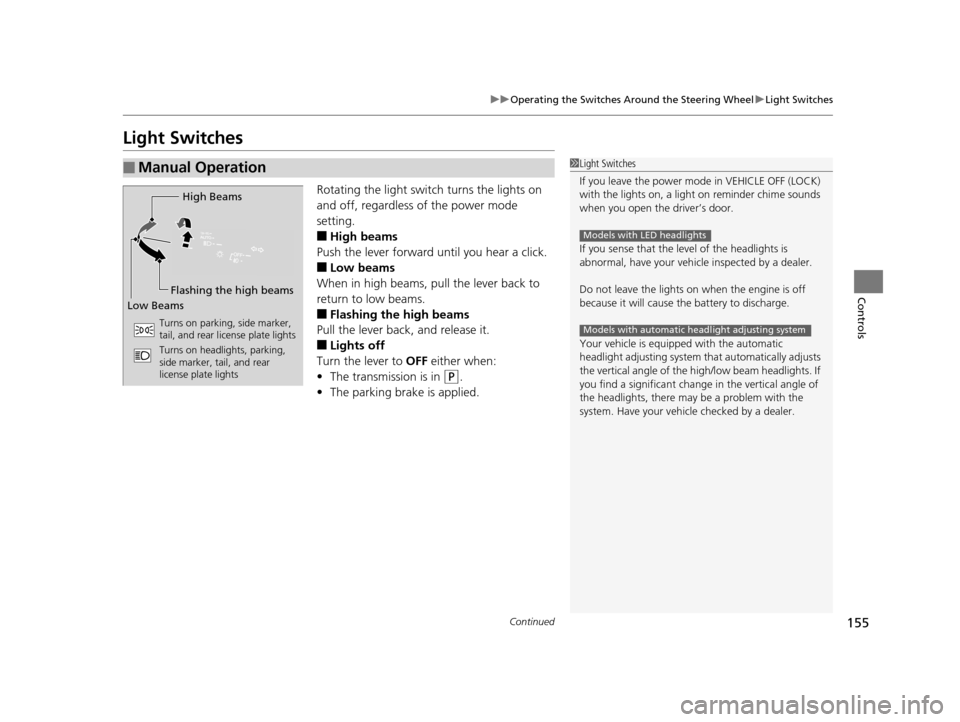
Rotating the light switch turns the lights on
and off, regardless of the power mode
setting.
■High beams
Push the lever forward until you hear a click.
■Low beams
When in high beams, pull the lever back to
return to low beams.
■Flashing the high beams
Pull the lever back, and release it.
■Lights off
Turn the lever to OFF either when:
• The transmission is in
(P.
• The parking brake is applied.
■Manual Operation1Light Switches
If you leave the power mode in VEHICLE OFF (LOCK)
with the lights on, a light on reminder chime sounds
when you open the driver’s door.
If you sense that the le vel of the headlights is
abnormal, have your vehicle inspected by a dealer.
Do not leave the lights on when the engine is off
because it will cause the battery to discharge.
Your vehicle is equipped with the automatic
headlight adjusting system that automatically adjusts
the vertical angle of the high/low beam headlights. If
you find a significant change in the vertical angle of
the headlights, there may be a problem with the
system. Have your vehicle checked by a dealer.
Models with LED headlights
Models with automatic headlight adjusting system
High Beams
Flashing the high beams
Low Beams
Turns on parking, side marker,
tail, and rear license plate lights
Turns on headlights, parking,
side marker, tail, and rear
license plate lights
16 PILOT-31TG76000.book 155 ページ 2015年6月15日 月曜日 午前11時30分
Page 169 of 661
168
uuOperating the Switches Around the Steering Wheel uDriving Position Memory System*
Controls
Driving Position Memory System*
You can store two driver’s seat (except for power lumbar) and door mirror positions
with the driving position memory system.
When you unlock and open the driver’s door with a remote transmitter, or smart
entry system, the seat and door mirrors adju st automatically to one of the two preset
positions.
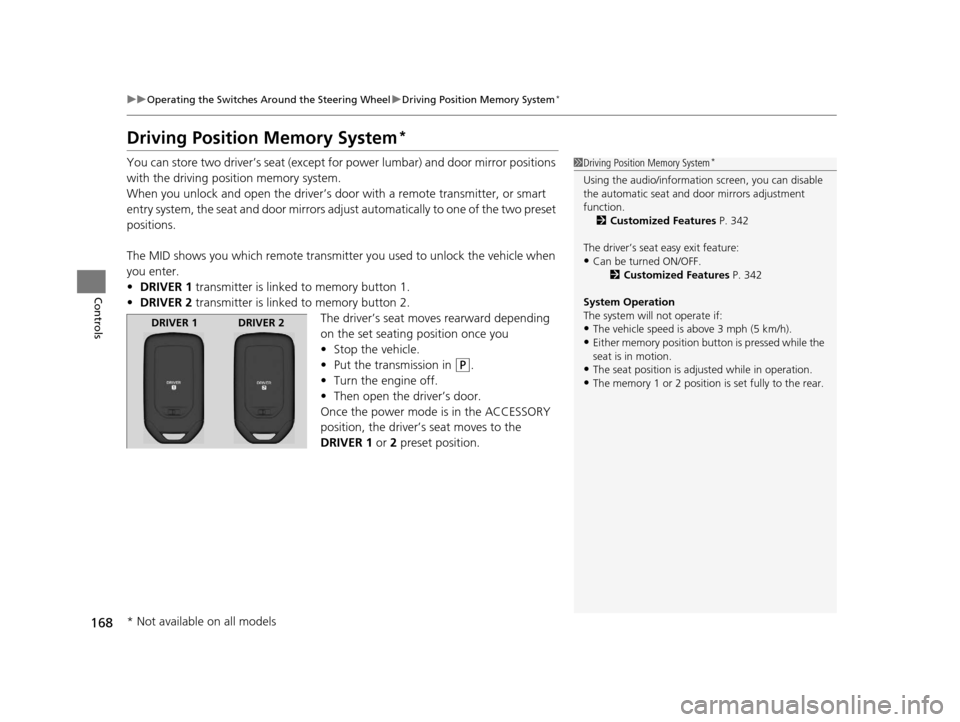
The MID shows you which remote transmitter you used to unlock the vehicle when
you enter.
• DRIVER 1 transmitter is linked to memory button 1.
• DRIVER 2 transmitter is linked to memory button 2.
The driver’s seat moves rearward depending
on the set seating position once you
•Stop the vehicle.
• Put the transmission in
(P.
• Turn the engine off.
• Then open the driver’s door.
Once the power mode is in the ACCESSORY
position, the driver’s seat moves to the
DRIVER 1 or 2 preset position.
1Driving Position Memory System*
Using the audio/informati on screen, you can disable
the automatic seat and d oor mirrors adjustment
function. 2 Customized Features P. 342
The driver’s seat easy exit feature:
•Can be turned ON/OFF. 2Customized Features P. 342
System Operation
The system will not operate if:
•The vehicle speed is above 3 mph (5 km/h).•Either memory position button is pressed while the
seat is in motion.
•The seat position is adju sted while in operation.•The memory 1 or 2 position is set fully to the rear.
DRIVER 1 DRIVER 2
* Not available on all models
16 PILOT-31TG76000.book 168 ページ 2015年6月15日 月曜日 午前11時30分
Page 172 of 661
171
Controls
Adjusting the Mirrors
Interior Rearview Mirror
Adjust the angle of the rearview mirror when you are sitting in the correct driving
position.
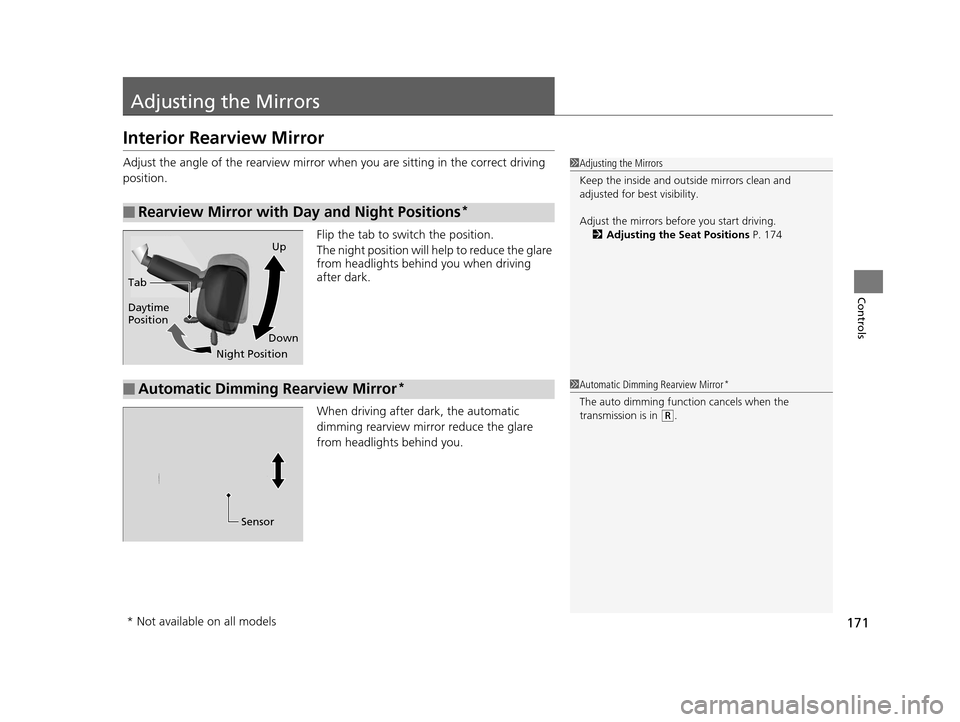
Flip the tab to switch the position.
The night position will help to reduce the glare
from headlights behind you when driving
after dark.
When driving after dark, the automatic
dimming rearview mirror reduce the glare
from headlights behind you.
■Rearview Mirror with Day and Night Positions*
1Adjusting the Mirrors
Keep the inside and out side mirrors clean and
adjusted for best visibility.
Adjust the mirrors befo re you start driving.
2 Adjusting the Seat Positions P. 174
Tab
Daytime
Position
Night PositionUp
Down
■Automatic Dimming Rearview Mirror*1 Automatic Dimming Rearview Mirror*
The auto dimming function cancels when the
transmission is in
(R.
Sensor
* Not available on all models
16 PILOT-31TG76000.book 171 ページ 2015年6月15日 月曜日 午前11時30分
Page 442 of 661
441
Driving
This chapter discusses driving, refueling, and information on items such as accessories.
Before Driving................................... 442
Towing a Trailer ................................ 448
Off-Highway Driving Guidelines ..... 459
When Driving Starting the Engine .......................... 461
Automatic Transmission ................... 468
Shifting ............................................ 469
Auto Idle-stop
*................................ 479
Intelligent Traction Management*.... 484
Cruise Control ................................. 486
Front Sensor Camera
*...................... 489
Adaptive Cruise Control (ACC)*....... 491Road Departure Mi tigation (RDM)
System*...................................... 502Lane Keeping Assist System (LKAS)*.. 507
Vehicle Stability Assist (VSA ®), aka Electronic
Stability Control (ESC), System ............. 515
Agile Handling Assist System............ 517
Blind spot inform ation (BSI) System*.... 518
LaneWatchTM*.................................. 520Intelligent VTM4 (i-VTM4)*................. 522Tire Pressure Monitoring System (TPMS) - Required Federal Explanation ......... 525
Braking
Brake System ................................... 527
Anti-lock Brake System (ABS) ........... 529
Brake Assist System.......................... 530
Collision Mitigati on Braking System
TM
(CMBSTM)*..................................... 531 Parking Your Vehicle
When Stopped ................................ 540
Parking Sensor System
*................... 541
Cross Traffic Monitor*..................... 545
Multi-view rear camera*.................. 549
Refueling
Fuel Information .............................. 550
How to Refuel ................................. 551
Fuel Economy .................................... 552
Accessories and Modifications ........ 553
* Not available on all models
16 PILOT-31TG76000.book 441 ページ 2015年6月15日 月曜日 午前11時30分
Page 453 of 661
uuTowing a Trailer uTowing Preparation
452
Driving
Towing generally requires a variety of supplemental equipment.
To ensure the best quality, we recomme nd that you purchase Honda equipment
whenever possible.
■Trailer brakes
Recommended for any trailer with a total weight of 1,000 lbs (450 kg) or more:
There are two common types of trailer brake s: surge and electric. Surge brakes are
common for boat trailers, since the brakes will get wet.
If you choose electric brakes, be sure th ey are electronically actuated. Do not
attempt to attach trailer brakes to your ve hicle’s hydraulic system, as it will lower
braking effectiveness and create a potential hazard.
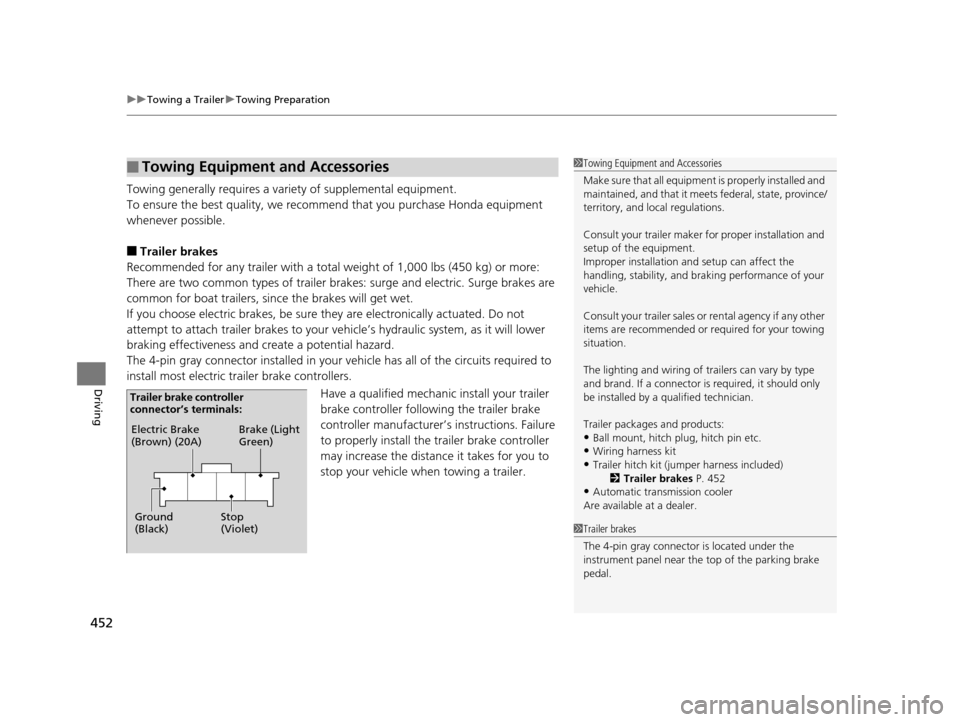
The 4-pin gray connector installed in your vehicle has all of the circuits required to
install most electric trailer brake controllers.
Have a qualified mechanic install your trailer
brake controller following the trailer brake
controller manufacturer’s instructions. Failure
to properly install the trailer brake controller
may increase the distance it takes for you to
stop your vehicle when towing a trailer.
■Towing Equipment and Accessories1 Towing Equipment and Accessories
Make sure that all equipment is properly installed and
maintained, and that it meets federal, state, province/
territory, and lo cal regulations.
Consult your trai ler maker for prope r installation and
setup of the equipment.
Improper installation and setup can affect the
handling, stability, and br aking performance of your
vehicle.
Consult your traile r sales or rental agency if any other
items are recommended or required for your towing
situation.
The lighting and wiring of tra ilers can vary by type
and brand. If a connector is required, it should only
be installed by a qua lified technician.
Trailer packages and products:
•Ball mount, hitch plug, hitch pin etc.•Wiring harness kit
•Trailer hitch kit (jum per harness included)
2 Trailer brakes P. 452
•Automatic transmission cooler
Are available at a dealer.
1 Trailer brakes
The 4-pin gray connector is located under the
instrument panel near the top of the parking brake
pedal.
Electric Brake
(Brown) (20A)
Ground
(Black) Brake (Light
Green)
Stop
(Violet)
Trailer brake controller
connector’s terminals:
16 PILOT-31TG76000.book 452 ページ 2015年6月15日 月曜日 午前11時30分
Page 456 of 661
455
uuTowing a Trailer uTowing Preparation
Driving
■Safety chains
Always use safety chains when you tow a trailer. Leave enough slack to allow the
trailer to turn corners easily, but do not allow the chains to drag on the ground.
■Sway control
This device can be used if your trailer te nds to sway. Your trailer maker can tell you
what kind of sway control you need and how to install it. Improper installation could
degrade the handling and stability of your vehicle.
■Trailer mirrors
Many states, provinces and territories requir e special exterior mirrors when towing a
trailer. Install special mirrors whenever you cannot clearly see behind you, or if the
trailer creates a blind spot.
■Automatic transmission cooler
An additional ATF (automatic transmission fluid) cooler is required to keep the
transmission from overheating when towing more than 3,500 lbs (1,588 kg). You
can get the additional ATF cooler at a dealer.
AWD models
16 PILOT-31TG76000.book 455 ページ 2015年6月15日 月曜日 午前11時30分
Page 469 of 661
468
uuWhen Driving uAutomatic Transmission
Driving
Automatic Transmission
The engine runs at a higher id le speed and creeping increases.
Keep the brake pedal firmly depressed when stopped.
Quickly depressing the accelerator pedal while driving uphill may cause the
transmission to drop to a lower gear, unex pectedly increasing vehicle speed. Depress
the accelerator pedal carefully, especi ally on slippery roads and curves.
■Creeping
■Kickdown
1Driving Guidelines for Your Utility Vehicle
Failure to operate your vehicle correctly might result
in a crash or a rollover. 2 Important Handling Information
* P. 34
2 Precautions While Driving P. 467
* Not available on all models
16 PILOT-31TG76000.book 468 ページ 2015年6月15日 月曜日 午前11時30分
Page 470 of 661
469
uuWhen Driving uShifting
Continued
Driving
Shifting
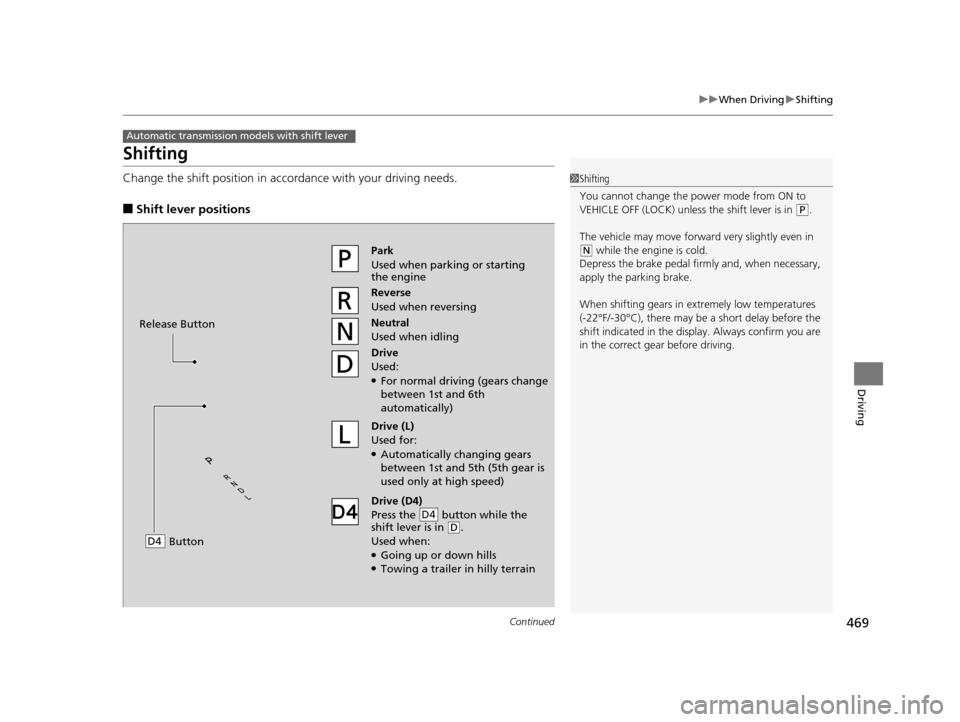
Change the shift position in accordance with your driving needs.
■Shift lever positions
Automatic transmission models with shift lever
1Shifting
You cannot change the pow er mode from ON to
VEHICLE OFF (LOCK) unless the shift lever is in
( P.
The vehicle may move forward very slightly even in
(N while the engine is cold.
Depress the brake pe dal firmly and, when necessary,
apply the parking brake.
When shifting gears in extremely low temperatures
(-22°F/-30°C), there may be a short delay before the
shift indicated in the display. Always confirm you are
in the correct gear before driving.Park
Used when parking or starting
the engine
Reverse
Used when reversing
Neutral
Used when idling
Drive
Used:
●For normal driving (gears change
between 1st and 6th
automatically)
Drive (L)
Used for:
●Automatically changing gears
between 1st and 5th (5th gear is
used only at high speed)
Drive (D4)
Press the button while the
shift lever is in
( D.
Used when:
●Going up or down hills●Towing a trailer in hilly terrain
D4
Release Button
Button
D4
16 PILOT-31TG76000.book 469 ページ 2015年6月15日 月曜日 午前11時30分