key HONDA PILOT 2016 3.G Owner's Manual
[x] Cancel search | Manufacturer: HONDA, Model Year: 2016, Model line: PILOT, Model: HONDA PILOT 2016 3.GPages: 661, PDF Size: 37.79 MB
Page 367 of 661
366
uuCustomized Features u
Features
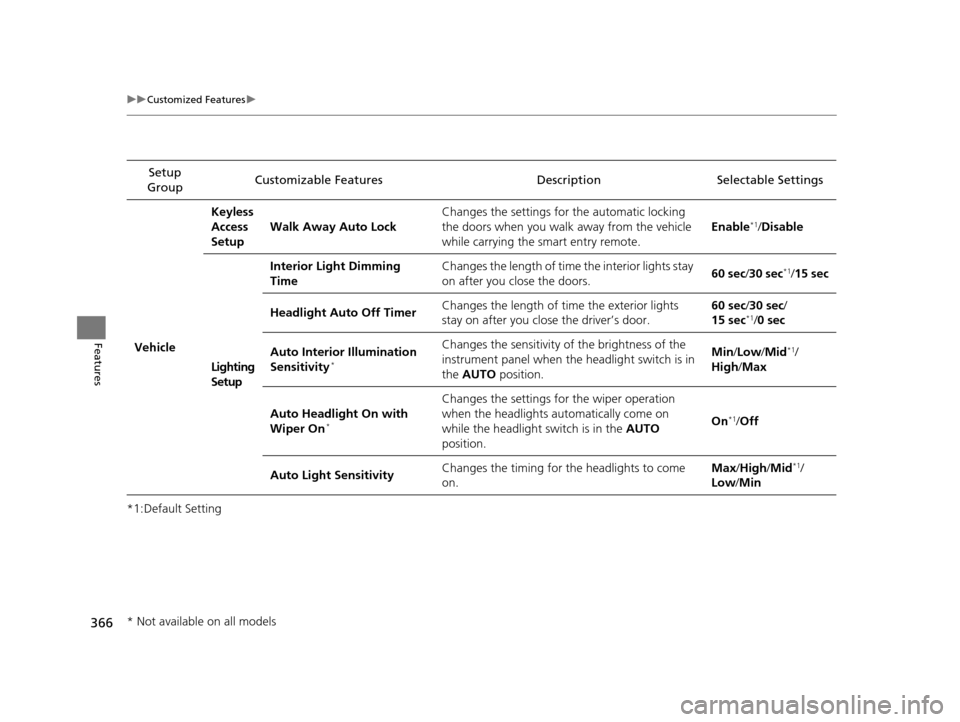
*1:Default SettingSetup
Group Customizable Features Descri
ption Selectable Settings
VehicleKeyless
Access
Setup
Walk Away Auto Lock Changes the settings for
the automatic locking
the doors when you walk away from the vehicle
while carrying the smart entry remote. Enable
*1/
Disable
Lighting
Setup Interior Light Dimming
Time
Changes the length of time the interior lights stay
on after you close the doors.
60 sec
/30 sec
*1/ 15 sec
Headlight Auto Off Timer Changes the length of time the exterior lights
stay on after you close the driver’s door. 60 sec
/30 sec/
15 sec
*1/ 0 sec
Auto Interior Illumination
Sensitivity
*
Changes the sensitivity of the brightness of the
instrument panel when th e headlight switch is in
the AUTO position. Min/
Low/Mid*1/
High /Max
Auto Headlight On with
Wiper On
*
Changes the settings fo r the wiper operation
when the headlights automatically come on
while the headlight switch is in the AUTO
position. On
*1/
Off
Auto Light Sensitivity Changes the timing for the headlights to come
on. Max
/High /Mid
*1/
Low /Min
* Not available on all models
16 PILOT-31TG76000.book 366 ページ 2015年6月15日 月曜日 午前11時30分
Page 368 of 661
367
uuCustomized Features u
Continued
Features
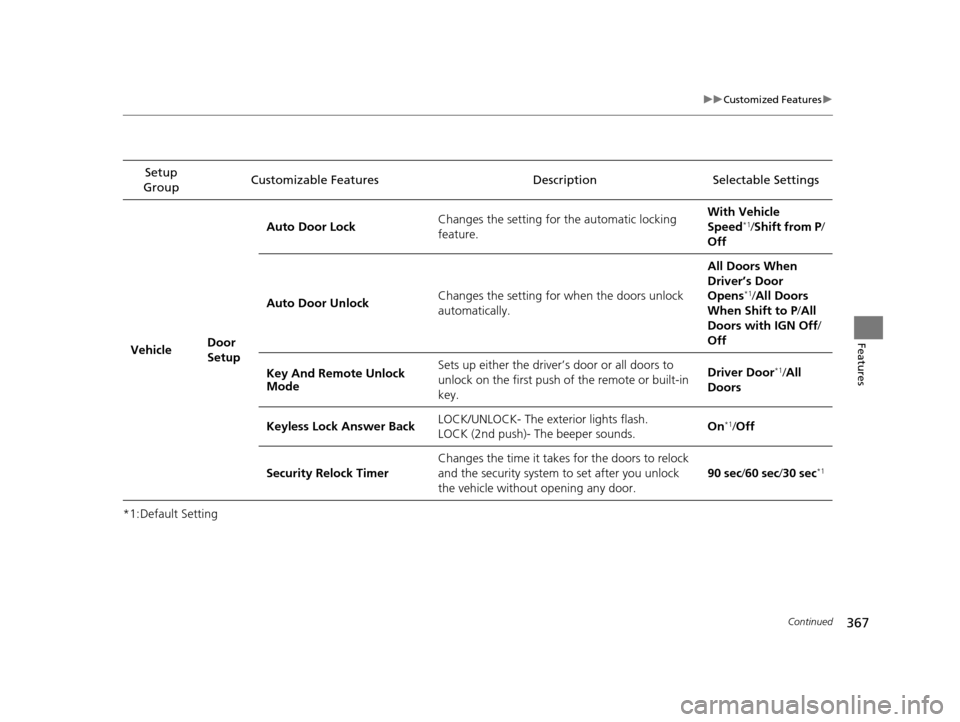
*1:Default SettingSetup
Group Customizable Features Description Selectable Settings
Vehicle Door
SetupAuto Door Lock
Changes the setting for the automatic locking
feature. With Ve
hicle
Speed
*1/ Shift from P /
Off
Auto Door Unlock Changes the setting for
when the doors unlock
automatically. All Doors When
Driver’s Door
Opens
*1/
All Doors
When Shift to P /All
Doors with IGN Off /
Off
Key And Remote Unlock
Mode Sets up either the driver’s door or all doors to
unlock on the first push of the remote or built-in
key. Driver Door
*1/
All
Doors
Keyless Lock Answer Back LOCK/UNLOCK- The exterior lights flash.
LOCK (2nd push)- The beeper sounds. On
*1/
Off
Security Relock Timer Changes the time it takes for the doors to relock
and the security system to set after you unlock
the vehicle without opening any door. 90 sec
/60 sec /30 sec
*1
16 PILOT-31TG76000.book 367 ページ 2015年6月15日 月曜日 午前11時30分
Page 369 of 661
368
uuCustomized Features u
Features
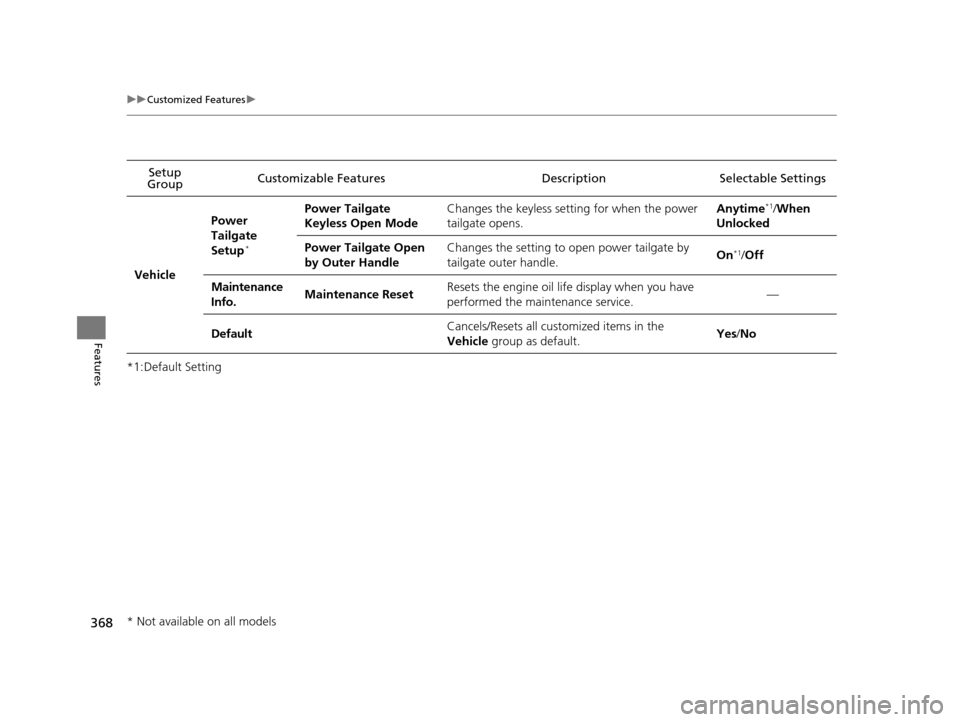
*1:Default SettingSetup
Group Customizable Features Descri
ption Selectable Settings
Vehicle
Power
Tailgate
Setup
*
Power Tailgate
Keyless Open ModeChanges the keyless setting for when the power
tailgate opens.Anytime*1/When
Unlocked
Power Tailgate Open
by Outer HandleChanges the setting to open power tailgate by
tailgate outer handle.On*1/ Off
Maintenance
Info.Maintenance ResetResets the engine oil life display when you have
performed the maintenance service.—
DefaultCancels/Resets all cust omized items in the
Vehicle group as default.Yes/No
* Not available on all models
16 PILOT-31TG76000.book 368 ページ 2015年6月15日 月曜日 午前11時30分
Page 385 of 661
384
uuBluetooth ® HandsFreeLink ®u HFL Menus
Features
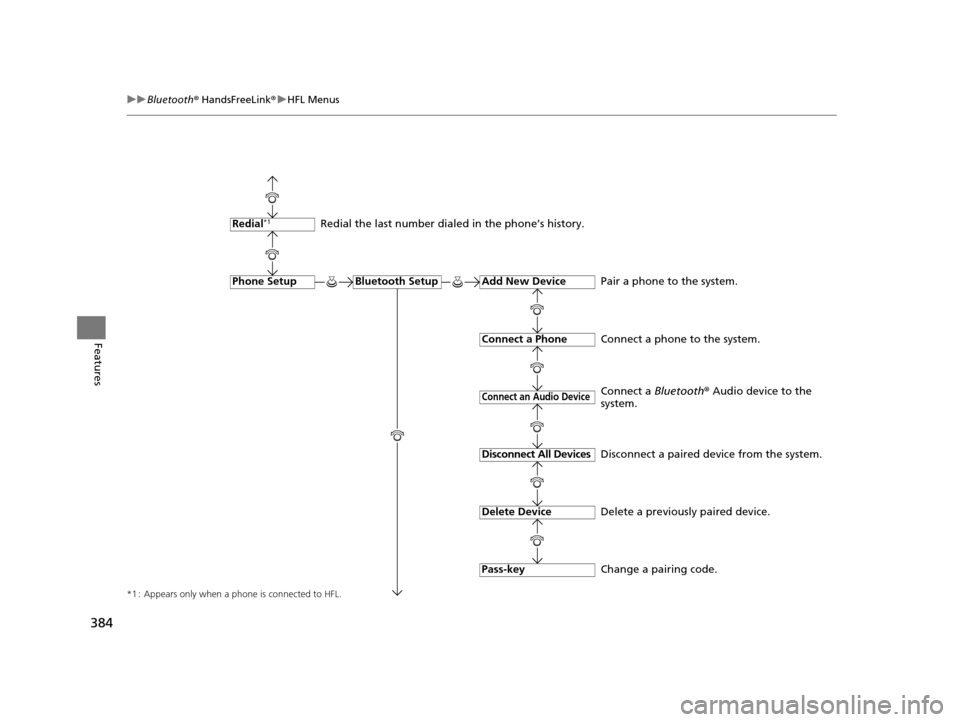
*1 : Appears only when a phone is connected to HFL.
Redial the last number dialed in the phone’s history.
Add New Device
Connect a Phone
Connect an Audio Device
Bluetooth SetupPhone Setup
Redial*1
Pair a phone to the system.
Connect a phone to the system.
Change a pairing code.
Disconnect All Devices
Delete Device
Pass-key
Disconnect a paired device from the system.
Delete a previously paired device. Connect a
Bluetooth® Audio device to the
system.
16 PILOT-31TG76000.book 384 ページ 2015年6月15日 月曜日 午前11時30分
Page 392 of 661
391
uuBluetooth ® HandsFreeLink ®u HFL Menus
Continued
Features
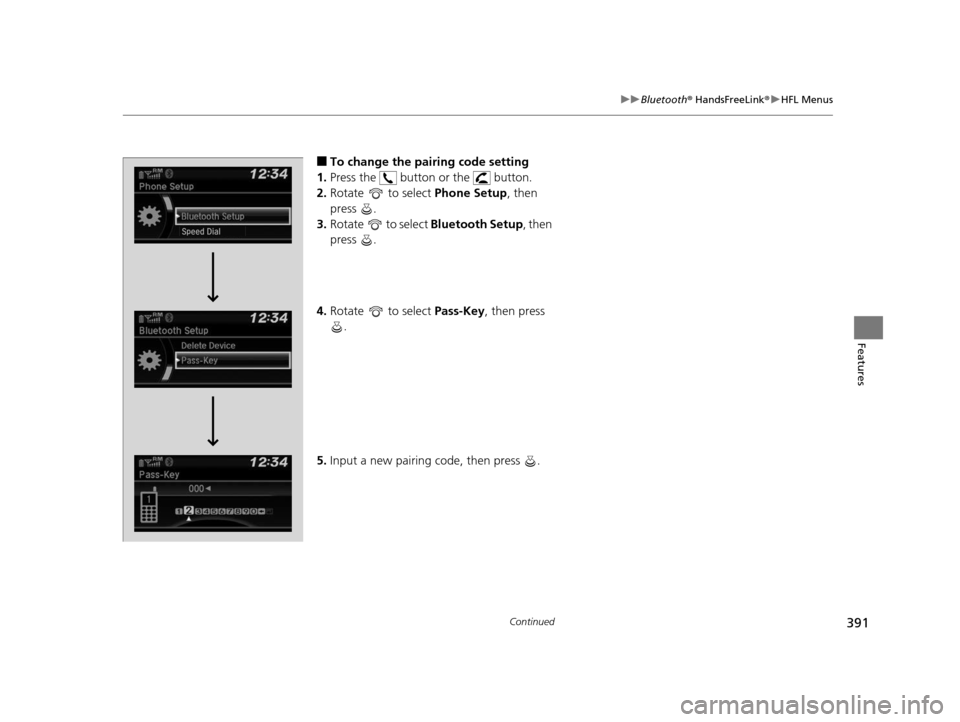
■To change the pairing code setting
1. Press the button or the button.
2. Rotate to select Phone Setup, then
press .
3. Rotate to select Bluetooth Setup, then
press .
4. Rotate to select Pass-Key, then press
.
5. Input a new pairing code, then press .
16 PILOT-31TG76000.book 391 ページ 2015年6月15日 月曜日 午前11時30分
Page 429 of 661
428
uuBluetooth ® HandsFreeLink ®u HFL Menus
Features
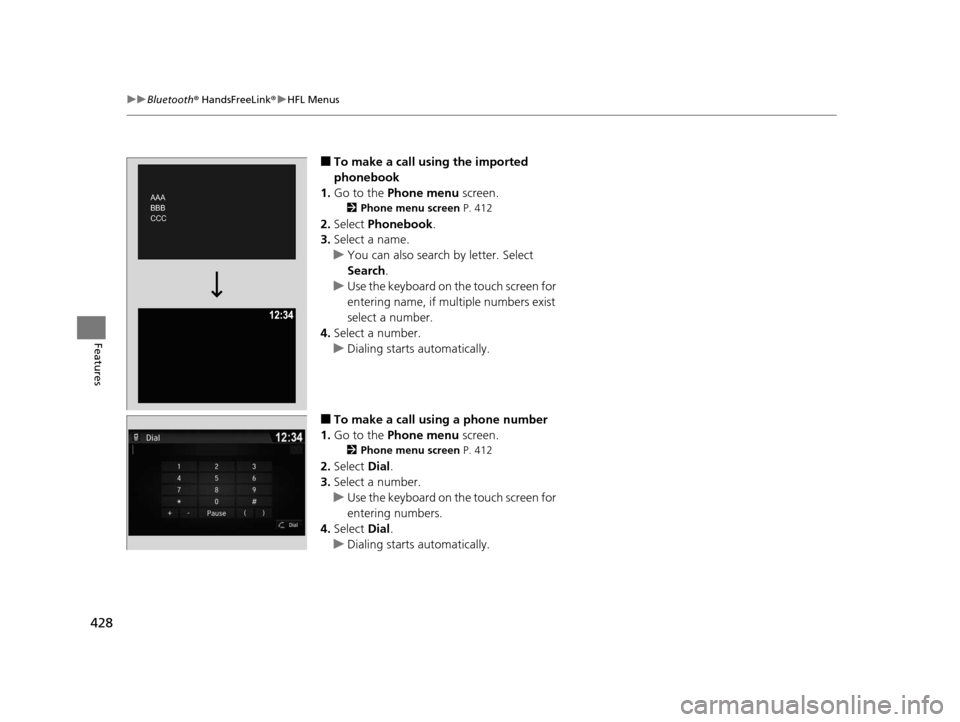
■To make a call using the imported
phonebook
1. Go to the Phone menu screen.
2Phone menu screen P. 412
2.Select Phonebook .
3. Select a name.
u You can also search by letter. Select
Search .
u Use the keyboard on the touch screen for
entering name, if multiple numbers exist
select a number.
4. Select a number.
u Dialing starts automatically.
■To make a call using a phone number
1. Go to the Phone menu screen.
2Phone menu screen P. 412
2.Select Dial.
3. Select a number.
u Use the keyboard on the touch screen for
entering numbers.
4. Select Dial.
u Dialing starts automatically.
AAA AAA
BBB
BBB
CCC CCC AAA
BBB
CCC
16 PILOT-31TG76000.book 428 ページ 2015年6月15日 月曜日 午前11時30分
Page 443 of 661
442
Driving
Before Driving
Driving Preparation
Check the following items before you start driving.
• Make sure there are no obstructions on th e windows, door mirrors, exterior
lights, or other parts of the vehicle.
u Remove any frost, snow, or ice.
u Remove any snow on the roof, as this can slip down and obstruct your field of
vision while driving. If frozen solid , remove ice once it has softened.
u When removing ice from around the wheel s, be sure not to damage the wheel
or wheel components.
• Make sure the hood is securely closed.
u If the hood opens while driving, your front view will be blocked.
• Make sure the tires are in good condition.
u Check air pressure, check for damage and excessive wear.
2 Checking and Maintaining Tires P. 585
•Make sure there are no people or ob jects behind or around the vehicle.
u There are blind spots from the inside.
■Exterior Checks1Exterior Checks
NOTICE
When doors are frozen s hut, use warm water around
the door edges to melt any ice. Do not try to force
them open, as this can damage the rubber trim
around the doors. When done, wipe dry to avoid
further freezing.
Do not pour warm water into the key cylinder.
You will be unable to insert the key if the water
freezes in the hole.
Heat from the engine and exhaust can ignite
flammable material s left under the hood, causing a
fire. If you’ve parked y our vehicle for an extended
period, inspect and remove any debris that may have
collected, such as dried grass and leaves that have
fallen or have been carried in for use as a nest by a
small animal.
Also check under the hood fo r leftover flammable
materials after you or so meone else has performed
maintenance on your vehicle.
16 PILOT-31TG76000.book 442 ページ 2015年6月15日 月曜日 午前11時30分
Page 465 of 661
uuWhen Driving uStarting the Engine
464
Driving
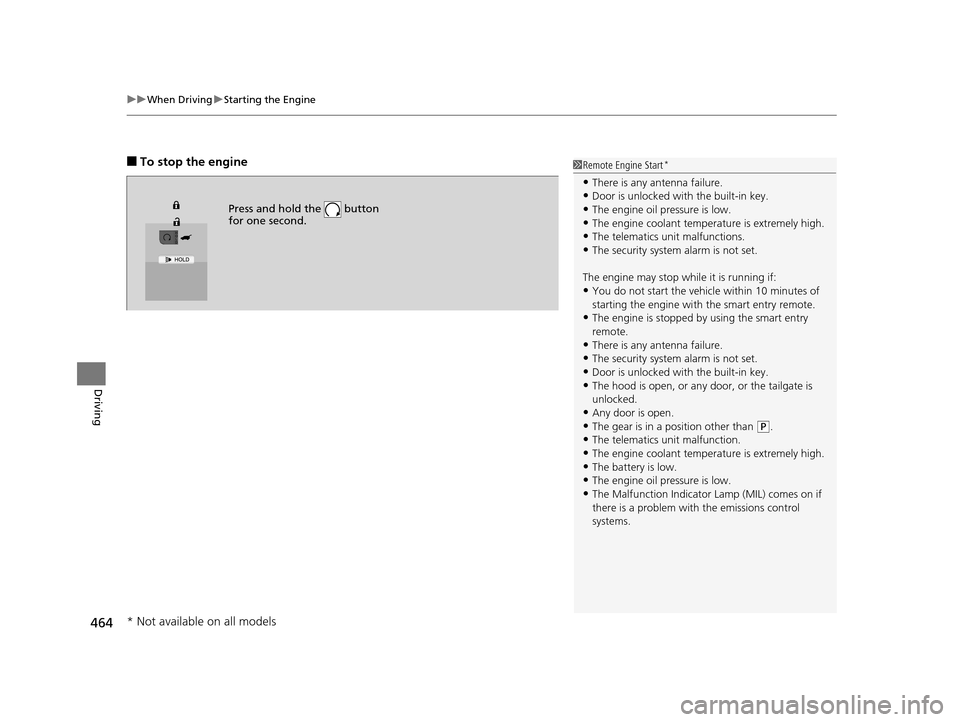
■To stop the engine
Press and hold the button
for one second.
1Remote Engine Start*
•There is any antenna failure.•Door is unlocked with the built-in key.
•The engine oil pressure is low.
•The engine coolant temper ature is extremely high.•The telematics unit malfunctions.
•The security system alarm is not set.
The engine may stop whil e it is running if:
•You do not start the vehicl e within 10 minutes of
starting the engine with the smart entry remote.
•The engine is stopped by using the smart entry
remote.
•There is any antenna failure.
•The security system alarm is not set.•Door is unlocked with the built-in key.
•The hood is open, or any door, or the tailgate is
unlocked.
•Any door is open.
•The gear is in a position other than ( P.
•The telematics unit malfunction.•The engine coolant temper ature is extremely high.
•The battery is low.
•The engine oil pressure is low.•The Malfunction Indicator Lamp (MIL) comes on if
there is a problem with the emissions control
systems.
* Not available on all models
16 PILOT-31TG76000.book 464 ページ 2015年6月15日 月曜日 午前11時30分
Page 597 of 661
596
Maintenance
Remote Transmitter Care
Replacing the Button Battery
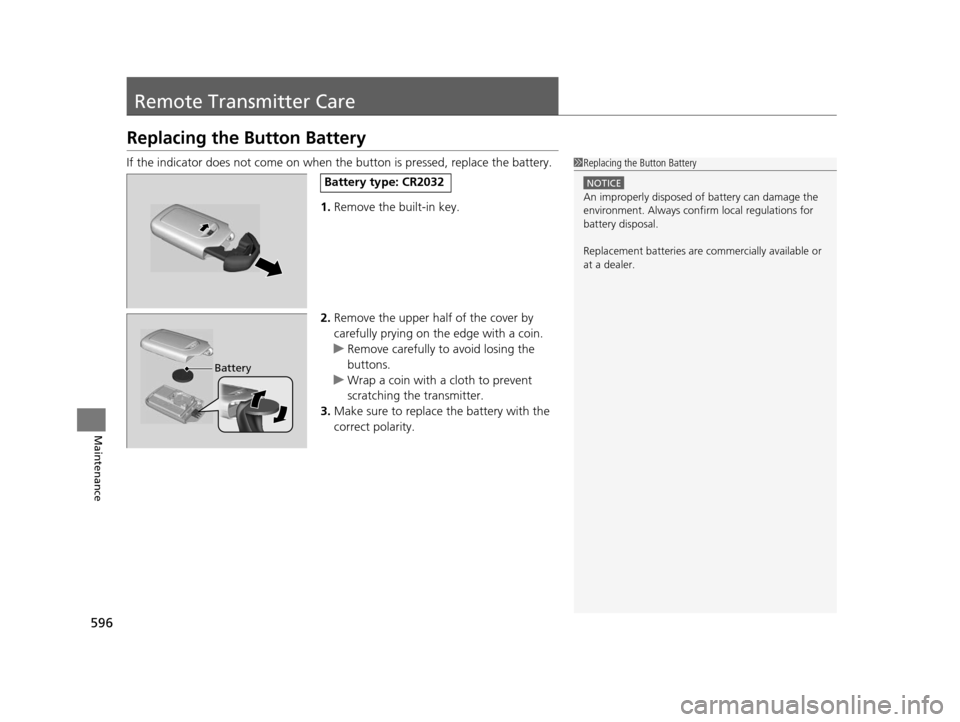
If the indicator does not come on when the button is pressed, replace the battery.
1. Remove the built-in key.
2. Remove the upper half of the cover by
carefully prying on the edge with a coin.
u Remove carefully to avoid losing the
buttons.
u Wrap a coin with a cloth to prevent
scratching the transmitter.
3. Make sure to replace the battery with the
correct polarity.1 Replacing the Button Battery
NOTICE
An improperly disposed of battery can damage the
environment. Always conf irm local regulations for
battery disposal.
Replacement batteries are commercially available or
at a dealer.
Battery type: CR2032
Battery
16 PILOT-31TG76000.book 596 ページ 2015年6月15日 月曜日 午前11時30分
Page 619 of 661
618
Handling the Unexpected
Shift Lever Does Not Move*
Follow the procedure below if you cannot move the shift lever out of the (P
position.
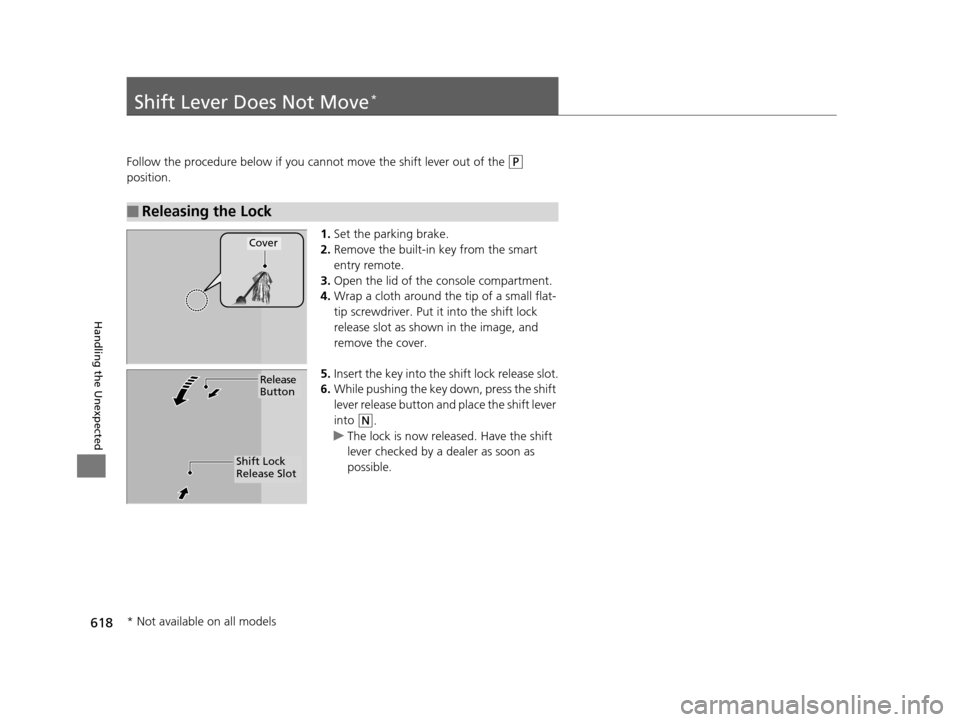
1.Set the parking brake.
2. Remove the built-in key from the smart
entry remote.
3. Open the lid of the console compartment.
4. Wrap a cloth around the tip of a small flat-
tip screwdriver. Put it into the shift lock
release slot as shown in the image, and
remove the cover.
5. Insert the key into the sh ift lock release slot.
6. While pushing the key down, press the shift
lever release button and place the shift lever
into
(N.
u The lock is now released. Have the shift
lever checked by a dealer as soon as
possible.
■Releasing the Lock
Cover
Release
Button
Shift Lock
Release Slot
* Not available on all models
16 PILOT-31TG76000.book 618 ページ 2015年6月15日 月曜日 午前11時30分