clock HONDA PILOT 2016 3.G Owner's Guide
[x] Cancel search | Manufacturer: HONDA, Model Year: 2016, Model line: PILOT, Model: HONDA PILOT 2016 3.GPages: 661, PDF Size: 37.79 MB
Page 362 of 661
361
uuCustomized Features u
Continued
Features
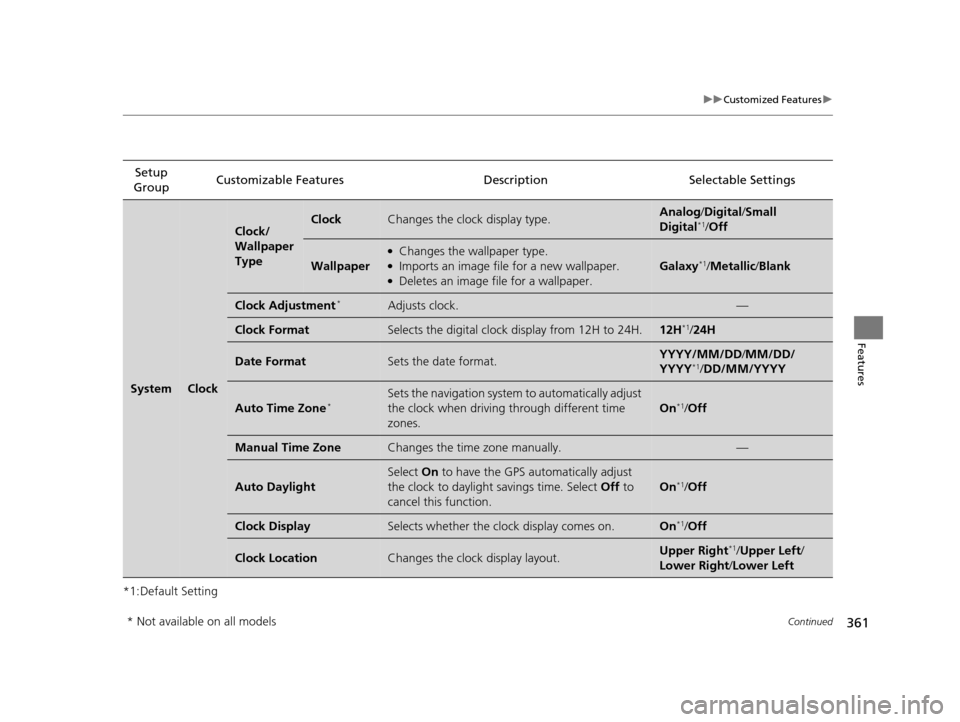
*1:Default SettingSetup
Group Customizable Features Description Selectable Settings
SystemClock
Clock/
Wallpaper
TypeClockChanges the clock display type.Analog
/Digital /Small
Digital*1/ Off
Wallpaper
●Changes the wallpaper type.●Imports an image file for a new wallpaper.●Deletes an image file for a wallpaper.
Galaxy*1/ Metallic/ Blank
Clock Adjustment*Adjusts clock.—
Clock FormatSelects the digital clock display from 12H to 24H.12H*1/24H
Date FormatSets the date format.YYYY/MM/DD/ MM/DD/
YYYY*1/ DD/MM/YYYY
Auto Time Zone*Sets the navigation system to automatically adjust
the clock when driving through different time
zones.
On*1/ Off
Manual Time ZoneChanges the time zone manually.—
Auto Daylight
Select On to have the GPS automatically adjust
the clock to daylight savings time. Select Off to
cancel this function.
On*1/ Off
Clock DisplaySelects whether the clock display comes on.On*1/Off
Clock LocationChanges the clock display layout.Upper Right*1/Upper Left /
Lower Right /Lower Left
* Not available on all models
16 PILOT-31TG76000.book 361 ページ 2015年6月15日 月曜日 午前11時30分
Page 363 of 661
362
uuCustomized Features u
Features
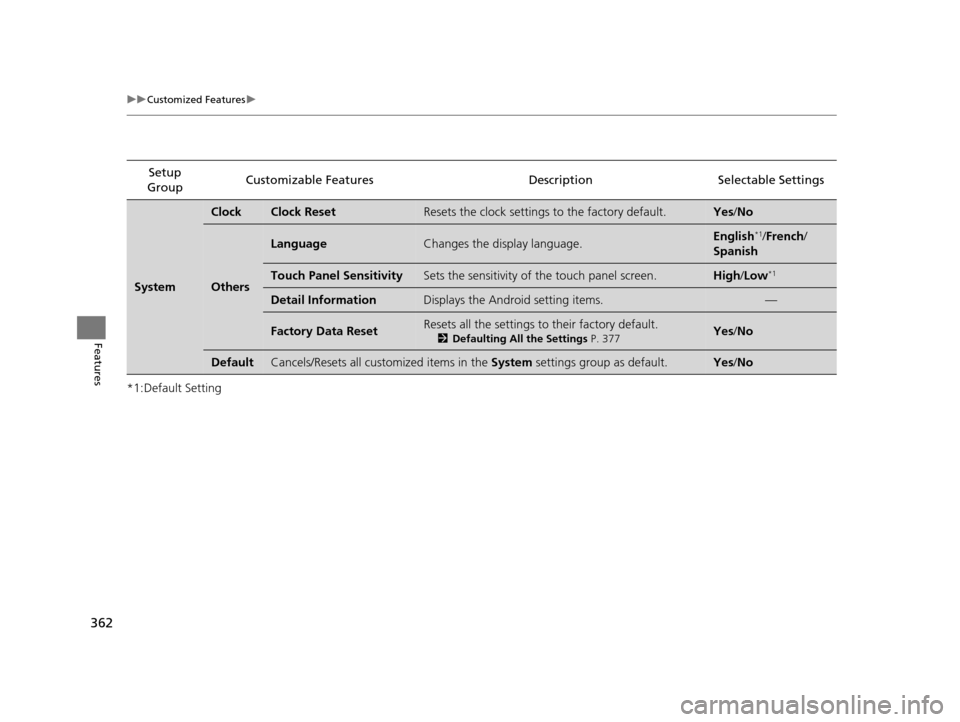
*1:Default SettingSetup
Group Customizable Features Description Selectable Settings
System
ClockClock ResetResets the clock settings to the factory default.Yes
/No
Others
LanguageChanges the display language.English*1/French /
Spanish
Touch Panel SensitivitySets the sensitivity of the touch panel screen.High/Low*1
Detail InformationDisplays the Android setting items.—
Factory Data ResetResets all the settings to their factory default.
2 Defaulting All the Settings P. 377Yes/No
DefaultCancels/Resets all customized items in the System settings group as default.Yes/No
16 PILOT-31TG76000.book 362 ページ 2015年6月15日 月曜日 午前11時30分
Page 374 of 661
373
uuCustomized Features u
Continued
Features
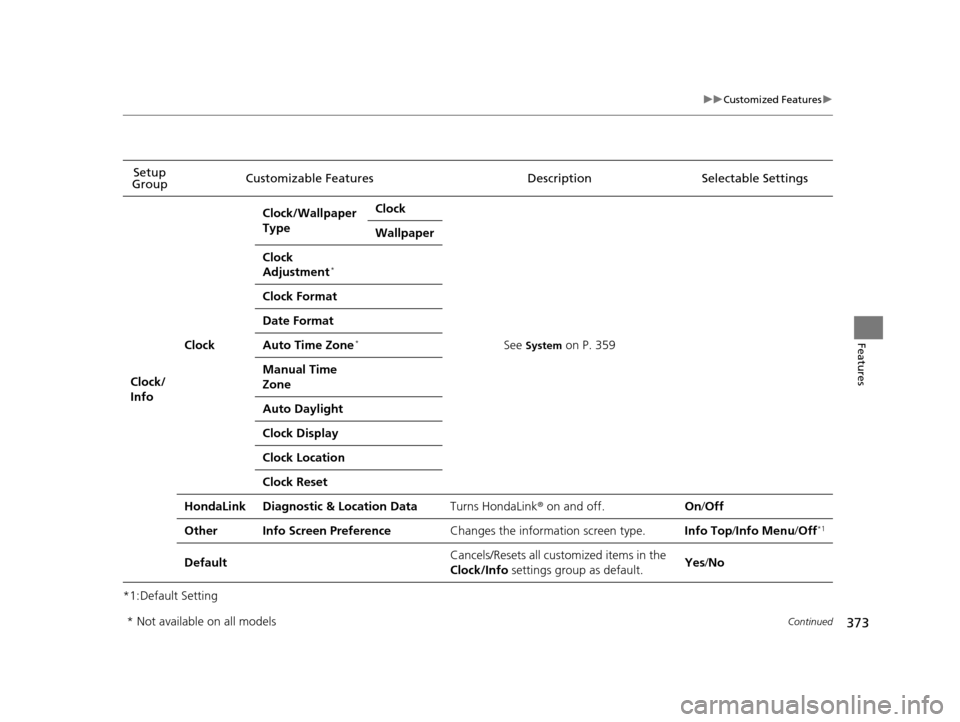
*1:Default SettingSetup
Group Customizable Features Description Selectable Settings
Clock/
Info
Clock
Clock/Wallpaper
TypeClock
See System on P. 359
Wallpaper
Clock
Adjustment*
Clock Format
Date Format
Auto Time Zone*
Manual Time
Zone
Auto Daylight
Clock Display
Clock Location
Clock Reset
HondaLinkDiagnostic & Location DataTurns HondaLink
® on and off.On /Off
OtherInfo Screen PreferenceChanges the information screen type.Info Top/ Info Menu /Off*1
DefaultCancels/Resets all cust omized items in the
Clock/Info settings group as default.Yes /No
* Not available on all models
16 PILOT-31TG76000.book 373 ページ 2015年6月15日 月曜日 午前11時30分
Page 573 of 661
uuMaintenance Under the Hood uEngine Coolant
572
Maintenance
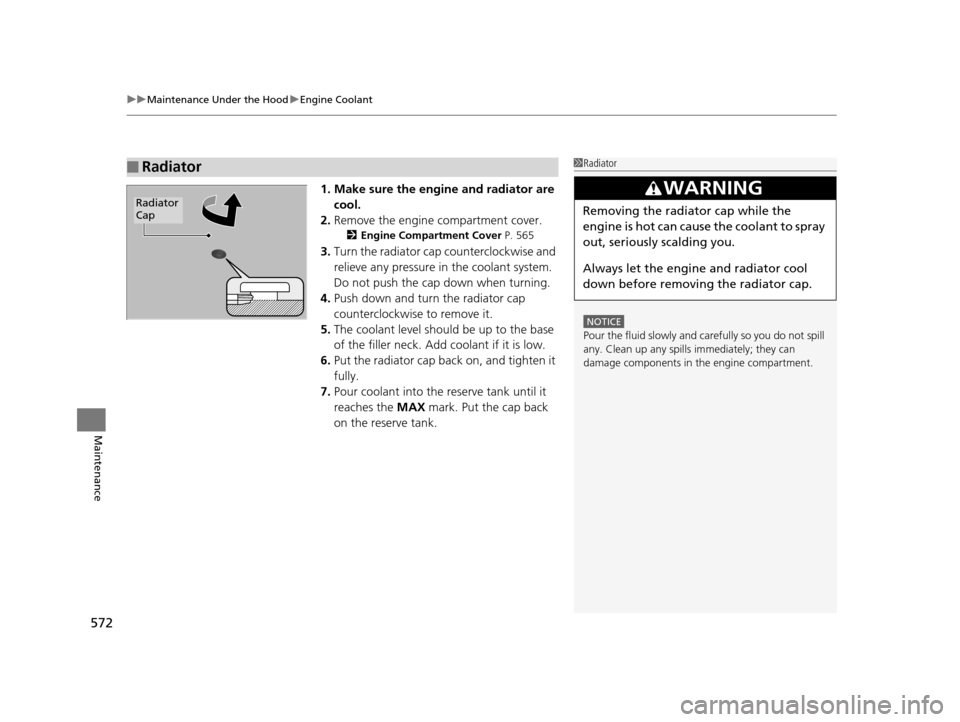
1. Make sure the engine and radiator are
cool.
2. Remove the engine compartment cover.
2 Engine Compartment Cover P. 565
3.Turn the radiator cap counterclockwise and
relieve any pressure in the coolant system.
Do not push the cap down when turning.
4. Push down and turn the radiator cap
counterclockwise to remove it.
5. The coolant level should be up to the base
of the filler neck. Add coolant if it is low.
6. Put the radiator cap back on, and tighten it
fully.
7. Pour coolant into the reserve tank until it
reaches the MAX mark. Put the cap back
on the reserve tank.
■Radiator1 Radiator
NOTICE
Pour the fluid slowly and ca refully so you do not spill
any. Clean up any spills immediately; they can
damage components in the engine compartment.
3WARNING
Removing the radiator cap while the
engine is hot can cause the coolant to spray
out, seriously scalding you.
Always let the engine and radiator cool
down before removing the radiator cap.Radiator
Cap
16 PILOT-31TG76000.book 572 ページ 2015年6月15日 月曜日 午前11時30分
Page 577 of 661
uuReplacing Light Bulbs uHeadlight Bulbs
576
Maintenance
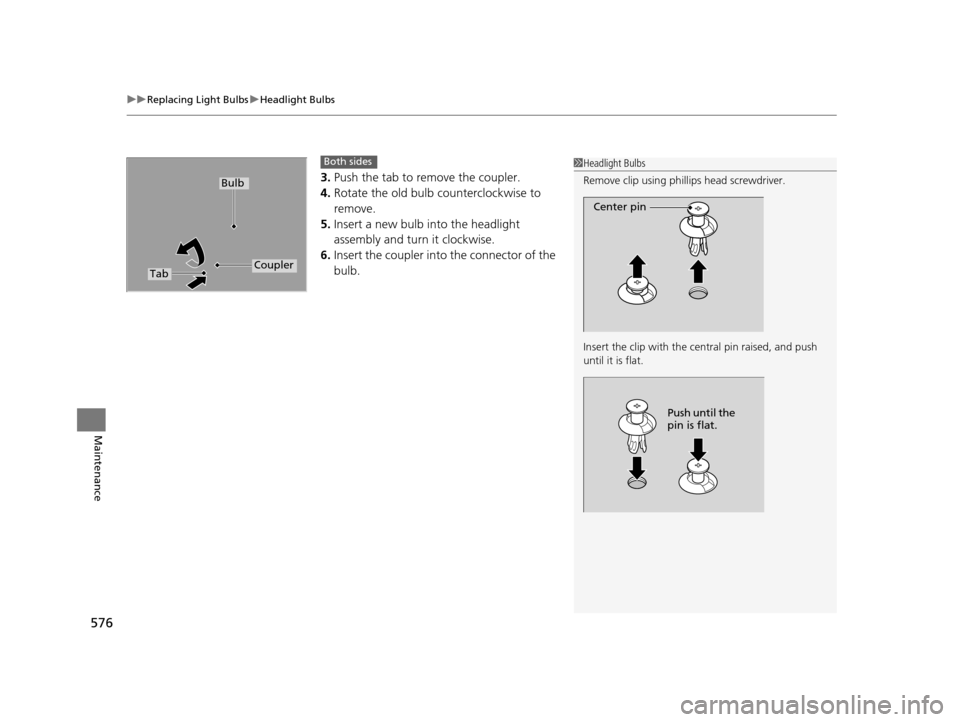
3. Push the tab to remove the coupler.
4. Rotate the old bulb counterclockwise to
remove.
5. Insert a new bulb into the headlight
assembly and turn it clockwise.
6. Insert the coupler into the connector of the
bulb.
1Headlight Bulbs
Remove clip using phillips head screwdriver.
Insert the clip with the central pin raised, and push
until it is flat.
Center pin
Push until the
pin is flat.
TabCoupler
Bulb
Both sides
16 PILOT-31TG76000.book 576 ページ 2015年6月15日 月曜日 午前11時30分
Page 578 of 661
577
uuReplacing Light Bulbs uDaytime Running Lights and Parking Lights
Maintenance
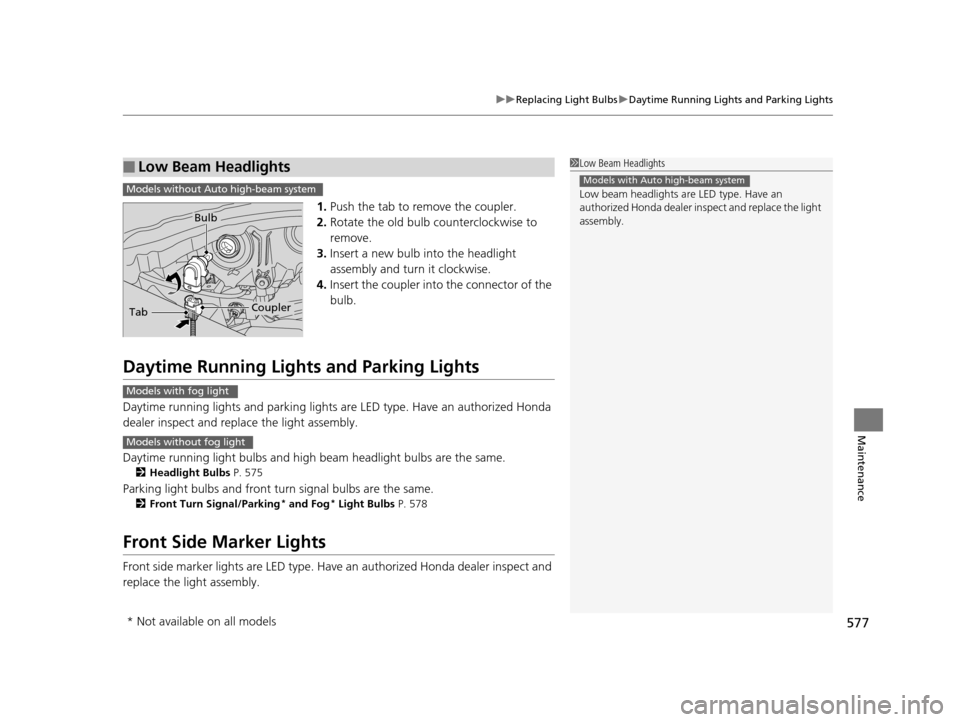
1. Push the tab to remove the coupler.
2. Rotate the old bulb counterclockwise to
remove.
3. Insert a new bulb into the headlight
assembly and turn it clockwise.
4. Insert the coupler into the connector of the
bulb.
Daytime Running Lights and Parking Lights
Daytime running lights and parking lights are LED type. Have an authorized Honda
dealer inspect and replace the light assembly.
Daytime running light bulbs and high beam headlight bulbs are the same.
2Headlight Bulbs P. 575
Parking light bulbs and front turn signal bulbs are the same.
2Front Turn Signal/Parking* and Fog* Light Bulbs P. 578
Front Side Marker Lights
Front side marker lights are LED type. Have an authorized Hond a dealer inspect and
replace the light assembly.
■Low Beam Headlights1 Low Beam Headlights
Low beam headlights are LED type. Have an
authorized Honda dealer in spect and replace the light
assembly.
Models with Auto high-beam systemModels without Auto high-beam system
TabCoupler
Bulb
Models with fog light
Models without fog light
* Not available on all models
16 PILOT-31TG76000.book 577 ページ 2015年6月15日 月曜日 午前11時30分
Page 579 of 661
578
uuReplacing Light Bulbs uFront Turn Signal/Parking* and Fog* Light Bulbs
Maintenance
Front Turn Signal/Parking* and Fog* Light Bulbs
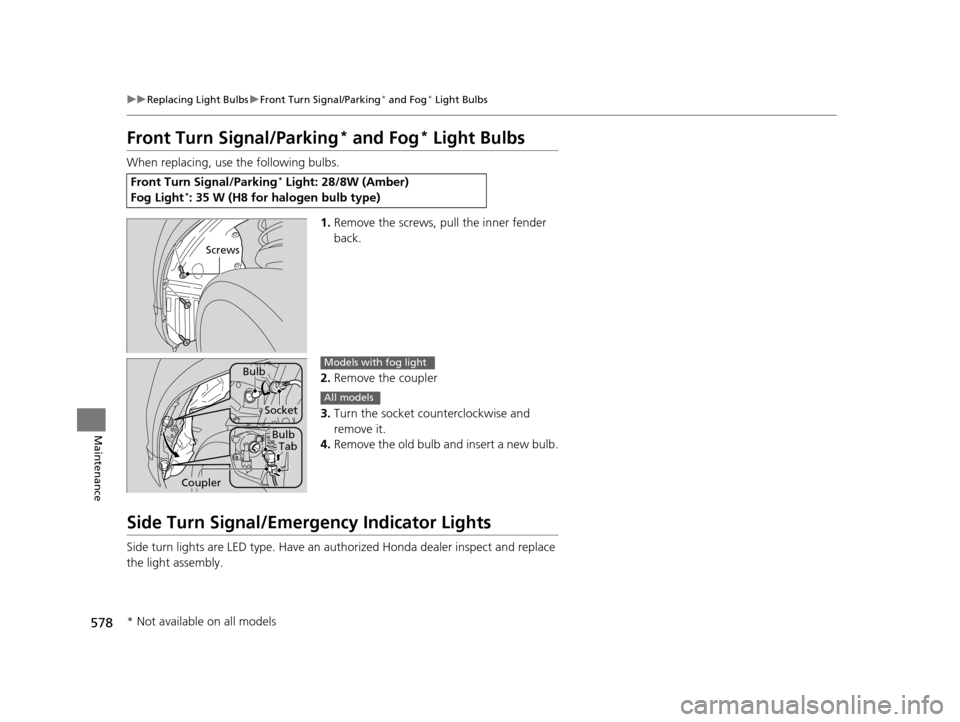
When replacing, use the following bulbs.
1.Remove the screws, pull the inner fender
back.
2. Remove the coupler
3. Turn the socket counterclockwise and
remove it.
4. Remove the old bulb and insert a new bulb.
Side Turn Signal/Emergency Indicator Lights
Side turn lights are LED type. Have an au thorized Honda dealer inspect and replace
the light assembly.
Front Turn Signal/Parking* Light: 28/8W (Amber)
Fog Light*: 35 W (H8 for halogen bulb type)
Screws
Bulb
Socket
BulbTab
Coupler
Models with fog light
All models
* Not available on all models
16 PILOT-31TG76000.book 578 ページ 2015年6月15日 月曜日 午前11時30分
Page 580 of 661
579
uuReplacing Light Bulbs uBrake Light and Turn Signal Light Bulbs
Maintenance
Brake Light and Turn Signal Light Bulbs
When replacing, use the following bulbs.
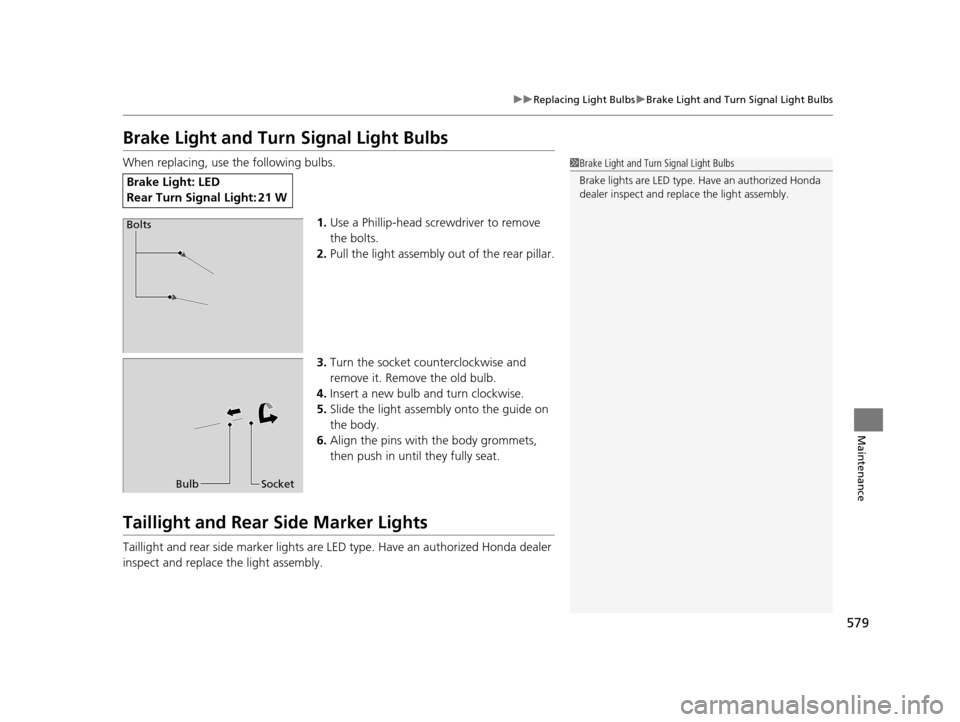
1.Use a Phillip-head screwdriver to remove
the bolts.
2. Pull the light assembly out of the rear pillar.
3. Turn the socket counterclockwise and
remove it. Remove the old bulb.
4. Insert a new bulb and turn clockwise.
5. Slide the light assembly onto the guide on
the body.
6. Align the pins with the body grommets,
then push in until they fully seat.
Taillight and Rear Side Marker Lights
Taillight and rear side marker lights are LE D type. Have an authorized Honda dealer
inspect and replace the light assembly.
Brake Ligh t: LED
Rear Turn Signal Light: 21 W
1 Brake Light and Turn Signal Light Bulbs
Brake lights are LE D type. Have an authorized Honda
dealer inspect and replace the light assembly.
Bolts
Bulb Socket
16 PILOT-31TG76000.book 579 ページ 2015年6月15日 月曜日 午前11時30分
Page 581 of 661
580
uuReplacing Light Bulbs uBack-Up Light
Maintenance
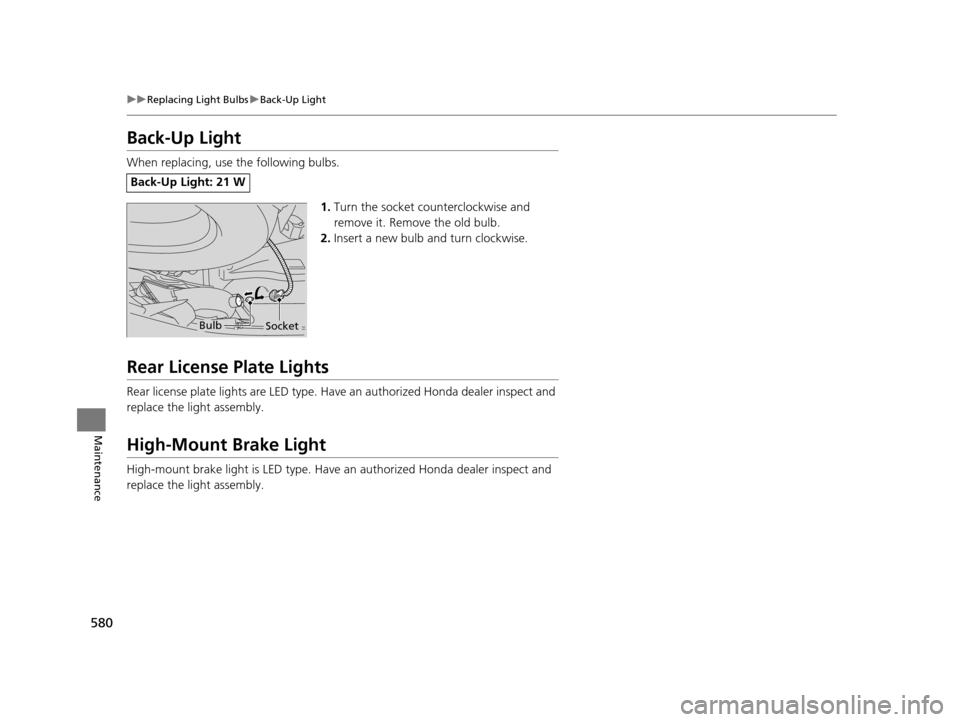
Back-Up Light
When replacing, use the following bulbs.
1.Turn the socket counterclockwise and
remove it. Remove the old bulb.
2. Insert a new bulb and turn clockwise.
Rear License Plate Lights
Rear license plate lights are LED type. Have an authorized Hond a dealer inspect and
replace the light assembly.
High-Mount Brake Light
High-mount brake light is LED type. Have an authorized Honda dealer inspect and
replace the light assembly.
Back-Up Light: 21 W
BulbSocket
16 PILOT-31TG76000.book 580 ページ 2015年6月15日 月曜日 午前11時30分
Page 595 of 661
594
Maintenance
Battery
Checking the Battery
The battery condition is being monitored by the sensor on the negative terminal.
If there is a problem with the sensor, the warning message on MID will let you know.
Have your vehicle checked by a dealer.
If your vehicle’s battery is disconnected or goes dead:
• The audio system is disabled.
2 Audio System Theft Protection P. 221
•The clock resets.
2 Clock P. 120
Charging the Battery
Disconnect both battery cables to prevent da maging your vehicle’s electrical system.
Always disconnect the negative (–) cable first, and reconnect it last.
1 Battery
WARNING: Battery post, terminals,
and related accessories contain lead
and lead compounds.
Wash your hands after handling.
When you find corrosion, cl ean the battery terminals
by applying a baking powder and water solution.
Clean the terminals with a damp towel. Cloth/towel
dry the battery. Coat the terminals with grease to
help prevent future corrosion.
When replacing the battery, the replacement must be
of the same specifications.
Please consult a dealer for more information.
3WARNING
The battery gives off explosive hydrogen
gas during normal operation.
A spark or flame can cause the battery to
explode with enough force to kill or
seriously hurt you.
When conducting any battery
maintenance, wear prot ective clothing and
a face shield, or have a skilled technician do
it.
16 PILOT-31TG76000.book 594 ページ 2015年6月15日 月曜日 午前11時30分