manual transmission HONDA PILOT 2016 3.G Owners Manual
[x] Cancel search | Manufacturer: HONDA, Model Year: 2016, Model line: PILOT, Model: HONDA PILOT 2016 3.GPages: 661, PDF Size: 37.79 MB
Page 23 of 661
22
Quick Reference Guide
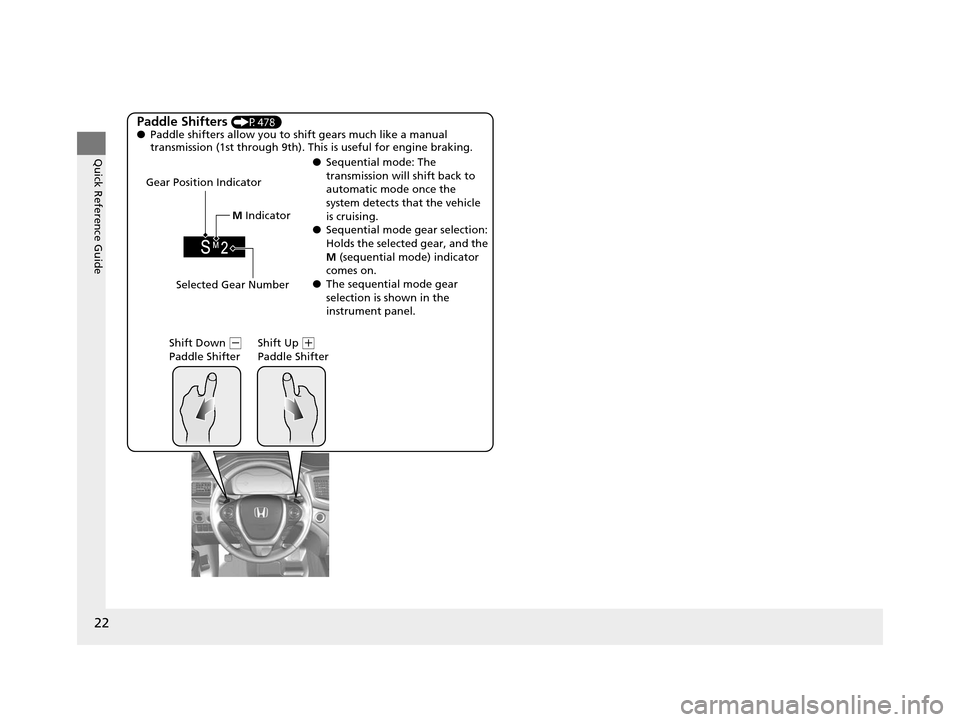
Paddle Shifters (P478)
● Paddle shifters allow you to shift gears much like a manual
transmission (1st through 9th). This is useful for engine braking.
● Sequential mode: The
transmission will shift back to
automatic mode once the
system detects that the vehicle
is cruising.
● Sequential mode gear selection:
Holds the selected gear, and the
M (sequential mode) indicator
comes on.
● The sequential mode gear
selection is shown in the
instrument panel.
Gear Position Indicator
Shift Down
(-
Paddle Shifter Shift Up (
+
Paddle Shifter
Selected Gear Number M
Indicator
16 PILOT-31TG76000.book 22 ページ 2015年6月15日 月曜日 午前11時30分
Page 81 of 661
80
uuIndicators u
Instrument Panel
IndicatorNameOn/BlinkingExplanationMessage
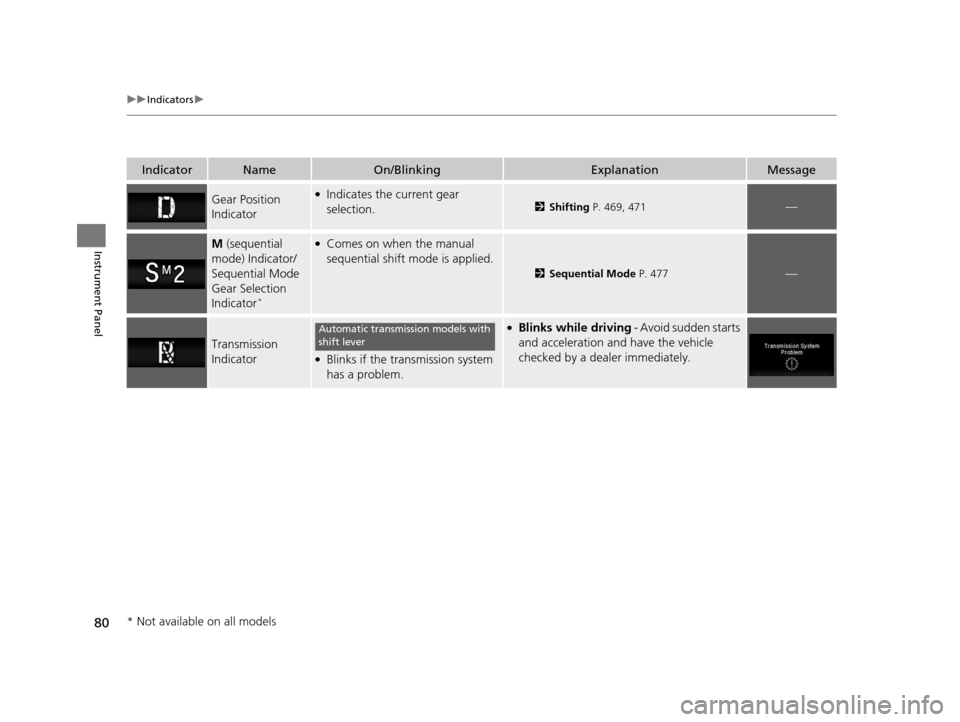
Gear Position
Indicator●Indicates the current gear
selection.2Shifting P. 469, 471—
M (sequential
mode) Indicator/
Sequential Mode
Gear Selection
Indicator
*
●Comes on when the manual
sequential shift mode is applied.
2 Sequential Mode P. 477—
Transmission
Indicator●Blinks if the transmission system
has a problem.
●Blinks while driving - Avoid sudden starts
and acceleration and have the vehicle
checked by a dealer immediately.Automatic transmission models with
shift lever
* Not available on all models
16 PILOT-31TG76000.book 80 ページ 2015年6月15日 月曜日 午前11時30分
Page 141 of 661
140
uuOpening and Closing the Tailgate uOpening/Closing the Power Tailgate*
Controls
Opening/Closing the Power Tailgate*
The power tailgate can be operated by pressing the power tailgate button on the
remote transmitter or driver's door, or pressing the button on the tailgate.
■The power tailgate can be opened when:
• The tailgate is fully closed.
• The transmission is in
(P.
• Press and hold the tailgat e button on the remote transmitter for about one
second when the power mode is in VEHICLE OFF (LOCK).
u If you have changed the Keyless Open Mode setting to When Unlocked ,
you need to unlock the tailgate before you press the tailgate button to open it.
2Customized Features P. 342
■The power tailgate can be closed when:
• The tailgate is fully open.
• Press and hold the tailgat e button on the remote transmitter for about one
second when the power mode is in VEHICLE OFF (LOCK).
1Opening/Closing the Power Tailgate*
NOTICE
Do not push or pull on the power tailgate when it is
being automatically opened or closed.
Forcibly opening or closing the power tailgate while
in operation can deform the tailgate frame.
The power tailgate may not open or close under the
following conditions:
•The vehicle is park ed on a steep hill.
•The vehicle is swayed in a strong wind.•The tailgate or the roof is covered with snow or ice.
If you close the power tail gate when all the doors are
locked, the power tailgate locks automatically.
If you replace the battery or the power tailgate fuse
while the tailgate is open, the power tailgate may be
disabled. The power tail gate resumes once you
manually close the tailgate and wait for about five
minutes.
Installing aftermarket com ponents other than Honda
genuine accessories on the power tailgate may
prevent it from fully opening or closing.
Make sure the power tailgate is fully open before you
get your luggage in and out.
Make sure the power tailgat e is fully closed before
you start the vehicle.
* Not available on all models
16 PILOT-31TG76000.book 140 ページ 2015年6月15日 月曜日 午前11時30分
Page 156 of 661
155
uuOperating the Switches Around the Steering Wheel uLight Switches
Continued
Controls
Light Switches
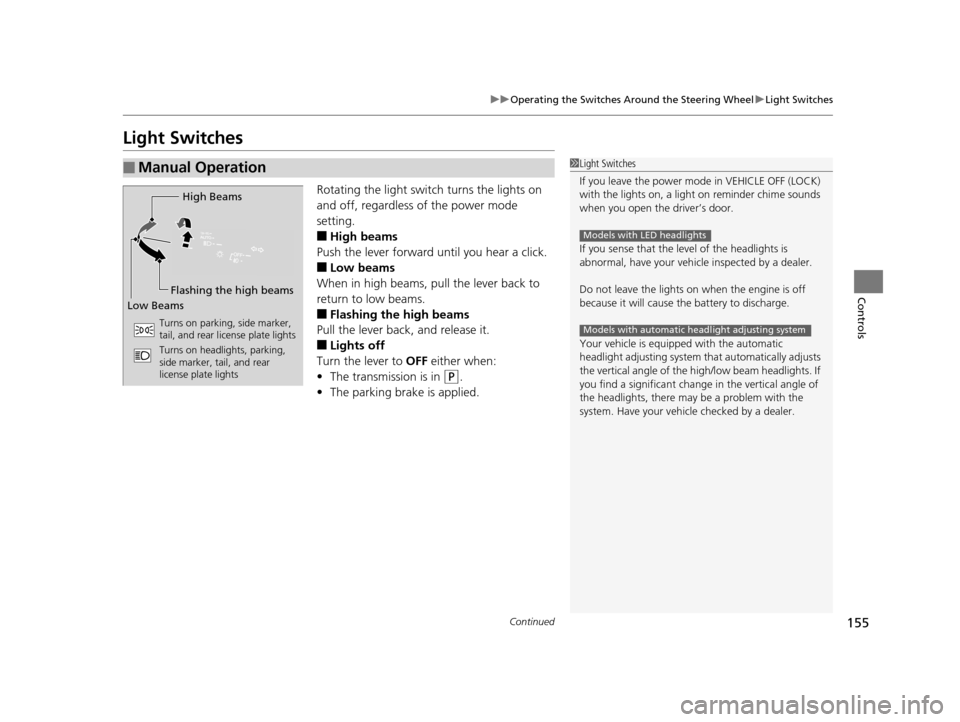
Rotating the light switch turns the lights on
and off, regardless of the power mode
setting.
■High beams
Push the lever forward until you hear a click.
■Low beams
When in high beams, pull the lever back to
return to low beams.
■Flashing the high beams
Pull the lever back, and release it.
■Lights off
Turn the lever to OFF either when:
• The transmission is in
(P.
• The parking brake is applied.
■Manual Operation1Light Switches
If you leave the power mode in VEHICLE OFF (LOCK)
with the lights on, a light on reminder chime sounds
when you open the driver’s door.
If you sense that the le vel of the headlights is
abnormal, have your vehicle inspected by a dealer.
Do not leave the lights on when the engine is off
because it will cause the battery to discharge.
Your vehicle is equipped with the automatic
headlight adjusting system that automatically adjusts
the vertical angle of the high/low beam headlights. If
you find a significant change in the vertical angle of
the headlights, there may be a problem with the
system. Have your vehicle checked by a dealer.
Models with LED headlights
Models with automatic headlight adjusting system
High Beams
Flashing the high beams
Low Beams
Turns on parking, side marker,
tail, and rear license plate lights
Turns on headlights, parking,
side marker, tail, and rear
license plate lights
16 PILOT-31TG76000.book 155 ページ 2015年6月15日 月曜日 午前11時30分
Page 302 of 661
301
uuAudio System Basic Operation uWi-Fi Connection
Continued
Features
Wi-Fi Connection
You can connect the display audio to the Internet using Wi-Fi and browse websites
or use online services on the audio/information screen. If your phone has cell
hotspot capabilities, the system can be tethered to the phone. Use the following
steps to setup.
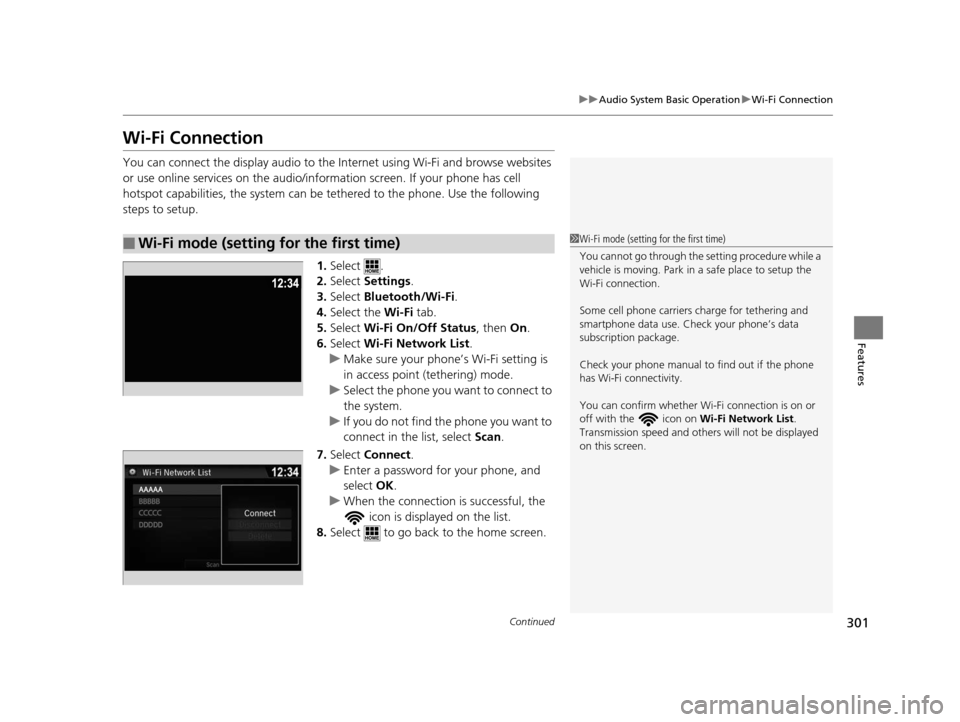
1.Select .
2. Select Settings .
3. Select Bluetooth/Wi-Fi .
4. Select the Wi-Fi tab.
5. Select Wi-Fi On/Off Status , then On.
6. Select Wi-Fi Network List .
u Make sure your phone’s Wi-Fi setting is
in access point (tethering) mode.
u Select the phone you want to connect to
the system.
u If you do not find the phone you want to
connect in the list, select Scan .
7. Select Connect .
u Enter a password for your phone, and
select OK .
u When the connection is successful, the
icon is displayed on the list.
8. Select to go back to the home screen.
■Wi-Fi mode (setting for the first time)1Wi-Fi mode (setting for the first time)
You cannot go through the setting procedure while a
vehicle is moving. Park in a safe place to setup the
Wi-Fi connection.
Some cell phone carriers charge for tethering and
smartphone data use. Check your phone’s data
subscription package.
Check your phone manual to find out if the phone
has Wi-Fi connectivity.
You can confirm whether Wi -Fi connection is on or
off with the icon on Wi-Fi Network List.
Transmission speed and others will not be displayed
on this screen.
16 PILOT-31TG76000.book 301 ページ 2015年6月15日 月曜日 午前11時30分
Page 475 of 661
uuWhen Driving uShifting
474
Driving
In freezing or sub-freezing conditions, the electronic gear selector response may be
slow.
Always depress the brake pedal before changing the gear position to
(P, and
confirm that
(P is shown on the gear position in dicator before releasing the brake.
■When opening the driver’s door
If you open the driver’s door under the following conditions, the gear position
automatically changes to
(P.
• The vehicle is stationary with the engine running, or moving at 1 mph (2 km/h) or
slower.
• The transmission is in other than
(P.
• You have unfastened the driver side seat belt.
u If you manually change the gear position from
(P with the brake pedal
depressed, the gear position will automatically return to
(P once you release
the brake pedal.
■When turning off the power mode
If you turn the engine off wh ile the vehicle is stationary, and the transmission is in
other than
(P, the gear position automatically changes to (P.
1 When opening the driver’s door
You should always select
(P before opening the
driver’s door.
Make sure to park the vehicle in a safe place. 2 When Stopped P. 540
If you want to drive the ve hicle after the gear position
has automatically changed to
( P under the described
conditions, close the door, fasten the seat belt,
depress the brake pedal, then change the gear
position.
If you leave the vehicle, tu rn off the engine and lock
the doors.
16 PILOT-31TG76000.book 474 ページ 2015年6月15日 月曜日 午前11時30分
Page 476 of 661
![HONDA PILOT 2016 3.G Owners Manual 475
uuWhen Driving uShifting
Continued
Driving
■If you want to keep the transmission in (N position [car wash mode]
With the engine running:
1. Press and hold the brake pedal.
2. Select
(N, then re](/img/13/6023/w960_6023-475.png "HONDA PILOT 2016 3.G Owners Manual 475
uuWhen Driving uShifting
Continued
Driving
■If you want to keep the transmission in (N position [car wash mode]
With the engine running:
1. Press and hold the brake pedal.
2. Select
(N, then re")
475
uuWhen Driving uShifting
Continued
Driving
■If you want to keep the transmission in (N position [car wash mode]
With the engine running:
1. Press and hold the brake pedal.
2. Select
(N, then release the button to display (Neutral) (N hold mode on the MID.
3. Press and hold
(N again for two seconds. At this point you can either:
u Leave the engine ru nning, the transmission remains in
(N.
u Or press the ENGINE STOP/START button to turn off the engine. The
Transmission remains in
(N.
In either case the transmission remains in
(N
for 15 minutes.
If the ENGINE STOP/START button is pressed
once, the power mode changes to ACCESSORY
and a message is displayed on the MID. u This puts the vehicle in car wash mode
which must be used when your vehicle is
pulled through a conveyor type
automatic car wash where you or an
attendant do not remain in the vehicle.
u The gear position remains in
(N with the
power mode in ACCESSORY for 15
minutes, then, it automatically changes to
(P and the power mode changes to OFF.
Manually changing to
(P cancels
ACCESSORY mode. The
(P indicator comes
on and the power mode changes to OFF. You
must always shift to
(P when car wash mode
is no longer needed.
16 PILOT-31TG76000.book 475 ページ 2015年6月15日 月曜日 午前11時30分
Page 638 of 661
637
Information
This chapter includes your vehicle’s specifications, locations of identification numbers, and other
information required by regulation.
Specifications.................................... 638
Identification Numbers Vehicle Identification Number (VIN), Engine Number and Transmission
Number ......................................... 640
Devices that Emit Radio Waves ....... 641
Reporting Safety Defects ................. 642Emissions Testing
Testing of Readiness Codes.............. 643
Warranty Coverages ........................ 645
Authorized Manuals ......................... 647
Customer Service Information ......... 648
16 PILOT-31TG76000.book 637 ページ 2015年6月15日 月曜日 午前11時30分
Page 654 of 661
653
Index
H
Handling the Unexpected....................... 605
HandsFreeLink ® (HFL) ...................... 381, 406
Automatic Import of Cellular Phonebook and Call History ................................... 395, 419
Caller’s ID Information ............................ 393
Displaying Messages ............................... 433
HFL Buttons .................................... 381, 406
HFL Menus...................................... 383, 409
HFL Status Display ........................... 382, 408
In Case of Emergency ............................. 437
Limitations for Manual Operation.... 382, 408
Making a Call ................................. 400, 427
Options During a Call...................... 405, 430
Phone Setup ................................... 387, 414
Phonebook Phonetic Modification........... 423
Receiving a Call............................... 404, 430
Receiving a Text Message/E-mail ............. 431
Ring Tone ....................................... 393, 418
Selecting a Mail Account......................... 432
Speed Dial ...................................... 396, 420
To Clear the System ................................ 394
To Set Up a Text Message/E-mail Options ................................................. 417
Hazard Warning Button .............................. 4
Hazard Warning Indicator ......................... 86
HD Radio
TM............................................... 265
HDMITM Port ............................................. 315
Head Restraints ........................ 179, 180, 181
Headlights ................................................ 155
Auto High-Beam System ......................... 159 Automatic Operation ............................... 156
Dimming ......................................... 155, 162
Operating ................................................ 155
Heated Door Mirrors ................................ 167
Heated Steering Wheel ............................ 200
Heated Windshield Button ...................... 167
Heater (Steering Wheel) .......................... 200
Heaters (Seat) ........................... 201, 202, 203
Heating and Cooling System ................... 205
Cooling ................................................... 207
Defrosting the Windshield and
Windows ............................................... 208
Heating ................................................... 206
HFL (HandsFreeLink ®)....................... 381, 406
High Beam Indicator .................................. 86
Hill Start Assist System ............................. 466
HomeLink® Universal Transceiver ............ 378
HondaLink® ............................................... 296
I
Identification Numbers ............................ 640
Engine and Transmission ......................... 640
Vehicle Identification ............................... 640
Illumination Control ................................. 166
Button ..................................................... 166
Immobilizer System .................................. 144
Indicator .................................................... 87
Indicators .................................................... 78
Adaptive Cruise Control (ACC) .................. 92
All-wheel drive (AWD) ............................... 89 Anti-lock Brake System (ABS)..................... 83
Auto high-beam system ............................ 87
Auto Idle-stop ........................................... 90
Auto Idle-stop System ............................... 90
Blind spot information (BSI) ............... 94, 519
Brake System (Amber) ............................... 78
Brake System (Red) ............................ 78, 626
Charging System ............................... 79, 624
Collision Mitigati
on Braking System
TM
(CMBSTM) ........................................... 95, 96
CRUISE CONTROL ............................. 88, 487
CRUISE MAIN .................................... 88, 486
ECON Mode .............................................. 94
Electric Power Steering (EPS) System .. 86, 626
Fog Lights ................................................. 87
Gear Position............................................. 80
Hazard Warning ........................................ 86
High Beam ................................................ 86
Immobilizer System ................................... 87
Lane Keeping Assist System (LKAS) .... 93, 509
Lights On .................................................. 87
Low Fuel ................................................... 82
Low Oil Pressure ................................ 79, 624
Low Tire Pressure/TPMS ..................... 86, 627
M (sequential mode) I ndicator/Sequential
Mode Gear Selection ............................... 80
Malfunction Indicator Lamp............... 79, 625
Parking Brake and Brake System ........ 78, 626
Road Departure Mitigation (RDM) ............. 91
Seat Belt Reminder .............................. 38, 82
Security System Alarm ............................... 88
16 PILOT-31TG76000.book 653 ページ 2015年6月15日 月曜日 午前11時30分