light HONDA PILOT 2016 3.G Quick Guide
[x] Cancel search | Manufacturer: HONDA, Model Year: 2016, Model line: PILOT, Model: HONDA PILOT 2016 3.GPages: 89, PDF Size: 5.82 MB
Page 33 of 89

58 || 59
AUDIO AND CONNECTIVITY
AUDIO AND CONNECTIVITY
Basic Audio Operation
Connect audio devices and operate buttons and displays for the audio sys\
tem.
USB Port
Connect a USB flash drive or other audio device, such as an iPod
® or iPhone®.
Install the flash drive or cable connector to the USB port.
Models with color audio system
The USB port is located inside the center console
and is for playing audio and/or charging devices.
Models with touchscreen
There are two USB ports in the front console: the
left port is for playing audio; the right port is for
playing audio and/or charging devices.
An additional port* is located inside the center
console. It can be used for playing audio and/or
charging devices.
There are additional ports* on the back of the
center console that can be used for charging only.
iPod and iPhone are trademarks of Apple, Inc. State or local laws may prohibit the operation
of handheld electronic devices while operating a vehicle.
*if equipped
AUDIO AND CONNECTIVITY
Learn how to operate the vehicle’s audio system.
USB audio play
and/or charging
USB audio
play
*if equipped
Accessory Power Socket Open the socket cover to use power when the
vehicle is on.
Power sockets are located in the front console,
inside the center console, and the rear cargo area*.
Do not insert an automotive type cigarette lighter element. This can ove\
rheat the
power socket.
NOTICE
AC Power Outlet*The outlet can supply power for appliances up to
115 volts that are rated 150 watts or less when the
engine is running.
1. Open the socket cover on the back of the center
console.
2. Slightly plug in the socket, turn it 90 degrees
clockwise, then push it in all the way.
Do not use the AC power outlet for electric appliances that require high\
initial
peak wattage, such as cathode-ray tube type televisions, refrigerators, \
electric
pumps, etc. It is not suitable for devices that process precise data, su\
ch as
medical equipment, and that require an extremely stable power supply, such as
microcomputer-controlled electric blankets, touch sensor lamps, etc.
NOTICE
Auxiliary Input JackConnect standard audio devices with a 1/8-inch
(3.5 mm) stereo miniplug.
1. Open the AUX cover.
2. Insert the miniplug attached to the audio device
into the jack. The audio system switches to
AUX mode. Use the device to control the audio.
Page 44 of 89
| 8180 | AUDIO AND CONNECTIVITY
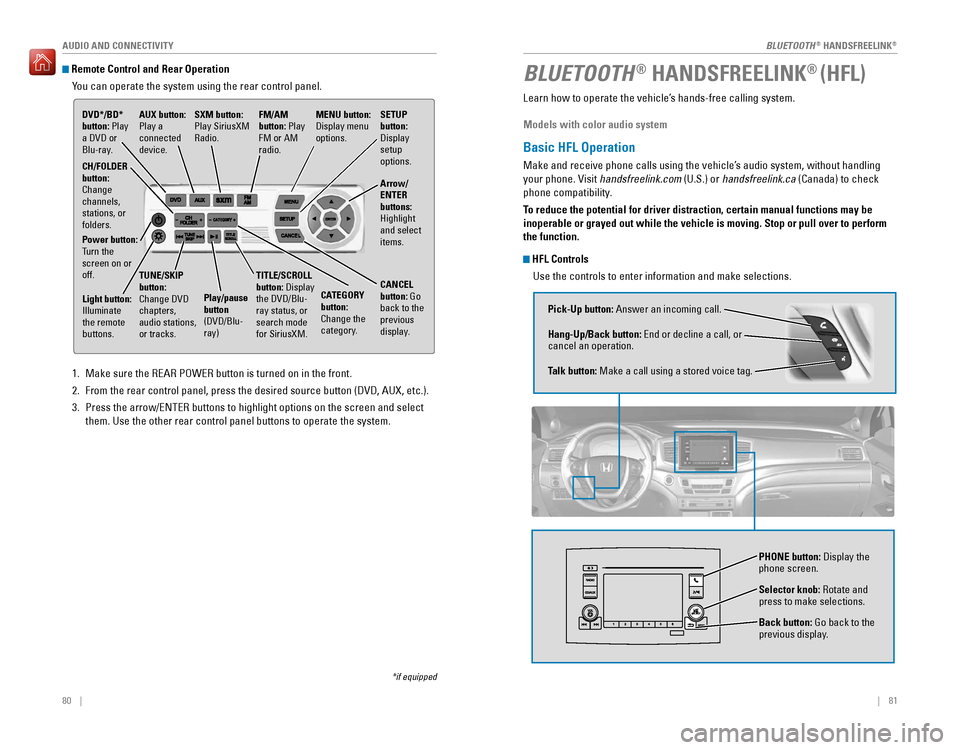
Remote Control and Rear OperationYou can operate the system using the rear control panel.
1. Make sure the REAR POWER button is turned on in the front.
2. From the rear control panel, press the desired source button (DVD, AUX,\
etc.).
3. Press the arrow/ENTER buttons to highlight options on the screen and sel\
ect
them. Use the other rear control panel buttons to operate the system.
DVD*/BD*
button: Play
a DVD or
Blu-ray.
CATEGORY
button:
Change the
category.
SXM button:
Play SiriusXM
Radio.
FM/AM
button: Play
FM or AM
radio.MENU button:
Display menu
options.
SETUP
button:
Display
setup
options.
Arrow/
ENTER
buttons:
Highlight
and select
items.
CH/FOLDER
button:
Change
channels,
stations, or
folders.
Power button:
Turn the
screen on or
off.
Light button:
Illuminate
the remote
buttons. TUNE/SKIP
button:
Change DVD
chapters,
audio stations,
or tracks.
Play/pause
button
(DVD/Blu-
ray)TITLE/SCROLL
button: Display
the DVD/Blu-
ray status, or
search mode
for SiriusXM.
CANCEL
button: Go
back to the
previous
display.
*if equipped
AUX button:
Play a
connected
device.
Learn how to operate the vehicle’s hands-free calling system.
Models with color audio system
Basic HFL Operation
Make and receive phone calls using the vehicle’s audio system, without handling
your phone. Visit handsfreelink.com (U.S.) or handsfreelink.ca (Canada) to check
phone compatibility.
To reduce the potential for driver distraction, certain manual functions \
may be
inoperable or grayed out while the vehicle is moving. Stop or pull over \
to perform
the function.
HFL Controls
Use the controls to enter information and make selections.
BLUETOOTH® HANDSFREELINK® (HFL)
Pick-Up button: Answer an incoming call.
Hang-Up/Back button: End or decline a call, or
cancel an operation.
Talk button: Make a call using a stored voice tag.
Selector knob: Rotate and
press to make selections.
Back button: Go back to the
previous display.
PHONE button: Display the
phone screen.
BLUETOOTH® HANDSFREELINK®
BLUETOOTH® HANDSFREELINK®
Page 46 of 89
84 || 85
Models with touchscreen
Basic HFL Operation
Make and receive phone calls using the vehicle’s audio system, without handling
your phone. Visit handsfreelink.com (U.S.) or handsfreelink.ca (Canada) to check
phone compatibility.
To reduce the potential for driver distraction, certain manual functions \
may be
inoperable or grayed out while the vehicle is moving. Stop or pull over \
to perform
the function. Voice commands are also available.
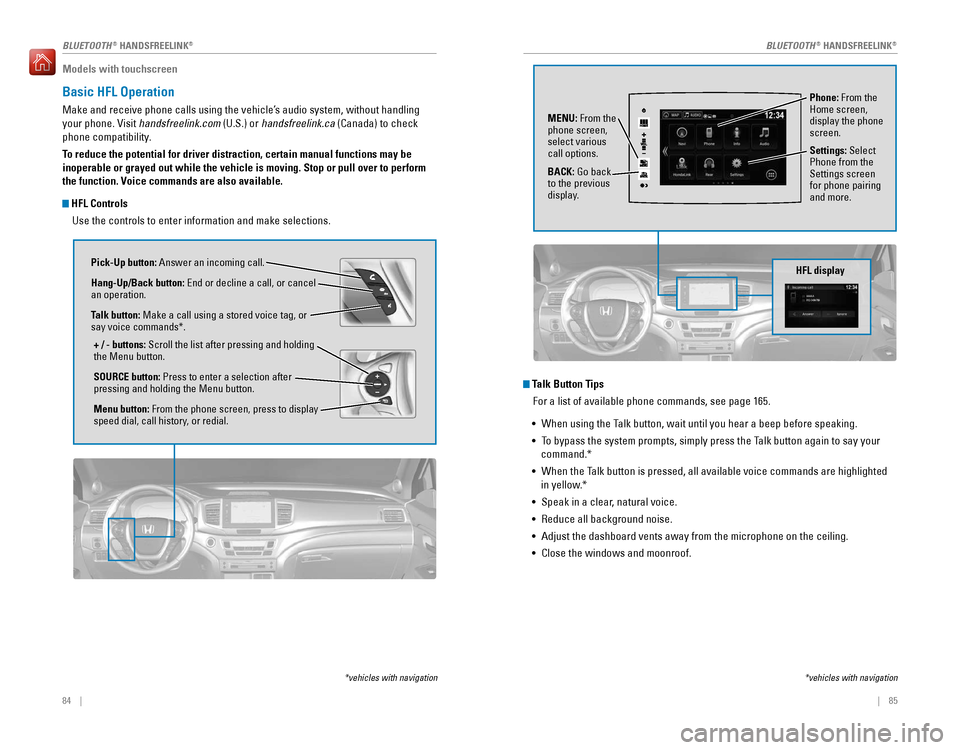
HFL Controls
Use the controls to enter information and make selections.
Pick-Up button: Answer an incoming call.
Hang-Up/Back button: End or decline a call, or cancel
an operation.
Talk button: Make a call using a stored voice tag, or
say voice commands*.
+ / - buttons: Scroll the list after pressing and holding
the Menu button.
SOURCE button: Press to enter a selection after
pressing and holding the Menu button.
Menu button: From the phone screen, press to display
speed dial, call history, or redial.
*vehicles with navigation
Talk Button Tips For a list of available phone commands, see page 165.
• When using the Talk button, wait until you hear a beep before speaking.
• To bypass the system prompts, simply press the Talk button again to say your
command.*
• When the Talk button is pressed, all available voice commands are highlighted
in yellow.*
• Speak in a clear, natural voice.
• Reduce all background noise.
• Adjust the dashboard vents away from the microphone on the ceiling.
• Close the windows and moonroof.
Phone: From the
Home screen,
display the phone
screen.
MENU: From the
phone screen,
select various
call options.
BACK: Go back
to the previous
display. Settings: Select
Phone from the
Settings screen
for phone pairing
and more.
*vehicles with navigation
HFL display
AAAAA012-3456789AAAAA
012-3456789
BLUETOOTH® HANDSFREELINK®BLUETOOTH® HANDSFREELINK®
Page 53 of 89
98 || 99
DRIVING
DRIVING
DRIVING
Learn about preparation for driving, as well as other features.
Before Driving
Check the following items before you begin driving.
Exterior Checks
• Make sure there are no obstructions on the windows, door mirrors, exterior
lights, or other parts of the vehicle.
• Remove any frost, snow, or ice.
• Make sure the hood is securely closed.
• Heat from the engine and exhaust can ignite flammable materials left u\
nder
the hood, causing a fire. If you’ve parked your vehicle for an exte\
nded period,
inspect and remove any debris that may have collected, such as dried grass
and leaves that have fallen or have been carried in for use as a nest by\
a small
animal. Also check under the hood for leftover flammable materials aft\
er you or
someone else has performed maintenance on your vehicle.
• Make sure the tires are in good condition.
• Make sure there are no people or objects behind or around the vehicle.
Interior Checks
• Store or secure all items on board properly.
• Do not pile items higher than the seat height.
• Do not place anything in the front seat footwells. Make sure to secure t\
he floor
mats.
• If you have any animals on board, do not let them move freely around in \
the
vehicle.
• Securely close and lock all doors and the tailgate.
• Adjust your seating position, mirrors, and steering wheel properly.
• Make sure items placed on the floor behind the front seats cannot roll\
under the
seats.
• Everyone in the vehicle must fasten their seat belt.
• Make sure that the indicators in the instrument panel come on when you s\
tart
the vehicle, and go off soon after.
If the doors are frozen shut, use warm water around the door edges to me\
lt any
ice. Do not try to force them open, as this can damage the rubber trim a\
round the
doors. When done, wipe dry to avoid further freezing.
NOTICE
Improper accessories or modifications can affect your vehicle’s handling, and
stability, and performance, and cause a crash in which you can be seriously
hurt or killed.
Follow all instructions in the vehicle owner’s manual regarding accessories
and modifications.
WARNING
In addition:
• During the first 600 miles (1,000 km) of operation, avoid sudden acc\
eleration or
full throttle operation so as to not damage the engine or powertrain.
• Avoid hard braking for the first 200 miles (300 km). You should also follow this
when the brake pads are replaced.
Driving Guidelines for Your Utility Vehicle
Utility vehicles have a significantly higher rollover rate than other \
types of
vehicles.
To prevent rollovers or loss of control:
• Take corners at slower speeds than you would with a passenger vehicle.
• Avoid sharp turns and abrupt maneuvers whenever possible.
• Do not modify your vehicle in any way that you would raise the center of\
gravity.
• Do not carry heavy cargo on the roof.
• Never carry more than 165 lbs (75 kg) of cargo on the roof rack (Hond\
a
accessory).
Your vehicle has been designed primarily for use on pavement, however, its higher
ground clearance allows you to occasionally travel on unpaved roads. It \
is not
designed for trail-blazing, or other challenging off-road activities.
If you decide to drive on unpaved roads, you will find that it require\
s somewhat
different driving skills and that your vehicle will handle somewhat diff\
erently than
it does on pavement. Pay attention to the precautions and tips in this s\
ection, and
get acquainted with your vehicle before leaving the pavement.
Improperly operating this vehicle on or off pavement can cause a crash o\
r
rollover in which you and your passengers can be seriously injured or ki\
lled.
• Follow all instructions and guidelines in this owner’s guide.
• Keep your speed low, and don’t drive faster than conditions permit.
WARNING
Page 54 of 89

100 || 101
DRIVING
DRIVING
Maximum Load Limit
Carrying too much cargo or improperly storing it can affect your vehicle\
’s handling,
stability, stopping distance, and tires, and make it unsafe.
Maximum Load for Your Vehicle
LX, EX, and EX-L with AWD
The maximum load for your vehicle is 1340 lbs (608 kg).
Touring and Elite with AWD
The maximum load for your vehicle is 1173 lbs (532 kg).
All other models
See the Tire and Loading Information label on the driver’s doorjamb.
Label example
The headlight aim on your vehicle was set by the factory, and does not need to be
adjusted. However, if you regularly carry heavy items in the cargo area or tow a
trailer, have the aiming readjusted at your dealer or by a qualified technici\
an. Overloading or improper loading can affect handling and stability and ca\
use a
crash in which you can be hurt or killed.
Follow all load limits and other loading guidelines in this guide.
WARNING
This figure includes the total weight of all occupants, cargo, and
accessories, and the tongue load if you are towing a trailer. Below are the
steps for determining the correct load limit:
1. Locate the statement “The combined weight of occupants and cargo
should never exceed XXX kg or XXX lbs.” on your vehicle’s placard.
2. Determine the combined weight of the driver and passengers that will be \
riding in your vehicle.
3. Subtract the combined weight of the driver and passengers from XXX kg
or XXX lbs.
4. The resulting figure equals the available amount of cargo and luggage \
load capacity. For example, if the “XXX” amount equals 1,400 lbs. and
there will be five 150 lb. passengers in your vehicle, the amount of
available cargo and luggage load capacity is 650 lbs. (1,400 - 750 (5 \
x 150)
= 650 lbs.)
5. Determine the combined weight of luggage and cargo being loaded on
the vehicle. That weight may not safely exceed the available cargo and
luggage load capacity calculated in step 4.
6. If your vehicle will be towing a trailer, load from your trailer will be
transferred to your vehicle. Consult the Owner’s Manual on the Owner
Information CD or at owners.honda.com (U.S.) or myhonda.ca (Canada)
to determine how this reduces the available cargo and luggage load
capacity of your vehicle.
In addition, the total weight of the vehicle, all occupants, accessories\
,
cargo, and trailer tongue load must not exceed the Gross Vehicle Weight
Rating (GVWR) or the Gross Axle Weight Rating (GAWR). Both are on a label
on the driver’s doorjamb.
Load limits exampl e
Example 1
Max load
1,173 lbs (532 kg ) Passenger weight
150 lbs x 2 = 300 lbs (68 kg x 2 = 136 kg) Cargo
weight
873 lbs
(396 kg)
Example 2 Max load
1,173 lbs (532 kg ) Passenger weight
150 lbs x 5 = 750 lbs
(68 kg x 5 = 340 kg )Cargo weight
423 lbs
(192 kg )
Page 57 of 89
106 || 107
DRIVING
DRIVING
Remote Engine Start*
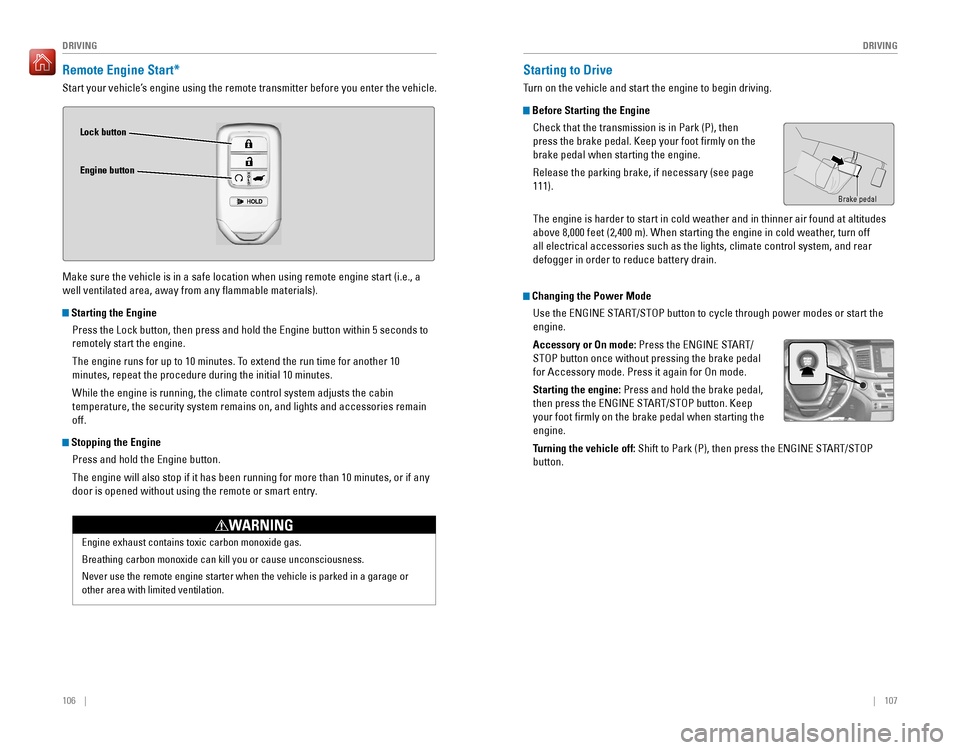
Start your vehicle’s engine using the remote transmitter before you enter the vehicle.
Make sure the vehicle is in a safe location when using remote engine start (i.e., a
well ventilated area, away from any flammable materials).
Starting the Engine
Press the Lock button, then press and hold the Engine button within 5 se\
conds to
remotely start the engine.
The engine runs for up to 10 minutes. To extend the run time for another 10
minutes, repeat the procedure during the initial 10 minutes.
While the engine is running, the climate control system adjusts the cabi\
n
temperature, the security system remains on, and lights and accessories remain
off.
Stopping the EnginePress and hold the Engine button.
The engine will also stop if it has been running for more than 10 minute\
s, or if any
door is opened without using the remote or smart entry.
Engine exhaust contains toxic carbon monoxide gas.
Breathing carbon monoxide can kill you or cause unconsciousness.
Never use the remote engine starter when the vehicle is parked in a gara\
ge or
other area with limited ventilation.
WARNING
Lock button
Engine button
Starting to Drive
Turn on the vehicle and start the engine to begin driving.
Before Starting the EngineCheck that the transmission is in Park (P), then
press the brake pedal. Keep your foot firmly on the
brake pedal when starting the engine.
Release the parking brake, if necessary (see page
111).
Brake pedal
The engine is harder to start in cold weather and in thinner air found a\
t altitudes
above 8,000 feet (2,400 m). When starting the engine in cold weather, turn off
all electrical accessories such as the lights, climate control system, a\
nd rear
defogger in order to reduce battery drain.
Changing the Power ModeUse the ENGINE START/STOP button to cycle through power modes or start the
engine.
Accessory or On mode: Press the ENGINE START/
STOP button once without pressing the brake pedal
for Accessory mode. Press it again for On mode.
Starting the engine: Press and hold the brake pedal,
then press the ENGINE START/STOP button. Keep
your foot firmly on the brake pedal when starting the
engine.
Turning the vehicle off: Shift to Park (P), then press the ENGINE START/STOP
button.
Page 59 of 89

110 || 111
DRIVING
DRIVING
Sequential Mode*
Use the paddle shifters to change gears without removing your hands from\
the
steering wheel.
When the transmission is in D: Press D/S once. The vehicle goes into sequential
shift mode momentarily, and the gear selection indicator comes on. When
you start traveling at a constant speed, sequential mode and the gear po\
sition
indicator automatically go off.
When the transmission is in S: Press D/S twice. The vehicle goes into sequential
mode, and the M (sequential mode) indicator and gear selection indicat\
or come
on. Use the paddle shifters to change gears.
To cancel this mode, hold the + paddle shifter for two seconds or press D\
/S again.
The M indicator and gear selection indicator go off.
(-) Paddle shifter:
Pull to shift down to
a lower gear. (+) Paddle shifter:
Pull to shift up to a
higher gear.
Recommended shift points
M indicator/gear position indicator
Shift up
Normal acceleration1st to 2n d15 mph (24 km/h)
2nd to 3r d2 5 mph (40 km/h)
3rd to 4th40 mph (64 km/h)
4th to 5t h4 7 mph (76 km/h)
5th to 6th52 mph (84 km/h)
6th to 7t h5 7 mph (92 km/h)
7th to 8th62 mph (100 km/h)
8th to 9th 67 mph (108 km/h)
Braking
Slow down or stop your vehicle, and keep it from moving when parked.
Foot Brake
Press the brake pedal to slow down or stop your
vehicle from moving.
Parking BrakeKeep the vehicle from moving when it is parked.
To apply: Press the parking brake with your foot.
To release: Press the brake pedal, then press the
parking brake until it releases.
Brake pedal
Parking brake
The ABS may not function correctly if you use an incorrect tire type and\
size.
NOTICE
Brake Assist System During hard or emergency braking, the system increases braking force. The brake
pedal may move slightly or make a noise; this is normal. Continue to hol\
d the brake
pedal firmly down.
Anti-Lock Brake System (ABS) During hard or emergency braking, the system rapidly pumps the brakes to
prevent wheel lockup and help you maintain steering control. The brake p\
edal may
pulsate slightly during ABS operation; this is normal. Do not pump the b\
rake pedal,
and continue to hold it firmly down.
Release the parking brake fully before driving. The rear brakes and axle\
can be
damaged if you drive with the parking brake applied.
NOTICE
Page 60 of 89

112 || 113
DRIVING
DRIVING
*if equipped
Intelligent Traction Management System*
Adjusts vehicle handling performance while driving on various road surfa\
ces.
Press the Mode button to select one of four
appropriate modes. The mode you select appears on
the MID.
Normal: Provides balanced driving performance on
most road surfaces.
Snow: Use when driving on snowy road surfaces.
Mud*: Use when driving on muddy roads or off-road
surfaces.
Sand*: Use when driving on soft, sandy road or off-
road surfaces.
Cruise control/adaptive cruise control* is not available
when Snow, Mud, or Sand is selected.
Selected mode
Mode button
Auto Idle Stop*
Automatically stops and restarts the engine to help maximize fuel econom\
y,
depending on environmental and vehicle conditions.
Activating Auto Idle Stop
When the vehicle stops with the gear position in
Drive (D) and the brake pedal is pressed, the engine
turns off and the auto idle stop indicator appears if
conditions permit.
When you release the brake pedal, turn the steering
wheel, or press the accelerator pedal, the engine
restarts and the vehicle begins to move.
Auto idle stop does not activate (or the engine may automatically resta\
rt) when
the driver’s seat belt is unfastened, the vehicle is stopped on a steep hill, the
windshield defroster is on, and other conditions.
Turning the System On or OffPress the Auto Idle Stop Off button to turn the
system off. The amber auto idle stop indicator
comes on. Press the button again to turn it on.
*if equipped
Eco Assist System
Can help improve your fuel economy by adjusting the performance of the e\
ngine,
climate control system, and cruise control.
ECON ButtonPress the ECON button to turn the system on or off.
The ECON Mode indicator appears when the system
is turned on.
Ambient MeterColor-coded bars around the speedometer change
based on your driving style and brake or accelerator
pedal operation.
Green: Fuel efficient driving
Light green: Moderate acceleration/deceleration
White: Aggressive acceleration/deceleration
Vehicle Stability Assist (VSA®), aka Electronic Stability Control
(ESC) System
Helps to stabilize the vehicle during cornering if the vehicle turns mor\
e or less
than what was intended. It assists in maintaining traction on slippery s\
urfaces by
regulating engine output and selectively applying the brakes.
Turning VSA On or Off
VSA is turned on every time you start the engine,
even if you previously turned it off. If you turn VSA
off, your vehicle has normal braking and cornering
ability, but traction and stability enhancement
become less effective.
Press and hold the VSA OFF button until you hear a
beep to turn VSA on or off. The VSA OFF indicator
appears when the system is off.
Traction control stops functioning, which may make it easier when trying to free
your vehicle if it is stuck in mud or snow.
VSA OFF indicator
Ambient meter
Page 64 of 89
*
Can assist you when there is a possibility of your vehicle colliding wit\
h a vehicle or a
pedestrian detecte")
120 || 121
DRIVING
DRIVING
Collision Mitigation Braking System™ (CMBS™)*
Can assist you when there is a possibility of your vehicle colliding wit\
h a vehicle or a
pedestrian detected in front of yours.
The system can give you visual, audible, and tactile
alerts when a potential collision is determined, and
reduce your vehicle speed to help minimize collision
severity when a collision is deemed unavoidable.
When a potential collision with a detected oncoming
vehicle is determined, the system also alerts you with
rapid vibrations on the steering wheel.
The system activates when:
• The speed difference between your vehicle and a vehicle or pedestrian de\
tected
in front of you is about 3 mph (5 km/h) and over with a chance of a co\
llision.
• Your vehicle speed is about 62 mph (100 km/h) or less and there is a ch\
ance of a
collision with an oncoming detected vehicle or a pedestrian in front of \
you.
Changing Settings
Determine the warning timing.
1. From the HOME screen, select Settings.
2. Select Vehicle. The vehicle must be in Park (P).
3. Select Forward Collision Warning Distance.
4. Select Long, Normal, or Short.
5. Press BACK to exit the menu.
*if equipped
Alert StagesThe system has three alert stages for a possible collision. Depending on\
the
circumstances or CMBS settings, CMBS may not go through all of the stage\
s
before initiating the last stage.
Stage 1: Visual and audible warning, steering wheel vibrations
Stage 2: Visual and audible warning and light brake application
Stage 3: Visual and audible warning and strong brake application
Beep
Steering vibrationsImportant Safety Reminder
CMBS is designed to reduce the severity of an unavoidable collision. It \
does not
prevent collisions nor stop the vehicle automatically. It is still your responsibility to
operate the brake pedal and steering wheel appropriately according to th\
e driving
conditions.
Turning CMBS On or OffPress and hold the CMBS OFF button. A beep sounds
and a message appears in the MID. The CMBS
indicator appears when the system is off.
CMBS OFF
button
Parking Sensor System*
When the system senses an object when you are parking or backing up, ind\
icators
appear on the display and a series of beeps will sound.
Turning the System On or OffPress the parking sensor button to turn the system
on or off. A green indicator light appears on the
button when the system is on.
Screen indicators
*if equipped
Page 66 of 89
, a real-time image of the area behind \
your vehicle is
shown in the display, along with helpful parkin")
124 || 125
DRIVING
DRIVING
Multi-View Rear Camera*
When you shift into Reverse (R), a real-time image of the area behind \
your vehicle is
shown in the display, along with helpful parking guidelines.
Wide view Normal viewTop down view
Press the selector knob (color audio system) or touch icons on the scr\
een (touchscreen) to toggle between views.
Changing Settings
Turn the guidelines on or off. Use the interface dial to make and enter s\
elections.
Models with color audio system
1. Press the MENU/CLOCK button.
2. Select Settings.
3. Select Rear Camera.
4. Select Camera Guidelines.
5. Select On or Off.
6. Press the Back button to exit the menus.
*if equipped The rear camera view is restricted. You cannot see the corner ends of the bumper or what is
underneath the bumper. Its unique lens also makes objects appear closer or farther than they \
actually are.
Visually confirm that it is safe to drive before backing up. Certain c\
onditions (such as weather,
lighting, and high temperatures) may also restrict the rear view. Do not rely on the rearview display,
which does not give you all information about conditions at the rear of \
your vehicle.
Models with touchscreen
1. From the HOME screen, select Settings.
2. Select Camera.
3. Select one of the options.
Fixed Guidelines: Guidelines appear when you
change the gear to Reverse. Select On or Off.
Dynamic Guidelines: Guidelines move as you turn
the steering wheel. Select On or Off.
4. Press BACK to exit the menu.