phone HONDA PILOT 2016 3.G Quick Guide
[x] Cancel search | Manufacturer: HONDA, Model Year: 2016, Model line: PILOT, Model: HONDA PILOT 2016 3.GPages: 89, PDF Size: 5.82 MB
Page 45 of 89

82 || 83
Models with color audio system
Pairing a Phone
To use hands-free phone and streaming audio functions, you must first p\
air your
phone to the system. This can only be done when the vehicle is stopped. \
Use the
selector knob to make and enter selections.
Pairing the First Phone
1. Press the Phone button to go to the Phone
screen. A prompt appears. Select Yes.
2. Make sure your phone is in discovery mode.
Select OK.
3. The system searches for your phone. Select your
phone when it appears on the list.
If your phone does not appear:
Select Phone Not Found and search for
HandsFreeLink from your phone. Connect to HFL.
4. The system gives you a pairing code. Compare it
to the code that appears on your phone. Connect
to HFL from your phone.
Pairing an Additional Phone
1. Press the Phone button to go to the Phone
screen. If a prompt appears asking to connect to
a phone, select No.
2. Select Phone Setup.
3. Select Bluetooth Setup.
4. Select Add New Device.
5. Make sure your phone is in discovery mode.
Select OK.
6. The system searches for your phone. Select it
when it appears on the list.
If your phone does not appear:
Select Phone Not Found, and search for
HandsFreeLink from your phone. Connect to HFL.
7. The system gives you a pairing code. Enter it on
your phone when prompted.
State, provincial, or local laws may prohibit the operation of
handheld electronic devices while operating a vehicle.
12:34
Models with color audio system
Making a Call
You can make a call using several methods.
Dialing a Number
Enter a 10-digit phone number to call. Use the selector knob to make and\
enter
selections. This method is inoperable while the vehicle is moving.
1. Press the Phone button.
2. Select Dial.
3. Enter the phone number. Select the green phone
icon to call.
Using the PhonebookWhen your phone is paired, its phonebook is automatically imported to th\
e system.
Use the selector knob to make and enter selections. This method is inope\
rable while
the vehicle is moving.
1. Press the Phone button.
2. Select Phonebook.
3. Scroll through the list to find the name and number
you want to call, and select it to call.
Storing Speed Dial EntriesStore up to 20 numbers for quick dialing. Use the selector knob to make \
and enter
selections.
1. Press the Phone button.
2. Select Phone Setup.
3. Select Speed Dial, then select Add New.
4. Select an entry method.
5. If desired, you can create a voice tag for the number. Follow the prompts.
Using Speed DialMake calls quickly using stored speed dial entries. Use the selector kno\
b to make
and enter selections.
1. Press the Phone button.
2. Select Speed Dial.
3. Scroll through the list to find the entry you want to
call, and select it to call.
Speed dial entries with stored voice tags can be called using the Talk button. Press
the Talk button and follow the prompts.
BLUETOOTH® HANDSFREELINK®BLUETOOTH® HANDSFREELINK®
Page 46 of 89
84 || 85
Models with touchscreen
Basic HFL Operation
Make and receive phone calls using the vehicle’s audio system, without handling
your phone. Visit handsfreelink.com (U.S.) or handsfreelink.ca (Canada) to check
phone compatibility.
To reduce the potential for driver distraction, certain manual functions \
may be
inoperable or grayed out while the vehicle is moving. Stop or pull over \
to perform
the function. Voice commands are also available.
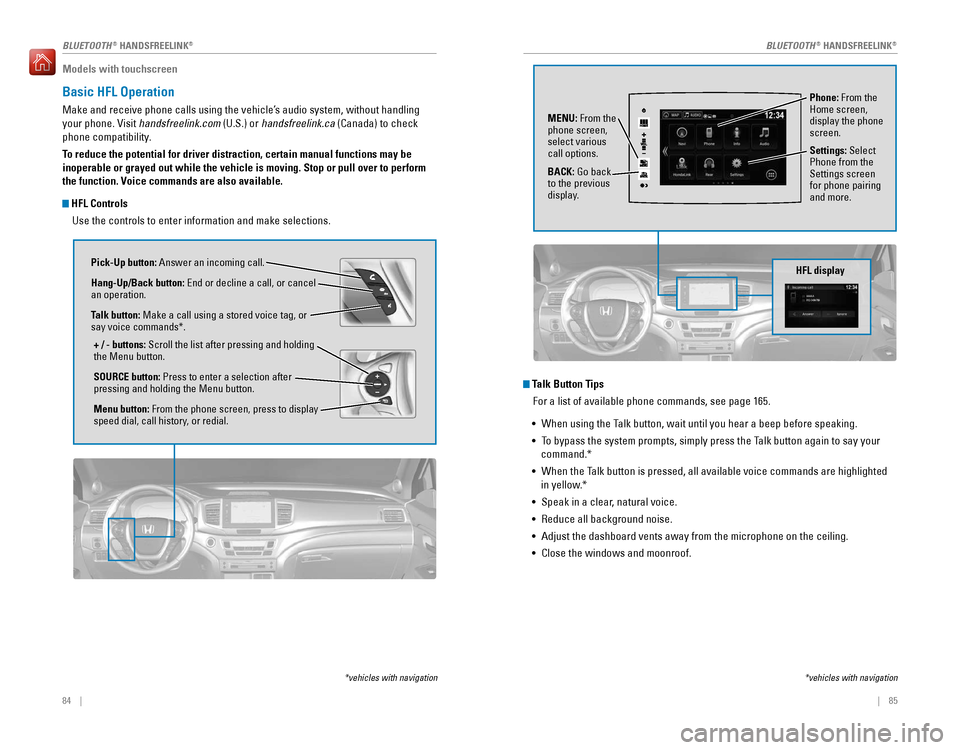
HFL Controls
Use the controls to enter information and make selections.
Pick-Up button: Answer an incoming call.
Hang-Up/Back button: End or decline a call, or cancel
an operation.
Talk button: Make a call using a stored voice tag, or
say voice commands*.
+ / - buttons: Scroll the list after pressing and holding
the Menu button.
SOURCE button: Press to enter a selection after
pressing and holding the Menu button.
Menu button: From the phone screen, press to display
speed dial, call history, or redial.
*vehicles with navigation
Talk Button Tips For a list of available phone commands, see page 165.
• When using the Talk button, wait until you hear a beep before speaking.
• To bypass the system prompts, simply press the Talk button again to say your
command.*
• When the Talk button is pressed, all available voice commands are highlighted
in yellow.*
• Speak in a clear, natural voice.
• Reduce all background noise.
• Adjust the dashboard vents away from the microphone on the ceiling.
• Close the windows and moonroof.
Phone: From the
Home screen,
display the phone
screen.
MENU: From the
phone screen,
select various
call options.
BACK: Go back
to the previous
display. Settings: Select
Phone from the
Settings screen
for phone pairing
and more.
*vehicles with navigation
HFL display
AAAAA012-3456789AAAAA
012-3456789
BLUETOOTH® HANDSFREELINK®BLUETOOTH® HANDSFREELINK®
Page 47 of 89

86 || 87
Models with touchscreen
Pairing a Phone
To use hands-free phone and streaming audio functions, you must first p\
air your
phone to the system. This can only be done when the vehicle is stopped. \
Use the
touchscreen to make and enter selections.
1. From the Home screen, select Settings.
2. Select Phone.
3. Select Bluetooth Device List.
4. Select Add Bluetooth Device.
5. Make sure your phone is in discovery mode. Select
Continue.
6. The system searches for your phone. Select your
phone when it appears on the list.
If your phone does not appear:
Select Phone Not Found and search for
HandsFreeLink from your phone. Connect to HFL.
7. The system gives you a pairing code. Compare it to
the code that appears on your phone. Connect to
HFL from your phone.
8. The system asks if you want to enable options:
HondaLink Assist: Select On to enable emergency
collision notification (see page 88).
Phone Synchronization: Select On to automatically
import contacts and call history from your phone.
9. Press BACK to exit the menu.
State, provincial, or local laws may prohibit the operation of
handheld electronic devices while operating a vehicle.
Models with touchscreen
Making a Call
You can make a call using several methods.
Dialing a Number
Enter a 10-digit phone number to call.
Using voice commands
Press the Talk button before you say each command.
1. Say “Dial by number.”
2. Say the phone number: For example,
“3-1-0-5-5-5-1-2-3-4.”
3. The system begins to dial.
Using the touchscreen
Manual operation is limited while the vehicle is moving. Voice commands are
always available.
1. From the Home screen, select Phone.
2. Select MENU.
3. Select Dial.
4. Enter the phone number. Select the green phone
icon to call.
Using the Phonebook When your phone is paired, its entire phonebook can be automatically imp\
orted to
the system. Phone synchronization must be turned on.
Using voice commands
Press the Talk button before you say each command.
1. Say “Dial by name.”
2. Say the phonebook name and phone type. For
example, “John Smith mobile.”
Using the touchscreen
Manual operation is limited while the vehicle is moving. Voice commands are
always available.
1. From the Home screen, select Phone.
2. Select MENU.
3. Select Phonebook.
4. Scroll through the list to find the name and number
you want to call, and select it to call.
BLUETOOTH® HANDSFREELINK®BLUETOOTH® HANDSFREELINK®
Page 48 of 89
88 || 89
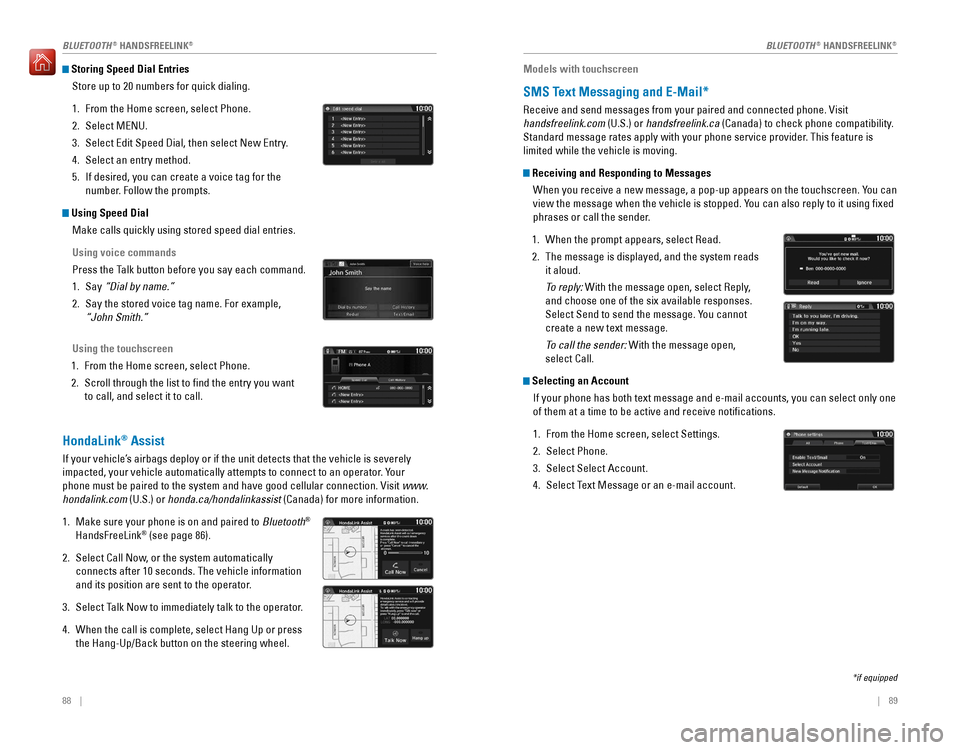
Storing Speed Dial Entries
Store up to 20 numbers for quick dialing.
1. From the Home screen, select Phone.
2. Select MENU.
3. Select Edit Speed Dial, then select New Entry.
4. Select an entry method.
5. If desired, you can create a voice tag for the
number. Follow the prompts.
Using Speed DialMake calls quickly using stored speed dial entries.
Using voice commands
Press the Talk button before you say each command.
1. Say “Dial by name.”
2. Say the stored voice tag name. For example,
“John Smith.”
Using the touchscreen
1. From the Home screen, select Phone.
2. Scroll through the list to find the entry you want
to call, and select it to call.
HondaLink® Assist
If your vehicle’s airbags deploy or if the unit detects that the vehicle is severely
impacted, your vehicle automatically attempts to connect to an operator. Your
phone must be paired to the system and have good cellular connection. Vi\
sit www.
hondalink.com (U.S.) or honda.ca/hondalinkassist (Canada) for more information.
1. Make sure your phone is on and paired to Bluetooth®
HandsFreeLink® (see page 86).
2. Select Call Now, or the system automatically
connects after 10 seconds. The vehicle information
and its position are sent to the operator.
3. Select Talk Now to immediately talk to the operator.
4. When the call is complete, select Hang Up or press
the Hang-Up/Back button on the steering wheel.
Models with touchscreen
SMS Text Messaging and E-Mail*
Receive and send messages from your paired and connected phone. Visit
handsfreelink.com (U.S.) or handsfreelink.ca (Canada) to check phone compatibility.
Standard message rates apply with your phone service provider. This feature is
limited while the vehicle is moving.
Receiving and Responding to Messages
When you receive a new message, a pop-up appears on the touchscreen. You can
view the message when the vehicle is stopped. You can also reply to it using fixed
phrases or call the sender.
1. When the prompt appears, select Read.
2. The message is displayed, and the system reads
it aloud.
To reply: With the message open, select Reply,
and choose one of the six available responses.
Select Send to send the message. You cannot
create a new text message.
To call the sender: With the message open,
select Call.
Selecting an AccountIf your phone has both text message and e-mail accounts, you can select \
only one
of them at a time to be active and receive notifications.
1. From the Home screen, select Settings.
2. Select Phone.
3. Select Select Account.
4. Select Text Message or an e-mail account.
*if equipped
BLUETOOTH® HANDSFREELINK®BLUETOOTH® HANDSFREELINK®
Page 49 of 89
| 91
NAVIGATION90 |
Models with touchscreen
Siri™ Eyes Free
Activate Siri through your vehicle when an iPhone® is paired to the system. Visit
handsfreelink.com (U.S.) or handsfreelink.ca (Canada) to check phone compatibility.
Here are some examples of Siri commands:
“Call John Smith”
“Read my new text message”
“Find a nearby sushi restaurant”
Notes:
• Any requests that include visual feedback from Siri on your phone are no\
t
displayed in the vehicle.
• Certain commands rely on the iPhone’s features and existing apps.
• To hear turn-by-turn directions or songs through the vehicle, set the aud\
io source
to Bluetooth
® Audio.
Siri and iPhone are trademarks of Apple, Inc.
“Remind me to pick up dinner”
“Set up a meeting today at 3 p.m.”
“Play song XYZ”
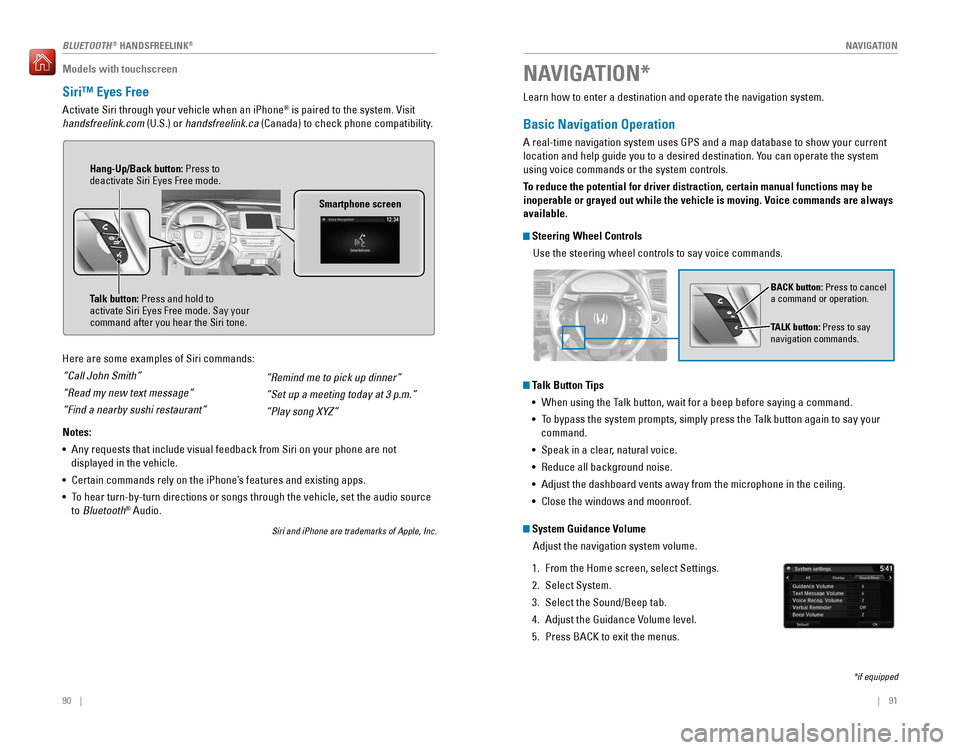
Smartphone screen
Talk button: Press and hold to
activate Siri Eyes Free mode. Say your
command after you hear the Siri tone. Hang-Up/Back button: Press to
deactivate Siri Eyes Free mode.
Learn how to enter a destination and operate the navigation system.
Basic Navigation Operation
A real-time navigation system uses GPS and a map database to show your current
location and help guide you to a desired destination. You can operate the system
using voice commands or the system controls.
To reduce the potential for driver distraction, certain manual functions \
may be
inoperable or grayed out while the vehicle is moving. Voice commands are always
available.
Steering Wheel Controls
Use the steering wheel controls to say voice commands.
Talk Button Tips• When using the Talk button, wait for a beep before saying a command.
• To bypass the system prompts, simply press the Talk button again to say your
command.
• Speak in a clear, natural voice.
• Reduce all background noise.
• Adjust the dashboard vents away from the microphone in the ceiling.
• Close the windows and moonroof.
BACK button: Press to cancel
a command or operation.
TALK button: Press to say
navigation commands.
NAVIGATION*
*if equipped
System Guidance Volume
Adjust the navigation system volume.
1. From the Home screen, select Settings.
2. Select System.
3. Select the Sound/Beep tab.
4. Adjust the Guidance Volume level.
5. Press BACK to exit the menus.
BLUETOOTH® HANDSFREELINK®
Page 85 of 89

162 || 163
CUSTOMER INFORMATION
CUSTOMER INFORMATION
Learn about information specific to you as a Honda customer and how to\
get help.
Frequently Asked Questions/Troubleshooting
Below are some frequently asked questions and troubleshooting items that\
you may
have about the vehicle.
Q:
How do I set the vehicle clock?
A:
See page 57. For vehicles with navigation, the time is automatically set\
using
GPS signals.
Q: Why doesn’t the vehicle start when I press the ENGINE START/STOP button?
A:
The brake pedal must be pressed to start the engine.
Q: What is the AUTO setting on my headlight lever?
A:
When in the AUTO position, the vehicle’ s exterior lights will automatically turn
on or off depending on the ambient lighting.
Q: Why won’t the driver’s door unlock when I grab the door handle, even though
the keyless access remote is within range?
A: If you pull the handle too quickly, the system may not have time to confirm the
door is unlocked. Wait to hear a beep to confirm the door is unlocked. If you are
wearing gloves, the system may be slow to respond.
Q: After my battery was disconnected or went dead, the audio system is aski\
ng for
a code. Where do I find this?
A: In most cases, you do not need to enter a code. Turn on the vehicle, and press
and hold the audio power button until the system reactivates.
Q: Why can’t I operate Pandora® through the audio system?
A:
Audio may be streaming through Bluetooth® Audio. Make sure Pandora mode
is selected and the phone cable is properly connected to the USB adapter\
.
Some phones may prompt you to “Allow” a connection.
Q: Is my phone compatible with Bluetooth features?
A:
Visit handsfreelink.honda.com (U.S.) or www.handsfreelink.ca (Canada) to
check phone compatibility for Bluetooth® Audio, Bluetooth® HandsFreeLink®,
and SMS text messaging.
Q: Every time I press the Talk button, the system gives me voice prompts. Can I turn
these off?*
A: From the HOME screen, select Settings. Select System, then the Voice Prompt
tab. Select Voice Prompt, then select Off.
CUSTOMER INFORMATION
*if equipped
Contact Us
Honda dealer personnel are trained professionals. They should be able to\
answer
all your questions. If you encounter a problem that your dealership does\
not solve
to your satisfaction, please discuss it with the dealership’s service manager or
general manager. If you are dissatisfied with the decision made by the dealership’\
s
management, contact Honda Automobile Customer Service.
U.S. owners
American Honda Motor Co., Inc.
Honda Automobile Customer Service
1919 Torrance Blvd.
Mail Stop 500-2N-7A
Torrance, CA 90501-2746
Tel: (800) 999-1009
In Puerto Rico and
the U.S. Virgin Islands
Bella International
P.O. Box 190816
San Juan, PR 00919-0816
Tel: (787) 620-7546
When you call or write, please give us the following information:
• Vehicle Identification Number
• Date of purchase
• Odometer reading of your vehicle
• Your name, address, and telephone number
• A detailed description of the problem
• Name of the dealer who sold the vehicle to you Canadian owners
Honda Canada, Inc.
Customer Relations
180 Honda Blvd.
Markham, ON
L6C 0H9
Tel: (888) 946-6329
Fax: (877) 939-0909
e-mail: [email protected]
Q:
Why can’t I select an item using the selector knob or touchscreen?
A:
To prevent driver distraction, certain items are limited are inoperable w\
hile the
vehicle is moving. Use voice commands or pull over to select the items.
Q: Where can I find the vehicle identification number (VIN)?
A:
Check the label on the driver’ s doorjamb.
*if equipped
Page 86 of 89

164 || 165
VOICE COMMAND INDEX
CUSTOMER INFORMATION
Honda Roadside Assistance
24-hour emergency road service is available to you in the United States \
and Canada
throughout your 3-year/36,000-mile warranty term. Services include jump starting,
flat tire and lockout assistance, towing, and more (limitations apply\
).
Call (866) 864-5211 (U.S.) or (800) 465-7587 (Canada).
Warranty Coverages
Below is a brief summary of the warranties covering your new vehicle.
New Vehicle Limited Warranty: Covers your new vehicle, except for the emissions
control system and accessories, against defects in materials and workman\
ship.
Emissions Control Systems Defects Warranty and Emissions Performance
Warranty: Covers your vehicle’s emissions control systems. Time, mileage, and
coverage are conditional.
Seat Belt Limited Warranty: Covers seat belts that fail to function properly.
Rust Perforation Limited Warranty: Covers all exterior body panels that rust through
from the inside.
Accessory Limited Warranty: Covers Honda accessories.
Replacement Parts Limited Warranty: Covers all Honda replacement parts against
defects in materials and workmanship.
Replacement Battery Limited Warranty: Provides prorated coverage for a
replacement battery purchased from a Honda dealer.
Replacement Muffler Lifetime Limited Warranty: Covers a replacement muffler for
the duration of the ownership.
Restrictions and exclusions apply to all these warranties. See the Warranty Manual
on the Owner Information CD or at owners.honda.com (U.S.) or www.myhonda.ca
(Canada) for complete descriptions of each warranty, including time, mileage, and
other conditional limitations.
Your vehicle’s original tires are covered by their manufacturer. Tire warranty
information can be found on the Owner Information CD or at owners.honda.com
(U.S.) or www.myhonda.ca (Canada).
Voice Portal Commands
When you press the Talk button, the Voice Portal screen appears. Say one of the
options, and follow the system prompts.
Navigation Commands*The system accepts these commands on most screens. You only need to press the
Talk button once for navigation commands.
Learn about all available voice commands to help you operate the vehicle\
. Available
on vehicles with touchscreen.
Press the Talk button before you say a command.
VOICE COMMAND INDEX
•
Phone call
• Music search
• Audio
• Climate control
• Navigation* •
Voice setting
• Voice help
• What is today’s date?
• What time is it?
• View map
• Find place
• Find category
• Find intersection
• Recently found •
Go home
• Find address
• Find city
• Find saved places
*models with navigation
**These commands toggle the function on and off, so the command may not match your intended action.
Climate Control Commands
The system accepts these commands on most screens.
• Climate control on**
• Climate control off**
• Air conditioner on**
• Air conditioner off**
• Defrost on**
• Defrost off** •
Fan speed # (#: 1 to 7)
• Temperature # degrees
(#: 57 to 87°F)
• Temperature max heat
• Temperature max cool
Phone Commands
The system accepts these commands on most screens.
• Call by number
• Call by name •
Call (number)
• Call (name)
Page 87 of 89
166 || 167
INDEX
VOICE COMMAND INDEX
Audio Commands*
The system accepts these commands on most screens. Audio volume levels
cannot be controlled using voice commands.
FM/AM Radio Commands
• Audio on**
• Audio off**
• Radio FM
• Radio AM
• Radio tune to # FM (#: frequency,
e.g., 95.5)
• Radio tune to # AM (#: frequency,
e.g., 1020)
• Radio FM preset # (#: 1 to 12)
• Radio AM preset # (#: 1 to 6)
SiriusXM
® Radio Commands
• Radio SXM
• SXM channel # (#: 0 to 255)
• SXM channel (channel name)
• Radio SXM preset # (#: 1 to 12) Disc (CD) Commands
• Disc
• Disc play
• Disc play track # (#: 1 to 30)
USB Commands
• USB
• USB play
• USB play track # (#: 1 to 30)
Pandora
® Commands (U.S. only)
• Pandora
• Pandora play iPod
® Commands
• iPod
• iPod play
• iPod play track # (#: 1-30)
Bluetooth
® Audio Commands
• Bluetooth audio play
(may not work on all phones)
AUX Commands
• Aux audio play
• Music search
• List album (specify album)
• List artist (specify artist)
• List composer (specify composer)
• List genre (specify genre)
• List playlist (specify playlist)
• Play album (specify album)
• Play artist (specify artist)
• Play composer (specify composer) •
Play genre (specify genre)
• Play playlist (specify playlist)
• Play song (specify song)
• What/Who am I listening to?
• Who is this?
• What’s playing?
• Who’s playing?
• What album is this?
Song By Voice™ Commands
Available for tracks stored on an iPod
® or USB device.
*models with navigation
**These commands toggle the function on and off, so the command may not match your intended action.
INDEX
ABS .............................................................25ACC .......................................................25, 27
Accessory Power Socket ...............................59
AC Power Outlet .........................................59, 79
Adaptive Cruise Control (ACC) .........25, 27, 115Address .............................................................93
Aha™ Radio ......................................................70Airbags ...............................................................9
Advanced Airbags .........................................9
Airbag Care ...................................................14
Airbag System Components .......................13
Airbag System Indicators ...........................11
Front Airbags (SRS) .......................................9
Passenger Airbag Off Indicator .................12
Side Airbags ..................................................10
Side Curtain Airbags ....................................10
SRS (Supplemental Restraint System) Indicator ............................................. 11
Air Conditioning System ..................................52
All-Wheel Drive (AWD)
...................................25
Ambient Meter ................................................ 113
Anti-Lock Brake System (ABS)
..............25, 111Apps .............................................................68
Audio Commands ...........................................165
Audio Operation ...............................................58
Accessory Power Socket ...........................59
AC Power Outlet ...........................................59
Aha™ Radio ..................................................70
Auxiliary Input Jack .....................................59
Bluetooth® Audio ...................................66, 76
Color Audio System .....................................62
Compact Disc (CD) .......................................73DVD .............................................................78
FM/AM Radio ..........................................63, 71
HondaLink® ...................................................69
iPod® .......................................................64, 74
Pandora® .......................................................77
Rear Entertainment System ........................78
SiriusXM® Radio ...........................................72Sound .............................................................61
SOURCE button .............................................60
Steering Wheel Controls .............................60
Touchscreen Operation ..............................67
USB Flash Drive ......................................65, 75
USB Port ........................................................58
Wi-Fi Connection ..........................................70
Wireless Headphones .................................79
AUTO button ...................................................... 53
Auto High Beam System
...........................27, 39
Auto idle stop ......................................25, 27, 112
Automatic Dimming Rearview Mirror ...........50
Automatic Rain-Sensing Wipers ...................41
Auto park mode ..............................................109 AUX Commands
.............................................. 166
Auxiliary input
.............................................59, 79AWD .............................................................25Battery ...........................................................150
Blind spot information (BSI) .............25, 27, 122
Bluetooth® Audio .......................................66, 76
Bluetooth® Audio Commands ......................166
Bluetooth® HandsFreeLink® (HFL) .................81E-Mail .............................................................89
HFL Controls ............................................81, 84
HondaLink® Assist .......................................88
Making a Call ..........................................83, 87
Pairing a Phone ......................................82, 86
Phonebook ..............................................83, 87
Siri Eyes Free ................................................90
SMS Text Messaging ..................................89
Speed Dial ...............................................83, 88
Talk Button Tips ............................................85
Brake Assist System ...................................... 111
Brake Fluid
......................................................150
Brake system ..............................................24, 25Braking ...........................................................111
Brightness Control ...........................................37
Carbon Monoxide Gas .......................................4
Cargo Area Lights
............................................38
Car wash mode ............................................... 109
Changing a Flat Tire
.......................................134
Changing Settings ............................................56
Charging system ............................................... 24
Childproof Door Locks
.....................................33
Child Safety .......................................................15
Childproof Door Locks .................................33
Selecting a Child Seat .................................17
Child Seat ..........................................................17
Adding Security with a Tether ...................21
Installing a LATCH-Compatible Child Seat..................................................... 18
Selecting a Child Seat
.................................17
Climate Control Commands ..........................165
Climate Control System ...................................53Clock .............................................................57
Collision Mitigation Braking System™ (CMBS™)
.............................25, 27, 120
Color Audio System .........................................62
Compact Disc (CD) ...........................................73
Compact Disc (CD) Commands ....................166
Contact Us .......................................................163
Cross Traffic Monitor .....................................123
Cruise Control ...........................................27, 114
Customer Information ....................................162
Customized Features
.......................................56
Dashboard and Ceiling Controls ......................2
Destination ........................................................93
Page 88 of 89
168 || 169
INDEX
INDEX
Dialing a Number .......................................83, 87
Door Mirrors .....................................................50
Door Operation ...........................................30, 33
DOT Tire Quality Grading ..............................157Driving .............................................................98
Adaptive Cruise Control (ACC) .................115
Auto Idle Stop .............................................112
Blind spot information (BSI) .....................122
Braking .........................................................111
Collision Mitigation Braking System™ (CMBS™)
.........................................120
Cruise Control .............................................114
Eco Assist System ......................................113
Intelligent Traction Management System .............................................. 112
Lane Keeping Assist System (LKAS)
.......118
LaneWatch™ ..............................................117
Maximum Load Limit ..................................100
Multi-View Rear Camera ..........................124
Paddle shifters ............................................110
Parking Sensor System .............................121
Power Mode ...............................................107
Rear Cross Traffic Monitor .......................123
Refueling ......................................................126
Remote Engine Start ..................................106
Road Departure Mitigation (RDM) ..........119
Shifting .........................................................108
Starting the Engine ....................................107
Towing a Trailer ..........................................102
Vehicle Stability Assist (VSA®) ................113
Driving Position Memory System ..................49DVD .............................................................78
Eco Assist System .......................................... 113
ECON Button
...................................................113
ECON mode .......................................................27
Electric power steering ...................................25
Electronic Gear Selector
..............................109
Electronic Stability Control (ESC) ................113E-Mail .............................................................89
Emergency Engine Stop ................................131
Emergency Towing ........................................131
Engine and Fuel ..............................................160
Engine Compartment Cover ..........................146
Engine Coolant ................................................ 149
Engine Oil ......................................................... 147
ENGINE START/STOP button
.......................107
Exterior lights ..............................................27, 38
Fastening a Seat Belt ........................................7Flat Tire ...........................................................134
Floor Mats .........................................................45Fluids ...........................................................160
FM/AM Radio ..............................................63, 71
FM/AM Radio Commands .............................166
Fog lights .....................................................27, 38
Foot Brake .......................................................111 Frequently Asked Questions
........................162
Front Airbags (SRS) ...........................................9
Front Door Inner Handle .................................33
Front Seats ........................................................42
Front Wipers .....................................................40
Fuel Information .............................................126
Fuse Locations ................................................ 138
Garage Opener
.................................................51
Hang-Up/Back button ................................81, 84
Hazards .............................................................27HDMI .............................................................79
Headlight-Wiper Integration ..........................40
Headphones ......................................................79
Head Restraints ................................................44
Heated Steering Wheel ...................................54
Heated Windshield Button
.............................54
High beams .......................................................27
Home Address ..................................................93
HomeLink® Garage Opener ............................51
HondaLink® .......................................................69
HondaLink® Assist ...........................................88
Honda Roadside Assistance ........................164Hood ...........................................................145
Immobilizer ........................................................26
Info buttons .......................................................28
Instrument Panel ..............................................24
Condition Indicators ....................................26
Malfunction Indicators ................................24
On/Off Indicators ..........................................27
Intelligent Traction Management System ...112
Interior Lights .................................................... 37
Intermittent Wipers .......................................... 40
iPod
® .......................................................64, 74
iPod® Commands ...........................................166
Jump Starting .................................................129
Lane Keeping Assist System (LKAS)
...............................................24, 27, 118
LaneWatch™ ..................................................117
Lap/Shoulder Seat Belts ...................................5
LATCH-Compatible Child Seat ........................18
Light Bulbs ....................................................... 161
Lights .............................................................37
Locking the Doors ............................................30
Lock Tab .............................................................33Low fuel .............................................................26
Low oil pressure ...............................................24
Low tire pressure .............................................26
Maintenance ................................................... 142
Brake Fluid
..................................................150
Changing Wiper Blades ............................151
Checking the Battery .................................150
Engine Coolant ............................................149
Engine Oil .....................................................147
Maintenance Minder™ .............................143
Safety Precautions ....................................142 Service Codes
.............................................144
Under the Hood ..........................................145
Window Washer Fluid ...............................150
Making a Call ..............................................83, 87
Malfunction indicator lamp ............................25
Map Legend ......................................................96
Map Lights ......................................................... 37
Master Door Lock Switch
...............................33
Maximum Load Limit ...................................... 100
Mirrors .............................................................50
Moonroof ...........................................................35
Multi-Information Display ...............................28
Multi-View Rear Camera ..............................124
Music search ..................................................166
Navigation .........................................................91
Display and Controls ....................................92
Entering a Destination .................................93
Home Address ..............................................93
Map Legend ..................................................96
Place Category .............................................94
Recent Places ...............................................94
Routing ...........................................................96
Saved Places ................................................95
Steering Wheel Controls .............................91
Street Address ..............................................93
Talk Button Tips ............................................91Traffic .............................................................97
Turn-by-turn directions ...............................96
Navigation Commands ..................................165
One-Touch Turn Signal ....................................38
Overheating ..................................................... 130
Paddle shifters ................................................ 110
Pairing a Phone
..........................................82, 86
Pandora® ...........................................................77
Pandora® Commands ....................................166
Panoramic Glass Roof .....................................36
Parking brake ............................................ 26, 111
Parking Sensor System
.................................121
Passenger Airbag Off Indicator .....................12Phone .......................................................82, 86
Phonebook ..................................................83, 87PHONE button ...................................................81
Phone Commands ..........................................165
Pick-Up button ............................................81, 84
Place Category .................................................94
Playing a DVD ...................................................78
Power Door Mirrors ......................................... 50
Power Mode
...................................................107
Power Moonroof ..............................................35
Power Tailgate ..................................................32
Power Windows ...............................................34Radio .......................................................63, 71
Rain-Sensing Wipers ....................................... 41
Readiness Codes ............................................ 159
Rear Camera
...................................................124 Rear Cross Traffic Monitor
...........................123
Rear Entertainment System (RES) .................78
Rear Seats .........................................................46
Rearview Mirror ...............................................50
Rear Wiper ........................................................41
Recent Places ................................................... 94
Refueling .......................................................... 126
Remote Battery Strength
..............................128
Remote Control .................................................80
Remote Engine Start ......................................106
Remote Transmitter .........................................29
Reporting Safety Defects ................................23
RESET button
....................................................28
Reverse Tilt Door Mirrors ...............................50
Road Departure Mitigation (RDM) ....25, 27, 119
Roadside Assistance .....................................164Routing .............................................................96
Safety Information .............................................3
Carbon Monoxide Gas ...................................4
Childproof Door Locks .................................33
Child Safety ...................................................15
Reporting Safety Defects ............................23
Safety Label Locations ................................23
Safety Messages ...........................................4
Saved Places ....................................................95
Seat Belts ............................................................5
Fastening a Seat Belt ....................................7
Lap/Shoulder Seat Belts ...............................5
Seat Belt Inspection ......................................6
Seat belt reminder .......................................26
Seat Belt with Detachable Anchor .............8
Shoulder Anchor ............................................7
Seat Heaters and Ventilation .........................55Seats .............................................................42
Second-Row Seat ............................................46
Sequential Mode ............................................110
Service Codes ................................................. 144
Setting the Clock
..............................................57Shifting ...........................................................108
Shift Lever Does Not Move ..........................129
Shoulder Anchor ................................................7
Side Airbags ...................................................... 10
Side Curtain Airbags ........................................ 10
Siri Eyes Free
....................................................90
SiriusXM® Radio ...............................................72
SiriusXM® Radio Commands ........................166
Smart Entry system ....................................24, 30
SMS Text Messaging ......................................89
Song By Voice™ Commands ........................166Sound .............................................................61
SOURCE button .................................................60
Specifications .................................................160
Speed Dial ...................................................83, 88
SRS (Supplemental Restraint System) Indicator ............................................. 11
Page 89 of 89
170 || 171
INDEX
INDEX
Starting the Engine ........................................107
Steering Wheel ................................................. 49
Steering Wheel and Nearby Controls
............1
Steering Wheel Controls ...........................60, 91
Street Address .................................................. 93
Supplemental Restraint System (SRS)
.........24
SYNC button ......................................................53
System Guidance Volume ...............................91
System message ..............................................26Tailgate .......................................................31, 32
Talk button ...................................................81, 84
Talk Button Tips ..........................................85, 91
Text Messaging ................................................89
Third-Row Seat ................................................. 47
Tire Fill Assist
..................................................132
Tire Information ..............................................153
DOT Tire Quality Grading ..........................157
Inflation Guidelines ....................................153
Tire and Loading Information Label ........154
Tire and Wheel Replacement ...................154
Tire Chains ...................................................155
Tire Identification Number (TIN) ..............156
Tire Labeling ................................................156
Tire Service Life ..........................................155
Tire Terminology .........................................156
Wear Indicators .........................................153
Winter Tires .................................................155
Tire Pressure Monitoring System (TPMS)
.......................................25, 132Tires ...........................................................160
Touchscreen Operation ..................................67
Towing a Trailer ..............................................102
Towing (emergency) ......................................131Traffic .............................................................97
Troubleshooting ..............................................162
Turn-by-turn directions ...................................96
Turn Signal ..................................................27, 38
Under the Hood ..............................................145
Unlocking the Doors ........................................30
USB Commands .............................................. 166
USB Flash Drive .......................................... 65, 75
USB Port
......................................................58, 79Vehicle ...........................................................160
Vehicle Controls ...............................................29
Vehicle Stability Assist (VSA®) ........25, 27, 113
Visual Index ......................................................... 1
Voice Command Index
..................................165
Voice Portal Commands ................................165
Walk Away Auto Lock .....................................30
Warranty Coverages .....................................164
Wear Indicators .............................................153Widgets .............................................................68
Wi-Fi Connection .............................................. 70
Window Washer Fluid
...................................150
Windows ............................................................ 34Winter Tires
.....................................................155
Wiper Blades ..................................................151
Wiper Operation ...............................................40
Wireless Headphones .....................................79