radio HONDA PILOT 2016 3.G Quick Guide
[x] Cancel search | Manufacturer: HONDA, Model Year: 2016, Model line: PILOT, Model: HONDA PILOT 2016 3.GPages: 89, PDF Size: 5.82 MB
Page 2 of 89

Devices That Emit Radio WavesThe following products and systems on your vehicle emit radio waves when\
in
operation:
DISCLOSURES
Event Data RecordersThis vehicle is equipped with an event data recorder (EDR). The main purpose of
an EDR is to record, in certain crash or near crash-like situations, suc\
h as an air
bag deployment or hitting a road obstacle, data that will assist in unde\
rstanding
how a vehicle’s systems performed. The EDR is designed to record data related to
vehicle dynamics and safety systems for a short period of time, typicall\
y
30 seconds or less. The EDR in this vehicle is designed to record such d\
ata as:
• How various systems in your vehicle were operating;
• Whether or not the driver and passenger safety belts were buckled/fasten\
ed;
• How far (if at all) the driver was depressing the accelerator and/or b\
rake
pedal; and,
• How fast the vehicle was traveling.
These data can help provide a better understanding of the circumstances \
in
which crashes and injuries occur. NOTE: EDR data are recorded by your vehicle
only if a non-trivial crash situation occurs; no data are recorded by th\
e EDR under
normal driving conditions and no personal data (e.g., name, gender, age, and
crash location) are recorded. However, other parties, such as law enforcement,
could combine the EDR data with the type of personally identifying data \
routinely
acquired during a crash investigation.
To read data recorded by an EDR, special equipment is required, and acces\
s to
the vehicle or the EDR is needed. In addition to the vehicle manufacture\
r, other
parties such as law enforcement that have the special equipment can read\
the
information if they have access to the vehicle or the EDR.
The data belong to the vehicle owner and may not be accessed by anyone e\
lse
except as legally required or with the permission of the vehicle owner.
Service Diagnostic Recorders This vehicle is equipped with service-related devices that record inform\
ation
about powertrain performance. The data can be used to verify emissions l\
aw
requirements and/or help technicians diagnose and solve service problems. It may
also be combined with data from other sources for research purposes, but\
it remains confidential.
*if equipped
• Audio system
• Blind spot information system*
• Immobilizer system
• Bluetooth
® Audio
• Bluetooth
® HandsFreeLink®
• Collision Mitigation Braking
System™ (CMBS™) •
HomeLink
® Universal
Transceiver*
• HondaLink
®
• Remote engine starter*
• Remote transmitter
• Smart entry system*
• Tire Pressure Monitoring System
Each of the above complies with the appropriate requirements or the requ\
ired
standards of the FCC (Federal Communications Commission) and Industry \
Canada,
described below:
As required by the FCC:
This device complies with Part 15 of the FCC rules. Operation is subject\
to the
following two conditions: (1) This device may not cause harmful interf\
erence, and
(2) this device must accept any interference received, including inter\
ference that
may cause undesired operation.
Changes or modifications not expressly approved by the party responsib\
le for
compliance could void the user’s authority to operate the equipment.
As required by Industry Canada:
This device complies with Industry Canada Standard RSS-Gen/210/310.
Operation is subject to the following two conditions: (1) this device \
may not
cause interference, and (2) this device must accept any interference, \
including
interference that may cause undesired operation of the device.
California Perchlorate Contamination Prevention Act The airbags, seat belt tensioners, and CR-type batteries in this vehicle\
may
contain perchlorate materials—special handling may apply. See www.dtsc.
ca.gov/hazardouswaste/perchlorate/ for more information.
California Proposition 65 WarningWARNING: This product contains or emits chemicals known to the state of
California to cause cancer and birth defects or other reproductive harm.\
Page 3 of 89

Honda Automobile Customer Service
Your authorized Honda dealer should be able to answer any questions you h\
ave
about your vehicle. However, if you are dissatisfied with the information you receive,
you can call Honda Automobile Customer Service (see page 163).
Honda Roadside Assistance
24-hour emergency road service is available to you in the United States \
and Canada
throughout your 3-year/36,000-mile warranty term. Services include jump starting,
flat tire and lockout assistance, towing, and more (limitations apply\
). This Owner’s Guide is intended to help you quickly get acquainted with your
2016 Honda Pilot. It provides basic information and instructions on technology and
convenience features, as well as emergency procedures and how to get ass\
istance.
This guide is for vehicles sold in the United States and Canada. It cove\
rs all models,
so you may find descriptions of features and equipment that are not in\
your vehicle.
Images throughout this guide are from U.S. vehicles and represent featur\
es and
equipment that are available on some, but not all, models.
This guide is not intended to be a substitute for the Owner’s Manual. The Owner
Information CD enclosed in your glove box kit includes the Owner’s Manual,
Navigation Manual, and vehicle and tire warranties in electronic format.\
This
information can be viewed on a computer (PC or Mac platform) and saved or printed
for your reference. You can also visit owners.honda.com (U.S.) or myhonda.ca
(Canada) to view the complete and most current information.
If you are the first registered owner of your vehicle, you may request\
a complimentary
printed copy of the Owner’s Manual, Navigation Manual, or Vehicle Warranty within
the first six months of vehicle purchase. To request a copy, visit owners.honda.com
and create or log in to your account. In Canada, please request a copy f\
rom your
Honda dealer.
American Honda Motor Company strives to be proactive in protecting our
environment and natural resources. By using electronic delivery for a co\
nsiderable
portion of the information typically found in a vehicle owner’s manual, we are further
reducing our impact on the environment.
INTRODUCTIONTABLE OF CONTENTS
Call (800) 999-1009 (U.S.) or (888) 946-6329 (Canada)
Call (866) 864-5211 (U.S) or (800) 465-7587 (Canada)
VISUAL INDEX .......................................1
Steering Wheel and Nearby Controls ...1
Dashboard and Ceiling Controls
........2
SAFETY INFORMATION
........................3
Important Safety Information
..............3
Seat Belts
...............................................5
Airbags
....................................................9
Child Safety
..........................................15
Safety Label Locations
.......................23
Reporting Safety Defects
...................23
INSTRUMENT PANEL
.........................24
Malfunction Indicators
......................24
Condition Indicators
...........................26
On/Off Indicators
.................................27
Multi-Information Display (MID)
......28
VEHICLE CONTROLS
...........................29
Using the Remote Transmitter
..........29
Smart Entry System*
...........................30
Tailgate Operation
..............................31
Power Tailgate Operation*
...............32
Door Operation
....................................33
Power Window Operation
................34
Power Moonroof Operation*
...........35
Panoramic Glass Roof*
.....................36
Interior and Exterior Lights
...............37
One-Touch Turn Signal
.......................38
Auto High Beam System*
..................39
Wiper Operation
..................................40
Adjusting the Seats
............................42
Rear Seats
...........................................46
Driving Position Memory System*
...49
Adjusting the Steering Wheel
..........49
Adjusting the Mirrors
.........................50
HomeLink
® Garage Opener* .............51 Air Conditioning System*
.................52
Climate Control System*
..................53
Seat Heaters*
......................................55
Customized Features
..........................56
Setting the Clock
.................................57
AUDIO AND CONNECTIVITY
.............58
Basic Audio Operation
.......................58
Models with color audio system
Color Audio System
............................62
FM/AM Radio
.......................................63
iPod
®...................................................... 64
USB Flash Drive
..................................65
Bluetooth
® Audio ................................66
Models with touchscreen
Touchscreen Operation
.....................67
HondaLink
® ..........................................69
Wi-Fi Connection
................................70
Aha™ Radio
.........................................70
FM/AM Radio
......................................71
SiriusXM
® Radio* ...............................72
Compact Disc (CD)*
...........................73
iPod
®...................................................... 74
USB Flash Drive
..................................75
Bluetooth
® Audio ................................76
Pandora
® ..............................................77
Rear Entertainment System (RES)*
...78
BLUETOOTH
® HANDSFREELINK® ....81
Models with color audio system
Basic HFL Operation
...........................81
Pairing a Phone
...................................82
Making a Call
......................................83
Models with touchscreen
Basic HFL Operation
...........................84
Pairing a Phone
...................................86
*if equipped
Page 34 of 89
60 || 61
AUDIO AND CONNECTIVITY
AUDIO AND CONNECTIVITY
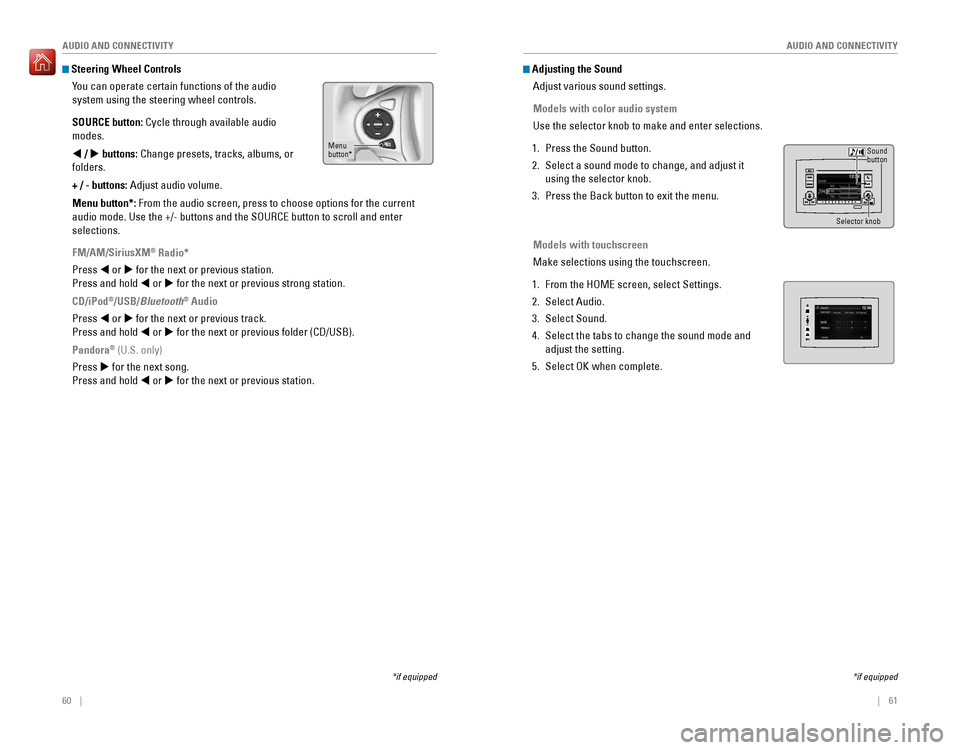
Steering Wheel Controls
You can operate certain functions of the audio
system using the steering wheel controls.
SOURCE button: Cycle through available audio
modes.
t / u buttons: Change presets, tracks, albums, or
folders.
+ / - buttons: Adjust audio volume.
Menu button*: From the audio screen, press to choose options for the current
audio mode. Use the +/- buttons and the SOURCE button to scroll and ente\
r
selections.
FM/AM/SiriusXM
® Radio*
Press t or u for the next or previous station.
Press and hold t or u for the next or previous strong station.
CD/iPod
®/USB/Bluetooth® Audio
Press t or u for the next or previous track.
Press and hold t or u for the next or previous folder (CD/USB).
Pandora
® (U.S. only)
Press u for the next song.
Press and hold t or u for the next or previous station.
*if equipped
Menu
button*
*if equipped
Adjusting the Sound Adjust various sound settings.
Models with color audio system
Use the selector knob to make and enter selections.
1. Press the Sound button.
2. Select a sound mode to change, and adjust it
using the selector knob.
3. Press the Back button to exit the menu.
Models with touchscreen
Make selections using the touchscreen.
1. From the HOME screen, select Settings.
2. Select Audio.
3. Select Sound.
4. Select the tabs to change the sound mode and
adjust the setting.
5. Select OK when complete.
Selector knob
Sound
button
Page 35 of 89
62 || 63
AUDIO AND CONNECTIVITY
AUDIO AND CONNECTIVITY
Models with color audio system
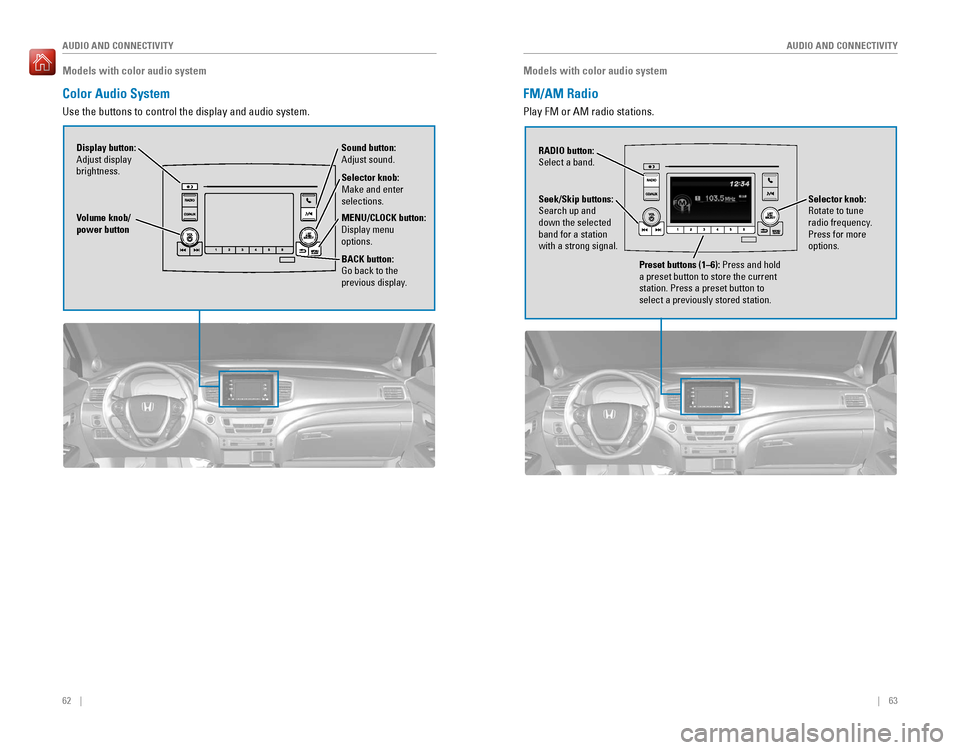
Color Audio System
Use the buttons to control the display and audio system.
Selector knob:
Make and enter
selections.
Volume knob/
power button
MENU/CLOCK button:
Display menu
options.
BACK button:
Go back to the
previous display.
Display button:
Adjust display
brightness. Sound button:
Adjust sound.
Models with color audio system
FM/AM Radio
Play FM or AM radio stations.
RADIO button:
Select a band.
Preset buttons (1–6): Press and hold
a preset button to store the current
station. Press a preset button to
select a previously stored station.
Seek/Skip buttons:
Search up and
down the selected
band for a station
with a strong signal.
Selector knob:
Rotate to tune
radio frequency.
Press for more
options.
Page 39 of 89
70 || 71
AUDIO AND CONNECTIVITY
AUDIO AND CONNECTIVITY
Models with touchscreen
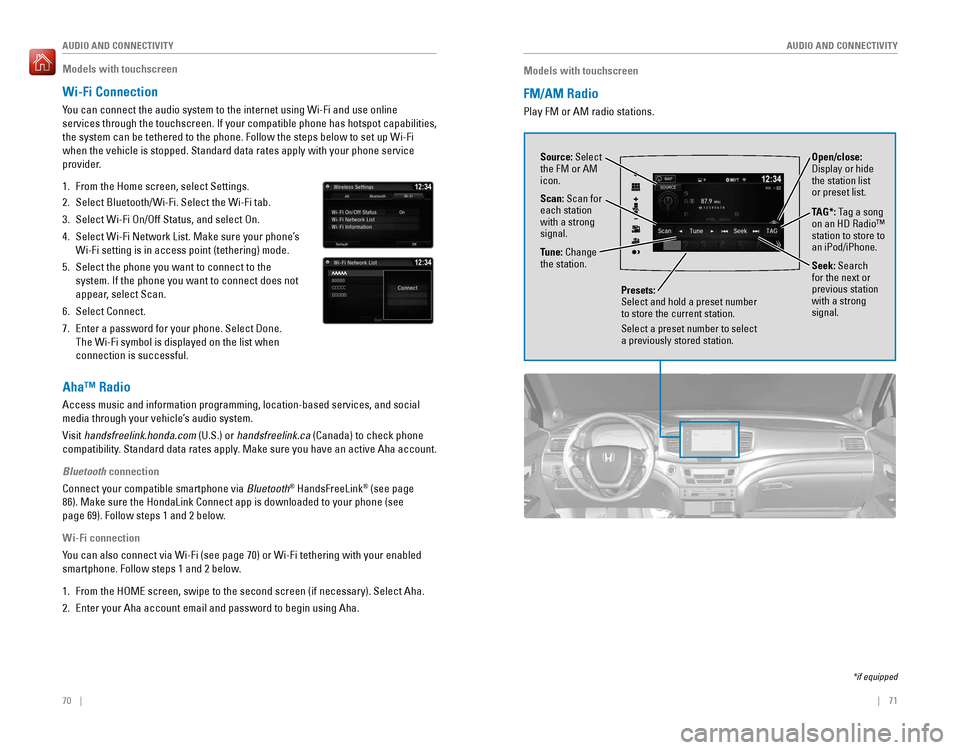
FM/AM Radio
Play FM or AM radio stations.
Source: Select
the FM or AM
icon.
Tune: Change
the station.
Seek: Search
for the next or
previous station
with a strong
signal. Open/close:
Display or hide
the station list
or preset list.
Scan: Scan for
each station
with a strong
signal.
Presets:
Select and hold a preset number
to store the current station.
Select a preset number to select
a previously stored station.
TAG*: Tag a song
on an HD Radio™
station to store to
an iPod/iPhone.
*if equipped
Models with touchscreen
Wi-Fi Connection
You can connect the audio system to the internet using Wi-Fi and use onli\
ne
services through the touchscreen. If your compatible phone has hotspot c\
apabilities,
the system can be tethered to the phone. Follow the steps below to set u\
p Wi-Fi
when the vehicle is stopped. Standard data rates apply with your phone s\
ervice
provider.
1. From the Home screen, select Settings.
2. Select Bluetooth/Wi-Fi. Select the Wi-Fi tab.
3. Select Wi-Fi On/Off Status, and select On.
4. Select Wi-Fi Network List. Make sure your phone’s
Wi-Fi setting is in access point (tethering) mode.
5. Select the phone you want to connect to the
system. If the phone you want to connect does not
appear, select Scan.
6. Select Connect.
7. Enter a password for your phone. Select Done.
The Wi-Fi symbol is displayed on the list when
connection is successful.
Aha™ Radio
Access music and information programming, location-based services, and social
media through your vehicle’s audio system.
Visit handsfreelink.honda.com (U.S.) or handsfreelink.ca (Canada) to check phone
compatibility. Standard data rates apply. Make sure you have an active Aha account.
Bluetooth connection
Connect your compatible smartphone via Bluetooth
® HandsFreeLink® (see page
86). Make sure the HondaLink Connect app is downloaded to your phone (\
see
page 69). Follow steps 1 and 2 below.
Wi-Fi connection
You can also connect via Wi-Fi (see page 70) or Wi-Fi tethering with yo\
ur enabled
smartphone. Follow steps 1 and 2 below.
1. From the HOME screen, swipe to the second screen (if necessary). Selec\
t Aha.
2. Enter your Aha account email and password to begin using Aha.
Page 40 of 89
72 || 73
AUDIO AND CONNECTIVITY
AUDIO AND CONNECTIVITY
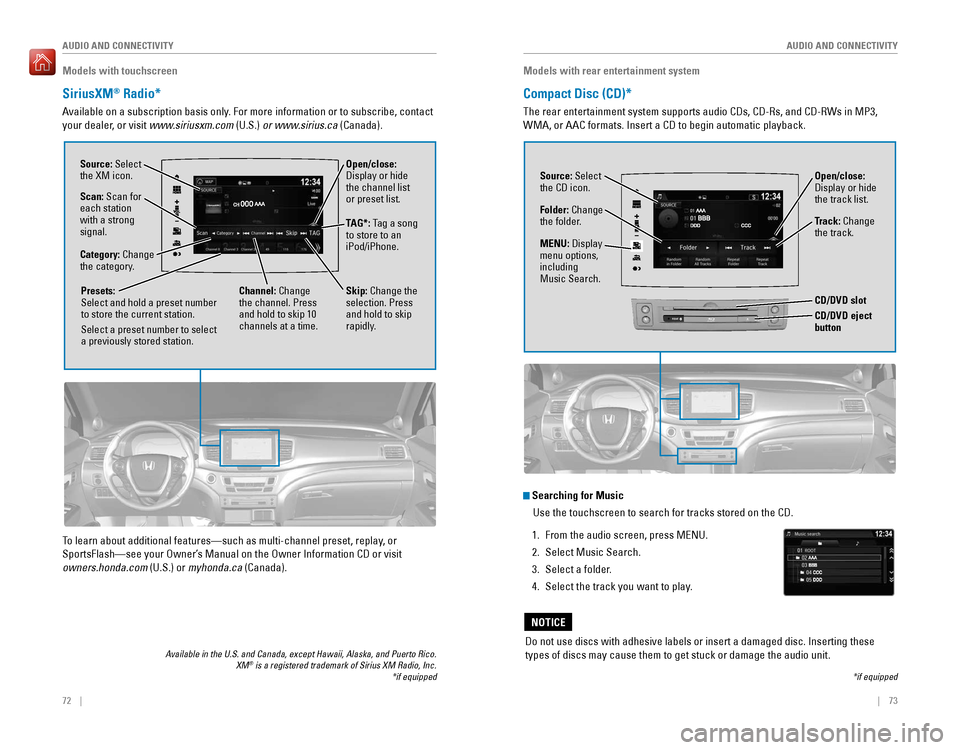
Open/close:
Display or hide
the channel list
or preset list.
Models with touchscreen
SiriusXM® Radio*
Available on a subscription basis only. For more information or to subscribe, contact
your dealer, or visit www.siriusxm.com (U.S.) or www.sirius.ca (Canada).
Available in the U.S. and Canada, except Hawaii, Alaska, and Puerto Rico.\
XM® is a registered trademark of Sirius XM Radio, Inc.
Source: Select
the XM icon.
Category: Change
the category.
Channel: Change
the channel. Press
and hold to skip 10
channels at a time.
Scan: Scan for
each station
with a strong
signal.
Presets:
Select and hold a preset number
to store the current station.
Select a preset number to select
a previously stored station.
*if equipped
TAG*: Tag a song
to store to an
iPod/iPhone.
Skip: Change the
selection. Press
and hold to skip
rapidly.
To learn about additional features—such as multi-channel preset, repla\
y, or
SportsFlash—see your Owner’s Manual on the Owner Information CD or visit
owners.honda.com (U.S.) or myhonda.ca (Canada).
Models with rear entertainment system
Compact Disc (CD)*
The rear entertainment system supports audio CDs, CD-Rs, and CD-RWs in M\
P3,
WMA, or AAC formats. Insert a CD to begin automatic playback.
Do not use discs with adhesive labels or insert a damaged disc. Insertin\
g these
types of discs may cause them to get stuck or damage the audio unit.
NOTICE
Source: Select
the CD icon.
Folder: Change
the folder. Open/close:
Display or hide
the track list.
Track: Change
the track.
*if equipped
Searching for Music
Use the touchscreen to search for tracks stored on the CD.
1. From the audio screen, press MENU.
2. Select Music Search.
3. Select a folder.
4. Select the track you want to play.
MENU: Display
menu options,
including
Music Search.
REARCD/DVD eject button
CD/DVD slot
Page 44 of 89
| 8180 | AUDIO AND CONNECTIVITY
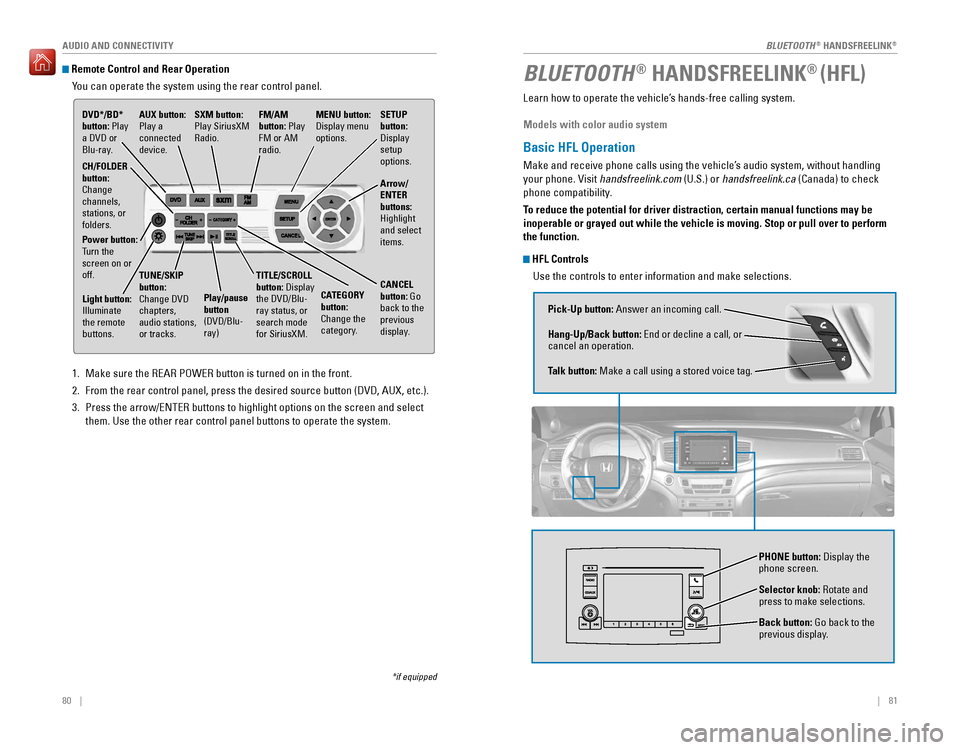
Remote Control and Rear OperationYou can operate the system using the rear control panel.
1. Make sure the REAR POWER button is turned on in the front.
2. From the rear control panel, press the desired source button (DVD, AUX,\
etc.).
3. Press the arrow/ENTER buttons to highlight options on the screen and sel\
ect
them. Use the other rear control panel buttons to operate the system.
DVD*/BD*
button: Play
a DVD or
Blu-ray.
CATEGORY
button:
Change the
category.
SXM button:
Play SiriusXM
Radio.
FM/AM
button: Play
FM or AM
radio.MENU button:
Display menu
options.
SETUP
button:
Display
setup
options.
Arrow/
ENTER
buttons:
Highlight
and select
items.
CH/FOLDER
button:
Change
channels,
stations, or
folders.
Power button:
Turn the
screen on or
off.
Light button:
Illuminate
the remote
buttons. TUNE/SKIP
button:
Change DVD
chapters,
audio stations,
or tracks.
Play/pause
button
(DVD/Blu-
ray)TITLE/SCROLL
button: Display
the DVD/Blu-
ray status, or
search mode
for SiriusXM.
CANCEL
button: Go
back to the
previous
display.
*if equipped
AUX button:
Play a
connected
device.
Learn how to operate the vehicle’s hands-free calling system.
Models with color audio system
Basic HFL Operation
Make and receive phone calls using the vehicle’s audio system, without handling
your phone. Visit handsfreelink.com (U.S.) or handsfreelink.ca (Canada) to check
phone compatibility.
To reduce the potential for driver distraction, certain manual functions \
may be
inoperable or grayed out while the vehicle is moving. Stop or pull over \
to perform
the function.
HFL Controls
Use the controls to enter information and make selections.
BLUETOOTH® HANDSFREELINK® (HFL)
Pick-Up button: Answer an incoming call.
Hang-Up/Back button: End or decline a call, or
cancel an operation.
Talk button: Make a call using a stored voice tag.
Selector knob: Rotate and
press to make selections.
Back button: Go back to the
previous display.
PHONE button: Display the
phone screen.
BLUETOOTH® HANDSFREELINK®
BLUETOOTH® HANDSFREELINK®
Page 73 of 89

138 || 139
HANDLING THE UNEXPECTED
HANDLING THE UNEXPECTED
Fuse Locations
If any electrical devices are not working, turn the vehicle off and chec\
k to see if any
applicable fuse is blown. Fuse locations are shown on the fuse box cover\
. Locate the
fuse in question by the fuse number and box cover number.
Engine Compartment Fuse Box Type A
Located under the hood on the passenger’s side. Push the tabs to open the box.
Circuit ProtectedAmps
1
(70 A)RR BLOWER30 AABS/VSA MTR40 AABS/VSA FSR20 AMAIN FAN30 AMAIN FUSE150 A
2
SUB FAN30 AWIP MT R30 AWASHER20 ASUNSHADE(20 A)(30 A)FR BLOWER40 AAC INVERTER(30 A)AUDIO AMP(30 A)RR DEF40 A(30 A)(20 A)
3
4 PARKING LIGHT 10 A
5
6 STOP LIGHT 10 A
7
8L H/L LO 10 A
9
10 R H/L LO 10 A
11 IGPS 7.5 A
13 H/L LO MAIN 20 A
15 FR FOG (15 A)
16 HAZARD 15 A
17 AS P/SEAT (REC) (20 A)
18 AS P/SEAT (SLIDE) (20 A)
19 ACM 20 A
20 MG CLUTCH 7.5 A
21 MAIN RLY 15 A
22 FI SUB1 5 A
23 IG COIL 15 A
24 DBW1 5 A
25 SMALL/STOP MAIN (20 A)
26 BACK UP 10 A
27 HTD STRG WHEEL (10 A)
28 HORN 10 A
29 RADIO (20 A)
Circuit Protecte
d Amps
14 USB CHARGER (15 A)
12
INJECTOR (20 A)
Circuit Protected Amps
1
(70 A)
RR BLOWER 30 A
ABS/VSA MTR 40 A
ABS/VSA FSR 20 A
MAIN FAN 30 A
MAIN FUSE 150 A
2 SUB FAN
30 A
WIP MT R 30 A
WASHER 20 A
SUNSHADE (20 A)
(30 A)
FR BLOWER 40 A
AC INVERTER (30 A)
AUDIO AMP (30 A)
RR DEF 40 A
(30 A)
(20 A)
3
4 PARKING LIGHT 10 A5
6 STOP LIGHT 10 A
7
8L H/L LO 10 A
9
10 R H/L LO 10 A
11IGPS7.5 A
13H/L LO MAIN20 A
15FR FO G(15 A)
16 HAZARD 15 A
17AS P/SEAT (REC)(20 A)
18 AS P/SEAT (SLIDE) (20 A)
19ACM20 A
20 MG CLUTCH 7.5 A
21MAIN RL Y15 A
22 FI SUB15 A23IG COIL15 A
24 DBW15 A25SMALL/STOP MAIN(20 A)
26 BACK UP 10 A
27HTD STRG WHEEL(10 A)
28 HORN 10 A
29RADIO(20 A)
Circuit Protecte dAmps
14USB CHARGER (15 A)
12
INJECTOR (20 A)
Ta b
Engine Compartment Fuse Box Type B
Located under the hood near the brake fluid reservoir. Push the tabs to open the
box.
Circuit ProtectedAmps
1
ST CUT1(40 A)4W D(20 A)IG MAIN30 AIG MAIN230 APTG MTR(40 A)F/B MAIN260 AF/B MAIN60 AEPS60 A2TRL MAI N(30 A)3TRL E-BRAKE(20 A)
4 BMS 7.5 A
5H/L HI MAI N20 A
6 PTG CLOSER (20 A)
7CTR ACC SOCKET20 A
8 RR ACC SOCKET (20 A)
9FR DE-ICE(15 A)
10 ACC/IG2_MAIN 10 A
11TRL CHARGE(20 A)12IDLE STOP ST CUT(30 A)13IDLE STOP(30 A)14IDLE STOP(30 A)15TCU/SBW(15 A)16RR HEATED SEAT(20 A)17STRLD7.5 A
Ta b
Page 87 of 89
166 || 167
INDEX
VOICE COMMAND INDEX
Audio Commands*
The system accepts these commands on most screens. Audio volume levels
cannot be controlled using voice commands.
FM/AM Radio Commands
• Audio on**
• Audio off**
• Radio FM
• Radio AM
• Radio tune to # FM (#: frequency,
e.g., 95.5)
• Radio tune to # AM (#: frequency,
e.g., 1020)
• Radio FM preset # (#: 1 to 12)
• Radio AM preset # (#: 1 to 6)
SiriusXM
® Radio Commands
• Radio SXM
• SXM channel # (#: 0 to 255)
• SXM channel (channel name)
• Radio SXM preset # (#: 1 to 12) Disc (CD) Commands
• Disc
• Disc play
• Disc play track # (#: 1 to 30)
USB Commands
• USB
• USB play
• USB play track # (#: 1 to 30)
Pandora
® Commands (U.S. only)
• Pandora
• Pandora play iPod
® Commands
• iPod
• iPod play
• iPod play track # (#: 1-30)
Bluetooth
® Audio Commands
• Bluetooth audio play
(may not work on all phones)
AUX Commands
• Aux audio play
• Music search
• List album (specify album)
• List artist (specify artist)
• List composer (specify composer)
• List genre (specify genre)
• List playlist (specify playlist)
• Play album (specify album)
• Play artist (specify artist)
• Play composer (specify composer) •
Play genre (specify genre)
• Play playlist (specify playlist)
• Play song (specify song)
• What/Who am I listening to?
• Who is this?
• What’s playing?
• Who’s playing?
• What album is this?
Song By Voice™ Commands
Available for tracks stored on an iPod
® or USB device.
*models with navigation
**These commands toggle the function on and off, so the command may not match your intended action.
INDEX
ABS .............................................................25ACC .......................................................25, 27
Accessory Power Socket ...............................59
AC Power Outlet .........................................59, 79
Adaptive Cruise Control (ACC) .........25, 27, 115Address .............................................................93
Aha™ Radio ......................................................70Airbags ...............................................................9
Advanced Airbags .........................................9
Airbag Care ...................................................14
Airbag System Components .......................13
Airbag System Indicators ...........................11
Front Airbags (SRS) .......................................9
Passenger Airbag Off Indicator .................12
Side Airbags ..................................................10
Side Curtain Airbags ....................................10
SRS (Supplemental Restraint System) Indicator ............................................. 11
Air Conditioning System ..................................52
All-Wheel Drive (AWD)
...................................25
Ambient Meter ................................................ 113
Anti-Lock Brake System (ABS)
..............25, 111Apps .............................................................68
Audio Commands ...........................................165
Audio Operation ...............................................58
Accessory Power Socket ...........................59
AC Power Outlet ...........................................59
Aha™ Radio ..................................................70
Auxiliary Input Jack .....................................59
Bluetooth® Audio ...................................66, 76
Color Audio System .....................................62
Compact Disc (CD) .......................................73DVD .............................................................78
FM/AM Radio ..........................................63, 71
HondaLink® ...................................................69
iPod® .......................................................64, 74
Pandora® .......................................................77
Rear Entertainment System ........................78
SiriusXM® Radio ...........................................72Sound .............................................................61
SOURCE button .............................................60
Steering Wheel Controls .............................60
Touchscreen Operation ..............................67
USB Flash Drive ......................................65, 75
USB Port ........................................................58
Wi-Fi Connection ..........................................70
Wireless Headphones .................................79
AUTO button ...................................................... 53
Auto High Beam System
...........................27, 39
Auto idle stop ......................................25, 27, 112
Automatic Dimming Rearview Mirror ...........50
Automatic Rain-Sensing Wipers ...................41
Auto park mode ..............................................109 AUX Commands
.............................................. 166
Auxiliary input
.............................................59, 79AWD .............................................................25Battery ...........................................................150
Blind spot information (BSI) .............25, 27, 122
Bluetooth® Audio .......................................66, 76
Bluetooth® Audio Commands ......................166
Bluetooth® HandsFreeLink® (HFL) .................81E-Mail .............................................................89
HFL Controls ............................................81, 84
HondaLink® Assist .......................................88
Making a Call ..........................................83, 87
Pairing a Phone ......................................82, 86
Phonebook ..............................................83, 87
Siri Eyes Free ................................................90
SMS Text Messaging ..................................89
Speed Dial ...............................................83, 88
Talk Button Tips ............................................85
Brake Assist System ...................................... 111
Brake Fluid
......................................................150
Brake system ..............................................24, 25Braking ...........................................................111
Brightness Control ...........................................37
Carbon Monoxide Gas .......................................4
Cargo Area Lights
............................................38
Car wash mode ............................................... 109
Changing a Flat Tire
.......................................134
Changing Settings ............................................56
Charging system ............................................... 24
Childproof Door Locks
.....................................33
Child Safety .......................................................15
Childproof Door Locks .................................33
Selecting a Child Seat .................................17
Child Seat ..........................................................17
Adding Security with a Tether ...................21
Installing a LATCH-Compatible Child Seat..................................................... 18
Selecting a Child Seat
.................................17
Climate Control Commands ..........................165
Climate Control System ...................................53Clock .............................................................57
Collision Mitigation Braking System™ (CMBS™)
.............................25, 27, 120
Color Audio System .........................................62
Compact Disc (CD) ...........................................73
Compact Disc (CD) Commands ....................166
Contact Us .......................................................163
Cross Traffic Monitor .....................................123
Cruise Control ...........................................27, 114
Customer Information ....................................162
Customized Features
.......................................56
Dashboard and Ceiling Controls ......................2
Destination ........................................................93
Page 88 of 89
168 || 169
INDEX
INDEX
Dialing a Number .......................................83, 87
Door Mirrors .....................................................50
Door Operation ...........................................30, 33
DOT Tire Quality Grading ..............................157Driving .............................................................98
Adaptive Cruise Control (ACC) .................115
Auto Idle Stop .............................................112
Blind spot information (BSI) .....................122
Braking .........................................................111
Collision Mitigation Braking System™ (CMBS™)
.........................................120
Cruise Control .............................................114
Eco Assist System ......................................113
Intelligent Traction Management System .............................................. 112
Lane Keeping Assist System (LKAS)
.......118
LaneWatch™ ..............................................117
Maximum Load Limit ..................................100
Multi-View Rear Camera ..........................124
Paddle shifters ............................................110
Parking Sensor System .............................121
Power Mode ...............................................107
Rear Cross Traffic Monitor .......................123
Refueling ......................................................126
Remote Engine Start ..................................106
Road Departure Mitigation (RDM) ..........119
Shifting .........................................................108
Starting the Engine ....................................107
Towing a Trailer ..........................................102
Vehicle Stability Assist (VSA®) ................113
Driving Position Memory System ..................49DVD .............................................................78
Eco Assist System .......................................... 113
ECON Button
...................................................113
ECON mode .......................................................27
Electric power steering ...................................25
Electronic Gear Selector
..............................109
Electronic Stability Control (ESC) ................113E-Mail .............................................................89
Emergency Engine Stop ................................131
Emergency Towing ........................................131
Engine and Fuel ..............................................160
Engine Compartment Cover ..........................146
Engine Coolant ................................................ 149
Engine Oil ......................................................... 147
ENGINE START/STOP button
.......................107
Exterior lights ..............................................27, 38
Fastening a Seat Belt ........................................7Flat Tire ...........................................................134
Floor Mats .........................................................45Fluids ...........................................................160
FM/AM Radio ..............................................63, 71
FM/AM Radio Commands .............................166
Fog lights .....................................................27, 38
Foot Brake .......................................................111 Frequently Asked Questions
........................162
Front Airbags (SRS) ...........................................9
Front Door Inner Handle .................................33
Front Seats ........................................................42
Front Wipers .....................................................40
Fuel Information .............................................126
Fuse Locations ................................................ 138
Garage Opener
.................................................51
Hang-Up/Back button ................................81, 84
Hazards .............................................................27HDMI .............................................................79
Headlight-Wiper Integration ..........................40
Headphones ......................................................79
Head Restraints ................................................44
Heated Steering Wheel ...................................54
Heated Windshield Button
.............................54
High beams .......................................................27
Home Address ..................................................93
HomeLink® Garage Opener ............................51
HondaLink® .......................................................69
HondaLink® Assist ...........................................88
Honda Roadside Assistance ........................164Hood ...........................................................145
Immobilizer ........................................................26
Info buttons .......................................................28
Instrument Panel ..............................................24
Condition Indicators ....................................26
Malfunction Indicators ................................24
On/Off Indicators ..........................................27
Intelligent Traction Management System ...112
Interior Lights .................................................... 37
Intermittent Wipers .......................................... 40
iPod
® .......................................................64, 74
iPod® Commands ...........................................166
Jump Starting .................................................129
Lane Keeping Assist System (LKAS)
...............................................24, 27, 118
LaneWatch™ ..................................................117
Lap/Shoulder Seat Belts ...................................5
LATCH-Compatible Child Seat ........................18
Light Bulbs ....................................................... 161
Lights .............................................................37
Locking the Doors ............................................30
Lock Tab .............................................................33Low fuel .............................................................26
Low oil pressure ...............................................24
Low tire pressure .............................................26
Maintenance ................................................... 142
Brake Fluid
..................................................150
Changing Wiper Blades ............................151
Checking the Battery .................................150
Engine Coolant ............................................149
Engine Oil .....................................................147
Maintenance Minder™ .............................143
Safety Precautions ....................................142 Service Codes
.............................................144
Under the Hood ..........................................145
Window Washer Fluid ...............................150
Making a Call ..............................................83, 87
Malfunction indicator lamp ............................25
Map Legend ......................................................96
Map Lights ......................................................... 37
Master Door Lock Switch
...............................33
Maximum Load Limit ...................................... 100
Mirrors .............................................................50
Moonroof ...........................................................35
Multi-Information Display ...............................28
Multi-View Rear Camera ..............................124
Music search ..................................................166
Navigation .........................................................91
Display and Controls ....................................92
Entering a Destination .................................93
Home Address ..............................................93
Map Legend ..................................................96
Place Category .............................................94
Recent Places ...............................................94
Routing ...........................................................96
Saved Places ................................................95
Steering Wheel Controls .............................91
Street Address ..............................................93
Talk Button Tips ............................................91Traffic .............................................................97
Turn-by-turn directions ...............................96
Navigation Commands ..................................165
One-Touch Turn Signal ....................................38
Overheating ..................................................... 130
Paddle shifters ................................................ 110
Pairing a Phone
..........................................82, 86
Pandora® ...........................................................77
Pandora® Commands ....................................166
Panoramic Glass Roof .....................................36
Parking brake ............................................ 26, 111
Parking Sensor System
.................................121
Passenger Airbag Off Indicator .....................12Phone .......................................................82, 86
Phonebook ..................................................83, 87PHONE button ...................................................81
Phone Commands ..........................................165
Pick-Up button ............................................81, 84
Place Category .................................................94
Playing a DVD ...................................................78
Power Door Mirrors ......................................... 50
Power Mode
...................................................107
Power Moonroof ..............................................35
Power Tailgate ..................................................32
Power Windows ...............................................34Radio .......................................................63, 71
Rain-Sensing Wipers ....................................... 41
Readiness Codes ............................................ 159
Rear Camera
...................................................124 Rear Cross Traffic Monitor
...........................123
Rear Entertainment System (RES) .................78
Rear Seats .........................................................46
Rearview Mirror ...............................................50
Rear Wiper ........................................................41
Recent Places ................................................... 94
Refueling .......................................................... 126
Remote Battery Strength
..............................128
Remote Control .................................................80
Remote Engine Start ......................................106
Remote Transmitter .........................................29
Reporting Safety Defects ................................23
RESET button
....................................................28
Reverse Tilt Door Mirrors ...............................50
Road Departure Mitigation (RDM) ....25, 27, 119
Roadside Assistance .....................................164Routing .............................................................96
Safety Information .............................................3
Carbon Monoxide Gas ...................................4
Childproof Door Locks .................................33
Child Safety ...................................................15
Reporting Safety Defects ............................23
Safety Label Locations ................................23
Safety Messages ...........................................4
Saved Places ....................................................95
Seat Belts ............................................................5
Fastening a Seat Belt ....................................7
Lap/Shoulder Seat Belts ...............................5
Seat Belt Inspection ......................................6
Seat belt reminder .......................................26
Seat Belt with Detachable Anchor .............8
Shoulder Anchor ............................................7
Seat Heaters and Ventilation .........................55Seats .............................................................42
Second-Row Seat ............................................46
Sequential Mode ............................................110
Service Codes ................................................. 144
Setting the Clock
..............................................57Shifting ...........................................................108
Shift Lever Does Not Move ..........................129
Shoulder Anchor ................................................7
Side Airbags ...................................................... 10
Side Curtain Airbags ........................................ 10
Siri Eyes Free
....................................................90
SiriusXM® Radio ...............................................72
SiriusXM® Radio Commands ........................166
Smart Entry system ....................................24, 30
SMS Text Messaging ......................................89
Song By Voice™ Commands ........................166Sound .............................................................61
SOURCE button .................................................60
Specifications .................................................160
Speed Dial ...................................................83, 88
SRS (Supplemental Restraint System) Indicator ............................................. 11