lock HONDA PILOT 2018 Owner's Manual (in English)
[x] Cancel search | Manufacturer: HONDA, Model Year: 2018, Model line: PILOT, Model: HONDA PILOT 2018Pages: 695, PDF Size: 48.42 MB
Page 575 of 695
573
uuParking Your Vehicle uParking Sensor System*
Driving
1. Make sure that the parking sensor system is not activated. Set the power mode to
VEHICLE OFF (LOCK).
2. Press and hold the parking sensor system button, and set the power mode to ON.
3. Keep pressing the button for 10 seconds. Release the button when the indicator
in the button flashes.
4. Press the button again. The indi cator in the button goes off.
u The beeper sounds twice. The r ear sensors are now turned off.
To turn the rear sensors on again, follo w the above procedure. The beeper sounds
three times when the rear sensors come back on.
■Turning off All Rear Sensors1 Turning off All Rear Sensors
When you set the gear position to
(R, the indicator
in the parking sensor system button blinks as a
reminder that the rear sens ors have been turned off.
18 PILOT-31TG76200.book 573 ページ 2018年3月30日 金曜日 午前11時51分
Page 577 of 695
Continued575
uuParking Your Vehicle uCross Traffic Monitor*
Driving
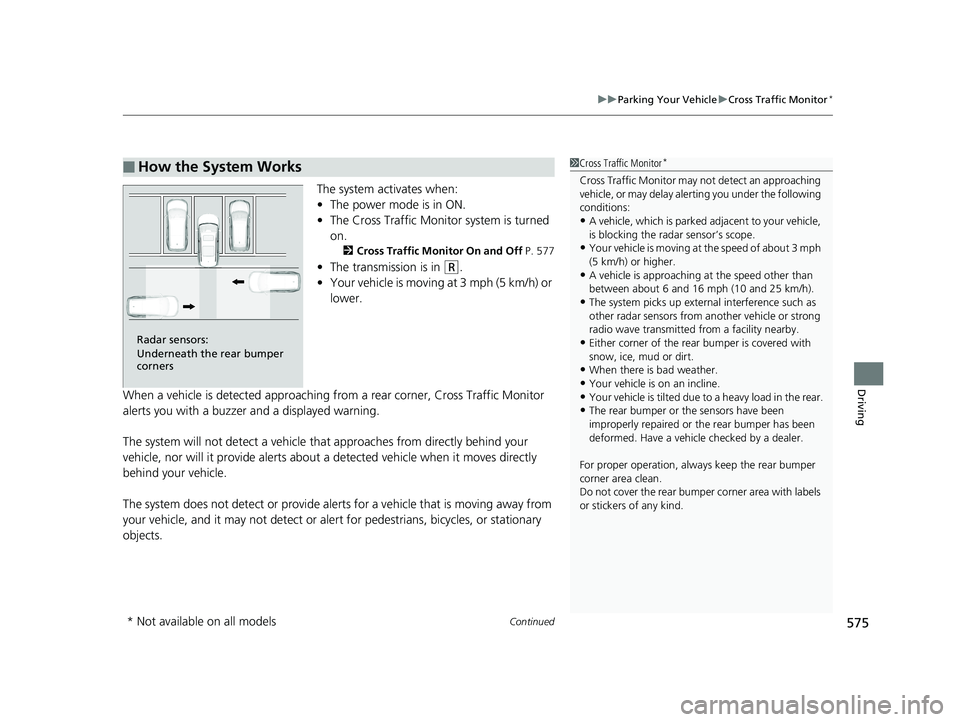
The system activates when:
• The power mode is in ON.
• The Cross Traffic Monito r system is turned
on.
2 Cross Traffic Monitor On and Off P. 577
•The transmission is in (R.
• Your vehicle is moving at 3 mph (5 km/h) or
lower.
When a vehicle is detected approaching from a rear corner, Cross Traffic Monitor
alerts you with a buzzer and a displayed warning.
The system will not detect a vehicle that approaches from directly behind your
vehicle, nor will it provide alerts about a detected vehicle when it moves directly
behind your vehicle.
The system does not detect or provide alerts for a vehicle that is moving away from
your vehicle, and it may not detect or ale rt for pedestrians, bicycles, or stationary
objects.
■How the System Works1 Cross Traffic Monitor*
Cross Traffic Monitor may not detect an approaching
vehicle, or may delay aler ting you under the following
conditions:
•A vehicle, which is parked adjacent to your vehicle,
is blocking the radar sensor’s scope.
•Your vehicle is moving at the speed of about 3 mph
(5 km/h) or higher.
•A vehicle is approaching at the speed other than
between about 6 and 16 mph (10 and 25 km/h).
•The system picks up external interference such as
other radar sensors from an other vehicle or strong
radio wave transmitted fr om a facility nearby.
•Either corner of the rear bumper is covered with
snow, ice, mud or dirt.
•When there is bad weather.
•Your vehicle is on an incline.•Your vehicle is tilted due to a heavy load in the rear.
•The rear bumper or the sensors have been
improperly repaired or the rear bumper has been
deformed. Have a vehicle checked by a dealer.
For proper operation, always keep the rear bumper
corner area clean.
Do not cover the rear bumper corner area with labels
or stickers of any kind.
Radar sensors:
Underneath the rear bumper
corners
* Not available on all models
18 PILOT-31TG76200.book 575 ページ 2018年3月30日 金曜日 午前11時51分
Page 602 of 695
uuMaintenance Under the Hood uEngine Coolant
600
Maintenance
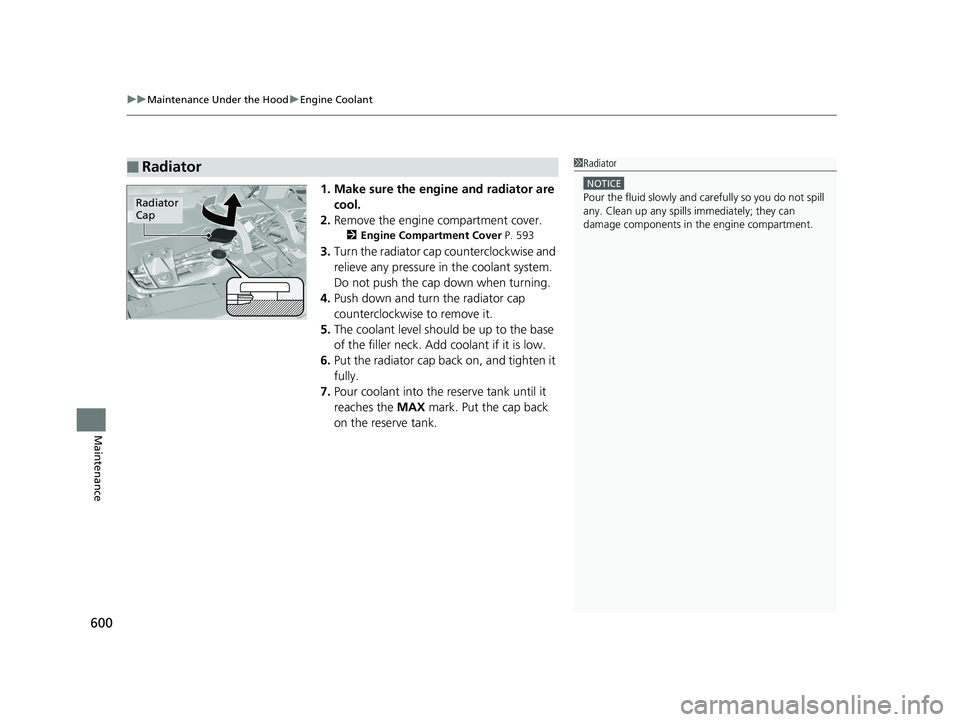
1. Make sure the engine and radiator are
cool.
2. Remove the engine compartment cover.
2 Engine Compartment Cover P. 593
3.Turn the radiator cap counterclockwise and
relieve any pressure in the coolant system.
Do not push the cap down when turning.
4. Push down and turn the radiator cap
counterclockwise to remove it.
5. The coolant level should be up to the base
of the filler neck. Add coolant if it is low.
6. Put the radiator cap back on, and tighten it
fully.
7. Pour coolant into the reserve tank until it
reaches the MAX mark. Put the cap back
on the reserve tank.
■Radiator1 Radiator
NOTICE
Pour the fluid slowly and ca refully so you do not spill
any. Clean up any spills immediately; they can
damage components in the engine compartment.Radiator
Cap
18 PILOT-31TG76200.book 600 ページ 2018年3月30日 金曜日 午前11時51分
Page 606 of 695
uuReplacing Light Bulbs uHeadlight Bulbs
604
Maintenance
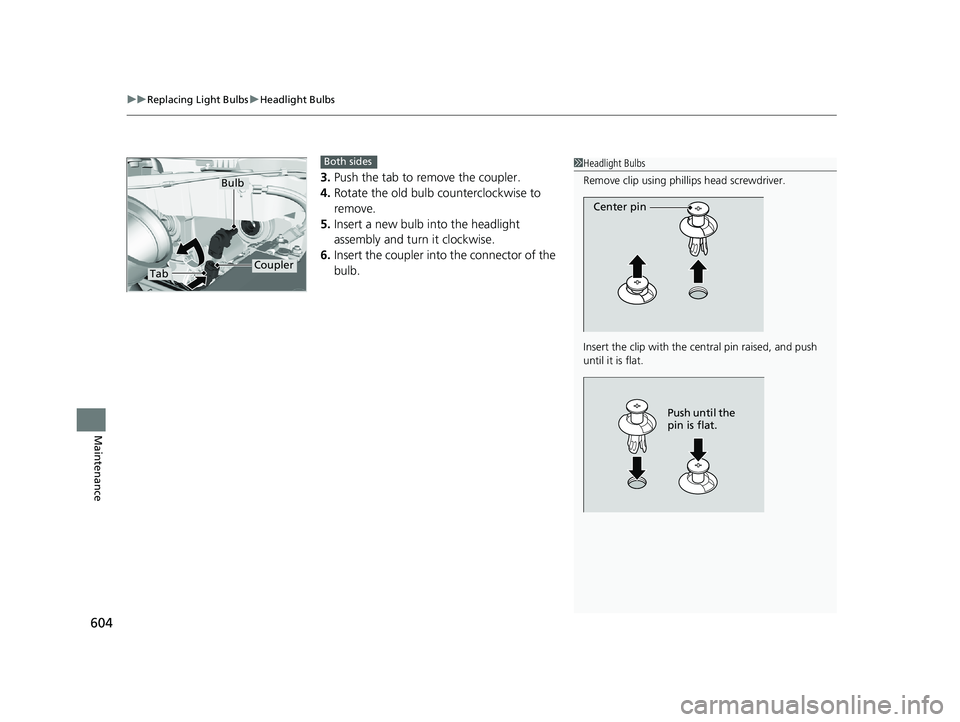
3. Push the tab to remove the coupler.
4. Rotate the old bulb counterclockwise to
remove.
5. Insert a new bulb into the headlight
assembly and turn it clockwise.
6. Insert the coupler into the connector of the
bulb.
1Headlight Bulbs
Remove clip using phillips head screwdriver.
Insert the clip with the central pin raised, and push
until it is flat.
Center pin
Push until the
pin is flat.
TabCoupler
Bulb
Both sides
18 PILOT-31TG76200.book 604 ページ 2018年3月30日 金曜日 午前11時51分
Page 607 of 695
605
uuReplacing Light Bulbs uDaytime Running Lights and Parking Lights
Maintenance
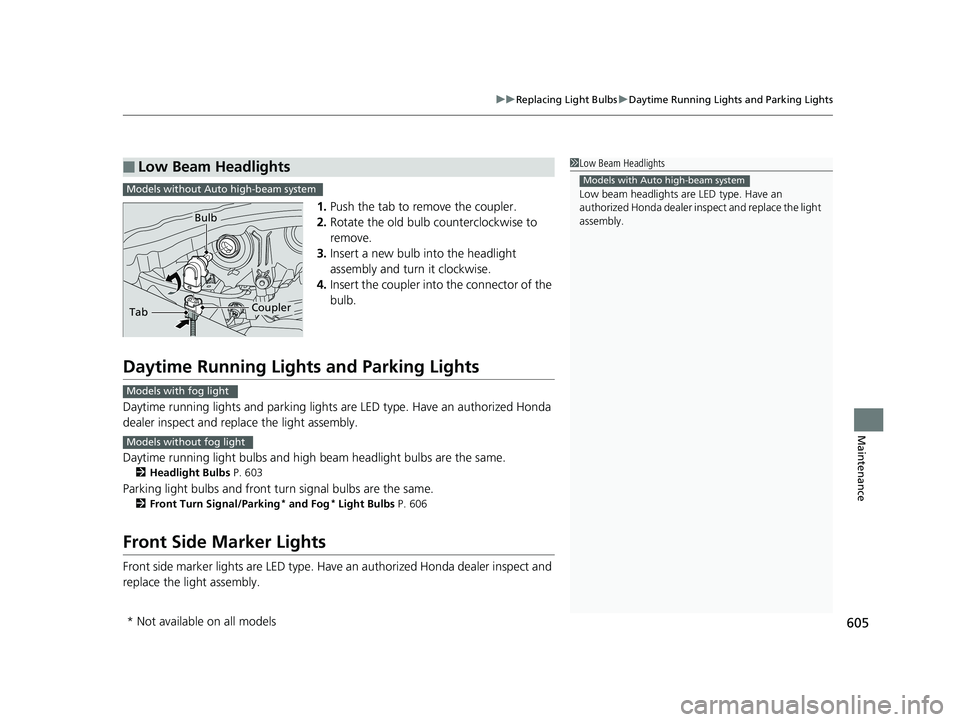
1. Push the tab to remove the coupler.
2. Rotate the old bulb counterclockwise to
remove.
3. Insert a new bulb into the headlight
assembly and turn it clockwise.
4. Insert the coupler into the connector of the
bulb.
Daytime Running Lights and Parking Lights
Daytime running lights and parking lights are LED type. Have an authorized Honda
dealer inspect and replace the light assembly.
Daytime running light bulbs and high beam headlight bulbs are the same.
2Headlight Bulbs P. 603
Parking light bulbs and front turn signal bulbs are the same.
2Front Turn Signal/Parking* and Fog* Light Bulbs P. 606
Front Side Marker Lights
Front side marker lights are LED type. Have an authorized Hond a dealer inspect and
replace the light assembly.
■Low Beam Headlights1 Low Beam Headlights
Low beam headlights are LED type. Have an
authorized Honda dealer in spect and replace the light
assembly.
Models with Auto high-beam systemModels without Auto high-beam system
TabCoupler
Bulb
Models with fog light
Models without fog light
* Not available on all models
18 PILOT-31TG76200.book 605 ページ 2018年3月30日 金曜日 午前11時51分
Page 608 of 695
606
uuReplacing Light Bulbs uFront Turn Signal/Parking* and Fog* Light Bulbs
Maintenance
Front Turn Signal/Parking* and Fog* Light Bulbs
When replacing, use the following bulbs.
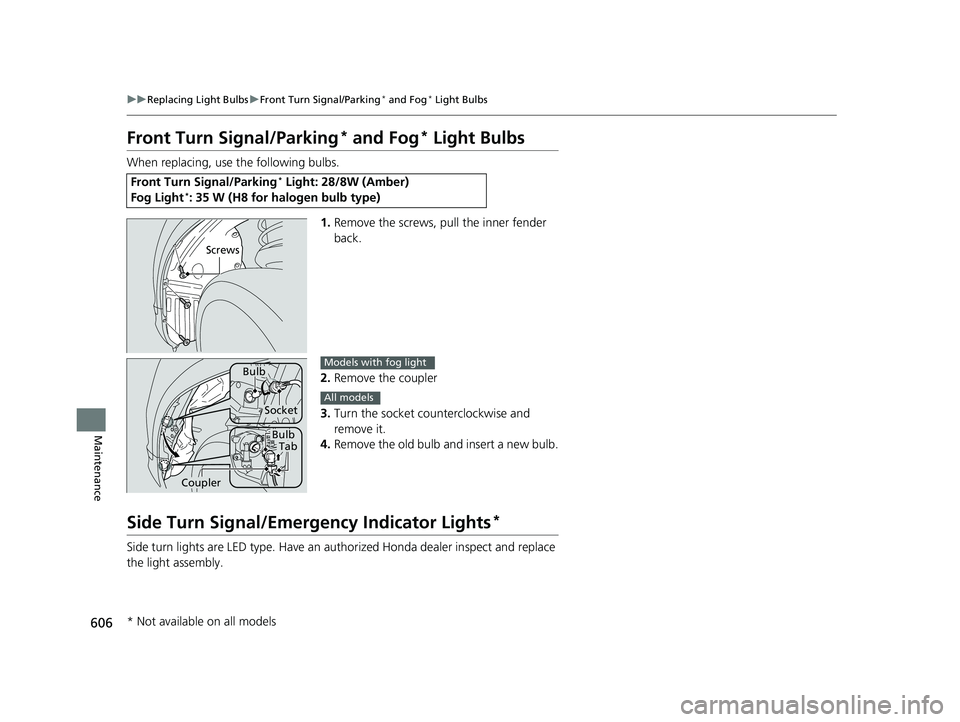
1.Remove the screws, pull the inner fender
back.
2. Remove the coupler
3. Turn the socket counterclockwise and
remove it.
4. Remove the old bulb and insert a new bulb.
Side Turn Signal/Emergency Indicator Lights*
Side turn lights are LED type. Have an au thorized Honda dealer inspect and replace
the light assembly.
Front Turn Signal/Parking* Light: 28/8W (Amber)
Fog Light*: 35 W (H8 for halogen bulb type)
Screws
Bulb
Socket
BulbTab
Coupler
Models with fog light
All models
* Not available on all models
18 PILOT-31TG76200.book 606 ページ 2018年3月30日 金曜日 午前11時51分
Page 609 of 695
607
uuReplacing Light Bulbs uBrake Light and Turn Signal Light Bulbs
Maintenance
Brake Light and Turn Signal Light Bulbs
When replacing, use the following bulbs.
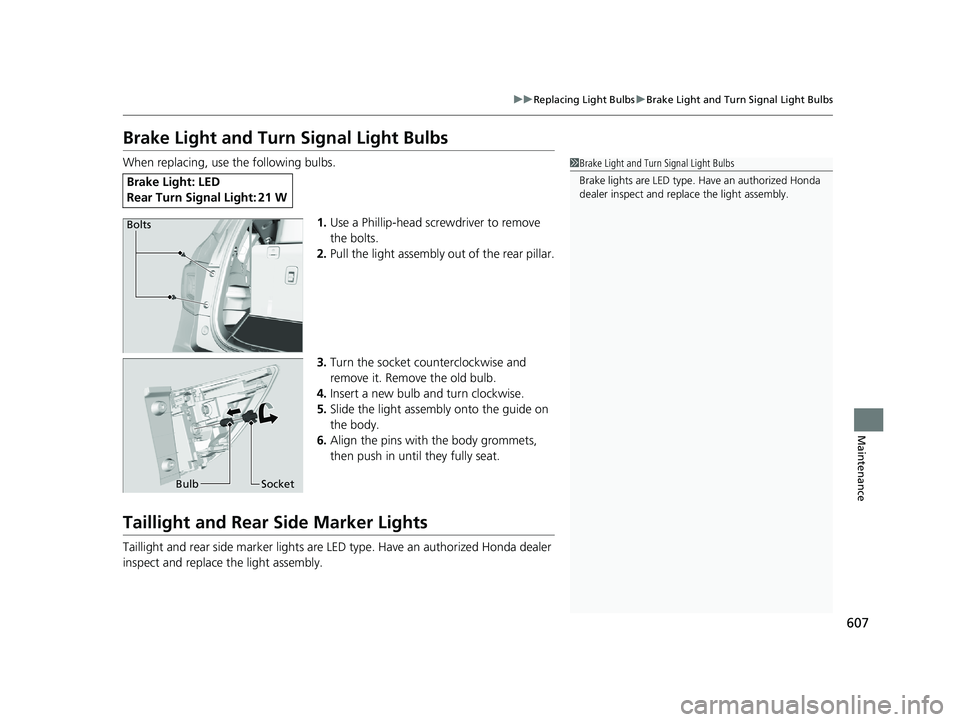
1.Use a Phillip-head screwdriver to remove
the bolts.
2. Pull the light assembly out of the rear pillar.
3. Turn the socket counterclockwise and
remove it. Remove the old bulb.
4. Insert a new bulb and turn clockwise.
5. Slide the light assembly onto the guide on
the body.
6. Align the pins with the body grommets,
then push in until they fully seat.
Taillight and Rear Side Marker Lights
Taillight and rear side marker lights are LE D type. Have an authorized Honda dealer
inspect and replace the light assembly.
Brake Ligh t: LED
Rear Turn Signal Light: 21 W
1 Brake Light and Turn Signal Light Bulbs
Brake lights are LE D type. Have an authorized Honda
dealer inspect and replace the light assembly.
Bolts
Bulb Socket
18 PILOT-31TG76200.book 607 ページ 2018年3月30日 金曜日 午前11時51分
Page 610 of 695
608
uuReplacing Light Bulbs uBack-Up Light
Maintenance
Back-Up Light
When replacing, use the following bulbs.
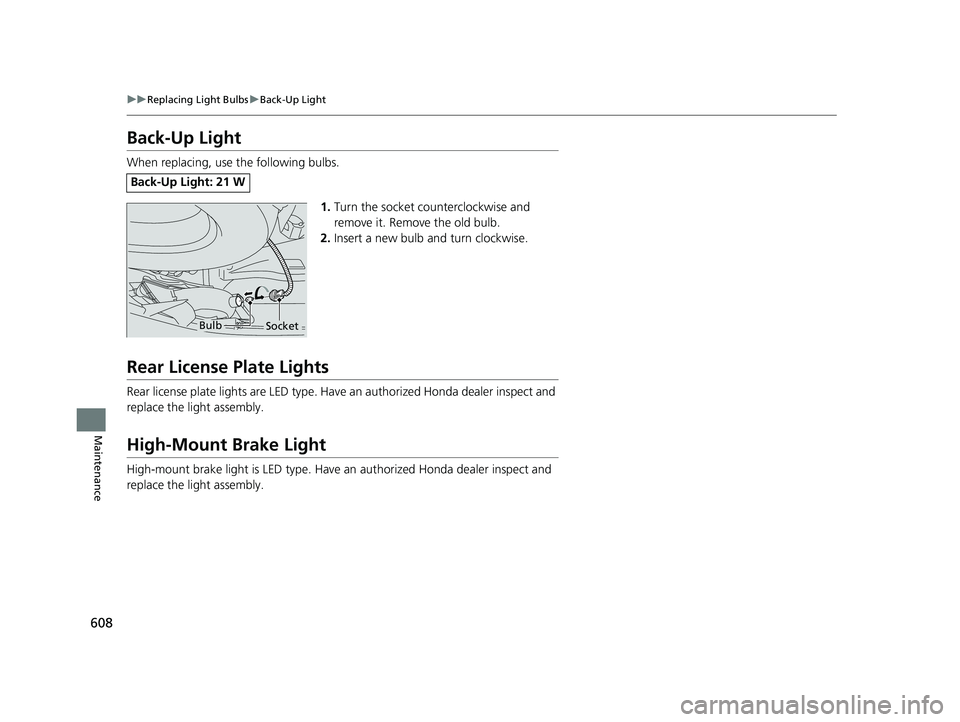
1.Turn the socket counterclockwise and
remove it. Remove the old bulb.
2. Insert a new bulb and turn clockwise.
Rear License Plate Lights
Rear license plate lights are LED type. Have an authorized Hond a dealer inspect and
replace the light assembly.
High-Mount Brake Light
High-mount brake light is LED type. Have an authorized Honda dealer inspect and
replace the light assembly.
Back-Up Light: 21 W
BulbSocket
18 PILOT-31TG76200.book 608 ページ 2018年3月30日 金曜日 午前11時51分
Page 611 of 695
609Continued
Maintenance
Checking and Maintaining Wiper Blades
Checking Wiper Blades
If the wiper blade rubber has deteriorated, it will leave streaks and the hard surfaces
of the blade may scratch the window glass.
Changing the Front Wiper Blade Rubber
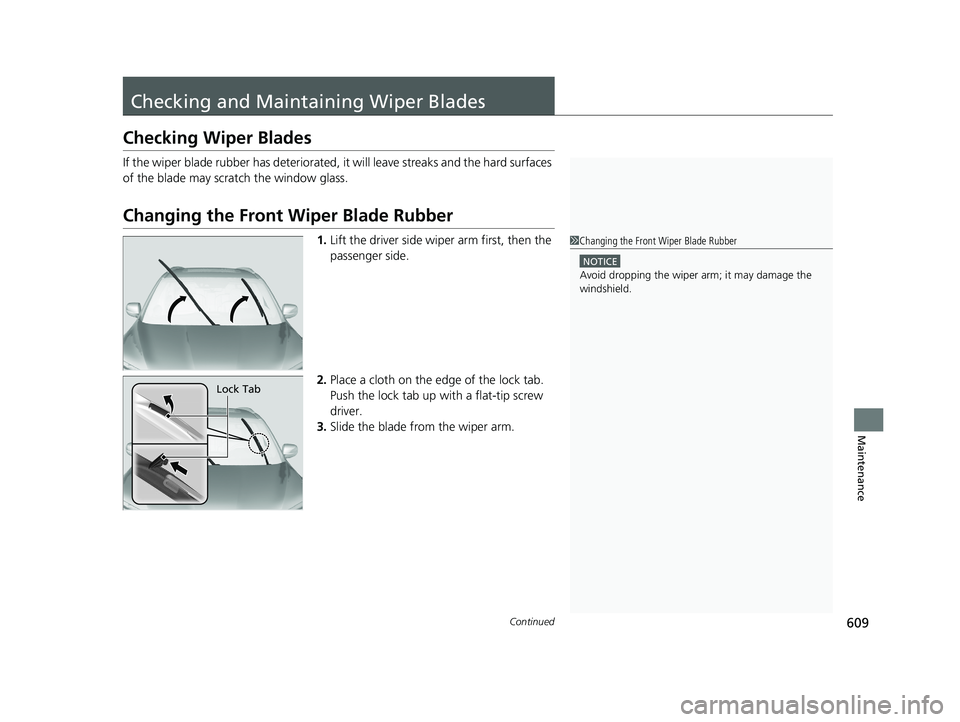
1.Lift the driver side wiper arm first, then the
passenger side.
2. Place a cloth on the edge of the lock tab.
Push the lock tab up with a flat-tip screw
driver.
3. Slide the blade from the wiper arm.1Changing the Front Wiper Blade Rubber
NOTICE
Avoid dropping the wiper ar m; it may damage the
windshield.
Lock Tab
18 PILOT-31TG76200.book 609 ページ 2018年3月30日 金曜日 午前11時51分
Page 612 of 695
610
uuChecking and Maintaining Wiper Blades uChanging the Front Wiper Blade Rubber
Maintenance
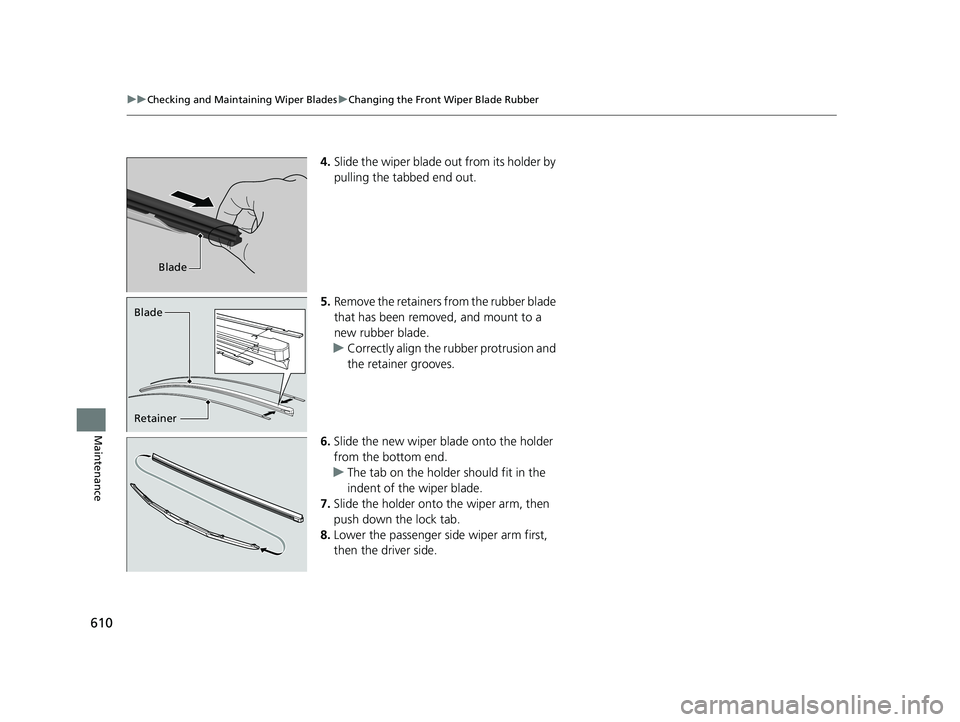
4. Slide the wiper blade out from its holder by
pulling the tabbed end out.
5. Remove the retainers from the rubber blade
that has been removed, and mount to a
new rubber blade.
u Correctly align the rubber protrusion and
the retainer grooves.
6. Slide the new wiper blade onto the holder
from the bottom end.
u The tab on the holder should fit in the
indent of the wiper blade.
7. Slide the holder onto the wiper arm, then
push down the lock tab.
8. Lower the passenger side wiper arm first,
then the driver side.
Blade
Retainer Blade
18 PILOT-31TG76200.book 610 ページ 2018年3月30日 金曜日 午前11時51分