audio HONDA PILOT 2018 Owner's Manual (in English)
[x] Cancel search | Manufacturer: HONDA, Model Year: 2018, Model line: PILOT, Model: HONDA PILOT 2018Pages: 695, PDF Size: 48.42 MB
Page 4 of 695
Contents
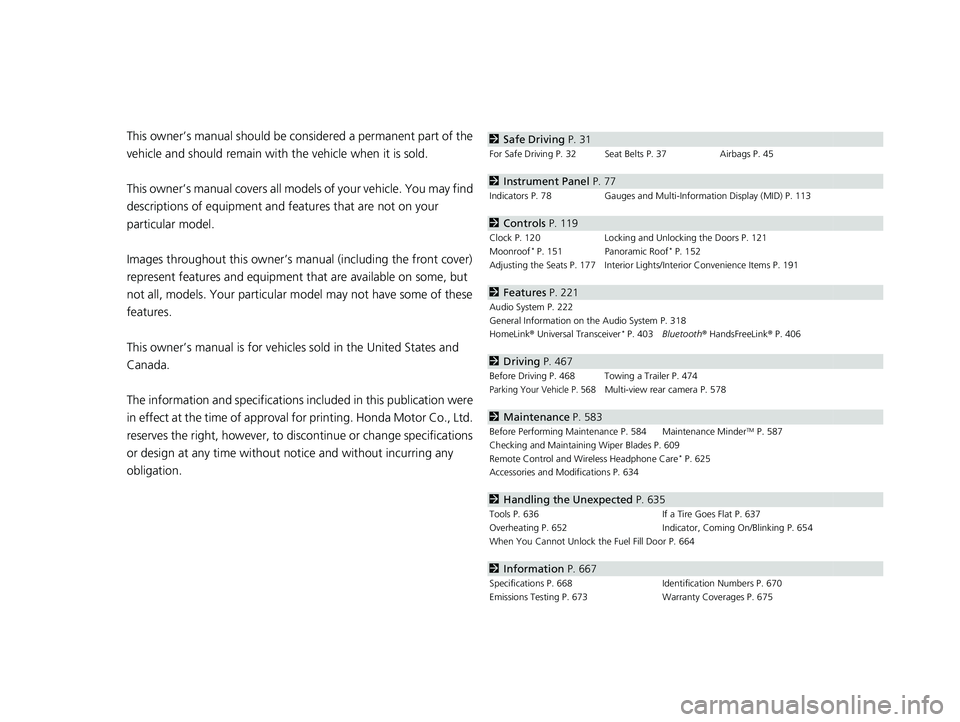
This owner’s manual should be considered a permanent part of the
vehicle and should remain with the vehicle when it is sold.
This owner’s manual covers all models of your vehicle. You may find
descriptions of equipment and features that are not on your
particular model.
Images throughout this owner’s manu al (including the front cover)
represent features and equipment that are available on some, but
not all, models. Your particular mo del may not have some of these
features.
This owner’s manual is for vehicles sold in the United States and
Canada.
The information and specifications in cluded in this publication were
in effect at the time of approval for printing. Honda Motor Co., Ltd.
reserves the right, however, to discontinue or change specifications
or design at any time without notice and without incurring any
obligation.2 Safe Driving P. 31
For Safe Driving P. 32 Seat Belts P. 37 Airbags P. 45
2Instrument Panel P. 77
Indicators P. 78 Gauges and Multi-Information Display (MID) P. 113
2Controls P. 119
Clock P. 120 Locking and Unlocking the Doors P. 121
Moonroof* P. 151 Panoramic Roof* P. 152
Adjusting the Seats P. 177 Interior Ligh ts/Interior Convenience Items P. 191
2Features P. 221
Audio System P. 222
General Information on the Audio System P. 318
HomeLink ® Universal Transceiver
* P. 403 Bluetooth ® HandsFreeLink ® P. 406
2 Driving P. 467
Before Driving P. 468 Towing a Trailer P. 474
Parking Your Vehicle P. 568Multi-view rear camera P. 578
2Maintenance P. 583
Before Performing Maintenance P. 584 Maintenance MinderTM P. 587
Checking and Maintaining Wiper Blades P. 609
Remote Control and Wireless Headphone Care
* P. 625
Accessories and Modifications P. 634
2 Handling the Unexpected P. 635
Tools P. 636 If a Tire Goes Flat P. 637
Overheating P. 652 Indicator, Coming On/Blinking P. 654
When You Cannot Unlock the Fuel Fill Door P. 664
2 Information P. 667
Specifications P. 668 Identification Numbers P. 670
Emissions Testing P. 673 Warranty Coverages P. 675
18 PILOT-31TG76200.book 2 ページ 2018年3月30日 金曜日 午前11時51分
Page 5 of 695
Contents
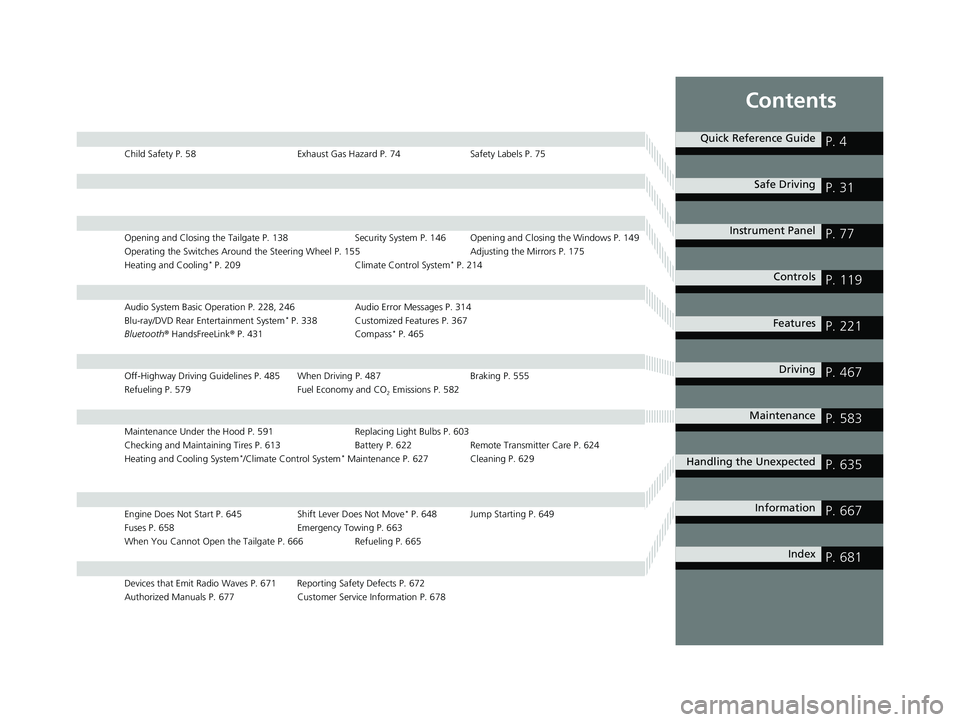
Child Safety P. 58Exhaust Gas Hazard P. 74Safety Labels P. 75
Opening and Closing the Tailgate P. 138 Security System P. 146 Opening and Closing the Windows P. 149
Operating the Switches Around the Steering Wheel P. 155 Adjusting the Mirrors P. 175
Heating and Cooling
* P. 209 Climate Control System* P. 214
Audio System Basic Operation P. 228, 246 Audio Error Messages P. 314
Blu-ray/DVD Rear Entertainment System* P. 338 Customized Features P. 367
Bluetooth ® HandsFreeLink ® P. 431 Compass* P. 465
Off-Highway Driving Guidelines P. 485 When Driving P. 487 Braking P. 555
Refueling P. 579 Fuel Economy and CO
2 Emissions P. 582
Maintenance Under the Hood P. 591 Replacing Light Bulbs P. 603
Checking and Maintaining Tires P. 613 Battery P. 622 Remote Transmitter Care P. 624
Heating and Cooling System
*/Climate Control System* Maintenance P. 627 Cleaning P. 629
Engine Does Not Start P. 645 Shift Lever Does Not Move* P. 648 Jump Starting P. 649
Fuses P. 658 Emergency Towing P. 663
When You Cannot Open the Tailgate P. 666 Refueling P. 665
Devices that Emit Radio Waves P. 671 Reporting Safety Defects P. 672
Authorized Manuals P. 677 Customer Service Information P. 678
Quick Reference GuideP. 4
Safe DrivingP. 31
Instrument PanelP. 77
ControlsP. 119
FeaturesP. 221
DrivingP. 467
MaintenanceP. 583
Handling the UnexpectedP. 635
InformationP. 667
IndexP. 681
18 PILOT-31TG76200.book 3 ページ 2018年3月30日 金曜日 午前11時51分
Page 6 of 695
4
Quick Reference Guide
Quick Reference Guide
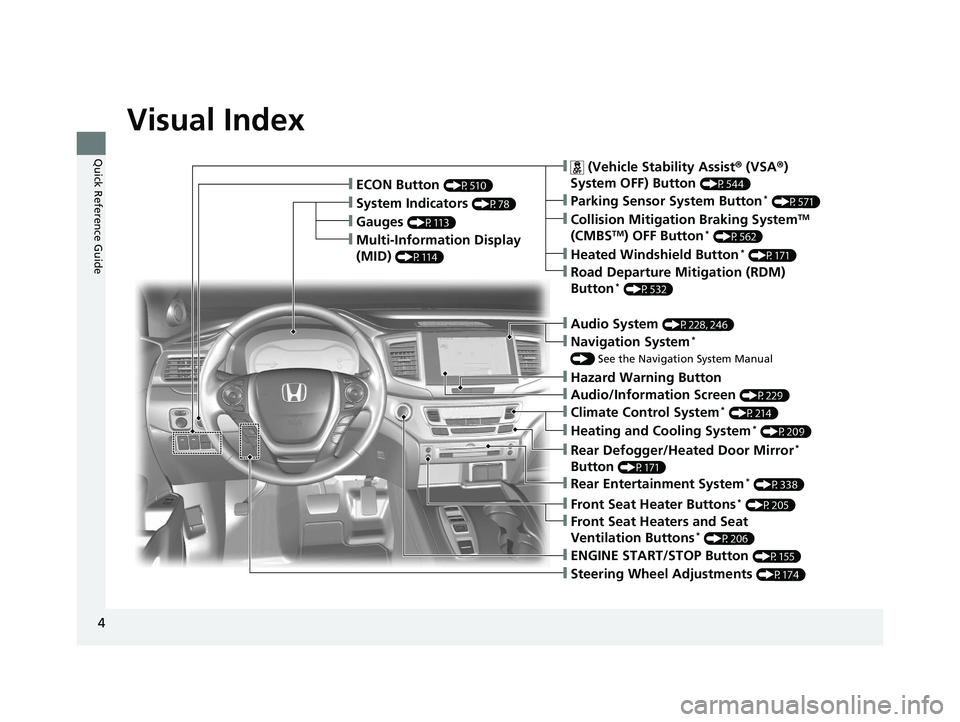
Visual Index
❙Gauges (P113)
❙Multi-Information Display
(MID)
(P114)
❙System Indicators (P78)
❙ECON Button (P510)
❙Audio System (P228, 246)
❙Navigation System*
() See the Navigation System Manual
❙Audio/Information Screen (P229)
❙Hazard Warning Button
❙ (Vehicle Stability Assist ® (VSA ®)
System OFF) Button
(P544)
❙Collision Mitigation Braking SystemTM
(CMBSTM) OFF Button* (P562)
❙Heated Windshield Button* (P171)
❙Road Departure Mitigation (RDM)
Button* (P532)
❙Parking Sensor System Button* (P571)
❙Climate Control System* (P214)
❙Heating and Cooling System* (P209)
❙Rear Defogger/Heated Door Mirror*
Button
(P171)
❙Rear Entertainment System* (P338)
❙Front Seat Heaters and Seat
Ventilation Buttons* (P206)
❙Front Seat Heater Buttons* (P205)
❙Steering Wheel Adjustments (P174)
❙ENGINE START/STOP Button (P155)
18 PILOT-31TG76200.book 4 ページ 2018年3月30日 金曜日 午前11時51分
Page 7 of 695
5
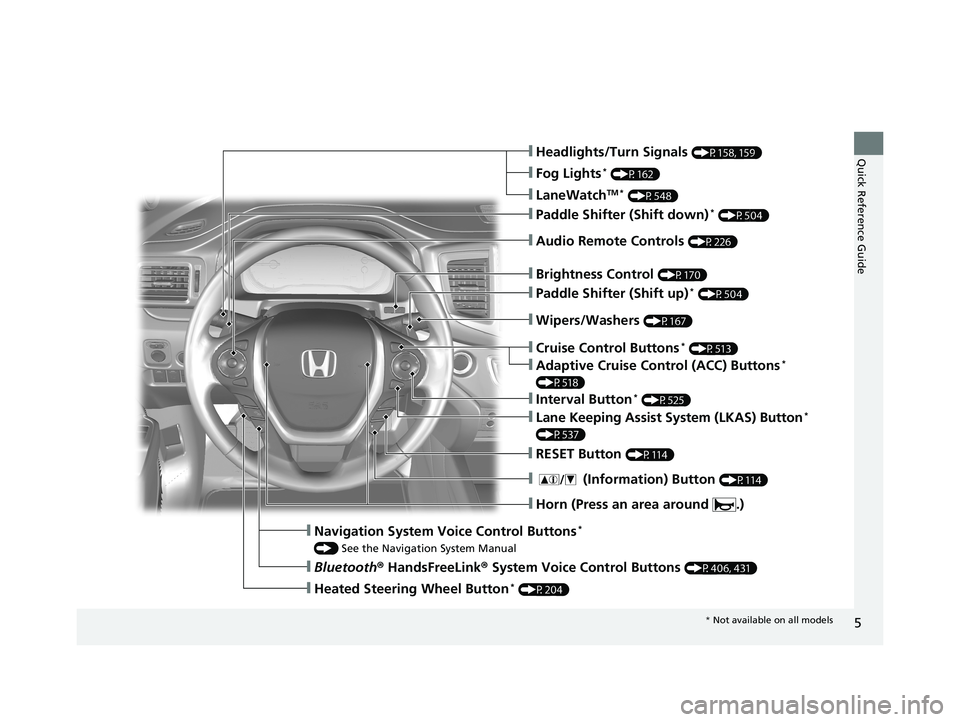
Quick Reference Guide❙Headlights/Turn Signals (P158, 159)
❙Fog Lights* (P162)
❙LaneWatchTM * (P548)
❙Paddle Shifter (Shift down)* (P504)
❙Audio Remote Controls (P226)
❙Wipers/Washers (P167)
❙Paddle Shifter (Shift up)* (P504)
❙Brightness Control (P170)
❙Cruise Control Buttons* (P513)
❙Adaptive Cruise Control (ACC) Buttons*
(P518)
❙Interval Button* (P525)
❙Lane Keeping Assist System (LKAS) Button*
(P537)
❙RESET Button (P114)
❙Horn (Press an area around .)
❙ (Information) Button (P114)
❙Navigation System Voice Control Buttons*
() See the Navigation System Manual
❙Bluetooth ® HandsFreeLink ® System Voice Control Buttons (P406, 431)
❙Heated Steering Wheel Button* (P204)
* Not available on all models
18 PILOT-31TG76200.book 5 ページ 2018年3月30日 金曜日 午前11時51分
Page 15 of 695
13
Quick Reference Guide
Controls (P119)
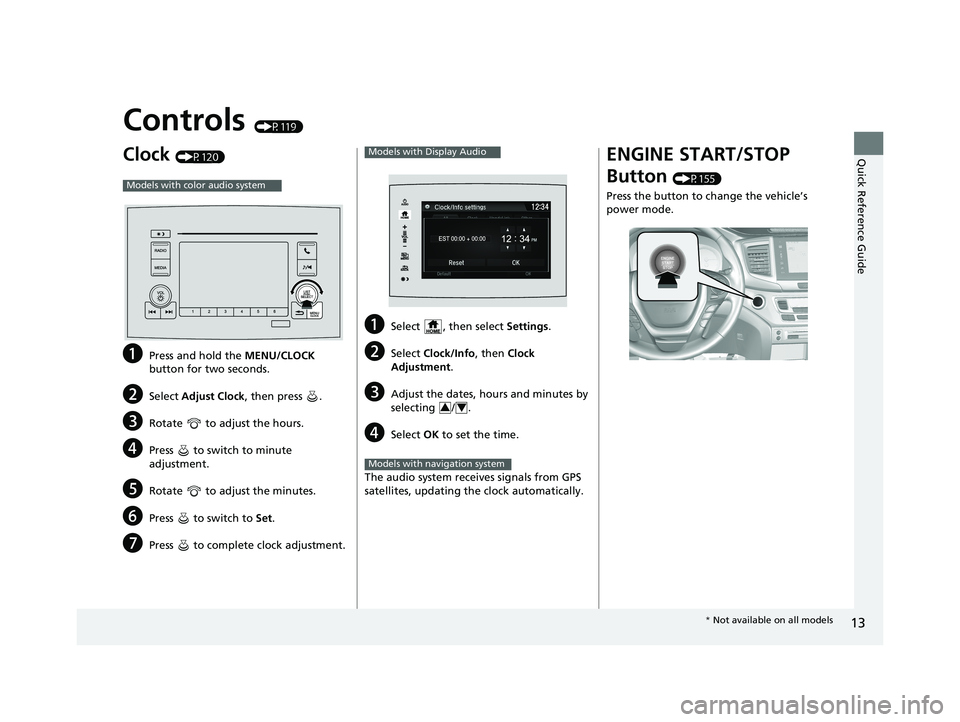
Clock (P120)
aPress and hold the MENU/CLOCK
button for two seconds.
bSelect Adjust Clock , then press .
cRotate to adjust the hours.
dPress to switch to minute
adjustment.
eRotate to adjust the minutes.
fPress to switch to Set.
gPress to complete clock adjustment.
Models with color audio system
aSelect , then select Settings .
bSelect Clock/Info , then Clock
Adjustment .
cAdjust the dates, hours and minutes by
selecting / .
dSelect OK to set the time.
The audio system receives signals from GPS
satellites, updating the clock automatically.
Models with Display Audio
34
Models with navigation system
ENGINE START/STOP
Button
(P155)
Press the button to change the vehicle’s
power mode.
* Not available on all models
18 PILOT-31TG76200.book 13 ページ 2018年3月30日 金曜日 午前11時51分
Page 19 of 695
17
Quick Reference Guide
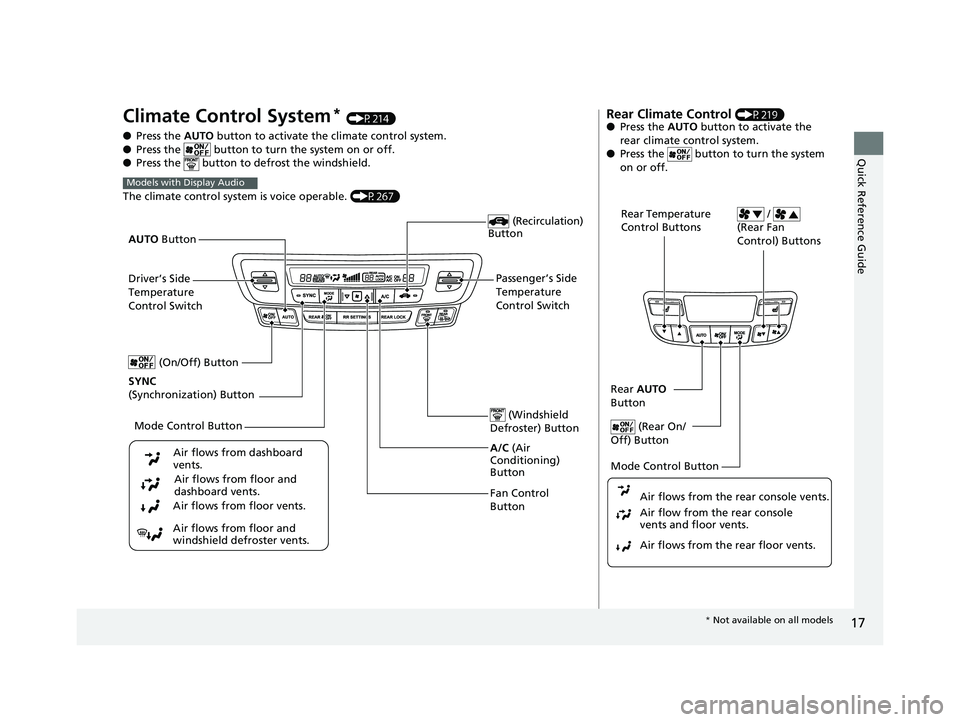
Climate Control System* (P214)
● Press the AUTO button to activate th e climate control system.
● Press the button to turn the system on or off.
● Press the button to de frost the windshield.
The climate control system is voice operable. (P267)
Models with Display Audio
Fan Control
Button (Windshield
Defroster) Button
A/C (Air
Conditioning)
Button
Air flows from floor and
windshield defroster vents. Air flows from floor vents. Air flows from floor and
dashboard vents.
Air flows from dashboard
vents.
(Recirculation)
Button
Passenger’s Side
Temperature
Control Switch
AUTO
Button
Driver’s Side
Temperature
Control Switch
Mode Control Button
SYNC
(Synchronization) Button (On/Off) Button
Rear Climate Control (P219)
● Press the AUTO button to activate the
rear climate control system.
● Press the button to turn the system
on or off.
Rear Temperature
Control Buttons /
(Rear Fan
Control) Buttons
Rear AUTO
Button
(Rear On/
Off) Button
Mode Control Button
Air flows from the rear floor vents. Air flow from the rear console
vents and floor vents. Air flows from the rear console vents.
* Not available on all models
18 PILOT-31TG76200.book 17 ページ 2018年3月30日 金曜日 午前11時51分
Page 20 of 695
18
Quick Reference Guide
Features (P221)
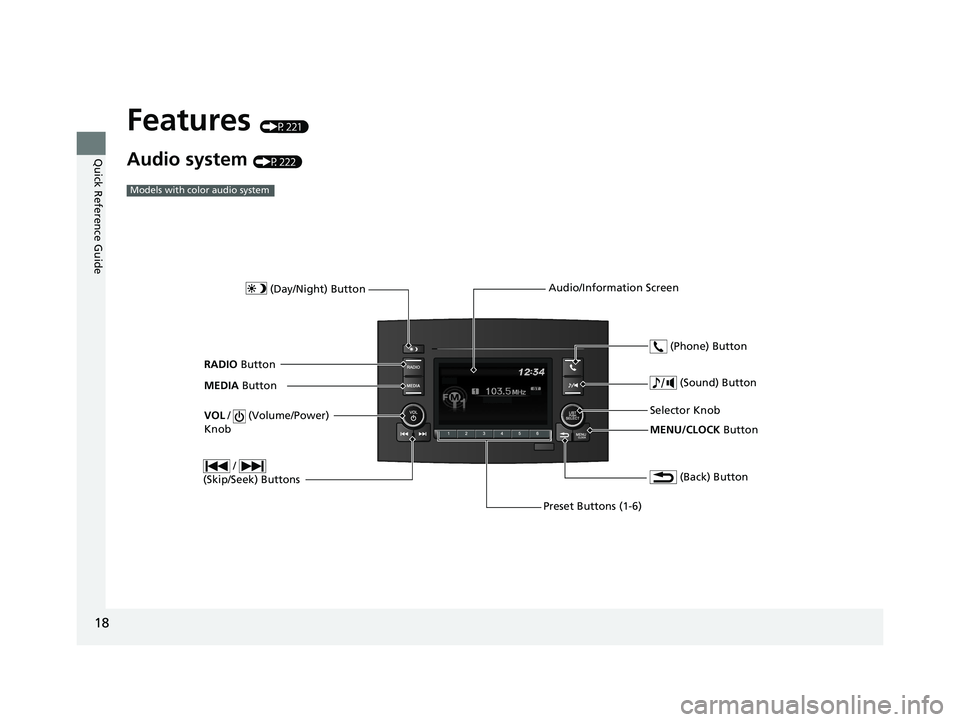
Audio system (P222)
Models with color audio system
MENU/CLOCK Button
Selector Knob
(Day/Night) Button
(Back) Button
(Sound) Button
VOL
/ (Volume/Power)
Knob
Preset Buttons (1-6) (Phone) Button
RADIO
Button
/
(Skip/Seek) Buttons
MEDIA Button Audio/Information Screen
18 PILOT-31TG76200.book 18 ページ 2018年3月30日 金曜日 午前11時51分
Page 21 of 695
19
Quick Reference Guide
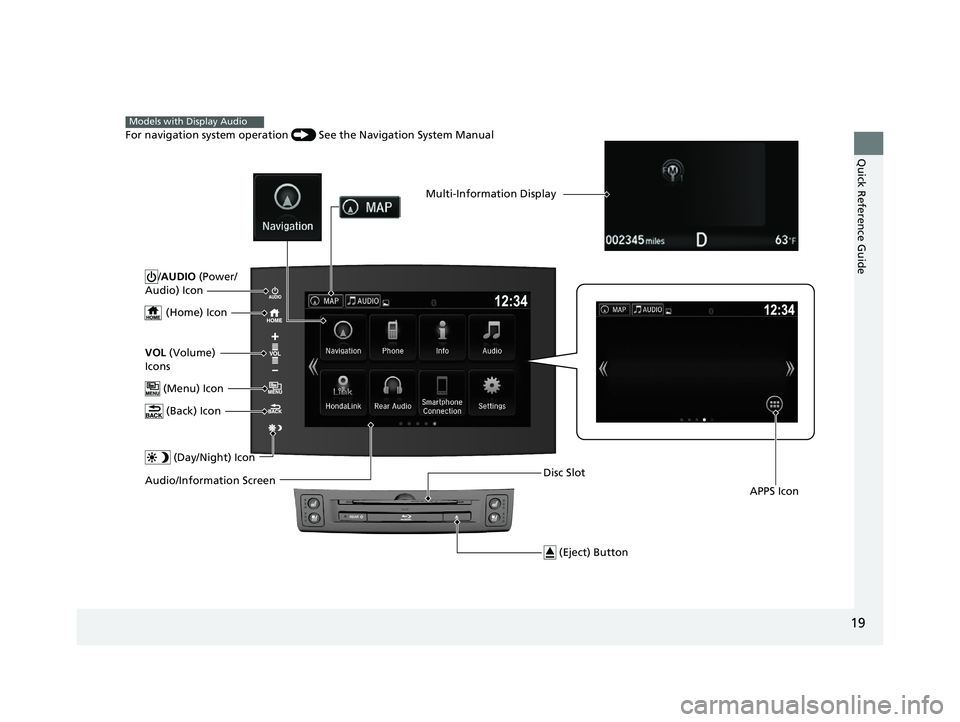
/AUDIO (Power/
Audio) Icon
(Home) Icon
VOL (Volume)
Icons
(Menu) Icon
(Back) Icon
(Day/Night) Icon
Audio/Information Screen
Multi-Information Display
APPS Icon
For navigation system operation () See the Navigation System Manual
Models with Display Audio
(Eject) Button
Disc Slot
18 PILOT-31TG76200.book 19 ページ 2018年3月30日 金曜日 午前11時51分
Page 22 of 695
20
Quick Reference Guide
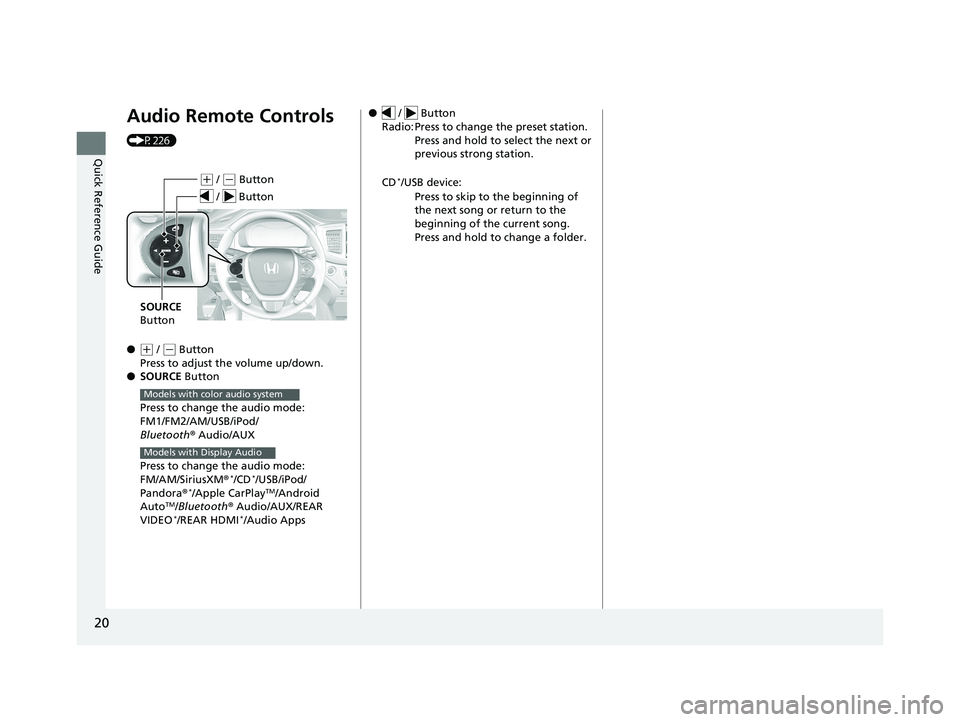
Audio Remote Controls
(P226)
●
(+ / ( - Button
Press to adjust the volume up/down.
● SOURCE Button
Press to change the audio mode:
FM1/FM2/AM/USB/iPod/
Bluetooth ® Audio/AUX
Press to change the audio mode:
FM/AM/SiriusXM ®
*/CD*/USB/iPod/
Pandora®*/Apple CarPlayTM/Android
AutoTM/Bluetooth ® Audio/AUX/REAR
VIDEO*/REAR HDMI*/Audio Apps
( + / (- Button
SOURCE
Button
/ Button
Models with color audio system
Models with Display Audio
● / Button
Radio: Press to change the preset station. Press and hold to select the next or
previous strong station.
CD
*/USB device: Press to skip to the beginning of
the next song or return to the
beginning of the current song.
Press and hold to change a folder.
18 PILOT-31TG76200.book 20 ページ 2018年3月30日 金曜日 午前11時51分
Page 118 of 695
uuGauges and Multi-Information Display (MID) uMID
116
Instrument Panel
Shows the outside temperature in Fahr enheit (U.S.) or Celsius (Canada).
■Adjusting the outside temperature display
Adjust the temperature reading up to ±5°F or ±3°C if the temperature reading
seems incorrect.
Shows the total number of miles (U.S.) or kilometers (Canada) driven since the last
reset. Meters A and B can be used to measure two separate trips.
■Resetting a trip meter
To reset a trip meter, display it, then press and hold the RESET button until the trip
meter is reset to 0.0.
Shows the estimated average fuel economy of each trip meter in mpg (U.S.) or l/100
km (Canada). The display is updated at set intervals. When a trip meter is reset, the
average fuel economy is also reset.
■Outside Temperature*
■Trip Meter
■Average Fuel Economy
1 Outside Temperature*
The temperature sensor is located in the front
bumper.
Road heat and exhaust fr om another vehicle can
affect the temperature reading when your vehicle
speed is less than 19 mph (30 km/h).
It may take several minutes for the display to be
updated after the temperature reading has stabilized.
Use the audio/information screen’s customized
features to correct the temperature.
2 Customized Features P. 367
1Trip Meter
Switch between trip meter A and trip meter B by
pressing the button.
1Average Fuel Economy
You can change when to reset the average fuel
economy.
2 Customized Features P. 367
* Not available on all models
18 PILOT-31TG76200.book 116 ページ 2018年3月30日 金曜日 午前11時51分