brake light HONDA PILOT 2018 Owner's Manual (in English)
[x] Cancel search | Manufacturer: HONDA, Model Year: 2018, Model line: PILOT, Model: HONDA PILOT 2018Pages: 695, PDF Size: 48.42 MB
Page 10 of 695
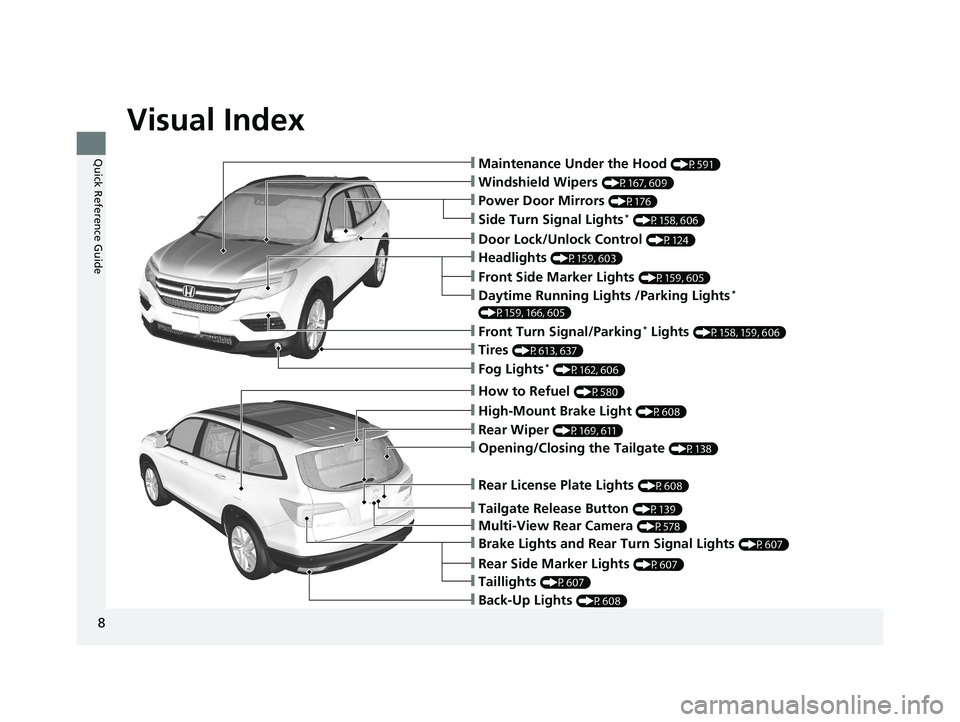
Visual Index
8
Quick Reference Guide❙Maintenance Under the Hood (P591)
❙Windshield Wipers (P167, 609)
❙Tires (P613, 637)
❙Door Lock/Unlock Control (P124)
❙Power Door Mirrors (P176)
❙Headlights (P159, 603)
❙Front Side Marker Lights (P159, 605)
❙Front Turn Signal/Parking* Lights (P158, 159, 606)
❙Fog Lights* (P162, 606)
❙Side Turn Signal Lights* (P158, 606)
❙Daytime Running Lights /Parking Lights*
(P159, 166, 605)
❙How to Refuel (P580)
❙High-Mount Brake Light (P608)
❙Opening/Closing the Tailgate (P138)
❙Rear Wiper (P169, 611)
❙Multi-View Rear Camera (P578)
❙Tailgate Release Button (P139)
❙Rear License Plate Lights (P608)
❙Rear Side Marker Lights (P607)
❙Taillights (P607)
❙Brake Lights and Rear Turn Signal Lights (P607)
❙Back-Up Lights (P608)
18 PILOT-31TG76200.book 8 ページ 2018年3月30日 金曜日 午前11時51分
Page 14 of 695
12
Quick Reference Guide
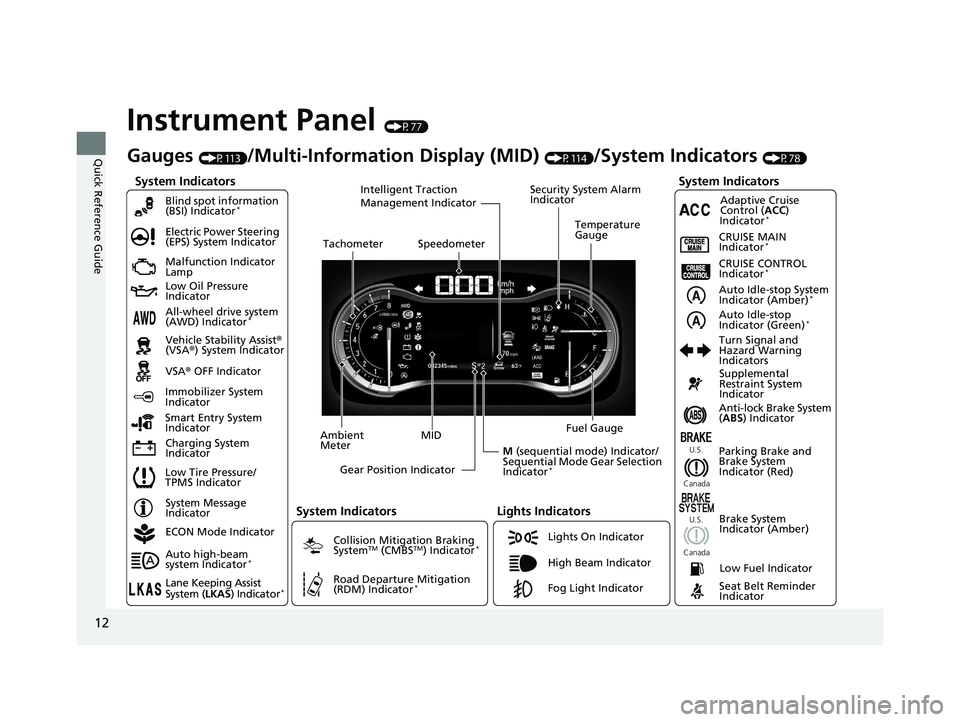
Instrument Panel (P77)
System Indicators
Malfunction Indicator
Lamp
Low Oil Pressure
Indicator
Charging System
IndicatorAnti-lock Brake System
(
ABS ) Indicator
Vehicle Stability Assist
®
(VSA® ) System Indicator
VSA ® OFF Indicator
Electric Power Steering
(EPS) System Indicator
Lights Indicators
Lights On Indicator
High Beam Indicator
Immobilizer System
Indicator
Seat Belt Reminder
Indicator
System Indicators
System Message
IndicatorParking Brake and
Brake System
Indicator (Red)Supplemental
Restraint System
Indicator
Low Fuel Indicator
Gauges (P113)/Multi-Information Display (MID) (P114)/System Indicators (P78)
Low Tire Pressure/
TPMS Indicator Turn Signal and
Hazard Warning
Indicators
Smart Entry System
Indicator Ambient
Meter
Gear Position Indicator Fuel Gauge
Tachometer
Temperature
Gauge
Speedometer
MID
M (sequential mode) Indicator/
Sequential Mode Gear Selection
Indicator
*
Brake System
Indicator (Amber)
All-wheel drive system
(AWD) Indicator*
Blind spot information
(BSI) Indicator*
System Indicators
Collision Mitigation Braking
SystemTM (CMBSTM) Indicator*
Road Departure Mitigation
(RDM) Indicator*
Security System Alarm
Indicator
U.S.
Canada U.S.
Canada
Fog Light Indicator
Auto Idle-stop System
Indicator (Amber)*
Auto Idle-stop
Indicator (Green)*
ECON Mode Indicator
Auto high-beam
system Indicator
*
Lane Keeping Assist
System ( LKAS) Indicator*
CRUISE MAIN
Indicator*
CRUISE CONTROL
Indicator*
Adaptive Cruise
Control ( ACC)
Indicator
*
Intelligent Traction
Management Indicator
18 PILOT-31TG76200.book 12 ページ 2018年3月30日 金曜日 午前11時51分
Page 28 of 695
26
Quick Reference Guide
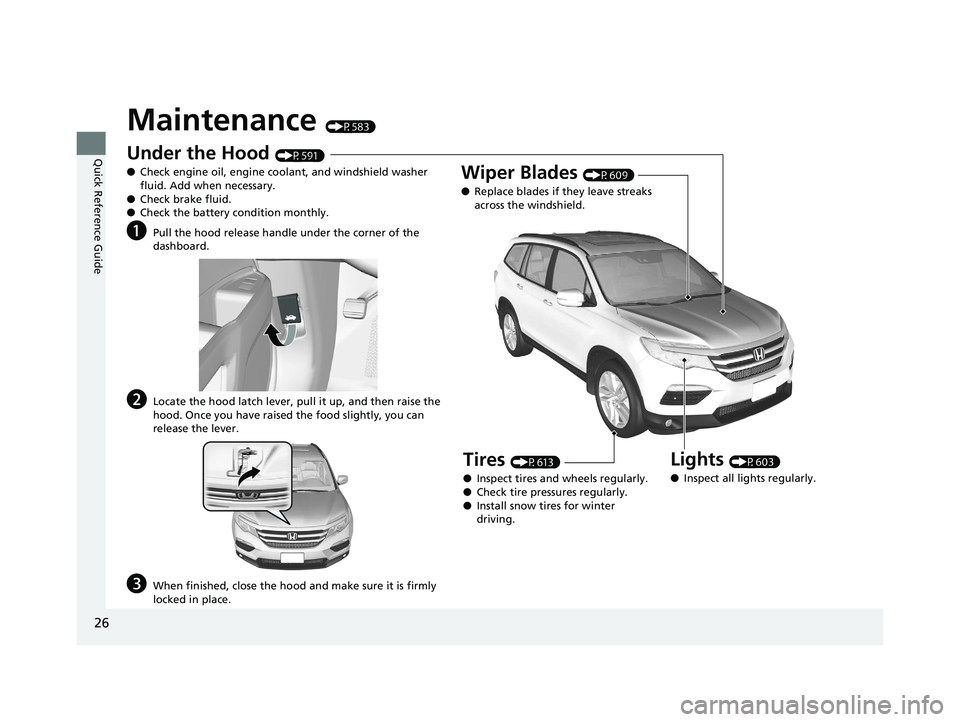
Maintenance (P583)
Under the Hood (P591)
● Check engine oil, engine coolant, and windshield washer
fluid. Add when necessary.
● Check brake fluid.
● Check the battery condition monthly.
aPull the hood release handle under the corner of the
dashboard.
bLocate the hood latch lever, pull it up, and then raise the
hood. Once you have raised the food slightly, you can
release the lever.
cWhen finished, close the hood and make sure it is firmly
locked in place.
Lights (P603)
● Inspect all lights regularly.
Wiper Blades (P609)
● Replace blades if they leave streaks
across the windshield.
Tires (P613)
● Inspect tires and wheels regularly.
● Check tire pressures regularly.
● Install snow tires for winter
driving.
18 PILOT-31TG76200.book 26 ページ 2018年3月30日 金曜日 午前11時51分
Page 30 of 695
28
Quick Reference Guide
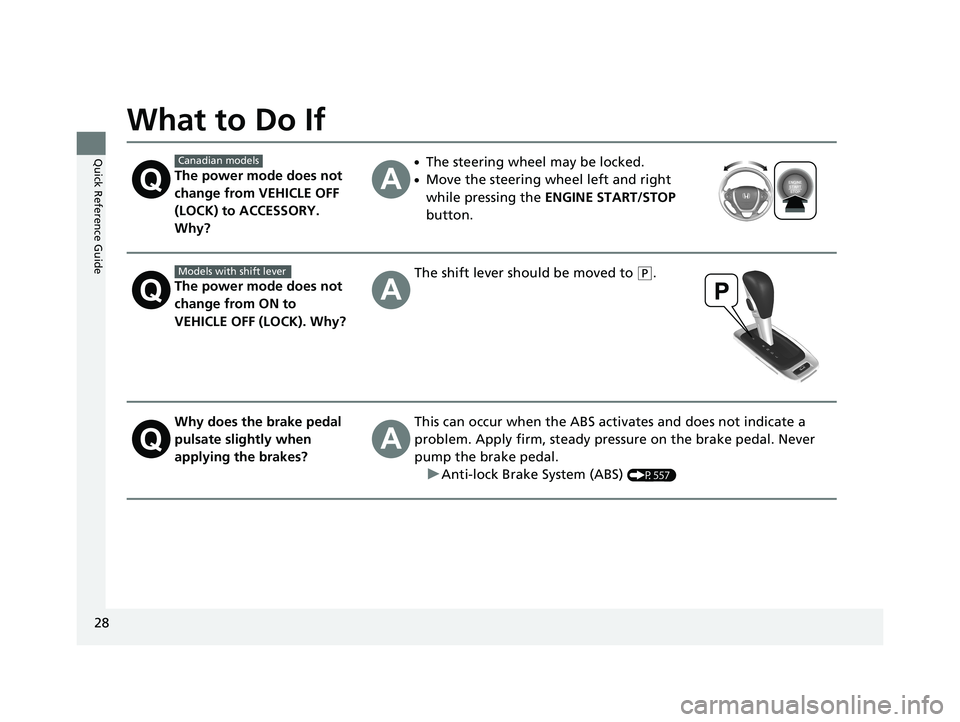
What to Do If
The power mode does not
change from VEHICLE OFF
(LOCK) to ACCESSORY.
Why?
●The steering wheel may be locked.
●Move the steering wheel left and right
while pressing the ENGINE START/STOP
button.
The power mode does not
change from ON to
VEHICLE OFF (LOCK). Why?
The shift lever should be moved to (P.
Why does the brake pedal
pulsate slightly when
applying the brakes?This can occur when the ABS activates and does not indicate a
problem. Apply firm, steady pressure on the brake pedal. Never
pump the brake pedal.
u Anti-lock Brake System (ABS)
(P557)
Canadian models
Models with shift lever
18 PILOT-31TG76200.book 28 ページ 2018年3月30日 金曜日 午前11時51分
Page 83 of 695
81
uuIndicators u
Continued
Instrument Panel
IndicatorNameOn/BlinkingExplanationMessage
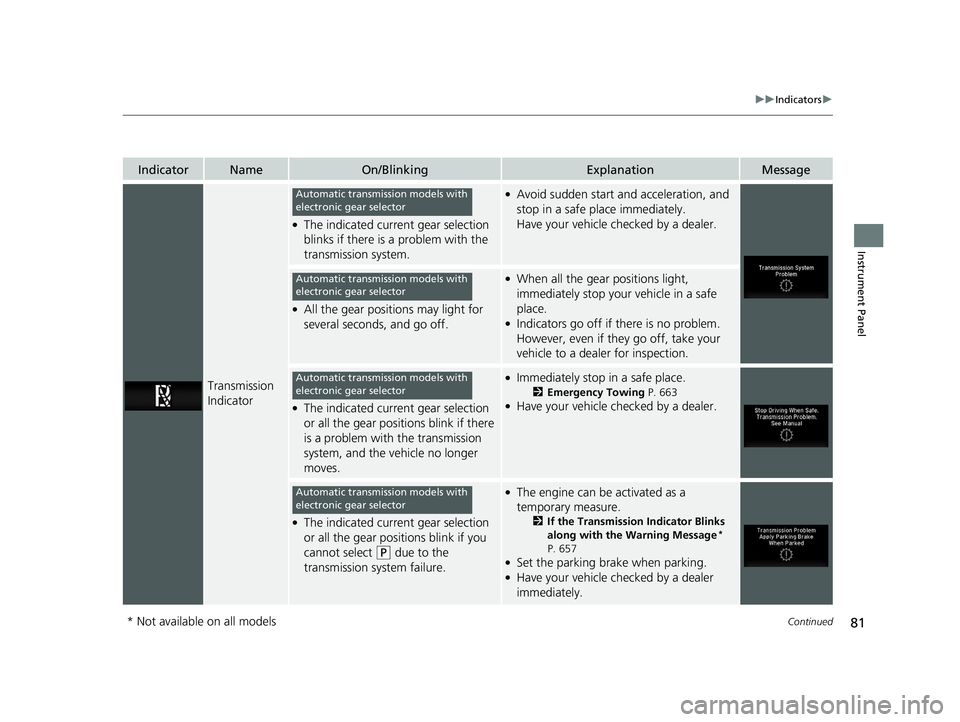
Transmission
Indicator
●The indicated current gear selection
blinks if there is a problem with the
transmission system.
●Avoid sudden start and acceleration, and
stop in a safe place immediately.
Have your vehicle checked by a dealer.
●All the gear positions may light for
several seconds, and go off.
●When all the gear positions light,
immediately stop your vehicle in a safe
place.
●Indicators go off if there is no problem.
However, even if they go off, take your
vehicle to a dealer for inspection.
●The indicated current gear selection
or all the gear positions blink if there
is a problem with the transmission
system, and the vehicle no longer
moves.
●Immediately stop in a safe place.
2Emergency Towing P. 663●Have your vehicle checked by a dealer.
●The indicated current gear selection
or all the gear positions blink if you
cannot select
(P due to the
transmission system failure.
●The engine can be activated as a
temporary measure.
2 If the Transmission Indicator Blinks
along with the Warning Message*
P. 657
●Set the parking brake when parking.●Have your vehicle checked by a dealer
immediately.
Automatic transmission models with
electronic gear selector
Automatic transmission models with
electronic gear selector
Automatic transmission models with
electronic gear selector
Automatic transmission models with
electronic gear selector
* Not available on all models
18 PILOT-31TG76200.book 81 ページ 2018年3月30日 金曜日 午前11時51分
Page 86 of 695
84
uuIndicators u
Instrument Panel
IndicatorNameOn/BlinkingExplanationMessage
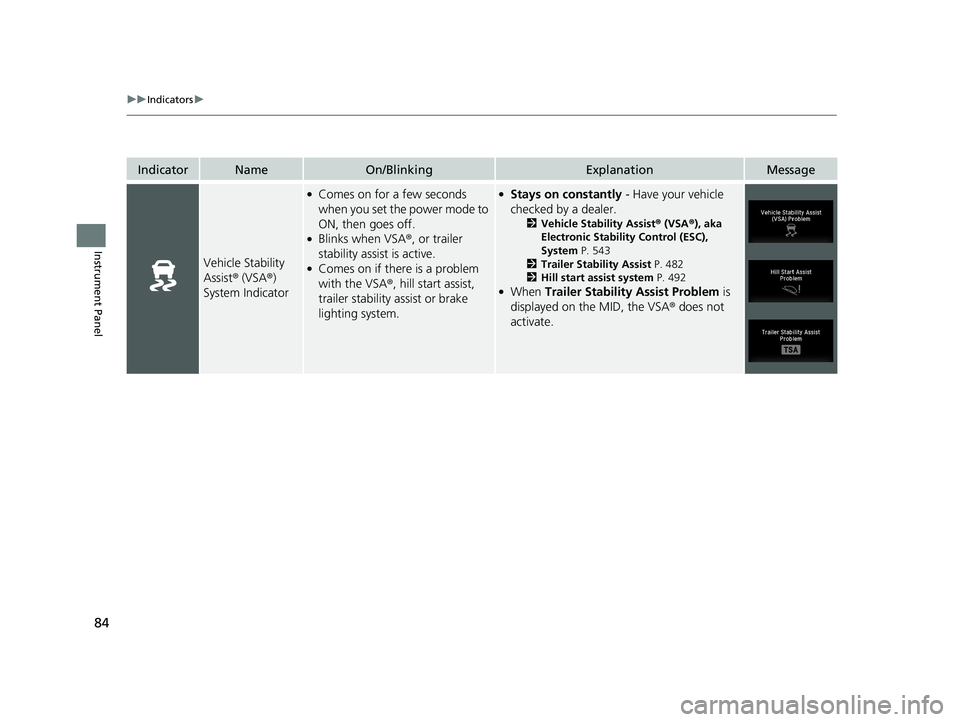
Vehicle Stability
Assist® (VSA ®)
System Indicator
●Comes on for a few seconds
when you set the power mode to
ON, then goes off.
●Blinks when VSA ®, or trailer
stability assist is active.
●Comes on if there is a problem
with the VSA ®, hill start assist,
trailer stability assist or brake
lighting system.
●Stays on constantly - Have your vehicle
checked by a dealer.
2 Vehicle Stability Assist ® (VSA ®), aka
Electronic Stability Control (ESC),
System P. 543
2 Trailer Stability Assist P. 482
2 Hill start assist system P. 492
●When Trailer Stability Assist Problem is
displayed on the MID, the VSA ® does not
activate.
18 PILOT-31TG76200.book 84 ページ 2018年3月30日 金曜日 午前11時51分
Page 168 of 695
166
uuOperating the Switches Around the Steering Wheel uDaytime Running Lights
Controls
Daytime Running Lights
The daytime running lights come on when the following conditions have been met:
• The power mode is in ON.
• The headlight switch is AUTO or OFF .
• The parking brake is released.
The lights remain on even if you set the parking brake. Setting the power mode to
VEHICLE OFF (LOCK) will turn off the daytime running lights.
The daytime running lights are off once the headlight switch is turned on, or when
the head light switch is in AUTO and it is getting darker outside.
18 PILOT-31TG76200.book 166 ページ 2018年3月30日 金曜日 午前11時51分
Page 175 of 695
173
uuOperating the Switches Around the Steering Wheel uDriving Position Memory System*
Controls
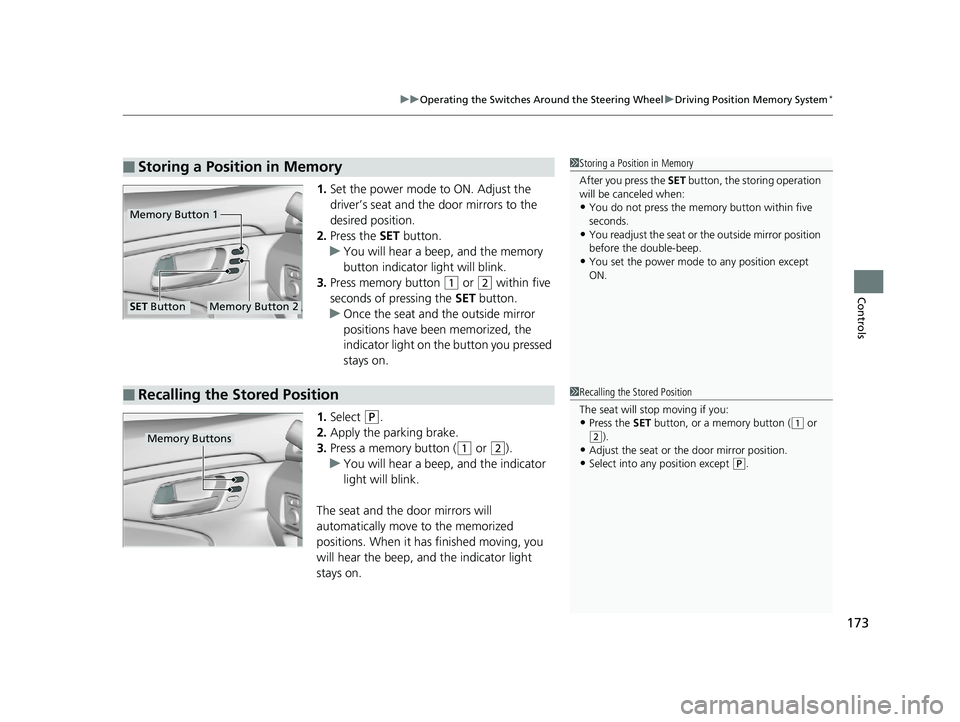
1. Set the power mode to ON. Adjust the
driver’s seat and the door mirrors to the
desired position.
2. Press the SET button.
u You will hear a beep, and the memory
button indicator light will blink.
3. Press memory button
(1 or (2 within five
seconds of pressing the SET button.
u Once the seat and the outside mirror
positions have been memorized, the
indicator light on the button you pressed
stays on.
1. Select
(P.
2. Apply the parking brake.
3. Press a memory button (
(1 or (2).
u You will hear a beep, and the indicator
light will blink.
The seat and the door mirrors will
automatically move to the memorized
positions. When it has finished moving, you
will hear the beep, and the indicator light
stays on.
■Storing a Position in Memory1 Storing a Position in Memory
After you press the SET button, the storing operation
will be canceled when:
•You do not press the memory button within five
seconds.
•You readjust the seat or the outside mirror position
before the double-beep.
•You set the power mode to any position except
ON.
Memory Button 1
Memory Button 2SET Button
■Recalling the Stored Position1 Recalling the Stored Position
The seat will st op moving if you:
•Press the SET button, or a memory button ((1 or
(2).•Adjust the seat or the door mirror position.
•Select into any position except (P.
Memory Buttons
18 PILOT-31TG76200.book 173 ページ 2018年3月30日 金曜日 午前11時51分
Page 471 of 695
Continued469
uuBefore Driving uDriving Preparation
Driving
• Store or secure all items on board properly.
u Carrying too much cargo, or improperly storing it, can affect your vehicle’s
handling, stability, sto pping distance, and tires, and make it unsafe.
2Maximum Load Limit P. 471
•Do not pile items higher than the seat height.
u They can block your view and may be thrown forward in the event of sudden
braking.
• Do not place anything in the front seat footwells. Make sure to secure the floor
mat.
u An object or unsecured floor mat can in terfere with your brake and accelerator
pedal operation while driving.
• If you have any animals on board, do not let them move around in the vehicle.
u They may interfere with driv ing and a crash could occur.
• Securely close and lock al l doors and the tailgate.
2Locking/Unlocking the Doors from the Inside P. 131
•Adjust your seating position properly.
u Adjust the head restraint, too.
2Adjusting the Seats P. 177
2 Adjusting the Head Restraints P. 182
•Adjust the mirrors and steering wh eel properly for your driving.
u Adjust them while sitting in the proper driving position.
2 Adjusting the Steering Wheel P. 174
2 Adjusting the Mirrors P. 175
■Interior Checks1Interior Checks
The headlight aim is set by the factory, and does not
need to be adjusted. Howeve r, if you regularly carry
heavy items in the cargo area or tow a trailer, have
the aiming readjusted at a dealer or by a qualified
technician.
18 PILOT-31TG76200.book 469 ページ 2018年3月30日 金曜日 午前11時51分
Page 480 of 695
uuTowing a Trailer uTowing Preparation
478
Driving
Towing generally requires a variety of supplemental equipment.
To ensure the best quality, we recomme nd that you purchase Honda equipment
whenever possible.
■Trailer brakes
Recommended for any trailer with a total weight of 1,000 lbs (450 kg) or more:
There are two common types of trailer brake s: surge and electric. Surge brakes are
common for boat trailers, since the brakes will get wet.
If you choose electric brakes, be sure th ey are electronically actuated. Do not
attempt to attach trailer brakes to your ve hicle’s hydraulic system, as it will lower
braking effectiveness and create a potential hazard.
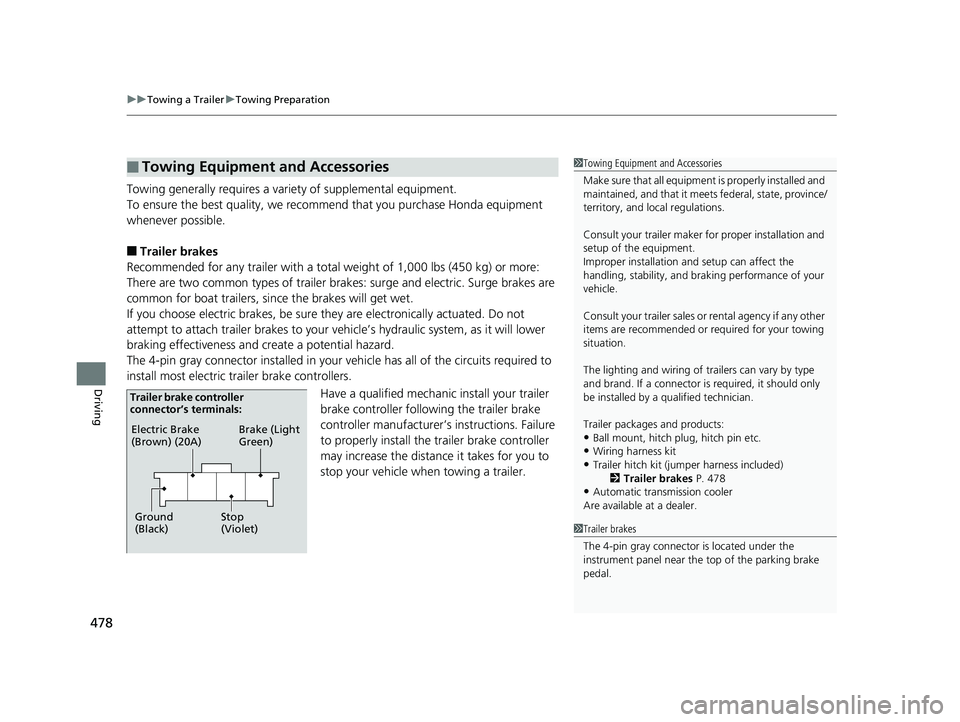
The 4-pin gray connector installed in your vehicle has all of the circuits required to
install most electric trailer brake controllers.
Have a qualified mechanic install your trailer
brake controller following the trailer brake
controller manufacturer’ s instructions. Failure
to properly install the trailer brake controller
may increase the distance it takes for you to
stop your vehicle when towing a trailer.
■Towing Equipment and Accessories1 Towing Equipment and Accessories
Make sure that all equipment is properly installed and
maintained, and that it meets federal, state, province/
territory, and lo cal regulations.
Consult your trai ler maker for prope r installation and
setup of the equipment.
Improper installation and setup can affect the
handling, stability, and br aking performance of your
vehicle.
Consult your traile r sales or rental agency if any other
items are recommended or required for your towing
situation.
The lighting and wiring of tra ilers can vary by type
and brand. If a connector is required, it should only
be installed by a qua lified technician.
Trailer packages and products:
•Ball mount, hitch plug, hitch pin etc.•Wiring harness kit
•Trailer hitch kit (jum per harness included)
2 Trailer brakes P. 478
•Automatic transmission cooler
Are available at a dealer.
1 Trailer brakes
The 4-pin gray connector is located under the
instrument panel near the top of the parking brake
pedal.
Electric Brake
(Brown) (20A)
Ground
(Black) Brake (Light
Green)
Stop
(Violet)
Trailer brake controller
connector’s terminals:
18 PILOT-31TG76200.book 478 ページ 2018年3月30日 金曜日 午前11時51分