maintenance HONDA PILOT 2018 Owner's Manual (in English)
[x] Cancel search | Manufacturer: HONDA, Model Year: 2018, Model line: PILOT, Model: HONDA PILOT 2018Pages: 695, PDF Size: 48.42 MB
Page 2 of 695
Event Data Recorders
This vehicle is equipped with an event data recorder (EDR).
The main purpose of an EDR is to record, in certain crash or near
crash-like situations, such as an air bag deployment or hitting a
road obstacle, data that will assist in understanding how a vehicle’s
systems performed. The EDR is designed to record data related
to vehicle dynamics and safety systems for a short period of
time, typically 30 seconds or le ss. The EDR in this vehicle is
designed to record such data as:
• How various systems in your vehicle were operating;
• Whether or not the driver and passenger safety belts were
buckled/fastened;
3WARNING
California Proposition 65 Warning
Operating, servicing and maintaining a
passenger vehicle or off-road vehicle can
expose you to chemicals including engine
exhaust, carbon monoxide, phthalates, and
lead, which are known to the State of
California to cause cancer and birth defects or
other reproductive harm. To minimize
exposure, avoid breathing exhaust, do not
idle the engine except as necessary, service
your vehicle in a well-ventilated area and
wear gloves or wash your hands frequently
when servicing your vehicle. For more
information go to
www.P65Warnings.ca.gov/
passenger-vehicle
.
• How far (if at all) the driver was depressing the accelerator
and/or brake pedal; and,
• How fast the vehicle was traveling.
These data can help provide a better understanding of the
circumstances in which crashes and injuries occur. NOTE: EDR data
are recorded by your vehicle only if a non-trivial crash situation
occurs; no data are recorded by the EDR under normal driving
conditions and no personal data (e.g., name, gender, age, and
crash location) are recorded. Howeve r, other parties, such as law
enforcement, could co mbine the EDR data with the type of
personally identifying data rout inely acquired during a crash
investigation.
To read data recorded by an ED R, special equipment is required,
and access to the vehicle or the EDR is needed. In addition to the
vehicle manufacturer, other parties, such as law enforcement, that
have the special equipment, can re ad the information if they have
access to the vehicle or the EDR.
The data belongs to the vehicle ow ner and may not be accessed by
anyone else except as legally requir ed or with the permission of the
vehicle owner.
Service Diagnostic Recorders
This vehicle is equipped with se rvice-related devices that record
information about powertrain perfo rmance. The data can be used
to verify emissions law requirem ents and/or help technicians
diagnose and solve service problems. It may also be combined with
data from other sources for res earch purposes, but it remains
confidential. Some diagnostic and maintenance information is
uploaded to Honda upon vehicle start up.
18 PILOT-31TG76200.book 0 ページ 2018年3月30日 金曜日 午前11時51分
Page 4 of 695
Contents
This owner’s manual should be considered a permanent part of the
vehicle and should remain with the vehicle when it is sold.
This owner’s manual covers all models of your vehicle. You may find
descriptions of equipment and features that are not on your
particular model.
Images throughout this owner’s manu al (including the front cover)
represent features and equipment that are available on some, but
not all, models. Your particular mo del may not have some of these
features.
This owner’s manual is for vehicles sold in the United States and
Canada.
The information and specifications in cluded in this publication were
in effect at the time of approval for printing. Honda Motor Co., Ltd.
reserves the right, however, to discontinue or change specifications
or design at any time without notice and without incurring any
obligation.2 Safe Driving P. 31
For Safe Driving P. 32 Seat Belts P. 37 Airbags P. 45
2Instrument Panel P. 77
Indicators P. 78 Gauges and Multi-Information Display (MID) P. 113
2Controls P. 119
Clock P. 120 Locking and Unlocking the Doors P. 121
Moonroof* P. 151 Panoramic Roof* P. 152
Adjusting the Seats P. 177 Interior Ligh ts/Interior Convenience Items P. 191
2Features P. 221
Audio System P. 222
General Information on the Audio System P. 318
HomeLink ® Universal Transceiver
* P. 403 Bluetooth ® HandsFreeLink ® P. 406
2 Driving P. 467
Before Driving P. 468 Towing a Trailer P. 474
Parking Your Vehicle P. 568Multi-view rear camera P. 578
2Maintenance P. 583
Before Performing Maintenance P. 584 Maintenance MinderTM P. 587
Checking and Maintaining Wiper Blades P. 609
Remote Control and Wireless Headphone Care
* P. 625
Accessories and Modifications P. 634
2 Handling the Unexpected P. 635
Tools P. 636 If a Tire Goes Flat P. 637
Overheating P. 652 Indicator, Coming On/Blinking P. 654
When You Cannot Unlock the Fuel Fill Door P. 664
2 Information P. 667
Specifications P. 668 Identification Numbers P. 670
Emissions Testing P. 673 Warranty Coverages P. 675
18 PILOT-31TG76200.book 2 ページ 2018年3月30日 金曜日 午前11時51分
Page 5 of 695
Contents
Child Safety P. 58Exhaust Gas Hazard P. 74Safety Labels P. 75
Opening and Closing the Tailgate P. 138 Security System P. 146 Opening and Closing the Windows P. 149
Operating the Switches Around the Steering Wheel P. 155 Adjusting the Mirrors P. 175
Heating and Cooling
* P. 209 Climate Control System* P. 214
Audio System Basic Operation P. 228, 246 Audio Error Messages P. 314
Blu-ray/DVD Rear Entertainment System* P. 338 Customized Features P. 367
Bluetooth ® HandsFreeLink ® P. 431 Compass* P. 465
Off-Highway Driving Guidelines P. 485 When Driving P. 487 Braking P. 555
Refueling P. 579 Fuel Economy and CO
2 Emissions P. 582
Maintenance Under the Hood P. 591 Replacing Light Bulbs P. 603
Checking and Maintaining Tires P. 613 Battery P. 622 Remote Transmitter Care P. 624
Heating and Cooling System
*/Climate Control System* Maintenance P. 627 Cleaning P. 629
Engine Does Not Start P. 645 Shift Lever Does Not Move* P. 648 Jump Starting P. 649
Fuses P. 658 Emergency Towing P. 663
When You Cannot Open the Tailgate P. 666 Refueling P. 665
Devices that Emit Radio Waves P. 671 Reporting Safety Defects P. 672
Authorized Manuals P. 677 Customer Service Information P. 678
Quick Reference GuideP. 4
Safe DrivingP. 31
Instrument PanelP. 77
ControlsP. 119
FeaturesP. 221
DrivingP. 467
MaintenanceP. 583
Handling the UnexpectedP. 635
InformationP. 667
IndexP. 681
18 PILOT-31TG76200.book 3 ページ 2018年3月30日 金曜日 午前11時51分
Page 10 of 695
Visual Index
8
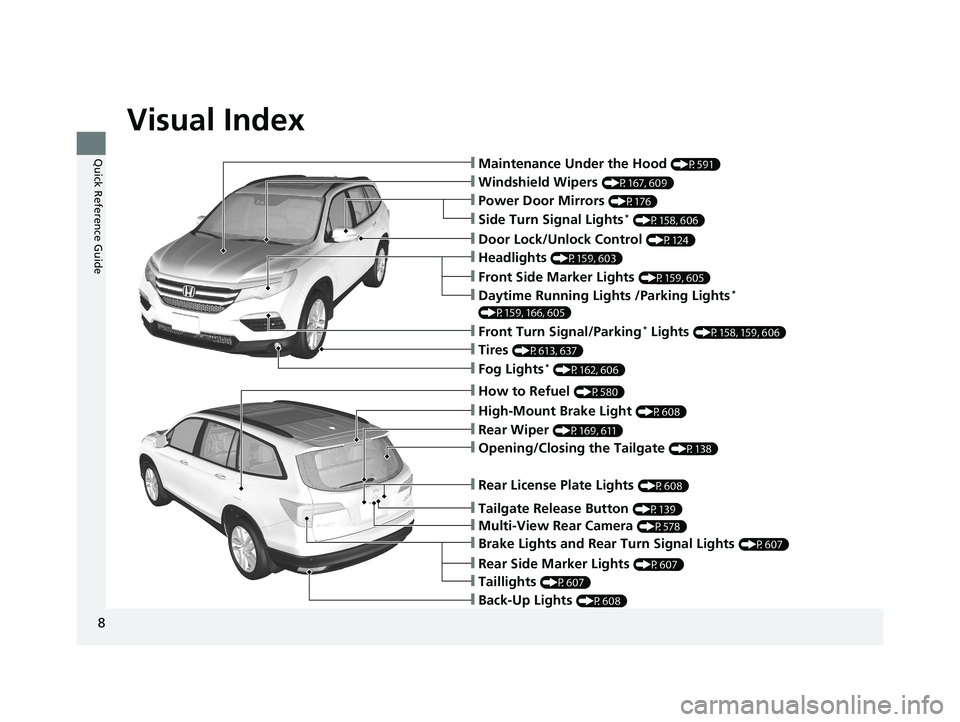
Quick Reference Guide❙Maintenance Under the Hood (P591)
❙Windshield Wipers (P167, 609)
❙Tires (P613, 637)
❙Door Lock/Unlock Control (P124)
❙Power Door Mirrors (P176)
❙Headlights (P159, 603)
❙Front Side Marker Lights (P159, 605)
❙Front Turn Signal/Parking* Lights (P158, 159, 606)
❙Fog Lights* (P162, 606)
❙Side Turn Signal Lights* (P158, 606)
❙Daytime Running Lights /Parking Lights*
(P159, 166, 605)
❙How to Refuel (P580)
❙High-Mount Brake Light (P608)
❙Opening/Closing the Tailgate (P138)
❙Rear Wiper (P169, 611)
❙Multi-View Rear Camera (P578)
❙Tailgate Release Button (P139)
❙Rear License Plate Lights (P608)
❙Rear Side Marker Lights (P607)
❙Taillights (P607)
❙Brake Lights and Rear Turn Signal Lights (P607)
❙Back-Up Lights (P608)
18 PILOT-31TG76200.book 8 ページ 2018年3月30日 金曜日 午前11時51分
Page 28 of 695
26
Quick Reference Guide
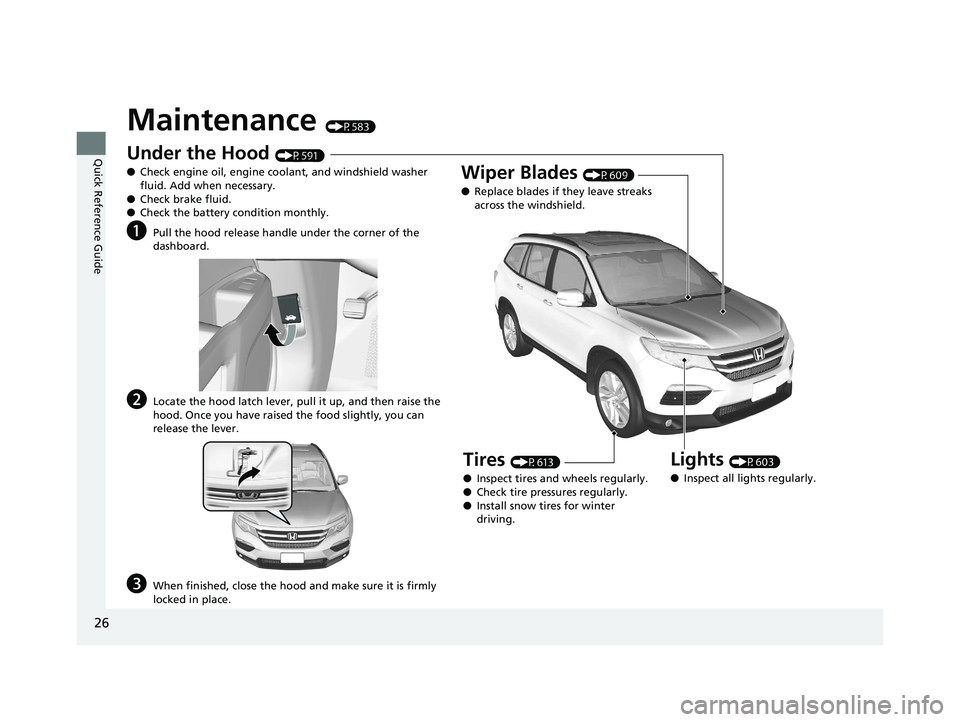
Maintenance (P583)
Under the Hood (P591)
● Check engine oil, engine coolant, and windshield washer
fluid. Add when necessary.
● Check brake fluid.
● Check the battery condition monthly.
aPull the hood release handle under the corner of the
dashboard.
bLocate the hood latch lever, pull it up, and then raise the
hood. Once you have raised the food slightly, you can
release the lever.
cWhen finished, close the hood and make sure it is firmly
locked in place.
Lights (P603)
● Inspect all lights regularly.
Wiper Blades (P609)
● Replace blades if they leave streaks
across the windshield.
Tires (P613)
● Inspect tires and wheels regularly.
● Check tire pressures regularly.
● Install snow tires for winter
driving.
18 PILOT-31TG76200.book 26 ページ 2018年3月30日 金曜日 午前11時51分
Page 35 of 695
33
uuFor Safe Driving uImportant Safety Precautions
Safe Driving
■Pay appropriate attention to the task of driving safely
Engaging in cell phone conversation or other activities that keep you from paying
close attention to the road, other vehicles , and pedestrians could lead to a crash.
Remember, situations can change quickly, and only you can decide when it is safe to
divert some attention away from driving.
■Control your speed
Excessive speed is a major factor in crash injuries and deaths. Generally, the higher
the speed, the greater the risk, but serious injuries can also occur at lower speeds.
Never drive faster than is safe for current conditions, regardless of the maximum
speed posted.
■Keep your vehicle in safe condition
Having a tire blowout or a mechanical failure can be extremely hazardous.
To reduce the possibility of such problems, check your tire pressures and condition
frequently, and perform all re gularly scheduled maintenance.
■Do not leave children unattended in the vehicle
Children left unattended in the vehicle may be injured if they activate one or more
of the vehicle controls. They may also cause the vehicle to move, resulting in a crash
in which the children and/or another pers on(s) can be injured or killed. Also,
depending on the ambient temperature, th e temperature of the interior may reach
extreme levels, which can re sult in injury or death.
Even if the climate control system is on, never leave children in the vehicle
unattended as the climate control system can shut off at any time.
18 PILOT-31TG76200.book 33 ページ 2018年3月30日 金曜日 午前11時51分
Page 59 of 695
57
uuAirbags uAirbag Care
Safe Driving
Airbag Care
You do not need to, and should not, perform any maintenance on or replace any
airbag system components yourself. However, you should have your vehicle
inspected by a dealer in the following situations:
■When the airbags have deployed
If an airbag has inflated, th e control unit and other related parts must be replaced.
Similarly, once an automatic seat belt te nsioner has been activated, it must be
replaced.
■When the vehicle has been in a moderate-to-severe collision
Even if the airbags did not infl ate, have your dealer inspect the following: the driver’s
seat position sensor, weight sensors in the passenger’s seat, front seat belt
tensioners, and each seat belt that was worn during the crash.
■Do not remove or modify a fron t seat without consulting a dealer
This would likely disable or affect the proper operation of the driver’s seat position
sensor or the weight sensors in the passenge r’s seat. If it is necessary to remove or
modify a front seat to accommodate a pe rson with disabilities, contact a Honda
dealer, or for U.S. vehicles, American Ho nda Automobile Customer Service at 1-800-
999-1009 and for Canadian vehicles, Hond a Canada Customer Relations at 1-888-
9-HONDA-9.
1 Airbag Care
We recommend against the use of salvaged airbag
system components, including the airbag, tensioners,
sensors, and control unit.
18 PILOT-31TG76200.book 57 ページ 2018年3月30日 金曜日 午前11時51分
Page 100 of 695
98
uuIndicators uMulti-Information Display (MID) Warning and Information Messages
Instrument Panel
MessageConditionExplanation
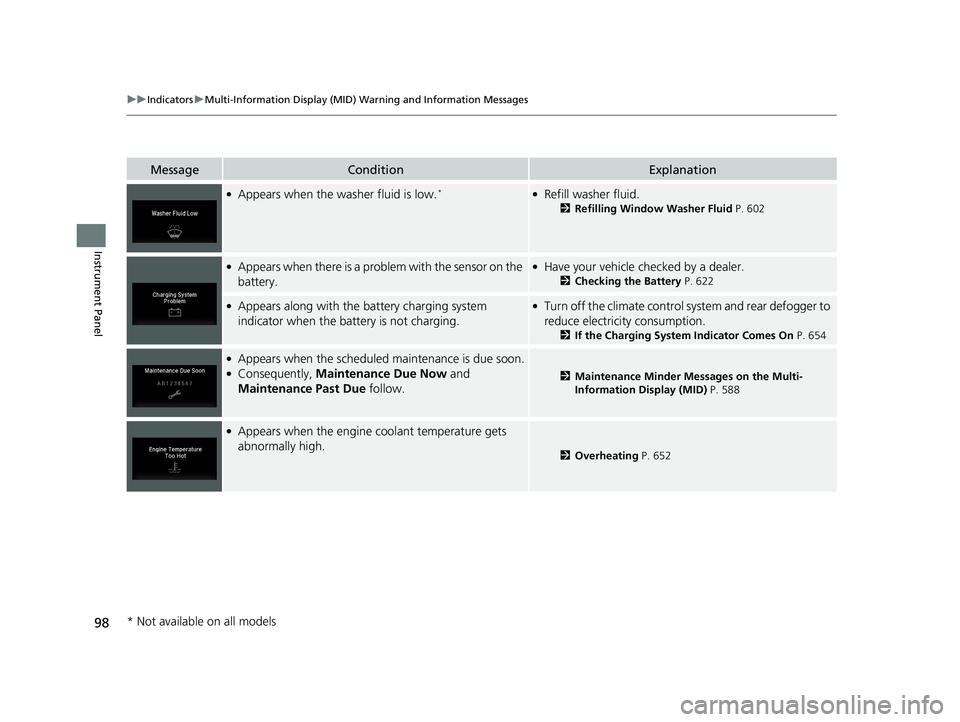
●Appears when the washer fluid is low.*●Refill washer fluid.
2 Refilling Window Washer Fluid P. 602
●Appears when there is a problem with the sensor on the
battery.●Have your vehicle ch ecked by a dealer.
2Checking the Battery P. 622
●Appears along with the battery charging system
indicator when the battery is not charging.●Turn off the climate control sy stem and rear defogger to
reduce electricity consumption.
2 If the Charging System Indicator Comes On P. 654
●Appears when the scheduled maintenance is due soon.●Consequently, Maintenance Due Now and
Maintenance Past Due follow.2Maintenance Minder Messages on the Multi-
Information Display (MID) P. 588
●Appears when the engine coolant temperature gets
abnormally high.
2Overheating P. 652
* Not available on all models
18 PILOT-31TG76200.book 98 ページ 2018年3月30日 金曜日 午前11時51分
Page 119 of 695
117
uuGauges and Multi-Info rmation Display (MID)uMID
Instrument Panel
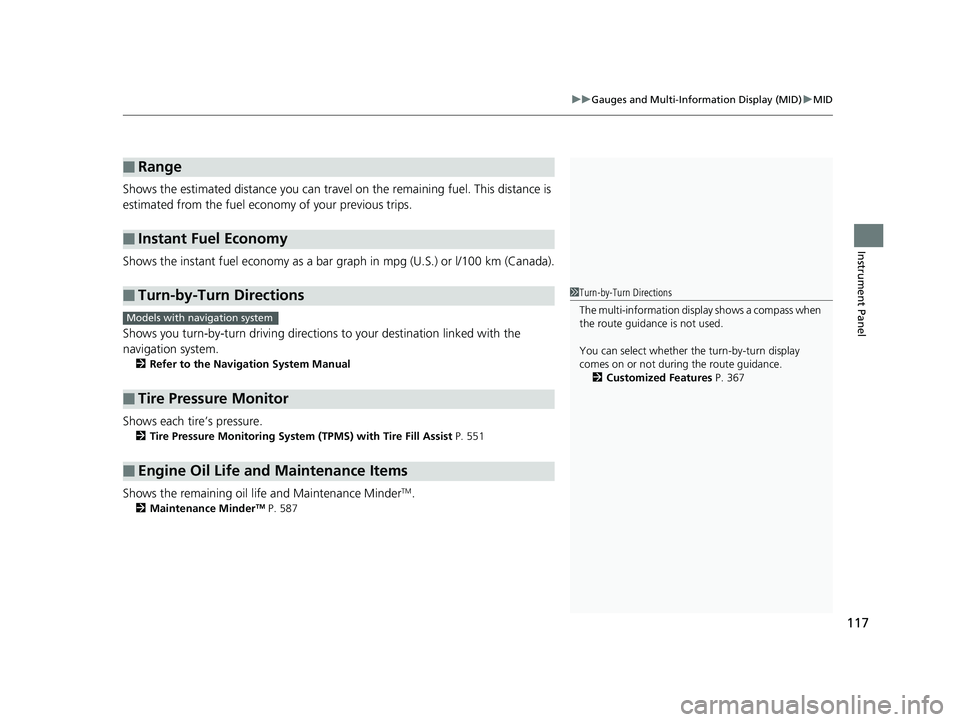
Shows the estimated distance you can travel on the remaining fuel. This distance is
estimated from the fuel economy of your previous trips.
Shows the instant fuel economy as a bar gr aph in mpg (U.S.) or l/100 km (Canada).
Shows you turn-by-turn driv ing directions to your destination linked with the
navigation system.
2 Refer to the Navigation System Manual
Shows each tire’s pressure.
2Tire Pressure Monitoring System (TPMS) with Tire Fill Assist P. 551
Shows the remaining oil life and Maintenance MinderTM.
2Maintenance MinderTM P. 587
■Range
■Instant Fuel Economy
■Turn-by-Turn Directions
■Tire Pressure Monitor
■Engine Oil Life and Maintenance Items
1Turn-by-Turn Directions
The multi-information disp lay shows a compass when
the route guidance is not used.
You can select whether the turn-by-turn display
comes on or not during the route guidance. 2 Customized Features P. 367
Models with navigation system
18 PILOT-31TG76200.book 117 ページ 2018年3月30日 金曜日 午前11時51分
Page 318 of 695
316
uuAudio Error Messages uPandora®*
Features
Pandora ®*
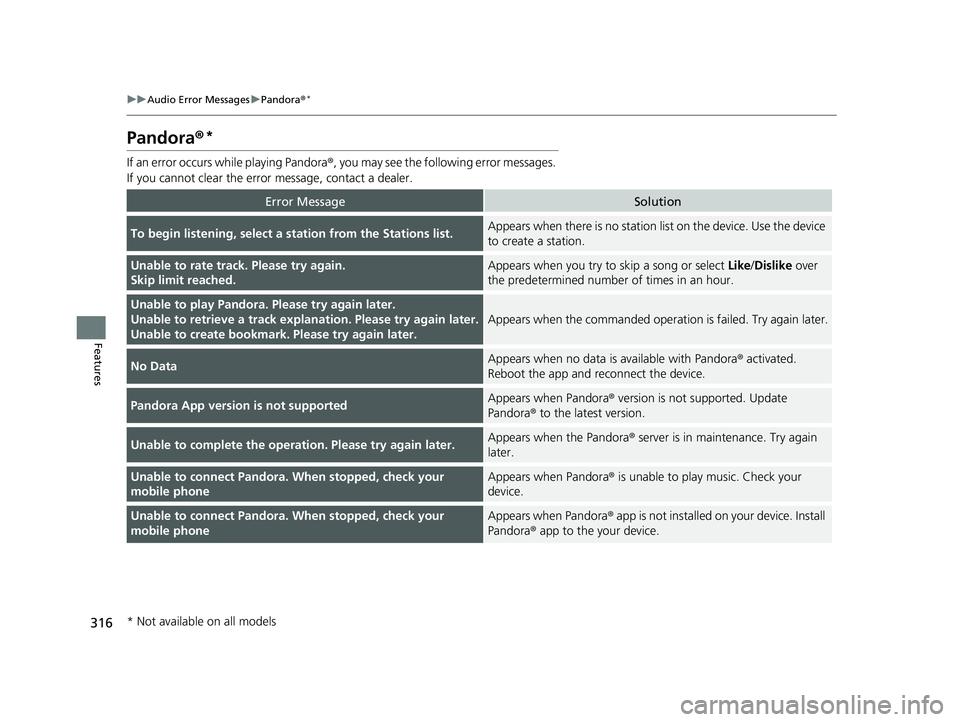
If an error occurs while playing Pandora ®, you may see the following error messages.
If you cannot clear the error message, contact a dealer.
Error MessageSolution
To begin listening, select a station from the Stations list.Appears when there is no station list on the device. Use the device
to create a station.
Unable to rate track. Please try again.
Skip limit reached.Appears when you try to skip a song or select Like/Dislike over
the predetermined number of times in an hour.
Unable to play Pandora. Please try again later.
Unable to retrieve a track explan ation. Please try again later.
Unable to create bookmark. Please try again later.
Appears when the commanded operation is failed. Try again later.
No DataAppears when no data is available with Pandora® activated.
Reboot the app and reconnect the device.
Pandora App version is not supportedAppears when Pandora ® version is not supported. Update
Pandora® to the latest version.
Unable to complete the operation. Please try again later.Appears when the Pandora ® server is in maintenance. Try again
later.
Unable to connect Pandora. When stopped, check your
mobile phoneAppears when Pandora ® is unable to play music. Check your
device.
Unable to connect Pandora. When stopped, check your
mobile phoneAppears when Pandora ® app is not installed on your device. Install
Pandora® app to the your device.
* Not available on all models
18 PILOT-31TG76200.book 316 ページ 2018年3月30日 金曜日 午前11時51分