Rear door HONDA PILOT 2019 Owner's Manual (in English)
[x] Cancel search | Manufacturer: HONDA, Model Year: 2019, Model line: PILOT, Model: HONDA PILOT 2019Pages: 747, PDF Size: 45.81 MB
Page 4 of 747
Contents
This owner’s manual should be considered a permanent part of the
vehicle and should remain with the vehicle when it is sold.
This owner’s manual covers all models of your vehicle. You may find
descriptions of equipment and features that are not on your
particular model.
Images throughout this owner’s manu al (including the front cover)
represent features and equipment that are available on some, but
not all, models. Your particular mo del may not have some of these
features.
This owner’s manual is for vehicles sold in the United States and
Canada.
The information and specifications in cluded in this publication were
in effect at the time of approval for printing. Honda Motor Co., Ltd.
reserves the right, however, to discontinue or change specifications
or design at any time without notice and without incurring any
obligation.2 Safe Driving P. 33
For Safe Driving P. 34 Seat Belts P. 39 Airbags P. 47
2Instrument Panel P. 79
Indicators P. 80 Gauges and Displays P. 110
2Controls P. 135
Clock P. 136 Locking and Unlocking the Doors P. 139
Moonroof* P. 169 Panoramic Roof* P. 170
Adjusting the Seats P. 194 Interior Ligh ts/Interior Convenience Items P. 209
2Features P. 243
Audio System P. 244
General Information on the Audio System P. 353
HomeLink ® Universal Transceiver
* P. 451 Bluetooth ® HandsFreeLink ® P. 454, 479
2 Driving P. 507
Before Driving P. 508 Towing a Trailer P. 514
Parking Your Vehicle P. 615Multi-View Rear Camera P. 626
2Maintenance P. 633
Before Performing Maintenance P. 634 Maintenance MinderTM P. 637
Checking and Maintaining Wiper Blades P. 660
Remote Control and Wireless Headphone Care
* P. 676
Accessories and Modifications P. 685
2 Handling the Unexpected P. 687
Tools P. 688 If a Tire Goes Flat P. 689
Overheating P. 705 Indicator, Coming On/Blinking P. 707
When You Cannot Unlock the Fuel Fill Door P. 717
2 Information P. 721
Specifications P. 722 Identification Numbers P. 724
Emissions Testing P. 728 Warranty Coverages P. 730
19 PILOT HMA ELP-31TG76310.book 2 ページ 2019年3月15日 金曜日 午後6時8分
Page 6 of 747
4
Quick Reference Guide
Quick Reference Guide
Visual Index
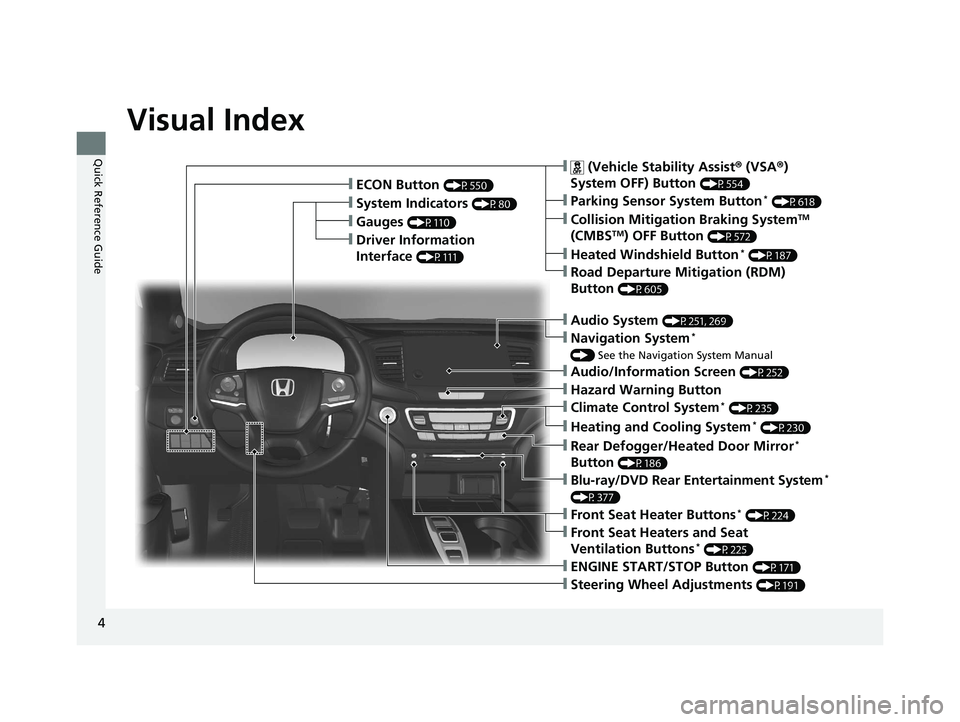
❙Gauges (P110)
❙Driver Information
Interface
(P111)
❙System Indicators (P80)
❙ECON Button (P550)
❙Audio System (P251, 269)
❙Navigation System*
() See the Navigation System Manual
❙ (Vehicle Stability Assist ® (VSA ®)
System OFF) Button
(P554)
❙Collision Mitigation Braking SystemTM
(CMBSTM) OFF Button (P572)
❙Heated Windshield Button* (P187)
❙Road Departure Mitigation (RDM)
Button
(P605)
❙Parking Sensor System Button* (P618)
❙Blu-ray/DVD Rear Entertainment System*
(P377)
❙Steering Wheel Adjustments (P191)
❙ENGINE START/STOP Button (P171)
❙Front Seat Heater Buttons* (P224)
❙Front Seat Heaters and Seat
Ventilation Buttons* (P225)
❙Climate Control System* (P235)
❙Heating and Cooling System* (P230)
❙Rear Defogger/Heated Door Mirror*
Button
(P186)
❙Audio/Information Screen (P252)
❙Hazard Warning Button
19 PILOT HMA ELP-31TG76310.book 4 ページ 2019年3月15日 金曜日 午後6時8分
Page 8 of 747
Visual Index
6
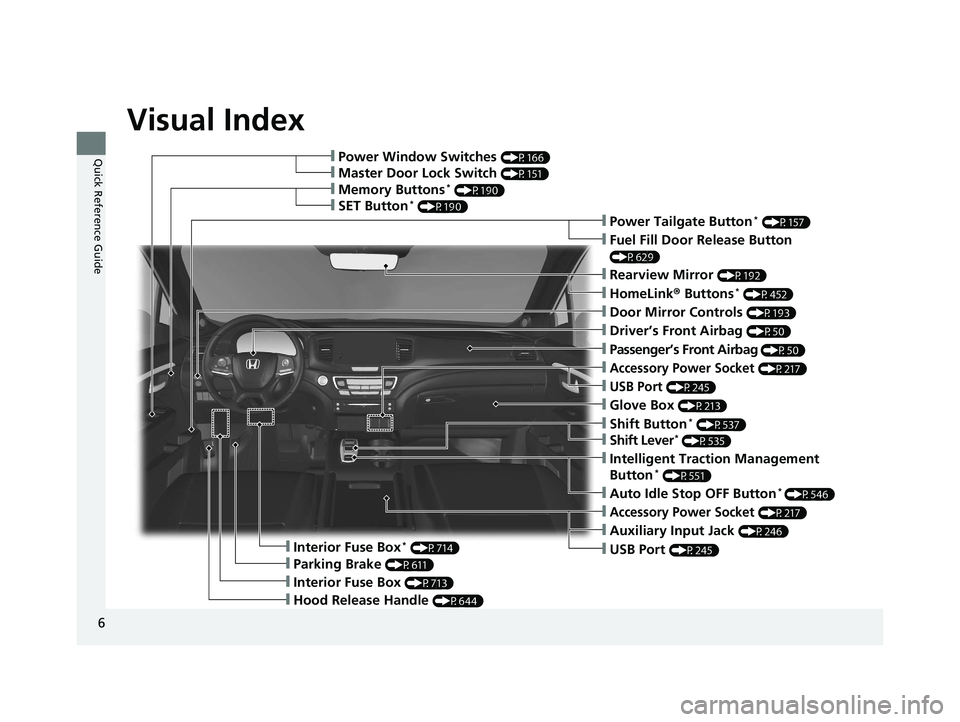
Quick Reference Guide❙Power Window Switches (P166)
❙Memory Buttons* (P190)
❙SET Button* (P190)
❙Master Door Lock Switch (P151)
❙Power Tailgate Button* (P157)
❙Fuel Fill Door Release Button
(P629)
❙Door Mirror Controls (P193)
❙Driver’s Front Airbag (P50)
❙Shift Button* (P537)
❙Shift Lever* (P535)
❙Hood Release Handle (P644)
❙Glove Box (P213)
❙Interior Fuse Box* (P714)
❙Parking Brake (P611)
❙Interior Fuse Box (P713)
❙Accessory Power Socket (P217)
❙USB Port (P245)
❙Rearview Mirror (P192)
❙HomeLink® Buttons* (P452)
❙Passenger’s Front Airbag (P50)
❙Auto Idle Stop OFF Button* (P546)
❙Intelligent Traction Management
Button* (P551)
❙Accessory Power Socket (P217)
❙Auxiliary Input Jack (P246)
❙USB Port (P245)
19 PILOT HMA ELP-31TG76310.book 6 ページ 2019年3月15日 金曜日 午後6時8分
Page 10 of 747
Visual Index
8
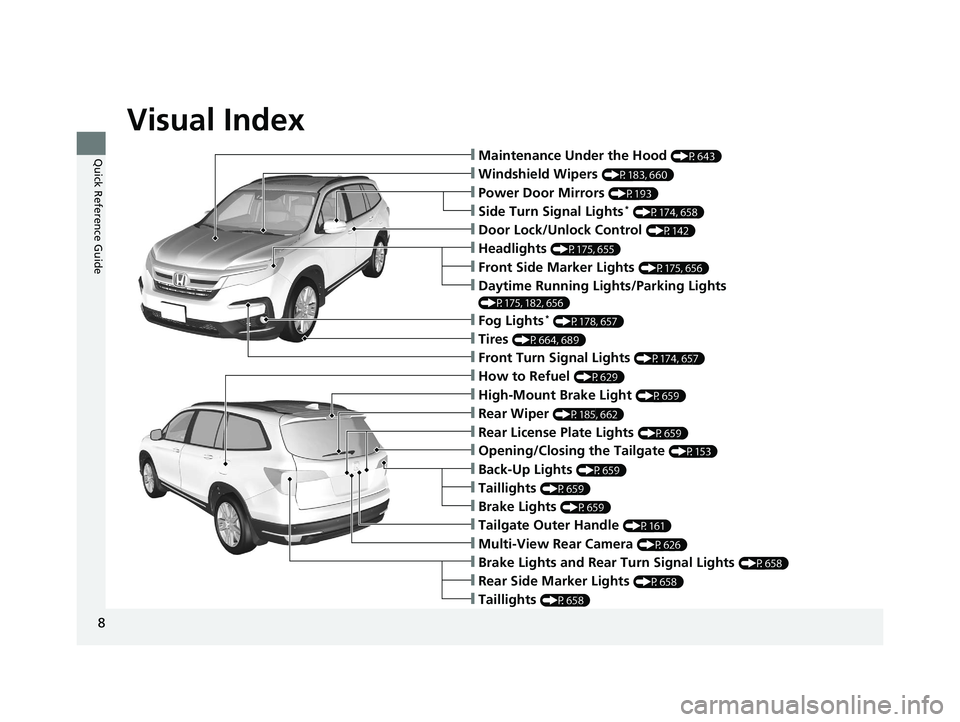
Quick Reference Guide❙Maintenance Under the Hood (P643)
❙Windshield Wipers (P183, 660)
❙Tires (P664, 689)
❙Power Door Mirrors (P193)
❙Headlights (P175, 655)
❙Front Side Marker Lights (P175, 656)
❙Front Turn Signal Lights (P174, 657)
❙Side Turn Signal Lights* (P174, 658)
❙Daytime Running Lights/Parking Lights
(P175, 182, 656)
❙How to Refuel (P629)
❙High-Mount Brake Light (P659)
❙Rear Wiper (P185, 662)
❙Rear License Plate Lights (P659)
❙Rear Side Marker Lights (P658)
❙Taillights (P658)
❙Brake Lights and Rear Turn Signal Lights (P658)
❙Taillights (P659)
❙Tailgate Outer Handle (P161)
❙Multi-View Rear Camera (P626)
❙Opening/Closing the Tailgate (P153)
❙Door Lock/Unlock Control (P142)
❙Fog Lights* (P178, 657)
❙Back-Up Lights (P659)
❙Brake Lights (P659)
19 PILOT HMA ELP-31TG76310.book 8 ページ 2019年3月15日 金曜日 午後6時8分
Page 17 of 747
15
Quick Reference Guide
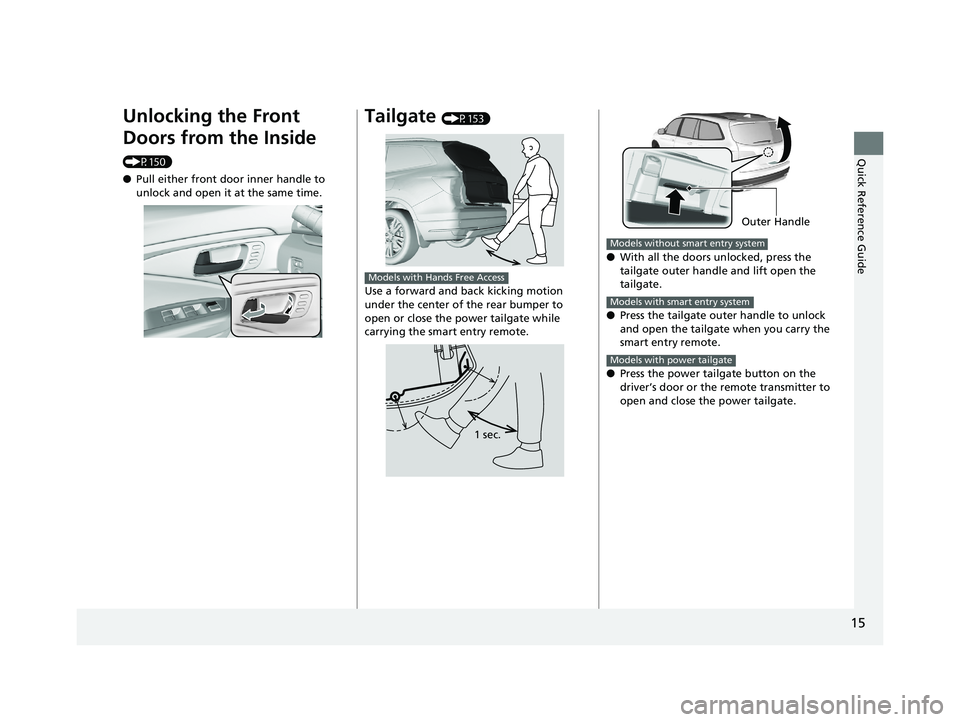
Unlocking the Front
Doors from the Inside
(P150)
●Pull either front door inner handle to
unlock and open it at the same time.
Tailgate (P153)
Use a forward and back kicking motion
under the center of the rear bumper to
open or close the power tailgate while
carrying the smart entry remote.
Models with Hands Free Access
1 sec.
● With all the doors unlocked, press the
tailgate outer handle and lift open the
tailgate.
● Press the tailgate outer handle to unlock
and open the tailgate when you carry the
smart entry remote.
● Press the power tailgate button on the
driver’s door or the remote transmitter to
open and close the power tailgate.
Outer Handle
Models without smart entry system
Models with smart entry system
Models with power tailgate
19 PILOT HMA ELP-31TG76310.book 15 ページ 2019年3月15日 金曜日 午後6時8分
Page 32 of 747
30
Quick Reference Guide
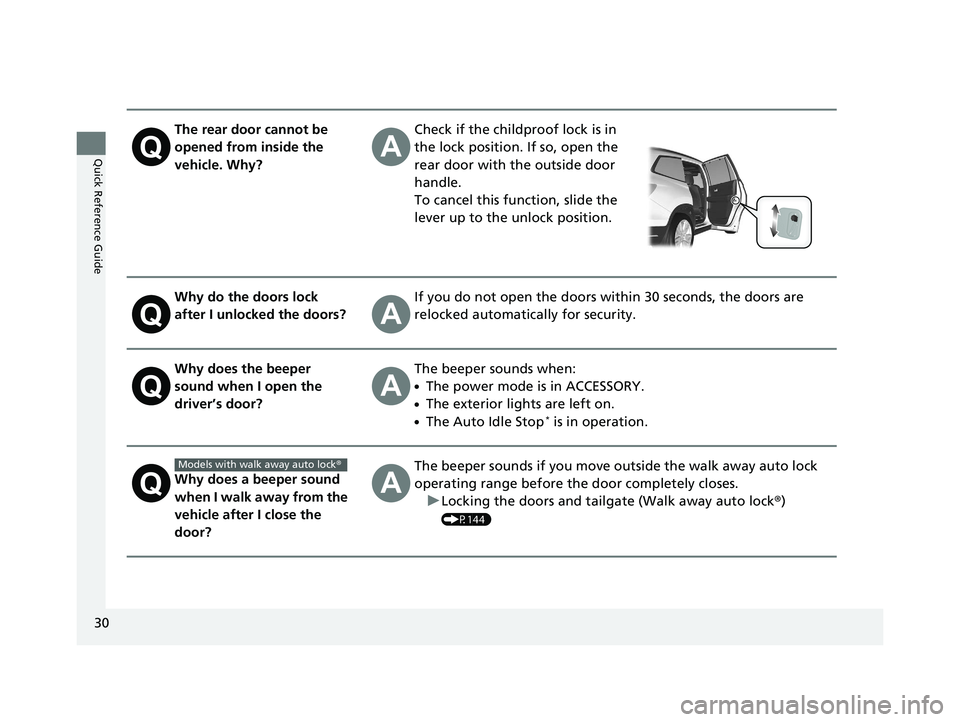
The rear door cannot be
opened from inside the
vehicle. Why?Check if the childproof lock is in
the lock position. If so, open the
rear door with the outside door
handle.
To cancel this function, slide the
lever up to the unlock position.
Why do the doors lock
after I unlocked the doors?If you do not open the doors within 30 seconds, the doors are
relocked automatically for security.
Why does the beeper
sound when I open the
driver’s door?The beeper sounds when:
●The power mode is in ACCESSORY.
●The exterior lights are left on.
●The Auto Idle Stop* is in operation.
Why does a beeper sound
when I walk away from the
vehicle after I close the
door?The beeper sounds if you move outside the walk away auto lock
operating range before the door completely closes.u Locking the doors and tailgate (Walk away auto lock ®)
(P144)
Models with walk away auto lock ®
19 PILOT HMA ELP-31TG76310.book 30 ページ 2019年3月15日 金曜日 午後6時8分
Page 39 of 747
37
uuFor Safe Driving uYour Vehicle’s Safety Features
Safe Driving
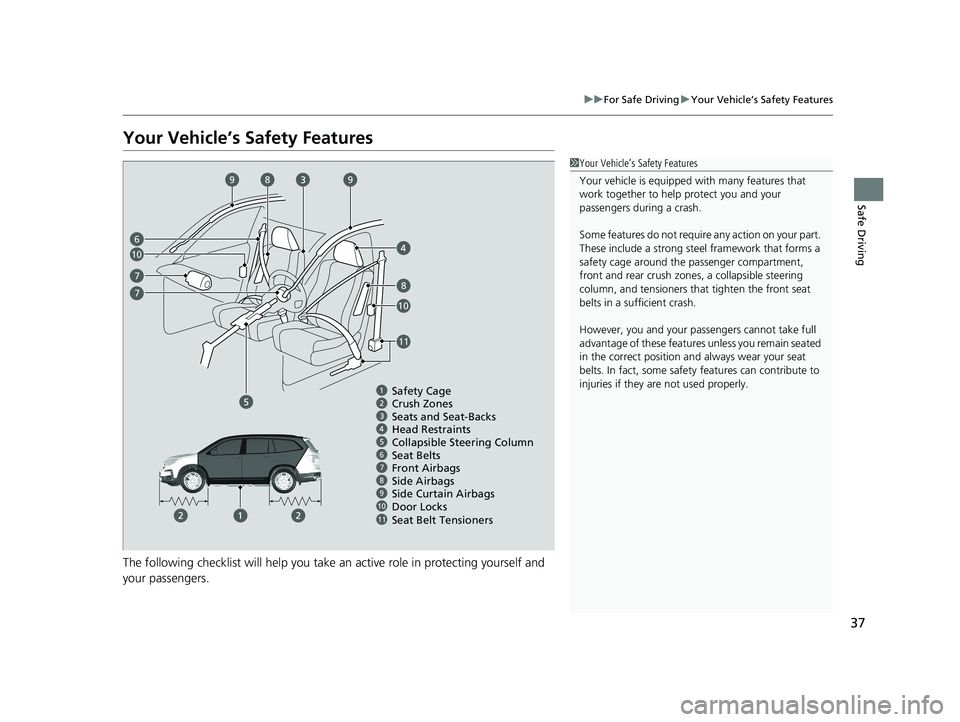
Your Vehicle’s Safety Features
The following checklist will help you take an active role in protecting yourself and
your passengers.
1Your Vehicle’s Safety Features
Your vehicle is equipped wi th many features that
work together to help protect you and your
passengers during a crash.
Some features do not require any action on your part.
These include a strong steel framework that forms a
safety cage around the passenger compartment,
front and rear crush zone s, a collapsible steering
column, and tensioners that tighten the front seat
belts in a sufficient crash.
However, you and your passe ngers cannot take full
advantage of these features unless you remain seated
in the correct position and always wear your seat
belts. In fact, some safety features can contribute to
injuries if they are not used properly.
678910
Safety Cage
Crush Zones
Seats and Seat-Backs
Head Restraints
Collapsible Steering Column
Seat Belts
Front Airbags
Door Locks
Seat Belt Tensioners Side Curtain Airbags
11
6
7
8
8
9
10
10
11
7
Side Airbags
9
19 PILOT HMA ELP-31TG76310.book 37 ページ 2019年3月15日 金曜日 午後6時8分
Page 40 of 747
38
uuFor Safe Driving uSafety Checklist
Safe Driving
Safety Checklist
For the safety of you and your passenge rs, make a habit of checking these items
each time before you drive.
• After everyone has entered the vehicle, be sure all doors and the tailgate are
closed and locked. Locking the doors and the tailgate helps prevent an occupant
from being ejected and an outsider from unexpectedly opening a door or the
tailgate.
2 Locking/Unlocking the Doors from the Inside P. 149
•Adjust your seat to a position suitable for driving. Be sure the front seats are
adjusted as far to the rear as possible while allowing the driver to control the
vehicle. Sitting too close to a front airbag can result in serious or fatal injury in a
crash.
2 Adjusting the Seats P. 194
•Adjust head restraints to the proper position. Head restraints are most effective
when the center of the head restraint alig ns with the center of your head. Taller
persons should adjust their head restraint to the highest position.
2 Adjusting the Front and Second Row Outer Seat Head Restraint Positions
P. 200
• Always wear your seat belt, and make sure you wear it properly. Confirm that any
passengers are properly belted as well.
2 Fastening a Seat Belt P. 42
•Protect children by using seat belts or chil d seats according to a child’s age, height
and weight.
2 Child Safety P. 60
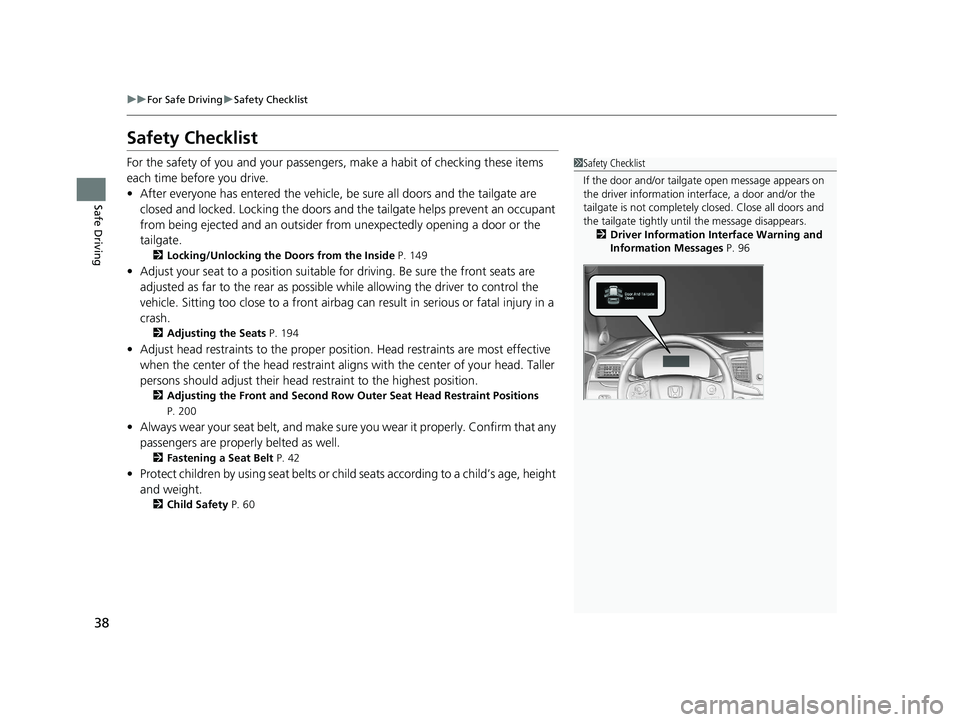
1Safety Checklist
If the door and/or tailga te open message appears on
the driver information inte rface, a door and/or the
tailgate is not completely closed. Close all doors and
the tailgate tightly unti l the message disappears.
2 Driver Information Interface Warning and
Information Messages P. 96
19 PILOT HMA ELP-31TG76310.book 38 ページ 2019年3月15日 金曜日 午後6時8分
Page 137 of 747
135
Controls
This chapter explains how to operate the various controls necessary for driving.
Clock.................................................. 136
Locking and Unlocking the Doors
Key Types and Functions .................. 139
Low Smart Entry Remote Signal Strength*.................................... 141Locking/Unlocking the Doors from the
Outside .......................................... 142
Locking/Unlocking the Doors from the Inside ............................................. 149
Childproof Door Locks ..................... 151
Auto Door Locking/Unlocking .......... 152
Opening and Closing the Tailgate ... 153
Security System Immobilizer System .......................... 163
Security System Alarm ...................... 163
Opening and Closing the Windows .... 166Moonroof*........................................ 169
Panoramic Roof*............................... 170
Operating the Switches Around the Steering Wheel
ENGINE START/STOP Button............. 171
Turn Signals ..................................... 174
Light Switches.................................. 175
Fog Lights
*...................................... 178
Auto High-Beam .............................. 179
Daytime Running Lights ................... 182
Wipers and Washers ........................ 183
Rear Defogger/Heat ed Door Mirror
*
Button ........................................... 186
Brightness Control ........................... 188 Driving Position Memory System
*.... 189
Adjusting the Steering Wheel .......... 191
Adjusting the Mirrors
Interior Rearview Mirror ................... 192
Power Door Mirrors ......................... 193
Adjusting the Seats
Front Seats ...................................... 194
Rear Seats........................................ 204
Armrest ........................................... 207
Interior Lights/Interior Convenience ItemsInterior Lights .................................. 209
Interior Convenience Items .............. 213
Heating and Cooling
*....................... 230
Climate Control System*.................. 235
* Not available on all models
19 PILOT HMA ELP-31TG76310.book 135 ページ 2019年3月15日 金曜日 午後6時8分
Page 150 of 747
uuLocking and Unlocking the Doors uLocking/Unlocking the Doors from the Outside
148
Controls
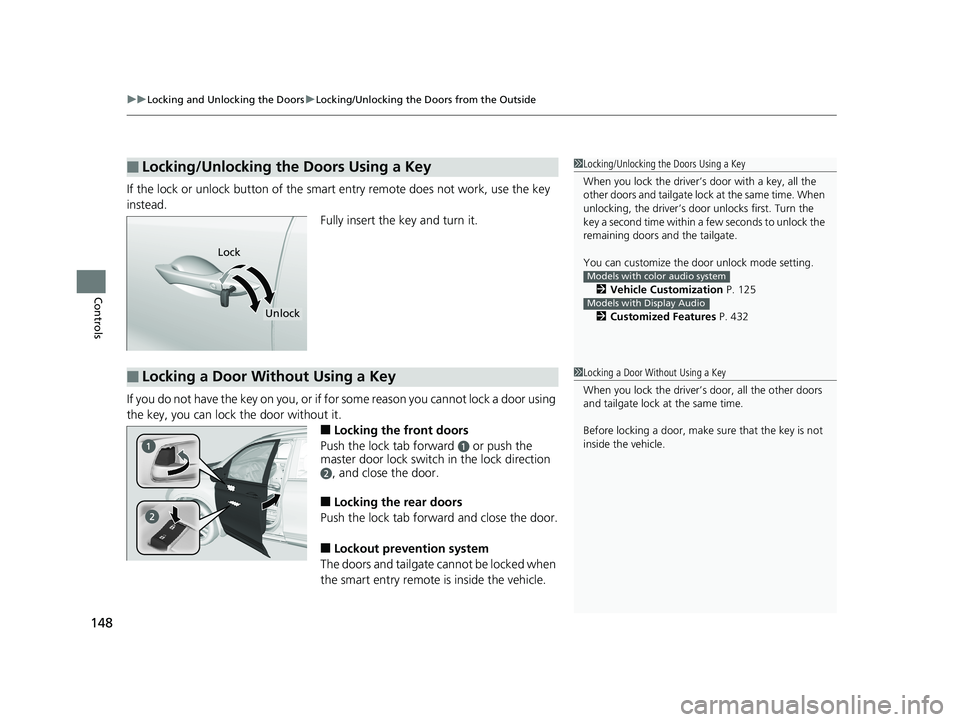
If the lock or unlock button of the sma rt entry remote does not work, use the key
instead. Fully insert the key and turn it.
If you do not have the key on you, or if for some reason you cannot lock a door using
the key, you can lock the door without it.
■Locking the front doors
Push the lock tab forward
a or push the
master door lock switch in the lock direction
b, and close the door.
■Locking the rear doors
Push the lock tab forward and close the door.
■Lockout prevention system
The doors and tailgate cannot be locked when
the smart entry remote is inside the vehicle.
■Locking/Unlocking the Doors Using a Key1 Locking/Unlocking the Doors Using a Key
When you lock the driver’s door with a key, all the
other doors and tail gate lock at the same time. When
unlocking, the driver’s door unlocks first. Turn the
key a second time within a few seconds to unlock the
remaining doors a nd the tailgate.
You can customize the door unlock mode setting. 2 Vehicle Customization P. 125
2 Customized Features P. 432
Models with color audio system
Models with Display Audio
Lock
Unlock
■Locking a Door Without Using a Key1Locking a Door Without Using a Key
When you lock the driver’s door, all the other doors
and tailgate lock at the same time.
Before locking a door, make sure that the key is not
inside the vehicle.
19 PILOT HMA ELP-31TG76310.book 148 ページ 2019年3月15日 金曜日 午後6時8分