engine cooling system HONDA PILOT 2019 Owner's Manual (in English)
[x] Cancel search | Manufacturer: HONDA, Model Year: 2019, Model line: PILOT, Model: HONDA PILOT 2019Pages: 747, PDF Size: 45.81 MB
Page 5 of 747
Contents
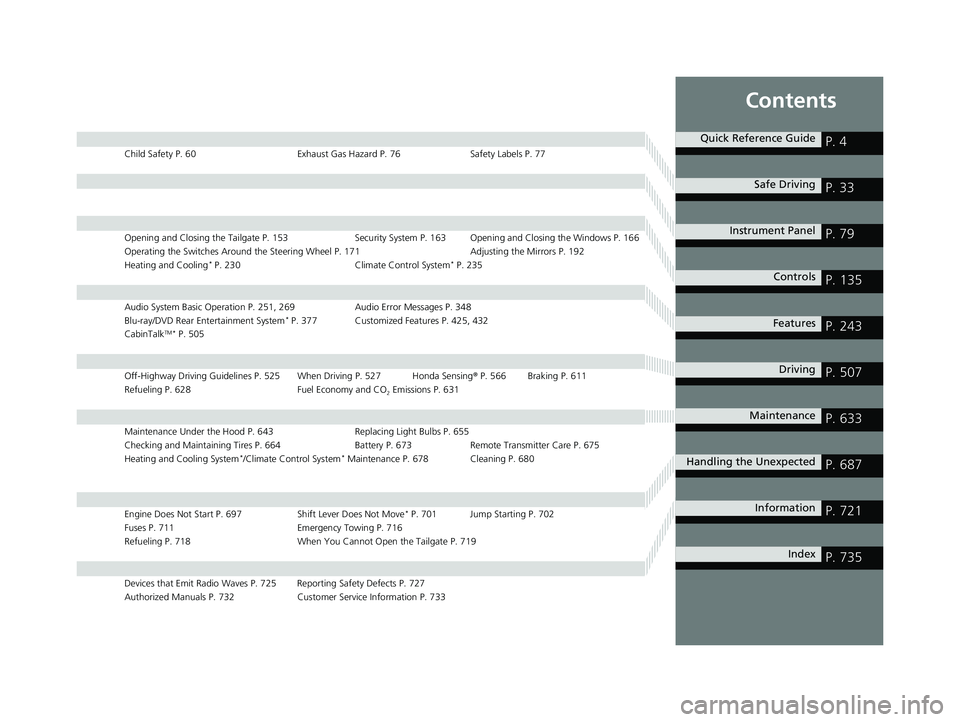
Child Safety P. 60Exhaust Gas Hazard P. 76Safety Labels P. 77
Opening and Closing the Tailgate P. 153 Security System P. 163 Opening and Closing the Windows P. 166
Operating the Switches Around the Steering Wheel P. 171 Adjusting the Mirrors P. 192
Heating and Cooling
* P. 230 Climate Control System* P. 235
Audio System Basic Operation P. 251, 269 Audio Error Messages P. 348
Blu-ray/DVD Rear Entertainment System* P. 377 Customized Features P. 425, 432
CabinTalkTM * P. 505
Off-Highway Driving Guidelines P. 525 When Driving P. 527 Honda Sensing ® P. 566 Braking P. 611
Refueling P. 628 Fuel Economy and CO
2 Emissions P. 631
Maintenance Under the Hood P. 643 Replacing Light Bulbs P. 655
Checking and Maintaining Tires P. 664 Battery P. 673 Remote Transmitter Care P. 675
Heating and Cooling System
*/Climate Control System* Maintenance P. 678 Cleaning P. 680
Engine Does Not Start P. 697 Shift Lever Does Not Move* P. 701 Jump Starting P. 702
Fuses P. 711 Emergency Towing P. 716
Refueling P. 718 When You Cannot Open the Tailgate P. 719
Devices that Emit Radio Waves P. 725 Reporting Safety Defects P. 727
Authorized Manuals P. 732 Customer Service Information P. 733
Quick Reference GuideP. 4
Safe DrivingP. 33
Instrument PanelP. 79
ControlsP. 135
FeaturesP. 243
DrivingP. 507
MaintenanceP. 633
Handling the UnexpectedP. 687
InformationP. 721
IndexP. 735
19 PILOT HMA ELP-31TG76310.book 3 ページ 2019年3月15日 金曜日 午後6時8分
Page 6 of 747
4
Quick Reference Guide
Quick Reference Guide
Visual Index
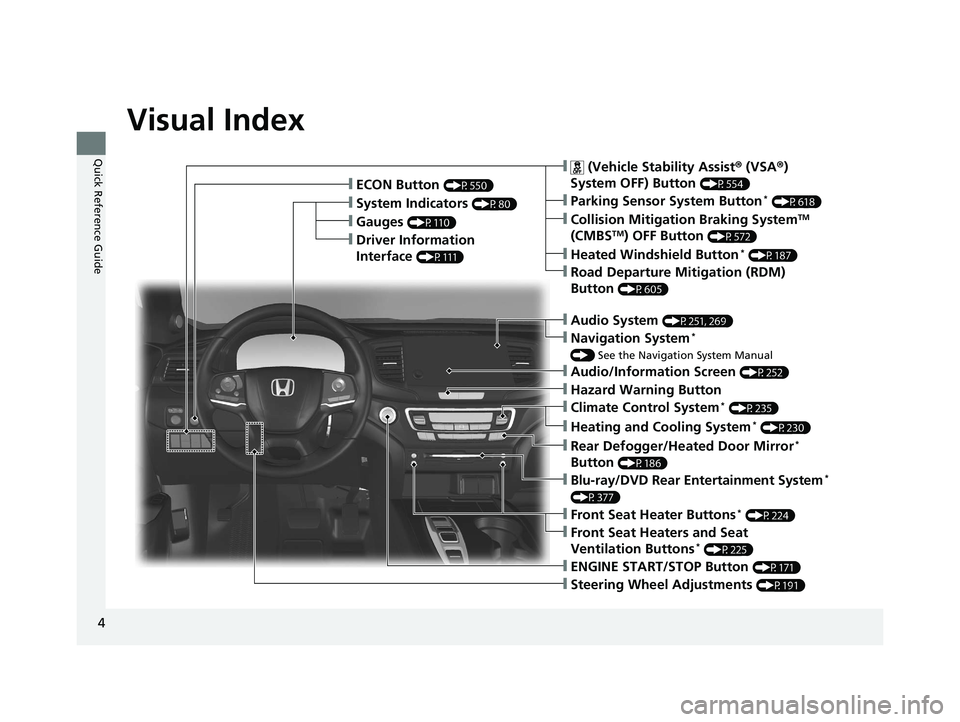
❙Gauges (P110)
❙Driver Information
Interface
(P111)
❙System Indicators (P80)
❙ECON Button (P550)
❙Audio System (P251, 269)
❙Navigation System*
() See the Navigation System Manual
❙ (Vehicle Stability Assist ® (VSA ®)
System OFF) Button
(P554)
❙Collision Mitigation Braking SystemTM
(CMBSTM) OFF Button (P572)
❙Heated Windshield Button* (P187)
❙Road Departure Mitigation (RDM)
Button
(P605)
❙Parking Sensor System Button* (P618)
❙Blu-ray/DVD Rear Entertainment System*
(P377)
❙Steering Wheel Adjustments (P191)
❙ENGINE START/STOP Button (P171)
❙Front Seat Heater Buttons* (P224)
❙Front Seat Heaters and Seat
Ventilation Buttons* (P225)
❙Climate Control System* (P235)
❙Heating and Cooling System* (P230)
❙Rear Defogger/Heated Door Mirror*
Button
(P186)
❙Audio/Information Screen (P252)
❙Hazard Warning Button
19 PILOT HMA ELP-31TG76310.book 4 ページ 2019年3月15日 金曜日 午後6時8分
Page 83 of 747
81
uuIndicators u
Continued
Instrument Panel
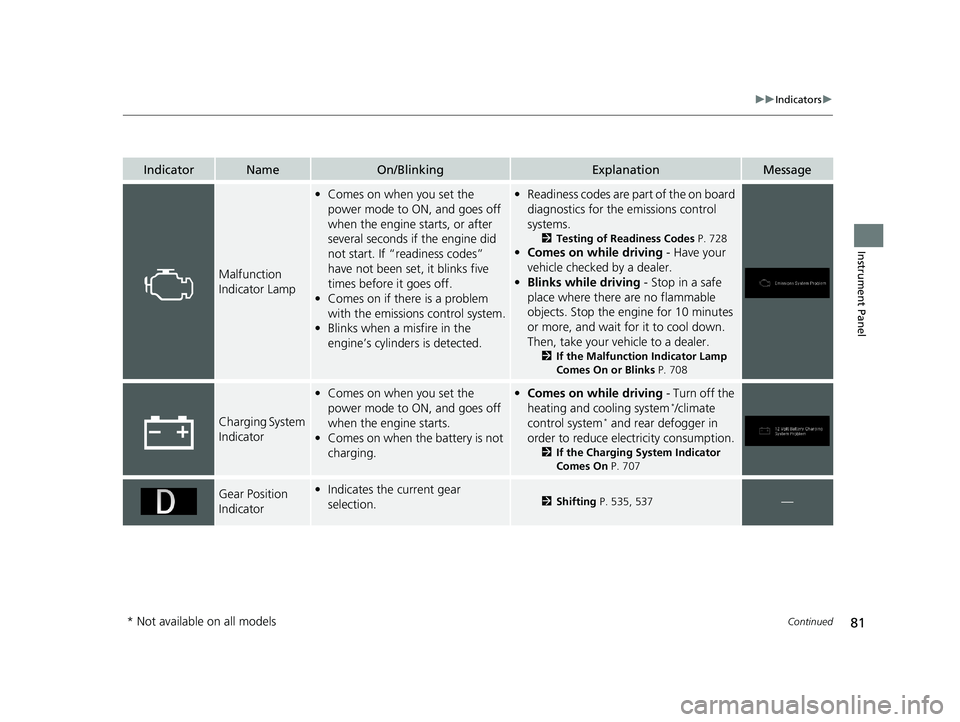
IndicatorNameOn/BlinkingExplanationMessage
Malfunction
Indicator Lamp
•Comes on when you set the
power mode to ON, and goes off
when the engine starts, or after
several seconds if the engine did
not start. If “readiness codes”
have not been set, it blinks five
times before it goes off.
• Comes on if there is a problem
with the emissions control system.
• Blinks when a misfire in the
engine’s cylinders is detected.•Readiness codes are part of the on board
diagnostics for the emissions control
systems.
2 Testing of Readiness Codes P. 728
•Comes on while driving - Have your
vehicle checked by a dealer.
• Blinks while driving - Stop in a safe
place where there are no flammable
objects. Stop the engine for 10 minutes
or more, and wait for it to cool down.
Then, take your vehicle to a dealer.
2 If the Malfunction Indicator Lamp
Comes On or Blinks P. 708
Charging System
Indicator
•Comes on when you set the
power mode to ON, and goes off
when the engine starts.
• Comes on when the battery is not
charging.•Comes on while driving - Turn off the
heating and cooling system*/climate
control system* and rear defogger in
order to reduce electricity consumption.
2 If the Charging System Indicator
Comes On P. 707
Gear Position
Indicator•Indicates the current gear
selection.2 Shifting P. 535, 537—
* Not available on all models
19 PILOT HMA ELP-31TG76310.book 81 ページ 2019年3月15日 金曜日 午後6時8分
Page 99 of 747
97
uuIndicators uDriver Information Interface Wa rning and Information Messages
Continued
Instrument Panel
MessageConditionExplanation
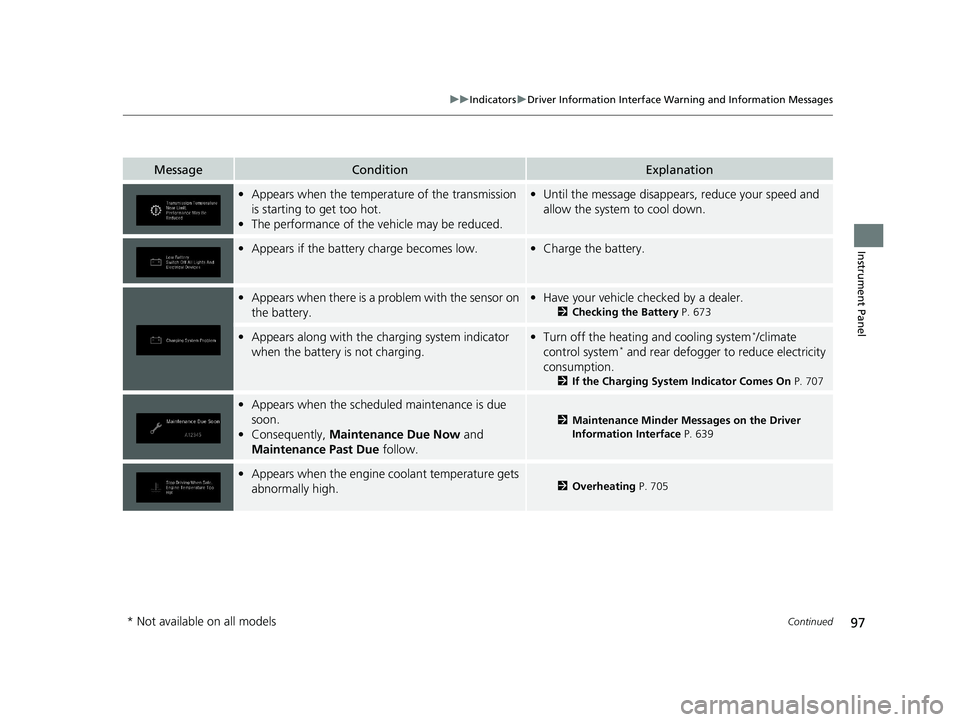
•Appears when the temperature of the transmission
is starting to get too hot.
• The performance of the vehicle may be reduced.•Until the message disappears, reduce your speed and
allow the system to cool down.
•Appears if the battery charge becomes low.•Charge the battery.
•Appears when there is a pr oblem with the sensor on
the battery.• Have your vehicle checked by a dealer.
2 Checking the Battery P. 673
•Appears along with the ch arging system indicator
when the battery is not charging.• Turn off the heating and cooling system*/climate
control system* and rear defogger to reduce electricity
consumption.
2 If the Charging System Indicator Comes On P. 707
•Appears when the scheduled maintenance is due
soon.
• Consequently, Maintenance Due Now and
Maintenance Past Due follow.
2Maintenance Minder Messages on the Driver
Information Interface P. 639
•Appears when the engine coolant temperature gets
abnormally high.2 Overheating P. 705
* Not available on all models
19 PILOT HMA ELP-31TG76310.book 97 ページ 2019年3月15日 金曜日 午後6時8分
Page 101 of 747
99
uuIndicators uDriver Information Interface Wa rning and Information Messages
Continued
Instrument Panel
MessageConditionExplanation
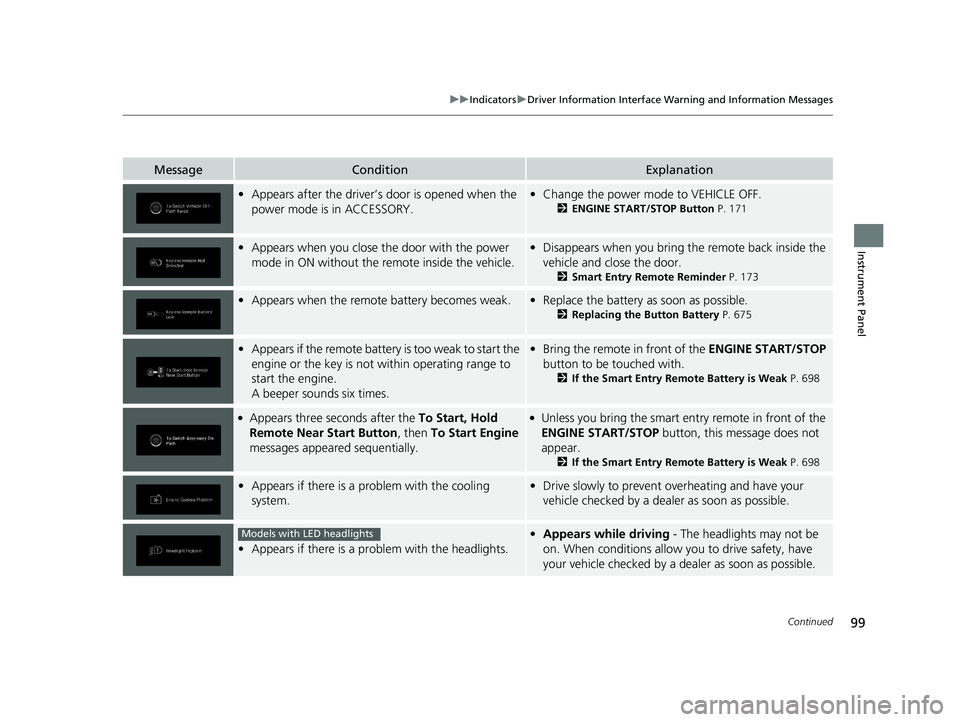
•Appears after the driver’s door is opened when the
power mode is in ACCESSORY.• Change the power mode to VEHICLE OFF.
2 ENGINE START/STOP Button P. 171
•Appears when you close th e door with the power
mode in ON without the remote inside the vehicle.• Disappears when you bring the remote back inside the
vehicle and close the door.
2 Smart Entry Remote Reminder P. 173
•Appears when the remote battery becomes weak.•Replace the battery as soon as possible.
2 Replacing the Button Battery P. 675
•Appears if the remote battery is too weak to start the
engine or the key is not within operating range to
start the engine.
A beeper sounds six times.•Bring the remote in front of the ENGINE START/STOP
button to be touched with.
2 If the Smart Entry Remote Battery is Weak P. 698
●Appears three seconds after the To Start, Hold
Remote Near Start Button , then To Start Engine
messages appeared sequentially.●Unless you bring the smart entry remote in front of the
ENGINE START/STOP button, this message does not
appear.
2 If the Smart Entry Remote Battery is Weak P. 698
•Appears if there is a problem with the cooling
system.•Drive slowly to prevent ov erheating and have your
vehicle checked by a dealer as soon as possible.
• Appears if there is a pr oblem with the headlights.
•Appears while driving - The headlights may not be
on. When conditions allow you to drive safety, have
your vehicle checked by a d ealer as soon as possible.Models with LED headlights
19 PILOT HMA ELP-31TG76310.book 99 ページ 2019年3月15日 金曜日 午後6時8分
Page 137 of 747
135
Controls
This chapter explains how to operate the various controls necessary for driving.
Clock.................................................. 136
Locking and Unlocking the Doors
Key Types and Functions .................. 139
Low Smart Entry Remote Signal Strength*.................................... 141Locking/Unlocking the Doors from the
Outside .......................................... 142
Locking/Unlocking the Doors from the Inside ............................................. 149
Childproof Door Locks ..................... 151
Auto Door Locking/Unlocking .......... 152
Opening and Closing the Tailgate ... 153
Security System Immobilizer System .......................... 163
Security System Alarm ...................... 163
Opening and Closing the Windows .... 166Moonroof*........................................ 169
Panoramic Roof*............................... 170
Operating the Switches Around the Steering Wheel
ENGINE START/STOP Button............. 171
Turn Signals ..................................... 174
Light Switches.................................. 175
Fog Lights
*...................................... 178
Auto High-Beam .............................. 179
Daytime Running Lights ................... 182
Wipers and Washers ........................ 183
Rear Defogger/Heat ed Door Mirror
*
Button ........................................... 186
Brightness Control ........................... 188 Driving Position Memory System
*.... 189
Adjusting the Steering Wheel .......... 191
Adjusting the Mirrors
Interior Rearview Mirror ................... 192
Power Door Mirrors ......................... 193
Adjusting the Seats
Front Seats ...................................... 194
Rear Seats........................................ 204
Armrest ........................................... 207
Interior Lights/Interior Convenience ItemsInterior Lights .................................. 209
Interior Convenience Items .............. 213
Heating and Cooling
*....................... 230
Climate Control System*.................. 235
* Not available on all models
19 PILOT HMA ELP-31TG76310.book 135 ページ 2019年3月15日 金曜日 午後6時8分
Page 188 of 747
186
uuOperating the Switches Around the Steering Wheel uRear Defogger/Heated Door Mirror* Button
Controls
Rear Defogger/Heated Door Mirror* Button
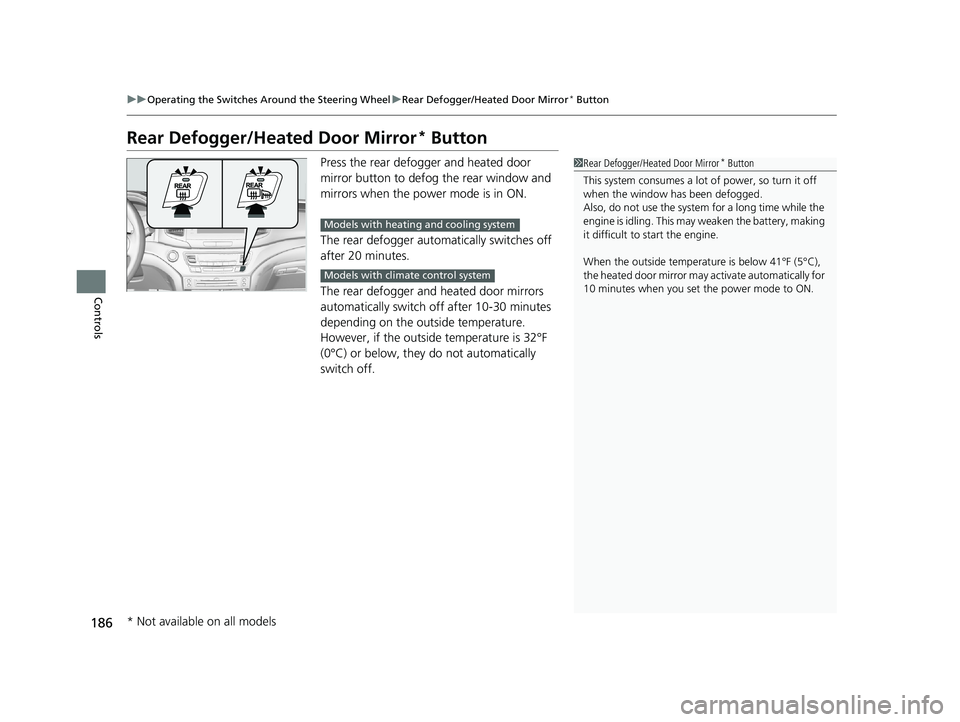
Press the rear defogger and heated door
mirror button to defog the rear window and
mirrors when the power mode is in ON.
The rear defogger automatically switches off
after 20 minutes.
The rear defogger and heated door mirrors
automatically switch off after 10-30 minutes
depending on the outside temperature.
However, if the outside temperature is 32°F
(0°C) or below, they do not automatically
switch off.1Rear Defogger/Heated Door Mirror* Button
This system consumes a lot of power, so turn it off
when the window has been defogged.
Also, do not use the system for a long time while the
engine is idling. This may weaken the battery, making
it difficult to start the engine.
When the outside temperature is below 41°F (5°C),
the heated door mirror may activate automatically for
10 minutes when you set the power mode to ON.
Models with heating and cooling system
Models with climate control system
* Not available on all models
19 PILOT HMA ELP-31TG76310.book 186 ページ 2019年3月15日 金曜日 午後6時8分
Page 233 of 747
Continued231
uuHeating and Cooling*uUsing Vents, Heating and A/C
Controls
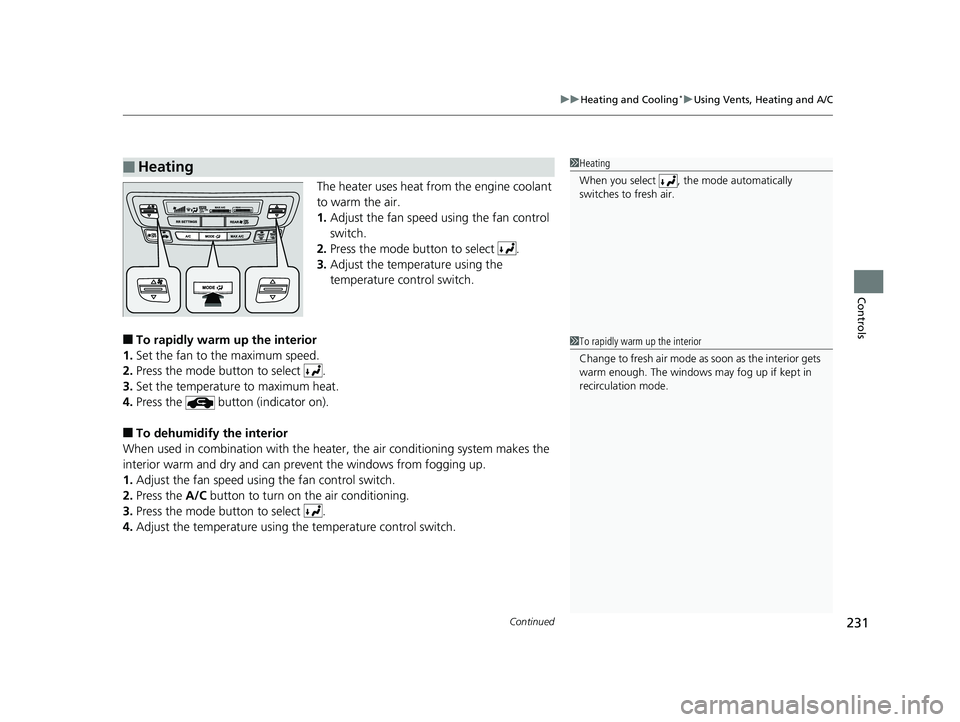
The heater uses heat from the engine coolant
to warm the air.
1. Adjust the fan speed using the fan control
switch.
2. Press the mode button to select .
3. Adjust the temperature using the
temperature control switch.
■To rapidly warm up the interior
1. Set the fan to the maximum speed.
2. Press the mode button to select .
3. Set the temperature to maximum heat.
4. Press the button (indicator on).
■To dehumidify the interior
When used in combination with the heat er, the air conditioning system makes the
interior warm and dry and can prev ent the windows from fogging up.
1. Adjust the fan speed using the fan control switch.
2. Press the A/C button to turn on the air conditioning.
3. Press the mode button to select .
4. Adjust the temperature using th e temperature control switch.
■Heating1Heating
When you select , th e mode automatically
switches to fresh air.
1 To rapidly warm up the interior
Change to fresh air mode as soon as the interior gets
warm enough. The windows may fog up if kept in
recirculation mode.
19 PILOT HMA ELP-31TG76310.book 231 ページ 2019年3月15日 金曜日 午後6時8分
Page 236 of 747
234
uuHeating and Cooling*uUsing Vents, Heating and A/C
Controls
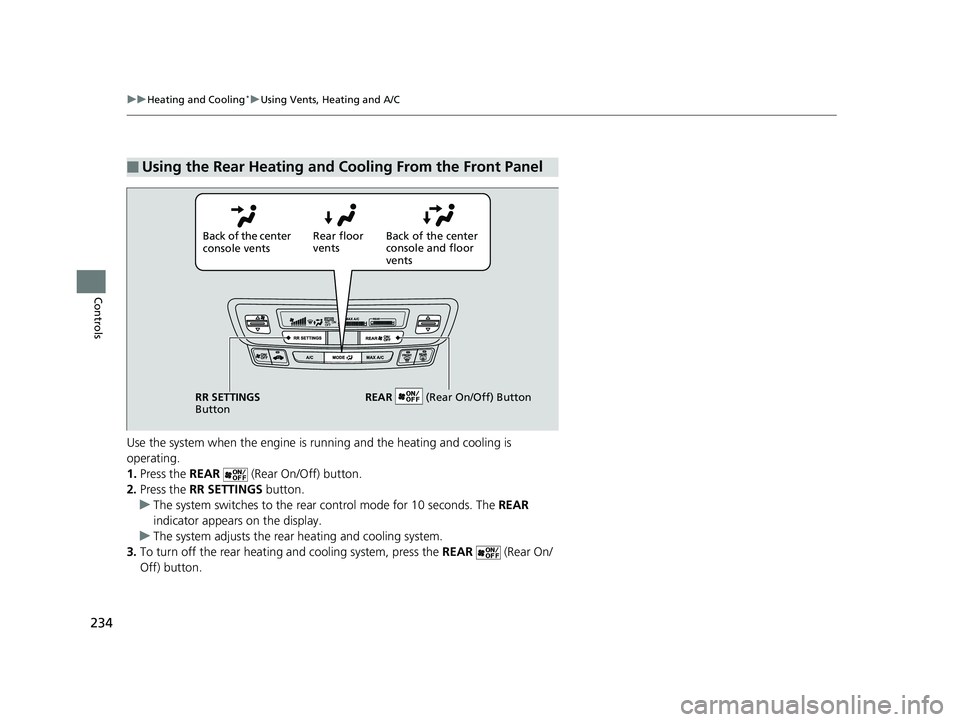
Use the system when the engine is ru nning and the heating and cooling is
operating.
1. Press the REAR (Rear On/Off) button.
2. Press the RR SETTINGS button.
u The system switches to the rear control mode for 10 seconds. The REAR
indicator appears on the display.
u The system adjusts the rear heating and cooling system.
3. To turn off the rear heating and cooling system, press the REAR (Rear On/
Off) button.
■Using the Rear Heating and Cooling From the Front Panel
Back of the center
console vents Rear floor
vents
Back of the center
console and floor
vents
RR SETTINGS
Button REAR
(Rear On/Off) Button
19 PILOT HMA ELP-31TG76310.book 234 ページ 2019年3月15日 金曜日 午後6時8分
Page 526 of 747
524
uuTowing a Trailer uTowing Your Vehicle
Driving
• Monitor your temperature gauge. If it nears the white (Hot) mark, turn off the
heating and cooling system*/climate control system* and reduce speed. Pull to the
side of the road safely to cool down the engine if necessary.
• Shift to the position if the transmission shifts frequently.
• Change the gear position to
(S position if the transmission shifts frequently.
If the vehicle tires slip when retrieving a boat from the water, keep the transmission
in
(D. This prevents damage to the transmission.
If the vehicle tires slip when retrieving a boat from the water, keep the transmission
in
(D and do not use the sequential shift mode in (S. This prevents damage to the
transmission.
Towing Your Vehicle
Your vehicle is not designed to be towed behind a motor home. If your vehicle needs
to be towed in an emergency, refe r to the emergency towing information.
2Emergency Towing P. 716
■Driving in Hilly Terrain
■Retrieving a Boat
Automatic transmission models with shift lever
D4
Automatic transmission models with electronic gear selector
Automatic transmission models with shift lever
Automatic transmission models with electronic gear selector
* Not available on all models
19 PILOT HMA ELP-31TG76310.book 524 ページ 2019年3月15日 金曜日 午後6時8分