remote HONDA PILOT 2019 Owner's Manual (in English)
[x] Cancel search | Manufacturer: HONDA, Model Year: 2019, Model line: PILOT, Model: HONDA PILOT 2019Pages: 747, PDF Size: 45.81 MB
Page 4 of 747
Contents
This owner’s manual should be considered a permanent part of the
vehicle and should remain with the vehicle when it is sold.
This owner’s manual covers all models of your vehicle. You may find
descriptions of equipment and features that are not on your
particular model.
Images throughout this owner’s manu al (including the front cover)
represent features and equipment that are available on some, but
not all, models. Your particular mo del may not have some of these
features.
This owner’s manual is for vehicles sold in the United States and
Canada.
The information and specifications in cluded in this publication were
in effect at the time of approval for printing. Honda Motor Co., Ltd.
reserves the right, however, to discontinue or change specifications
or design at any time without notice and without incurring any
obligation.2 Safe Driving P. 33
For Safe Driving P. 34 Seat Belts P. 39 Airbags P. 47
2Instrument Panel P. 79
Indicators P. 80 Gauges and Displays P. 110
2Controls P. 135
Clock P. 136 Locking and Unlocking the Doors P. 139
Moonroof* P. 169 Panoramic Roof* P. 170
Adjusting the Seats P. 194 Interior Ligh ts/Interior Convenience Items P. 209
2Features P. 243
Audio System P. 244
General Information on the Audio System P. 353
HomeLink ® Universal Transceiver
* P. 451 Bluetooth ® HandsFreeLink ® P. 454, 479
2 Driving P. 507
Before Driving P. 508 Towing a Trailer P. 514
Parking Your Vehicle P. 615Multi-View Rear Camera P. 626
2Maintenance P. 633
Before Performing Maintenance P. 634 Maintenance MinderTM P. 637
Checking and Maintaining Wiper Blades P. 660
Remote Control and Wireless Headphone Care
* P. 676
Accessories and Modifications P. 685
2 Handling the Unexpected P. 687
Tools P. 688 If a Tire Goes Flat P. 689
Overheating P. 705 Indicator, Coming On/Blinking P. 707
When You Cannot Unlock the Fuel Fill Door P. 717
2 Information P. 721
Specifications P. 722 Identification Numbers P. 724
Emissions Testing P. 728 Warranty Coverages P. 730
19 PILOT HMA ELP-31TG76310.book 2 ページ 2019年3月15日 金曜日 午後6時8分
Page 5 of 747
Contents
Child Safety P. 60Exhaust Gas Hazard P. 76Safety Labels P. 77
Opening and Closing the Tailgate P. 153 Security System P. 163 Opening and Closing the Windows P. 166
Operating the Switches Around the Steering Wheel P. 171 Adjusting the Mirrors P. 192
Heating and Cooling
* P. 230 Climate Control System* P. 235
Audio System Basic Operation P. 251, 269 Audio Error Messages P. 348
Blu-ray/DVD Rear Entertainment System* P. 377 Customized Features P. 425, 432
CabinTalkTM * P. 505
Off-Highway Driving Guidelines P. 525 When Driving P. 527 Honda Sensing ® P. 566 Braking P. 611
Refueling P. 628 Fuel Economy and CO
2 Emissions P. 631
Maintenance Under the Hood P. 643 Replacing Light Bulbs P. 655
Checking and Maintaining Tires P. 664 Battery P. 673 Remote Transmitter Care P. 675
Heating and Cooling System
*/Climate Control System* Maintenance P. 678 Cleaning P. 680
Engine Does Not Start P. 697 Shift Lever Does Not Move* P. 701 Jump Starting P. 702
Fuses P. 711 Emergency Towing P. 716
Refueling P. 718 When You Cannot Open the Tailgate P. 719
Devices that Emit Radio Waves P. 725 Reporting Safety Defects P. 727
Authorized Manuals P. 732 Customer Service Information P. 733
Quick Reference GuideP. 4
Safe DrivingP. 33
Instrument PanelP. 79
ControlsP. 135
FeaturesP. 243
DrivingP. 507
MaintenanceP. 633
Handling the UnexpectedP. 687
InformationP. 721
IndexP. 735
19 PILOT HMA ELP-31TG76310.book 3 ページ 2019年3月15日 金曜日 午後6時8分
Page 7 of 747
5
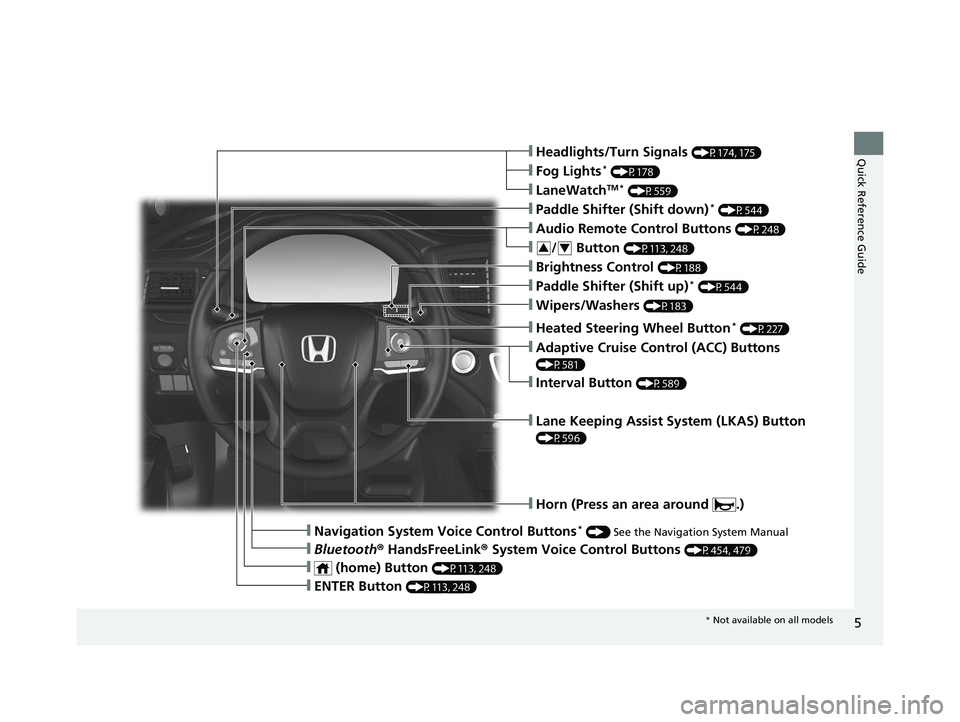
Quick Reference Guide❙Headlights/Turn Signals (P174, 175)
❙Fog Lights* (P178)
❙LaneWatchTM * (P559)
❙Paddle Shifter (Shift down)* (P544)
❙Wipers/Washers (P183)
❙Paddle Shifter (Shift up)* (P544)
❙Brightness Control (P188)
❙Lane Keeping Assist System (LKAS) Button
(P596)
❙Horn (Press an area around .)
❙Navigation System Voice Control Buttons* () See the Navigation System Manual
❙Bluetooth ® HandsFreeLink ® System Voice Control Buttons (P454, 479)
❙Heated Steering Wheel Button* (P227)
❙ENTER Button (P113, 248)
❙Interval Button (P589)
❙Adaptive Cruise Control (ACC) Buttons
(P581)
❙ (home) Button (P113, 248)
❙/ Button (P113, 248)34
❙Audio Remote Control Buttons (P248)
* Not available on all models
19 PILOT HMA ELP-31TG76310.book 5 ページ 2019年3月15日 金曜日 午後6時8分
Page 17 of 747
15
Quick Reference Guide
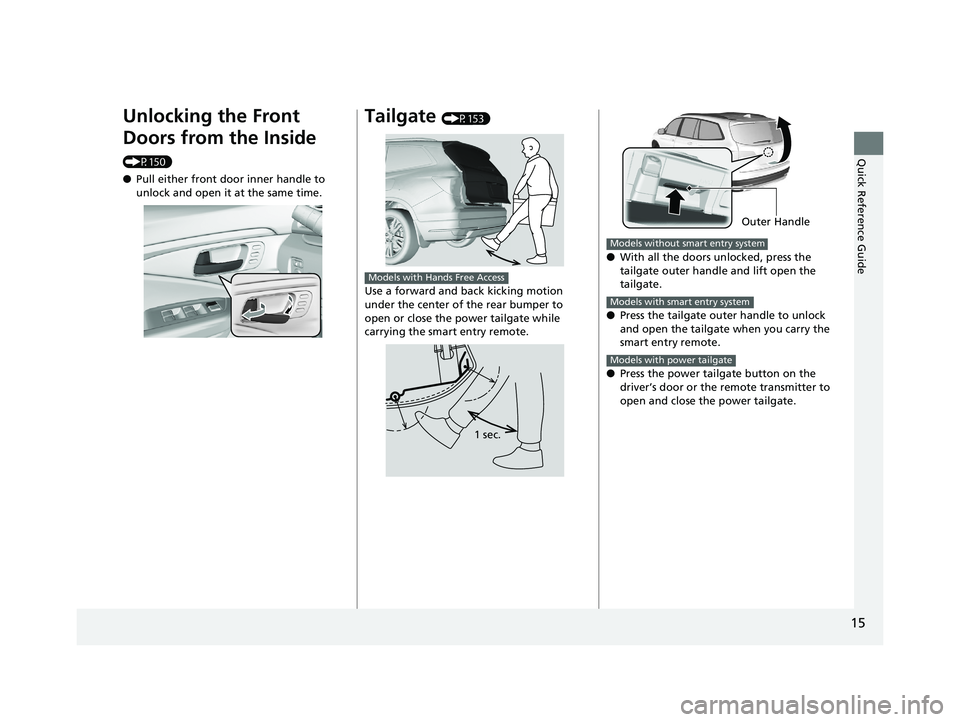
Unlocking the Front
Doors from the Inside
(P150)
●Pull either front door inner handle to
unlock and open it at the same time.
Tailgate (P153)
Use a forward and back kicking motion
under the center of the rear bumper to
open or close the power tailgate while
carrying the smart entry remote.
Models with Hands Free Access
1 sec.
● With all the doors unlocked, press the
tailgate outer handle and lift open the
tailgate.
● Press the tailgate outer handle to unlock
and open the tailgate when you carry the
smart entry remote.
● Press the power tailgate button on the
driver’s door or the remote transmitter to
open and close the power tailgate.
Outer Handle
Models without smart entry system
Models with smart entry system
Models with power tailgate
19 PILOT HMA ELP-31TG76310.book 15 ページ 2019年3月15日 金曜日 午後6時8分
Page 23 of 747
21
Quick Reference Guide
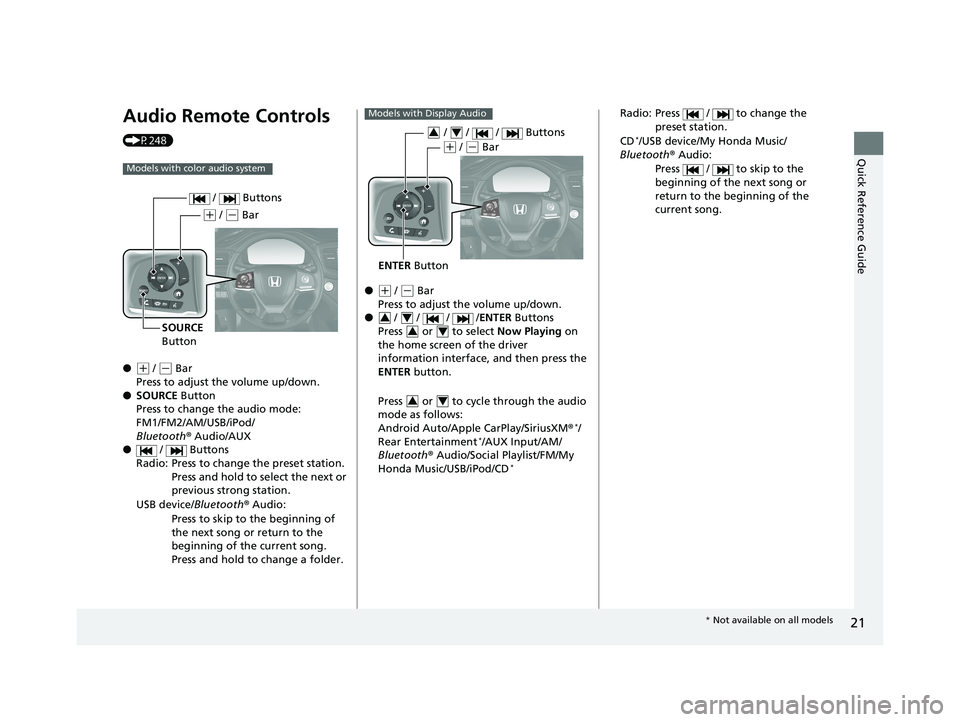
Audio Remote Controls
(P248)
●
(+ / (- Bar
Press to adjust the volume up/down.
● SOURCE Button
Press to change the audio mode:
FM1/FM2/AM/USB/iPod/
Bluetooth ® Audio/AUX
● / Buttons
Radio: Press to change the preset station. Press and hold to select the next or
previous strong station.
USB device/ Bluetooth® Audio:
Press to skip to the beginning of
the next song or return to the
beginning of the current song.
Press and hold to change a folder.
Models with color audio system
( + / (- Bar
SOURCE
Button / Buttons
●(
+ / (- Bar
Press to adjust the volume up/down.
● / / / /ENTER Buttons
Press or to select Now Playing on
the home screen of the driver
information interface, and then press the
ENTER button.
Press or to cycle through the audio
mode as follows:
Android Auto/Apple CarPlay/SiriusXM ®
*/
Rear Entertainment*/AUX Input/AM/
Bluetooth ® Audio/Social Playlist/FM/My
Honda Music/USB/iPod/CD
*
Models with Display Audio
ENTER Button
/ / / Buttons34
(+ / (- Bar
34
34
34
Radio: Press / to change the
preset station.
CD
*/USB device/My Honda Music/
Bluetooth ® Audio:
Press / to skip to the
beginning of the next song or
return to the beginning of the
current song.
* Not available on all models
19 PILOT HMA ELP-31TG76310.book 21 ページ 2019年3月15日 金曜日 午後6時8分
Page 101 of 747
99
uuIndicators uDriver Information Interface Wa rning and Information Messages
Continued
Instrument Panel
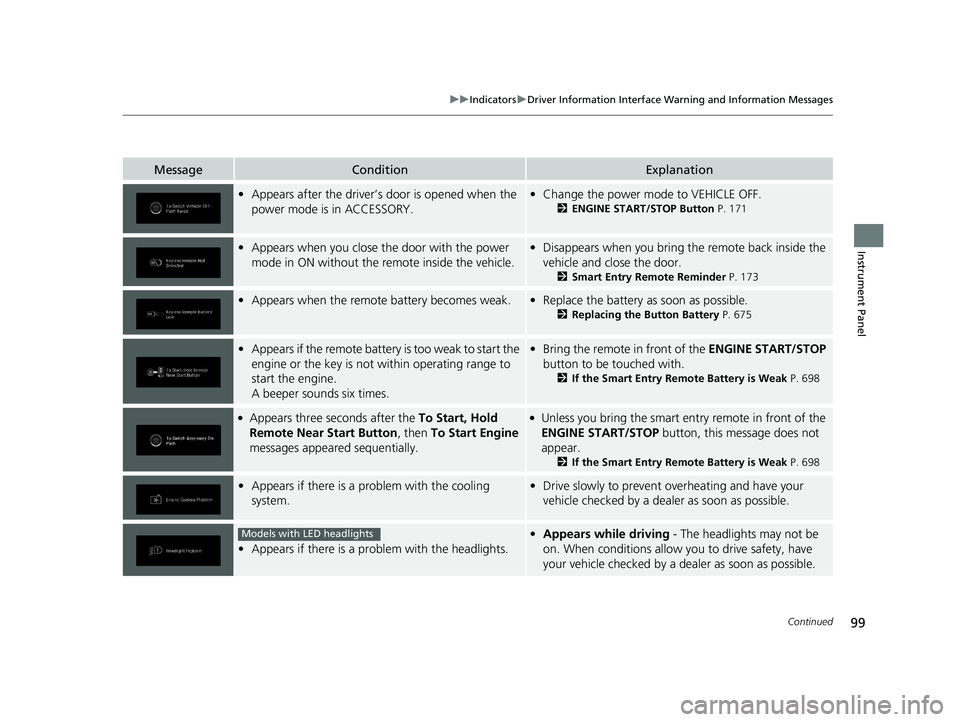
MessageConditionExplanation
•Appears after the driver’s door is opened when the
power mode is in ACCESSORY.• Change the power mode to VEHICLE OFF.
2 ENGINE START/STOP Button P. 171
•Appears when you close th e door with the power
mode in ON without the remote inside the vehicle.• Disappears when you bring the remote back inside the
vehicle and close the door.
2 Smart Entry Remote Reminder P. 173
•Appears when the remote battery becomes weak.•Replace the battery as soon as possible.
2 Replacing the Button Battery P. 675
•Appears if the remote battery is too weak to start the
engine or the key is not within operating range to
start the engine.
A beeper sounds six times.•Bring the remote in front of the ENGINE START/STOP
button to be touched with.
2 If the Smart Entry Remote Battery is Weak P. 698
●Appears three seconds after the To Start, Hold
Remote Near Start Button , then To Start Engine
messages appeared sequentially.●Unless you bring the smart entry remote in front of the
ENGINE START/STOP button, this message does not
appear.
2 If the Smart Entry Remote Battery is Weak P. 698
•Appears if there is a problem with the cooling
system.•Drive slowly to prevent ov erheating and have your
vehicle checked by a dealer as soon as possible.
• Appears if there is a pr oblem with the headlights.
•Appears while driving - The headlights may not be
on. When conditions allow you to drive safety, have
your vehicle checked by a d ealer as soon as possible.Models with LED headlights
19 PILOT HMA ELP-31TG76310.book 99 ページ 2019年3月15日 金曜日 午後6時8分
Page 111 of 747
109
uuIndicators uDriver Information Interface Wa rning and Information Messages
Instrument Panel
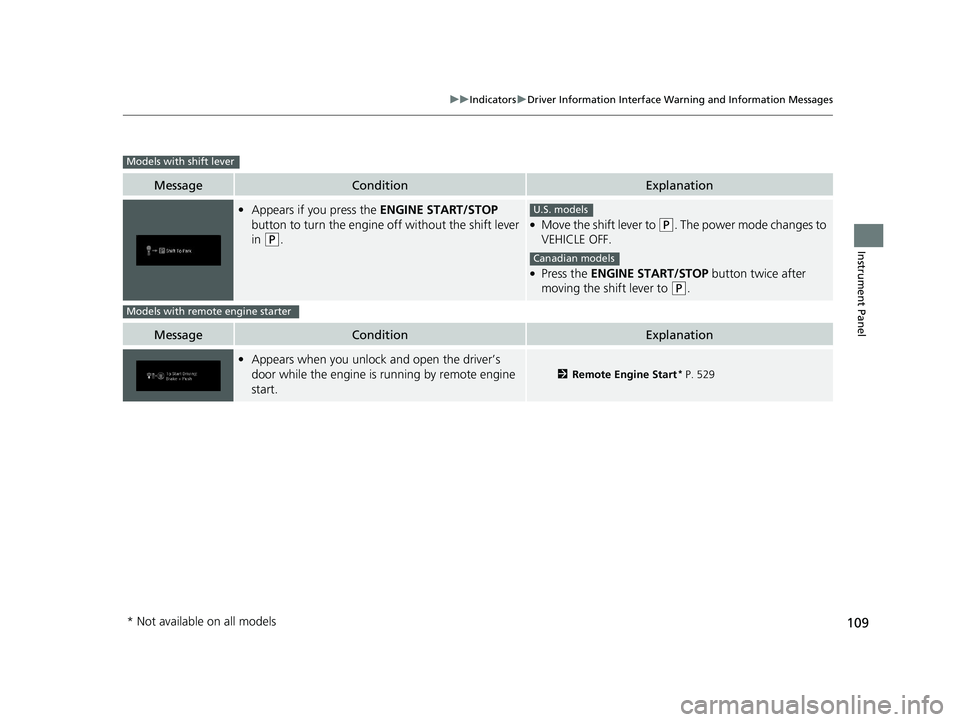
MessageConditionExplanation
•Appears if you press the ENGINE START/STOP
button to turn the engine off without the shift lever
in
(P.
●Move the shift lever to (P. The power mode changes to
VEHICLE OFF.
●Press the ENGINE START/STOP button twice after
moving the shift lever to
(P.
MessageConditionExplanation
• Appears when you unlock and open the driver’s
door while the engine is running by remote engine
start.
2 Remote Engine Start* P. 529
Models with shift lever
U.S. models
Canadian models
Models with remote engine starter
* Not available on all models
19 PILOT HMA ELP-31TG76310.book 109 ページ 2019年3月15日 金曜日 午後6時8分
Page 129 of 747
127
uuGauges and Displays uDriver Information Interface
Continued
Instrument Panel
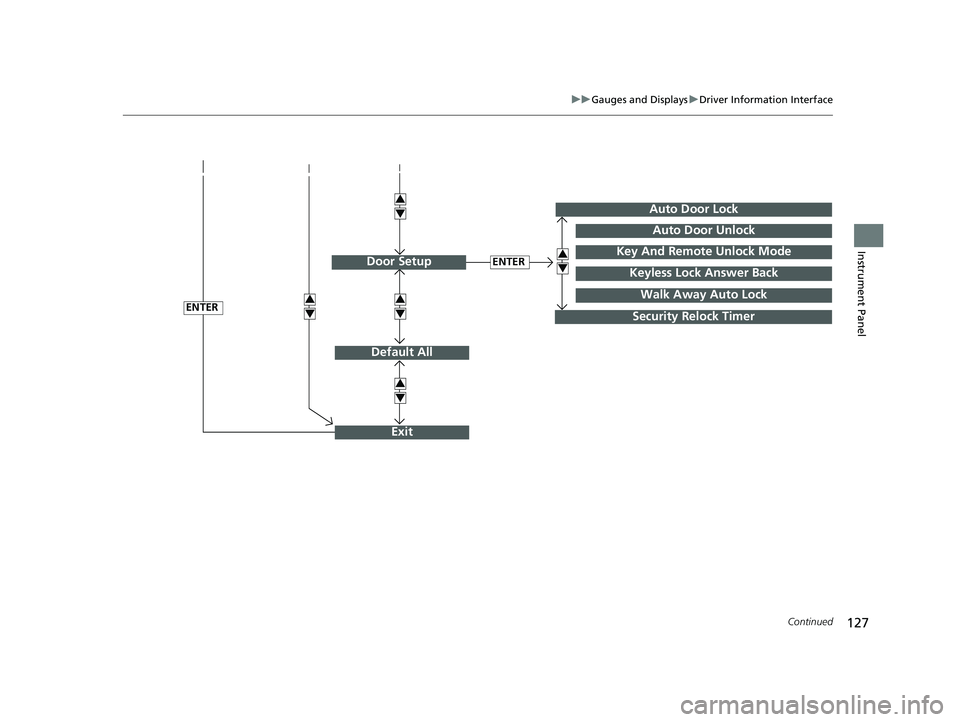
Default All
ENTER
ENTER
Auto Door Lock
Security Relock Timer
Auto Door Unlock
Key And Remote Unlock Mode
Keyless Lock Answer BackDoor Setup
Exit
3
4
3
4
3
4
3
4
3
4
Walk Away Auto Lock
19 PILOT HMA ELP-31TG76310.book 127 ページ 2019年3月15日 金曜日 午後6時8分
Page 132 of 747
130
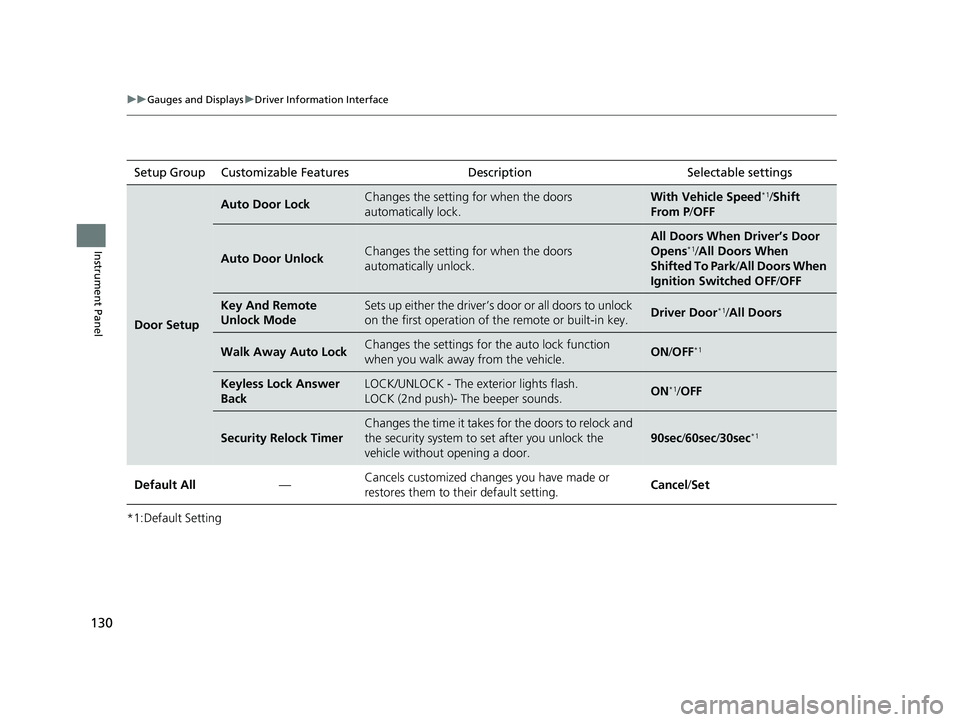
uuGauges and Displays uDriver Information Interface
Instrument Panel
*1:Default SettingSetup Group Customizable Features
Description Selectable settings
Door Setup
Auto Door LockChanges the setting for when the doors
automatically lock.With Vehicle Speed*1/Shift
From P /OFF
Auto Door UnlockChanges the setting for when the doors
automatically unlock.
All Doors When Driver’s Door
Opens*1/All Doors When
Shifted To Park /All Doors When
Ignition Switched OFF /OFF
Key And Remote
Unlock ModeSets up either the driver’s do or or all doors to unlock
on the first operation of the remote or built-in key.Driver Door*1/All Doors
Walk Away Auto LockChanges the settings for the auto lock function
when you walk away from the vehicle.ON /OFF*1
Keyless Lock Answer
BackLOCK/UNLOCK - The exterior lights flash.
LOCK (2nd push)- The beeper sounds.ON*1/OFF
Security Relock Timer
Changes the time it takes for the doors to relock and
the security system to set after you unlock the
vehicle without opening a door.
90sec /60sec/ 30sec*1
Default All —Cancels customized changes you have made or
restores them to their default setting. Cancel
/Set
19 PILOT HMA ELP-31TG76310.book 130 ページ 2019年3月15日 金曜日 午後6時8分
Page 137 of 747
135
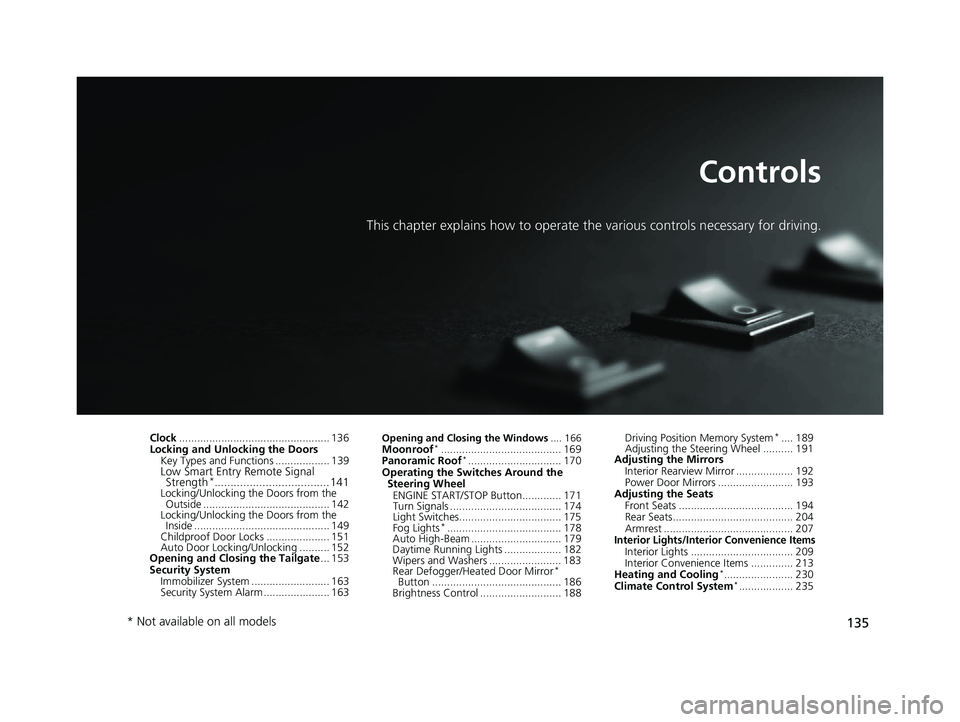
Controls
This chapter explains how to operate the various controls necessary for driving.
Clock.................................................. 136
Locking and Unlocking the Doors
Key Types and Functions .................. 139
Low Smart Entry Remote Signal Strength*.................................... 141Locking/Unlocking the Doors from the
Outside .......................................... 142
Locking/Unlocking the Doors from the Inside ............................................. 149
Childproof Door Locks ..................... 151
Auto Door Locking/Unlocking .......... 152
Opening and Closing the Tailgate ... 153
Security System Immobilizer System .......................... 163
Security System Alarm ...................... 163
Opening and Closing the Windows .... 166Moonroof*........................................ 169
Panoramic Roof*............................... 170
Operating the Switches Around the Steering Wheel
ENGINE START/STOP Button............. 171
Turn Signals ..................................... 174
Light Switches.................................. 175
Fog Lights
*...................................... 178
Auto High-Beam .............................. 179
Daytime Running Lights ................... 182
Wipers and Washers ........................ 183
Rear Defogger/Heat ed Door Mirror
*
Button ........................................... 186
Brightness Control ........................... 188 Driving Position Memory System
*.... 189
Adjusting the Steering Wheel .......... 191
Adjusting the Mirrors
Interior Rearview Mirror ................... 192
Power Door Mirrors ......................... 193
Adjusting the Seats
Front Seats ...................................... 194
Rear Seats........................................ 204
Armrest ........................................... 207
Interior Lights/Interior Convenience ItemsInterior Lights .................................. 209
Interior Convenience Items .............. 213
Heating and Cooling
*....................... 230
Climate Control System*.................. 235
* Not available on all models
19 PILOT HMA ELP-31TG76310.book 135 ページ 2019年3月15日 金曜日 午後6時8分