brake light HONDA PILOT 2020 (in English) Owner's Guide
[x] Cancel search | Manufacturer: HONDA, Model Year: 2020, Model line: PILOT, Model: HONDA PILOT 2020Pages: 743, PDF Size: 45.53 MB
Page 633 of 743
631
Maintenance
This chapter discusses basic maintenance.
Before Performing MaintenanceInspection and Maintenance ............ 632
Safety When Performing Maintenance ..633
Parts and Fluids Used in Maintenance Service ........................................... 634
Maintenance Minder
TM..................... 635
Maintenance Under the Hood Maintenance Items Under the Hood .. 641
Opening the Hood ........................... 642
Engine Compartment Cover ............. 643
Recommended Engine Oil ................ 644
Oil Check ......................................... 645
Adding Engine Oil ............................ 646
Changing the Engine Oil and Oil Filter ...647 Engine Coolant ................................ 649
Transmission Fluid ............................ 651
Brake Fluid ....................................... 652
Refilling Window Washer Fluid......... 652
Replacing Light Bulbs ....................... 653Checking and Maintaining Wiper Blades... 658Checking and Maintaining Tires
Checking Tires ................................. 662
Tire and Loading Information Label .. 663
Tire Labeling .................................... 663
DOT Tire Quality Grading (U.S. Vehicles).. 665Wear Indicators................................ 667
Tire Service Life ................................ 667 Tire and Wheel Replacement ........... 668
Tire Rotation .................................... 669
Winter Tires ..................................... 670
Battery ............................................... 671
Remote Transmitter Care ................. 673
Remote Control and Wireless Headphone Care
*........................... 674Heating and Cooling System*/Climate
Control System* Maintenance............. 676Cleaning Interior Care .................................... 678
Exterior Care.................................... 680
Accessories and Modifications ........ 683
* Not available on all models
20 PILOT-31TG76401.book 631 ページ 2019年7月24日 水曜日 午後3時32分
Page 634 of 743
632
Maintenance
Before Performing Maintenance
Inspection and Maintenance
For your safety, perform all listed inspections and maintenance to keep your vehicle
in good condition. If you become aware of any abnormality (noise, smell, insufficient
brake fluid, oil residue on the ground, etc.), have your vehicle inspected by a dealer.
(Note, however, that service at a dealer is not mandatory to keep your warranties in
effect.)
■Daily inspections
Perform inspections before long distance trips, when washing the vehicle, or when
refueling.
■Periodic inspections
• Check the brake fluid level monthly.
2 Checking the Brake Fluid P. 652
•Check the tire pressure monthly. Examin e the tread for wear and foreign objects.
2Checking and Maintaining Tires P. 662
•Check the operation of the exterior lights monthly.
2 Replacing Light Bulbs P. 653
•Check the condition of the wiper bl ades at least every six months.
2Checking and Maintaining Wiper Blades P. 658
■Types of Inspection and Maintenance
1Inspection and Maintenance
Maintenance, replacement, or repair of
emissions control devices and systems may be
done by any automotive repair establishment or
individuals using parts that are “certified” to
EPA standards.
According to state and fede ral regulations, failure to
perform maintenance on the maintenance main
items marked with # will not void your emissions
warranties. However, all ma intenance services should
be performed in accordan ce with the intervals
indicated by the driver information interface.
2 Maintenance Service Items P. 638
If you want to perform complex maintenance tasks
that require more skills a nd tools, you can purchase a
subscription to the Service Express website at
www.techinfo.honda.com .
2 Authorized Manuals P. 729
If you want to perform ma intenance yourself, make
sure that you have the necessary tools and skills first.
After performing ma intenance, update the records in
the separate maintenance booklet.
U.S. models
20 PILOT-31TG76401.book 632 ページ 2019年7月24日 水曜日 午後3時32分
Page 644 of 743
642
uuMaintenance Under the Hood uOpening the Hood
Maintenance
Opening the Hood
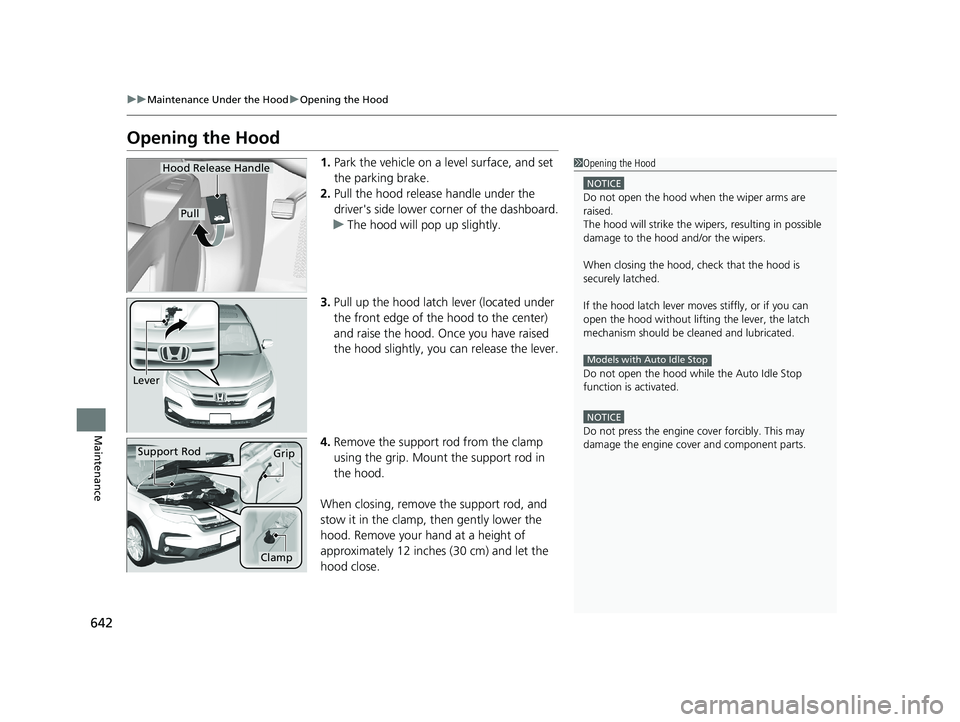
1. Park the vehicle on a level surface, and set
the parking brake.
2. Pull the hood release handle under the
driver's side lower co rner of the dashboard.
u The hood will pop up slightly.
3. Pull up the hood latch lever (located under
the front edge of the hood to the center)
and raise the hood. On ce you have raised
the hood slightly, you can release the lever.
4. Remove the support rod from the clamp
using the grip. Mount the support rod in
the hood.
When closing, remove the support rod, and
stow it in the clamp, then gently lower the
hood. Remove your hand at a height of
approximately 12 inches (30 cm) and let the
hood close.1 Opening the Hood
NOTICE
Do not open the hood when the wiper arms are
raised.
The hood will strike the wipe rs, resulting in possible
damage to the hood and/or the wipers.
When closing the hood, check that the hood is
securely latched.
If the hood latch lever moves stiffly, or if you can
open the hood without lifti ng the lever, the latch
mechanism should be cl eaned and lubricated.
Do not open the hood while the Auto Idle Stop
function is activated.
NOTICE
Do not press the engine cover forcibly. This may
damage the engine cover and component parts.
Models with Auto Idle Stop
Hood Release Handle
Pull
Lever
Support RodGrip
Clamp
20 PILOT-31TG76401.book 642 ページ 2019年7月24日 水曜日 午後3時32分
Page 658 of 743
656
uuReplacing Light Bulbs uSide Turn Signal/Emergency Indicator Lights*
Maintenance
Side Turn Signal/Emergency Indicator Lights*
Side turn lights are LED type. Have an au thorized Honda dealer inspect and replace
the light assembly.
Brake/Taillight, Rear Side Marker Light, and Rear
Turn Signal Light Bulbs
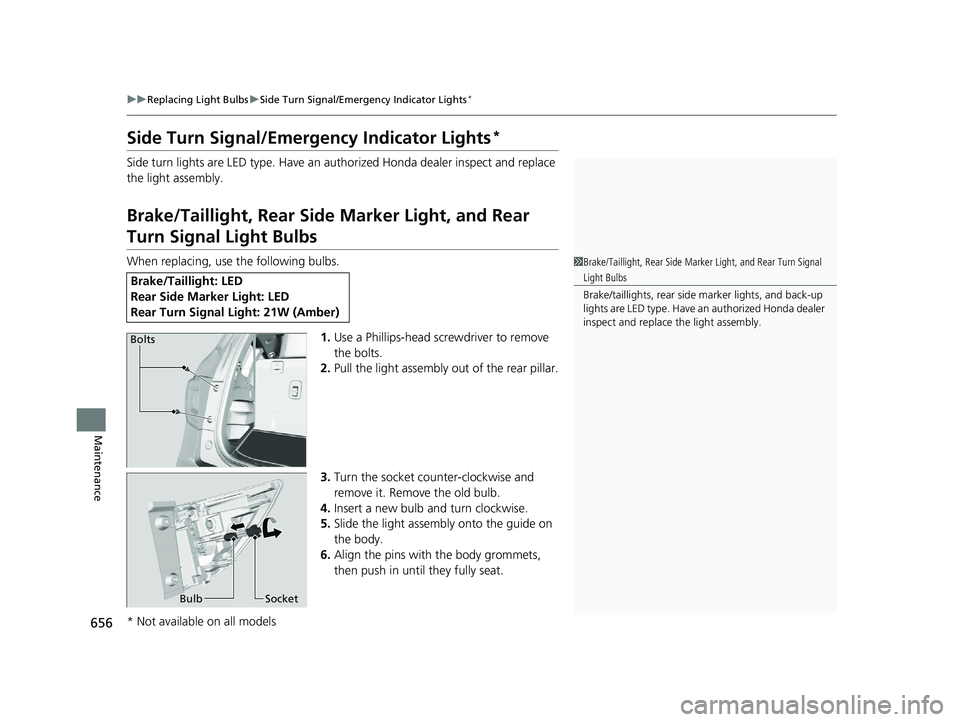
When replacing, use the following bulbs.
1.Use a Phillips-head screwdriver to remove
the bolts.
2. Pull the light assembly out of the rear pillar.
3. Turn the socket counter-clockwise and
remove it. Remove the old bulb.
4. Insert a new bulb and turn clockwise.
5. Slide the light assembly onto the guide on
the body.
6. Align the pins with the body grommets,
then push in unt il they fully seat.
Brake/Taillight: LED
Rear Side Marker Light: LED
Rear Turn Signal Light: 21W (Amber)
1Brake/Taillight, Rear Side Marker Light, and Rear Turn Signal
Light Bulbs
Brake/taillights, rear side marker lights, and back-up
lights are LED type. Have an authorized Honda dealer
inspect and replace the light assembly.
Bolts
Bulb Socket
* Not available on all models
20 PILOT-31TG76401.book 656 ページ 2019年7月24日 水曜日 午後3時32分
Page 659 of 743
657
uuReplacing Light Bulbs uBrake/Taillight and Back-Up Lights
Maintenance
Brake/Taillight and Back-Up Lights
Brake/taillight and back-up lights are LED ty pe. Have an authorized Honda dealer
inspect and replace the light assembly.
Rear License Plate Lights
Rear license plate lights are LED type. Have an authorized Honda dealer inspect and
replace the light assembly.
High-Mount Brake Light
High-mount brake light is LED type. Have an authorized Honda dealer inspect and
replace the light assembly.
20 PILOT-31TG76401.book 657 ページ 2019年7月24日 水曜日 午後3時32分
Page 684 of 743
682
uuCleaning uExterior Care
Maintenance
The inside lenses of exterior lights (headlig hts, brake lights, etc.) may fog temporarily
if you have driven in the rain, or after the vehicle has been run through a car wash.
Dew condensation also may build up inside the lenses when there is a significant
enough difference between the ambient and inside lens temperatures (similar to
vehicle windows fogging up in rainy conditions). These conditions are natural
processes, not structural design problems in the exterior lights.
Lens design characteristics may result in mo isture developing on the light lens frame
surfaces. This also is not a malfunction.
However, if you see large amounts of wa ter accumulation, or large water drops
building up inside the lenses, have your vehicle inspected by a dealer.
■Fogged Exterior Light Lenses
20 PILOT-31TG76401.book 682 ページ 2019年7月24日 水曜日 午後3時32分
Page 689 of 743
687Continued
Handling the Unexpected
If a Tire Goes Flat
Changing a Flat Tire
If a tire goes flat while driving, grasp the steering wheel firmly, and brake gradually
to reduce speed. Then, stop in a safe plac e. Replace the flat tire with a compact
spare tire. Go to a dealer as soon as possib le to have the full-size tire repaired or
replaced.
1. Park the vehicle on firm, level, non-slip pery surface and apply the parking brake.
2. Change the gear position to
(P.
2. Put the transmission into
(P.
3. Turn on the hazard warning lights an d set the power mode to VEHICLE OFF
(LOCK).
1 Changing a Flat Tire
Follow compact spare precautions:
Periodically check the tire pressure of the compact
spare. It should be set to the specified pressure.
Specified Pressure: 60 psi (420 kPa, 4.2 kgf/cm
2)
When driving with the compact spare tire, keep the
vehicle speed under 50 mph (80 km/h). Replace with
a full-size tire as soon as possible.
The compact spare tire and wheel in your vehicle are
specifically for this model. Do not use them with
another vehicle. Do not us e another type of compact
spare tire or wheel with your vehicle.
Do not mount tire chains on a compact spare tire.
If a chain-mounted front tire goes flat, remove one of
the full-size rear tires and replace it with the compact
spare tire. Remove the flat front tire and replace it
with the full-size tire that was removed from the rear.
Mount the tire chains on the front tire.
Do not use a puncture-repairi ng agent on a flat tire,
as it can damage the tire pressure sensor.
Models with electronic gear selector
Models with shift lever
All models
20 PILOT-31TG76401.book 687 ページ 2019年7月24日 水曜日 午後3時32分
Page 709 of 743
707
uuIndicator, Comin g On/BlinkinguIf the Brake System Indicator (Red) Comes On
Handling the Unexpected
If the Brake System Indicator (Red) Comes On
■Reasons for the indicator to come on
• The brake fluid is low.
• There is a malfunction in the brake system.
■What to do when the indica tor comes on while driving
Depress the brake pedal lightly to check pedal pressure.
• If normal, check the brake fluid level the next time you stop.
• If abnormal, take immediate acti on. If necessary, downshift the
transmission to slow the vehicle using engine braking.
If the Electric Power Steeri ng (EPS) System Indicator
Comes On
■Reasons for the indicator to come on
• Comes on when there is a problem with the EPS system.
• If you depress the accelerator pedal repeatedly to increase the engine
speed while the engine is idling, the indicator comes on, and
sometimes the steering wheel becomes harder to operate.
■What to do when th e indicator comes on
Stop the vehicle in a safe place and restart the engine.
If the indicator comes on and stays on, immediately have your vehicle
inspected by a dealer.
1 If the Brake System Indicator (Red) Comes On
Have your vehicle re paired immediately.
It is dangerous to drive with low brake fluid. If there
is no resistance from the brake pedal, stop
immediately in a safe plac e. If necessary downshift
the gears.
If the brake system indicator and ABS indicator come
on simultaneously, the elec tronic brake distribution
system is not working. Th is can result in vehicle
instability under sudden braking.
Have your vehicle inspecte d by a dealer immediately.U.S.
Canada
20 PILOT-31TG76401.book 707 ページ 2019年7月24日 水曜日 午後3時32分
Page 710 of 743
708
uuIndicator, Coming On/Blinking uIf the Low Tire Pressure/Tire Pressure Monitoring System (TPMS) Indicator Comes On or Blinks
Handling the Unexpected
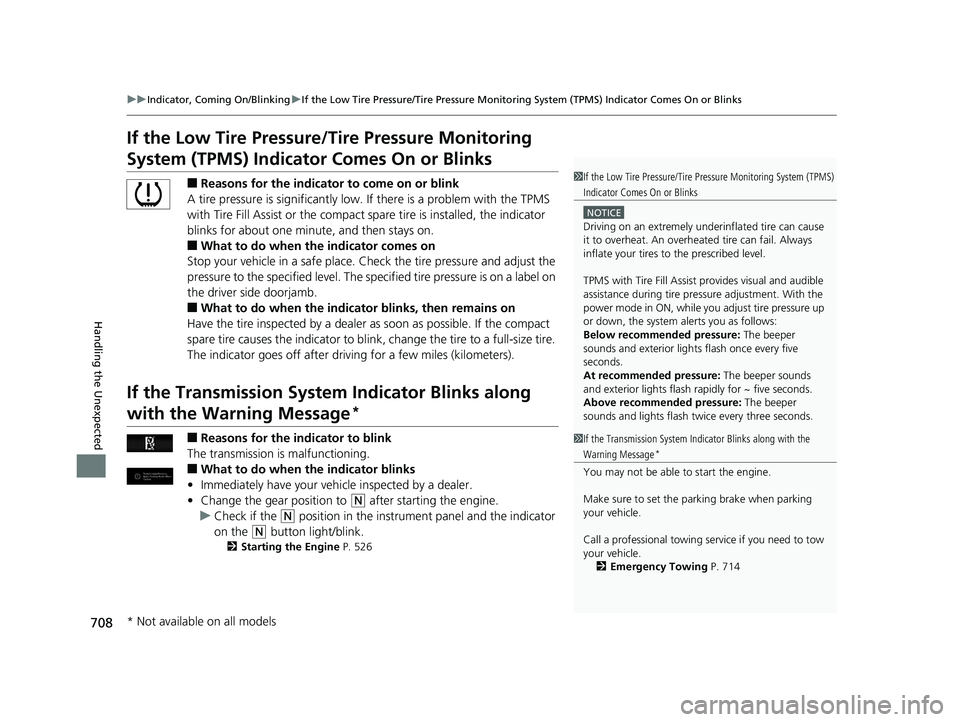
If the Low Tire Pressure/Tire Pressure Monitoring
System (TPMS) Indicato r Comes On or Blinks
■Reasons for the indicator to come on or blink
A tire pressure is significantly low. If there is a problem with the TPMS
with Tire Fill Assist or the compact spare tire is installed, the indicator
blinks for about one mi nute, and then stays on.
■What to do when the indicator comes on
Stop your vehicle in a safe place. Ch eck the tire pressure and adjust the
pressure to the specified level. The sp ecified tire pressure is on a label on
the driver side doorjamb.
■What to do when the indicator blinks, then remains on
Have the tire inspected by a dealer as soon as possible. If the compact
spare tire causes the indicator to blink, change the tire to a full-size tire.
The indicator goes off after driv ing for a few miles (kilometers).
If the Transmission System Indicator Blinks along
with the Warning Message*
■Reasons for the indicator to blink
The transmission is malfunctioning.
■What to do when the indicator blinks
• Immediately have your vehi cle inspected by a dealer.
• Change the gear position to
(N after starting the engine.
u Check if the
(N position in the instrume nt panel and the indicator
on the
(N button light/blink.
2 Starting the Engine P. 526
1If the Low Tire Pressure/Tire Pressure Monitoring System (TPMS)
Indicator Comes On or Blinks
NOTICE
Driving on an extremely unde rinflated tire can cause
it to overheat. An overheated tire can fail. Always
inflate your tires to the prescribed level.
TPMS with Tire Fill Assist provides visual and audible
assistance during tire pre ssure adjustment. With the
power mode in ON, while y ou adjust tire pressure up
or down, the system alerts you as follows:
Below recommended pressure: The beeper
sounds and exterior lights flash once every five
seconds.
At recommended pressure: The beeper sounds
and exterior lights flash ra pidly for ~ five seconds.
Above recommended pressure: The beeper
sounds and lights flash twice every three seconds.
1 If the Transmission System In dicator Blinks along with the
Warning Message*
You may not be able to start the engine.
Make sure to set the pa rking brake when parking
your vehicle.
Call a professional towing service if you need to tow
your vehicle. 2 Emergency Towing P. 714
* Not available on all models
20 PILOT-31TG76401.book 708 ページ 2019年7月24日 水曜日 午後3時32分
Page 722 of 743
720
Information
Specifications
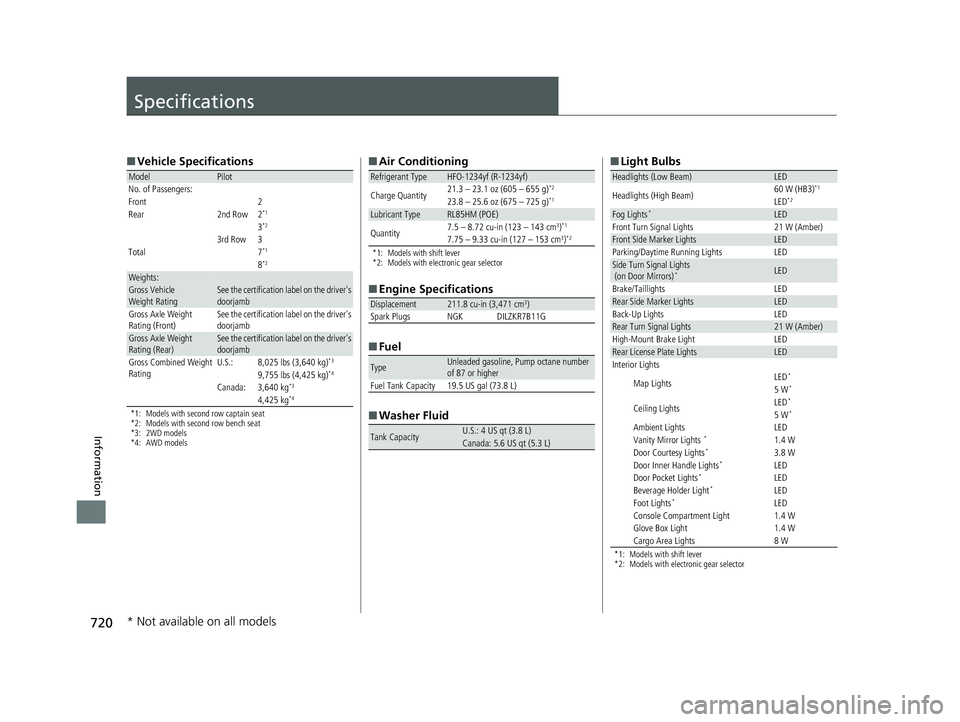
■Vehicle Specifications
*1: Models with second row captain seat
*2: Models with second row bench seat
*3: 2WD models
*4: AWD models
ModelPilot
No. of Passengers:
Front 2
Rear 2nd Row 2
*1
3*2
3rd Row 3
Total7*1
8*2
Weights:Gross Vehicle
Weight RatingSee the certification label on the driver's
doorjamb
Gross Axle Weight
Rating (Front)See the certification label on the driver's
doorjamb
Gross Axle Weight
Rating (Rear)See the certification label on the driver's
doorjamb
Gross Combined Weight
RatingU.S.:8,025 lbs (3,640 kg)*3
9,755 lbs (4,425 kg)*4
Canada:3,640 kg*3
4,425 kg*4
■ Air Conditioning
*1: Models with shift lever
*2: Models with electronic gear selector
■Engine Specifications
■ Fuel
■ Washer Fluid
Refrigerant TypeHFO-1234yf (R-1234yf)
Charge Quantity 21.3 – 23.1 oz (605 – 655 g)*2
23.8 – 25.6 oz (675 – 725 g)*1
Lubricant TypeRL85HM (POE)
Quantity7.5 – 8.72 cu-in (123 – 143 cm3)*1
7.75 – 9.33 cu-in (127 – 153 cm3)*2
Displacement211.8 cu-in (3,471 cm3)
Spark Plugs NGK DILZKR7B11G
TypeUnleaded gasoline, Pump octane number
of 87 or higher
Fuel Tank Capacity 19.5 US gal (73.8 L)
Tank CapacityU.S.: 4 US qt (3.8 L)Canada: 5.6 US qt (5.3 L)
■ Light Bulbs
*1: Models with shift lever
*2: Models with electronic gear selector
Headlights (Low Beam)LED
Headlights (High Beam)60 W (HB3)*1
LED*2
Fog Lights*LEDFront Turn Signal Lights21 W (Amber)Front Side Marker LightsLEDParking/Daytime Running LightsLEDSide Turn Signal Lights
(on Door Mirrors)*LED
Brake/TaillightsLEDRear Side Marker LightsLEDBack-Up LightsLEDRear Turn Signal Lights21 W (Amber)High-Mount Brake LightLEDRear License Plate LightsLEDInterior Lights
Map LightsLED*
5 W*
Ceiling LightsLED*
5 W*
Ambient LightsLEDVanity Mirror Lights *1.4 WDoor Courtesy Lights*3.8 WDoor Inner Handle Lights*LEDDoor Pocket Lights*LEDBeverage Holder Light*LEDFoot Lights*LEDConsole Compartment Light1.4 WGlove Box Light1.4 WCargo Area Lights8 W
* Not available on all models
20 PILOT-31TG76401.book 720 ページ 2019年7月24日 水曜日 午後3時32分