window HONDA PILOT 2020 (in English) Owner's Guide
[x] Cancel search | Manufacturer: HONDA, Model Year: 2020, Model line: PILOT, Model: HONDA PILOT 2020Pages: 743, PDF Size: 45.53 MB
Page 366 of 743
364
uuGeneral Information on the Audio System uHonda App License Agreement
Features
E. Information Collection and Storage
1. Information Collection , Use, Transmission and Storage of Data. Consent to Use of Data:
You agree that HONDA and PROVIDERS may
collect and use your information gathered in any manner as part of product support services related to the SOFTWARE or related services.
HONDA may share such information with third parties, including, without limitation, PROV IDERS, third party software and service s
suppliers, their affiliates and/or their design ated agents, solely to improve their products or to provide services or technologies to you.
HONDA, third party software and systems supp liers, their affiliates and/or their designated agent may disclose this information to others,
but not in a form that pe rsonally identifies you.
2. Information Storage.
Depending on the type of multimedia system you have in your VEHICLE, certain information may be stored for ease
of use of the SOFTWARE including, without limitation, search hi story, location history in certain applications, previous and saved
destinations, map locations within certain applications, and device numbers and contact information.
(a) Vehicle Health Information.
Your VEHICLE may remotely trans mit information regarding the status and health of your VEHICLE
(“VEHICLE INFORMATION”) to HONDA without notification to you. VEHICLE INFORMATION may contain VEHICLE maintenance and
malfunction status that is derived from VEHICLE diagnostic data and includes, but is not limited to, status of powered doors and windows,
battery life data, battery charging data, VEHICLE speed, coolant temperat ure, air compressor revolution, output power, warning codes,
diagnostic trouble codes, fuel injection volume, and engine rotati ons per minute. VEHICLE HEALTH INFORMATION may be used by HONDA
for research and development, to deliver HO NDA SERVICES and information to you, and to contact you, and is retained only for a period
of time necessary to fulfill these goals.
(b) VEHICLE Geolocation Data (non-navigation/map based).
If you opt-in to geolocation-based SERVICES, your vehicle’s geolocation data
(latitude and longitude) will be automatically sent from your VEHICLE to HONDA and PROVIDERS.
(c) You understand that the inputting or uploading of information to your VEHICLE’s multimedia system or the SOFTWARE or SERVICES is
at your own risk and that HONDA is not resp onsible for unauthorized access to or use of any personal or other information. All information
uploaded to the SOFTWARE and SERVICES may be stored on your VEHI CLES’s multimedia system and you understand that the security and
safety of your VEHICLE’s multimedia system is your sole responsibility.
20 PILOT-31TG76401.book 364 ページ 2019年7月24日 水曜日 午後3時32分
Page 376 of 743
374
uuGeneral Information on the Audio System uLicense Information*
Features
The Bluetooth ® word mark and logos are registered trademarks owned by Bluetooth
SIG, Inc. and any use of such marks by DENSO CORPORATION is under license.
Other trademarks and trade names are those of their respective owners.
This product is protected by certain intelle ctual property rights of Microsoft. Use or
distribution of such technology outside of this product is prohibited without a
license from Microsoft.
■Bluetooth
■Windows Media
20 PILOT-31TG76401.book 374 ページ 2019年7月24日 水曜日 午後3時32分
Page 415 of 743
413
uuBlu-ray/DVD Rear Entertainment System*uPlayable Discs
Continued
Features
Redistribution and use in source and binary forms, with or with out modification, are permitted provided that the following cond itions are
met:
1. Redistributions of source code must retain the copyright notice, this list of conditions and the following disclaimer.
2. Redistributions in binary form must re produce the above copyright notice, this list of conditions and the following disclaim er in the
documentation and/or other materials provided with the distribution.
3. All advertising materials mentioning features or use of this software must display the following acknowledgement:
“This product includes cryptographic software written by Eric Young ( [email protected])”
The word 'cryptographic' can be left out if the rouines from the library being used are not cryptographic related :-).
4. If you include any Windows specific code (or a derivative thereof) from the apps directory (application code) you must inclu de an
acknowledgement: “This product includes software written by Tim Hudson ( [email protected])”
THIS SOFTWARE IS PROVIDED BY ERIC YOUNG “AS IS” AND ANY EXPRESS OR IMPLIED WARRANTIES, INCLUDING, BUT NOT LIMITED TO,
THE IMPLIED WARRANTIES OF MERCHANTABILITY AND FITNESS FOR A PARTICULAR PURPOSE ARE DISCLAIMED. IN NO EVENT SHALL THE
AUTHOR OR CONTRIBUTORS BE LIABLE FO R ANY DIRECT, INDIRECT, INCIDENTAL, SPEC IAL, EXEMPLARY, OR CONSEQUENTIAL
DAMAGES (INCLUDING, BUT NOT LIMITED TO, PRO CUREMENT OF SUBSTITUTE GOODS OR SERVICES; LOSS OF USE, DATA, OR PROFITS;
OR BUSINESS INTERRUPTION) HOWEVER CAUSED AND ON ANY THEORY OF LIABILITY, WHETHER IN CONTRACT, STRICT LIABILITY, OR
TORT (INCLUDING NEGLIGENCE OR OTHERWISE) ARISING IN ANY WAY OUT OF THE USE OF THIS SOFTWARE, EVEN IF ADVISED OF THE
POSSIBILITY OF SUCH DAMAGE.
The license and distribution terms for any pub lically available version or derivative of this code cannot be changed. i.e. this code cannot
simply be copied and put under another distribution license [including the GNU Public License.]
20 PILOT-31TG76401.book 413 ページ 2019年7月24日 水曜日 午後3時32分
Page 425 of 743
423
uuBlu-ray/DVD Rear Entertainment System*uPlayable Discs
Features
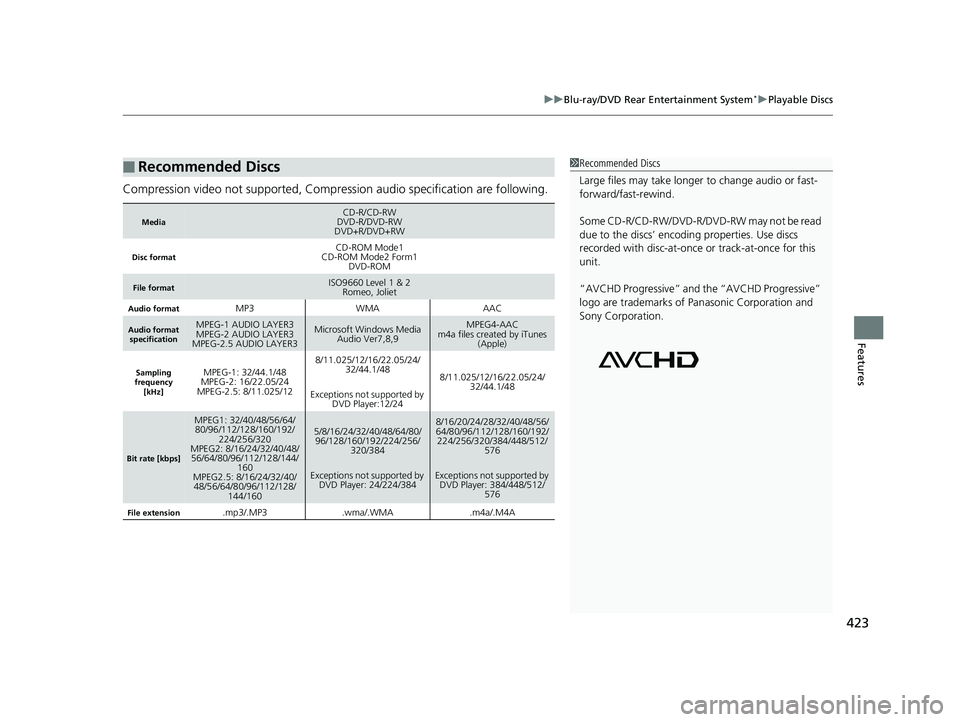
Compression video not supported, Compression audio specification are following.
■Recommended Discs
MediaCD-R/CD-RW
DVD-R/DVD-RW
DVD+R/DVD+RW
Disc formatCD-ROM Mode1
CD-ROM Mode2 Form1 DVD-ROM
File formatISO9660 Level 1 & 2Romeo, Joliet
Audio formatMP3WMAAAC
Audio format
specificationMPEG-1 AUDIO LAYER3
MPEG-2 AUDIO LAYER3
MPEG-2.5 AUDIO LAYER3Microsoft Windows Media Audio Ver7,8,9MPEG4-AAC
m4a files created by iTunes (Apple)
Sampling
frequency
[kHz]MPEG-1: 32/44.1/48
MPEG-2: 16/22.05/24
MPEG-2.5: 8/11.025/128/11.025/12/16/22.05/24/ 32/44.1/48
Exceptions not supported by DVD Player:12/24
8/11.025/12/16/22.05/24/
32/44.1/48
Bit rate [kbps]
MPEG1: 32/40/48/56/64/80/96/112/128/160/192/ 224/256/320
MPEG2: 8/16/24/32/40/48/
56/64/80/96/112/128/144/ 160
MPEG2.5: 8/16/24/32/40/
48/56/64/80/96/112/128/ 144/1605/8/16/24/32/40/48/64/80/96/128/160/192/224/256/
320/384
Exceptions not supported by DVD Player: 24/224/3848/16/20/24/28/32/40/48/56/
64/80/96/112/128/160/192/224/256/320/384/448/512/
576
Exceptions not supported by DVD Player: 384/448/512/ 576
File extension.mp3/.MP3.wma/.WMA.m4a/.M4A
1Recommended Discs
Large files may take longer to change audio or fast-
forward/fast-rewind.
Some CD-R/CD-RW/DVD-R/DVD -RW may not be read
due to the discs’ encoding properties. Use discs
recorded with disc-at-once or track-at-once for this
unit.
“AVCHD Progressive” and the “AVCHD Progressive”
logo are trademarks of Pa nasonic Corporation and
Sony Corporation.
20 PILOT-31TG76401.book 423 ページ 2019年7月24日 水曜日 午後3時32分
Page 457 of 743
455Continued
Features
Bluetooth® HandsFreeLink ®
Bluetooth® HandsFreeLink ® (HFL) allows you to place and receive phone calls using
your vehicle’s audio system, without handling your cell phone.
Using HFL
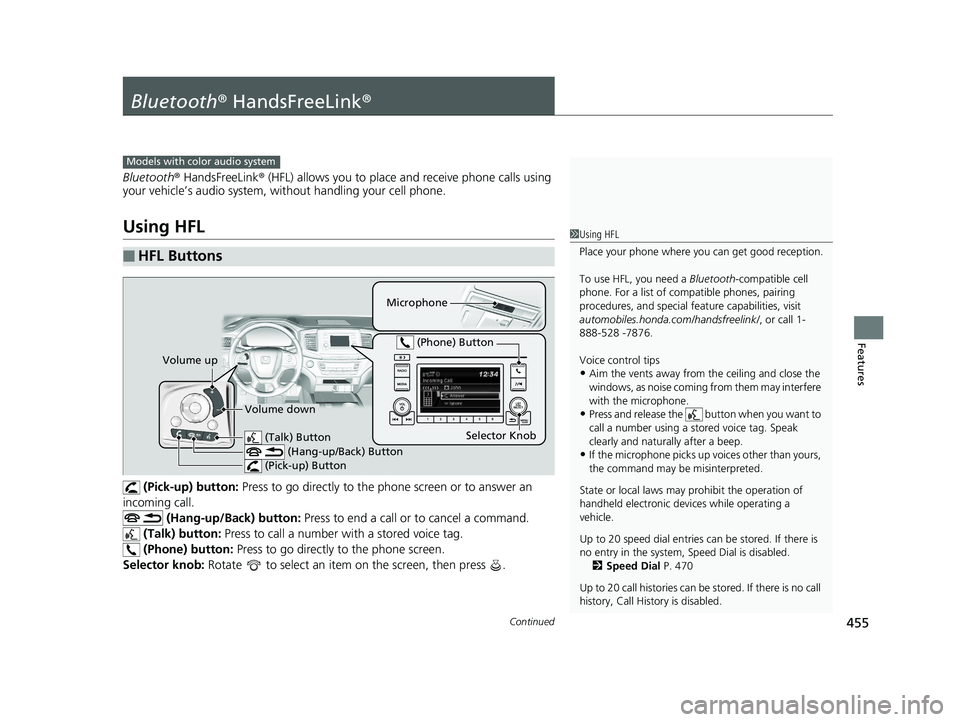
(Pick-up) button: Press to go directly to the p hone screen or to answer an
incoming call. (Hang-up/Back) button: Press to end a call or to cancel a command.
(Talk) button: Press to call a number wi th a stored voice tag.
(Phone) button: Press to go directly to the phone screen.
Selector knob: Rotate to select an item on the screen, then press .
■HFL Buttons
1Using HFL
Place your phone where y ou can get good reception.
To use HFL, you need a Bluetooth-compatible cell
phone. For a list of compatible phones, pairing
procedures, and special fe ature capabilities, visit
automobiles.honda.com /handsfreelink/, or call 1-
888-528 -7876.
Voice control tips
•Aim the vents away from the ceiling and close the
windows, as noise coming fr om them may interfere
with the microphone.
•Press and release the button when you want to
call a number using a st ored voice tag. Speak
clearly and naturally after a beep.
•If the microphone picks up vo ices other than yours,
the command may be misinterpreted.
State or local laws may pr ohibit the operation of
handheld electronic devi ces while operating a
vehicle.
Up to 20 speed dial entries can be stored. If there is
no entry in the system, Speed Dial is disabled. 2 Speed Dial P. 470
Up to 20 call histories can be stored. If there is no call
history, Call History is disabled.
Models with color audio system
Microphone
(Talk) Button (Hang-up/Back) Button
(Pick-up) Button
Selector Knob
(Phone) Button
Volume up
Volume down
20 PILOT-31TG76401.book 455 ページ 2019年7月24日 水曜日 午後3時32分
Page 482 of 743
480
Features
Bluetooth® HandsFreeLink ®
Bluetooth® HandsFreeLink ® (HFL) allows you to place and receive phone calls using
your vehicle’s audio system, without handling your cell phone.
Using HFL
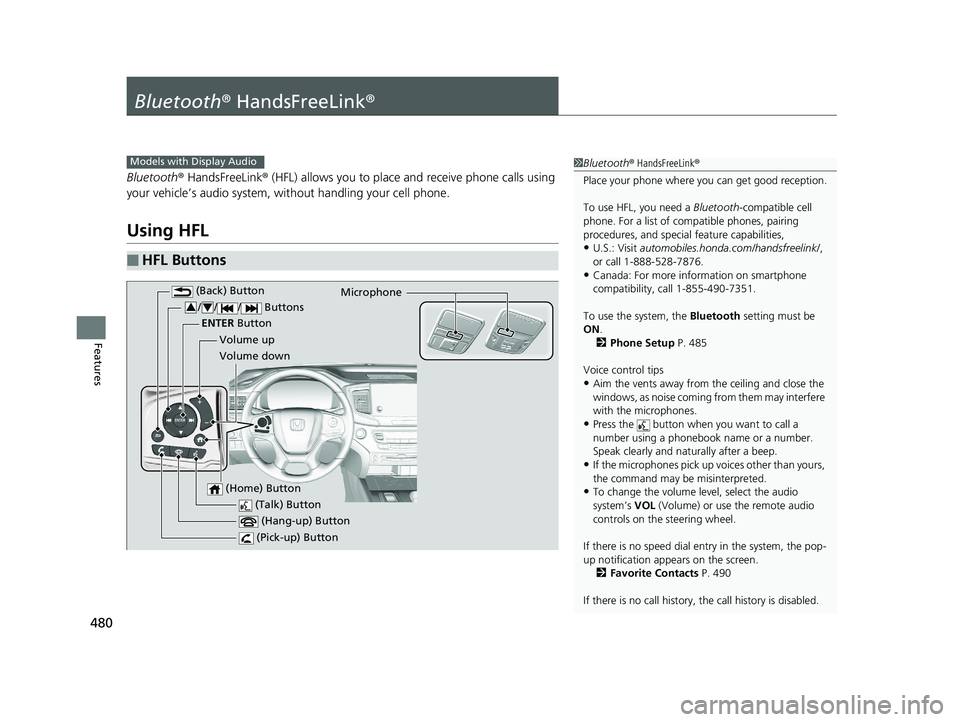
■HFL Buttons
1 Bluetooth ® HandsFreeLink ®
Place your phone where y ou can get good reception.
To use HFL, you need a Bluetooth-compatible cell
phone. For a list of compatible phones, pairing
procedures, and special feature capabilities,
•U.S.: Visit automobiles.honda.com /handsfreelink/,
or call 1-888-528-7876.
•Canada: For more info rmation on smartphone
compatibility, call 1-855-490-7351.
To use the system, the Bluetooth setting must be
ON .
2 Phone Setup P. 485
Voice control tips
•Aim the vents away from the ceiling and close the
windows, as noise coming fr om them may interfere
with the microphones.
•Press the button when you want to call a
number using a phonebook name or a number.
Speak clearly and naturally after a beep.
•If the microphones pick up vo ices other than yours,
the command may be misinterpreted.
•To change the volume level, select the audio
system’s VOL (Volume) or use the remote audio
controls on the steering wheel.
If there is no speed dial entry in the system, the pop-
up notification appe ars on the screen.
2 Favorite Contacts P. 490
If there is no call history, the call history is disabled.
Models with Display Audio
(Talk) Button
Volume up Microphone
(Hang-up) Button
(Pick-up) Button
Volume down
ENTER
Button
(Back) Button
// / Buttons34
(Home) Button
20 PILOT-31TG76401.book 480 ページ 2019年7月24日 水曜日 午後3時32分
Page 510 of 743
508
Driving
Before Driving
Driving Preparation
Check the following items before you start driving.
• Make sure there are no obstructions on th e windows, door mirrors, exterior
lights, or other parts of the vehicle.
u Remove any frost, snow, or ice.
u Remove any snow on the roof, as this can slip down and obstruct your field of
vision while driving. If frozen solid , remove ice once it has softened.
u When removing ice from around the wheel s, be sure not to damage the wheel
or wheel components.
• Make sure the hood is securely closed.
u If the hood opens while driving, your front view will be blocked.
• Make sure the tires are in good condition.
u Check air pressures, and check for damage and excessive wear.
2Checking and Maintaining Tires P. 662
•Make sure there are no people or ob jects behind or around the vehicle.
u There are blind spots from the inside.
■Exterior Checks1Exterior Checks
NOTICE
When doors are frozen s hut, use warm water around
the door edges to melt any ice. Do not try to force
them open, as this can damage the rubber trim
around the doors. When done, wipe dry to avoid
further freezing.
Do not pour warm water into the key cylinder.
You will be unable to insert the key if the water
freezes in the hole.
Heat from the engine and exhaust can ignite
flammable material s left under the hood, causing a
fire. If you’ve parked y our vehicle for an extended
period, inspect and remove any debris that may have
collected, such as dried grass and leaves that have
fallen or have been carried in for use as a nest by a
small animal. Also check under the hood for leftover
flammable materials after you or someone else has
performed maintenance on your vehicle.
20 PILOT-31TG76401.book 508 ページ 2019年7月24日 水曜日 午後3時32分
Page 633 of 743
631
Maintenance
This chapter discusses basic maintenance.
Before Performing MaintenanceInspection and Maintenance ............ 632
Safety When Performing Maintenance ..633
Parts and Fluids Used in Maintenance Service ........................................... 634
Maintenance Minder
TM..................... 635
Maintenance Under the Hood Maintenance Items Under the Hood .. 641
Opening the Hood ........................... 642
Engine Compartment Cover ............. 643
Recommended Engine Oil ................ 644
Oil Check ......................................... 645
Adding Engine Oil ............................ 646
Changing the Engine Oil and Oil Filter ...647 Engine Coolant ................................ 649
Transmission Fluid ............................ 651
Brake Fluid ....................................... 652
Refilling Window Washer Fluid......... 652
Replacing Light Bulbs ....................... 653Checking and Maintaining Wiper Blades... 658Checking and Maintaining Tires
Checking Tires ................................. 662
Tire and Loading Information Label .. 663
Tire Labeling .................................... 663
DOT Tire Quality Grading (U.S. Vehicles).. 665Wear Indicators................................ 667
Tire Service Life ................................ 667 Tire and Wheel Replacement ........... 668
Tire Rotation .................................... 669
Winter Tires ..................................... 670
Battery ............................................... 671
Remote Transmitter Care ................. 673
Remote Control and Wireless Headphone Care
*........................... 674Heating and Cooling System*/Climate
Control System* Maintenance............. 676Cleaning Interior Care .................................... 678
Exterior Care.................................... 680
Accessories and Modifications ........ 683
* Not available on all models
20 PILOT-31TG76401.book 631 ページ 2019年7月24日 水曜日 午後3時32分
Page 654 of 743
652
uuMaintenance Under the Hood uBrake Fluid
Maintenance
Brake Fluid
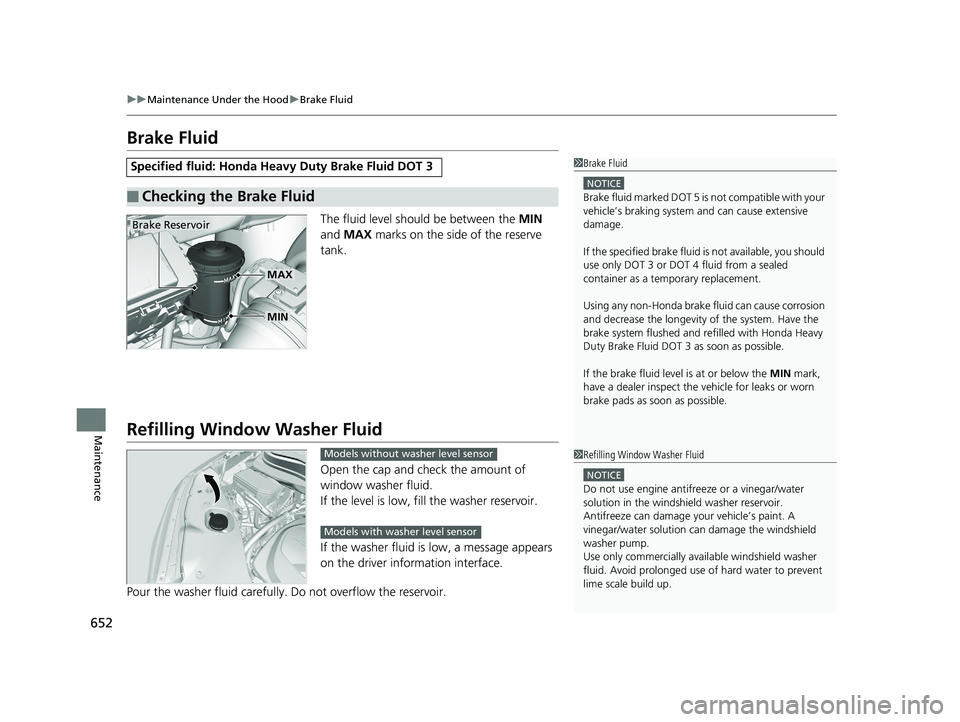
The fluid level should be between the MIN
and MAX marks on the side of the reserve
tank.
Refilling Window Washer Fluid
Open the cap and check the amount of
window washer fluid.
If the level is low, fill the washer reservoir.
If the washer fluid is low, a message appears
on the driver information interface.
Pour the washer fluid carefully. Do not overflow the reservoir.
Specified fluid: Honda Heavy Duty Brake Fluid DOT 3
■Checking the Brake Fluid
1Brake Fluid
NOTICE
Brake fluid marked DOT 5 is not compatible with your
vehicle’s braking system and can cause extensive
damage.
If the specified brake fluid is not available, you should
use only DOT 3 or DOT 4 fluid from a sealed
container as a temporary replacement.
Using any non-Honda brake fluid can cause corrosion
and decrease the longevity of the system. Have the
brake system flushed and re filled with Honda Heavy
Duty Brake Fluid DOT 3 as soon as possible.
If the brake fluid level is at or below the MIN mark,
have a dealer inspect the vehicle for leaks or worn
brake pads as soon as possible.
Brake Reservoir
MIN
MAX
1 Refilling Window Washer Fluid
NOTICE
Do not use engine antifreeze or a vinegar/water
solution in the windshield washer reservoir.
Antifreeze can damage y our vehicle’s paint. A
vinegar/water solution ca n damage the windshield
washer pump.
Use only commercially avai lable windshield washer
fluid. Avoid prolonged use of hard water to prevent
lime scale build up.
Models without washer level sensor
Models with washer level sensor
20 PILOT-31TG76401.book 652 ページ 2019年7月24日 水曜日 午後3時32分
Page 660 of 743
658
Maintenance
Checking and Maintaining Wiper Blades
Checking Wiper Blades
If the wiper blade rubber has deteriorated, it will leave streaks and the hard surfaces
of the blade may scratch the window glass.
Changing the Front Wiper Blade Rubber
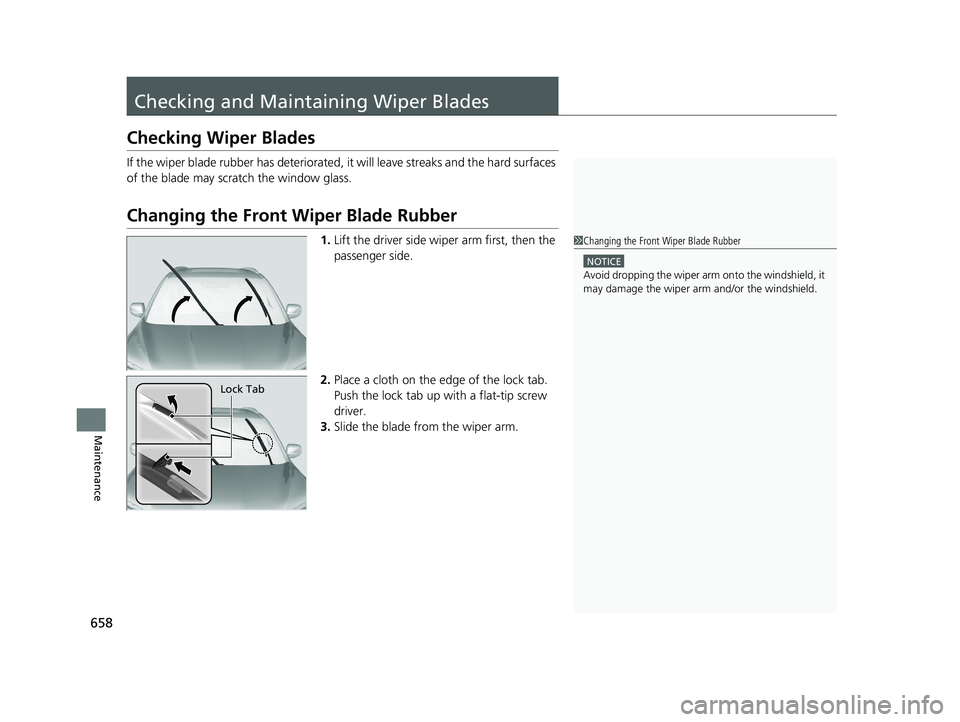
1. Lift the driver side wiper arm first, then the
passenger side.
2. Place a cloth on the ed ge of the lock tab.
Push the lock tab up with a flat-tip screw
driver.
3. Slide the blade from the wiper arm.1Changing the Front Wiper Blade Rubber
NOTICE
Avoid dropping the wiper arm onto the windshield, it
may damage the wiper arm and/or the windshield.
Lock Tab
20 PILOT-31TG76401.book 658 ページ 2019年7月24日 水曜日 午後3時32分