fuel type HONDA PILOT 2021 Owner's Manual (in English)
[x] Cancel search | Manufacturer: HONDA, Model Year: 2021, Model line: PILOT, Model: HONDA PILOT 2021Pages: 739, PDF Size: 44.86 MB
Page 363 of 739
361
uuGeneral Information on the Audio System uHonda App License Agreement
Continued
Features
E. Information Collection and Storage
1. Information Collection, Use, Transmission a nd Storage of Data. Consent to Use of Data:
You agree that HONDA and PROVIDERS may
collect and use your information gathered in any manner as part of product support services related to the SOFTWARE or related services.
HONDA may share such information with third parties, including, without limitation, PR OVIDERS, third party software and service s
suppliers, their affiliates and/or their designated agents, solely to improve their products or to provide services or technolo gies to you.
HONDA, third party software and systems supplie rs, their affiliates and/or their designated agent may disclose this information to others,
but not in a form that pe rsonally identifies you.
2. Information Storage.
Depending on the type of mult imedia system you have in your VEHICLE, certain information may be stored for ease
of use of the SOFTWARE including, without limitation, search history, location history in certain applications, previous and sa ved
destinations, map locations within certain applications, and device numbers and contact information.
(a) Vehicle Health Information.
Your VEHICLE may remotely transmit information re garding the status and health of your VEHICLE
(“VEHICLE INFORMATION”) to HO NDA without notification to you. VEHICLE INFO RMATION may contain VEHICLE maintenance and
malfunction status that is derived from VEHICLE diagnostic data and includes, but is not limited to, status of powered doors and windows,
battery life data, battery charging data, VE HICLE speed, coolant temperature, air comp ressor revolution, output power, warning codes,
diagnostic trouble codes, fuel injection volume, and engine rotati ons per minute. VEHICLE HEALTH INFORMATION may be used by HON DA
for research and development, to deliver HONDA SERVICES and informat ion to you, and to contact you, and is retained only for a period
of time necessary to fulfill these goals.
(b) VEHICLE Geolocation Data (non-navigation/map based).
If you opt-in to geolocation-based SERVICES, your vehicle’s geolocation data
(latitude and longitude) will be automatically sent from your VEHICLE to HONDA and PROVIDERS.
(c) You understand that the inputting or uploading of information to your VEHICLE’s multimedia system or the SOFTWARE or SERVIC ES is
at your own risk and that HONDA is not responsible for unauthori zed access to or use of any personal or other information. All information
uploaded to the SOFTWARE and SERVICES may be stored on your VEHICLES’s multimedia system and you understand that the security and
safety of your VEHICLE’s multimedia system is your sole responsibility.
21 PILOT-31TG76500.book 361 ページ 2020年3月18日 水曜日 午後4時38分
Page 542 of 739
540
uuWhen Driving uAuto Idle Stop
Driving
Auto Idle Stop
To help maximize fuel econ omy, the engine automatica lly stops when the vehicle
comes to a stop, depending on environmen tal and vehicle operating conditions. The
indicator (green) comes on at this time.
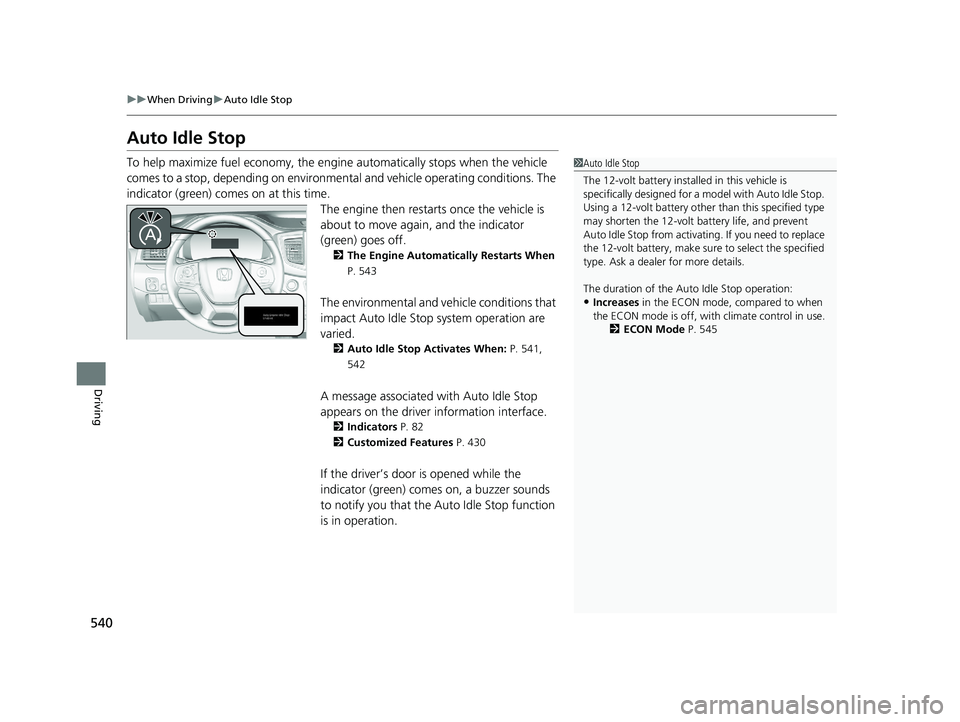
The engine then restarts once the vehicle is
about to move again, and the indicator
(green) goes off.
2 The Engine Automatically Restarts When
P. 543
The environmental and vehicle conditions that
impact Auto Idle Stop system operation are
varied.
2 Auto Idle Stop Activates When: P. 541,
542
A message associated with Auto Idle Stop
appears on the driver information interface.
2Indicators P. 82
2 Customized Features P. 430
If the driver’s door is opened while the
indicator (green) comes on, a buzzer sounds
to notify you that the Auto Idle Stop function
is in operation.
1Auto Idle Stop
The 12-volt battery insta lled in this vehicle is
specifically designed for a m odel with Auto Idle Stop.
Using a 12-volt battery other than this specified type
may shorten the 12-volt ba ttery life, and prevent
Auto Idle Stop from activati ng. If you need to replace
the 12-volt battery, make sure to select the specified
type. Ask a dealer for more details.
The duration of the Au to Idle Stop operation:
•Increases in the ECON mode, compared to when
the ECON mode is off, with climate control in use.
2ECON Mode P. 545
21 PILOT-31TG76500.book 540 ページ 2020年3月18日 水曜日 午後4時38分
Page 630 of 739
628
Maintenance
Before Performing Maintenance
Inspection and Maintenance
For your safety, perform all listed inspections and maintenance to keep your vehicle
in good condition. If you become aware of an y abnormality (noise, smell, insufficient
brake fluid, oil residue on the ground, etc.), have your vehicle inspected by a dealer.
(Note, however, that service at a dealer is not mandatory to keep your warranties in
effect.)
■Daily inspections
Perform inspections before long distance tri ps, when washing the vehicle, or when
refueling.
■Periodic inspections
• Check the brake fluid level monthly.
2 Checking the Brake Fluid P. 648
•Check the tire pressure monthly. Examin e the tread for wear and foreign objects.
2Checking and Maintaining Tires P. 658
•Check the operation of the exterior lights monthly.
2 Replacing Light Bulbs P. 649
•Check the condition of the wiper bl ades at least every six months.
2Checking and Maintaining Wiper Blades P. 654
■Types of Inspection and Maintenance
1Inspection and Maintenance
Maintenance, replacement, or repair of
emissions control devices and systems may be
done by any automotive repair establishment or
individuals using parts that are “certified” to
EPA standards.
According to state and fede ral regulations, failure to
perform maintenance on the maintenance main
items marked with # will not void your emissions
warranties. However, all ma intenance services should
be performed in accordan ce with the intervals
indicated by the driver information interface.
2 Maintenance Service Items P. 634
If you want to perform complex maintenance tasks
that require more skills a nd tools, you can purchase a
subscription to the Service Express website at
www.techinfo.honda.com .
2 Authorized Manuals P. 724
If you want to perform ma intenance yourself, make
sure that you have the necessary tools and skills first.
After performing maintenanc e, update the records in
the separate maintenance booklet.
U.S. models
21 PILOT-31TG76500.book 628 ページ 2020年3月18日 水曜日 午後4時38分
Page 642 of 739
640
uuMaintenance Under the Hood uRecommended Engine Oil
Maintenance
Recommended Engine Oil
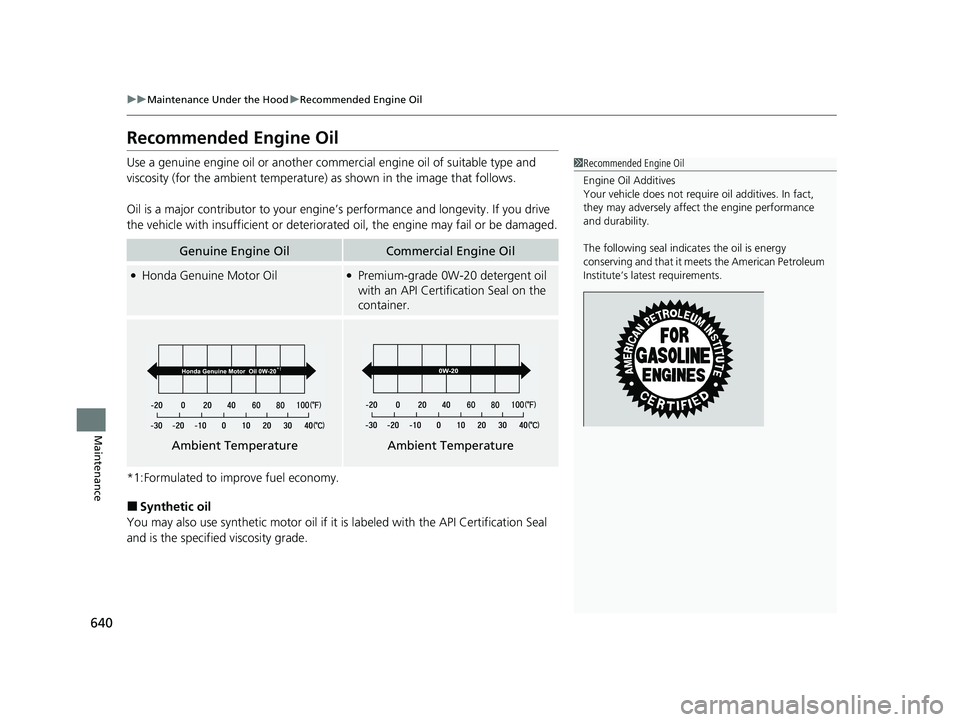
Use a genuine engine oil or another commercial engine oil of suitable type and
viscosity (for the ambient temperature) as shown in the image that follows.
Oil is a major contributor to your engine ’s performance and longevity. If you drive
the vehicle with insufficient or deteriorat ed oil, the engine may fail or be damaged.
*1:Formulated to improve fuel economy.
■Synthetic oil
You may also use synthetic motor oil if it is labeled with the API Certification Seal
and is the specified viscosity grade.
Genuine Engine OilCommercial Engine Oil
●Honda Genuine Motor Oil●Premium-grade 0W-20 detergent oil
with an API Certification Seal on the
container.
1 Recommended Engine Oil
Engine Oil Additives
Your vehicle does not require oil additives. In fact,
they may adversely affect the engine performance
and durability.
The following seal indicates the oil is energy
conserving and that it meets the American Petroleum
Institute’s late st requirements.
Ambient TemperatureAmbient Temperature
21 PILOT-31TG76500.book 640 ページ 2020年3月18日 水曜日 午後4時38分
Page 647 of 739
645
uuMaintenance Under the Hood uEngine Coolant
Continued
Maintenance
Engine Coolant
This coolant is premixed with 50% an tifreeze and 50% water. Do not add any
straight antifreeze or water.
We recommend you check the engine coolant level every time you refuel. Check the
reserve tank first. If it is completely empty, also check the coolant level in the
radiator. Add the engine coolant accordingly.
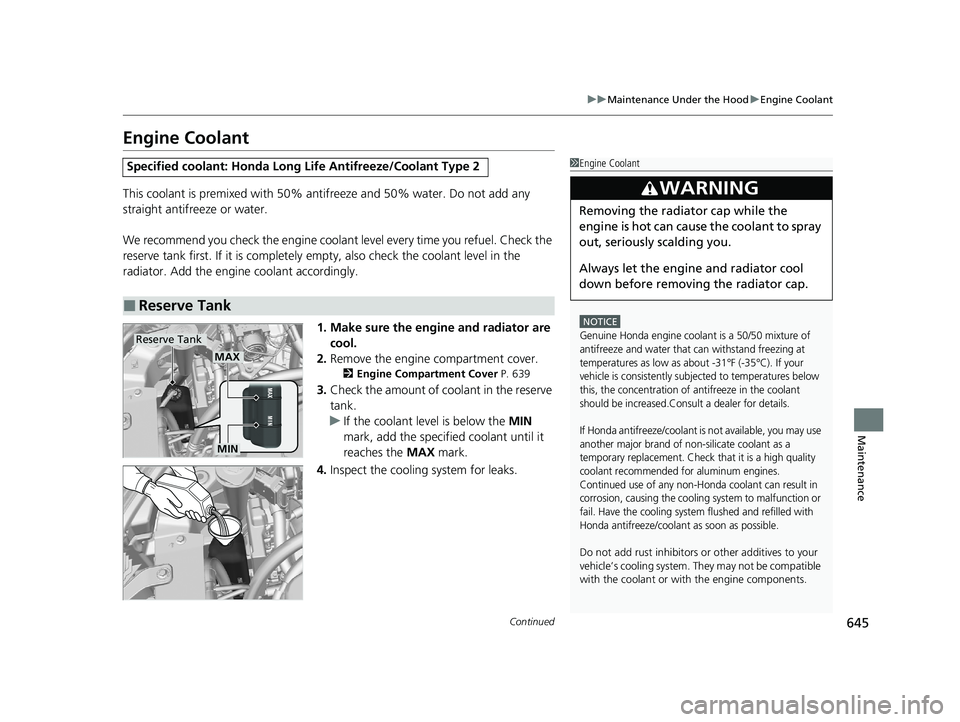
1. Make sure the engine and radiator are cool.
2. Remove the engine compartment cover.
2 Engine Compartment Cover P. 639
3.Check the amount of coolant in the reserve
tank.
u If the coolant level is below the MIN
mark, add the specified coolant until it
reaches the MAX mark.
4. Inspect the cooling system for leaks.
Specified coolant: Ho nda Long Life Antifreeze/Coolant Type 2
■Reserve Tank
1Engine Coolant
NOTICE
Genuine Honda engine coolant is a 50/50 mixture of
antifreeze and water that can withstand freezing at
temperatures as low as about -31°F (-35°C). If your
vehicle is consistently subjected to temperatures below
this, the concentration of antifreeze in the coolant
should be increased.Consult a dealer for details.
If Honda antifreeze/coolant is not available, you may use
another major brand of non-silicate coolant as a
temporary replacement. Check that it is a high quality
coolant recommended for aluminum engines.
Continued use of any non-Honda coolant can result in
corrosion, causing the cooling system to malfunction or
fail. Have the cooling system flushed and refilled with
Honda antifreeze/coolant as soon as possible.
Do not add rust inhibitors or other additives to your
vehicle’s cooling system. Th ey may not be compatible
with the coolant or with the engine components.
3WARNING
Removing the radiator cap while the
engine is hot can cause the coolant to spray
out, seriously scalding you.
Always let the engine and radiator cool
down before removing the radiator cap.
MAX
MIN
Reserve Tank
21 PILOT-31TG76500.book 645 ページ 2020年3月18日 水曜日 午後4時38分
Page 660 of 739
658
Maintenance
Checking and Maintaining Tires
Checking Tires
To safely operate your vehicle, your tires must be of the proper type and size, in
good condition with adequate tread, and properly inflated.
■Inflation guidelines
Properly inflated tires provide the best combination of handling, tread life, and comfort.
Refer to the driver’s doorjamb label or spec ifications page for the specified pressure.
Underinflated tires wear unevenly, adversely affect handling and fuel economy, and
are more likely to fail from overheating.
Overinflated tires make your vehicle ride harshly, are more prone to road hazards,
and wear unevenly.
Every day before you drive, look at each of the tires. If one looks lower than the
others, check the pressure with a tire gauge.
At least once a month or before long trips, use a gauge to measure the pressure in
all tires, including the spare. Even tires in good condition can lose 1-2 psi (10-20 kPa,
0.1-0.2 kgf/cm
2) per month.
■Inspection guidelines
Every time you check inflation, also examine the tires and valve stems.
Look for:
• Bumps or bulges on the side or in the tread. Replace the tire if you find any cuts,
splits, or cracks in the si de of the tire. Replace it if you see fabric or cord.
• Remove any foreign objects and inspect for air leaks.
• Uneven tread wear. Have a deal er check the wheel alignment.
• Excessive tread wear.
2 Wear Indicators P. 663
•Cracks or other damage around valve stem.
1Checking Tires
Measure the air pressure when tires are cold. This
means the vehicle has been parked for at least three
hours, or driven less than 1 mile (1.6 km). If
necessary, add or releas e air until the specified
pressure is reached.
If checked when hot, tire pressure can be as much as
4–6 psi (30–40 kPa, 0.3–0.4 kgf/cm
2) higher than if
checked when cold.
Have a dealer check the tires if you feel a consistent
vibration while driving. Ne w tires and any that have
been removed and reinst alled should be properly
balanced.
Check the spare tire pressu re once a month or before
long trips.
3WARNING
Using tires that are excessively worn or
improperly inflated can cause a crash in
which you can be seriously hurt or killed.
Follow all instruction s in this owner’s
manual regarding ti re inflation and
maintenance.
21 PILOT-31TG76500.book 658 ページ 2020年3月18日 水曜日 午後4時38分
Page 683 of 739
681
Handling the Unexpected
This chapter explains how to handle unexpected troubles.
ToolsTypes of Tools .................................. 682
If a Tire Goes Flat Changing a Flat Tire ......................... 683
Engine Does Not Start Checking the Engine ........................ 691
If the Smart Entry Remote Battery is Weak .......................................... 692
Emergency Engine Stop ................... 693
Jump Starting .................................... 694
Overheating How to Handle Overheating ............. 697 Indicator, Coming On/Blinking
If the Low Oil Pressure Warning Appears ... 699If the Charging System Indicator Comes
On ................................................. 699
If the Malfunction Indicator Lamp Comes On or Blinks ................................... 700
If the Brake System Indicator (Red) Comes
On ................................................. 701
If the Electric Power Steering (EPS) System Indicator Comes On ....................... 701
If the Low Tire Pressure/Tire Pressure Monitoring System (TPMS) Indicator
Comes On or Blinks........................ 702
If the Transmission System Indicator Blinks
along with the Warning Message ....... 702
Fuses Fuse Locations ................................. 703
Inspecting and Changing Fuses ........ 707
Emergency Towing ........................... 708
When You Cannot Unlock the Fuel Fill Door ................................................. 709
Refueling
Refueling From a Portable Fuel Container ................................... 710
When You Cannot Open the Tailgate .. 711
21 PILOT-31TG76500.book 681 ページ 2020年3月18日 水曜日 午後4時38分
Page 707 of 739
705
uuFuses uFuse Locations
Continued
Handling the Unexpected
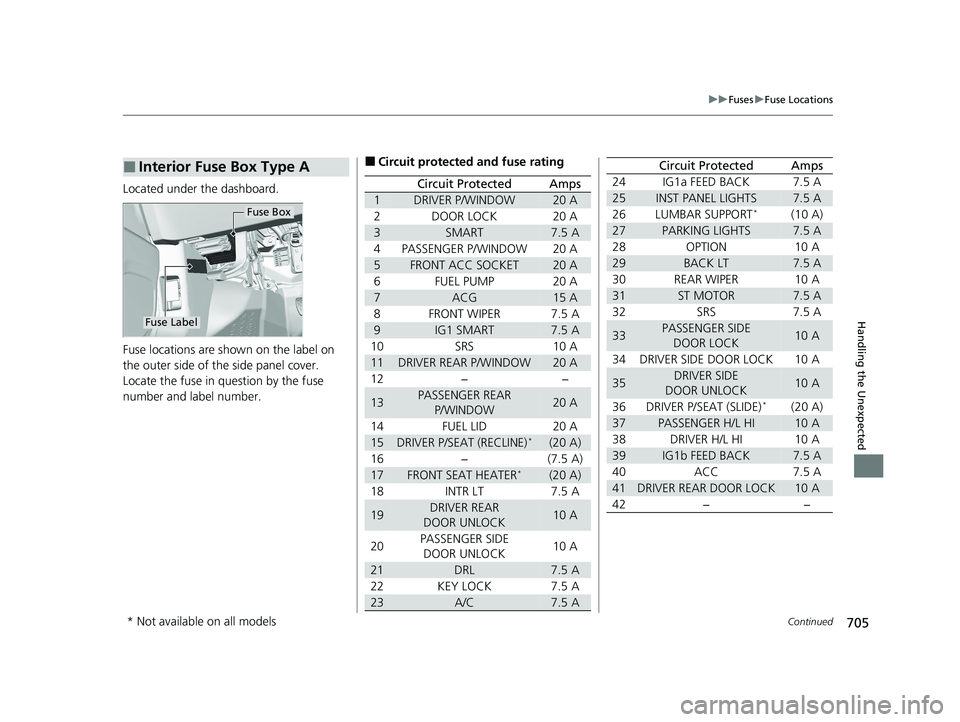
Located under the dashboard.
Fuse locations are shown on the label on
the outer side of the side panel cover.
Locate the fuse in question by the fuse
number and label number.
■Interior Fuse Box Type A
Fuse Box
Fuse Label
■Circuit protected and fuse rating
Circuit ProtectedAmps
1DRIVER P/WINDOW20 A
2DOOR LOCK20 A
3SMART7.5 A
4PASSENGER P/WINDOW20 A
5FRONT ACC SOCKET20 A
6FUEL PUMP20 A
7ACG15 A
8FRONT WIPER7.5 A
9IG1 SMART7.5 A
10SRS10 A
11DRIVER REAR P/WINDOW20 A
12−−
13PASSENGER REAR
P/WINDOW20 A
14FUEL LID20 A
15DRIVER P/SEAT (RECLINE)*(20 A)
16−(7.5 A)
17FRONT SEAT HEATER*(20 A)
18INTR LT7.5 A
19DRIVER REAR
DOOR UNLOCK10 A
20PASSENGER SIDE DOOR UNLOCK10 A
21DRL7.5 A
22KEY LOCK7.5 A
23A/C7.5 A
24IG1a FEED BACK7.5 A
25INST PANEL LIGHTS7.5 A
26LUMBAR SUPPORT*(10 A)
27PARKING LIGHTS7.5 A
28OPTION10 A
29BACK LT7.5 A
30REAR WIPER10 A
31ST MOTOR7.5 A
32SRS7.5 A
33PASSENGER SIDE
DOOR LOCK10 A
34DRIVER SIDE DOOR LOCK10 A
35DRIVER SIDE
DOOR UNLOCK10 A
36DRIVER P/SEAT (SLIDE)*(20 A)
37PASSENGER H/L HI10 A
38DRIVER H/L HI10 A
39IG1b FEED BACK7.5 A
40ACC7.5 A
41DRIVER REAR DOOR LOCK10 A
42−−
Circuit ProtectedAmps
* Not available on all models
21 PILOT-31TG76500.book 705 ページ 2020年3月18日 水曜日 午後4時38分
Page 716 of 739
714
Information
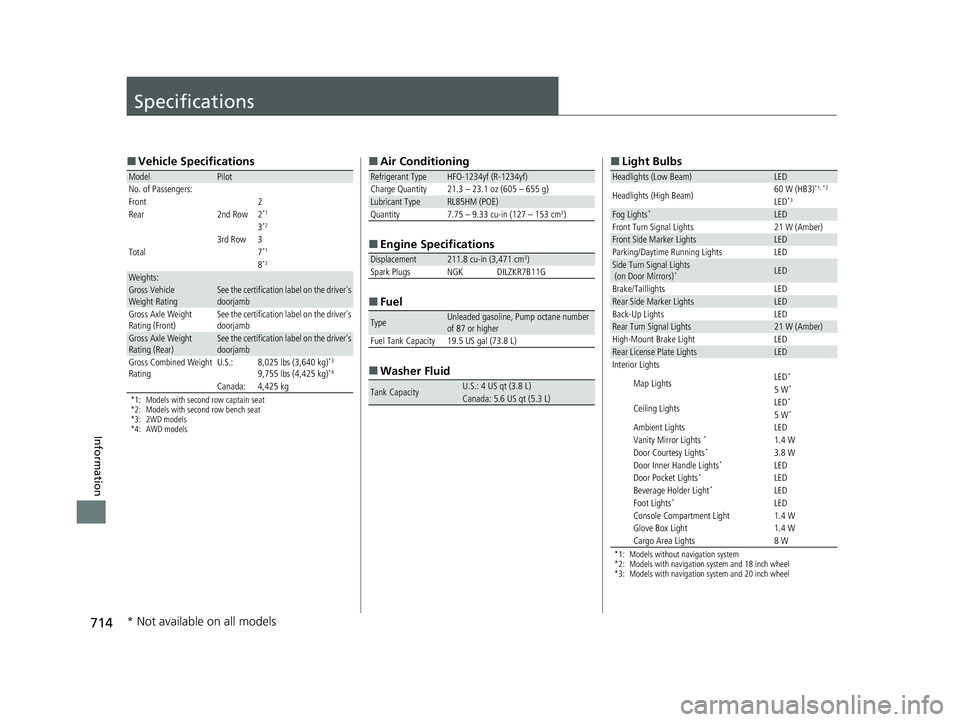
Specifications
■Vehicle Specifications
*1: Models with second row captain seat
*2: Models with second row bench seat
*3: 2WD models
*4: AWD models
ModelPilot
No. of Passengers:
Front 2
Rear 2nd Row 2
*1
3*2
3rd Row 3
Total7*1
8*2
Weights:Gross Vehicle
Weight RatingSee the certification label on the driver's
doorjamb
Gross Axle Weight
Rating (Front)See the certification label on the driver's
doorjamb
Gross Axle Weight
Rating (Rear)See the certification label on the driver's
doorjamb
Gross Combined Weight
RatingU.S.:8,025 lbs (3,640 kg)*3
9,755 lbs (4,425 kg)*4
Canada:4,425 kg
■ Air Conditioning
■ Engine Specifications
■ Fuel
■ Washer Fluid
Refrigerant TypeHFO-1234yf (R-1234yf)
Charge Quantity 21.3 – 23.1 oz (605 – 655 g)
Lubricant TypeRL85HM (POE)Quantity7.75 – 9.33 cu-in (127 – 153 cm3)
Displacement211.8 cu-in (3,471 cm3)
Spark Plugs NGK DILZKR7B11G
TypeUnleaded gasoline, Pump octane number
of 87 or higher
Fuel Tank Capacity 19.5 US gal (73.8 L)
Tank CapacityU.S.: 4 US qt (3.8 L)Canada: 5.6 US qt (5.3 L)
■ Light Bulbs
*1: Models without navigation system
*2: Models with navigation system and 18 inch wheel
*3: Models with navigation system and 20 inch wheel
Headlights (Low Beam)LED
Headlights (High Beam)60 W (HB3)*1, *2
LED*3
Fog Lights*LEDFront Turn Signal Lights21 W (Amber)Front Side Marker LightsLEDParking/Daytime Running LightsLEDSide Turn Signal Lights
(on Door Mirrors)*LED
Brake/TaillightsLEDRear Side Marker LightsLEDBack-Up LightsLEDRear Turn Signal Lights21 W (Amber)High-Mount Brake LightLEDRear License Plate LightsLEDInterior Lights
Map LightsLED*
5 W*
Ceiling LightsLED*
5 W*
Ambient LightsLEDVanity Mirror Lights *1.4 WDoor Courtesy Lights*3.8 WDoor Inner Handle Lights*LEDDoor Pocket Lights*LEDBeverage Holder Light*LEDFoot Lights*LEDConsole Compartment Light1.4 WGlove Box Light1.4 WCargo Area Lights8 W
* Not available on all models
21 PILOT-31TG76500.book 714 ページ 2020年3月18日 水曜日 午後4時38分
Page 730 of 739
728
Index
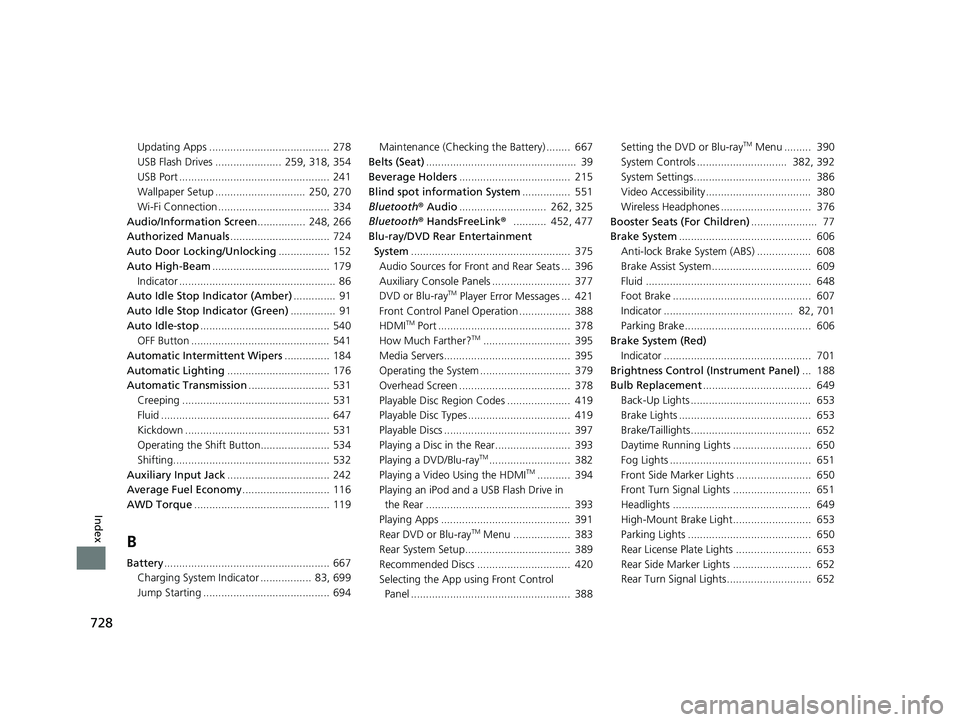
Updating Apps ........................................ 278
USB Flash Drives ...................... 259, 318, 354
USB Port .................................................. 241
Wallpaper Setup .............................. 250, 270
Wi-Fi Connection ..................................... 334
Audio/Information Screen ................ 248, 266
Authorized Manuals ................................. 724
Auto Door Locking/Unlocking ................. 152
Auto High-Beam ....................................... 179
Indicator .................................................... 86
Auto Idle Stop Indicator (Amber) .............. 91
Auto Idle Stop Indicator (Green) ............... 91
Auto Idle-stop ........................................... 540
OFF Button .............................................. 541
Automatic Intermittent Wipers ............... 184
Automatic Lighting .................................. 176
Automatic Transmission ........................... 531
Creeping ................................................. 531
Fluid ........................................................ 647
Kickdown ................................................ 531
Operating the Shift Button....................... 534
Shifting.................................................... 532
Auxiliary Input Jack .................................. 242
Average Fuel Economy ............................. 116
AWD Torque ............................................. 119
B
Battery....................................................... 667
Charging System Indicator ................. 83, 699
Jump Starting .......................................... 694 Maintenance (Checking the Battery) ........ 667
Belts (Seat) .................................................. 39
Beverage Holders ..................................... 215
Blind spot information System ................ 551
Bluetooth® Audio............................. 262, 325
Bluetooth® HandsFreeLink ®........... 452, 477
Blu-ray/DVD Rear Entertainment System ..................................................... 375
Audio Sources for Front and Rear Seats ... 396
Auxiliary Console Panels .......................... 377
DVD or Blu-ray
TM Player Error Messages ... 421
Front Control Panel Operation ................. 388
HDMI
TM Port ............................................ 378
How Much Farther?TM............................. 395
Media Servers.......................................... 395
Operating the System .............................. 379
Overhead Screen ..................................... 378
Playable Disc Region Codes ..................... 419
Playable Disc Types .................................. 419
Playable Discs .......................................... 397
Playing a Disc in the Rear......................... 393
Playing a DVD/Blu-ray
TM........................... 382
Playing a Video Using the HDMITM........... 394
Playing an iPod and a USB Flash Drive in the Rear ................................................ 393
Playing Apps ........................................... 391
Rear DVD or Blu-ray
TM Menu ................... 383
Rear System Setup................................... 389
Recommended Discs ............................... 420
Selecting the App us ing Front Control
Panel ..................................................... 388 Setting the DVD or Blu-ray
TM Menu ......... 390
System Controls .............................. 382, 392
System Settings....................................... 386
Video Accessibility ................................... 380
Wireless Headphones .............................. 376
Booster Seats (For Children) ...................... 77
Brake System ............................................ 606
Anti-lock Brake System (ABS) .................. 608
Brake Assist System................................. 609
Fluid ....................................................... 648
Foot Brake .............................................. 607
Indicator ........................................... 82, 701
Parking Brake.......................................... 606
Brake System (Red)
Indicator ................................................. 701
Brightness Control (Instrument Panel) ... 188
Bulb Replacement .................................... 649
Back-Up Lights ........................................ 653
Brake Lights ............................................ 653
Brake/Taillights........................................ 652
Daytime Running Lights .......................... 650
Fog Lights ............................................... 651
Front Side Marker Lights ......................... 650
Front Turn Signal Lights .......................... 651
Headlights .............................................. 649
High-Mount Brake Light.......................... 653
Parking Lights ......................................... 650
Rear License Plate Lights ......................... 653
Rear Side Marker Lights .......................... 652
Rear Turn Signal Lights............................ 652
21 PILOT-31TG76500.book 728 ページ 2020年3月18日 水曜日 午後4時38分