phone HONDA PILOT 2021 Owner's Manual (in English)
[x] Cancel search | Manufacturer: HONDA, Model Year: 2021, Model line: PILOT, Model: HONDA PILOT 2021Pages: 739, PDF Size: 44.86 MB
Page 6 of 739
Contents
This owner’s manual should be considered a permanent part of the
vehicle and should remain with the vehicle when it is sold.
This owner’s manual covers all models of your vehicle. You may find
descriptions of equipment and features that are not on your
particular model.
Images throughout this owner’s manual (including the front cover)
represent features and equipment that are available on some, but
not all, models. Your particular mo del may not have some of these
features.
This owner’s manual is for vehicles sold in the United States and
Canada.
The information and specifications in cluded in this publication were
in effect at the time of approval for printing. Honda Motor Co., Ltd.
reserves the right, however, to discontinue or change specifications
or design at any time without notice and without incurring any
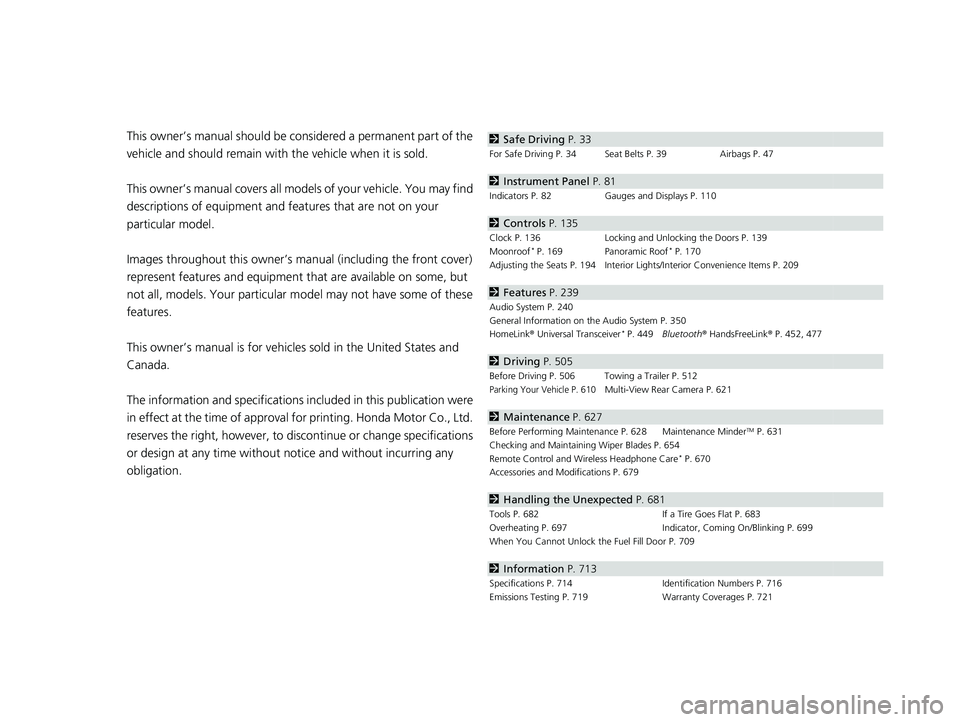
obligation.2 Safe Driving P. 33
For Safe Driving P. 34 Seat Belts P. 39 Airbags P. 47
2Instrument Panel P. 81
Indicators P. 82 Gauges and Displays P. 110
2Controls P. 135
Clock P. 136 Locking and Unlocking the Doors P. 139
Moonroof* P. 169 Panoramic Roof* P. 170
Adjusting the Seats P. 194 Interior Lights/Interior Convenience Items P. 209
2 Features P. 239
Audio System P. 240
General Information on the Audio System P. 350
HomeLink ® Universal Transceiver
* P. 449 Bluetooth ® HandsFreeLink ® P. 452, 477
2 Driving P. 505
Before Driving P. 506 Towing a Trailer P. 512
Parking Your Vehicle P. 610Multi-View Rear Camera P. 621
2Maintenance P. 627
Before Performing Maintenance P. 628 Maintenance MinderTM P. 631
Checking and Maintaining Wiper Blades P. 654
Remote Control and Wireless Headphone Care
* P. 670
Accessories and Modifications P. 679
2 Handling the Unexpected P. 681
Tools P. 682 If a Tire Goes Flat P. 683
Overheating P. 697 Indicator, Coming On/Blinking P. 699
When You Cannot Unlock the Fuel Fill Door P. 709
2 Information P. 713
Specifications P. 714 Identification Numbers P. 716
Emissions Testing P. 719 Warranty Coverages P. 721
21 PILOT-31TG76500.book 4 ページ 2020年3月18日 水曜日 午後4時38分
Page 22 of 739
20
Quick Reference Guide
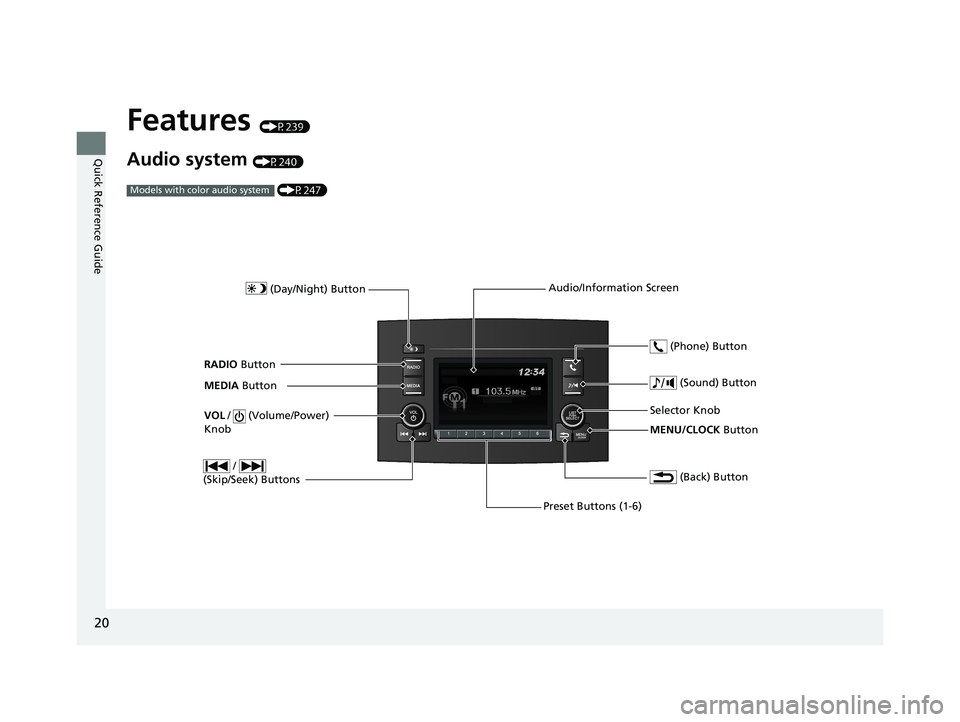
Features (P239)
Audio system (P240) (P247)
Models with color audio system
MENU/CLOCK Button
Selector Knob
(Day/Night) Button
(Back) Button
(Sound) Button
VOL
/ (Volume/Power)
Knob
Preset Buttons (1-6) (Phone) Button
RADIO
Button
/
(Skip/Seek) Buttons
MEDIA Button Audio/Information Screen
21 PILOT-31TG76500.book 20 ページ 2020年3月18日 水曜日 午後4時38分
Page 36 of 739
34
Safe Driving
For Safe Driving
The following pages explain your vehicle’s safety features and how to use them
properly. The safety precauti ons below are ones that we consider to be among the
most important.
Important Safety Precautions
■Always wear your seat belt
A seat belt is your best protection in all types of collisions. Airbags are designed to
supplement seat belts, not replace them. So even though your vehicle is equipped
with airbags, make sure you and your passe ngers always wear your seat belts, and
wear them properly.
■Restrain all children
Children ages 12 and under should ride properly restrained in a back seat, not the
front seat. Infants and small children shoul d be restrained in a child seat. Larger
children should use a booster seat and a lap/shoulder seat belt until they can use the
belt properly without a booster seat.
■Be aware of airbag hazards
While airbags can save lives, they can cause serious or fatal injuries to occupants
who sit too close to them, or are not prop erly restrained. Infants, young children,
and short adults are at the greatest risk. Be sure to follow all instructions and
warnings in this manual.
■Don’t drink and drive
Alcohol and driving don’t mix. Even one dr ink can reduce your ability to respond to
changing conditions, and your reaction time gets worse with every additional drink.
So don’t drink and drive, and don’t let your friends drink and drive, either.
1Important Safety Precautions
Some states, provinces and te rritories prohibit the use
of cell phones other than hands-free devices by the
driver while driving.
21 PILOT-31TG76500.book 34 ページ 2020年3月18日 水曜日 午後4時38分
Page 37 of 739
35
uuFor Safe Driving uImportant Safety Precautions
Safe Driving
■Pay appropriate attention to the task of driving safely
Engaging in cell phone conversation or other activities that keep you from paying
close attention to the road, other vehicles, and pedestrians could lead to a crash.
Remember, situations can change quickly, and only you can decide when it is safe to
divert some attention away from driving.
■Control your speed
Excessive speed is a major factor in crash injuries and deaths. Generally, the higher
the speed, the greater the risk, but serious injuries can also occur at lower speeds.
Never drive faster than is safe for current conditions, regardless of the maximum
speed posted.
■Keep your vehicle in safe condition
Having a tire blowout or a mechanical failure can be extremely hazardous.
To reduce the possibility of such problems, check your tire pressures and condition
frequently, and perform all regul arly scheduled maintenance.
■Do not leave children unattended in the vehicle
Children, pets and people needing assistan ce left unattended in the vehicle may be
injured if they activate one or more of the vehicle controls. They may also cause the
vehicle to move, resulting in a crash in wh ich they and/or another person(s) can be
injured or killed. Also, depending on the am bient temperature, the temperature of
the interior may reach extreme levels, which can result in harm or death. Even if the
climate control system is on, never leave them in the vehicle unattended as the
climate control system can shut off at any time.
21 PILOT-31TG76500.book 35 ページ 2020年3月18日 水曜日 午後4時38分
Page 119 of 739
Continued117
uuGauges and Displays uDriver Information Interface
Instrument Panel
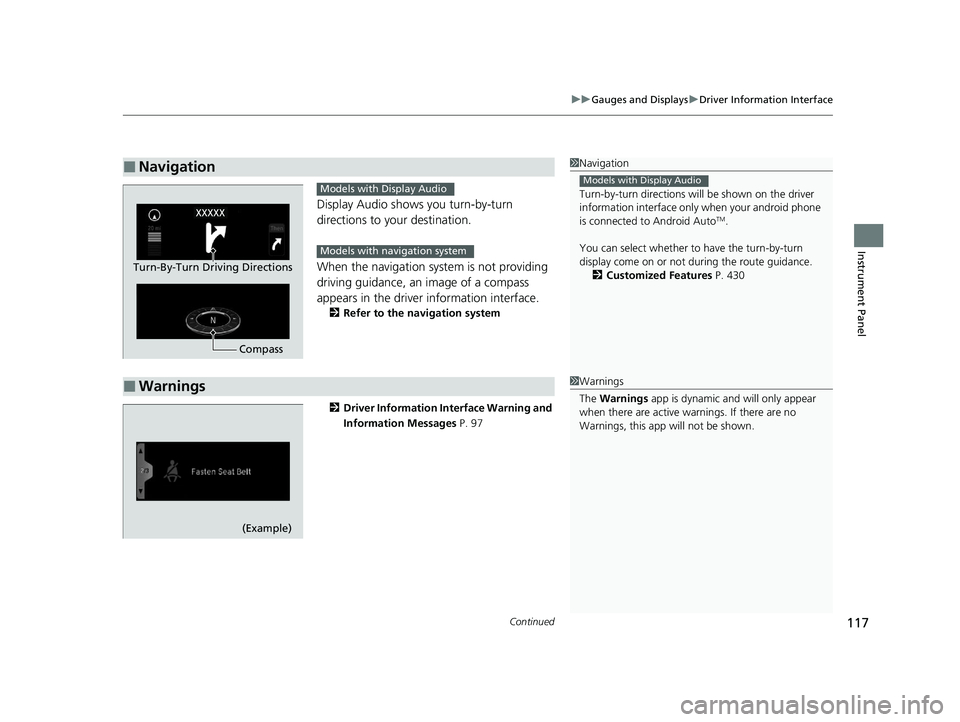
Display Audio shows you turn-by-turn
directions to your destination.
When the navigation system is not providing
driving guidance, an image of a compass
appears in the driver information interface.
2 Refer to the navigation system
2 Driver Information Interface Warning and
Information Messages P. 97
■Navigation1Navigation
Turn-by-turn directions wi ll be shown on the driver
information interface only when your android phone
is connected to Android Auto
TM.
You can select whether to have the turn-by-turn
display come on or not dur ing the route guidance.
2 Customized Features P. 430
Models with Display Audio
Compass
Turn-By-Turn Driving Directions
Models with Display Audio
Models with navigation system
■Warnings1Warnings
The Warnings app is dynamic a nd will only appear
when there are active warnings. If there are no
Warnings, this app will not be shown.
(Example)
21 PILOT-31TG76500.book 117 ページ 2020年3月18日 水曜日 午後4時38分
Page 121 of 739
119
uuGauges and Displays uDriver Information Interface
Continued
Instrument Panel
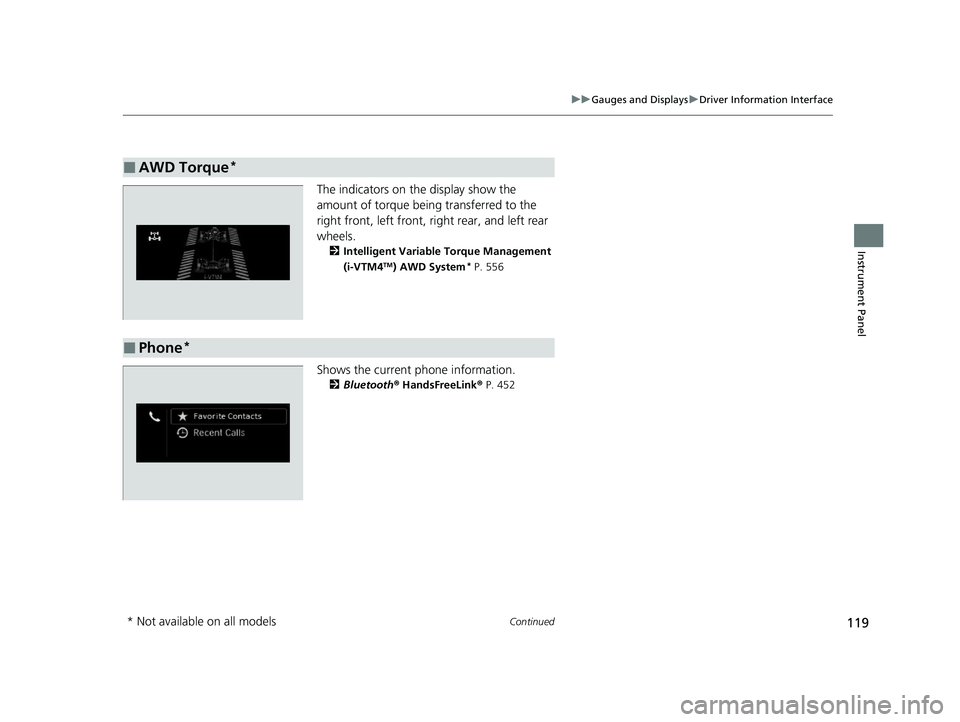
The indicators on the display show the
amount of torque being transferred to the
right front, left front, right rear, and left rear
wheels.
2 Intelligent Variable Torque Management
(i-VTM4TM) AWD System* P. 556
Shows the current phone information.
2Bluetooth® HandsFreeLink® P. 452
■AWD Torque*
■Phone*
* Not available on all models
21 PILOT-31TG76500.book 119 ページ 2020年3月18日 水曜日 午後4時38分
Page 143 of 739
141
uuLocking and Unlocking the Doors uLow Smart Entry Remote Signal Strength
Controls
Low Smart Entry Remote Signal Strength
The vehicle transmits radio waves to loca te the smart entry remote when locking/
unlocking* the doors and tailgate, or to start the engine.
In the following cases, locking/unlocking
* the doors and tailgate, or starting the
engine may be inhibited or operation may be unstable:
• Strong radio waves are being transmitted by nearby equipment.
• You are carrying the smart entry remo te together with telecommunications
equipment, laptop computers, ce ll phones, or wireless devices.
• A metallic object is touching or covering the smart entry remote.
1Low Smart Entry Remote Signal Strength
Communication between the smart entry remote and
the vehicle consumes the smart entry remote’s
battery.
Battery life is about two years, but this varies
depending on re gularity of use.
The battery is consumed whenever the smart entry
remote is receivi ng strong radio wave s. Avoid placing
it near electrical appliances such as televisions and
personal computers.
* Not available on all models
21 PILOT-31TG76500.book 141 ページ 2020年3月18日 水曜日 午後4時38分
Page 241 of 739
239
Features
This chapter describes how to operate technology features.
Audio SystemAbout Your Audio System ................ 240
USB Ports ......................................... 241
Auxiliary Input Jack .......................... 242
Audio System Theft Protection ......... 243
Audio Remote Controls .................... 244
Audio System Basic Operation ..... 247, 265
Audio Error Messages
CD Player*....................................... 345
iPod/USB Flash Drive ........................ 347
Android/Apps .................................. 349
Models with Display Audio
General Information on the Audio System SiriusXM ® Radio Service
*................. 350
Recommended CDs*....................... 351
Compatible iPod, iPad, iPhone, and USB Flash Drives .................................... 353
Honda App License Agreement ........ 355
Legal Information on Apple CarPlay/
Android Auto ................................. 367
About Open Source Licenses ............ 369
License Information
*........................ 370 Blu-ray/DVD Rear Entertainment
System
*........................................... 375
Customized Features ................ 423, 430
HomeLink ® Universal Transceiver
*.. 449
Bluetooth® HandsFreeLink® ..... 452, 477
CabinTalk
TM *...................................... 503
* Not available on all models
21 PILOT-31TG76500.book 239 ページ 2020年3月18日 水曜日 午後4時38分
Page 242 of 739
240
Features
Audio System
About Your Audio System
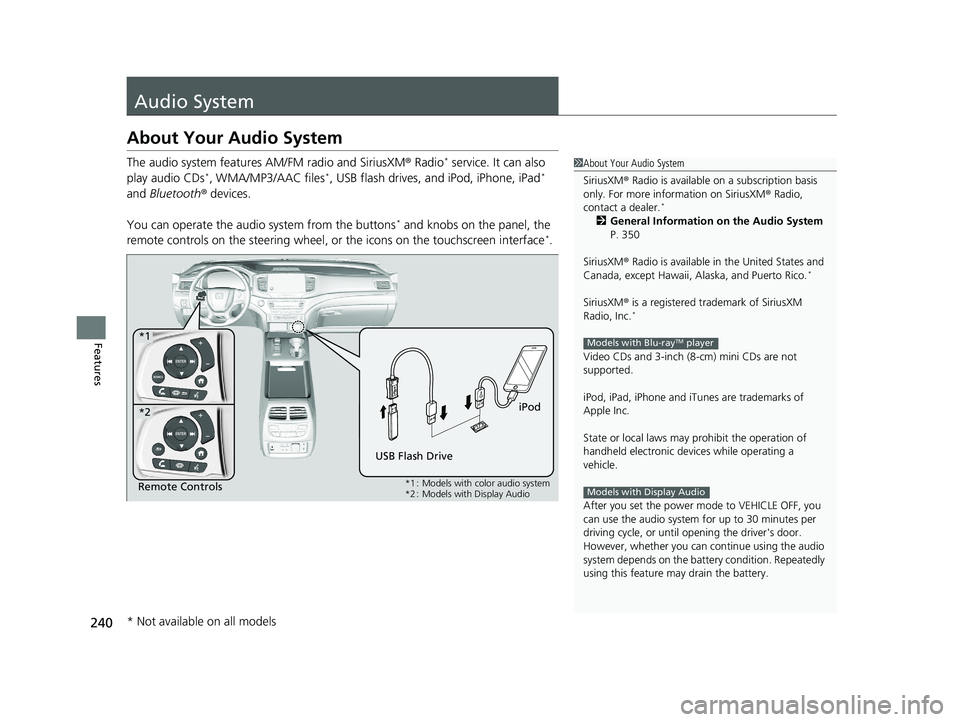
The audio system features AM/FM radio and SiriusXM® Radio* service. It can also
play audio CDs*, WMA/MP3/AAC files*, USB flash drives, and iPod, iPhone, iPad*
and Bluetooth ® devices.
You can operate the audio system from the buttons
* and knobs on the panel, the
remote controls on the steering wheel, or the icons on the touchscreen interface*.
1 About Your Audio System
SiriusXM ® Radio is available on a subscription basis
only. For more information on SiriusXM ® Radio,
contact a dealer.
*
2 General Information on the Audio System
P. 350
SiriusXM ® Radio is available in the United States and
Canada, except Ha waii, Alaska, and Puerto Rico.
*
SiriusXM® is a registered trademark of SiriusXM
Radio, Inc.*
Video CDs and 3-inch (8 -cm) mini CDs are not
supported.
iPod, iPad, iPhone and iT unes are trademarks of
Apple Inc.
State or local laws may pr ohibit the operation of
handheld electronic devices while operating a
vehicle.
After you set the power m ode to VEHICLE OFF, you
can use the audio system for up to 30 minutes per
driving cycle, or until opening the driver's door.
However, whether you can continue using the audio
system depends on the batter y condition. Repeatedly
using this feature ma y drain the battery.
Models with Blu-rayTM player
Models with Display AudioRemote Controls iPod
USB Flash Drive
*1
*2
*1 : Models with color audio system
*2 : Models with Display Audio
* Not available on all models
21 PILOT-31TG76500.book 240 ページ 2020年3月18日 水曜日 午後4時38分
Page 243 of 739
241
uuAudio System uUSB Ports
Continued
Features
USB Ports
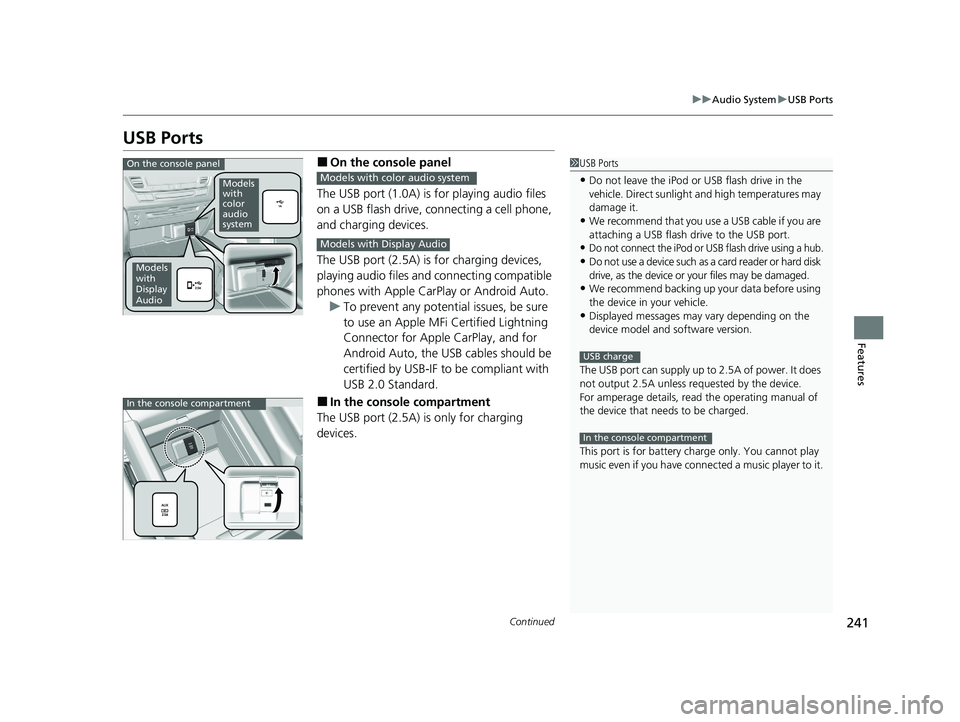
■On the console panel
The USB port (1.0A) is for playing audio files
on a USB flash drive, connecting a cell phone,
and charging devices.
The USB port (2.5A) is for charging devices,
playing audio files and connecting compatible
phones with Apple CarPlay or Android Auto. u To prevent any potenti al issues, be sure
to use an Apple MFi Certified Lightning
Connector for Apple CarPlay, and for
Android Auto, the USB cables should be
certified by USB-IF to be compliant with
USB 2.0 Standard.
■In the consol e compartment
The USB port (2.5A) is only for charging
devices.
1 USB Ports
•Do not leave the iPod or USB flash drive in the
vehicle. Direct sunlight and high temperatures may
damage it.
•We recommend that you us e a USB cable if you are
attaching a USB flash drive to the USB port.
•Do not connect the iPod or USB flash drive using a hub.
•Do not use a device such as a card reader or hard disk
drive, as the device or your files may be damaged.
•We recommend backing up yo ur data before using
the device in your vehicle.
•Displayed messages may vary depending on the
device model and software version.
The USB port can supply up to 2.5A of power. It does
not output 2.5A unless requested by the device.
For amperage details, read the operating manual of
the device that ne eds to be charged.
This port is for battery charge only. You cannot play
music even if you have conne cted a music player to it.
USB charge
In the console compartment
On the console panel
Models
with
color
audio
system
Models
with
Display
Audio
Models with color audio system
Models with Display Audio
In the console compartment
21 PILOT-31TG76500.book 241 ページ 2020年3月18日 水曜日 午後4時38分