radio lock HONDA PILOT 2021 Owner's Manual (in English)
[x] Cancel search | Manufacturer: HONDA, Model Year: 2021, Model line: PILOT, Model: HONDA PILOT 2021Pages: 739, PDF Size: 44.86 MB
Page 22 of 739
20
Quick Reference Guide
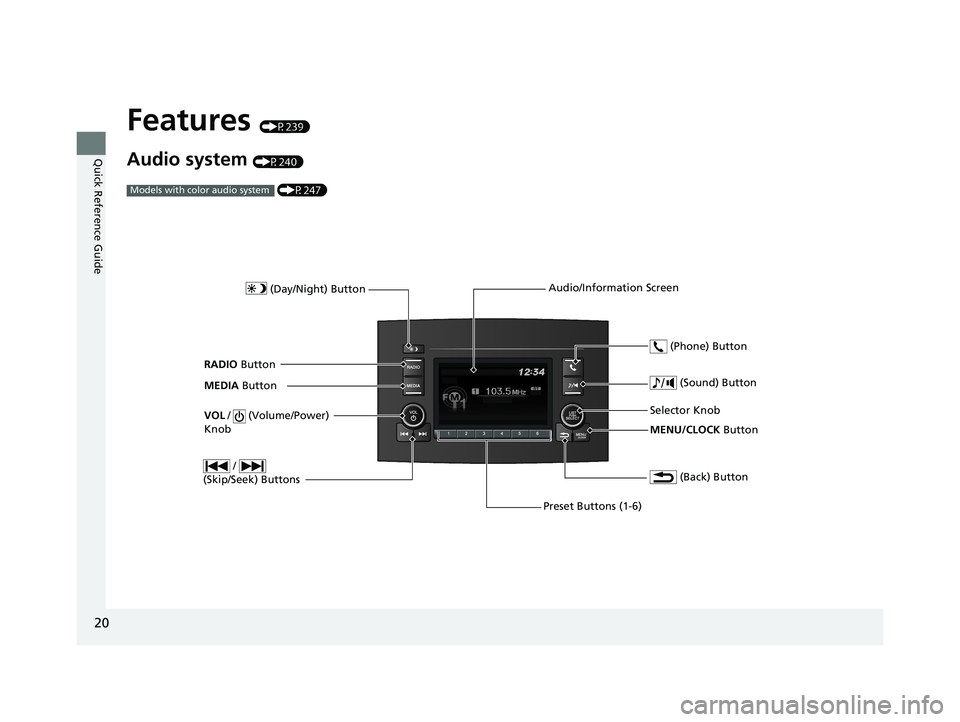
Features (P239)
Audio system (P240) (P247)
Models with color audio system
MENU/CLOCK Button
Selector Knob
(Day/Night) Button
(Back) Button
(Sound) Button
VOL
/ (Volume/Power)
Knob
Preset Buttons (1-6) (Phone) Button
RADIO
Button
/
(Skip/Seek) Buttons
MEDIA Button Audio/Information Screen
21 PILOT-31TG76500.book 20 ページ 2020年3月18日 水曜日 午後4時38分
Page 143 of 739
141
uuLocking and Unlocking the Doors uLow Smart Entry Remote Signal Strength
Controls
Low Smart Entry Remote Signal Strength
The vehicle transmits radio waves to loca te the smart entry remote when locking/
unlocking* the doors and tailgate, or to start the engine.
In the following cases, locking/unlocking
* the doors and tailgate, or starting the
engine may be inhibited or operation may be unstable:
• Strong radio waves are being transmitted by nearby equipment.
• You are carrying the smart entry remo te together with telecommunications
equipment, laptop computers, ce ll phones, or wireless devices.
• A metallic object is touching or covering the smart entry remote.
1Low Smart Entry Remote Signal Strength
Communication between the smart entry remote and
the vehicle consumes the smart entry remote’s
battery.
Battery life is about two years, but this varies
depending on re gularity of use.
The battery is consumed whenever the smart entry
remote is receivi ng strong radio wave s. Avoid placing
it near electrical appliances such as televisions and
personal computers.
* Not available on all models
21 PILOT-31TG76500.book 141 ページ 2020年3月18日 水曜日 午後4時38分
Page 256 of 739
254
uuAudio System Basic Operation uPlaying AM/FM Radio
Features
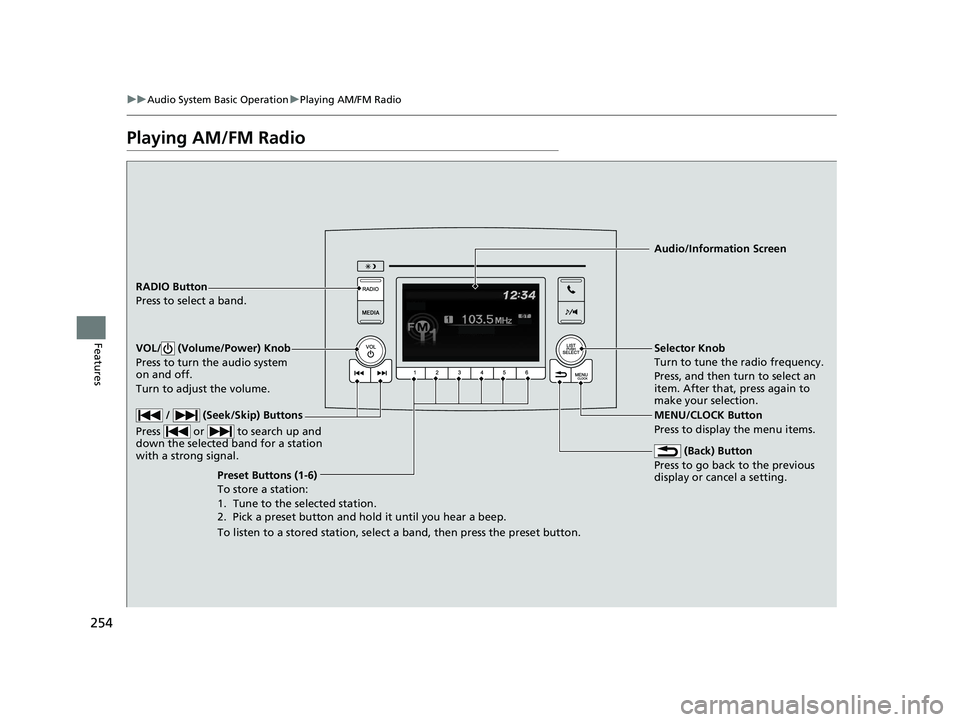
Playing AM/FM Radio
RADIO Button
Press to select a band.
(Back) Button
Press to go back to the previous
display or cancel a setting.
/ (Seek/Skip) Buttons
Press or to search up and
down the selected band for a station
with a strong signal.
VOL/ (Volume/Power) Knob
Press to turn the audio system
on and off.
Turn to adjust the volume.
Preset Buttons (1-6)
To store a station:
1. Tune to the selected station.
2. Pick a preset button and hold it until you hear a beep.
To listen to a stored station, select a band, then press the preset button. Selector Knob
Turn to tune the radio frequency.
Press, and then turn to select an
item. After that, press again to
make your selection.
MENU/CLOCK Button
Press to display the menu items.
Audio/Information Screen
21 PILOT-31TG76500.book 254 ページ 2020年3月18日 水曜日 午後4時38分
Page 257 of 739
255
uuAudio System Basic Operation uPlaying AM/FM Radio
Features
Provides text data information related to your selected RDS capable FM station.
■To find an RDS station from Station List
1. Press while listening to an FM station.
2. Rotate to select the station, then press .
■Update List
Updates your available st ation list at any time.
1. Press while listening to an FM station.
2. Rotate to select Update List, then press .
■Radio text
Displays the radio text information of the selected RDS station.
1. Press the MENU/CLOCK button.
2. Rotate to select Settings, then press .
3. Rotate to select RDS Settings, then press .
4. Rotate to select Radio Text, then press .
■Scan
Samples each of the strongest stations on the selected band for 10 seconds.
1. Press the MENU/CLOCK button.
2. Rotate to select Scan, then press .
To turn off scan, press .
■Radio Data System (RDS)1 Playing AM/FM Radio
The ST indicator appears on the display indicating
stereo FM broadcasts.
Stereo reproduction in AM is not available.
You can store 6 AM stations and 12 FM stations into
reset button memory. FM1 and FM2 let you store 6
stations each.
Switching the Audio Mode
Press the SOURCE button on the steering wheel.
2 Audio Remote Controls P. 244
1Radio Data System (RDS)
When you select an RDS-capable FM station, the RDS
automatically turns on, and the frequency display
changes to the station name. However, when the
signals of that station become weak, the display
changes from the statio n name to the frequency.
21 PILOT-31TG76500.book 255 ページ 2020年3月18日 水曜日 午後4時38分
Page 352 of 739
350
Features
General Information on the Audio System
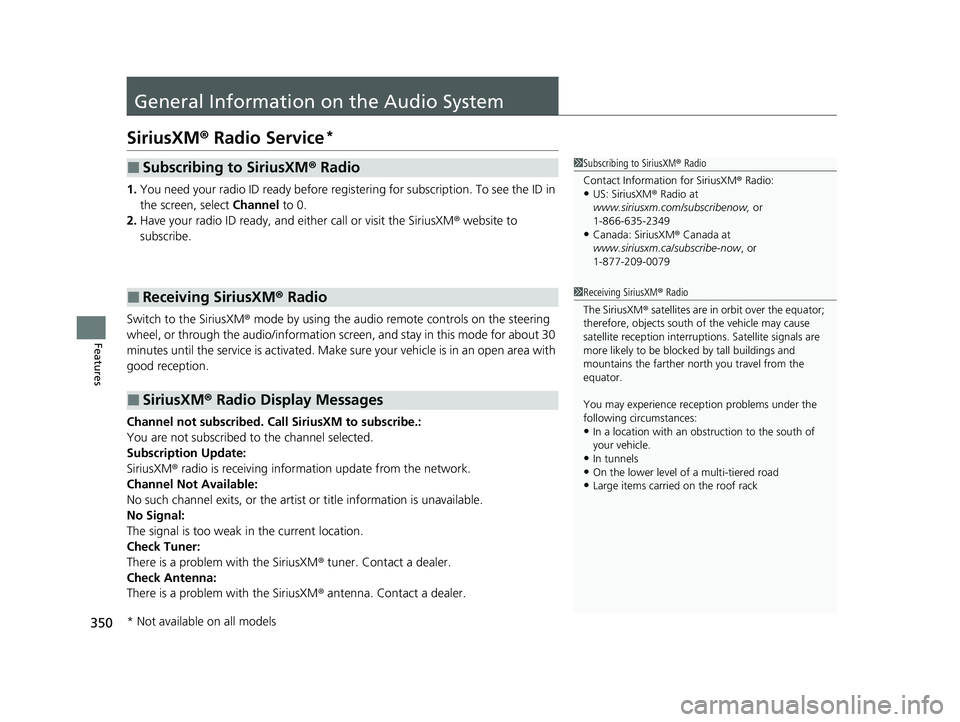
SiriusXM® Radio Service*
1. You need your radio ID ready before regist ering for subscription. To see the ID in
the screen, select Channel to 0.
2. Have your radio ID ready, and either call or visit the SiriusXM ® website to
subscribe.
Switch to the SiriusXM ® mode by using the audio remote controls on the steering
wheel, or through the audio/information screen, and stay in this mode for about 30
minutes until the service is activated. Make sure your vehicle is in an open area with
good reception.
Channel not subscribed. Call SiriusXM to subscribe.:
You are not subscribed to the channel selected.
Subscription Update:
SiriusXM ® radio is receiving informat ion update from the network.
Channel Not Available:
No such channel exits, or the artist or title information is unavailable.
No Signal:
The signal is too weak in the current location.
Check Tuner:
There is a problem with the SiriusXM ® tuner. Contact a dealer.
Check Antenna:
There is a problem with the SiriusXM ® antenna. Contact a dealer.
■Subscribing to SiriusXM® Radio
■Receiving SiriusXM ® Radio
■SiriusXM ® Radio Display Messages
1 Subscribing to SiriusXM ® Radio
Contact Information for SiriusXM ® Radio:
•US: SiriusXM ® Radio at
www.siriusxm.com/subscribenow, or
1-866-635-2349
•Canada: SiriusXM ® Canada at
www.siriusxm.ca/subscribe-now , or
1-877-209-0079
1 Receiving SiriusXM ® Radio
The SiriusXM ® satellites are in orbit over the equator;
therefore, objects south of the vehicle may cause
satellite reception interruptions. Sa tellite signals are
more likely to be blocked by tall buildings and
mountains the farther north you travel from the
equator.
You may experience rece ption problems under the
following circumstances:
•In a location with an obstruction to the south of
your vehicle.
•In tunnels•On the lower level of a multi-tiered road
•Large items carried on the roof rack
* Not available on all models
21 PILOT-31TG76500.book 350 ページ 2020年3月18日 水曜日 午後4時38分
Page 426 of 739
424
uuCustomized Features u
Features
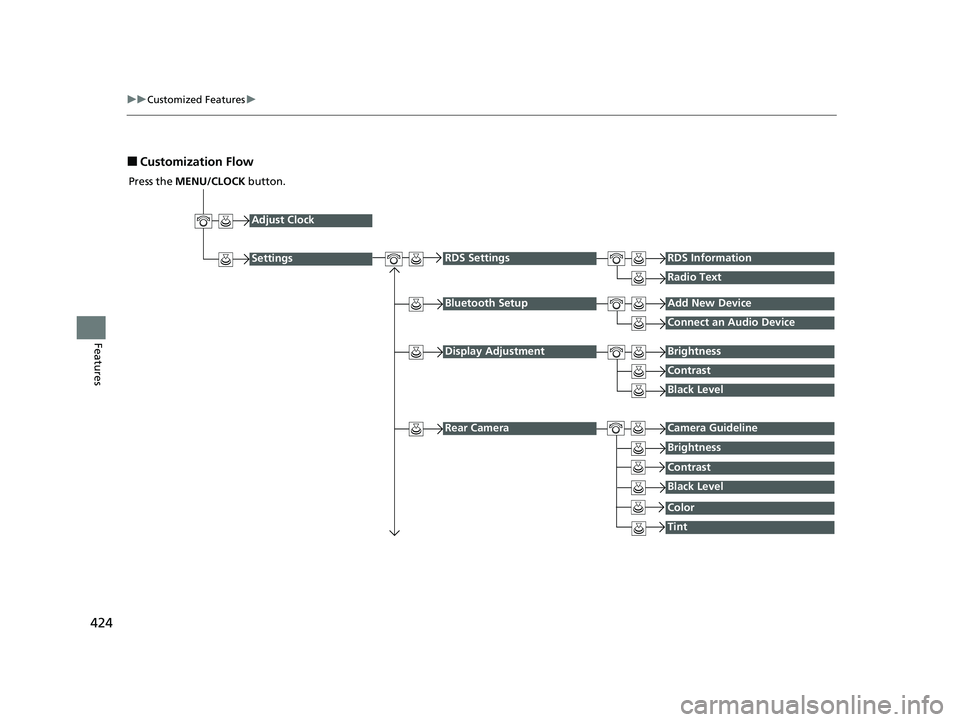
■Customization Flow
Press the MENU/CLOCK button.
Adjust Clock
Settings
Bluetooth SetupAdd New Device
Connect an Audio Device
Display AdjustmentBrightness
Contrast
Black Level
Rear CameraCamera Guideline
RDS SettingsRDS Information
Radio Text
Brightness
Contrast
Black Level
Color
Tint
21 PILOT-31TG76500.book 424 ページ 2020年3月18日 水曜日 午後4時38分
Page 429 of 739
427
uuCustomized Features u
Continued
Features
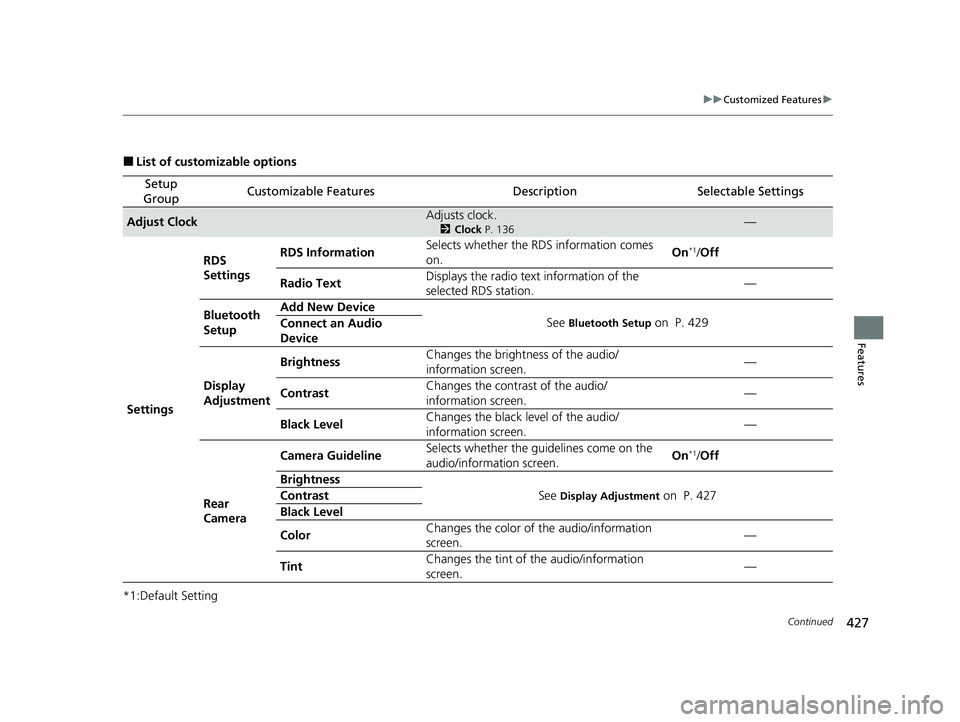
■List of customizable options
*1:Default Setting
Setup
GroupCustomizable FeaturesDescriptionSelectable Settings
Adjust ClockAdjusts clock.
2 Clock P. 136—
Settings RDS
Settings
RDS Information
Selects whether the RDS information comes
on. On
*1/
Off
Radio Text Displays the radio text information of the
selected RDS station. —
Bluetooth
Setup Add New Device
See
Bluetooth Setup on P. 429
Connect an Audio
Device
Display
Adjustment Brightness
Changes the brightness of the audio/
information screen. —
Contrast Changes the contrast of the audio/
information screen. —
Black Level Changes the black level of the audio/
information screen.
—
Rear
Camera Camera Guideline
Selects whether the guidelines come on the
audio/information screen. On
*1/
Off
Brightness See
Display Adjustment on P. 427
Contrast
Black Level
Color Changes the color of the audio/information
screen. —
Tint Changes the tint of the audio/information
screen. —
21 PILOT-31TG76500.book 427 ページ 2020年3月18日 水曜日 午後4時38分
Page 526 of 739
524
Driving
When Driving
Starting the Engine
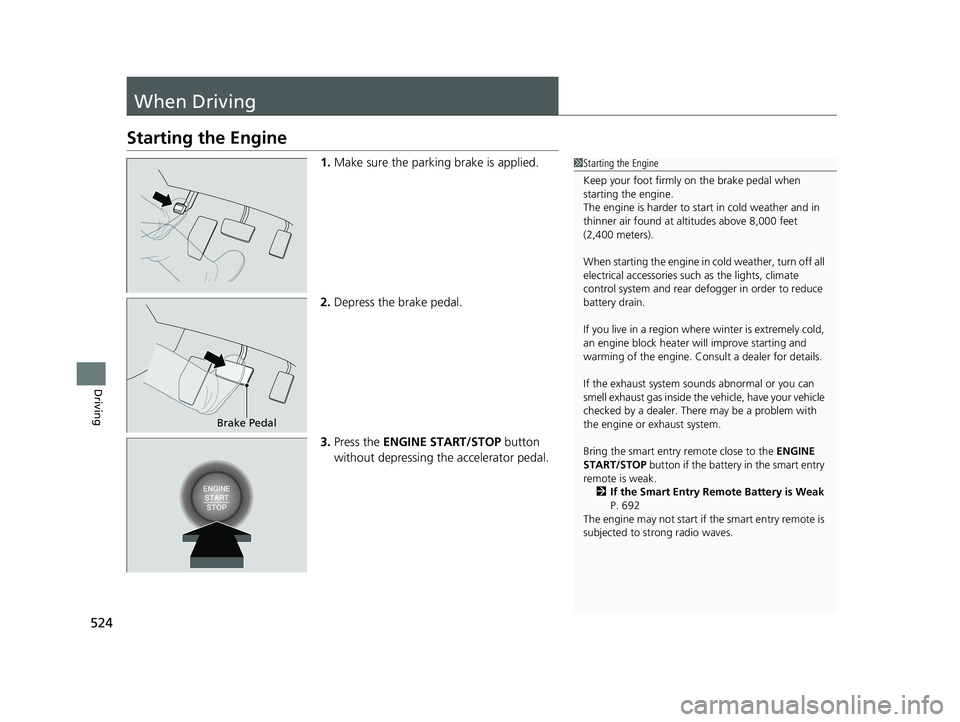
1.Make sure the parking brake is applied.
2. Depress the brake pedal.
3. Press the ENGINE START/STOP button
without depressing the accelerator pedal.1 Starting the Engine
Keep your foot firmly on the brake pedal when
starting the engine.
The engine is harder to st art in cold weather and in
thinner air found at al titudes above 8,000 feet
(2,400 meters).
When starting the engine in cold weather, turn off all
electrical accessories such as the lights, climate
control system and rear de fogger in order to reduce
battery drain.
If you live in a region where winter is extremely cold,
an engine block heater will improve starting and
warming of the engine. Cons ult a dealer for details.
If the exhaust system sounds abnormal or you can
smell exhaust gas inside the vehicle, have your vehicle
checked by a dealer. There may be a problem with
the engine or exhaust system.
Bring the smart entry remote close to the ENGINE
START/STOP button if the battery in the smart entry
remote is weak. 2 If the Smart Entry Remote Battery is Weak
P. 692
The engine may not start if the smart entry remote is
subjected to strong radio waves.
Brake Pedal
21 PILOT-31TG76500.book 524 ページ 2020年3月18日 水曜日 午後4時38分
Page 620 of 739
uuParking Your Vehicle uCross Traffic Monitor*
618
Driving
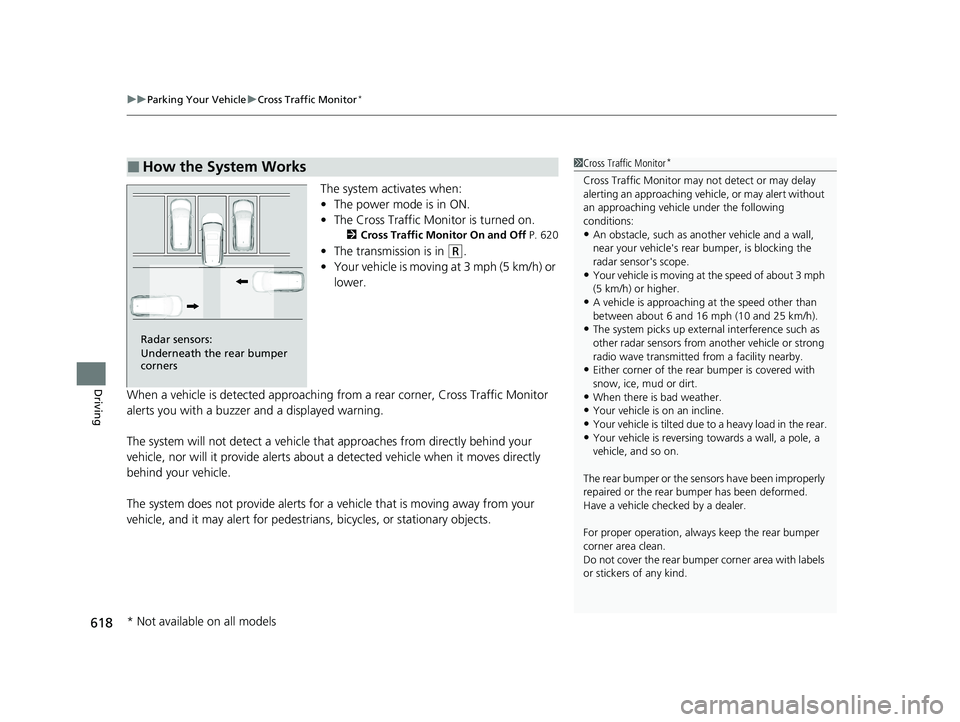
The system activates when:
• The power mode is in ON.
• The Cross Traffic Monitor is turned on.
2 Cross Traffic Monitor On and Off P. 620
•The transmission is in (R.
• Your vehicle is moving at 3 mph (5 km/h) or
lower.
When a vehicle is detected approaching from a rear corner, Cross Traffic Monitor
alerts you with a buzzer and a displayed warning.
The system will not detect a vehicle that approaches from directly behind your
vehicle, nor will it provide alerts about a detected vehicle when it moves directly
behind your vehicle.
The system does not provide alerts for a vehicle that is moving away from your
vehicle, and it may alert for pedestri ans, bicycles, or stationary objects.
■How the System Works1Cross Traffic Monitor*
Cross Traffic Monitor may not detect or may delay
alerting an approach ing vehicle, or may alert without
an approaching vehicle under the following
conditions:
•An obstacle, such as a nother vehicle and a wall,
near your vehicle's rear bumper, is blocking the
radar sensor's scope.
•Your vehicle is moving at the speed of about 3 mph
(5 km/h) or higher.
•A vehicle is approaching at the speed other than
between about 6 and 16 mph (10 and 25 km/h).
•The system picks up external interference such as
other radar sensors from an other vehicle or strong
radio wave transmitted fr om a facility nearby.
•Either corner of the rear bumper is covered with
snow, ice, mud or dirt.
•When there is bad weather.
•Your vehicle is on an incline.
•Your vehicle is tilted due to a heavy load in the rear.
•Your vehicle is reversing towards a wall, a pole, a
vehicle, and so on.
The rear bumper or the sens ors have been improperly
repaired or the rear bum per has been deformed.
Have a vehicle checked by a dealer.
For proper operation, always keep the rear bumper
corner area clean.
Do not cover the rear bumper corner area with labels
or stickers of any kind.
Radar sensors:
Underneath the rear bumper
corners
* Not available on all models
21 PILOT-31TG76500.book 618 ページ 2020年3月18日 水曜日 午後4時38分
Page 729 of 739
Index
727
Index
Index
A
AAC................................... 259, 312, 318, 321
ABS (Anti-lock Brake System) .................. 608
AC Power Outlet ...................................... 218
Accessories and Modifications ................ 679
Accessory Power Sockets ......................... 217
Adaptive Cruise Control (ACC) ................ 576
Adaptive Cruise Control (ACC) Indicator
(Amber) ..................................................... 94
Adaptive Cruise Control (ACC) Indicator (Green) ...................................................... 94
Additives Coolant .................................................. 645
Engine Oil ............................................... 640
Washer ................................................... 648
Additives, Engine Oil ............................... 640
Adjusting
Armrest .................................................. 207
Front Seats.............................................. 194
Head Restraints ....................... 200, 201, 202
Mirrors.................................................... 192
Rear Seats ............................................... 204
Second Row Seats................................... 198
Steering Wheel ....................................... 191
third row seat ......................................... 199
Agile Handling Assist ............................... 550
Air Conditioning System (Climate Control System) ....................... 231
Changing the Mode................................ 231
Defrosting the Windshield and Windows .............................................. 232 Dust and Pollen Filter ............................... 673
Recirculation/Fresh Air Mode ................... 232
Sensor ..................................................... 237
Synchronization Mode ............................. 234
Using Automatic Climate Control ............ 231
Air Pressure ....................................... 659, 715
Airbags ........................................................ 47
Advanced Airbags ..................................... 53
After a Collision ......................................... 51
Airbag Care ............................................... 61
Event Data Recorder .................................... 0
Front Airbags (SRS) .................................... 50
Indicator .............................................. 58, 86
Passenger Airbag Off Indicator .................. 59
Sensors ...................................................... 47
Side Airbags .............................................. 55
Side Curtain Airbags .................................. 57
All-wheel drive (AWD) Indicator ............... 91
AM/FM Radio .................................... 254, 298
Android Auto ............................................ 341
Anti-lock Brake System (ABS) .................. 608
Indicator .................................................... 85
Apple CarPlay ........................................... 338
Armrest ..................................................... 207
Audio Remote Controls ............................ 244
Audio System ............................ 240, 247, 265
Adjusting the Sound ........................ 252, 292
AM/FM Radio .................................. 254, 298
Android Auto .......................................... 341
Apple CarPlay .......................................... 338
Audio/Information Screen ................ 248, 266 Auxiliary Input Jack.................................. 242
Changing the Screen Brightness .............. 293
Display Setup .................................. 253, 293
Error Messages ........................................ 345
File Manager ........................................... 286
General Information ................................ 350
HD Subchannel ....................................... 301
Home Screen........................................... 272
HondaLink
®........................................... 329
How to Delete a File ................................ 289
How to Transfer a File ............................. 286
How to Update Wirelessly ....................... 280
How to Update with a USB Device........... 284
iPod ................................................ 256, 315
Limitations for Manual Operation ............ 294
MP3/WMA/AAC .............. 259, 312, 318, 321
My Honda Music ..................................... 321
Playing a CD............................................ 312
Playing AM/FM Radio .............................. 298
Playing Bluetooth ® Audio ................ 262, 325
Playing SiriusXM ® Radio .......................... 302
Playing Social Playlist ............................... 327
Reactivating ............................................ 243
Recommended CDs ................................. 351
Remote Controls ..................................... 244
Security Code .......................................... 243
Selecting an Audio Source ....................... 294
Siri Eyes Free ........................................... 337
Status Area
............................................. 277
System Updates....................................... 280
Theft Protection ...................................... 243
21 PILOT-31TG76500.book 727 ページ 2020年3月18日 水曜日 午後4時38分