battery HONDA PILOT 2022 Owner's Manual
[x] Cancel search | Manufacturer: HONDA, Model Year: 2022, Model line: PILOT, Model: HONDA PILOT 2022Pages: 737, PDF Size: 28.84 MB
Page 227 of 737
Continued225
uuInterior Lights/Interior Convenience Items uInterior Convenience Items
Controls
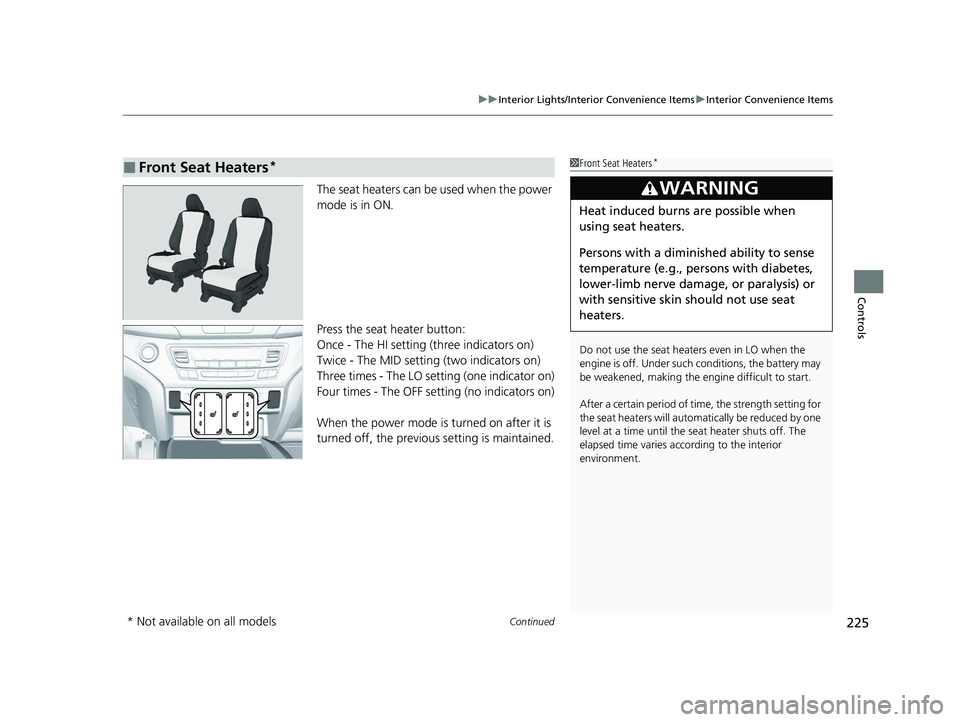
The seat heaters can be used when the power
mode is in ON.
Press the seat heater button:
Once - The HI setting (three indicators on)
Twice - The MID setting (two indicators on)
Three times - The LO setting (one indicator on)
Four times - The OFF setting (no indicators on)
When the power mode is turned on after it is
turned off, the previous setting is maintained.
■Front Seat Heaters*1Front Seat Heaters*
Do not use the seat heaters even in LO when the
engine is off. Under such conditions, the battery may
be weakened, making the engine difficult to start.
After a certain period of time, the strength setting for
the seat heaters will automatically be reduced by one
level at a time until the seat heater shuts off. The
elapsed time varies according to the interior
environment.
3WARNING
Heat induced burns are possible when
using seat heaters.
Persons with a diminished ability to sense
temperature (e.g., persons with diabetes,
lower-limb nerve damage, or paralysis) or
with sensitive skin should not use seat
heaters.
* Not available on all models
22 PILOT-31TG76600.book 225 ページ 2021年6月11日 金曜日 午後4時40分
Page 228 of 737
uuInterior Lights/Interior Convenience Items uInterior Convenience Items
226
Controls
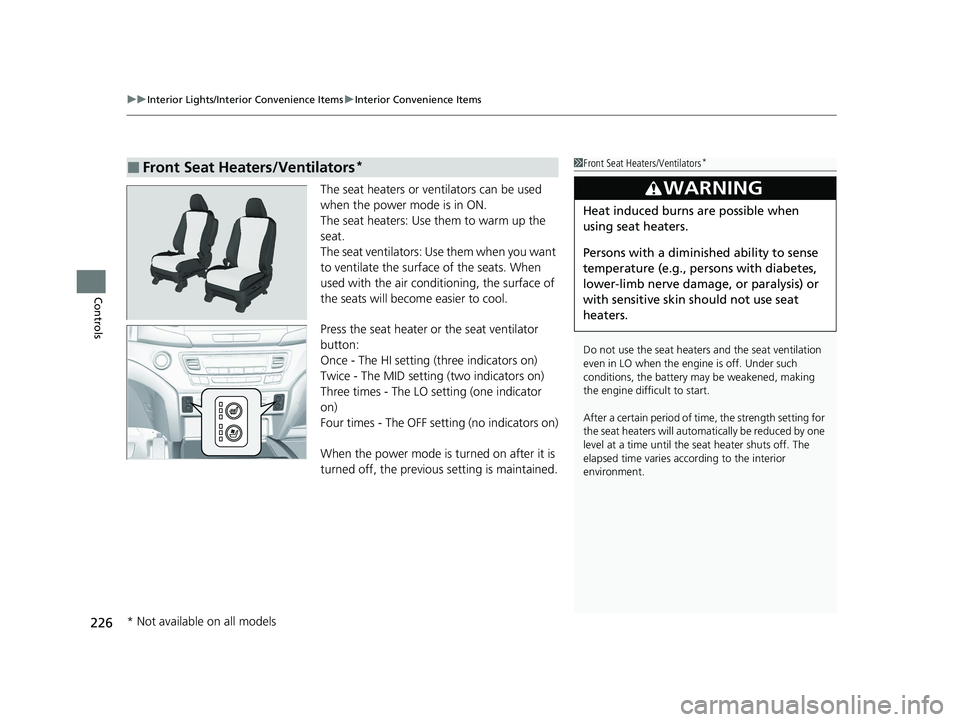
The seat heaters or ve ntilators can be used
when the power mode is in ON.
The seat heaters: Use them to warm up the
seat.
The seat ventilators: Use them when you want
to ventilate the surface of the seats. When
used with the air conditioning, the surface of
the seats will become easier to cool.
Press the seat heater or the seat ventilator
button:
Once - The HI setting (three indicators on)
Twice - The MID setting (two indicators on)
Three times - The LO setting (one indicator
on)
Four times - The OFF setting (no indicators on)
When the power mode is turned on after it is
turned off, the previous setting is maintained.
■Front Seat Heaters/Ventilators*1Front Seat Heaters/Ventilators*
Do not use the seat heater s and the seat ventilation
even in LO when the engine is off. Under such
conditions, the battery ma y be weakened, making
the engine difficult to start.
After a certain period of time, the strength setting for
the seat heaters will automatically be reduced by one
level at a time until the seat heater shuts off. The
elapsed time varies according to the interior
environment.
3WARNING
Heat induced burns are possible when
using seat heaters.
Persons with a diminished ability to sense
temperature (e.g., persons with diabetes,
lower-limb nerve damage, or paralysis) or
with sensitive skin should not use seat
heaters.
* Not available on all models
22 PILOT-31TG76600.book 226 ページ 2021年6月11日 金曜日 午後4時40分
Page 229 of 737
Continued227
uuInterior Lights/Interior Convenience Items uInterior Convenience Items
Controls
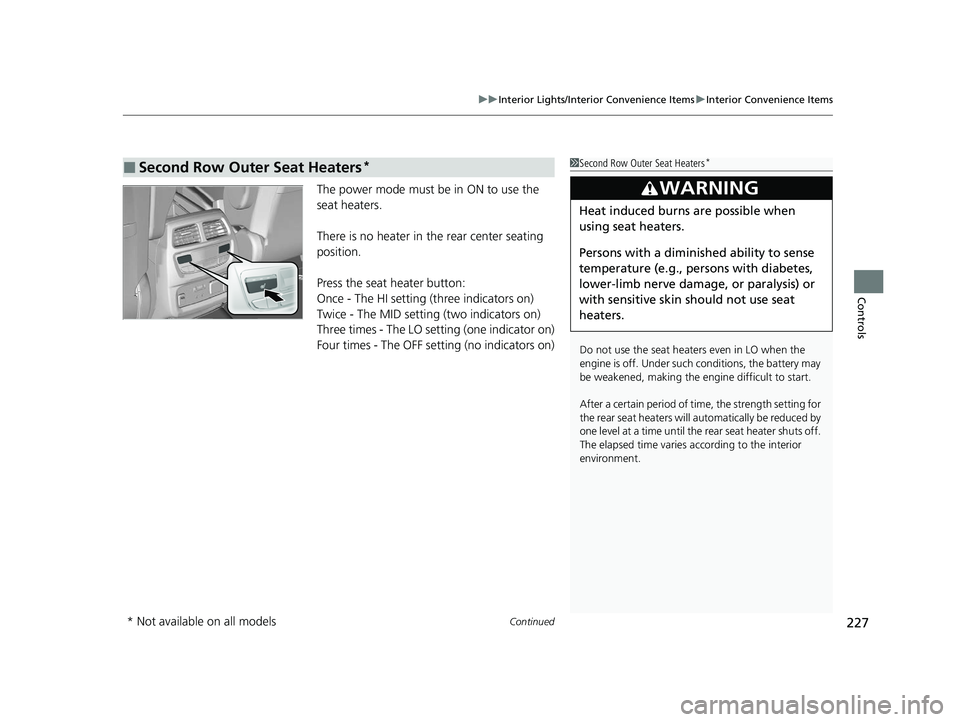
The power mode must be in ON to use the
seat heaters.
There is no heater in the rear center seating
position.
Press the seat heater button:
Once - The HI setting (three indicators on)
Twice - The MID setting (two indicators on)
Three times - The LO setting (one indicator on)
Four times - The OFF setting (no indicators on)
■Second Row Outer Seat Heaters*1 Second Row Outer Seat Heaters*
Do not use the seat heaters even in LO when the
engine is off. Under such conditions, the battery may
be weakened, making the engine difficult to start.
After a certain period of time, the strength setting for
the rear seat heaters will automatically be reduced by
one level at a time until the rear seat heater shuts off.
The elapsed time varies according to the interior
environment.
3WARNING
Heat induced burns are possible when
using seat heaters.
Persons with a diminished ability to sense
temperature (e.g., persons with diabetes,
lower-limb nerve damage, or paralysis) or
with sensitive skin should not use seat
heaters.
* Not available on all models
22 PILOT-31TG76600.book 227 ページ 2021年6月11日 金曜日 午後4時40分
Page 230 of 737
uuInterior Lights/Interior Convenience Items uInterior Convenience Items
228
Controls
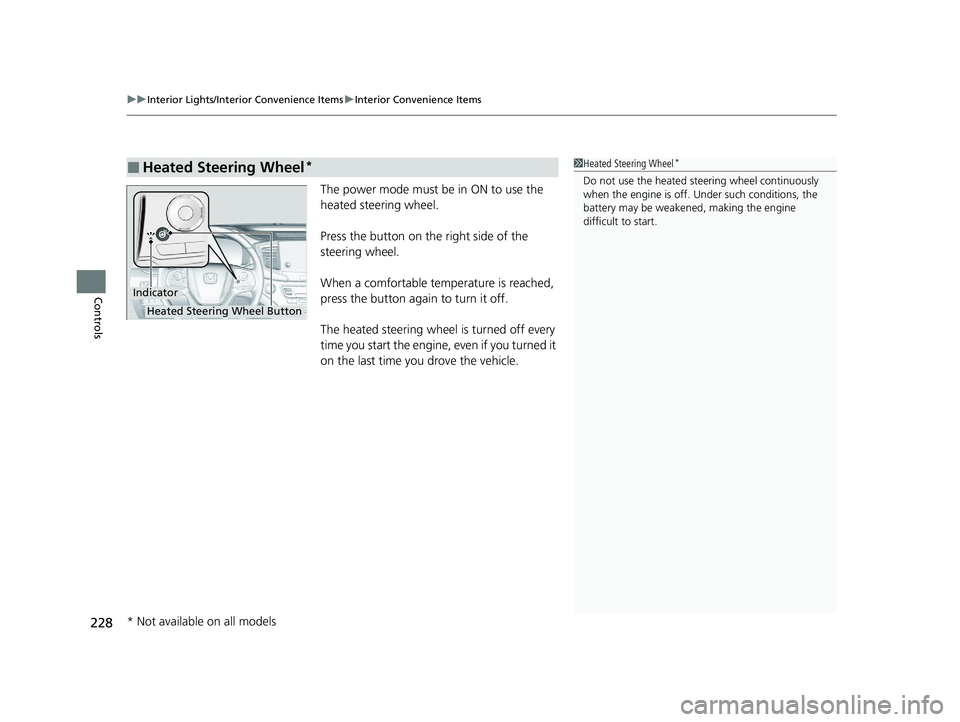
The power mode must be in ON to use the
heated steering wheel.
Press the button on the right side of the
steering wheel.
When a comfortable temperature is reached,
press the button again to turn it off.
The heated steering wheel is turned off every
time you start the engine, even if you turned it
on the last time you drove the vehicle.
■Heated Steering Wheel*1Heated Steering Wheel*
Do not use the heated st eering wheel continuously
when the engine is off. Under such conditions, the
battery may be weaken ed, making the engine
difficult to start.
Indicator
Heated Steering Wheel Button
* Not available on all models
22 PILOT-31TG76600.book 228 ページ 2021年6月11日 金曜日 午後4時40分
Page 242 of 737
240
Features
Audio System
About Your Audio System
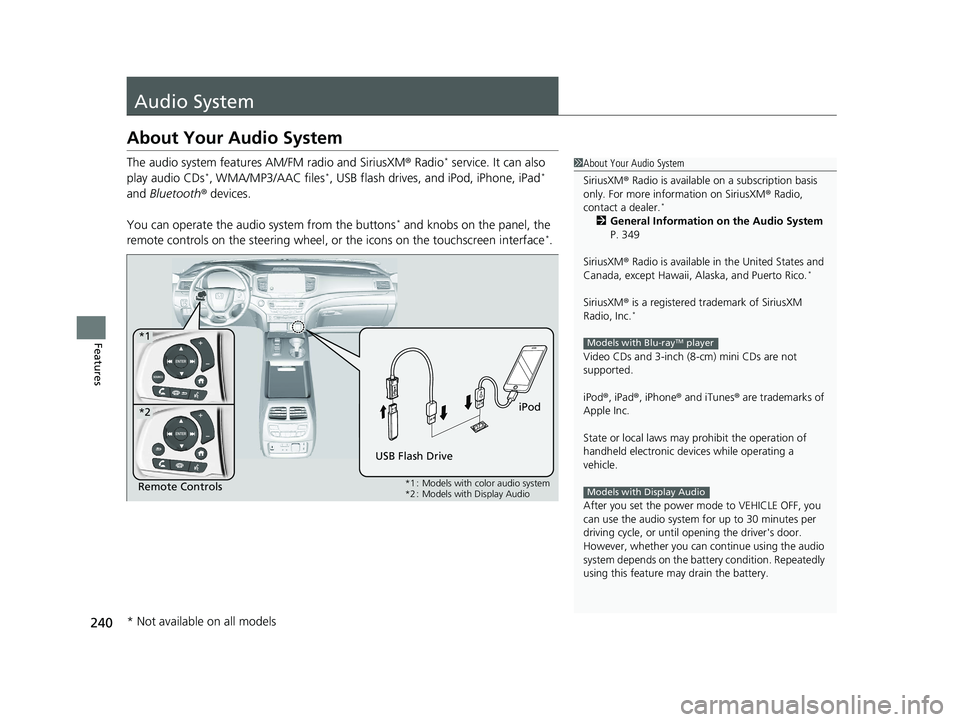
The audio system features AM/FM radio and SiriusXM® Radio* service. It can also
play audio CDs*, WMA/MP3/AAC files*, USB flash drives, and iPod, iPhone, iPad*
and Bluetooth ® devices.
You can operate the audio system from the buttons
* and knobs on the panel, the
remote controls on the steering wheel, or the icons on the touchscreen interface*.
1 About Your Audio System
SiriusXM ® Radio is available on a subscription basis
only. For more information on SiriusXM ® Radio,
contact a dealer.
*
2 General Information on the Audio System
P. 349
SiriusXM ® Radio is available in the United States and
Canada, except Ha waii, Alaska, and Puerto Rico.
*
SiriusXM® is a registered trademark of SiriusXM
Radio, Inc.*
Video CDs and 3-inch (8 -cm) mini CDs are not
supported.
iPod ®, iPad ®, iPhone ® and iTunes ® are trademarks of
Apple Inc.
State or local laws may pr ohibit the operation of
handheld electronic devices while operating a
vehicle.
After you set the power m ode to VEHICLE OFF, you
can use the audio system for up to 30 minutes per
driving cycle, or until opening the driver's door.
However, whether you can continue using the audio
system depends on the batter y condition. Repeatedly
using this feature ma y drain the battery.
Models with Blu-rayTM player
Models with Display AudioRemote Controls iPod
USB Flash Drive
*1
*2
*1 : Models with color audio system
*2 : Models with Display Audio
* Not available on all models
22 PILOT-31TG76600.book 240 ページ 2021年6月11日 金曜日 午後4時40分
Page 243 of 737
241
uuAudio System uUSB Ports
Continued
Features
USB Ports
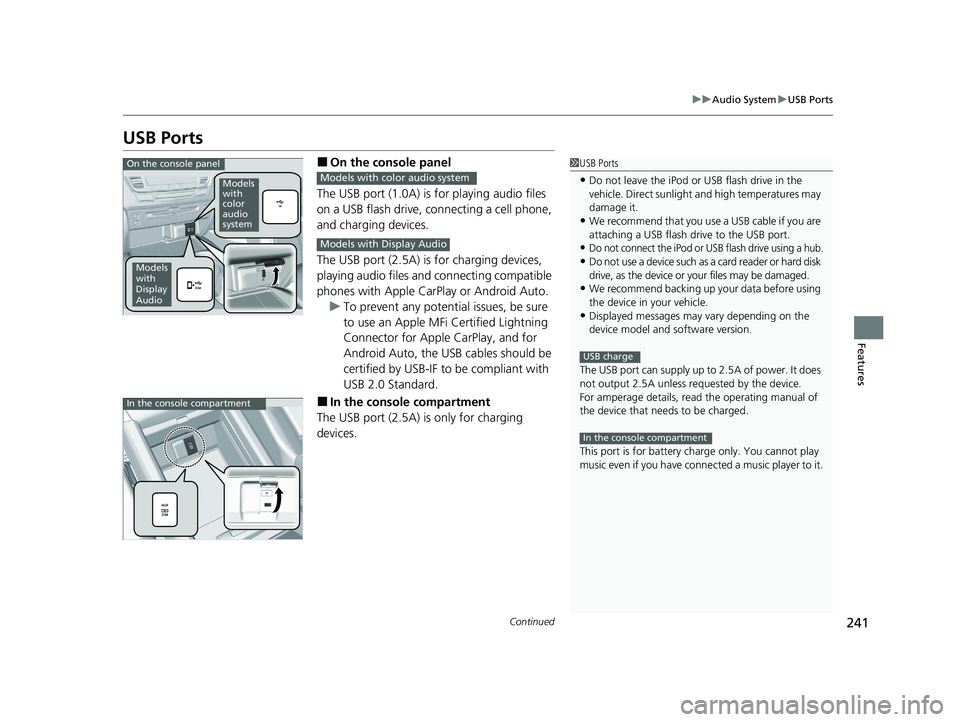
■On the console panel
The USB port (1.0A) is for playing audio files
on a USB flash drive, connecting a cell phone,
and charging devices.
The USB port (2.5A) is for charging devices,
playing audio files and connecting compatible
phones with Apple CarPlay or Android Auto. u To prevent any potenti al issues, be sure
to use an Apple MFi Certified Lightning
Connector for Apple CarPlay, and for
Android Auto, the USB cables should be
certified by USB-IF to be compliant with
USB 2.0 Standard.
■In the consol e compartment
The USB port (2.5A) is only for charging
devices.
1 USB Ports
•Do not leave the iPod or USB flash drive in the
vehicle. Direct sunlight and high temperatures may
damage it.
•We recommend that you us e a USB cable if you are
attaching a USB flash drive to the USB port.
•Do not connect the iPod or USB flash drive using a hub.
•Do not use a device such as a card reader or hard disk
drive, as the device or your files may be damaged.
•We recommend backing up yo ur data before using
the device in your vehicle.
•Displayed messages may vary depending on the
device model and software version.
The USB port can supply up to 2.5A of power. It does
not output 2.5A unless requested by the device.
For amperage details, read the operating manual of
the device that ne eds to be charged.
This port is for battery charge only. You cannot play
music even if you have conne cted a music player to it.
USB charge
In the console compartment
On the console panel
Models
with
color
audio
system
Models
with
Display
Audio
Models with color audio system
Models with Display Audio
In the console compartment
22 PILOT-31TG76600.book 241 ページ 2021年6月11日 金曜日 午後4時40分
Page 244 of 737
uuAudio System uAuxiliary Input Jack
242
Features
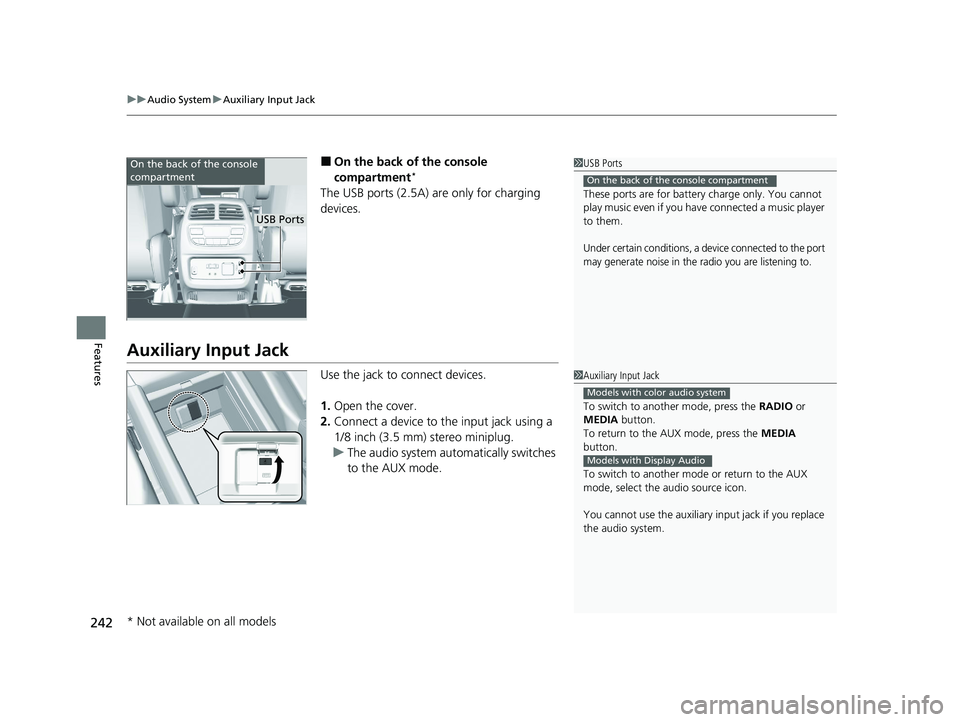
■On the back of the console
compartment*
The USB ports (2.5A) are only for charging
devices.
Auxiliary Input Jack
Use the jack to connect devices.
1. Open the cover.
2. Connect a device to the input jack using a
1/8 inch (3.5 mm) stereo miniplug.
u The audio system automatically switches
to the AUX mode.
1USB Ports
These ports are for battery charge only. You cannot
play music even if you have connected a music player
to them.
Under certain conditions, a device connected to the port
may generate noise in the radio you are listening to.
On the back of the console compartment
On the back of the console
compartment
USB Ports
1 Auxiliary Input Jack
To switch to another mode, press the RADIO or
MEDIA button.
To return to the AUX mode, press the MEDIA
button.
To switch to another mode or return to the AUX
mode, select the audio source icon.
You cannot use the auxiliary input jack if you replace
the audio system.
Models with color audio system
Models with Display Audio
* Not available on all models
22 PILOT-31TG76600.book 242 ページ 2021年6月11日 金曜日 午後4時40分
Page 245 of 737
243
uuAudio System uAudio System Theft Protection
Features
Audio System Theft Protection
The audio system is disabled when it is disconnected from the power source, such as
when the battery is disconnected or goes dead. In certain conditions, the system
may display a code entry screen. If this occurs, reactivate the audio system.
■Reactivating the audio system
1. Set the power mode to ON.
2. Turn on the audio system.
3. Press and hold the audio system powe r button for more than two seconds.
u The audio system is reac tivated when the audio co ntrol unit establishes a
connection with the vehicl e control unit. If the control unit fails to recognize
the audio unit, you must go to a dealer and have the audio unit checked.
22 PILOT-31TG76600.book 243 ページ 2021年6月11日 金曜日 午後4時40分
Page 362 of 737
360
uuGeneral Information on the Audio System uHonda App License Agreement
Features
E. Information Coll ection and Storage
1. Information Collection, Use, Transmission and Storage of Data. Consent to Use of Data:
You agree that HONDA and PROVIDERS may
collect and use your information gathered in any manner as part of product support services related to the SOFTWARE or related services.
HONDA may share such information with third parties, including, without limitation, PROVIDERS, th ird party software and services
suppliers, their affiliates and/or their desi gnated agents, solely to improve their products or to provide services or technolo gies to you.
HONDA, third party software and systems s uppliers, their affiliates and/or their designated agent may disclose this information to others,
but not in a form that pe rsonally identifies you.
2. Information Storage.
Depending on the type of multimedia system you have in your VEHICLE, certain information may be stored for ease
of use of the SOFTWARE including, without limitation, search hi story, location history in certain applications, previous and saved
destinations, map locations within certain applications, and device numbers and contact information.
(a) Vehicle Health Information.
Your VEHICLE may remotely trans mit information regarding the status and health of your VEHICLE
(“VEHICLE INFORMATION”) to HONDA without notification to you. VEHICLE INFORMATION may contain VEHICLE maintenance and
malfunction status that is derived from VEHICLE diagnostic data and includes, but is not limited to, status of powered doors and windows,
battery life data, battery charging data, VEHICLE speed, coolant temperat ure, air compressor revolution, output power, warning codes,
diagnostic trouble codes, fuel injection volu me, and engine rotations per minute. VEHICL E HEALTH INFORMATION may be used by HON DA
for research and development, to deliver HONDA SERVICES and information to you, and to contact you, and is retained only for a period
of time necessary to fulfill these goals.
(b) VEHICLE Geolocation Data (non-navigation/map based).
If you opt-in to geolocation-based SERVICES, your vehicle’s geolocation data
(latitude and longitude) will be automatically se nt from your VEHICLE to HONDA and PROVIDERS.
(c) You understand that the inputting or uploading of information to your VEHICLE’s multimedia system or the SOFTWARE or SERVIC ES is
at your own risk and that HONDA is not responsible for unauthorized access to or use of any personal or other information. All information
uploaded to the SOFTWARE and SERVICES may be stored on your VEHICLES’s multimedia system and you understand that the security and
safety of your VEHICLE’s multimedia system is your sole responsibility.
22 PILOT-31TG76600.book 360 ページ 2021年6月11日 金曜日 午後4時40分
Page 454 of 737
uuBluetooth ® HandsFreeLink ®u Using HFL
452
Features
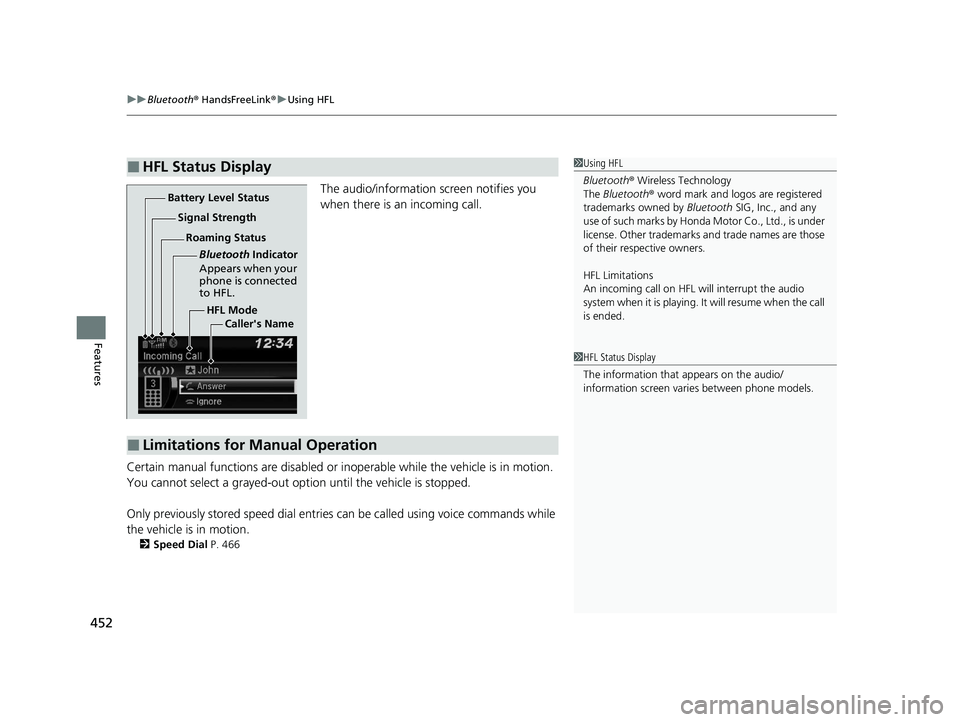
The audio/information screen notifies you
when there is an incoming call.
Certain manual functions are disabled or i noperable while the vehicle is in motion.
You cannot select a grayed-out option until the vehicle is stopped.
Only previously stored speed dial entries can be called using voice commands while
the vehicle is in motion.
2 Speed Dial P. 466
■HFL Status Display1Using HFL
Bluetooth ® Wireless Technology
The Bluetooth ® word mark and logos are registered
trademarks owned by Bluetooth SIG, Inc., and any
use of such marks by Honda Motor Co., Ltd., is under
license. Other trademarks and trade names are those
of their respective owners.
HFL Limitations
An incoming call on HFL will interrupt the audio
system when it is playing. It will resume when the call
is ended.
HFL Mode
Battery Level Status
Signal Strength
Bluetooth Indicator
Appears when your
phone is connected
to HFL.
Roaming Status
Caller's Name
■Limitations for Manual Operation
1HFL Status Display
The information that appears on the audio/
information screen vari es between phone models.
22 PILOT-31TG76600.book 452 ページ 2021年6月11日 金曜日 午後4時40分