child seat HONDA PILOT 2022 Owner's Manual
[x] Cancel search | Manufacturer: HONDA, Model Year: 2022, Model line: PILOT, Model: HONDA PILOT 2022Pages: 737, PDF Size: 28.84 MB
Page 74 of 737
uuChild Safety uSafety of Infants and Small Children
72
Safe Driving
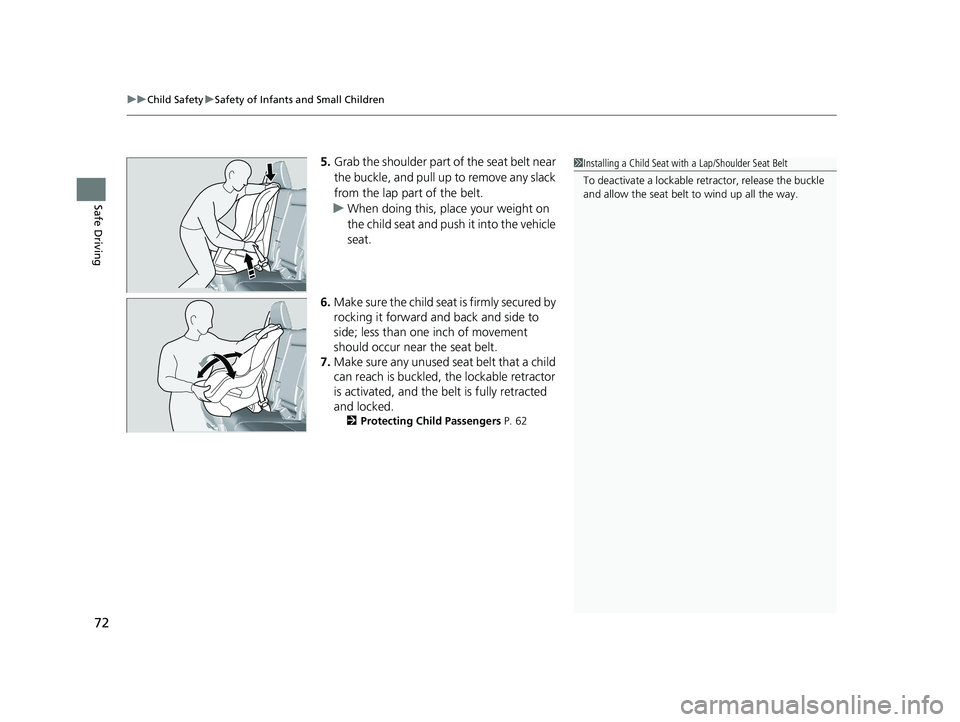
5. Grab the shoulder part of the seat belt near
the buckle, and pull up to remove any slack
from the lap part of the belt.
u When doing this, plac e your weight on
the child seat and push it into the vehicle
seat.
6. Make sure the child seat is firmly secured by
rocking it forward and back and side to
side; less than one inch of movement
should occur near the seat belt.
7. Make sure any unused seat belt that a child
can reach is buckled, the lockable retractor
is activated, and the be lt is fully retracted
and locked.
2 Protecting Child Passengers P. 62
1Installing a Child Seat with a Lap/Shoulder Seat Belt
To deactivate a lockable retractor, release the buckle
and allow the seat belt to wind up all the way.
22 PILOT-31TG76600.book 72 ページ 2021年6月11日 金曜日 午後4時40分
Page 75 of 737
Continued73
uuChild Safety uSafety of Infants and Small Children
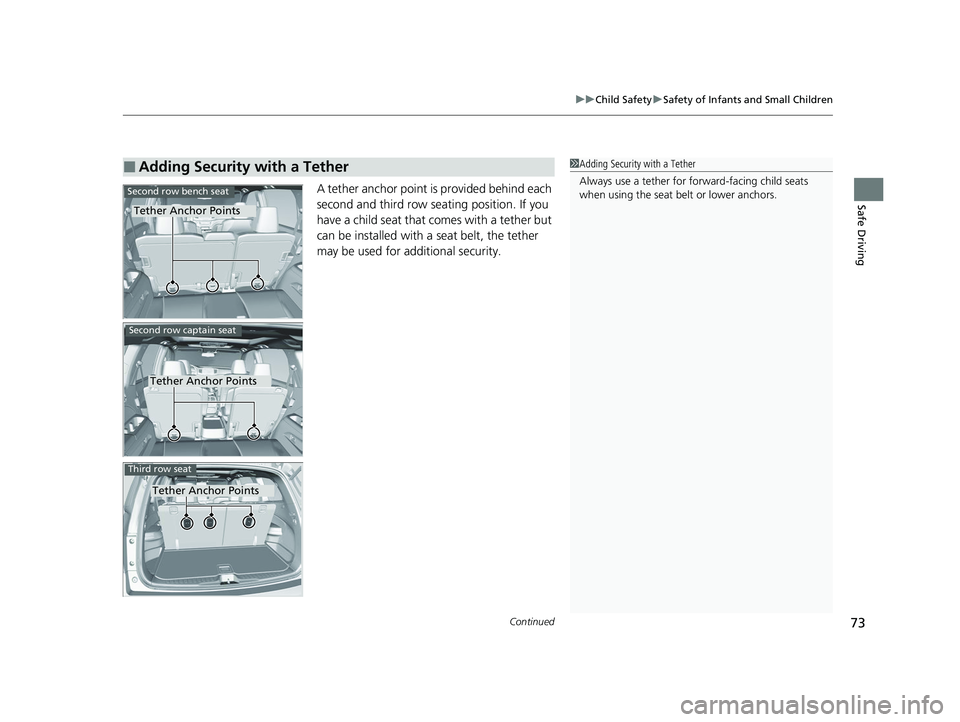
Safe DrivingA tether anchor point is provided behind each
second and third row seating position. If you
have a child seat that comes with a tether but
can be installed with a seat belt, the tether
may be used for additional security.
■Adding Security with a Tether
Tether Anchor Points
Second row bench seat
1Adding Security with a Tether
Always use a tether for forward-facing child seats
when using the seat be lt or lower anchors.
Second row captain seat
Tether Anchor Points
Tether Anchor Points
Third row seat
22 PILOT-31TG76600.book 73 ページ 2021年6月11日 金曜日 午後4時40分
Page 76 of 737
74
uuChild Safety uSafety of Infants and Small Children
Safe Driving
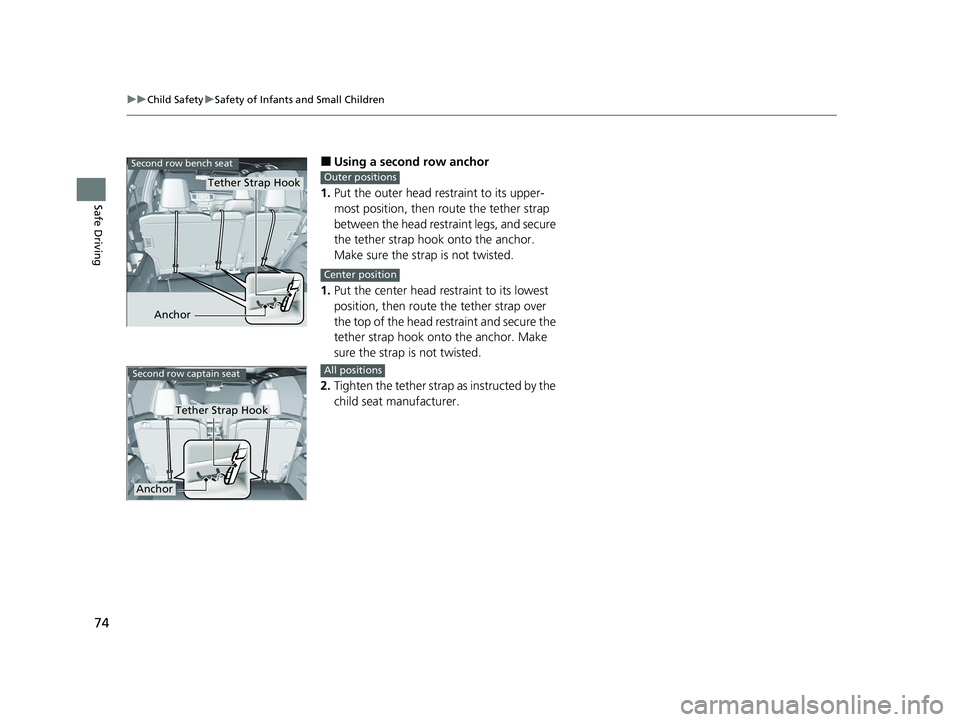
■Using a second row anchor
1. Put the outer head restraint to its upper-
most position, then route the tether strap
between the head restraint legs, and secure
the tether strap hook onto the anchor.
Make sure the strap is not twisted.
1. Put the center head re straint to its lowest
position, then route the tether strap over
the top of the head restraint and secure the
tether strap hook onto the anchor. Make
sure the strap is not twisted.
2. Tighten the tether strap as instructed by the
child seat manufacturer.
Anchor
Second row bench seat
Tether Strap HookOuter positions
Center position
Second row captain seat
Tether Strap Hook
Anchor
All positions
22 PILOT-31TG76600.book 74 ページ 2021年6月11日 金曜日 午後4時40分
Page 77 of 737
75
uuChild Safety uSafety of Infants and Small Children
Safe Driving
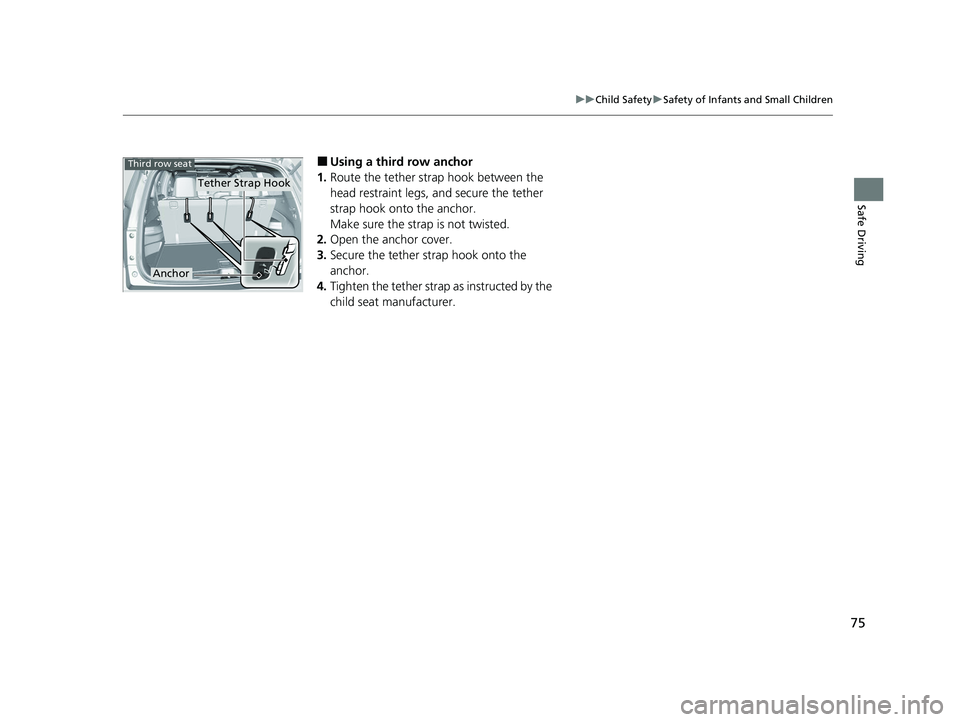
■Using a third row anchor
1. Route the tether strap hook between the
head restraint legs, and secure the tether
strap hook onto the anchor.
Make sure the strap is not twisted.
2. Open the anchor cover.
3. Secure the tether strap hook onto the
anchor.
4. Tighten the tether strap as instructed by the
child seat manufacturer.
Tether Strap Hook
Anchor
Third row seat
22 PILOT-31TG76600.book 75 ページ 2021年6月11日 金曜日 午後4時40分
Page 78 of 737
76
uuChild Safety uSafety of Larger Children
Safe Driving
Safety of Larger Children
The following pages give instructions on how to check proper seat belt fit, what kind
of booster seat to use if one is needed, and important precautions for a child who
must sit in front.
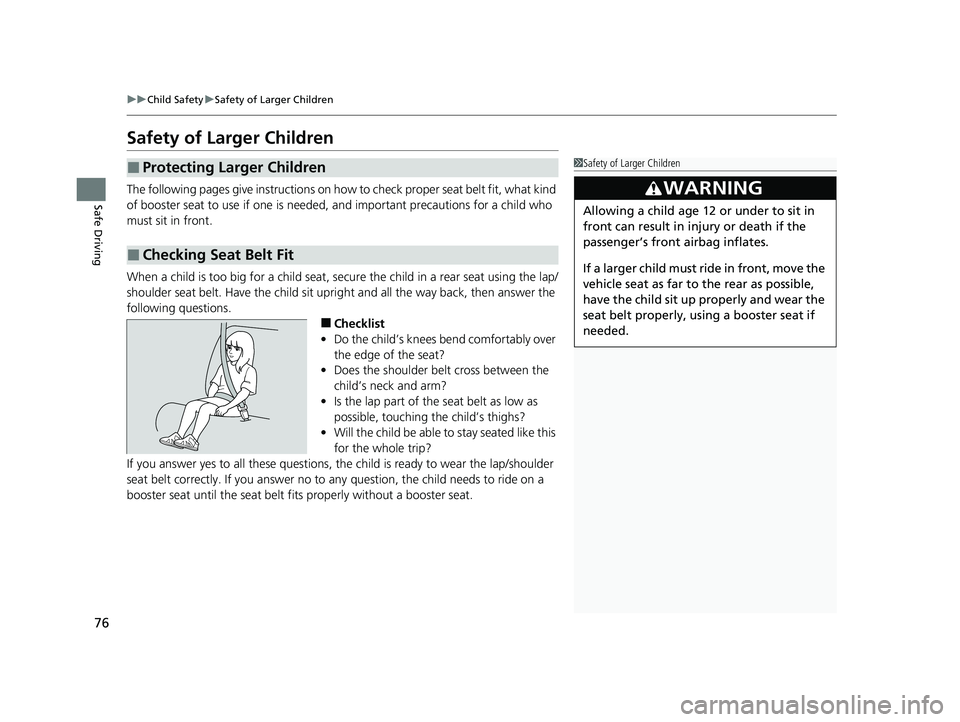
When a child is too big for a child seat, secure the child in a rear seat using the lap/
shoulder seat belt. Have the child sit upright and all the way back, then answer the
following questions.
■Checklist
• Do the child’s knees bend comfortably over
the edge of the seat?
• Does the shoulder belt cross between the
child’s neck and arm?
• Is the lap part of the seat belt as low as
possible, touching the child’s thighs?
• Will the child be able to stay seated like this
for the whole trip?
If you answer yes to all thes e questions, the child is read y to wear the lap/shoulder
seat belt correctly. If you answer no to any question, the child needs to ride on a
booster seat until the seat belt fits properly without a booster seat.
■Protecting Larger Children
■Checking Seat Belt Fit
1 Safety of Larger Children
3WARNING
Allowing a child age 12 or under to sit in
front can result in injury or death if the
passenger’s front airbag inflates.
If a larger child must ride in front, move the
vehicle seat as far to the rear as possible,
have the child sit up properly and wear the
seat belt properly, using a booster seat if
needed.
22 PILOT-31TG76600.book 76 ページ 2021年6月11日 金曜日 午後4時40分
Page 79 of 737
77
uuChild Safety uSafety of Larger Children
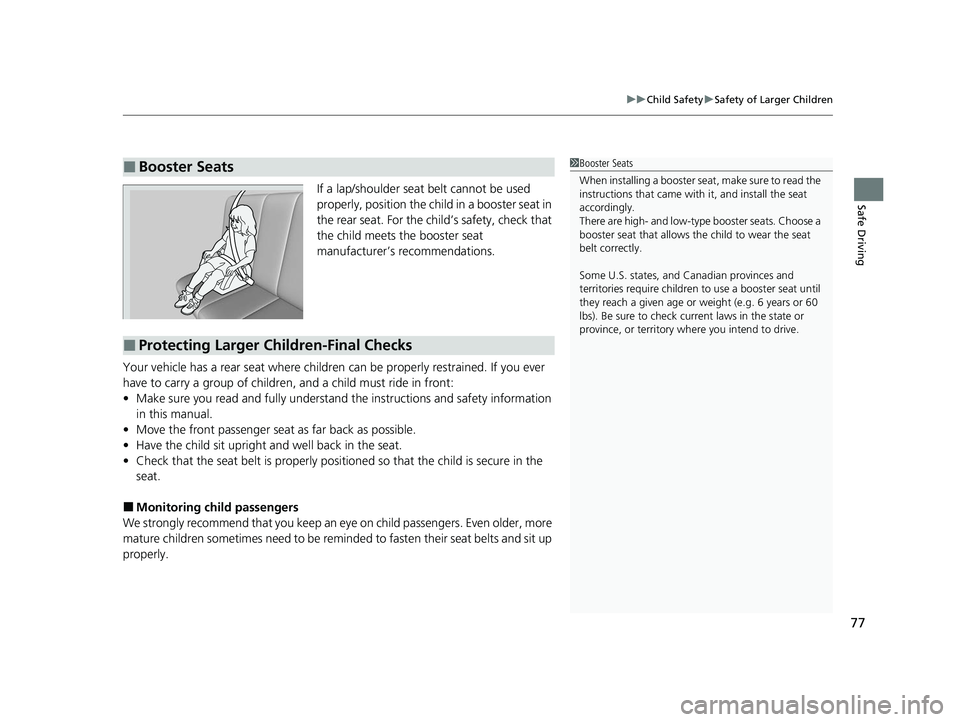
Safe DrivingIf a lap/shoulder seat belt cannot be used
properly, position the child in a booster seat in
the rear seat. For the child’s safety, check that
the child meets the booster seat
manufacturer’s recommendations.
Your vehicle has a rear seat where children can be properly restrained. If you ever
have to carry a group of children, and a child must ride in front:
• Make sure you read and fully understand the instructions and safety information
in this manual.
• Move the front passenger seat as far back as possible.
• Have the child sit upright and well back in the seat.
• Check that the seat belt is properly positi oned so that the child is secure in the
seat.
■Monitoring child passengers
We strongly recommend that you keep an eye on child passengers. Even older, more
mature children sometimes need to be remi nded to fasten their seat belts and sit up
properly.
■Booster Seats1 Booster Seats
When installing a booster seat , make sure to read the
instructions that came with it, and install the seat
accordingly.
There are high- and low-type booster seats. Choose a
booster seat that allows the child to wear the seat
belt correctly.
Some U.S. states, and Canadian provinces and
territories require children to use a booster seat until
they reach a given age or weight (e.g. 6 years or 60
lbs). Be sure to check current laws in the state or
province, or territory where you intend to drive.
■Protecting Larger Children-Final Checks
22 PILOT-31TG76600.book 77 ページ 2021年6月11日 金曜日 午後4時40分
Page 137 of 737
135
Controls
This chapter explains how to operate the various controls necessary for driving.
Clock.................................................. 136
Locking and Unlocking the Doors Key Types and Functions .................. 139
Low Keyless Remote Signal Strength ......... 141Locking/Unlocking the Doors from the Outside .......................................... 142
Locking/Unlocking the Doors from the Inside ............................................. 149
Childproof Door Locks ..................... 151
Auto Door Locking/Unlocking .......... 152
Opening and Closing the Tailgate ... 153
Security System Immobilizer System .......................... 163
Security System Alarm ...................... 163
Opening and Closing the Windows .... 166Moonroof*........................................ 169
Panoramic Roof*............................... 170
Operating the Switches Around the Steering Wheel ENGINE START/STOP Button............. 171
Turn Signals ..................................... 174
Light Switches.................................. 175
Fog Lights
*...................................... 178
Auto High-Beam .............................. 179
Daytime Running Lights ................... 182
Wipers and Washers ........................ 183
Rear Defogger/Heat ed Door Mirror
*
Button ........................................... 186 Brightness Control ........................... 188
Driving Position Memory System
*.... 189
Adjusting the Steering Wheel .......... 191
Adjusting the Mirrors Interior Rearview Mirror ................... 192
Power Door Mirrors ......................... 193
Adjusting the Seats Front Seats ...................................... 194
Rear Seats........................................ 204
Armrest ........................................... 207
Interior Lights/Interior Convenience Items Interior Lights .................................. 209
Interior Convenience Items .............. 213
Climate Control System ................... 231
* Not available on all models
22 PILOT-31TG76600.book 135 ページ 2021年6月11日 金曜日 午後4時40分
Page 152 of 737
uuLocking and Unlocking the Doors uLocking/Unlocking the Doors from the Inside
150
Controls
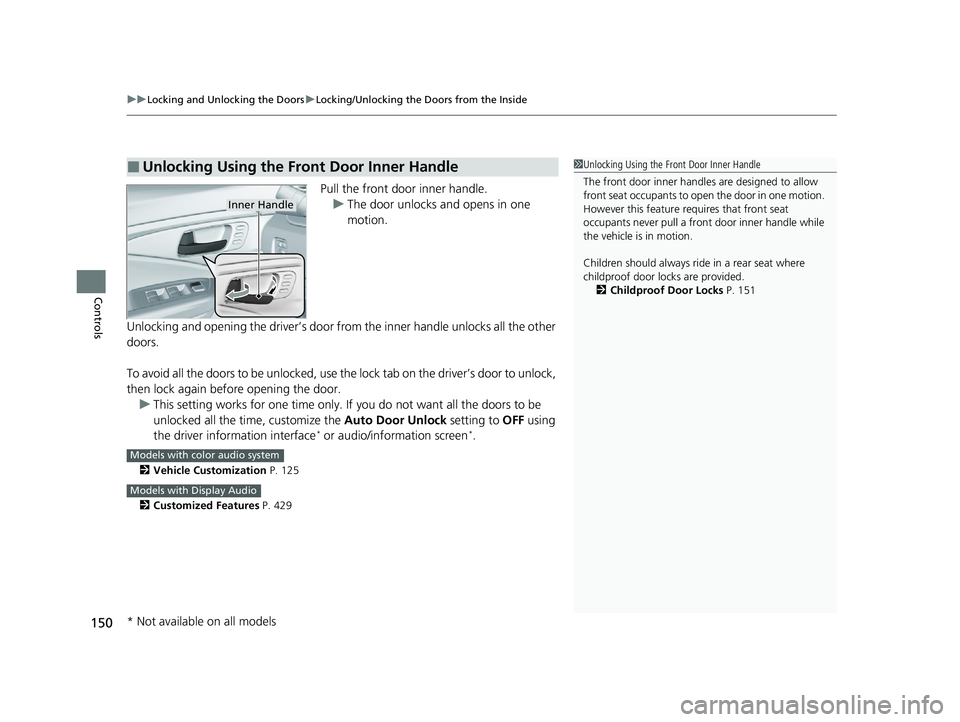
Pull the front door inner handle.
u The door unlocks and opens in one
motion.
Unlocking and opening the driver’s door from the inner handle unlocks all the other
doors.
To avoid all the doors to be unlocked, use the lock tab on the driver’s door to unlock,
then lock again before opening the door. u This setting works for one time only. If you do not want all the doors to be
unlocked all the time, customize the Auto Door Unlock setting to OFF using
the driver information interface
* or audio/information screen*.
2 Vehicle Customization P. 125
2 Customized Features P. 429
■Unlocking Using the Front Door Inner Handle1Unlocking Using the Front Door Inner Handle
The front door inne r handles are designed to allow
front seat occupants to ope n the door in one motion.
However this feature requires that front seat
occupants never pull a front door inner handle while
the vehicle is in motion.
Children should always ride in a rear seat where
childproof door locks are provided. 2 Childproof Door Locks P. 151
Inner Handle
Models with color audio system
Models with Display Audio
* Not available on all models
22 PILOT-31TG76600.book 150 ページ 2021年6月11日 金曜日 午後4時40分
Page 168 of 737
166
Controls
Opening and Closing the Windows
Opening/Closing the Power Windows
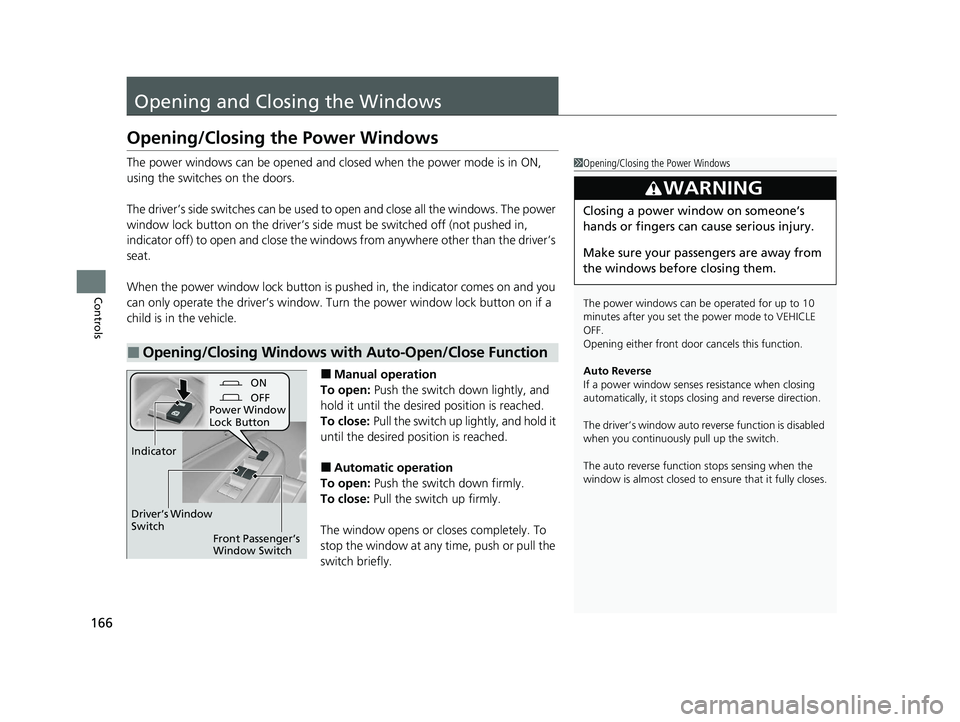
The power windows can be opened and closed when the power mode is in ON,
using the switches on the doors.
The driver’s side switches can be used to open and close all the windows. The power
window lock button on the driver’s side must be switched off (not pushed in,
indicator off) to open and close the windows from anyw here other than the driver’s
seat.
When the power window lock button is pu shed in, the indicator comes on and you
can only operate the driver’s window. Turn the power window lock button on if a
child is in the vehicle.
■Manual operation
To open: Push the switch down lightly, and
hold it until the desired position is reached.
To close: Pull the switch up lightly, and hold it
until the desired position is reached.
■Automatic operation
To open: Push the switch down firmly.
To close: Pull the switch up firmly.
The window opens or cl oses completely. To
stop the window at any time, push or pull the
switch briefly.
■Opening/Closing Windows with Auto-Open/Close Function
1 Opening/Closing the Power Windows
The power windows can be operated for up to 10
minutes after you set the power mode to VEHICLE
OFF.
Opening either front door cancels this function.
Auto Reverse
If a power window senses resistance when closing
automatically, it stops clos ing and reverse direction.
The driver’s window auto re verse function is disabled
when you continuously pull up the switch.
The auto reverse function stops sensing when the
window is almost closed to en sure that it fully closes.
3WARNING
Closing a power window on someone’s
hands or fingers can cause serious injury.
Make sure your passengers are away from
the windows before closing them.
ON
OFF
Power Window
Lock Button
Front Passenger’s
Window Switch
Driver’s Window
Switch
Indicator
22 PILOT-31TG76600.book 166 ページ 2021年6月11日 金曜日 午後4時40分
Page 728 of 737
726
Index
Updating Apps ........................................ 278
USB Flash Drives ...................... 259, 318, 353
USB Port .................................................. 241
Wallpaper Setup .............................. 250, 270
Wi-Fi Connection ..................................... 334
Audio/Information Screen ................ 248, 266
Authorized Manuals ................................. 722
Auto Door Locking/Unlocking ................. 152
Auto High-Beam ....................................... 179
Indicator .................................................... 86
Auto Idle Stop Indicator (Green) ............... 91
Auto Idle Stop System Indicator (Amber) ..................................................... 91
Auto Idle-stop ........................................... 538
OFF Button .............................................. 539
Automatic Intermittent Wipers ............... 184
Automatic Lighting .................................. 176
Automatic Transmission ........................... 529
Creeping ................................................. 529
Fluid ........................................................ 645
Kickdown ................................................ 529
Operating the Shift Button....................... 532
Shifting.................................................... 530
Auxiliary Input Jack .................................. 242
Average Fuel Economy ............................. 116
AWD Torque ............................................. 119
B
Battery....................................................... 665
Charging System Indicator ................. 83, 697 If the Battery Is Dead ............................... 692
Maintenance (Checking the Battery) ........ 665
Belts (Seat) .................................................. 39
Beverage Holders ..................................... 215
Blind spot information System ................ 549
Bluetooth® Audio............................. 262, 325
Bluetooth® HandsFreeLink ®........... 451, 476
Blu-ray/DVD Rear Entertainment
System ..................................................... 374
Audio Sources for Front and Rear Seats ... 395
Auxiliary Console Panels .......................... 376
DVD or Blu-ray
TM Player Error Messages ... 420
Front Control Panel Operation ................. 387
HDMI
TM Port ............................................ 377
How Much Farther?TM............................. 394
Media Servers.......................................... 394
Operating the System .............................. 378
Overhead Screen ..................................... 377
Playable Disc Region Codes ..................... 418
Playable Disc Types .................................. 418
Playable Discs .......................................... 396
Playing a Disc in the Rear......................... 392
Playing a DVD/Blu-ray
TM........................... 381
Playing a Video Using the HDMITM........... 393
Playing an iPod and a USB Flash Drive in
the Rear ................................................ 392
Playing Apps ........................................... 390
Rear DVD or Blu-ray
TM Menu ................... 382
Rear System Setup................................... 388
Recommended Discs ............................... 419 Selecting the App using Front Control
Panel..................................................... 387
Setting the DVD or Blu-ray
TM Menu ......... 389
System Controls .............................. 381, 391
System Settings....................................... 385
Video Accessibility ................................... 379
Wireless Headphones .............................. 375
Booster Seats (For Children) ...................... 77
Brake System ............................................ 604
Anti-lock Brake System (ABS) .................. 606
Brake Assist System................................. 607
Fluid ....................................................... 646
Foot Brake .............................................. 605
Indicator ........................................... 82, 699
Parking Brake.......................................... 604
Brake System (Red) Indicator ................................................. 699
Brightness Control (Instrument Panel) ... 188
Bulb Replacement .................................... 647
Back-Up Lights ........................................ 651
Brake Lights ............................................ 651
Brake/Taillights........................................ 650
Daytime Running Lights .......................... 648
Fog Lights ............................................... 649
Front Side Marker Lights ......................... 648
Front Turn Signal Lights .......................... 649
Headlights .............................................. 647
High-Mount Brake Light.......................... 651
Parking Lights ......................................... 648
Rear License Plate Lights ......................... 651
Rear Side Marker Lights .......................... 650
22 PILOT-31TG76600.book 726 ページ 2021年6月11日 金曜日 午後4時40分