ESP HONDA PILOT 2022 Owner's Guide
[x] Cancel search | Manufacturer: HONDA, Model Year: 2022, Model line: PILOT, Model: HONDA PILOT 2022Pages: 737, PDF Size: 28.84 MB
Page 408 of 737
406
uuBlu-ray/DVD Rear Entertainment System*uPlayable Discs
Features
■OSS
This product incorporates the following software:
(1) The software developed by, or developed for, Panasonic Corporation (“Panasonic”),
(2) The software owned by third party and licensed to Panasonic,
(3) The software licensed under the GNU GENERAL PUBLIC LICENSE, Version 2 (“GPL”),
(4) The software licensed under the GNU LESSER GENE RAL PUBLIC LICENSE, Version 2.1 (“LGPL”), and/or
(5) Open sourced software licensed under terms and conditions other than GPL or LGPL.
For the software classified as (3) or (4) above, please refer to the terms and conditions of GPL and LGPL at the websites liste d below:
http://www.gnu.org/licenses/old-licenses/gpl-2.0.html
http://www.gnu.org/licenses/old-licenses/lgpl-2.1.html
The software classified as (3) and (4) above are copyrighted by multiple people. Please refer to the websites below regarding the copyright
notices of those people.
http://www.hondaopensource2.com/17M_BDP/
At least three (3) years from delivery of pr oducts, Panasonic will give to any third party who contacts us at the Contact Information
provided below, for a charge no more than our cost of physically performing source code distri bution, a complete machine-readable copy
of the source code corresponding to the GPL/LGPL Software.
Please note that we are unable to answer any queries regarding source code details, etc.
[Contact Information]
Engineering Administration Group Manager Panasonic Corporation, Automotive Systems Company, 4261 Ikonobe-cho, Tsuzuki-ku,
Yokohama, Kanagawa 224-8520, Japan
Furthermore, source code corresponding to the GPL/LGPL Software li sted above is freely available to you and any member of the public at
the websites listed below:
http://www.hondaopensource2.com/17M_BDP/
The software classified as (5) above co ntains various open sourced software (“OSS”) including the following software:
22 PILOT-31TG76600.book 406 ページ 2021年6月11日 金曜日 午後4時40分
Page 417 of 737
415
uuBlu-ray/DVD Rear Entertainment System*uPlayable Discs
Continued
Features
This License becomes null and void to the ex tent applicable to Fonts or Font Software that has been modified and is distributed under the
“Bitstream Vera” names.
The Font Software may be sold as part of a larger software packag e but no copy of one or more of the Font Software typefaces ma y be
sold by itself.
THE FONT SOFTWARE IS PROVIDED “AS IS”, WITHOUT WARRANTY OF ANY KIND, EXPRESS OR IMPLIED, INCLUDING BUT NOT LIMITED
TO ANY WARRANTIES OF MERCHANTABILITY, FITNESS FOR A PARTIC ULAR PURPOSE AND NONINFRINGEMENT OF COPYRIGHT, PATENT,
TRADEMARK, OR OTHER RIGHT. IN NO EVENT SHALL BITSTREAM OR THE GNOME FOUNDATION BE LIABLE FOR ANY CLAIM, DAMAGES
OR OTHER LIABILITY, INCLUDING ANY GENERAL, SPECIAL, INDI RECT, INCIDENTAL, OR CONSEQUENTIAL DAMAGES, WHETHER IN AN
ACTION OF CONTRACT, TORT OR OTHERWISE, ARISING FROM, OUT OF THE USE OR INABILITY TO USE THE FONT SOFTWARE OR FROM
OTHER DEALINGS IN THE FONT SOFTWARE.
Except as contained in this notice, the names of Gnome, the Gn ome Foundation, and Bitstream Inc., shall not be used in advertis ing or
otherwise to promote the sale, use or other dealings in this F ont Software without prior written authorization from the Gnome Foundation
or Bitstream Inc., respectively. For further information, contact: fonts at gnome dot org.
libtiff
Copyright (c) 1988-1997 Sam Leffler
Copyright (c) 1991-1997 Silicon Graphics, Inc.
Permission to use, copy, modify, distribute, and sell this software and its documen tation for any purpose is hereby granted without fee,
provided that (i) the above copyright notices and this permission notice appear in all copies of the software and related documentation,
and (ii) the names of Sam Leffler and Silicon Graphics may not be used in any advertising or publicity relating to the software without the
specific, prior written permission of Sam Leffler and Silicon Graphics.
22 PILOT-31TG76600.book 415 ページ 2021年6月11日 金曜日 午後4時40分
Page 454 of 737
uuBluetooth ® HandsFreeLink ®u Using HFL
452
Features
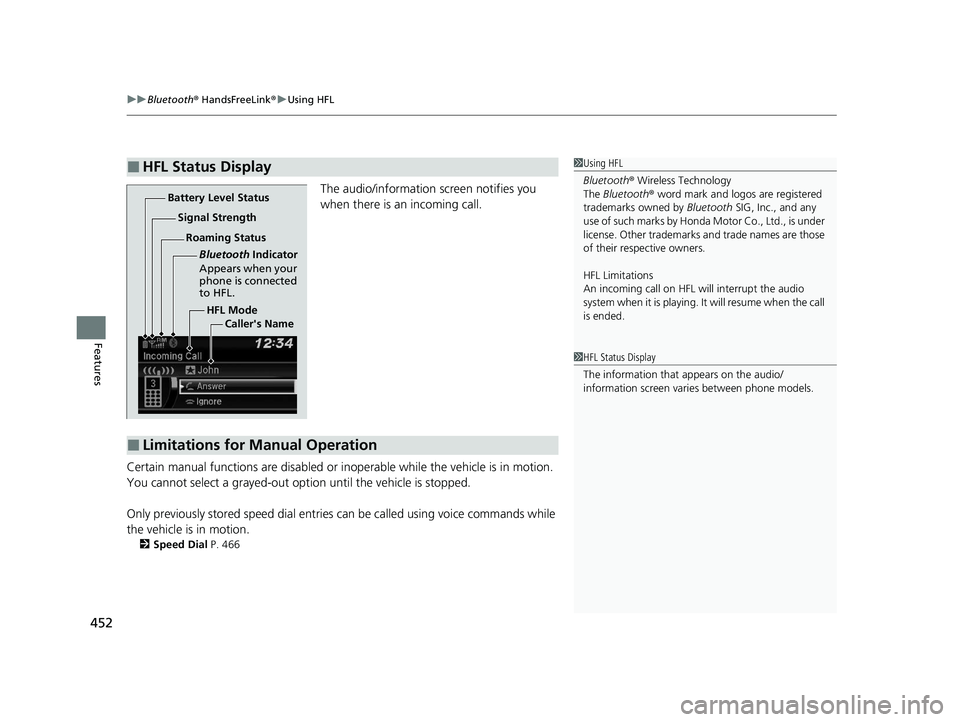
The audio/information screen notifies you
when there is an incoming call.
Certain manual functions are disabled or i noperable while the vehicle is in motion.
You cannot select a grayed-out option until the vehicle is stopped.
Only previously stored speed dial entries can be called using voice commands while
the vehicle is in motion.
2 Speed Dial P. 466
■HFL Status Display1Using HFL
Bluetooth ® Wireless Technology
The Bluetooth ® word mark and logos are registered
trademarks owned by Bluetooth SIG, Inc., and any
use of such marks by Honda Motor Co., Ltd., is under
license. Other trademarks and trade names are those
of their respective owners.
HFL Limitations
An incoming call on HFL will interrupt the audio
system when it is playing. It will resume when the call
is ended.
HFL Mode
Battery Level Status
Signal Strength
Bluetooth Indicator
Appears when your
phone is connected
to HFL.
Roaming Status
Caller's Name
■Limitations for Manual Operation
1HFL Status Display
The information that appears on the audio/
information screen vari es between phone models.
22 PILOT-31TG76600.book 452 ページ 2021年6月11日 金曜日 午後4時40分
Page 455 of 737
453
uuBluetooth ® HandsFreeLink ®u HFL Menus
Continued
Features
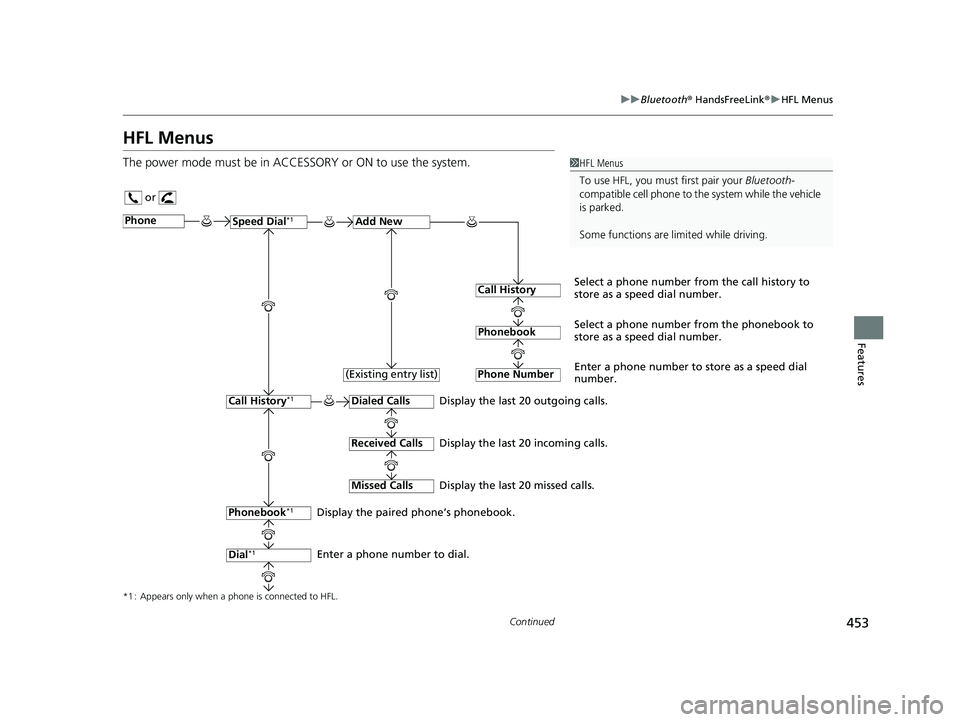
HFL Menus
The power mode must be in ACCESSO RY or ON to use the system.1HFL Menus
To use HFL, you must first pair your Bluetooth-
compatible cell phone to th e system while the vehicle
is parked.
Some functions are limited while driving.
or
Display the last 20 outgoing calls.
Display the last 20 incoming calls.
Display the last 20 missed calls.
*1 : Appears only when a phone is connected to HFL.
PhoneSpeed Dial*1Add New
Select a phone number from the call history to
store as a speed dial number.
Call History
PhonebookSelect a phone number from the phonebook to
store as a speed dial number.
Phone Number
Enter a phone number to store as a speed dial
number.
Dialed Calls
Received Calls
Missed Calls
Phonebook*1
Dial*1
Call History*1
Display the paired phone’s phonebook.
Enter a phone number to dial. (Existing entry list)
22 PILOT-31TG76600.book 453 ページ 2021年6月11日 金曜日 午後4時40分
Page 479 of 737
Continued477
uuBluetooth ® HandsFreeLink ®u Using HFL
Features
(Pick-up) button: Press to go directly to the phone screen of the driver
information interface, or to answer an incoming call.
(Hang-up) button: Press to end a call.
(Back) button: Press to go back to the previous screen, or cancel a command.
(Talk) button: Press to access Voice Portal.
/ / / buttons: Press to select an item displayed on the phone screen
of the driver information interface.
ENTER button: Press to call a number listed in the selected item on the phone
screen of the driver information interface.
(Home) button: Press to go back to the home sc reen of the driver information
interface.
To go to the phone screen of the driver information interface:
1. Press the (home) button on the steering wheel.
2. Select Phone .
u You can select Favorite Contacts or Recent Calls .1Bluetooth ® HandsFreeLink ®
Bluetooth ® Wireless Technology
The Bluetooth ® word mark and logos are registered
trademarks owned by Bluetooth SIG, Inc., and any
use of such marks by Honda Motor Co., Ltd., is under
license. Other trademarks and trade names are those
of their respective owners.
HFL Limitations
An incoming call on HFL will interrupt the audio
system when it is playing. It will resume when the call
is ended.
34
22 PILOT-31TG76600.book 477 ページ 2021年6月11日 金曜日 午後4時40分
Page 531 of 737
529
uuWhen Driving uAutomatic Transmission
Driving
Automatic Transmission
The engine runs at a higher id le speed and creeping increases.
Keep the brake pedal firmly depressed when stopped.
Quickly depressing the accelerator peda l while driving uphill may cause the
transmission to drop to a lo wer gear, unexpectedly increa sing vehicle speed. Depress
the accelerator pedal carefully, especi ally on slippery roads and curves.
■Creeping
■Kickdown
1Driving Guidelines for Your Utility Vehicle
Failure to operate your vehi cle correctly might result
in a crash or a rollover. 2 Important Handling Information P. 36
2 Precautions While Driving P. 528
22 PILOT-31TG76600.book 529 ページ 2021年6月11日 金曜日 午後4時40分
Page 535 of 737
Continued533
uuWhen Driving uShifting
Driving
In freezing or sub-freezing conditions, the electronic gear selector response may be
slow.
Always depress the brake pedal before changing the gear position to
(P, and
confirm that
(P is shown on the gear position in dicator before releasing the brake.
■When opening the driver’s door
If you open the driver’s door under the following conditions, the gear position
automatically changes to
(P.
• The vehicle is stationary with the engine running, or moving at 1 mph (2 km/h) or
slower.
• The transmission is in other than
(P.
• You have unfastened the driver side seat belt.
u If you manually change the gear position from
(P with the brake pedal
depressed, the gear position will automatically return to
(P once you release
the brake pedal.
■When turning off the power mode
If you turn the engine off wh ile the vehicle is stationary, and the transmission is in
other than
(P, the gear position au tomatically changes to (P.
1When opening the driver’s door
You should always select
(P before opening the
driver’s door.
Make sure to park the vehicle in a safe place. 2 When Stopped P. 608
If you want to drive the ve hicle after the gear position
has automatically changed to
( P under the described
conditions, close the door, fasten the seat belt,
depress the brake pedal, then change the gear
position.
If you leave the vehicle, tu rn off the engine and lock
the doors.
22 PILOT-31TG76600.book 533 ページ 2021年6月11日 金曜日 午後4時40分
Page 548 of 737
546
uuWhen Driving uVehicle Stability AssistTM (VSA ®), aka Electronic Stability Control (ESC), System
Driving
Vehicle Stability AssistTM (VSA ®), aka Electronic
Stability Control (ESC), System
VSA ® helps to stabilize the vehicle during cornering if the vehicle turns more or less
than what was intended. It also assists in maintaining traction on slippery surfaces.
It does so by regulating engine output and select ively applying the brakes.
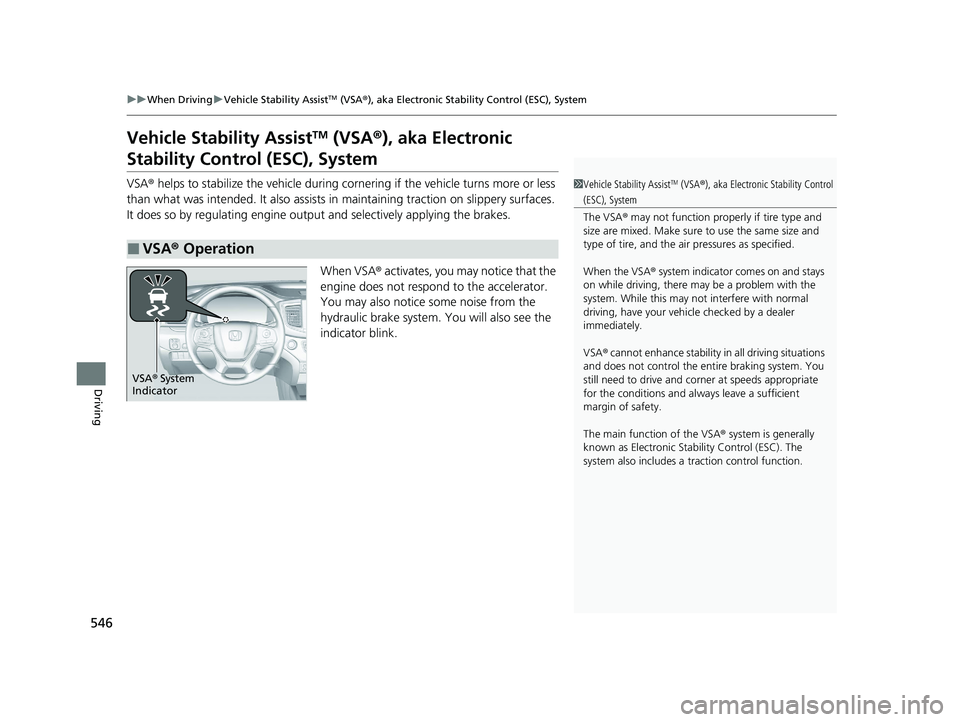
When VSA ® activates, you may notice that the
engine does not respond to the accelerator.
You may also notice some noise from the
hydraulic brake system. You will also see the
indicator blink.
■VSA ® Operation
1 Vehicle Stability AssistTM (VSA ®), aka Electronic Stability Control
(ESC), System
The VSA ® may not function properl y if tire type and
size are mixed. Make sure to use the same size and
type of tire, and the air pressures as specified.
When the VSA ® system indicator comes on and stays
on while driving, there ma y be a problem with the
system. While this may not interfere with normal
driving, have your vehi cle checked by a dealer
immediately.
VSA ® cannot enhance stability in all driving situations
and does not control the entire braking system. You
still need to drive and corner at speeds appropriate
for the conditions and always leave a sufficient
margin of safety.
The main function of the VSA ® system is generally
known as Electronic Stability Control (ESC). The
system also includes a traction control function.
VSA® System
Indicator
22 PILOT-31TG76600.book 546 ページ 2021年6月11日 金曜日 午後4時40分
Page 555 of 737
553
uuWhen Driving uLaneWatchTM*
Driving
■Customizing the La neWatch settings
You can customize the following items using the audio/information screen.
• Show with Turn Signal : Selects whether LaneWatch monitor comes on when
you operate the tu rn signal lever.
• Show Reference Line : Selects whether the reference lines appear on the
LaneWatch monitor.
• Display : Adjusts display settings.
2Customized Features P. 429
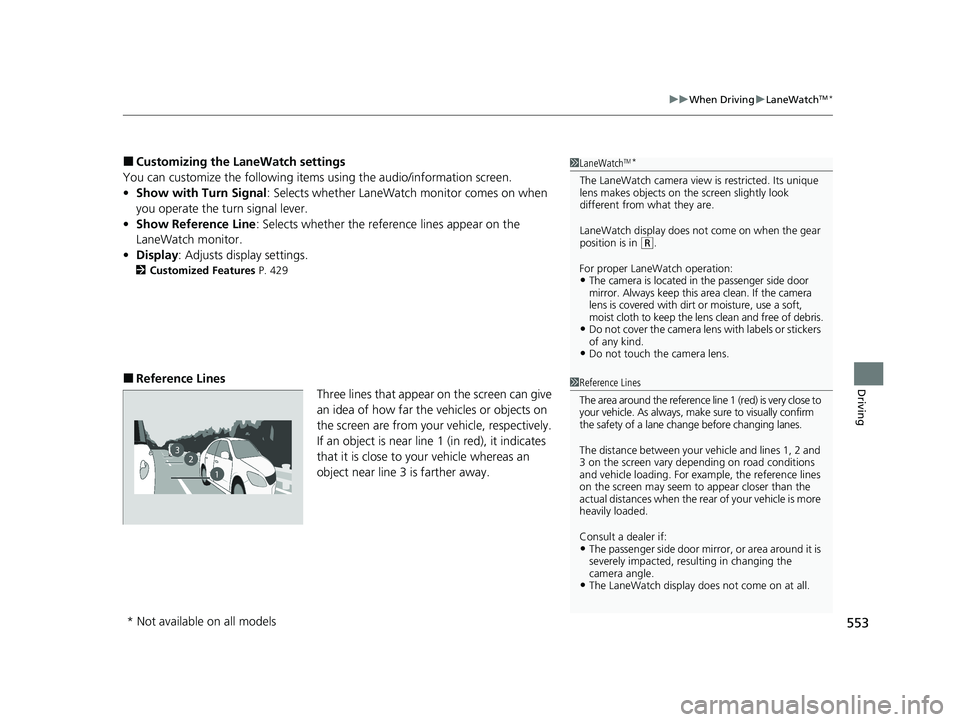
■Reference Lines
Three lines that appear on the screen can give
an idea of how far the vehicles or objects on
the screen are from your vehicle, respectively.
If an object is near line 1 (in red), it indicates
that it is close to your vehicle whereas an
object near line 3 is farther away.
1LaneWatchTM*
The LaneWatch camera view is restricted. Its unique
lens makes objects on the screen slightly look
different from what they are.
LaneWatch display does not come on when the gear
position is in
( R.
For proper LaneWatch operation:
•The camera is located in the passenger side door
mirror. Always keep this area clean. If the camera
lens is covered with dirt or moisture, use a soft,
moist cloth to keep the lens clean and free of debris.
•Do not cover the camera lens with labels or stickers
of any kind.
•Do not touch the camera lens.
1Reference Lines
The area around the reference line 1 (red) is very close to
your vehicle. As always, m ake sure to visually confirm
the safety of a lane chan ge before changing lanes.
The distance betwee n your vehicle and lines 1, 2 and
3 on the screen vary depending on road conditions
and vehicle loading. For ex ample, the reference lines
on the screen may seem to appear closer than the
actual distances when the rear of your vehicle is more
heavily loaded.
Consult a dealer if:
•The passenger side door mirr or, or area around it is
severely impacted, resulting in changing the
camera angle.
•The LaneWatch display doe s not come on at all.
23
1
* Not available on all models
22 PILOT-31TG76600.book 553 ページ 2021年6月11日 金曜日 午後4時40分
Page 560 of 737
558
uuWhen Driving uTire Pressure Monitoring System (TPMS) - Required Federal Explanation
Driving
Please note that the TPMS is not a substitute for proper tire
maintenance, and it is the driver ’s responsibility to maintain
correct tire pressure, even if un der-inflation has not reached the
level to trigger illumina tion of the TPMS low ti re pressure telltale.
Your vehicle has also been eq uipped with a TPMS malfunction
indicator to indicate when the sy stem is not operating properly.
The TPMS malfunction indicator is combined with the low tire
pressure telltale. When the system detects a malfunction, the
telltale will flash fo r approximately one minute and then remain
continuously illuminated. This sequence will continue upon
subsequent vehicle start-ups as long as the malfunction exists.
When the malfunction indicator is illuminated, the system may
not be able to detect or signal low tire pressure as intended.
TPMS malfunctions may occur for a variety of reasons, including
the installation of replacement or alternate tires or wheels on the
vehicle that prevent the TPMS from functioning properly.
Always check the TPMS malfunction telltale after replacing one or
more tires or wheels on your vehicle to ensure that the
replacement or alternate tires and wheels allow the TPMS to
continue to function properly.
22 PILOT-31TG76600.book 558 ページ 2021年6月11日 金曜日 午後4時40分