ECU HONDA PILOT 2022 Service Manual
[x] Cancel search | Manufacturer: HONDA, Model Year: 2022, Model line: PILOT, Model: HONDA PILOT 2022Pages: 737, PDF Size: 28.84 MB
Page 415 of 737
413
uuBlu-ray/DVD Rear Entertainment System*uPlayable Discs
Continued
Features
2. Redistribution
This license grants a worldwide, royalty-fr ee, perpetual and irrevocable right and license to use, execute, perform, compile, display, copy,
create derivative works of, distribute and sublicense the FreeType Project (in both source and object code forms) and derivative works
thereof for any purpose; and to authorize others to exercise some or all of the rights granted herein, subject to the following conditions:
• Redistribution of source code must retain this license file ('FTL.TXT') unaltered; any additions, de letions or changes to the original files
must be clearly indicated in accompanying do cumentation. The copyright notices of the unaltered, original files must be preserv ed in all
copies of source files.
• Redistribution in binary form must provide a disclaimer that states that the software is based in part of the work of the FreeT ype Team,
in the distribution documentation. We also encourage you to put an URL to the FreeType web page in your documentation, though t his
isn't mandatory.
These conditions apply to any software derived from or based on the FreeType Project, not just the unmodified files. If you use our work,
you must acknowledge us. However, no fee need be paid to us.
3. Advertising
Neither the FreeType authors and c ontributors nor you shall use the name of the other for commercial, advertising, or promotion al
purposes without specific prior written permission.
We suggest, but do not require, that you use one or more of the following phrases to refer to this software in your documentation or
advertising materials: 'FreeType Projec t', 'FreeType Engine', 'FreeType library', or 'FreeType Distribution'.
As you have not signed this lic ense, you are not required to accept it. However, as the FreeType Project is copyrighted material, only this
license, or another one contracted with the authors, grants you the right to use, distribute, a nd modify it. Therefore, by using, distributing,
or modifying the FreeType Project, you indicate that y ou understand and accept all the terms of this license.
22 PILOT-31TG76600.book 413 ページ 2021年6月11日 金曜日 午後4時40分
Page 436 of 737
434
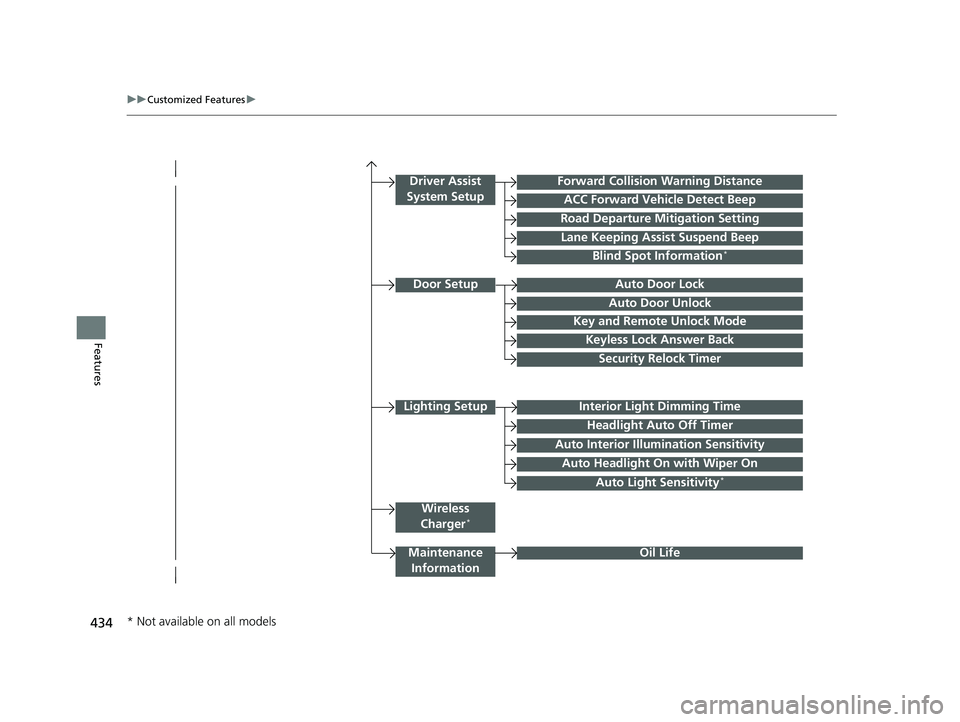
uuCustomized Features u
Features
Lighting SetupInterior Light Dimming Time
Headlight Auto Off Timer
Forward Collision Warning Distance
ACC Forward Vehicle Detect Beep
Auto Interior Illu mination Sensitivity
Door SetupAuto Door Lock
Auto Door Unlock
Key and Remote Unlock Mode
Keyless Lock Answer Back
Security Relock Timer
Maintenance
Information
Driver Assist
System Setup
Oil Life
Road Departure Mitigation Setting
Lane Keeping Assist Suspend Beep
Blind Spot Information*
Wireless
Charger*
Auto Headlight On with Wiper On
Auto Light Sensitivity*
* Not available on all models
22 PILOT-31TG76600.book 434 ページ 2021年6月11日 金曜日 午後4時40分
Page 445 of 737
443
uuCustomized Features u
Continued
Features
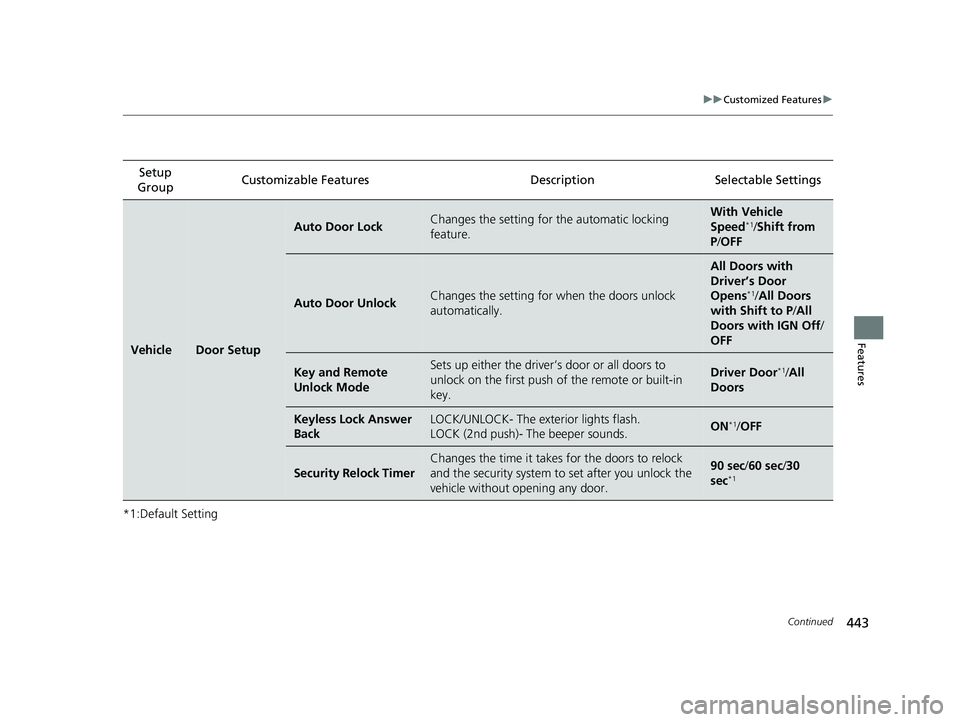
*1:Default SettingSetup
Group Customizable Features Description Selectable Settings
VehicleDoor Setup
Auto Door LockChanges the setting for
the automatic locking
feature.With Ve hicle
Speed*1/ Shift from
P /OFF
Auto Door UnlockChanges the setting for when the doors unlock
automatically.
All Doors with
Driver’s Door
Opens
*1/ All Doors
with Shift to P /All
Doors with IGN Off /
OFF
Key and Remote
Unlock ModeSets up either the driver’s door or all doors to
unlock on the first push of the remote or built-in
key.Driver Door*1/ All
Doors
Keyless Lock Answer
BackLOCK/UNLOCK- The exterior lights flash.
LOCK (2nd push)- The beeper sounds.ON*1/ OFF
Security Relock Timer
Changes the time it takes for the doors to relock
and the security system to set after you unlock the
vehicle without opening any door.90 sec/ 60 sec/30
sec*1
22 PILOT-31TG76600.book 443 ページ 2021年6月11日 金曜日 午後4時40分
Page 450 of 737
448
Features
HomeLink® Universal Transceiver*
The HomeLink ® Universal Transceiver can be pr ogrammed to operate up to three
remote controlled devices around your home , such as garage doors, lighting, or
home security systems.
Refer to the safety information that came wi th your garage door opener to test that
the safety features are functioning properly. If you do not have the safety
information, contac t the manufacturer.
Before programming HomeLink, make sure th at people and objects are out of the
way of the garage or gate to prevent potential injury or damage.
When programming a garage door opener, park just outside the garage door’s path.
■Important Safety Precautions
1HomeLink ® Universal Transceiver*
Before programming HomeLi nk to operate a garage
door opener, confirm that the opener has an external
entrapment protection system , such as an “electronic
eye,” or other safety and reverse stop features. If it
does not, HomeLink may not be able to operate it.
NOTE:
Some LED lightbulbs instal led in the garage door
opener can interfere with th e training and consistent
operation of your HomeLink device. Please consider
use of Low RF interference bulbs in your garage door
opener.
* Not available on all models
22 PILOT-31TG76600.book 448 ページ 2021年6月11日 金曜日 午後4時40分
Page 458 of 737
456
uuBluetooth ® HandsFreeLink ®u HFL Menus
Features
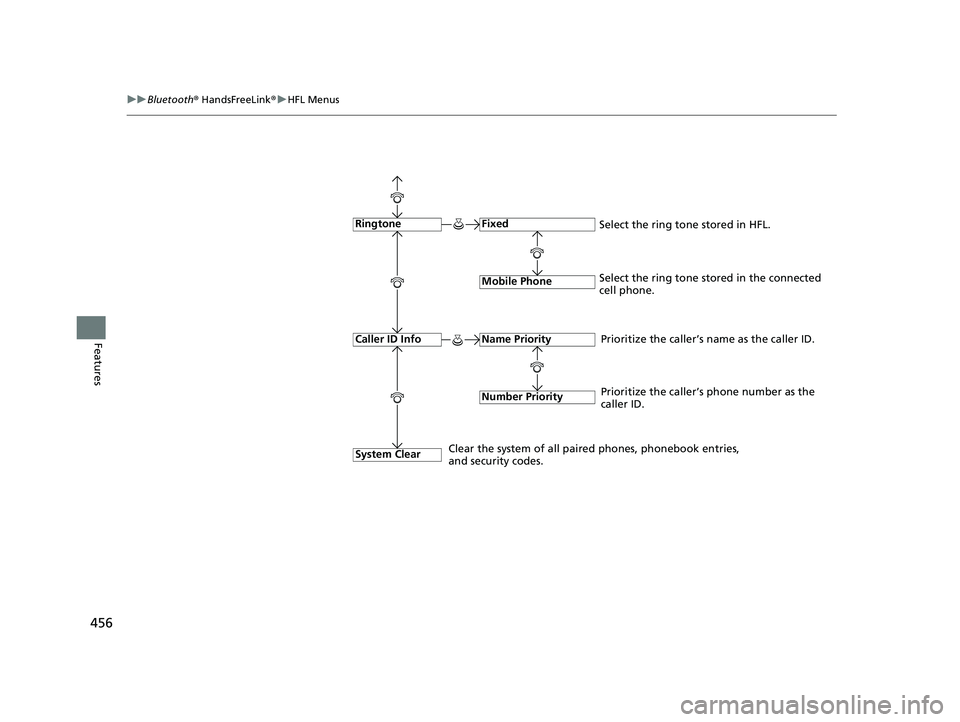
Fixed
Mobile Phone
System Clear
Ringtone
Select the ring tone stored in the connected
cell phone.
Name Priority
Number Priority
Caller ID InfoPrioritize the caller’s name as the caller ID.
Clear the system of all paired phones, phonebook entries,
and security codes. Prioritize the caller’s phone number as the
caller ID.
Select the ring tone stored in HFL.
22 PILOT-31TG76600.book 456 ページ 2021年6月11日 金曜日 午後4時40分
Page 506 of 737
504
Driving
Before Driving
Driving Preparation
Check the following items before you start driving.
• Make sure there are no obstructions on the windows, door mirrors, exterior
lights, or other parts of the vehicle.
u Remove any frost, snow, or ice.
u Remove any snow on the roof, as this can slip down and obstruct your field of
vision while driving. If frozen solid , remove ice once it has softened.
u When removing ice from around the wheels, be sure not to damage the wheel
or wheel components.
• Make sure the hood is securely closed.
u If the hood opens while driving, your front view will be blocked.
• Make sure the tires are in good condition.
u Check air pressures, and check for damage and excessive wear.
2Checking and Maintaining Tires P. 656
•Make sure there are no people or ob jects behind or around the vehicle.
u There are blind spots from the inside.
■Exterior Checks1Exterior Checks
NOTICE
When doors are frozen s hut, use warm water around
the door edges to melt any ice. Do not try to force
them open, as this can damage the rubber trim
around the doors. When done, wipe dry to avoid
further freezing.
Do not pour warm water into the key cylinder.
You will be unable to insert the key if the water
freezes in the hole.
Heat from the engine and exhaust can ignite
flammable material s left under the hood, causing a
fire. If you’ve parked y our vehicle for an extended
period, inspect and remove any debris that may have
collected, such as dried grass and leaves that have
fallen or have been carried in for use as a nest by a
small animal. Also, check under the hood for leftover
flammable materials after you or someone else has
performed maintenance on your vehicle.
22 PILOT-31TG76600.book 504 ページ 2021年6月11日 金曜日 午後4時40分
Page 507 of 737
Continued505
uuBefore Driving uDriving Preparation
Driving
• Store or secure all items on board properly.
u Carrying too much cargo, or improperly storing it, can affect your vehicle’s
handling, stability, sto pping distance, and tires, and make it unsafe.
2Maximum Load Limit P. 507
•Do not pile items higher than the seat height.
u They can block your view and may be thrown forward in the event of sudden
braking.
• Do not place anything in the front seat footwells. Make sure to secure the floor
mat.
u An object or unsecured floor mat can in terfere with your brake and accelerator
pedal operation while driving.
• If you have any animals on board, do not let them move around in the vehicle.
u They may interfere with driving and a crash could occur.
• Securely close and lock al l doors and the tailgate.
2Locking/Unlocking the Doors from the Inside P. 149
•Adjust your seating position properly.
u Adjust the head restraint, too.
2Adjusting the Seats P. 194
2 Adjusting the Front and Second Row Outer Seat Head Restraint Positions
P. 200
• Adjust the mirrors and steering wheel properly.
u Adjust them while sitting in the proper driving position.
2 Adjusting the Steering Wheel P. 191
2 Adjusting the Mirrors P. 192
■Interior Checks1Interior Checks
The headlight aim is set by the factory, and does not
need to be adjusted. Howeve r, if you regularly carry
heavy items in the cargo area or tow a trailer, have
the aiming readjusted at a dealer or by a qualified
technician.
22 PILOT-31TG76600.book 505 ページ 2021年6月11日 金曜日 午後4時40分
Page 520 of 737
518
uuTowing a Trailer uDriving Safely with a Trailer
Driving
Driving Safely with a Trailer
• Have the trailer properly serviced and keep it in good condition.
• Make sure that all the weights and load in the vehicle and trailer are within limits.
2Towing Load Limits P. 510
•When towing more than 3,500 lbs (1,590 kg), use of gasoline with a pump
octane number of 87 or higher is recommended.
u Towing performance can be affected by high altitude, high temperature, or
steep uphill.
• Securely attach the hitch, safety chains, and other necessary parts to the trailer.
• Securely store all the items in and on the tr ailer so that they do not shift while
driving.
• Check if the lights and brakes on the trailer are working properly.
• Check the pressures of the trailer tires.
• Turn off the Auto Idle Stop syst em using the Auto Idle Stop OFF button. The
trailer weight can affect your vehicle's br ake effectiveness if Auto Idle Stop is
activated on a hill while towing a trailer.
• Drive slower than normal.
• Obey posted speed limits for vehicles with trailers.
• Use the
(D position when towing a trailer on level roads.
• Turn more slowly and with a wider turning arc than normal.
• Allow more time and distance for braking.
• Do not brake or turn suddenly.
■Things You Need To Know Before Towing a Trailer
■Towing Speeds and Gears
■Turning and Braking
1Driving Safely with a Trailer
Operating speed when towing a trailer must not
exceed 62 mph (100 km/h).
Parking
In addition to the normal precautions, place wheel
chocks at each of the trailer’s tires.
1Towing Speeds and Gears
When towing a fixed-sided trailer (e.g., camper), do
not exceed 55 mph (88 km/h).
At higher speeds, the trai ler may sway or affect
vehicle handling.
22 PILOT-31TG76600.book 518 ページ 2021年6月11日 金曜日 午後4時40分
Page 527 of 737
Continued525
uuWhen Driving uStarting the Engine
Driving
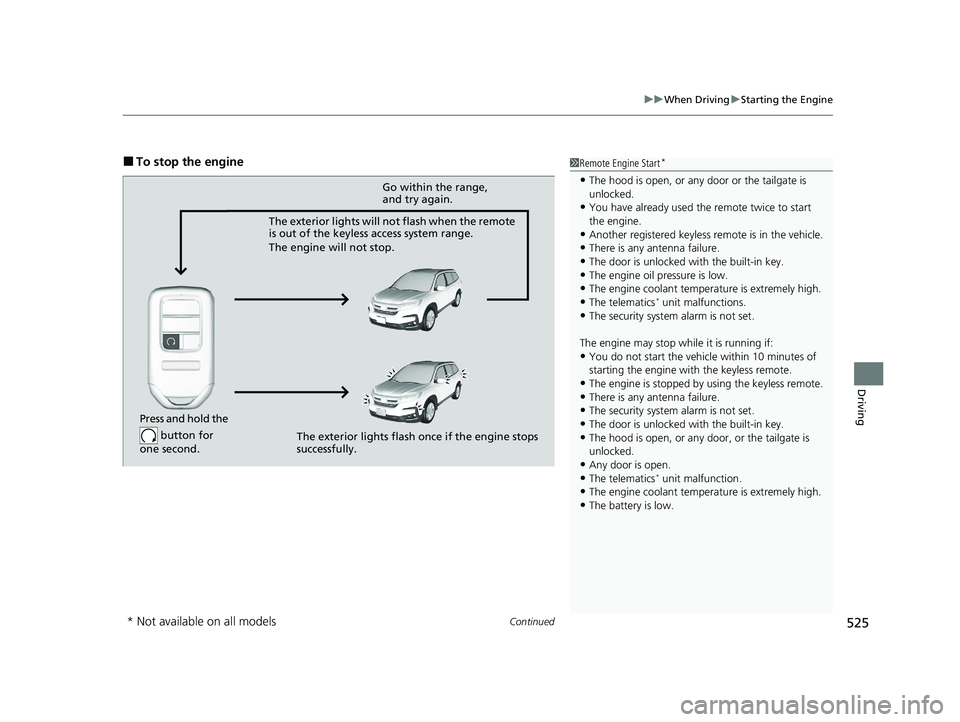
■To stop the engine1Remote Engine Start*
•The hood is open, or any door or the tailgate is
unlocked.
•You have already used the remote twice to start
the engine.
•Another registered keyless remote is in the vehicle.
•There is any antenna failure.
•The door is unlocked with the built-in key.•The engine oil pressure is low.
•The engine coolant temper ature is extremely high.
•The telematics* unit malfunctions.•The security system alarm is not set.
The engine may stop whil e it is running if:
•You do not start the vehicl e within 10 minutes of
starting the engine with the keyless remote.
•The engine is stopped by using the keyless remote.•There is any antenna failure.
•The security system alarm is not set.
•The door is unlocked with the built-in key.
•The hood is open, or any door, or the tailgate is
unlocked.
•Any door is open.
•The telematics* unit malfunction.•The engine coolant temper ature is extremely high.
•The battery is low.
Press and hold the
button for
one second.
Go within the range,
and try again.
The exterior lights will not flash when the remote
is out of the keyless access system range.
The engine will not stop.
The exterior lights flash once if the engine stops
successfully.
* Not available on all models
22 PILOT-31TG76600.book 525 ページ 2021年6月11日 金曜日 午後4時40分
Page 638 of 737
636
uuMaintenance Under the Hood uOpening the Hood
Maintenance
Opening the Hood
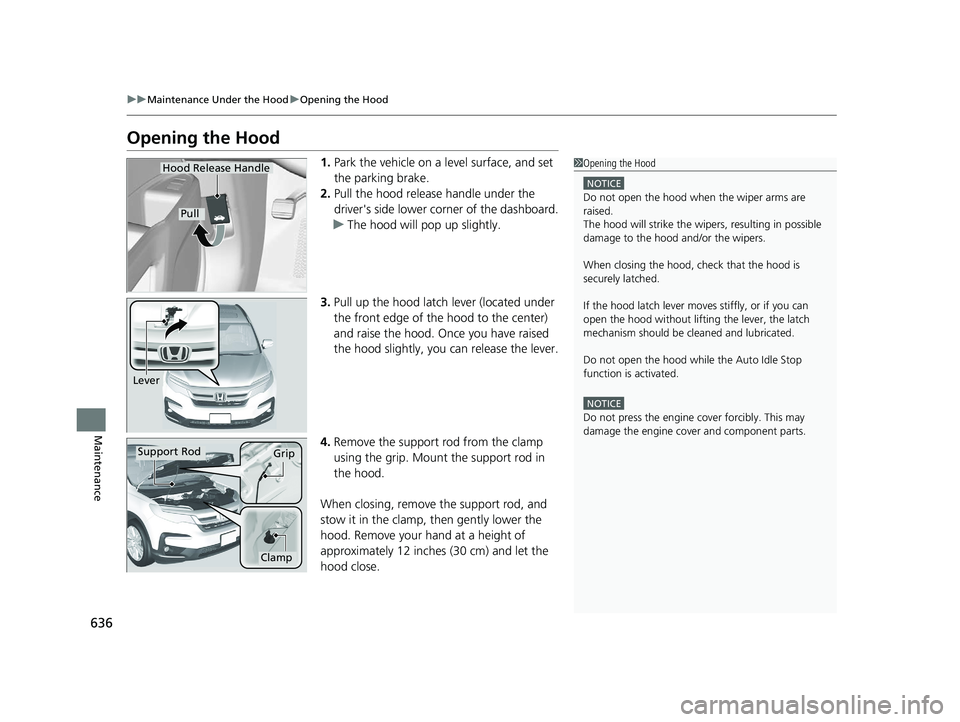
1. Park the vehicle on a level surface, and set
the parking brake.
2. Pull the hood release handle under the
driver's side lower corner of the dashboard.
u The hood will pop up slightly.
3. Pull up the hood latch lever (located under
the front edge of the hood to the center)
and raise the hood. Once you have raised
the hood slightly, you can release the lever.
4. Remove the support rod from the clamp
using the grip. Mount the support rod in
the hood.
When closing, remove the support rod, and
stow it in the clamp, then gently lower the
hood. Remove your hand at a height of
approximately 12 inches (30 cm) and let the
hood close.1 Opening the Hood
NOTICE
Do not open the hood when the wiper arms are
raised.
The hood will strike the wipe rs, resulting in possible
damage to the hood and/or the wipers.
When closing the hood, check that the hood is
securely latched.
If the hood latch lever moves stiffly, or if you can
open the hood without lifti ng the lever, the latch
mechanism should be cl eaned and lubricated.
Do not open the hood while the Auto Idle Stop
function is activated.
NOTICE
Do not press the engine cover forcibly. This may
damage the engine cover and component parts.
Hood Release Handle
Pull
Lever
Support RodGrip
Clamp
22 PILOT-31TG76600.book 636 ページ 2021年6月11日 金曜日 午後4時40分