Intelligent HONDA PILOT 2022 Owners Manual
[x] Cancel search | Manufacturer: HONDA, Model Year: 2022, Model line: PILOT, Model: HONDA PILOT 2022Pages: 737, PDF Size: 28.84 MB
Page 16 of 737
14
Quick Reference Guide
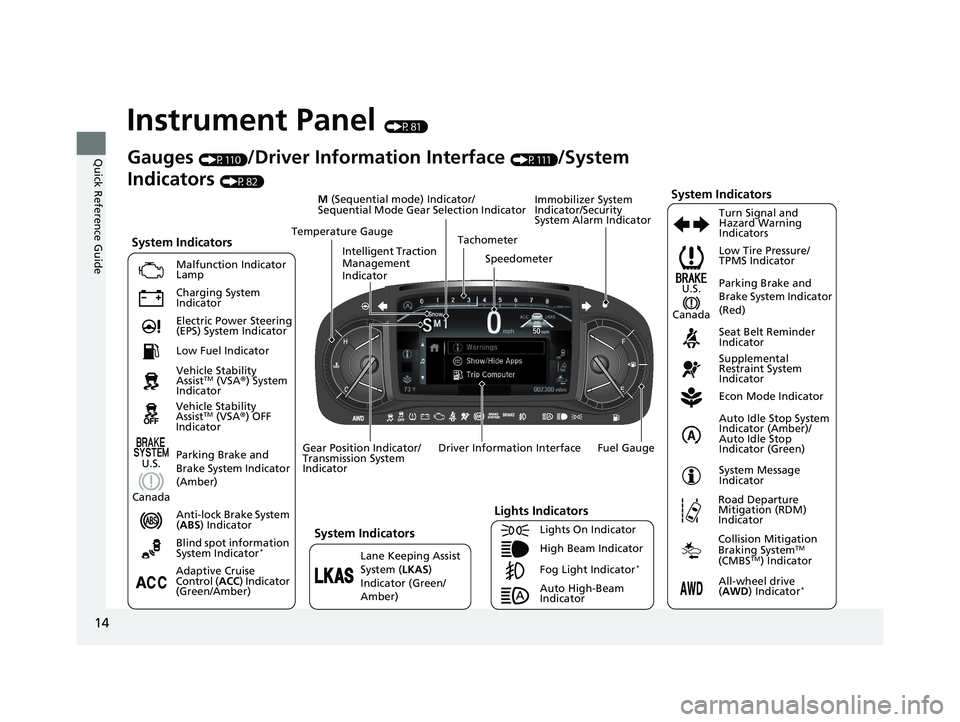
Instrument Panel (P81)
System Indicators
Malfunction Indicator
Lamp
Charging System
Indicator
Anti-lock Brake System
(ABS ) Indicator
Vehicle Stability
Assist
TM (VSA
®) System
Indicator Low Tire Pressure/
TPMS Indicator
Immobilizer System
Indicator/Security
System Alarm Indicator
Lights Indicators
Lights On Indicator
High Beam Indicator
Fog Light Indicator
*Lane Keeping Assist
System (
LKAS)
Indicator (Green/
Amber) Seat Belt Reminder
Indicator
System Indicators
Econ Mode Indicator
System Message
Indicator Parking Brake and
Brake System Indicator
(Red)
Supplemental
Restraint System
Indicator
Driver Information Interface Tachometer
M
(Sequential mode) Indicator/
Sequential Mode Gear Selection Indicator
Speedometer
Fuel Gauge
Gear Position Indicator/
Transmission System
Indicator Auto Idle Stop System
Indicator (Amber)/
Auto Idle Stop
Indicator (Green)
Gauges (P110)/Driver Information Interface (P111)/System
Indicators
(P82)
Adaptive Cruise
Control ( ACC) Indicator
(Green/Amber) Turn Signal and
Hazard Warning
Indicators
Electric Power Steering
(EPS) System Indicator
Blind spot information
System Indicator
*
Temperature Gauge
Parking Brake and
Brake System Indicator
(Amber)U.S.
Canada
System Indicators
U.S.
Canada
Low Fuel Indicator
Auto High-Beam
Indicator
Road Departure
Mitigation (RDM)
Indicator
Collision Mitigation
Braking SystemTM
(CMBSTM) Indicator
All-wheel drive
( AWD ) In
dicator*
Intelligent Traction
Management
Indicator
Vehicle Stability
AssistTM (VSA®) OFF
Indicator
22 PILOT-31TG76600.book 14 ページ 2021年6月11日 金曜日 午後4時40分
Page 25 of 737
23
Quick Reference Guide
Driving (P503)
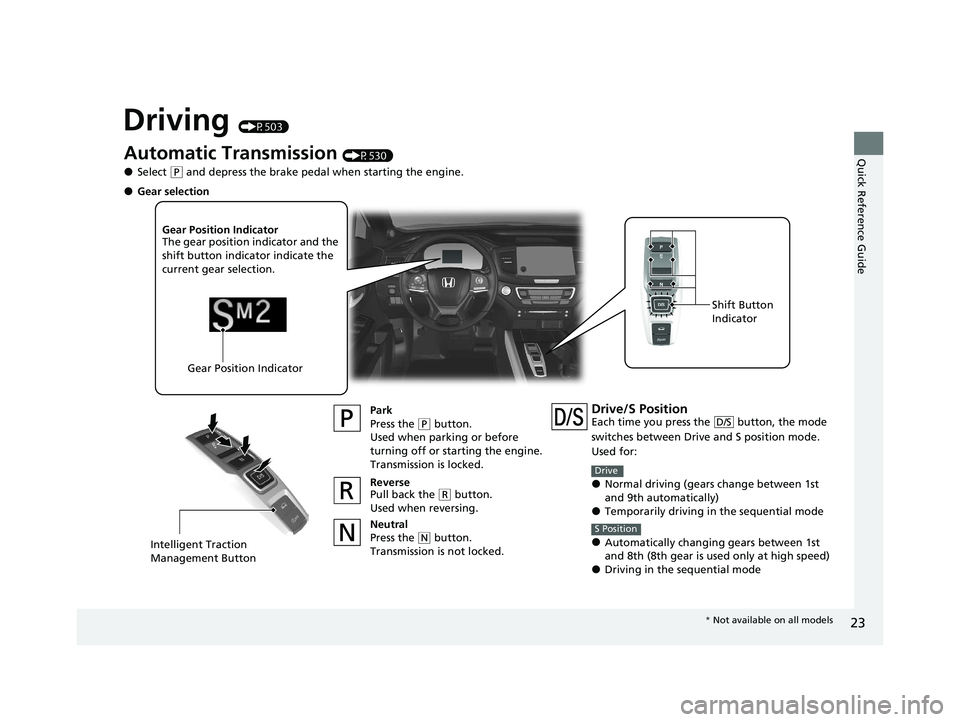
Automatic Transmission (P530)
●Select (P and depress the brake pedal when starting the engine.
Park
Press the
(P button.
Used when parking or before
turning off or starting the engine.
Transmission is locked.
Reverse
Pull back the
( R button.
Used when reversing.
Neutral
Press the
( N button.
Transmission is not locked.
Gear Position Indicator
The gear position indicator and the
shift button indicator indicate the
current gear selection.
Gear Position Indicator Shift Button
Indicator
●Gear selection
Intelligent Traction
Management Button
Drive/S PositionEach time you press the button, the mode
switches between Drive
and S position mode.
Used for:
●Normal driving (gears change between 1st
and 9th automatically)
●Temporarily driving in the sequential mode
●Automatically changing gears between 1st
and 8th (8th gear is used only at high speed)
●Driving in the sequential mode
D/S
Drive
S Position
* Not available on all models
22 PILOT-31TG76600.book 23 ページ 2021年6月11日 金曜日 午後4時40分
Page 89 of 737
87
uuIndicators u
Continued
Instrument Panel
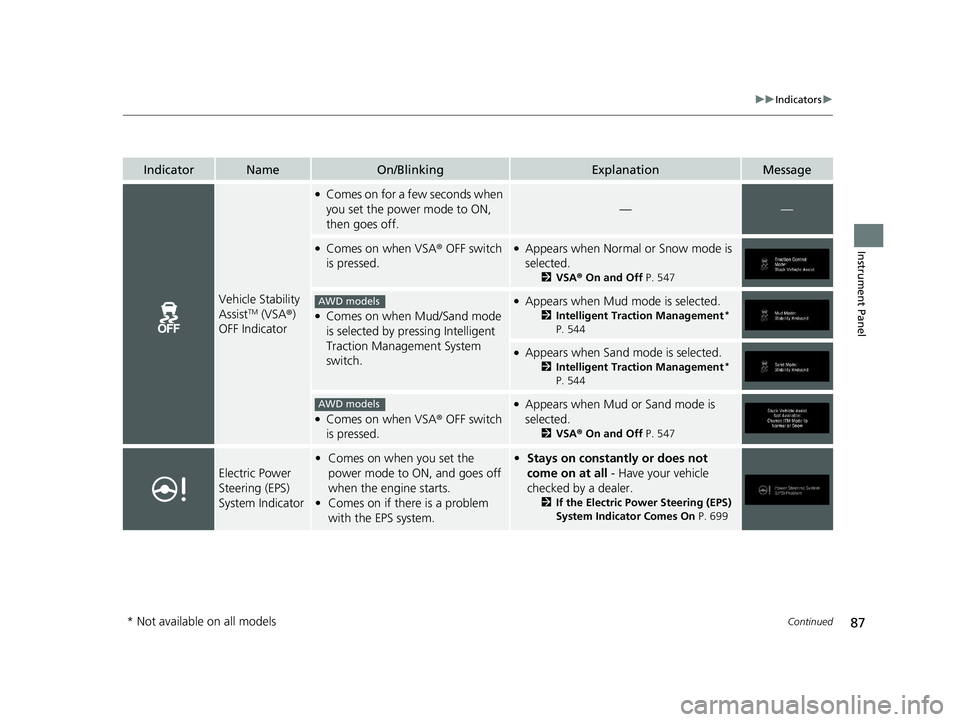
IndicatorNameOn/BlinkingExplanationMessage
Vehicle Stability
AssistTM (VSA®)
OFF Indicator
●Comes on for a few seconds when
you set the power mode to ON,
then goes off.
——
●Comes on when VSA ® OFF switch
is pressed.●Appears when Normal or Snow mode is
selected.
2 VSA ® On and Off P. 547
●Comes on when Mud/Sand mode
is selected by pressing Intelligent
Traction Management System
switch.
●Appears when Mud mode is selected.
2Intelligent Traction Management*
P. 544
●Appears when Sand mode is selected.
2 Intelligent Traction Management*
P. 544
●Comes on when VSA ® OFF switch
is pressed.
●Appears when Mud or Sand mode is
selected.
2 VSA ® On and Off P. 547
Electric Power
Steering (EPS)
System Indicator
•Comes on when you set the
power mode to ON, and goes off
when the engine starts.
• Comes on if there is a problem
with the EPS system.•Stays on constantly or does not
come on at all - Have your vehicle
checked by a dealer.
2 If the Electric Power Steering (EPS)
System Indicator Comes On P. 699
AWD models
AWD models
* Not available on all models
22 PILOT-31TG76600.book 87 ページ 2021年6月11日 金曜日 午後4時40分
Page 92 of 737
90
uuIndicators u
Instrument Panel
*1:AWD models
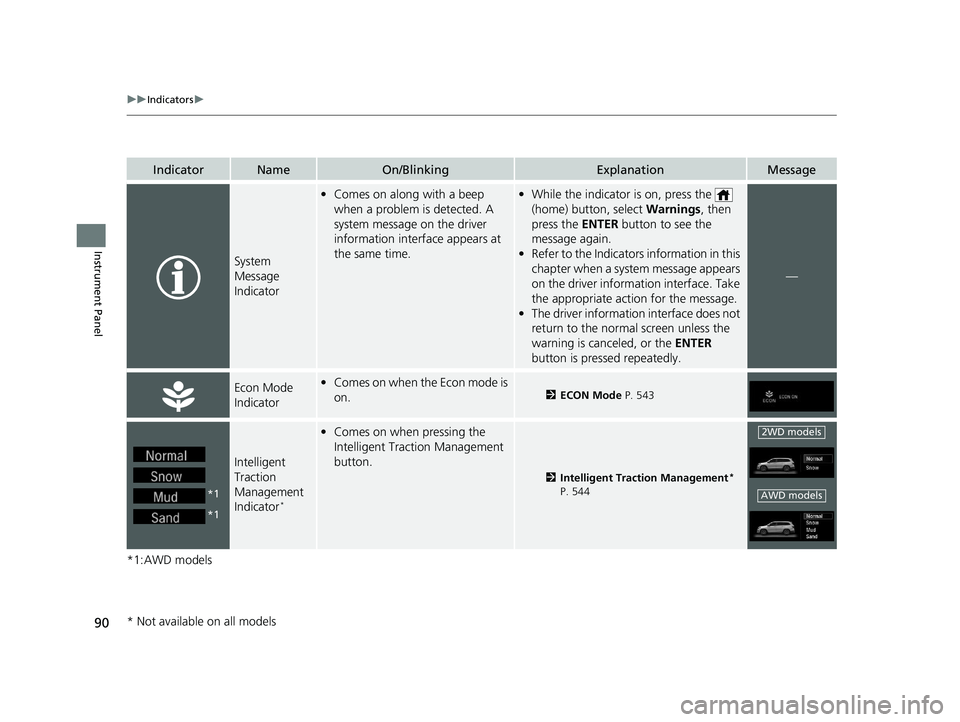
IndicatorNameOn/BlinkingExplanationMessage
System
Message
Indicator
•Comes on along with a beep
when a problem is detected. A
system message on the driver
information interface appears at
the same time.•While the indicator is on, press the
(home) button, select Warnings, then
press the ENTER button to see the
message again.
• Refer to the Indicators information in this
chapter when a syst em message appears
on the driver inform ation interface. Take
the appropriate action for the message.
• The driver information interface does not
return to the normal screen unless the
warning is canceled, or the ENTER
button is pressed repeatedly.
—
Econ Mode
Indicator• Comes on when the Econ mode is
on.2 ECON Mode P. 543
Intelligent
Traction
Management
Indicator
*
•Comes on when pressing the
Intelligent Traction Management
button.
2 Intelligent Traction Management*
P. 544
*1
*1
2WD models
AWD models
* Not available on all models
22 PILOT-31TG76600.book 90 ページ 2021年6月11日 金曜日 午後4時40分
Page 93 of 737
91
uuIndicators u
Continued
Instrument Panel
IndicatorNameOn/BlinkingExplanationMessage
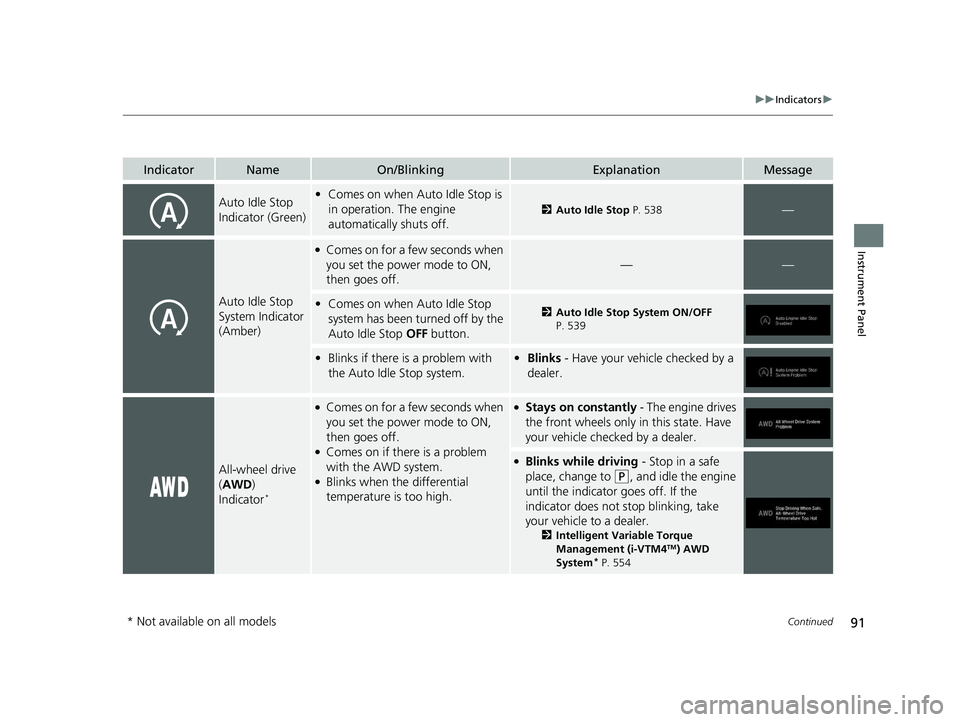
Auto Idle Stop
Indicator (Green)•Comes on when Auto Idle Stop is
in operation. The engine
automatically shuts off.
2 Auto Idle Stop P. 538—
Auto Idle Stop
System Indicator
(Amber)
●Comes on for a few seconds when
you set the power mode to ON,
then goes off.
——
•Comes on when Auto Idle Stop
system has been turned off by the
Auto Idle Stop OFF button.2Auto Idle Stop System ON/OFF
P. 539
• Blinks if there is a problem with
the Auto Idle Stop system.• Blinks - Have your vehicle checked by a
dealer.
All-wheel drive
(AWD )
Indicator
*
●Comes on for a few seconds when
you set the power mode to ON,
then goes off.
●Comes on if there is a problem
with the AWD system.
●Blinks when the differential
temperature is too high.
●Stays on constantly - The engine drives
the front wheels only in this state. Have
your vehicle checked by a dealer.
●Blinks while driving - Stop in a safe
place, change to
(P, and idle the engine
until the indicator goes off. If the
indicator does not stop blinking, take
your vehicle to a dealer.
2 Intelligent Variable Torque
Management (i-VTM4TM) AWD
System* P. 554
* Not available on all models
22 PILOT-31TG76600.book 91 ページ 2021年6月11日 金曜日 午後4時40分
Page 121 of 737
119
uuGauges and Displays uDriver Information Interface
Continued
Instrument Panel
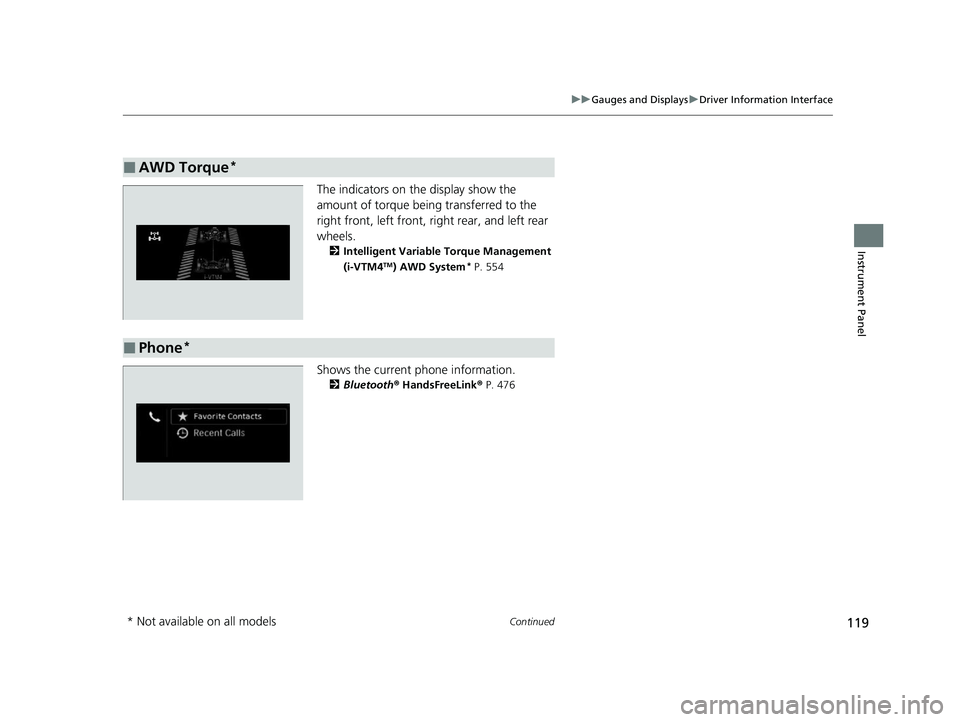
The indicators on the display show the
amount of torque being transferred to the
right front, left front, right rear, and left rear
wheels.
2 Intelligent Variable Torque Management
(i-VTM4TM) AWD System* P. 554
Shows the current phone information.
2Bluetooth® HandsFreeLink® P. 476
■AWD Torque*
■Phone*
* Not available on all models
22 PILOT-31TG76600.book 119 ページ 2021年6月11日 金曜日 午後4時40分
Page 505 of 737
503
Driving
This chapter discusses driving and refueling.
Before Driving................................... 504
Towing a Trailer ................................ 510
Off-Highway Driving Guidelines ..... 520
When Driving Starting the Engine .......................... 522
Automatic Transmission ................... 529
Shifting ............................................ 530
Auto Idle Stop .................................. 538
ECON Mode .................................... 543
Intelligent Trac tion Management
*.... 544Vehicle Stability AssistTM (VSA®), aka Electronic
Stability Control (ESC), System ..............546
Agile Handling Assist ....................... 548
Blind spot information System*........ 549
LaneWatchTM*.................................. 552 Intelligent Variable To
rque Management (i-
VTM4
TM) AWD System*.................. 554
Tire Pressure Monitoring System (TPMS) with Tire Fill Assist .......................... 555
Tire Pressure Monitoring System (TPMS) -
Required Federal Explanation ......... 557
Honda Sensing ®................................ 559
Collision Mitigati on Braking System
TM
(CMBSTM) ....................................... 562
Adaptive Cruise Control (ACC)......... 574
Lane Keeping Assist System (LKAS) .. 587
Road Departure Mitigation (RDM)
System ....................................... 596
Front Sensor Camera ....................... 601
Radar Sensor.................................... 603 Braking
Brake System ................................... 604
Anti-lock Brake System (ABS) ........... 606
Brake Assist System ......................... 607
Parking Your Vehicle
When Stopped ................................ 608
Parking Sensor System
*................... 610
Cross Traffic Monitor*..................... 615
Multi-View Rear Camera .................. 619
Refueling Fuel Information .............................. 621
How to Refuel ................................. 622
Fuel Economy and CO
2 Emissions
Improving Fuel Economy and Reducing CO
2 Emissions ................................ 624
* Not available on all models
22 PILOT-31TG76600.book 503 ページ 2021年6月11日 金曜日 午後4時40分
Page 522 of 737
520
Driving
Off-Highway Driving Guidelines
General Information
Your vehicle has been designed primarily for use on pavement, however, its higher
ground clearance allows you to occasionally travel on unpaved roads. It is not
designed for trail-blazing, or other challenging off-highway activities.
If you decide to drive on unpaved roads, you will find that it requires somewhat
different driving skills and that your vehicle will handle somewhat differently than it
does on pavement. Pay attention to the precautions and tips in this section, and get
acquainted with your vehicle before leaving the pavement.
Important Safety Precautions
To avoid loss of control or rollover, be sure to follow all precautions and
recommendations:
• Be sure to store cargo properly and do not exceed your cargo load limits.
2 Maximum Load Limit P. 507
•Whenever you drive, make sure you and your passengers always wear seat belts.
• Keep your speed low, and never go faster than the conditions allow.
• It’s up to you to continually assess the situation and drive within the limits.
1Off-Highway Driving Guidelines
Failure to operate your vehicle correctly might result
in a crash or a rollover.
2 Important Handling Information P. 36
2 Precautions While Driving P. 528
Spinning the tires excessiv ely can also damage the
Intelligent VTM4 (i-VTM4
TM) system.
3WARNING
Improperly operating this vehicle on or off
pavement can cause a crash or rollover in
which you and your passengers could be
seriously injured or killed.
• Follow all instructions and guidelines in
this owner’s manual.
• Keep your speed low, and don’t drive
faster than conditions permit.
22 PILOT-31TG76600.book 520 ページ 2021年6月11日 金曜日 午後4時40分
Page 542 of 737
540
uuWhen Driving uAuto Idle Stop
Driving
• The engine is started with the hood open.
u Turn off the engine. Close the hood before you restart the engine to activate
Auto Idle Stop.
• The battery charge is low.
• The internal temperature of the battery is 14°F (−10°C) or less.
• The climate control system is in use, an d the outside temperature is below −4°F
(−20°C) or over 104°F (40°C).
• The climate control system is in us e, and the temperature is set to Hi or Lo.
• is ON (indicator on).
• The rear fan is set to maximum speed.
u Auto Idle Stop may not ac tivate under other conditions when the rear climate
control system is in use.
• When the Intelligent Traction Management is set to Snow, Mud
*, or Sand*.
■Auto Idle Stop m ay not activate when:
• The vehicle is stopped by braking suddenly.
• The steering wheel is operated.
• The fan speed is high.
• Altitude is high.
• The climate control system is in use, and there is a significant difference between
the set temperature and the actual interior temperature.
• The climate control system is in use, and humidity in the interior is high.
• The rear fan is set to maximum speed.
u Auto Idle Stop may not ac tivate under other conditions when the rear climate
control system is in use.
* Not available on all models
22 PILOT-31TG76600.book 540 ページ 2021年6月11日 金曜日 午後4時40分
Page 543 of 737
Continued541
uuWhen Driving uAuto Idle Stop
Driving
The brake pedal is released.
■The engine restarts even if the brake pedal is depressed when:
• The Auto Idle Stop OFF button is pressed.
• When a steering wheel is operated.
• The transmission is put into
(R or (S, or when it is set from (N to (D.
u If you put the tra nsmission into
(P after the Auto Idle Stop activates, the Auto
Idle Stop continues to operate. In this case, the engine restarts when you
depress the brake pedal.
• The pressure on the brake pedal is reduced and the vehicle starts moving while
stopped on an incline.
• The pressure on the brake pedal is repeated ly applied and released slightly during
a stop.
• The battery charge becomes low.
• The accelerator pedal is depressed.
• The driver’s seat belt is unlatched.
• is ON (indicator on).
• The climate control system is in use, and the difference between the set
temperature and actual interior temperature becomes significant.
• The climate control system is being used to dehumidify the interior.
• The rear fan is set to maximum speed.
u Auto Idle Stop may not activate under other conditions when the rear climate
control system is in use.
• When the Intelligent Traction Mana gement is set to Snow, Mud
*, or Sand*.
■The Engine Automatically Restarts When1The Engine Automatically Restarts When
If you are using an electroni c device during Auto Idle
Stop, the device may tempor arily be turned off when
the engine restarts.
* Not available on all models
22 PILOT-31TG76600.book 541 ページ 2021年6月11日 金曜日 午後4時40分