climate control HONDA PILOT 2023 User Guide
[x] Cancel search | Manufacturer: HONDA, Model Year: 2023, Model line: PILOT, Model: HONDA PILOT 2023Pages: 814, PDF Size: 29.02 MB
Page 229 of 814
uuOperating the Switches Around the Steering Wheel uAuto High-Beam
228
Controls
■Manual switching between high-beam and low-beam
If you want to manually switch the headlights between high beam and low beam,
follow either of the proced ures below. Note that when you do this, the auto high-
beam indicator will turn off and the auto high-beam will be deactivated.
Using the lever:
Pull the lever toward you for flashi ng the high beams then release it.
u To reactivate the auto high-beam, follo w either of the procedures below and
the auto high-beam indicator will come on.
• Pull the lever toward you and release it.
• Turn the light switch to and then to AUTO when the lever is in the low beam
position.
Using the light switch:
Turn the light switch to . u To reactivate the auto high-be am, turn the light switch to AUTO when the
lever is in the low beam position and the auto high-beam indicator will come
on.1 How to Use the Auto High-Beam
How to turn off the Auto High-Beam System
You can turn the auto high- beam system on and off.
2 Settings
* P. 140
2 How to Customize the Vehicle Settings
P. 444
If the Some driver assist systems cannot operate:
Camera temperature too high message appears:
•Use the climate control system to cool down the
interior and, if necessary, also use defroster mode
with the airflow directed toward the camera.
•Start driving the vehicle to lower the windshield
temperature, which cool s down the area around
the camera.
If the Some driver assist systems cannot operate:
Clean front windshield or poor viewing
condition. message appears:
•Park your vehicle in a sa fe place, and clean the
windshield. If the message does not disappear after
you have cleaned the windshield and driven for a
while, have your vehicle checked by a dealer.
Models with 7-in. Color Touchscreen
Models with 9-in. Color Touchscreen
* Not available on all models
23 PILOT-31T906000_03.book 228 ページ 2022年10月31日 月曜日 午前10時26分
Page 284 of 814
283Continued
Controls
Climate Control System
Using Automatic Climate Control
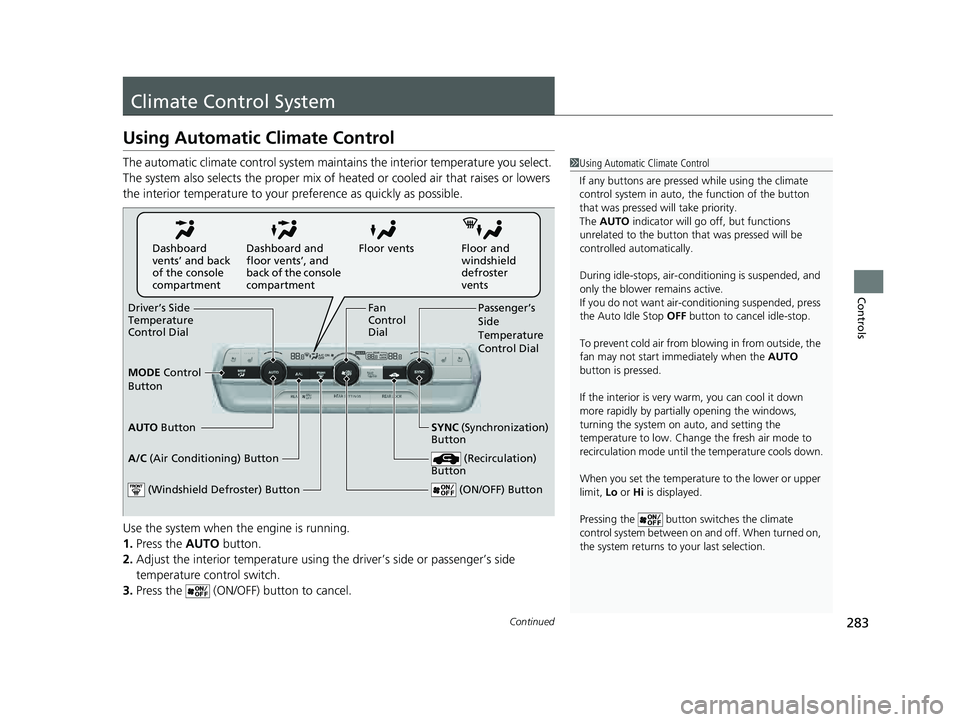
The automatic climate control system maintains the interior temperature you select.
The system also selects the proper mix of heat ed or cooled air that raises or lowers
the interior temperature to your pr eference as quickly as possible.
Use the system when the engine is running.
1. Press the AUTO button.
2. Adjust the interior temperature using the driver’s side or passenger’s side
temperature control switch.
3. Press the (ON/OFF) button to cancel.1Using Automatic Climate Control
If any buttons are presse d while using the climate
control system in auto, the function of the button
that was pressed will take priority.
The AUTO indicator will go off, but functions
unrelated to the button th at was pressed will be
controlled automatically.
During idle-stops, air-conditioning is suspended, and
only the blower remains active.
If you do not want air-cond itioning suspended, press
the Auto Idle Stop OFF button to cancel idle-stop.
To prevent cold air from bl owing in from outside, the
fan may not start i mmediately when the AUTO
button is pressed.
If the interior is very warm, you can cool it down
more rapidly by partial ly opening the windows,
turning the system on auto, and setting the
temperature to low. Change the fresh air mode to
recirculation mode until the temperature cools down.
When you set the temperat ure to the lower or upper
limit, Lo or Hi is displayed.
Pressing the button switches the climate
control system between on and off. When turned on,
the system returns to your last selection.
Floor and
windshield
defroster
vents
Floor vents
Dashboard and
floor vents’, and
back of the console
compartment
Dashboard
vents’ and back
of the console
compartment
Driver’s Side
Temperature
Control Dial Passenger’s
Side
Temperature
Control Dial
A/C (Air Conditioning) Button
(ON/OFF) Button
Fan
Control
Dial
(Recirculation)
Button
(Windshield Defroster) Button
AUTO Button SYNC (Synchronization)
Button
MODE
Control
Button
23 PILOT-31T906000_03.book 283 ページ 2022年10月31日 月曜日 午前10時26分
Page 285 of 814
uuClimate Control System uUsing Automatic Climate Control
284
Controls
■Switching between the recirc ulation and fresh air modes
Press the (recirculation) button and switch the mode depending on
environmental conditions.
Recirculation mode (indicator on): Recirculates air from the vehicle’s interior through
the system.
Fresh air mode (indicator off): Maintains outside ventilation.1Using Automatic Climate Control
When you unlock the doors with your remote, the
driver’s ID (DRIVER 1 or DRIVER 2) is detected, and
the climate control settings are turned to the
respective mode automatically when you set the
power mode to ON.
23 PILOT-31T906000_03.book 284 ページ 2022年10月31日 月曜日 午前10時26分
Page 286 of 814
Continued285
uuClimate Control System uUsing Automatic Climate Control
Controls
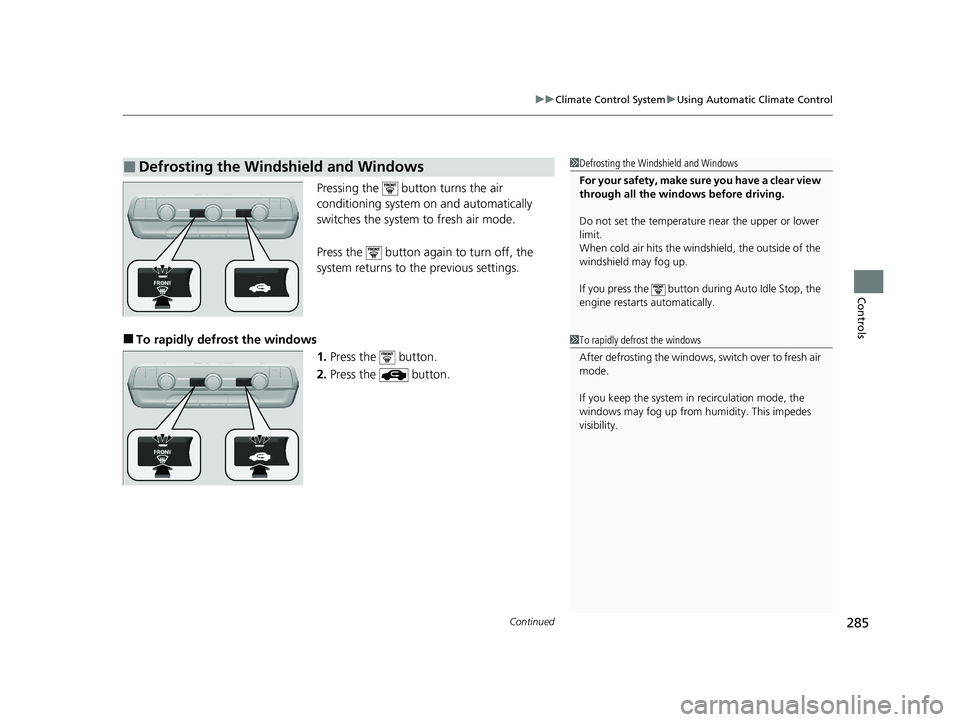
Pressing the button turns the air
conditioning system on and automatically
switches the system to fresh air mode.
Press the button again to turn off, the
system returns to the previous settings.
■To rapidly defrost the windows
1.Press the button.
2. Press the button.
■Defrosting the Windshield and Windows1Defrosting the Windshield and Windows
For your safety, make sure you have a clear view
through all the windows before driving.
Do not set the temperatur e near the upper or lower
limit.
When cold air hits the windshield, the outside of the
windshield may fog up.
If you press the button dur ing Auto Idle Stop, the
engine restarts automatically.
1 To rapidly defrost the windows
After defrosting the windows, switch over to fresh air
mode.
If you keep the system in recirculation mode, the
windows may fog up from humidity. This impedes
visibility.
23 PILOT-31T906000_03.book 285 ページ 2022年10月31日 月曜日 午前10時26分
Page 287 of 814
uuClimate Control System uUsing Automatic Climate Control
286
Controls
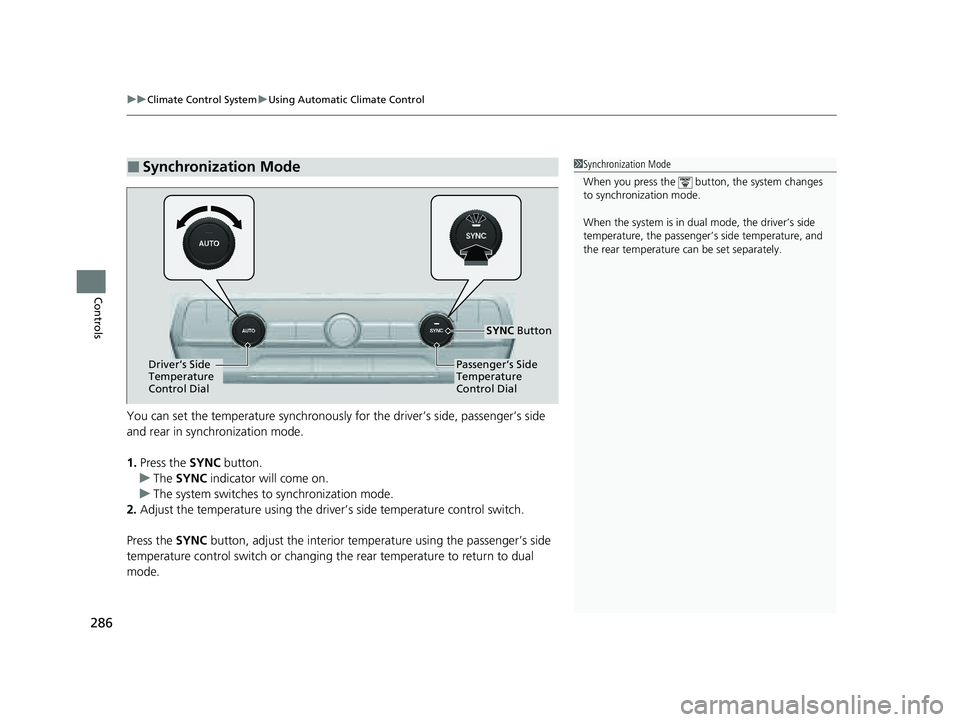
You can set the temperature synchronously for the driver’s side, passenger’s side
and rear in synchronization mode.
1. Press the SYNC button.
u The SYNC indicator will come on.
u The system switches to synchronization mode.
2. Adjust the temperature using the driver ’s side temperature control switch.
Press the SYNC button, adjust the interior temperature using the passenger’s side
temperature control switch or changing th e rear temperature to return to dual
mode.
■Synchronization Mode1 Synchronization Mode
When you press the button, the system changes
to synchronization mode.
When the system is in dua l mode, the driver’s side
temperature, the passenger’s side temperature, and
the rear temperature can be set separately.
Driver’s Side
Temperature
Control DialPassenger’s Side
Temperature
Control Dial
SYNC Button
23 PILOT-31T906000_03.book 286 ページ 2022年10月31日 月曜日 午前10時26分
Page 288 of 814
287
uuClimate Control System uRear Climate Control System
Continued
Controls
Rear Climate Control System
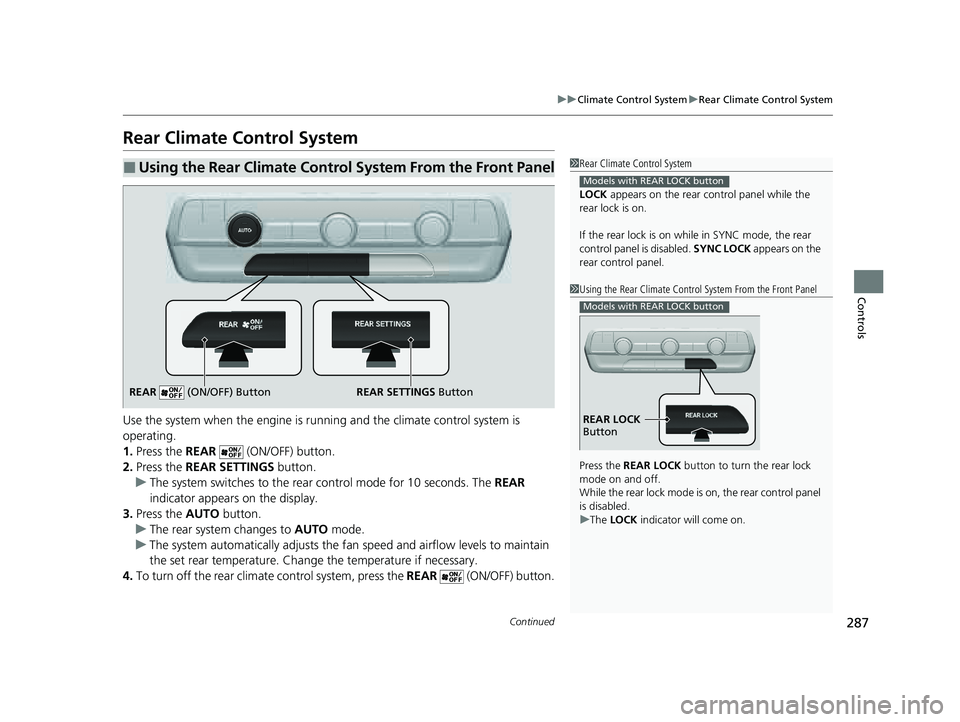
Use the system when the engine is runni ng and the climate control system is
operating.
1. Press the REAR (ON/OFF) button.
2. Press the REAR SETTINGS button.
u The system switches to the rear control mode for 10 seconds. The REAR
indicator appears on the display.
3. Press the AUTO button.
u The rear system changes to AUTO mode.
u The system automatically adjusts the fan speed and airfl ow levels to maintain
the set rear temperature. Change the temperature if necessary.
4. To turn off the rear climat e control system, press the REAR (ON/OFF) button.
■Using the Rear Climate Control System From the Front Panel1Rear Climate Control System
LOCK appears on the rear control panel while the
rear lock is on.
If the rear lock is on while in SYNC mode, the rear
control panel is disabled. SYNC LOCK appears on the
rear control panel.
Models with REAR LOCK button
1 Using the Rear Climate Control System From the Front Panel
Press the REAR LOCK button to turn the rear lock
mode on and off.
While the rear lock mode is on, the rear control panel
is disabled.
u The LOCK indicator will come on.
Models with REAR LOCK button
REAR LOCK
Button
REAR SETTINGS Button
REAR (ON/OFF) Button
23 PILOT-31T906000_03.book 287 ページ 2022年10月31日 月曜日 午前10時26分
Page 289 of 814
uuClimate Control System uRear Climate Control System
288
Controls
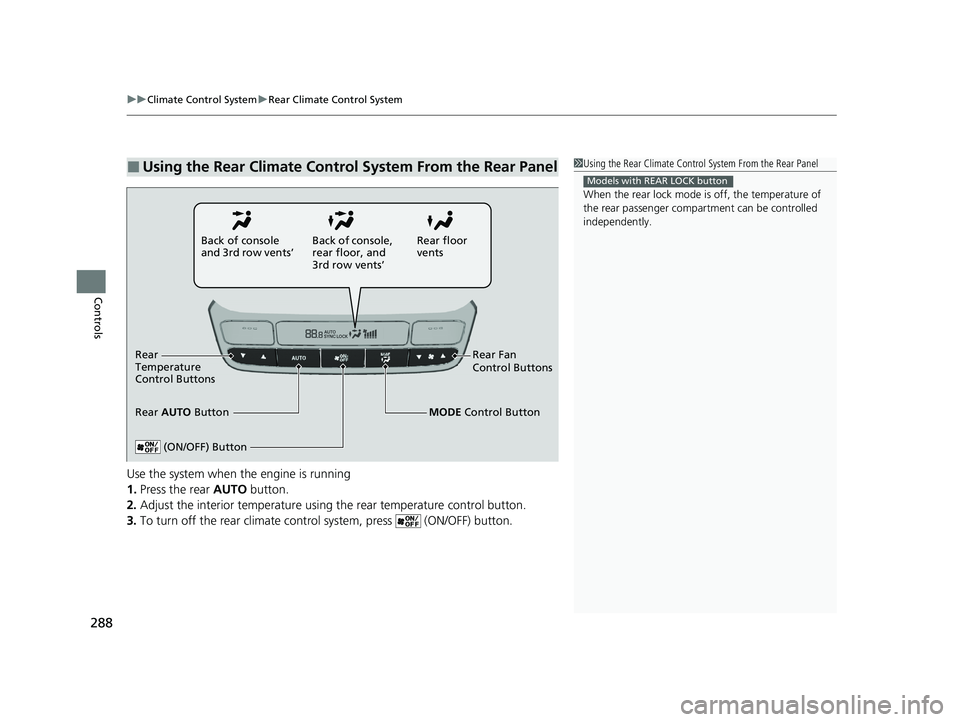
Use the system when the engine is running
1. Press the rear AUTO button.
2. Adjust the interior temperature using the rear temperature control button.
3. To turn off the rear climate con trol system, press (ON/OFF) button.
■Using the Rear Climate Control System From the Rear Panel1Using the Rear Climate Control System From the Rear Panel
When the rear lock mode is off, the temperature of
the rear passenger compar tment can be controlled
independently.
Models with REAR LOCK button
Rear floor
vents
Back of console
and 3rd row vents’
Rear Fan
Control Buttons
(ON/OFF) Button
Rear
Temperature
Control Buttons
Rear AUTO Button Back of console,
rear floor, and
3rd row vents’
MODE Control Button
23 PILOT-31T906000_03.book 288 ページ 2022年10月31日 月曜日 午前10時26分
Page 290 of 814
289
uuClimate Control System uAutomatic Climate Control Sensors
Controls
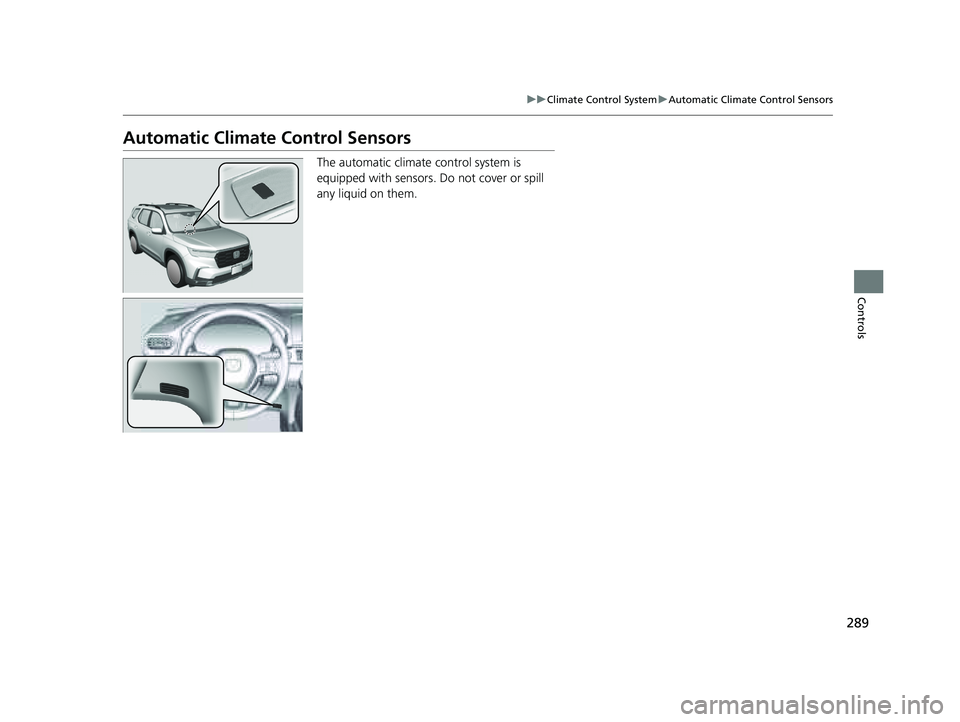
Automatic Climate Control Sensors
The automatic climate control system is
equipped with sensors. Do not cover or spill
any liquid on them.
23 PILOT-31T906000_03.book 289 ページ 2022年10月31日 月曜日 午前10時26分
Page 518 of 814
517
uuTowing a Trailer uDriving Safely with a Trailer
Driving
• Drive slower than normal.
• Obey posted speed limits fo r vehicles with trailers.
• Use the
(D position when towing a trailer on level roads.
• Turn more slowly and with a wider turning arc than normal.
• Allow more time and distance for braking.
• Do not brake or turn suddenly.
• If the Engine temperature near limit. Av oid heavy acceleration and high
speed. message appears on the driver information interface, turn off the climate
control system and reduce speed.
If the Engine temperature too hot. Do no t drive. Allow engine to cool.
message appears on the driver information interface, pull to the side of the road
safely to cool down the engine.
• Change the gear position to
(S position if the transmission shifts frequently.
When retrieving a boat from the wa ter, the sequential shift mode
(S is
recommended to utilize the transmissions lower gears.
■Towing Speeds and Gears
■Turning and Braking
■Driving in Hilly Terrain
■Retrieving a Boat
1Towing Speeds and Gears
When towing a fixed-sided trailer (e.g., camper), do
not exceed 55 mph (88 km/h).
At higher speeds, the trai ler may sway or affect
vehicle handling.
1 Driving in Hilly Terrain
If the automatic transmission fluid temperature
exceeds the specified limit, the transmission will also
automatically up shift, even in the sequential shift
mode.
23 PILOT-31T906000_03.book 517 ページ 2022年10月31日 月曜日 午前10時26分
Page 525 of 814
524
Driving
When Driving
Starting the Engine
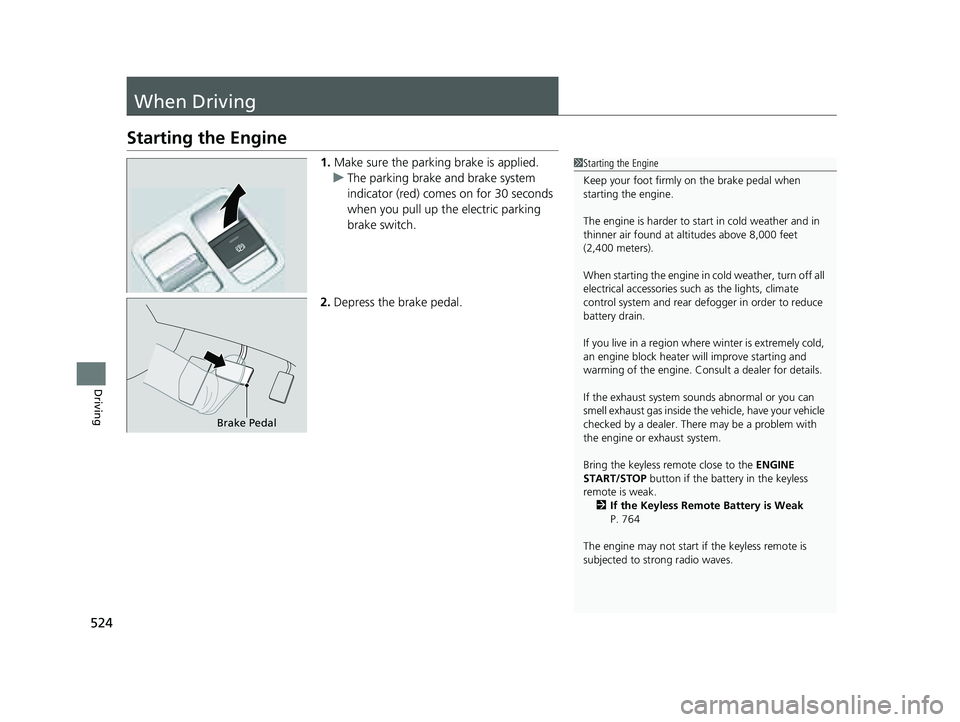
1.Make sure the parking brake is applied.
u The parking brake and brake system
indicator (red) comes on for 30 seconds
when you pull up the electric parking
brake switch.
2. Depress the brake pedal.1Starting the Engine
Keep your foot firmly on the brake pedal when
starting the engine.
The engine is harder to st art in cold weather and in
thinner air found at al titudes above 8,000 feet
(2,400 meters).
When starting the engine in cold weather, turn off all
electrical accessories such as the lights, climate
control system and rear de fogger in order to reduce
battery drain.
If you live in a region where winter is extremely cold,
an engine block heater will improve starting and
warming of the engine. Consult a dealer for details.
If the exhaust system sounds abnormal or you can
smell exhaust gas inside the vehicle, have your vehicle
checked by a dealer. There may be a problem with
the engine or exhaust system.
Bring the keyless remote close to the ENGINE
START/STOP button if the batte ry in the keyless
remote is weak.
2 If the Keyless Remote Battery is Weak
P. 764
The engine may not start if the keyless remote is
subjected to strong radio waves.
Brake Pedal
23 PILOT-31T906000_03.book 524 ページ 2022年10月31日 月曜日 午前10時26分