fuel type HONDA PILOT 2023 User Guide
[x] Cancel search | Manufacturer: HONDA, Model Year: 2023, Model line: PILOT, Model: HONDA PILOT 2023Pages: 814, PDF Size: 29.02 MB
Page 145 of 814
144
uuGauges and Displays uDriver Information Interface (A-type Meter)
Instrument Panel
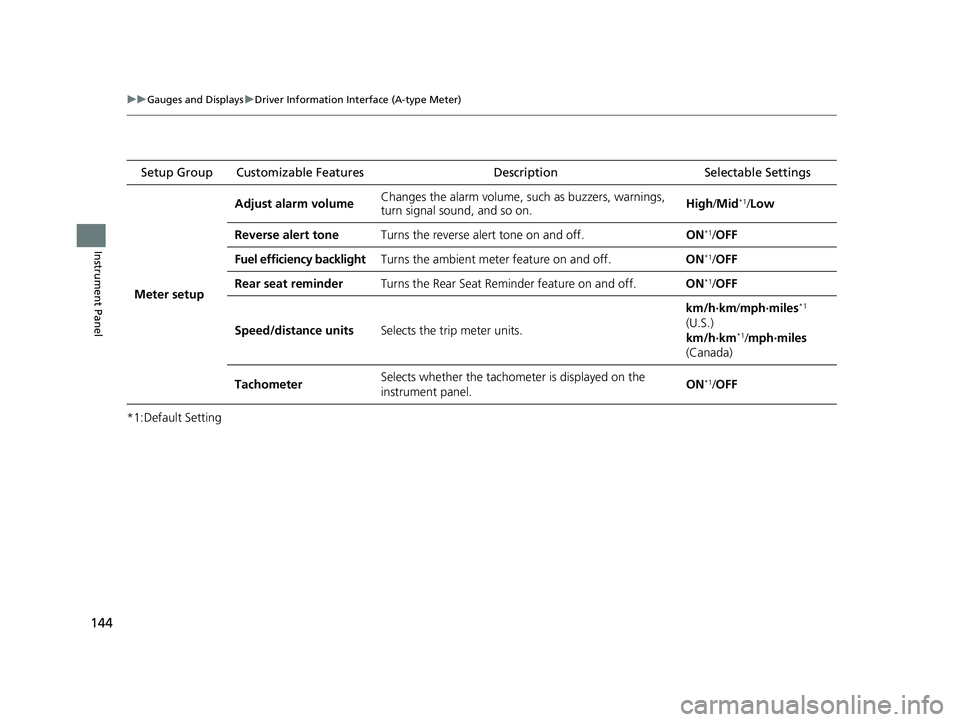
*1:Default Setting Setup Group Customizable Features
Description Selectable Settings
Meter setup Adjust alarm volume
Changes the alarm volume, su
ch as buzzers, warnings,
turn signal sound, and so on. High
/Mid
*1/Low
Reverse alert tone Turns the reverse alert tone on and off. ON
*1/OFF
Fuel efficiency backlight Turns the ambient meter feature on and off. ON
*1/OFF
Rear seat reminder Turns the Rear Seat Reminder feature on and off. ON
*1/OFF
Speed/distance units Selects the trip meter units. km/h∙km/
mph∙miles
*1
(U.S.)
km/h∙km
*1/ mph∙miles
(Canada)
Tachometer Selects whether the tachomet
er is displayed on the
instrument panel. ON
*1/
OFF
23 PILOT-31T906000_03.book 144 ページ 2022年10月31日 月曜日 午前10時26分
Page 149 of 814
148
uuGauges and Displays uDriver Information Interface (A-type Meter)
Instrument Panel
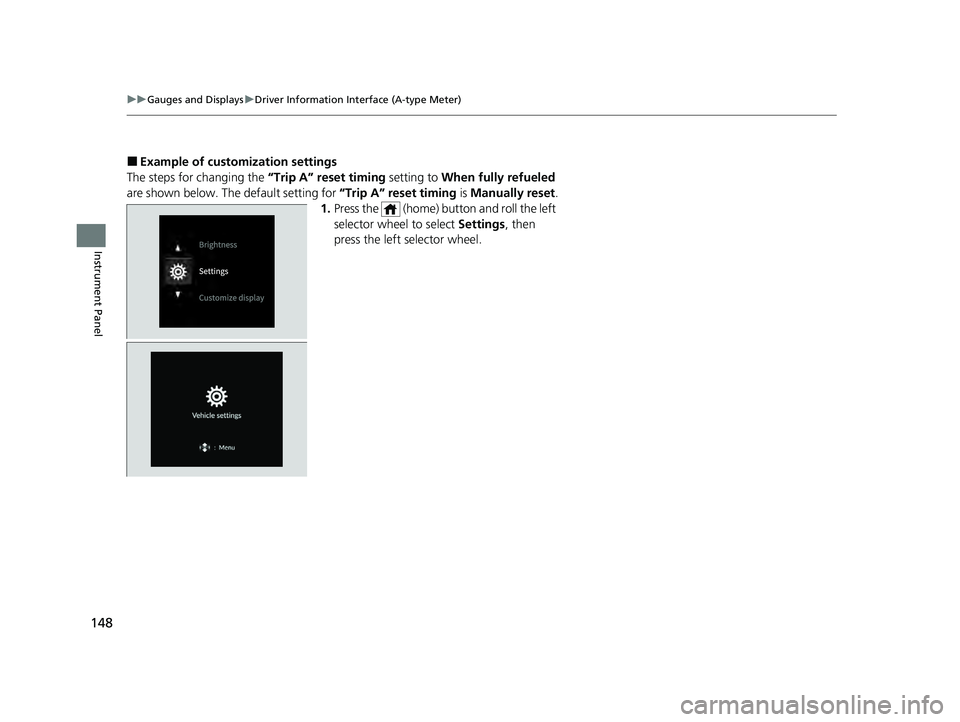
■Example of customization settings
The steps for changing the “Trip A” reset timing setting to When fully refueled
are shown below. The default setting for “Trip A” reset timing is Manually reset.
1. Press the (home) button and roll the left
selector wheel to select Settings, then
press the left selector wheel.
23 PILOT-31T906000_03.book 148 ページ 2022年10月31日 月曜日 午前10時26分
Page 150 of 814
149
uuGauges and Displays uDriver Information Interface (A-type Meter)
Continued
Instrument Panel
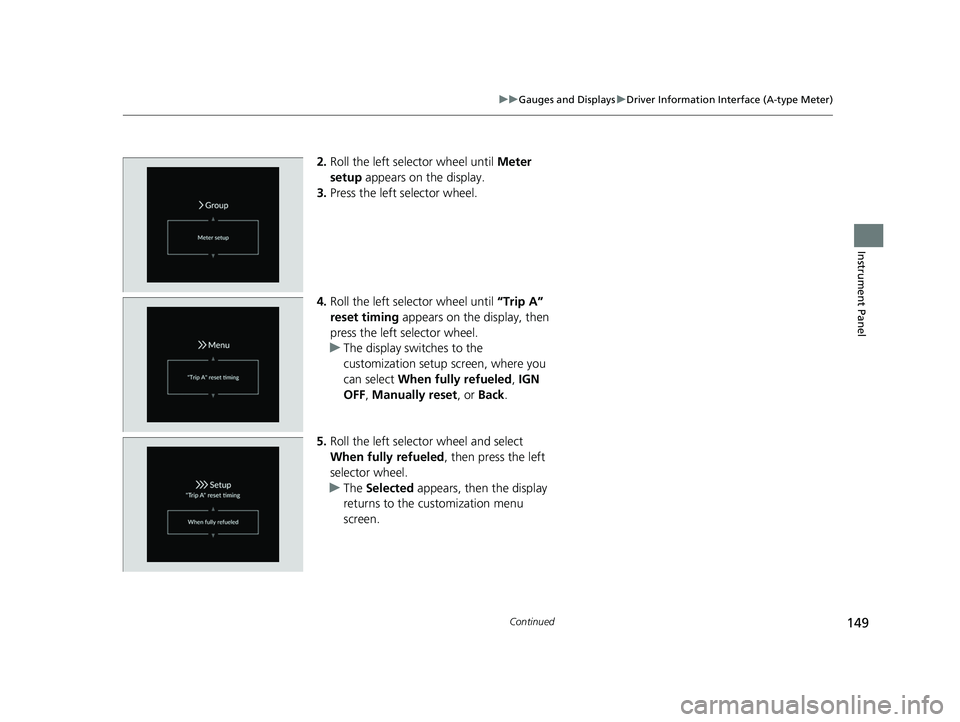
2. Roll the left selector wheel until Meter
setup appears on the display.
3. Press the left selector wheel.
4. Roll the left selector wheel until “Trip A”
reset timing appears on the display, then
press the left selector wheel.
u The display swit ches to the
customization setup screen, where you
can select When fully refueled , IGN
OFF , Manually reset , or Back .
5. Roll the left selector wheel and select
When fully refueled , then press the left
selector wheel.
u The Selected appears, then the display
returns to the customization menu
screen.
23 PILOT-31T906000_03.book 149 ページ 2022年10月31日 月曜日 午前10時26分
Page 155 of 814
154
uuGauges and Displays uDriver Information Interface Ri ght Side Area (B-type-Meter)
Instrument Panel
Driver Information Interface Right Side Area (B-type-
Meter)
The driver information interface shows in formation such as the estimated travelable
distance and fuel economy of the vehicle. It also displays messages such as warnings
and other helpful information.
When a warning message displays, please check the message and contact a dealer
to have the vehicle inspected if necessary . Please refer to the pages below if the
Engine oil pressure low or Engine temperature too hot message is displayed.
2If the Engine oil pressure low Warning Appears P. 771
2 Overheating P. 769
Roll the right selector wheel to view different types of content.
■Switching the Display1Switching the Display
You can add or delete the meter contents.
2 Gauge Display Settings P. 167
23 PILOT-31T906000_03.book 154 ページ 2022年10月31日 月曜日 午前10時26分
Page 156 of 814
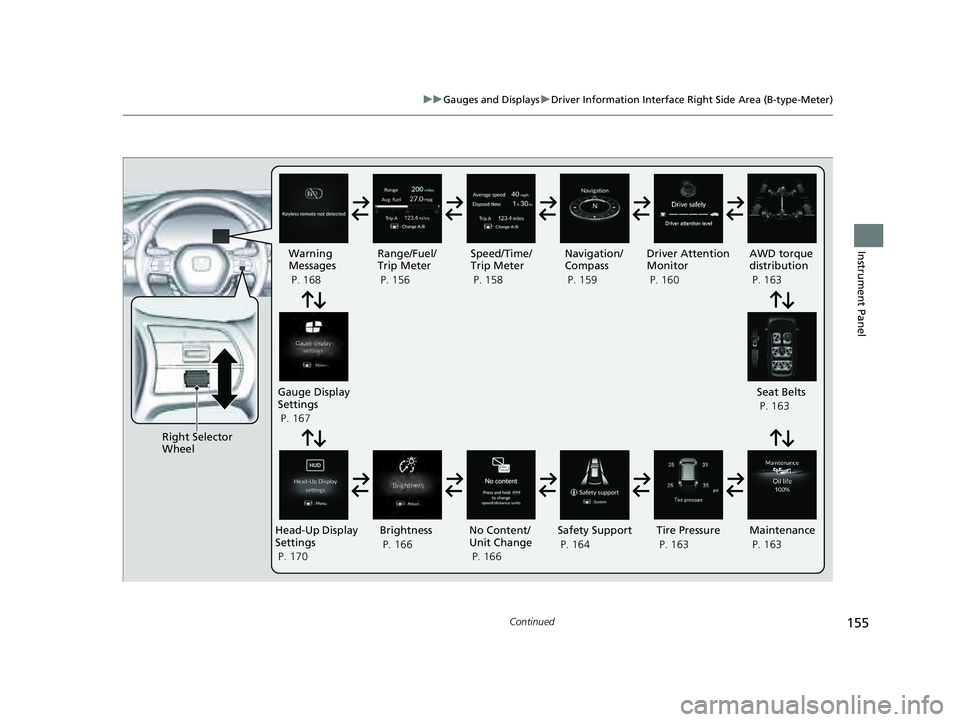
155
uuGauges and Displays uDriver Information Interface Right Side Area (B-type-Meter)
Continued
Instrument Panel
Right Selector
Wheel Warning
Messages
P. 168
Range/Fuel/
Trip Meter
P. 156
No Content/
Unit Change
P. 166 Driver Attention
Monitor
P. 160
Navigation/
Compass
P. 159
Speed/Time/
Trip Meter
P. 158
Gauge Display
Settings
P. 167 Maintenance
P. 163
Safety Support
P. 164 Seat Belts
P. 163
Head-Up Display
Settings
P. 170 Brightness
P. 166
Tire Pressure
P. 163
AWD torque
distribution
P. 163
23 PILOT-31T906000_03.book 155 ページ 2022年10月31日 月曜日 午前10時26分
Page 157 of 814
156
uuGauges and Displays uDriver Information Interface Ri ght Side Area (B-type-Meter)
Instrument Panel
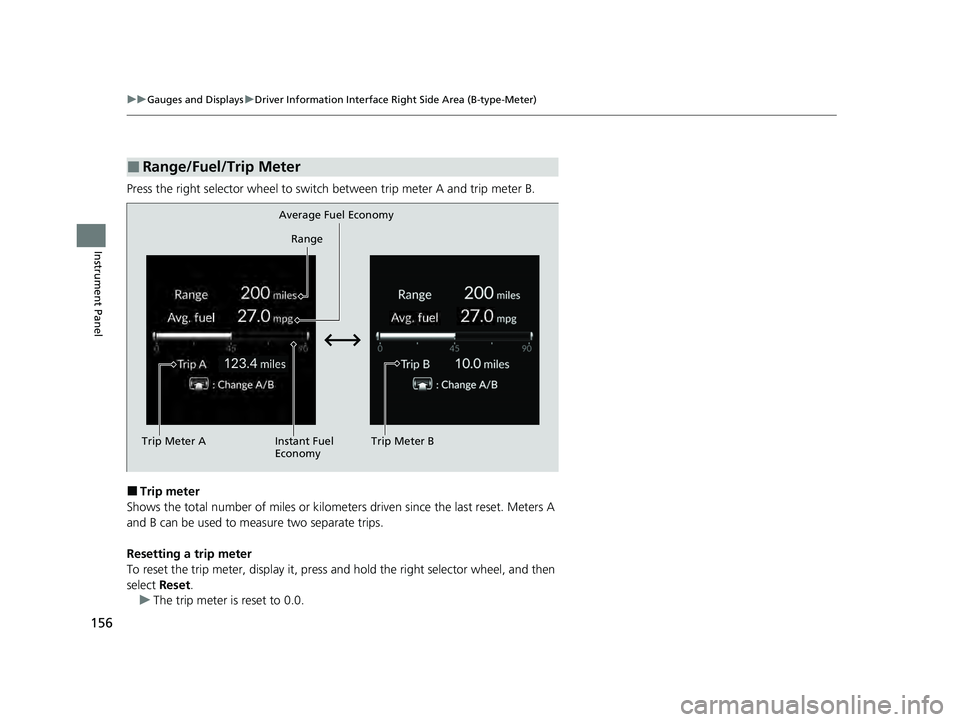
Press the right selector wheel to switch between trip meter A and trip meter B.
■Trip meter
Shows the total number of miles or kilomete rs driven since the last reset. Meters A
and B can be used to measure two separate trips.
Resetting a trip meter
To reset the trip meter, display it, press an d hold the right selector wheel, and then
select Reset.
u The trip meter is reset to 0.0.
■Range/Fuel/Trip Meter
Trip Meter A Range
Average Fuel Economy
Instant Fuel
Economy Trip Meter B
23 PILOT-31T906000_03.book 156 ページ 2022年10月31日 月曜日 午前10時26分
Page 158 of 814
Continued157
uuGauges and Displays uDriver Information Interface Right Side Area (B-type-Meter)
Instrument Panel
■Average fuel economy
Shows the estimated average fuel economy of each trip meter in mpg or l/100 km.
The display is updated at set intervals. Wh en a trip meter is reset, the average fuel
economy is also reset.
■Instant fuel economy
Shows the instant fuel economy as a bar graph in mpg or l/100 km.
■Range
Shows the estimated distance you can trave l on the remaining fuel. This estimated
distance is based on the vehicle’s current fuel economy.
1 Average fuel economy
You can change when to reset the average fuel
economy.
2 Customized Features P. 429
1Range
The driving range displayed is only an estimate and
may differ from the actual distance the vehicle can
travel.
23 PILOT-31T906000_03.book 157 ページ 2022年10月31日 月曜日 午前10時26分
Page 409 of 814
408
uuGeneral Information on the Audio System uHonda App License Agreement
Features
E. Information Coll ection and Storage
1. Information Collection, Use, Transmission and Storage of Data. Consent to Use of Data:
You agree that HONDA and PROVIDERS may
collect and use your information gathered in any manner as part of product support services related to the SOFTWARE or related services.
HONDA may share such information with third parties, including, without limitation, PROVIDERS, th ird party software and services
suppliers, their affiliates and/or their desi gnated agents, solely to improve their products or to provide services or technolo gies to you.
HONDA, third party software and systems s uppliers, their affiliates and/or their designated agent may disclose this information to others,
but not in a form that pe rsonally identifies you.
2. Information Storage.
Depending on the type of multimedia system you have in your VEHICLE, certain information may be stored for ease
of use of the SOFTWARE including, without limitation, search hi story, location history in certain applications, previous and saved
destinations, map locations within certain applications, and device numbers and contact information.
(a) Vehicle Health Information.
Your VEHICLE may remotely trans mit information regarding the status and health of your VEHICLE
(“VEHICLE INFORMATION”) to HONDA without notification to you. VEHICLE INFORMATION may contain VEHICLE maintenance and
malfunction status that is derived from VEHICLE diagnostic data and includes, but is not limited to, status of powered doors and windows,
battery life data, battery charging data, VEHICLE speed, coolant temperat ure, air compressor revolution, output power, warning codes,
diagnostic trouble codes, fuel injection volu me, and engine rotations per minute. VEHICL E HEALTH INFORMATION may be used by HON DA
for research and development, to deliver HONDA SERVICES and information to you, and to contact you, and is retained only for a period
of time necessary to fulfill these goals.
(b) VEHICLE Geolocation Data (non-navigation/map based).
If you opt-in to geolocation-based SERVICES, your vehicle’s geolocation data
(latitude and longitude) will be automatically se nt from your VEHICLE to HONDA and PROVIDERS.
(c) You understand that the inputting or uploading of information to your VEHICLE’s multimedia system or the SOFTWARE or SERVIC ES is
at your own risk and that HONDA is not responsible for unauthorized access to or use of any personal or other information. All information
uploaded to the SOFTWARE and SERVICES may be stored on your VEHICLES’s multimedia system and you understand that the security and
safety of your VEHICLE’s multimedia system is your sole responsibility.
23 PILOT-31T906000_03.book 408 ページ 2022年10月31日 月曜日 午前10時26分
Page 536 of 814
Continued535
uuWhen Driving uShifting
Driving
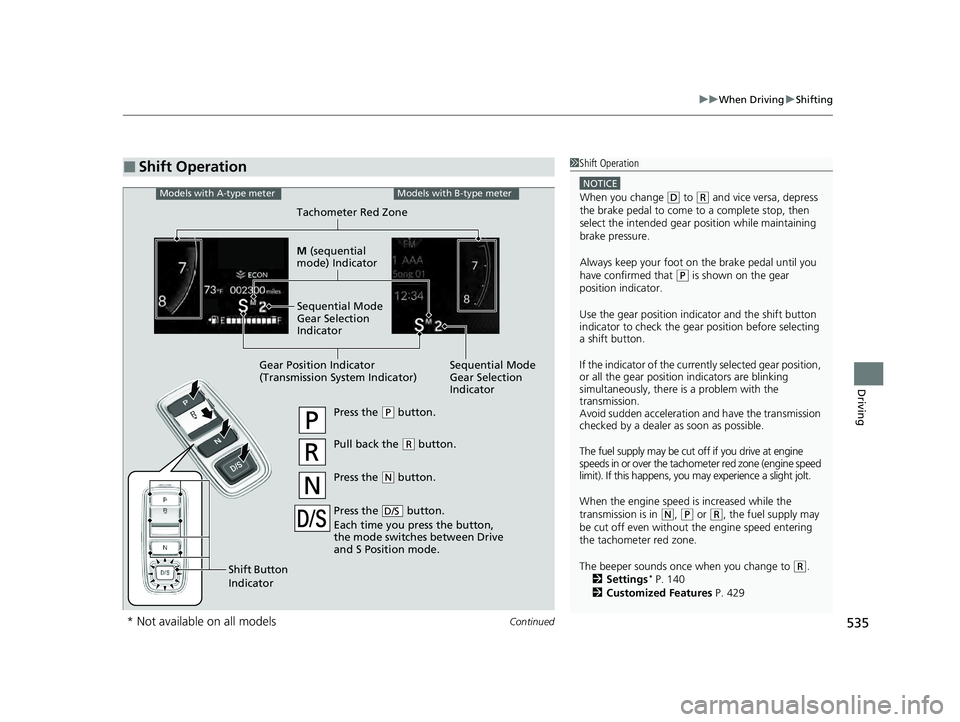
■Shift Operation1Shift Operation
NOTICE
When you change (D to (R and vice versa, depress
the brake pedal to come to a complete stop, then
select the intended gear position while maintaining
brake pressure.
Always keep your foot on the brake pedal until you
have confirmed that
( P is shown on the gear
position indicator.
Use the gear position indicator and the shift button
indicator to check the gear position before selecting
a shift button.
If the indicator of the currently selected gear position,
or all the gear position indicators are blinking
simultaneously, there is a problem with the
transmission.
Avoid sudden acceleration and have the transmission
checked by a dealer as soon as possible.
The fuel supply may be cut of f if you drive at engine
speeds in or over the tachom eter red zone (engine speed
limit). If this happens, you ma y experience a slight jolt.
When the engine speed is increased while the
transmission is in
( N, (P or (R, the fuel supply may
be cut off even without the engine speed entering
the tachometer red zone.
The beeper sounds once when you change to
( R.
2 Settings* P. 140
2 Customized Features P. 429
Press the (P button.
Pull back the (R button.
Press the
( N button.
Press the button.
Each time you press the button,
the mode switches between Drive
and S Position mode.
D/S
Shift Button
Indicator
Models with A-type meterModels with B-type meter
Gear Position Indicator
(Transmission System Indicator) Tachometer Red Zone
M
(sequential
mode) Indicator
Sequential Mode
Gear Selection
Indicator
Sequential Mode
Gear Selection
Indicator
* Not available on all models
23 PILOT-31T906000_03.book 535 ページ 2022年10月31日 月曜日 午前10時26分
Page 543 of 814
542
uuWhen Driving uAuto Idle Stop
Driving
Auto Idle Stop
To help maximize fuel econ omy, the engine automatica lly stops when the vehicle
comes to a stop, depending on environmen tal and vehicle operating conditions. The
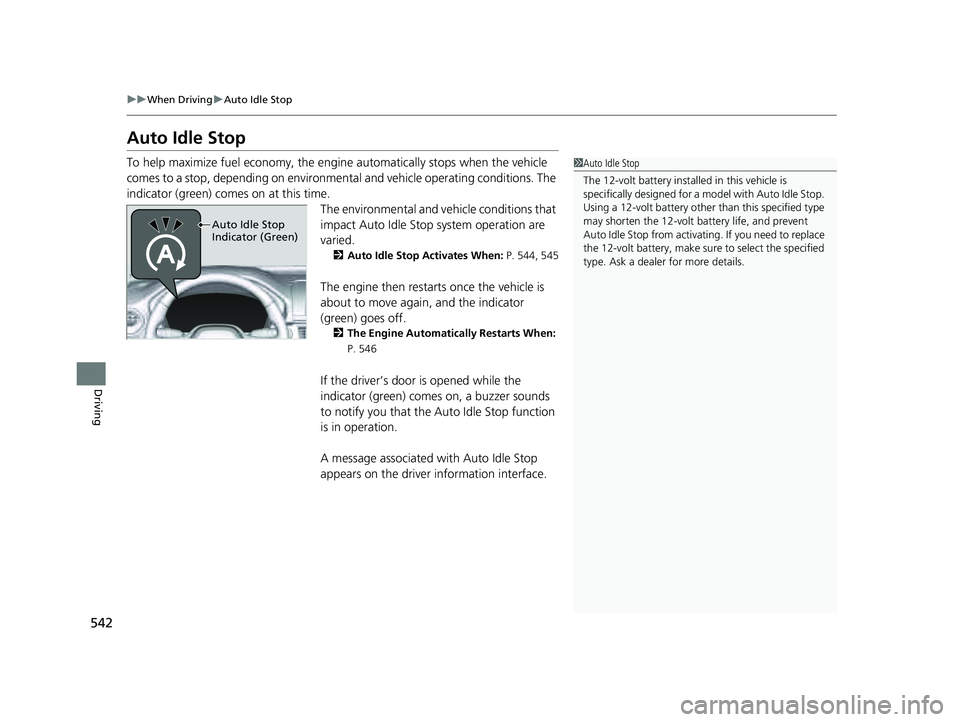
indicator (green) comes on at this time.
The environmental and vehicle conditions that
impact Auto Idle Stop system operation are
varied.
2Auto Idle Stop Activates When: P. 544, 545
The engine then restarts once the vehicle is
about to move again, and the indicator
(green) goes off.
2 The Engine Automatically Restarts When:
P. 546
If the driver’s door is opened while the
indicator (green) comes on, a buzzer sounds
to notify you that the Auto Idle Stop function
is in operation.
A message associated with Auto Idle Stop
appears on the driver information interface.
1Auto Idle Stop
The 12-volt battery insta lled in this vehicle is
specifically designed for a m odel with Auto Idle Stop.
Using a 12-volt battery other than this specified type
may shorten the 12-volt ba ttery life, and prevent
Auto Idle Stop from activati ng. If you need to replace
the 12-volt battery, make sure to select the specified
type. Ask a dealer for more details.
Auto Idle Stop
Indicator (Green)
23 PILOT-31T906000_03.book 542 ページ 2022年10月31日 月曜日 午前10時26分