lights HONDA PILOT 2023 User Guide
[x] Cancel search | Manufacturer: HONDA, Model Year: 2023, Model line: PILOT, Model: HONDA PILOT 2023Pages: 814, PDF Size: 29.02 MB
Page 117 of 814
116
uuIndicators u
Instrument Panel
IndicatorNameOn/BlinkingExplanation
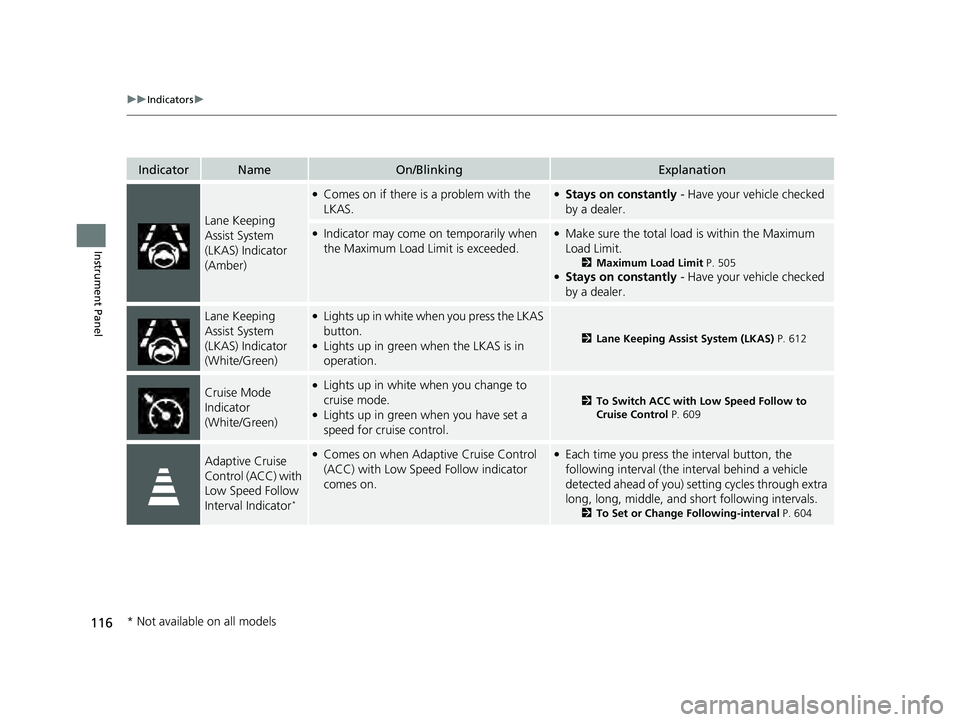
Lane Keeping
Assist System
(LKAS) Indicator
(Amber)
●Comes on if there is a problem with the
LKAS.●Stays on constantly - Have your vehicle checked
by a dealer.
●Indicator may come on temporarily when
the Maximum Load Limit is exceeded.●Make sure the total load is within the Maximum
Load Limit.
2 Maximum Load Limit P. 505●Stays on constantly - Have your vehicle checked
by a dealer.
Lane Keeping
Assist System
(LKAS) Indicator
(White/Green)●Lights up in white wh en you press the LKAS
button.
●Lights up in green when the LKAS is in
operation.2 Lane Keeping Assist System (LKAS) P. 612
Cruise Mode
Indicator
(White/Green)●Lights up in white when you change to
cruise mode.
●Lights up in green when you have set a
speed for cruise control.
2To Switch ACC with Low Speed Follow to
Cruise Control P. 609
Adaptive Cruise
Control (ACC) with
Low Speed Follow
Interval Indicator
*
●Comes on when Adaptive Cruise Control
(ACC) with Low Speed Follow indicator
comes on.●Each time you press the interval button, the
following interval (the interval behind a vehicle
detected ahead of you) se tting cycles through extra
long, long, middle, and short following intervals.
2 To Set or Change Following-interval P. 604
* Not available on all models
23 PILOT-31T906000_03.book 116 ページ 2022年10月31日 月曜日 午前10時26分
Page 121 of 814
120
uuIndicators u
Instrument Panel
IndicatorNameOn/BlinkingExplanation
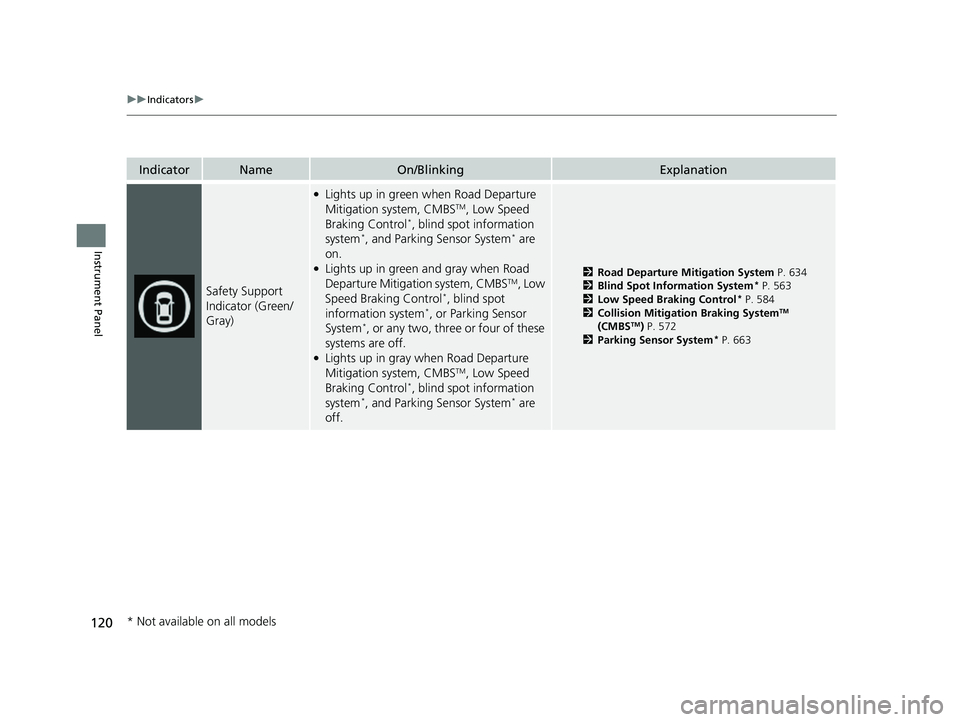
Safety Support
Indicator (Green/
Gray)
●Lights up in green when Road Departure
Mitigation system, CMBSTM, Low Speed
Braking Control*, blind spot information
system*, and Parking Sensor System* are
on.
●Lights up in green and gray when Road
Departure Mitiga tion system, CMBSTM, Low
Speed Braking Control*, blind spot
information system*, or Parking Sensor
System*, or any two, three or four of these
systems are off.
●Lights up in gray when Road Departure
Mitigation system, CMBSTM, Low Speed
Braking Control*, blind spot information
system*, and Parking Sensor System* are
off.
2 Road Departure Mitigation System P. 634
2 Blind Spot Information System* P. 563
2 Low Speed Braking Control* P. 584
2 Collision Mitigation Braking SystemTM
(CMBSTM) P. 572
2 Parking Sensor System* P. 663
* Not available on all models
23 PILOT-31T906000_03.book 120 ページ 2022年10月31日 月曜日 午前10時26分
Page 134 of 814
133
uuGauges and Displays uDriver Information Interface (A-type Meter)
Continued
Instrument Panel
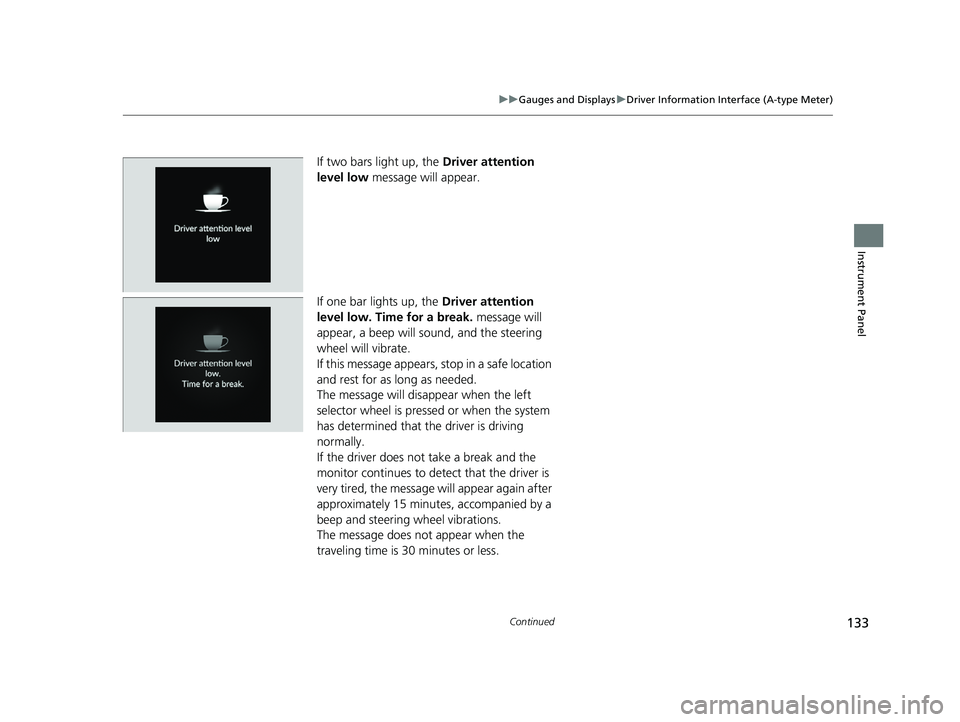
If two bars light up, the Driver attention
level low message will appear.
If one bar lights up, the Driver attention
level low. Time for a break. message will
appear, a beep will sound, and the steering
wheel will vibrate.
If this message appears, stop in a safe location
and rest for as long as needed.
The message will disappear when the left
selector wheel is presse d or when the system
has determined that the driver is driving
normally.
If the driver does not take a break and the
monitor continues to detect that the driver is
very tired, the message will appear again after
approximately 15 minutes, accompanied by a
beep and steering wheel vibrations.
The message does not appear when the
traveling time is 30 minutes or less.
23 PILOT-31T906000_03.book 133 ページ 2022年10月31日 月曜日 午前10時26分
Page 146 of 814
145
uuGauges and Displays uDriver Information Interface (A-type Meter)
Continued
Instrument Panel
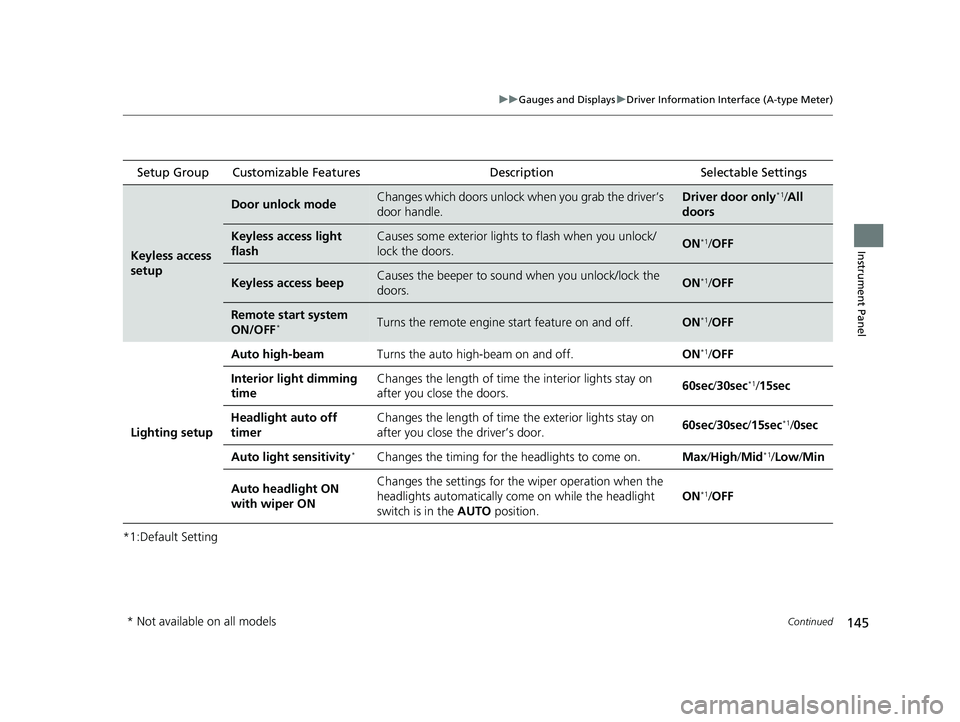
*1:Default Setting Setup Group Customizable Features
Description Selectable Settings
Keyless access
setup
Door unlock modeChanges which doors unlock when you grab the driver’s
door handle.Driver door only*1/All
doors
Keyless access light
flashCauses some exterior lights to flash when you unlock/
lock the doors.ON*1/ OFF
Keyless access beepCauses the beeper to sound when you unlock/lock the
doors.ON*1/OFF
Remote start system
ON/OFF*Turns the remote engine start feature on and off.ON*1/OFF
Lighting setup Auto high-beam
Turns the auto high-beam on and off. ON
*1/OFF
Interior light dimming
time Changes the length of time
the interior lights stay on
after you close the doors. 60sec
/30sec
*1/ 15sec
Headlight auto off
timer Changes the length of time
the exterior lights stay on
after you close the driver’s door. 60sec
/30sec /15sec
*1/0sec
Auto light sensitivity
*Changes the timing for th e headlights to come on. Max/High /Mid*1/Low /Min
Auto headlight ON
with wiper ON Changes the settings for the
wiper operation when the
headlights automatically come on while the headlight
switch is in the AUTO position. ON
*1/
OFF
* Not available on all models
23 PILOT-31T906000_03.book 145 ページ 2022年10月31日 月曜日 午前10時26分
Page 147 of 814
146
uuGauges and Displays uDriver Information Interface (A-type Meter)
Instrument Panel
*1:Default SettingSetup Group Customizable Features Description Selectable Settings
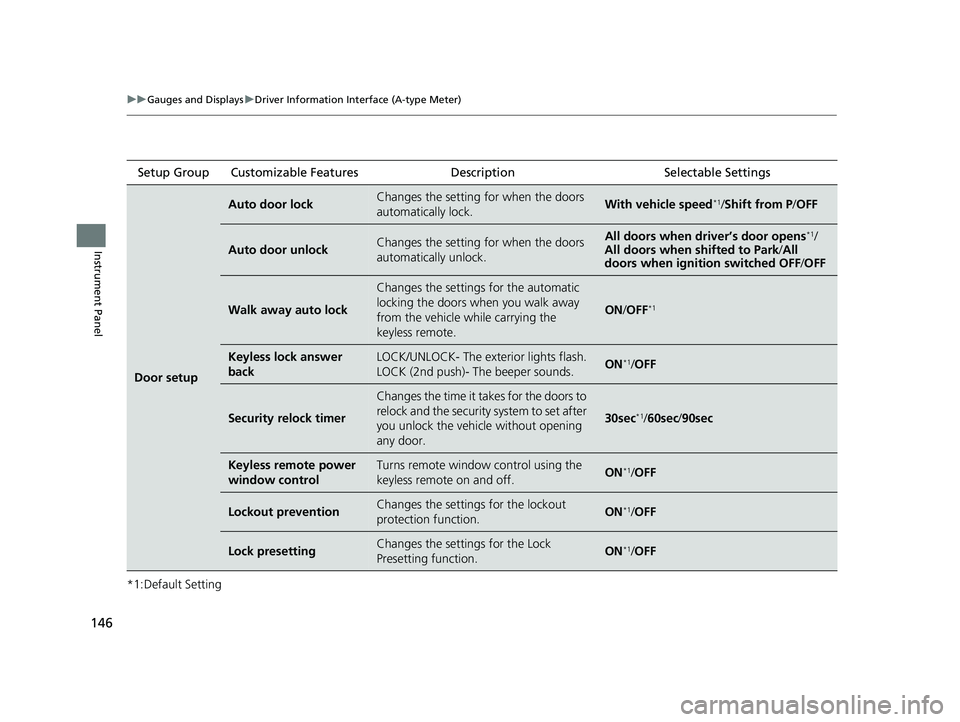
Door setup
Auto door lockChanges the setting for when the doors
automatically lock.With vehicle speed*1/
Shift from P /OFF
Auto door unlockChanges the setting for when the doors
automatically unlock.All doors when driver’s door opens*1/
All doors when shifted to Park /All
doors when ignition switched OFF /OFF
Walk away auto lock
Changes the settings for the automatic
locking the doors wh en you walk away
from the vehicle while carrying the
keyless remote.
ON /OFF*1
Keyless lock answer
backLOCK/UNLOCK- The ex terior lights flash.
LOCK (2nd push)- The beeper sounds.ON*1/ OFF
Security relock timer
Changes the time it takes for the doors to
relock and the security system to set after
you unlock the vehicle without opening
any door.
30sec*1/60sec /90sec
Keyless remote power
window controlTurns remote window control using the
keyless remote on and off.ON*1/ OFF
Lockout preventionChanges the settings for the lockout
protection function.ON*1/OFF
Lock presettingChanges the settings for the Lock
Presetting function.ON*1/OFF
23 PILOT-31T906000_03.book 146 ページ 2022年10月31日 月曜日 午前10時26分
Page 162 of 814
161
uuGauges and Displays uDriver Information Interface Right Side Area (B-type-Meter)
Continued
Instrument Panel
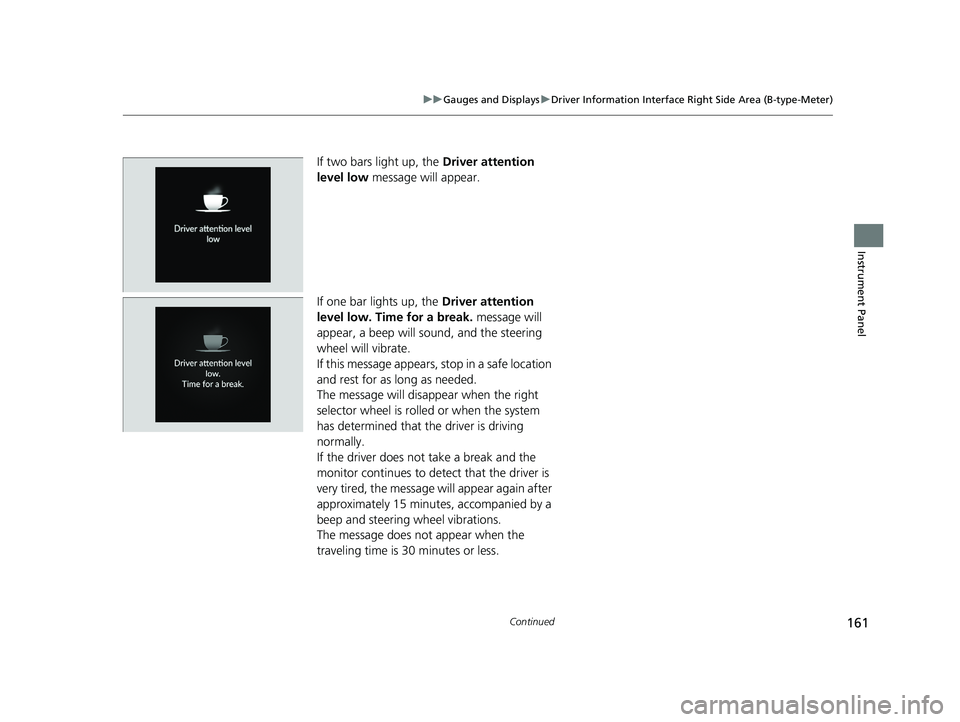
If two bars light up, the Driver attention
level low message will appear.
If one bar lights up, the Driver attention
level low. Time for a break. message will
appear, a beep will sound, and the steering
wheel will vibrate.
If this message appears, stop in a safe location
and rest for as long as needed.
The message will disappear when the right
selector wheel is rolled or when the system
has determined that the driver is driving
normally.
If the driver does not take a break and the
monitor continues to detect that the driver is
very tired, the message will appear again after
approximately 15 minutes, accompanied by a
beep and steering wheel vibrations.
The message does not appear when the
traveling time is 30 minutes or less.
23 PILOT-31T906000_03.book 161 ページ 2022年10月31日 月曜日 午前10時26分
Page 170 of 814
169
uuGauges and Displays uHead-Up Display*
Continued
Instrument Panel
Head-Up Display*
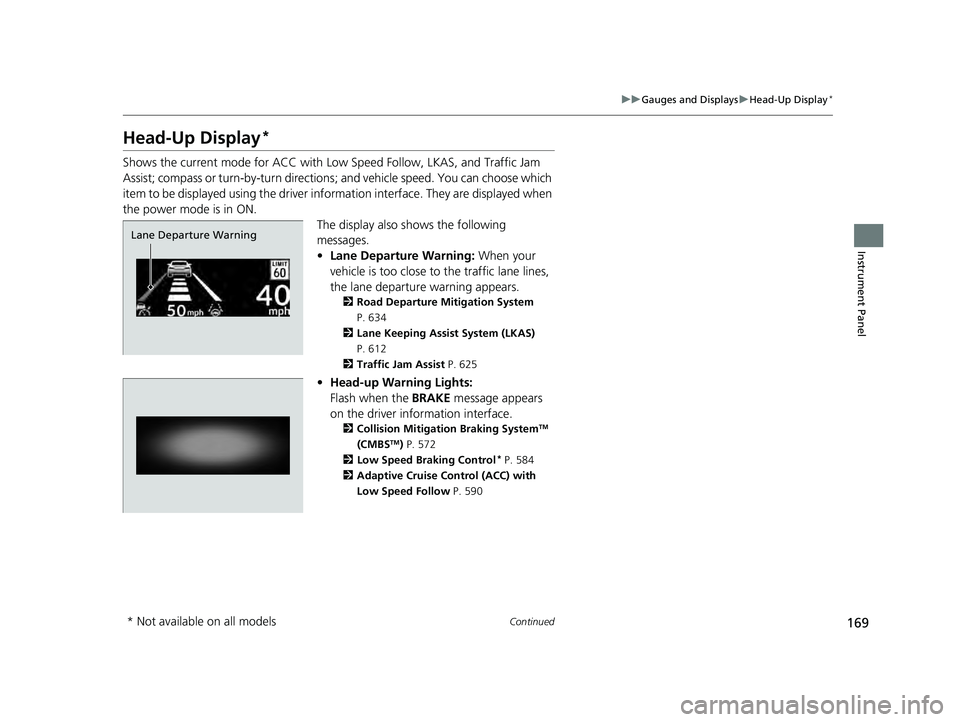
Shows the current mode for ACC with Low Speed Follow, LKAS, and Traffic Jam
Assist; compass or turn-by-turn directions ; and vehicle speed. You can choose which
item to be displayed using the driver in formation interface. They are displayed when
the power mode is in ON. The display also shows the following
messages.
•Lane Departure Warning: When your
vehicle is too close to the traffic lane lines,
the lane departure warning appears.
2 Road Departure Mitigation System
P. 634
2 Lane Keeping Assist System (LKAS)
P. 612
2 Traffic Jam Assist P. 625
•Head-up Warning Lights:
Flash when the BRAKE message appears
on the driver information interface.
2 Collision Mitigation Braking SystemTM
(CMBSTM) P. 572
2 Low Speed Braking Control* P. 584
2 Adaptive Cruise Control (ACC) with
Low Speed Follow P. 590
Lane Departure Warning
* Not available on all models
23 PILOT-31T906000_03.book 169 ページ 2022年10月31日 月曜日 午前10時26分
Page 176 of 814
175
Controls
This chapter explains how to operate the various controls necessary for driving.
Clock.................................................. 176
Locking and Unlocking the Doors Key .................................................. 178
Low Keyless Remote Signal Strength ......... 180Locking/Unlocking the Doors from the Outside .......................................... 181
Locking/Unlocking the Doors from the Inside ............................................. 192
Childproof Door Locks ..................... 194
Auto Door Locking/Unlocking .......... 195
Tailgate .............................................. 196
Security System ................................ 207
Windows................................................ 210
Panoramic Roof*............................... 213
Operating the Switches Around the Steering Wheel ENGINE START/STOP Button............. 217
Lights............................................... 220
Auto High-Beam .............................. 226
Wipers and Washers ........................ 229
Rear Defogger/Heated Door Mirror*
Button........................................ 232
Heated Windshield Button*............. 232
Driving Position Memory System*.... 233
Adjusting the Steering Wheel........... 235
Mirrors ............................................... 236 Seats
Front Seats ...................................... 239
Second Row Seats ........................... 243
Third Row Seats ............................... 249
Rear Seat Reminder ......................... 251
Maintain a Proper Sitting Position .... 252
Head Restraints................................ 253
Armrest ........................................... 258
Interior Convenience Items .............. 260
Climate Control System ................... 283
* Not available on all models
23 PILOT-31T906000_03.book 175 ページ 2022年10月31日 月曜日 午前10時26分
Page 182 of 814
181
uuLocking and Unlocking the Doors uLocking/Unlocking the Doors from the Outside
Continued
Controls
Locking/Unlocking the Doors from the Outside
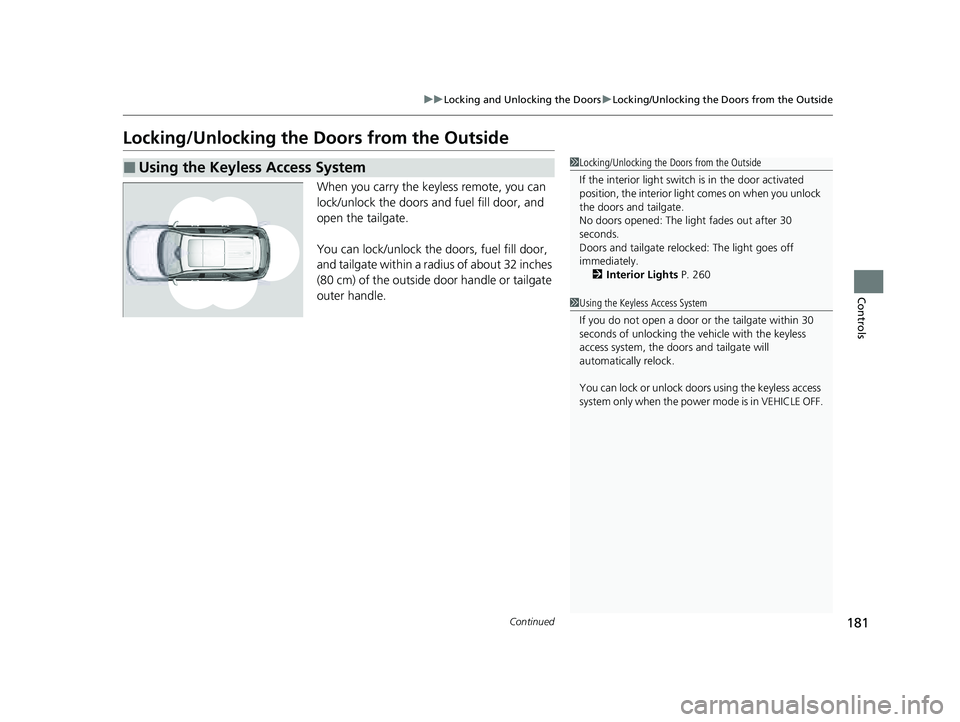
When you carry the keyless remote, you can
lock/unlock the doors and fuel fill door, and
open the tailgate.
You can lock/unlock the doors, fuel fill door,
and tailgate within a radius of about 32 inches
(80 cm) of the outside door handle or tailgate
outer handle.
■Using the Keyless Access System1Locking/Unlocking the Doors from the Outside
If the interior light switch is in the door activated
position, the interior light comes on when you unlock
the doors and tailgate.
No doors opened: The li ght fades out after 30
seconds.
Doors and tailgate relo cked: The light goes off
immediately. 2 Interior Lights P. 260
1Using the Keyless Access System
If you do not open a door or the tailgate within 30
seconds of unlocking the vehicle with the keyless
access system, the doors and tailgate will
automatically relock.
You can lock or unlock doors using the keyless access
system only when the power mode is in VEHICLE OFF.
23 PILOT-31T906000_03.book 181 ページ 2022年10月31日 月曜日 午前10時26分
Page 183 of 814
uuLocking and Unlocking the Doors uLocking/Unlocking the Doors from the Outside
182
Controls
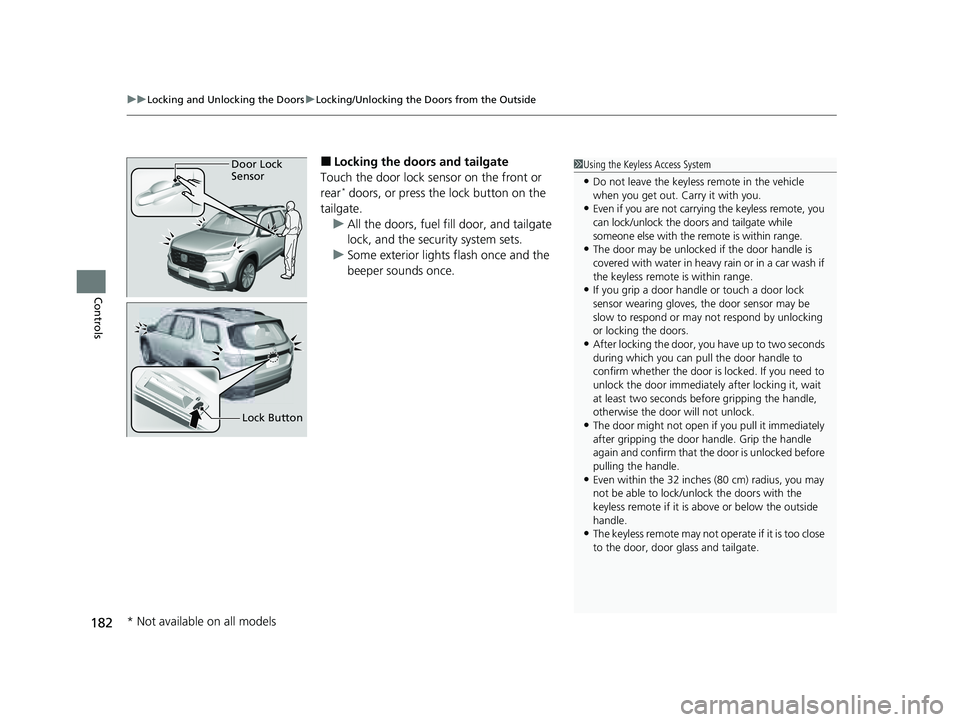
■Locking the doors and tailgate
Touch the door lock sensor on the front or
rear
* doors, or press the lock button on the
tailgate. u All the doors, fuel fill door, and tailgate
lock, and the security system sets.
u Some exterior lights flash once and the
beeper sounds once.
1Using the Keyless Access System
•Do not leave the keyless remote in the vehicle
when you get out. Carry it with you.
•Even if you are not carrying the keyless remote, you
can lock/unlock the doors and tailgate while
someone else with the remote is within range.
•The door may be unlocked if the door handle is
covered with water in heavy rain or in a car wash if
the keyless remote is within range.
•If you grip a door handle or touch a door lock
sensor wearing gloves, the door sensor may be
slow to respond or may not respond by unlocking
or locking the doors.
•After locking the door, yo u have up to two seconds
during which you can pull the door handle to
confirm whether the door is locked. If you need to
unlock the door immediately after locking it, wait
at least two seconds befo re gripping the handle,
otherwise the door will not unlock.
•The door might not open if you pull it immediately
after gripping the door handle. Grip the handle
again and confirm that th e door is unlocked before
pulling the handle.
•Even within the 32 inches (80 cm) radius, you may
not be able to lock/unl ock the doors with the
keyless remote if it is above or below the outside
handle.
•The keyless remote may not operate if it is too close
to the door, door glass and tailgate.
Door Lock
Sensor
Lock Button
* Not available on all models
23 PILOT-31T906000_03.book 182 ページ 2022年10月31日 月曜日 午前10時26分