tire pressure HONDA PILOT 2023 User Guide
[x] Cancel search | Manufacturer: HONDA, Model Year: 2023, Model line: PILOT, Model: HONDA PILOT 2023Pages: 814, PDF Size: 29.02 MB
Page 502 of 814
501
Driving
This chapter discusses driving and refueling.
Before Driving....................................... 502
Towing a Trailer .................................... 508
Off-Highway Driving Guidelines ......... 519
When Driving
Starting the Engine .......................... 524
Precautions While Driving................. 531
Automatic Transmission ................... 532
Shifting ............................................ 533
Auto Idle Stop .................................. 542
Drive Mode System .......................... 548
Hill Descent Control System ............. 553
Vehicle Stability AssistTM (VSA ®), aka Electronic
Stability Control (ESC), System ..............555
Agile Handling Assist ....................... 557 Intelligent Variable To
rque Management (i-
VTM4
TM) AWD System*.................. 558
Tire Pressure Monitoring System (TPMS) with Tire Fill Assist .......................... 559
Tire Pressure Monitoring System (TPMS) -
Required Federal Explanation ......... 561
Blind Spot Information System
*....... 563Honda Sensing ®.................................... 567Collision Mitigation Braking SystemTM (CMBSTM) ....572Low Speed Braking Control*............ 584Adaptive Cruise Control (ACC) with Low Speed Follow.. 590Lane Keeping Assist System (LKAS) .. 612
Traffic Jam Assist ............................. 625
Road Departure Mitigation System .. 634
Traffic Sign Recognition System.... 642
Front Sensor Camera ....................... 648
Radar Sensor ................................... 650
Sonar Sensors*............................. 651BrakingBrake System ................................... 652
Anti-lock Brake System (ABS) ........... 659
Brake Assist System ......................... 660
Parking Your VehicleWhen Stopped ................................ 661
Parking Sensor System*................... 663
Cross Traffic Monitor*..................... 668Multi-View Rear Camera*..................... 672
Surround View Camera System*.......... 674Refueling ........................................... 686
Fuel Economy and CO
2 Emissions .... 689
* Not available on all models
23 PILOT-31T906000_03.book 501 ページ 2022年10月31日 月曜日 午前10時26分
Page 503 of 814
502
Driving
Before Driving
Driving Preparation
Check the following items before you start driving.
• Make sure there are no obstructions on the windows, door mirrors, exterior
lights, or other parts of the vehicle.
u Remove any frost, snow, or ice.
u Remove any snow on the roof, as this can slip down and obstruct your field of
vision while driving. If frozen solid , remove ice once it has softened.
u When removing ice from around the wheels, be sure not to damage the wheel
or wheel components.
• Make sure the hood is securely closed.
u If the hood opens while driving, your front view will be blocked.
• Make sure the tires are in good condition.
u Check air pressures, and check for damage and excessive wear.
2Checking and Maintaining Tires P. 728
•Make sure there are no people or ob jects behind or around the vehicle.
u There are blind spots from the inside.
■Exterior Checks1Exterior Checks
NOTICE
When doors are frozen s hut, use warm water around
the door edges to melt any ice. Do not try to force
them open, as this can damage the rubber trim
around the doors. When done, wipe dry to avoid
further freezing.
Do not pour warm water into the key cylinder.
You will be unable to insert the key if the water
freezes in the hole.
Heat from the engine and exhaust can ignite
flammable material s left under the hood, causing a
fire. If you’ve parked y our vehicle for an extended
period, inspect and remove any debris that may have
collected, such as dried grass and leaves that have
fallen or have been carried in for use as a nest by a
small animal. Also, check under the hood for leftover
flammable materials after you or someone else has
performed maintenance on your vehicle.
23 PILOT-31T906000_03.book 502 ページ 2022年10月31日 月曜日 午前10時26分
Page 517 of 814
516
uuTowing a Trailer uDriving Safely with a Trailer
Driving
Driving Safely with a Trailer
• Have the trailer properly serviced and keep it in good condition.
• Make sure that all the weights and load in the vehicle and trailer are within limits.
2Towing Load Limits P. 508
•Securely attach the hitch, safety chains, and other necessary parts to the trailer.
• Securely store all the items in and on the tr ailer so that they do not shift while
driving.
• Check if the lights and brakes on the trailer are working properly.
• Check the pressures of the traile r tires, including the spare.
• Turn off the Auto Idle Stop syst em using the Auto Idle Stop OFF button. The
trailer weight can affect your vehicle's br ake effectiveness if Auto Idle Stop is
activated on a hill while towing a trailer.
• Select TOW mode for optimized transmissio n operation when towing a trailer.
2Drive Mode System P. 548
•Turn off the rear parking sensor system.
2 Parking sensor system on and off P. 664
•Turn off the Low Speed Braking Control syst em. It may activate if it detects the
towed object as an obstacle.
2 System On and Off P. 587
■Things You Need To Know Before Towing a Trailer1Driving Safely with a Trailer
Operating speed when towing a trailer must not
exceed 62 mph (100 km/h).
Parking
In addition to the normal precautions, place wheel
chocks at each of the trailer’s tires.
Remember to unhitch the tra iler before changing a
flat tire. Ask the trailer sales or rental agency where
and how to store the trailer’s spare tire.
Models with Parking Sensor System
Models with Low Speed Braking Control
23 PILOT-31T906000_03.book 516 ページ 2022年10月31日 月曜日 午前10時26分
Page 521 of 814
520
uuOff-Highway Driving Guidelines uAvoiding Trouble
Driving
Avoiding Trouble
• Check Out Your Vehicle before you leave the pavement and make sure that all
scheduled maintenance has been comple ted. Pay special attention to the
condition of the tires, an d check the tire pressures.
• Remember the route you choose presents limits (too steep or bumpy), you have
limits (driving skill and comfort), and your ve hicle has limits (traction, stability, and
power). Failing to recognize these limits will likely put you and your passengers in
a hazardous situation.
• Accelerating and Braking should be done slowly and gradually. Trying to start
or stop too fast can cause a loss of traction and you could lose control.
• Avoiding Obstacles and Debris in the road reduces the likelihood of a rollover
or damage to your suspension or other components.
• Driving on Slopes increases your risk of a rollover, particularly if you attempt to
drive across a slope that is too steep. Going straight up or down a slope is usually
the safest. If you can’t clearly see all cond itions or obstacles on a slope, walk it
before you drive it. If there is any doubt whether you can safely pass, don’t try it.
Find another route. If you get stuck when climbing, do not try to turn around.
Back down slowly following the same route you took up the hill.
• Crossing a Stream - Avoid driving through deep water. If you encounter water
in your route (a small stream or large pu ddle, for example), evaluate it carefully
before going ahead. Make sure it is shallow, flowing slowly, and has firm ground
underneath. If you are not sure of the depth or the ground, turn around and find
another route. Driving through deep water can also damage your vehicle. When
driving in water that reaches around half of the wheel height, water can get into
the transmission and di fferential, diluting the lubric ant and causing an eventual
failure. It can also wash the grease out of the wheel bearings.
• If You Get Stuck, carefully go in the direction that you think will get you
unstuck. Do not spin the tires as this will only make things worse and could
damage the transmission. If you are unable to free yourself, your vehicle will need
to be towed. Front tow hook
* and trailer hitch* are provided for this purpose.
1 Avoiding Trouble
Spinning the tires can also damage the Intelligent
VTM4 (i-VTM4
TM) system.
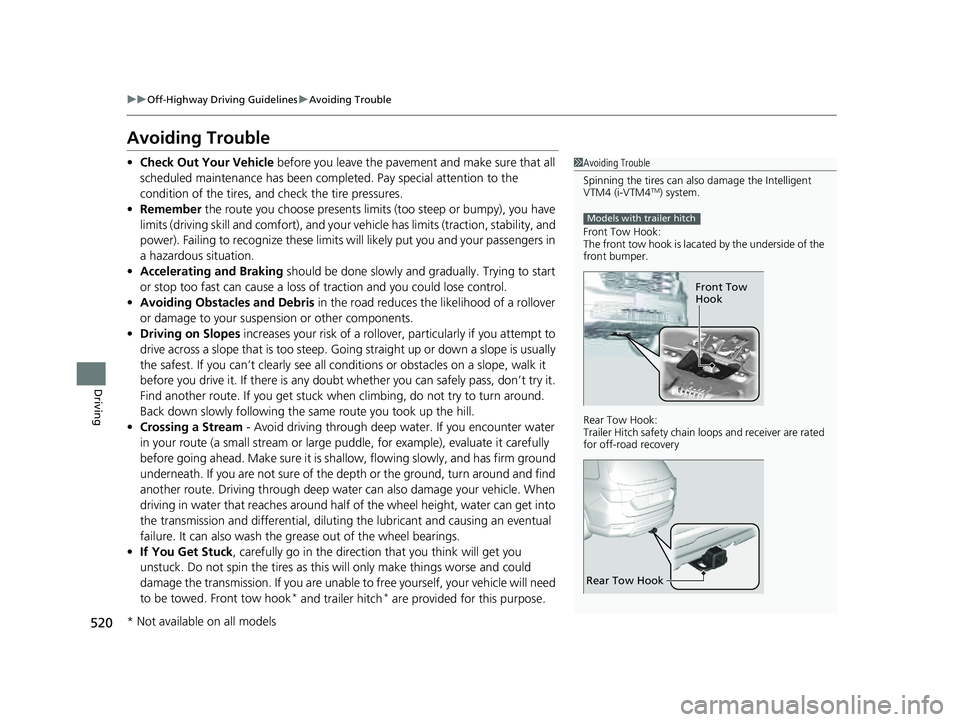
Front Tow Hook:
The front tow hook is lacated by the underside of the
front bumper.
Rear Tow Hook:
Trailer Hitch safety chain loops and re ceiver are rated
for off-road recovery
Models with trailer hitch
Front Tow
Hook
Rear Tow Hook
* Not available on all models
23 PILOT-31T906000_03.book 520 ページ 2022年10月31日 月曜日 午前10時26分
Page 524 of 814
523
uuOff-Highway Driv ing GuidelinesuOff-Highway Driving
Driving
INSPECT YOUR VEHICLE
• Driving off-highway can be hard on a vehi cle. Before you leave the pavement, be
sure all scheduled maintenance and service has been carried out, and that you
have inspected your vehicle and each of its relevant components to make sure
that it still is in a safe operating condition (example: wheel lug bolt torque, skid
plate
* and/or under body component damage, tire pressure, etc.). We
recommend repeating the BEFORE DRIVIN G protocol, and if any item shows
excessive wear or appears to be in an unusual condition, have it replaced, or
exercise appropriate caution when driv ing and see your authorized dealer.
For more information, please contact your authorized dealer, and/or Honda
Customer Service.
2 Customer Service Information P. 801
AFTER DRIVING
•After off-highway driving, it is critical to allow your vehicle to properly cool down.
• Check underneath your vehicle and each of its relevant components, including
the skid plates
*, to make sure that it still is in a safe operating condition (example:
wheel lug bolt torque, tire pressure, skid plate* damage, dirt and debris
accumulation on skids, and suspension components, etc.). We recommend
repeating the BEFORE DRIVING protocol, a nd if any item shows excessive wear or
appears to be in an unusual condition, ha ve it replaced, or exercise appropriate
caution when driving and se e your authorized dealer
• If operated in dirty conditions, clean brakes of abrasion materials to prevent
excessive wear or/and unpredictable braking.
* Not available on all models
23 PILOT-31T906000_03.book 523 ページ 2022年10月31日 月曜日 午前10時26分
Page 556 of 814
555
uuWhen Driving uVehicle Stability AssistTM (VSA ®), aka Electronic Stability Control (ESC), System
Continued
Driving
Vehicle Stability AssistTM (VSA ®), aka Electronic
Stability Control (ESC), System
VSA ® helps stabilize the vehicle during cornering if the vehicle turns more or less
than what was intended. It also assists in maintaining traction on slippery surfaces.
It does so by regulating engine ou tput and selectively applying the brakes.
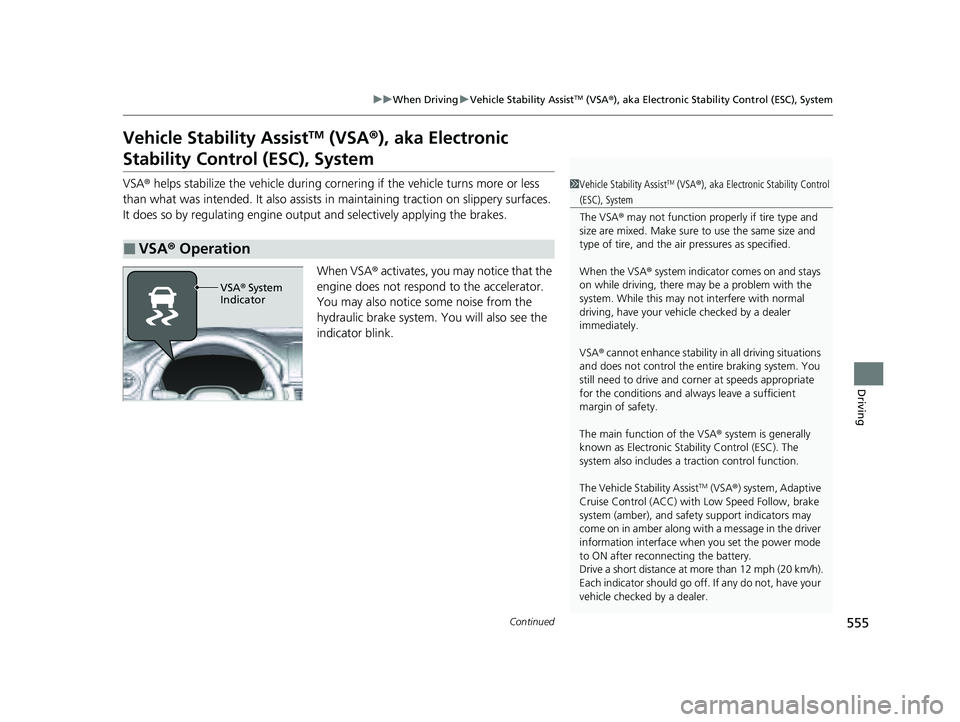
When VSA ® activates, you may notice that the
engine does not respond to the accelerator.
You may also notice some noise from the
hydraulic brake system. You will also see the
indicator blink.
■VSA ® Operation
1 Vehicle Stability AssistTM (VSA® ), aka Electronic Stability Control
(ESC), System
The VSA ® may not function properl y if tire type and
size are mixed. Make sure to use the same size and
type of tire, and the air pressures as specified.
When the VSA ® system indicator comes on and stays
on while driving, there ma y be a problem with the
system. While this may not interfere with normal
driving, have your vehi cle checked by a dealer
immediately.
VSA ® cannot enhance stability in all driving situations
and does not control the entire braking system. You
still need to drive and corner at speeds appropriate
for the conditions and always leave a sufficient
margin of safety.
The main function of the VSA ® system is generally
known as Electronic Stability Control (ESC). The
system also includes a traction control function.
The Vehicle Stability Assist
TM (VSA ®) system, Adaptive
Cruise Control (ACC) with Low Speed Follow, brake
system (amber), and safety support indicators may
come on in amber along with a message in the driver
information interface when you set the power mode
to ON after reconnecting the battery.
Drive a short distance at more than 12 mph (20 km/h).
Each indicator should go off. If any do not, have your
vehicle checked by a dealer.
VSA ® System
Indicator
23 PILOT-31T906000_03.book 555 ページ 2022年10月31日 月曜日 午前10時26分
Page 559 of 814
558
uuWhen Driving uIntelligent Variable Torque Management (i-VTM4TM) AWD System*
Driving
Intelligent Variable Torque Management (i-VTM4TM) AWD System*
The intelligent variable torque management (i-VTM4TM) AWD system is a full time all
wheel drive system that automatically c ontrols and transfers varying amount of
engine torque to all wheels independently according to the driving conditions.
You still need to exercise the same care when accelerating, steering, and braking
that you would in a tw o-wheel drive vehicle.
Avoid continuously driving on slippery surfa ces where a wheel is likely to spin out,
and do not drive if the AWD temperature too hot. Do not drive. Idle engine to
allow system to cool. message appears. Driving continuously under such
conditions can damage the system’s torque distribution unit.
If AWD temperature too hot. Do not drive. Idle engine to allow system to
cool. message appears on the driver informati on interface while driving, it indicates
the differential temperature is too high. If this happens, pull to the side of the road
when it is safe, change the shift position to
(P, and idle the engine until the
message disappears. If the me ssage does not disappear, take your vehicle to a dealer
to have it checked.
1Intelligent Variable Torque Management (i-VTM4TM) AWD System*
NOTICE
Do not continuously spin the front tires of your
vehicle. Continuously spinning the front tires can
cause transmission or re ar differential damage.
The intelligent variable torque management
(i-VTM4
TM) AWD system may not function properly if
tire type and size are mixed. Make sure to use the
same size and type of tire , and the air pressures as
specified. 2 Tire and Wheel Replacement P. 734
* Not available on all models
23 PILOT-31T906000_03.book 558 ページ 2022年10月31日 月曜日 午前10時26分
Page 560 of 814
559
uuWhen Driving uTire Pressure Monitoring System (TPMS) with Tire Fill Assist
Continued
Driving
Tire Pressure Monitoring System (TPMS) with Tire
Fill Assist
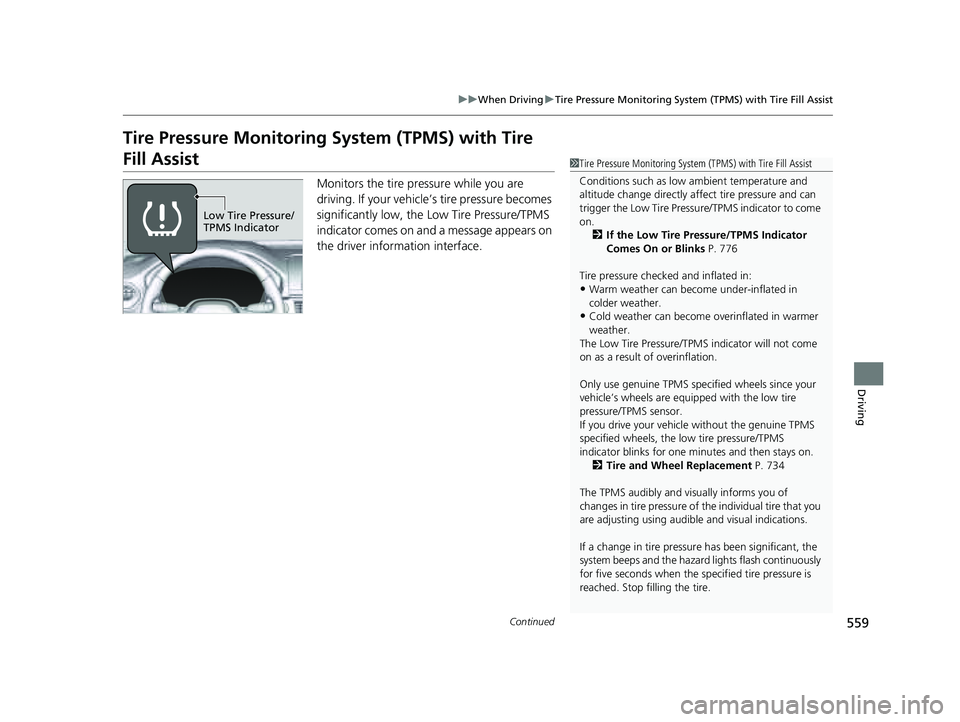
Monitors the tire pr essure while you are
driving. If your vehicle’s tire pressure becomes
significantly low, the Low Tire Pressure/TPMS
indicator comes on and a message appears on
the driver information interface.
1 Tire Pressure Monitoring System (TPMS) with Tire Fill Assist
Conditions such as low ambient temperature and
altitude change directly affect tire pressure and can
trigger the Low Tire Pressure/TPMS indicator to come
on. 2 If the Low Tire Pressure/TPMS Indicator
Comes On or Blinks P. 776
Tire pressure checked and inflated in:
•Warm weather can beco me under-inflated in
colder weather.
•Cold weather can become overinflated in warmer
weather.
The Low Tire Pressure/TPMS indicator will not come
on as a result of overinflation.
Only use genuine TPMS specified wheels since your
vehicle’s wheels are equipped with the low tire
pressure/TPMS sensor.
If you drive your vehicle without the genuine TPMS
specified wheels, the low tire pressure/TPMS
indicator blinks for one minutes and then stays on.
2 Tire and Wheel Replacement P. 734
The TPMS audibly and visually informs you of
changes in tire pressure of the individual tire that you
are adjusting using audibl e and visual indications.
If a change in tire pressure has been significant, the
system beeps and the hazard lights flash continuously
for five seconds when the specified tire pressure is
reached. Stop filling the tire.
Low Tire Pressure/
TPMS Indicator
23 PILOT-31T906000_03.book 559 ページ 2022年10月31日 月曜日 午前10時26分
Page 561 of 814
uuWhen Driving uTire Pressure Monitoring System (TPMS) with Tire Fill Assist
560
Driving
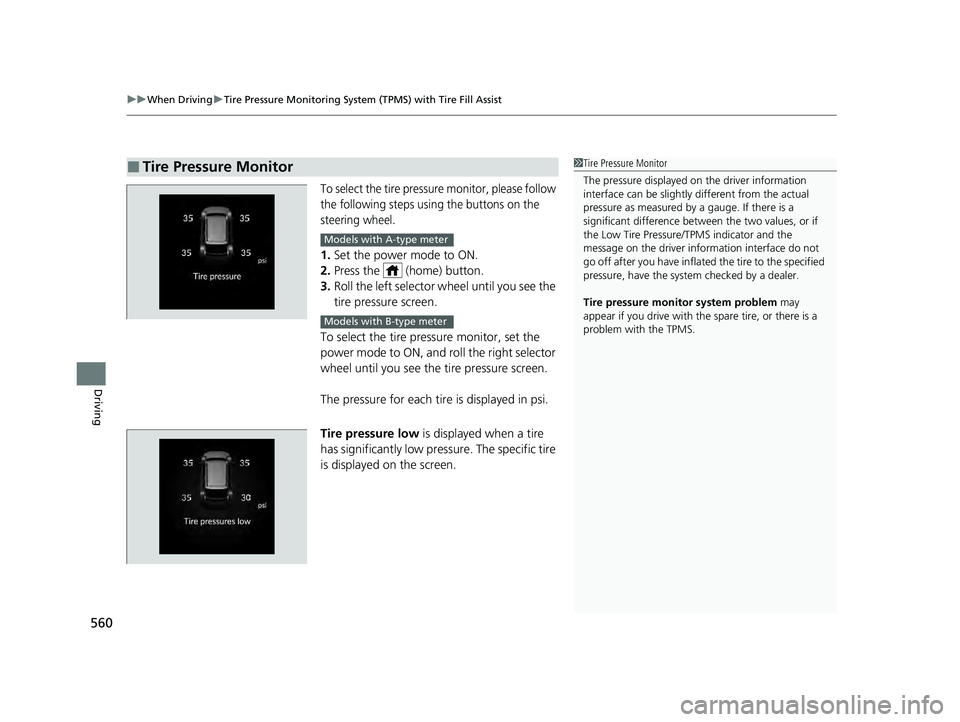
To select the tire pressure monitor, please follow
the following steps using the buttons on the
steering wheel.
1. Set the power mode to ON.
2. Press the (home) button.
3. Roll the left selector wheel until you see the
tire pressure screen.
To select the tire pressure monitor, set the
power mode to ON, and roll the right selector
wheel until you see the tire pressure screen.
The pressure for each tire is displayed in psi.
Tire pressure low is displayed when a tire
has significantly low pressure. The specific tire
is displayed on the screen.
■Tire Pressure Monitor1 Tire Pressure Monitor
The pressure displayed on the driver information
interface can be slightly different from the actual
pressure as measured by a gauge. If there is a
significant di fference between the two values, or if
the Low Tire Pressure/TPMS indicator and the
message on the driver info rmation interface do not
go off after you have inflated the tire to the specified
pressure, have the system checked by a dealer.
Tire pressure monitor system problem may
appear if you drive with the spare tire, or there is a
problem with the TPMS.
Models with A-type meter
Models with B-type meter
23 PILOT-31T906000_03.book 560 ページ 2022年10月31日 月曜日 午前10時26分
Page 562 of 814
561
uuWhen Driving uTire Pressure Monitoring System (TPMS) - Required Federal Explanation
Continued
Driving
Tire Pressure Monitoring System (TPMS) - Required
Federal Explanation
Each tire, including the spare (if provided), should be checked
monthly when cold and inflated to the inflation pressure
recommended by the vehicle manufa cturer on the vehicle placard
or tire inflation pressure label.
(If your vehicle has tires of a diff erent size than the size indicated
on the vehicle placard or tire inflation pressure label, you should
determine the proper tire inflat ion pressure for those tires.)
As an added safety feature, your vehicle has been equipped with
a tire pressure monitoring system (TPMS) that illuminates a low
tire pressure telltale
when one or more of your tires is significantly under-inflated.
Accordingly, when the low tire pressure telltale illuminates, you
should stop and check your tires as soon as possible, and inflate
them to the proper pressure.
Driving on a significantly under-inf lated tire causes the tire to
overheat and can lead to tire fail ure. Under-inflation also reduces
fuel efficiency and tire tread life, and may affect the vehicle’s
handling and stopping ability.
23 PILOT-31T906000_03.book 561 ページ 2022年10月31日 月曜日 午前10時26分