tire type HONDA PILOT 2023 User Guide
[x] Cancel search | Manufacturer: HONDA, Model Year: 2023, Model line: PILOT, Model: HONDA PILOT 2023Pages: 814, PDF Size: 29.02 MB
Page 561 of 814
uuWhen Driving uTire Pressure Monitoring System (TPMS) with Tire Fill Assist
560
Driving
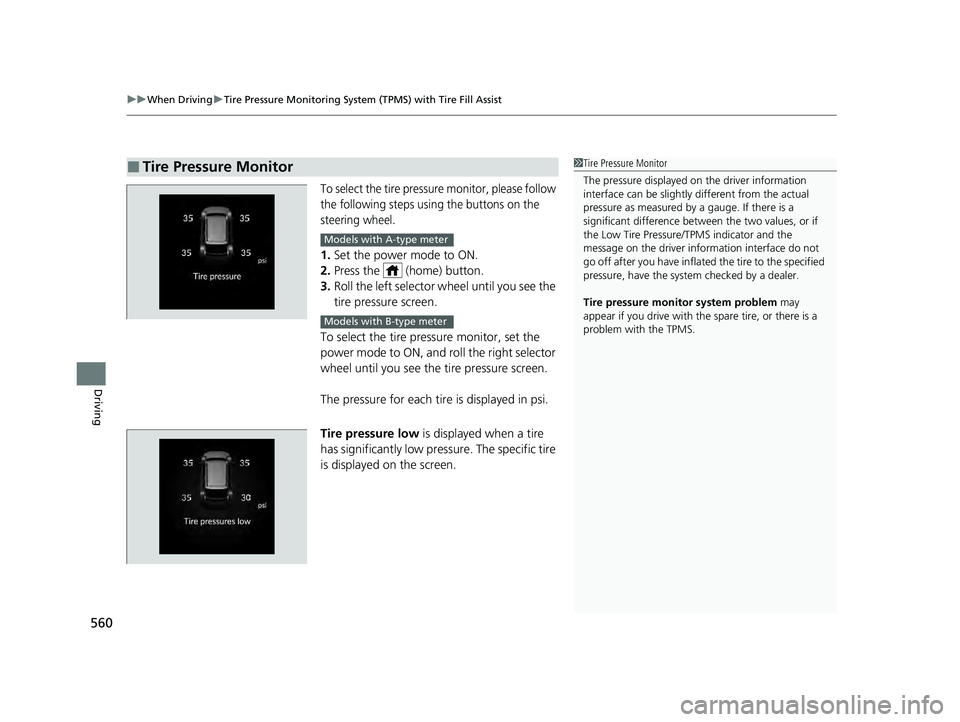
To select the tire pressure monitor, please follow
the following steps using the buttons on the
steering wheel.
1. Set the power mode to ON.
2. Press the (home) button.
3. Roll the left selector wheel until you see the
tire pressure screen.
To select the tire pressure monitor, set the
power mode to ON, and roll the right selector
wheel until you see the tire pressure screen.
The pressure for each tire is displayed in psi.
Tire pressure low is displayed when a tire
has significantly low pressure. The specific tire
is displayed on the screen.
■Tire Pressure Monitor1 Tire Pressure Monitor
The pressure displayed on the driver information
interface can be slightly different from the actual
pressure as measured by a gauge. If there is a
significant di fference between the two values, or if
the Low Tire Pressure/TPMS indicator and the
message on the driver info rmation interface do not
go off after you have inflated the tire to the specified
pressure, have the system checked by a dealer.
Tire pressure monitor system problem may
appear if you drive with the spare tire, or there is a
problem with the TPMS.
Models with A-type meter
Models with B-type meter
23 PILOT-31T906000_03.book 560 ページ 2022年10月31日 月曜日 午前10時26分
Page 580 of 814
Continued579
uuHonda Sensing ®u Collision Mitigation Braking SystemTM (CMBSTM)
Driving
■Examples of limitations on the correc t detection of the camera due to the
condition of the vehicle ahead of you, oncoming vehicles, pedestrians, or
moving bicycles
• The distance between your vehicle and the vehicle ahead of you, oncoming
vehicle, pedestrian, or moving bicycle ahead of you is too short.
• The vehicle ahead of you, oncoming vehicle, pedestrian, or moving bicycle
suddenly cuts in front of or jumps out in front of you.
• The bicycle is stopped.
• The oncoming vehicle or vehicle ahead of you is sideways or facing diagonally.
• When the vehicle ahead of you, oncoming vehicle, pedestrian, or moving bicycle
blends in with the background, preventing the system from recognizing it.
• When several pedestrians are moving ahead of you in a group.
• When several bicycles are movi ng ahead of you in a group.
• When a pedestrian or moving bicy cle crosses the road too quickly.
• A pedestrian or moving bicycle approaches from the opposite direction.
• The headlights of the vehicle ahead of you or oncoming vehicle are lit on one side
or not lit on either side in a dark place.
• When part of a pedestrian (heads, limbs, etc.) is hidden by a load.
• When a pedestrian is bent over or squatting, when their hands are raised, or they
are running.
• When the pedestrian is shorte r than about 3.3 feet (1 meter) or taller than about
6.6 feet (2 meters) in height.
• When the pedestrian is push ing a stroller or bicycle.1Collision Mitigation Braking SystemTM (CMBSTM)
Make sure that all the tires are of the same specified
size, type and brand, and that they are evenly worn.
If you use tires of different sizes, types, brands, or
degree of wear, the syst em may not work properly.
Do not modify the suspensi on. Altering the height of
the vehicle may prevent the system from working
properly.
23 PILOT-31T906000_03.book 579 ページ 2022年10月31日 月曜日 午前10時26分
Page 608 of 814
Continued607
uuHonda Sensing ®u Adaptive Cruise Control (ACC) with Low Speed Follow
Driving
■Automatic cancellation
The beeper sounds and a message appears on the driver information interface when
ACC with Low Speed Follow is automatically canceled. Any of these conditions may
cause the ACC with Low Speed Fo llow to automatically cancel:
• Bad weather (rain, fog, snow, etc.)
• When the radar sensor behind the Honda emblem gets dirty.
• The vehicle ahead of yo u cannot be detected.
• An abnormal tire condition is detected, or the tires are skidding.
• Driving on a mountainous road for extended periods, or driving off road.
• Abrupt steering wheel movement.
• When the ABS, VSA ®, CMBS
TM, or Low Speed Braking Control* is activated.
• When the ABS or VSA ® system indicator comes on.
• When the vehicle is stopped on a very steep slope.
• When you manually apply the parking brake.
• When the detected vehicle within the AC C with Low Speed Follow range is too
close to your vehicle.
• When accelerating rapidly.
• The camera behind the rearview mirror, or the area around the camera, including
the windshield, gets dirty.
• The vehicle has repeatedly applied the brakes to maintain the set speed (for
example, you are descending a long slope).
• When the system doesn't detect any drivi ng actions from the driver for a certain
amount of time while the LKAS is also activated.
• When the Maximum Load Limit is exceeded.
• When passing through an enclosed space, such as tunnel.
• When the parking brake and brake system indicator (amber) comes on.
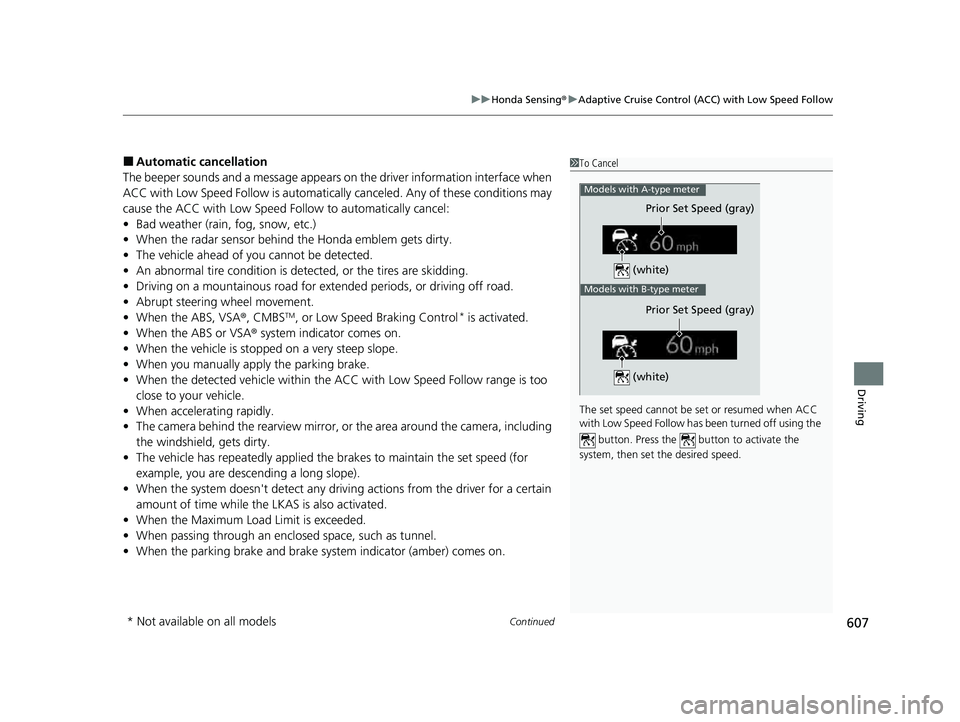
1To Cancel
The set speed cannot be set or resumed when ACC
with Low Speed Follow has been turned off using the
button. Press the button to activate the
system, then set the desired speed.
(white)
Prior Set Speed (gray)
Models with A-type meter
Models with B-type meter
Prior Set Speed (gray)
(white)
* Not available on all models
23 PILOT-31T906000_03.book 607 ページ 2022年10月31日 月曜日 午前10時26分
Page 645 of 814
uuHonda Sensing ®u Traffic Sign Recognition System
644
Driving
The Traffic Sign Recognition system may incorrectly recognize, be slow to identify,
or fail to recognize the traffi c sign in the following cases.
■Environmental conditions
• Driving into low sunlight (e.g., at dawn or dusk).
• Strong light is reflected onto the roadway.
• Driving at night, in dark areas such as long tunnels.
• Driving in bad weather (rain, fog, snow, etc.).
• Sudden changes between light and dark, such as the entrance or exit of a tunnel
or the shadows of trees, buildings, etc.
• Water is sprayed by or snow blown from a vehicle ahead.
■Roadway conditions
• Your vehicle is strongly shaken on uneven road surfaces.
■Vehicle conditions
• When lighting is weak due to dirt covering the headlight lenses, or there is poor
visibility in a dark place due to th e headlights being improperly adjusted.
• The front of the camera is covered by dirt, fog, rain, mud, wet snow, seals,
accessories, stickers, or film on the windshield.
• There is residue on the windshie ld from the windshield wipers.
• An abnormal tire or wheel condition (incorre ct sizes, varied sizes or construction,
improperly inflated, compact spare tire
*, etc.).
• The vehicle is tilted due to heavy lo ad in the cargo area or rear seats.
• The suspension has been modified.
• Tire chains are installed.
• Driving at night or in a dark place (e .g., a tunnel) with the headlights off.
• The vehicle is towing a trailer.
■Traffic Sign Recognition System Conditions and Limitations1Traffic Sign Recognition System Conditions and Limitations
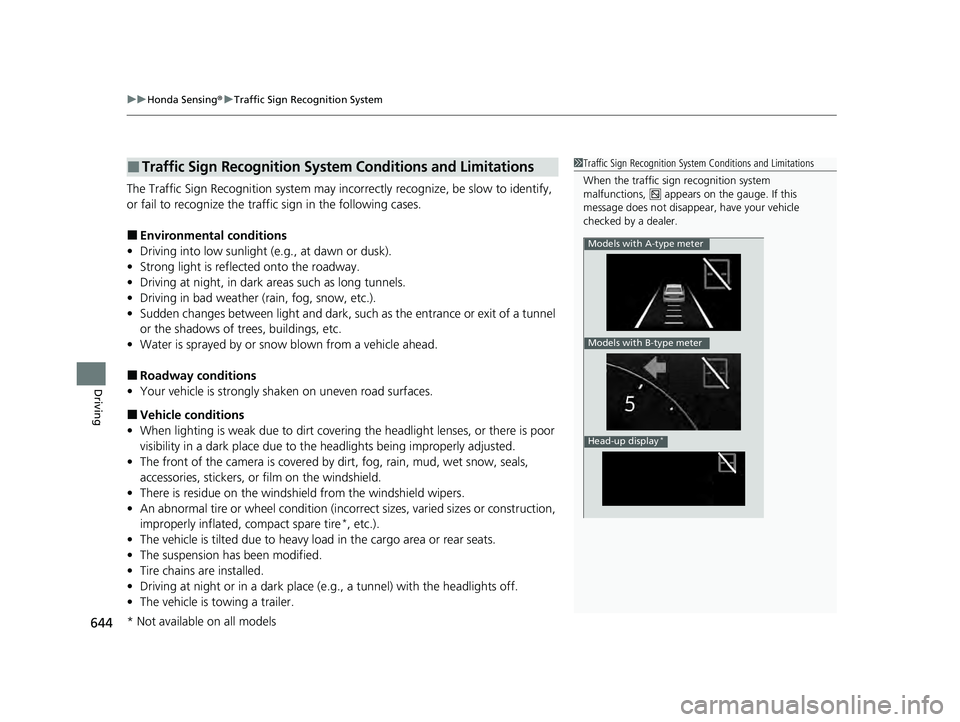
When the traffic sign recognition system
malfunctions, appears on the gauge. If this
message does not disappear, have your vehicle
checked by a dealer.
Models with A-type meter
Models with B-type meter
Head-up display*
* Not available on all models
23 PILOT-31T906000_03.book 644 ページ 2022年10月31日 月曜日 午前10時26分
Page 660 of 814
659
uuBraking uAnti-lock Brake System (ABS)
Driving
Anti-lock Brake System (ABS)
Helps prevent the wheels from locking up, and helps you retain steering control by
pumping the brakes rapidly, much faster than you can.
The electronic brake distribu tion (EBD) system, which is part of the ABS, also
balances the front-to-rear braking distribution according to vehicle loading.
You should never pump the brake pedal. Let the ABS work for you by always
keeping firm, steady pressure on the brake pe dal. This is sometimes referred to as
“stomp and steer.”
■ABS operation
The brake pedal may pulsate slightly when the ABS is working. Depress the brake
pedal and keep holding the pedal firmly do wn. On dry pavement, you will need to
press on the brake pedal very hard before th e ABS activates. However, you may feel
the ABS activate immediately if you are trying to stop on snow or ice.
ABS may activate when you depres s the brake pedal when driving on:
• Wet or snow covered roads.
• Roads paved with stone.
• Roads with uneven surf aces, such as potholes, cracks, manholes, etc.
When the vehicle speed goes under 6 mph (10 km/h), the ABS stops.
■ABS1Anti-lock Brake System (ABS)
NOTICE
The ABS may not function correctly if you use a tire of
the incorrect size or type.
If the ABS indicator comes on while driving, there
may be a problem with the system.
While normal braking will not be affected, there is a
possibility that the ABS wi ll not be operating. Have
your vehicle checked by a dealer immediately.
The ABS is not designed for the purpose of reducing
the time or distance it takes for a vehicle to stop: It is
designed to limit brake lo ckup which can lead to
skidding and loss of steering control.
In the following cases, yo ur vehicle may need more
distance to stop than a vehicle without the ABS:
•You are driving on rough or uneven road surfaces,
such as gravel or snow.
•The tires are equipped with snow chains.
The following may be observed with the ABS system:
•Motor sounds coming from the engine
compartment when the brakes are applied, or when
system checks are being performed after the engine
has been started and while the vehicle accelerates.
•Brake pedal and/or the vehicle body vibration when
ABS activates.
These vibrations and sounds are normal to ABS
systems and are no cause for concern.
23 PILOT-31T906000_03.book 659 ページ 2022年10月31日 月曜日 午前10時26分
Page 693 of 814
692
Maintenance
Before Performing Maintenance
Inspection and Maintenance
For your safety, perform all listed inspections and maintenance to keep your vehicle
in good condition. If you become aware of an y abnormality (noise, smell, insufficient
brake fluid, oil residue on the ground, etc.), have your vehicle inspected by a dealer.
(Note, however, that service at a dealer is not mandatory to keep your warranties in
effect.)
■Routine inspections
Perform inspections before long distance tri ps, when washing the vehicle, or when
refueling.
2 Maintenance P. 32
■Periodic inspections
• Check the brake fluid level monthly.
2 Checking the Brake Fluid P. 717
•Check the tire pressure monthly. Examin e the tread for wear and foreign objects.
2Checking and Maintaining Tires P. 728
•Check the operation of the exterior lights monthly.
2 Replacing Light Bulbs P. 718
•Check the condition of the wiper bl ades at least every six months.
2Checking and Maintaining Wiper Blades P. 723
■Types of Inspection and Maintenance
1Inspection and Maintenance
Maintenance, replacement, or repair of
emissions control devices and systems may be
done by any automotive repair establishment or
individuals using parts that are “certified” to
EPA standards.
According to state and fede ral regulations, failure to
perform maintenance on the maintenance main
items marked with # will not void your emissions
warranties. However, all ma intenance services should
be performed in accordan ce with the intervals
indicated by the driver information interface.
2 Maintenance Service Items P. 700
If you want to perform complex maintenance tasks
that require more skills a nd tools, you can purchase a
subscription to the Service Express website at
www.techinfo.honda.com .
2 Authorized Manuals P. 800
If you want to perform ma intenance yourself, make
sure that you have the necessary tools and skills first.
After performing maintenanc e, update the records in
the separate maintenance booklet.
U.S. models
23 PILOT-31T906000_03.book 692 ページ 2022年10月31日 月曜日 午前10時26分
Page 729 of 814
728
Maintenance
Checking and Maintaining Tires
Checking Tires
To safely operate your vehicle, your tires must be of the proper type and size, in
good condition with adequate tread, and properly inflated.
■Inflation guidelines
Properly inflated tires provide the best combination of handling, tread life, and comfort.
Refer to the driver’s doorjamb label or spec ifications page for the specified pressure.
Underinflated tires wear unevenly, adversely affect handling and fuel economy, and
are more likely to fail from overheating.
Overinflated tires make your vehicle ride harshly, are more prone to road hazards,
and wear unevenly.
Every day before you drive, look at each of the tires. If one looks lower than the
others, check the pressure with a tire gauge.
At least once a month or before long trips, use a gauge to measure the pressure in
all tires, including the spare. Even tires in good condition can lose 1-2 psi (10-20 kPa,
0.1-0.2 kgf/cm
2) per month.
■Inspection guidelines
Every time you check inflation, also examine the tires and valve stems.
Look for:
• Bumps or bulges on the side or in the tread. Replace the tire if you find any cuts,
splits, or cracks in the si de of the tire. Replace it if you see fabric or cord.
• Remove any foreign objects and inspect for air leaks.
• Uneven tread wear. Have a deal er check the wheel alignment.
• Excessive tread wear.
2 Wear Indicators P. 733
•Cracks or other damage around valve stem.
1Checking Tires
Measure the air pressure when tires are cold. This
means the vehicle has been parked for at least three
hours, or driven less than 1 mile (1.6 km). If
necessary, add or releas e air until the specified
pressure is reached.
If checked when hot, tire pressure can be as much as
4–6 psi (30–40 kPa, 0.3–0.4 kgf/cm
2) higher than if
checked when cold.
Have a dealer check the tires if you feel a consistent
vibration while driving. Ne w tires and any that have
been removed and reinst alled should be properly
balanced.
3WARNING
Using tires that are excessively worn or
improperly inflated can cause a crash in
which you can be seriously hurt or killed.
Follow all instruction s in this owner’s
manual regarding ti re inflation and
maintenance.
23 PILOT-31T906000_03.book 728 ページ 2022年10月31日 月曜日 午前10時26分
Page 730 of 814
729
uuChecking and Maintaining Tires uTire and Loading Information Label
Continued
Maintenance
Tire and Loading Information Label
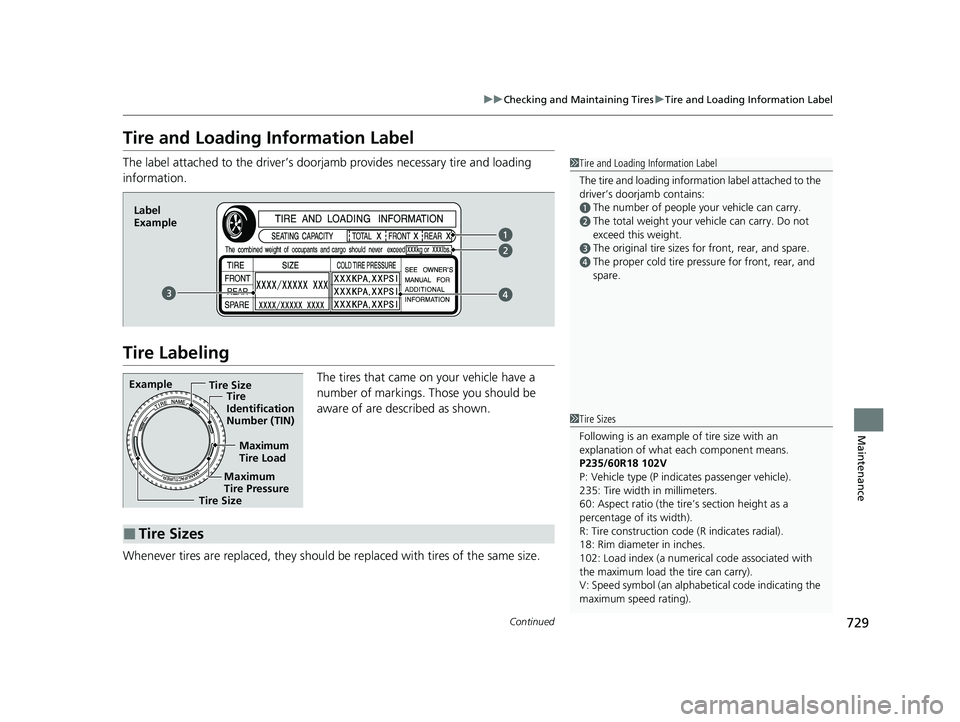
The label attached to the driver’s doorj amb provides necessary tire and loading
information.
Tire Labeling
The tires that came on your vehicle have a
number of markings. Those you should be
aware of are described as shown.
Whenever tires are replaced, they should be replaced with tires of the same size.
1Tire and Loading Information Label
The tire and loading informat ion label attached to the
driver’s doorjamb contains:
aThe number of people your vehicle can carry.
bThe total weight your vehicle can carry. Do not
exceed this weight.
cThe original tire sizes for front, rear, and spare.
dThe proper cold tire pressure for front, rear, and
spare.
Label
Example
Example Tire Size
Tire
Identification
Number (TIN)
Maximum
Tire Load
Maximum
Tire Pressure
Tire Size
■Tire Sizes
1 Tire Sizes
Following is an example of tire size with an
explanation of what each component means.
P235/60R18 102V
P: Vehicle type (P indi cates passenger vehicle).
235: Tire width in millimeters.
60: Aspect ratio (the tire’s section height as a
percentage of its width).
R: Tire construction code (R indicates radial).
18: Rim diameter in inches.
102: Load index (a numerical code associated with
the maximum load the tire can carry).
V: Speed symbol (an alphab etical code indicating the
maximum speed rating).
23 PILOT-31T906000_03.book 729 ページ 2022年10月31日 月曜日 午前10時26分
Page 731 of 814
uuChecking and Maintaining Tires uTire Labeling
730
Maintenance
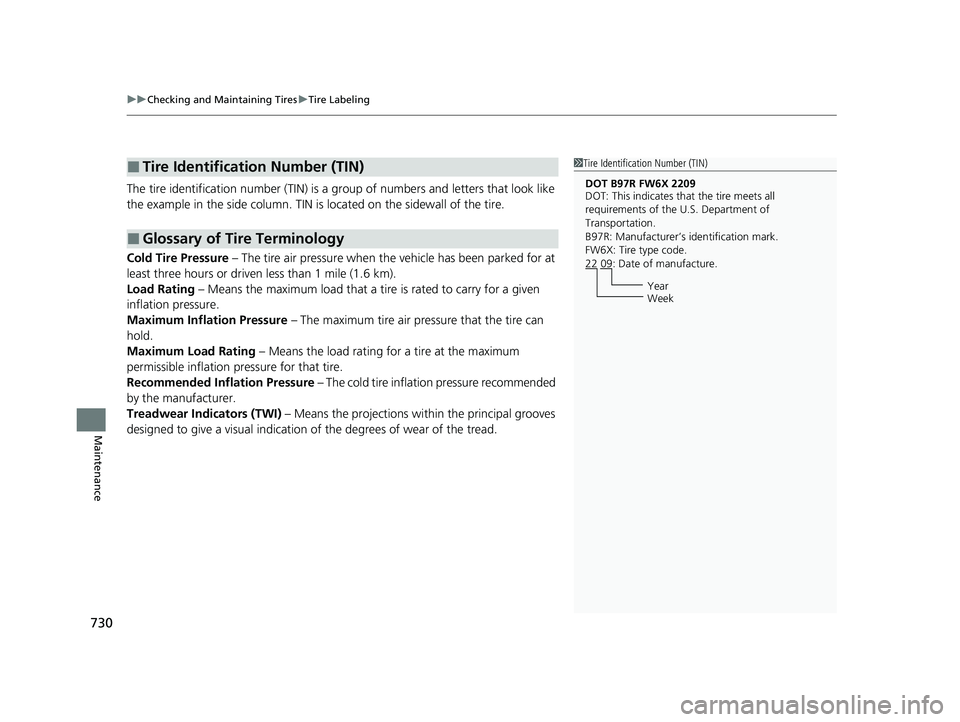
The tire identification number (TIN) is a gr oup of numbers and letters that look like
the example in the side co lumn. TIN is located on the sidewall of the tire.
Cold Tire Pressure – The tire air pressure when the vehicle has been parked for at
least three hours or driven less than 1 mile (1.6 km).
Load Rating – Means the maximum load that a ti re is rated to carry for a given
inflation pressure.
Maximum Inflation Pressure – The maximum tire air pressure that the tire can
hold.
Maximum Load Rating – Means the load rating for a tire at the maximum
permissible inflation pr essure for that tire.
Recommended Inflation Pressure – The cold tire inflation pressure recommended
by the manufacturer.
Treadwear Indicators (TWI) – Means the projections within the principal grooves
designed to give a visual indication of the degrees of wear of the tread.
■Tire Identification Number (TIN)
■Glossary of Tire Terminology
1 Tire Identification Number (TIN)
DOT B97R FW6X 2209
DOT: This indicates that the tire meets all
requirements of the U.S. Department of
Transportation.
B97R: Manufacturer’s identification mark.
FW6X: Tire type code.
22 09: Date of manufacture.
Year
Week
23 PILOT-31T906000_03.book 730 ページ 2022年10月31日 月曜日 午前10時26分
Page 735 of 814
734
uuChecking and Maintaining Tires uTire and Wheel Replacement
Maintenance
Tire and Wheel Replacement
Replace your tires with radials of the sa me size, load range, speed rating, and
maximum cold tire pressure ra ting (as shown on the tire's sidewall). Using tires of a
different size or construction can cause ce rtain vehicle systems such as the ABS and
Vehicle Stability Assist
TM (VSA ®) system to work incorrectly.
It is best to replace all four tires at the same time. If that isn’t possible, replace the
front or rear tires in pairs.
Whenever you have a tire replaced or reset, make sure that the rubber valve stem is
replaced and that the TPMS sensor is trans ferred from the old valve stem to the new
one.
If you replace a wheel, make sure that the wheel’s specifications match those of the
original wheels.
1 Tire and Wheel Replacement
3WARNING
Installing improper tires on your vehicle can
affect handling and stability. This can cause
a crash in which you can be seriously hurt or
killed.
Always use the size and type of tires
recommended in this owner’s manual.
23 PILOT-31T906000_03.book 734 ページ 2022年10月31日 月曜日 午前10時26分