Maintenance HONDA PILOT 2023 Owner's Manual
[x] Cancel search | Manufacturer: HONDA, Model Year: 2023, Model line: PILOT, Model: HONDA PILOT 2023Pages: 814, PDF Size: 29.02 MB
Page 524 of 814
523
uuOff-Highway Driv ing GuidelinesuOff-Highway Driving
Driving
INSPECT YOUR VEHICLE
• Driving off-highway can be hard on a vehi cle. Before you leave the pavement, be
sure all scheduled maintenance and service has been carried out, and that you
have inspected your vehicle and each of its relevant components to make sure
that it still is in a safe operating condition (example: wheel lug bolt torque, skid
plate
* and/or under body component damage, tire pressure, etc.). We
recommend repeating the BEFORE DRIVIN G protocol, and if any item shows
excessive wear or appears to be in an unusual condition, have it replaced, or
exercise appropriate caution when driv ing and see your authorized dealer.
For more information, please contact your authorized dealer, and/or Honda
Customer Service.
2 Customer Service Information P. 801
AFTER DRIVING
•After off-highway driving, it is critical to allow your vehicle to properly cool down.
• Check underneath your vehicle and each of its relevant components, including
the skid plates
*, to make sure that it still is in a safe operating condition (example:
wheel lug bolt torque, tire pressure, skid plate* damage, dirt and debris
accumulation on skids, and suspension components, etc.). We recommend
repeating the BEFORE DRIVING protocol, a nd if any item shows excessive wear or
appears to be in an unusual condition, ha ve it replaced, or exercise appropriate
caution when driving and se e your authorized dealer
• If operated in dirty conditions, clean brakes of abrasion materials to prevent
excessive wear or/and unpredictable braking.
* Not available on all models
23 PILOT-31T906000_03.book 523 ページ 2022年10月31日 月曜日 午前10時26分
Page 563 of 814
562
uuWhen Driving uTire Pressure Monitoring System (TPMS) - Required Federal Explanation
Driving
Please note that the TPMS is not a substitute for proper tire
maintenance, and it is the driver ’s responsibility to maintain
correct tire pressure, even if un der-inflation has not reached the
level to trigger illumina tion of the TPMS low ti re pressure telltale.
Your vehicle has also been eq uipped with a TPMS malfunction
indicator to indicate when the sy stem is not operating properly.
The TPMS malfunction indicator is combined with the low tire
pressure telltale. When the system detects a malfunction, the
telltale will flash fo r approximately one minute and then remain
continuously illuminated. This sequence will continue upon
subsequent vehicle start-ups as long as the malfunction exists.
When the malfunction indicator is illuminated, the system may
not be able to detect or signal low tire pressure as intended.
TPMS malfunctions may occur for a variety of reasons, including
the installation of replacement or alternate tires or wheels on the
vehicle that prevent the TPMS from functioning properly.
Always check the TPMS malfunction telltale after replacing one or
more tires or wheels on your vehicle to ensure that the
replacement or alternate tires and wheels allow the TPMS to
continue to function properly.
23 PILOT-31T906000_03.book 562 ページ 2022年10月31日 月曜日 午前10時26分
Page 586 of 814
Continued585
uuHonda Sensing ®u Low Speed Braking Control*
Driving
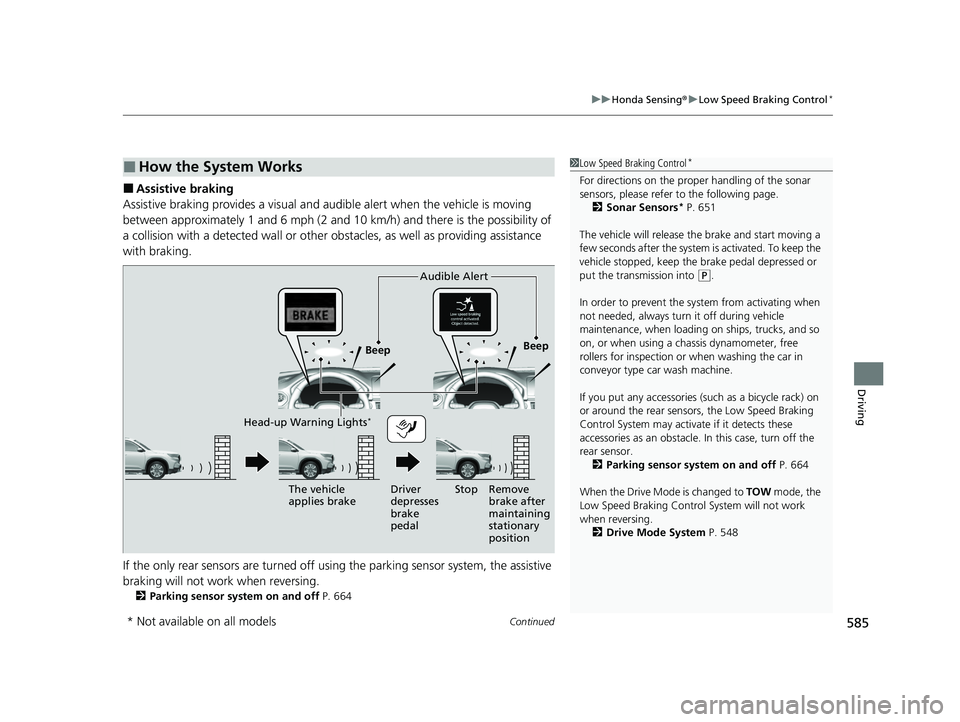
■Assistive braking
Assistive braking provides a visual and audible alert when the vehicle is moving
between approximately 1 and 6 mph (2 and 10 km/h) and there is the possibility of
a collision with a detected wall or other ob stacles, as well as providing assistance
with braking.
If the only rear sensors are turned off usi ng the parking sensor system, the assistive
braking will not work when reversing.
2 Parking sensor system on and off P. 664
■How the System Works1Low Speed Braking Control*
For directions on the prop er handling of the sonar
sensors, please refer to the following page.
2 Sonar Sensors
* P. 651
The vehicle will release the brake and start moving a
few seconds after the system is activated. To keep the
vehicle stopped, keep the brake pedal depressed or
put the transmission into
( P.
In order to prevent the sy stem from activating when
not needed, always turn it off during vehicle
maintenance, when loading on ships, trucks, and so
on, or when using a chassis dynamometer, free
rollers for inspection or when washing the car in
conveyor type car wash machine.
If you put any accessories (such as a bicycle rack) on
or around the rear sensors, the Low Speed Braking
Control System may activate if it detects these
accessories as an obstacle. In this case, turn off the
rear sensor.
2 Parking sensor system on and off P. 664
When the Drive Mode is changed to TOW mode, the
Low Speed Braking Control System will not work
when reversing. 2 Drive Mode System P. 548
Beep Beep
The vehicle
applies brake Driver
depresses
brake
pedalRemove
brake after
maintaining
stationary
position
Stop
Audible Alert
Head-up Warning Lights*
* Not available on all models
23 PILOT-31T906000_03.book 585 ページ 2022年10月31日 月曜日 午前10時26分
Page 690 of 814
689
Driving
Fuel Economy and CO2 Emissions
Improving Fuel Economy and Reducing CO2 Emissions
Achieving fuel economy and reducing CO2 emissions is dependent on several
factors, including driving conditions, load weight, idling time, driving habits, and
vehicle condition. Depending on these and other factors, you may not achieve the
rated fuel economy of this vehicle.
You can optimize your fuel economy with proper maintenance of your vehicle.
Always maintain your vehicle in accord ance with the messages displayed on the
driver information interface.
• Use engine oil with the viscosity recommended.
2 Recommended Engine Oil P. 709
•Maintain the specified tire pressure.
• Do not load the vehicle with excess cargo.
• Keep your vehicle clean. A buildup of snow or mud on your vehicle’s underside
adds weight and increases wind resistance.
■Maintenance and Fuel Economy
1Improving Fuel Economy and Reducing CO2 Emissions
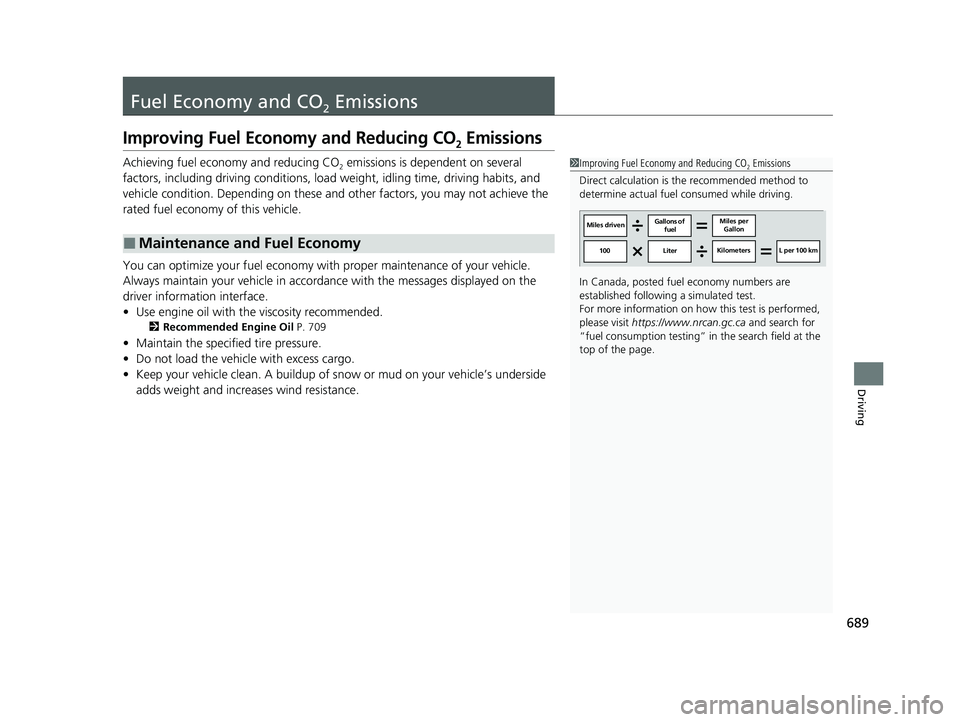
Direct calculation is the recommended method to
determine actual fuel consumed while driving.
In Canada, posted fuel economy numbers are
established following a simulated test.
For more information on how this test is performed,
please visit https://www.nrcan.gc.ca and search for
“fuel consumption testing” in the search field at the
top of the page.
Miles driven Gallons of
fuel Miles per
Gallon
100 Liter Kilometers L per 100 km
23 PILOT-31T906000_03.book 689 ページ 2022年10月31日 月曜日 午前10時26分
Page 692 of 814
691
Maintenance
This chapter discusses basic maintenance.
Before Performing MaintenanceInspection and Maintenance ............ 692
Safety When Performing Maintenance ..693
Parts and Fluids Used in Maintenance Service ........................................... 694
Maintenance Minder
TM..................... 695
Maintenance Under the Hood Maintenance Items Under the Hood .. 705
Opening the Hood ........................... 706
Engine Compartment Cover ............. 708
Recommended Engine Oil ................ 709
Oil Check ......................................... 710
Adding Engine Oil ............................ 711
Changing the Engine Oil and Oil Filter ....712
Engine Coolant ................................ 714
Transmission Fluid ............................ 716
Transfer Assembly Fluid
*.................. 716
Brake Fluid ....................................... 717
Refilling Window Wa sher Fluid......... 717
Replacing Light Bulbs ....................... 718
Checking and Maintaining Wiper
Blades .......................................... 723
Checking and Maintaining Tires
Checking Tires ................................. 728
Tire and Loading Information Label .. 729
Tire Labeling .................................... 729
DOT Tire Quality Grading (U.S. Vehicles) .. 731
Wear Indicators ............................... 733
Tire Service Life ................................ 733
Tire and Wheel Replacement ........... 734
Tire Rotation .................................... 735
Winter Tires ..................................... 736
Battery ............................................... 737
Remote Transmitter Care ................. 739
Climate Control System Maintenance .. 740Cleaning
Interior Care .................................... 742
Exterior Care.................................... 744
Accessories and Modifications ........ 747
* Not available on all models
23 PILOT-31T906000_03.book 691 ページ 2022年10月31日 月曜日 午前10時26分
Page 693 of 814
692
Maintenance
Before Performing Maintenance
Inspection and Maintenance
For your safety, perform all listed inspections and maintenance to keep your vehicle
in good condition. If you become aware of an y abnormality (noise, smell, insufficient
brake fluid, oil residue on the ground, etc.), have your vehicle inspected by a dealer.
(Note, however, that service at a dealer is not mandatory to keep your warranties in
effect.)
■Routine inspections
Perform inspections before long distance tri ps, when washing the vehicle, or when
refueling.
2 Maintenance P. 32
■Periodic inspections
• Check the brake fluid level monthly.
2 Checking the Brake Fluid P. 717
•Check the tire pressure monthly. Examin e the tread for wear and foreign objects.
2Checking and Maintaining Tires P. 728
•Check the operation of the exterior lights monthly.
2 Replacing Light Bulbs P. 718
•Check the condition of the wiper bl ades at least every six months.
2Checking and Maintaining Wiper Blades P. 723
■Types of Inspection and Maintenance
1Inspection and Maintenance
Maintenance, replacement, or repair of
emissions control devices and systems may be
done by any automotive repair establishment or
individuals using parts that are “certified” to
EPA standards.
According to state and fede ral regulations, failure to
perform maintenance on the maintenance main
items marked with # will not void your emissions
warranties. However, all ma intenance services should
be performed in accordan ce with the intervals
indicated by the driver information interface.
2 Maintenance Service Items P. 700
If you want to perform complex maintenance tasks
that require more skills a nd tools, you can purchase a
subscription to the Service Express website at
www.techinfo.honda.com .
2 Authorized Manuals P. 800
If you want to perform ma intenance yourself, make
sure that you have the necessary tools and skills first.
After performing maintenanc e, update the records in
the separate maintenance booklet.
U.S. models
23 PILOT-31T906000_03.book 692 ページ 2022年10月31日 月曜日 午前10時26分
Page 694 of 814
693
uuBefore Performing Maintenance uSafety When Performing Maintenance
Maintenance
Safety When Performing Maintenance
Some of the most important safety precau tions are given here. However, we cannot
warn you of every conceivable hazard that can arise in performing maintenance.
Only you can decide whether you should perform a given task.
• To reduce the possibility of fire or explos ion, keep cigarettes, sparks, and flames
away from the battery and all fuel related parts.
• Never leave rags, towels, or other flammable objects under the hood.
u Heat from the engine and exhaust can ignite them, causing a fire.
•To clean parts, use a commercially available degreaser or parts cleaner, not gasoline.
•Wear eye protection and protective clothi ng when working with the battery or
compressed air.
• Engine exhaust contains carbon monoxide, which is poisonous and can kill you.
u Only operate the engine if th ere is sufficient ventilation.
• The vehicle must be in a stationary condition.
u Make sure your vehicle is parked on le vel ground, the parking brake is set, and
the engine is off.
• Be aware that hot parts can burn you.
u Make sure to let the engine and exhaust system cool thoroughly before
touching vehicle parts.
• Be aware that moving parts can injure you.
u Do not start the engine unless instruct ed, and keep your hands and limbs away
from moving parts.
u Do not open the hood while the Auto Idle Stop function is activated.
■Maintenance Safety
■Vehicle Safety
1Safety When Performing Maintenance
3WARNING
Improperly maintaining this vehicle or
failing to correct a pr oblem before driving
can cause a crash in which you can be
seriously hurt or killed.
Always follow the inspection and
maintenance recommendations according
to the schedules in this owner’s manual.
3WARNING
Failure to properly follow maintenance
instructions and precautions can cause you
to be seriously hurt or killed.
Always follow the procedures and
precautions in this owner’s manual.
23 PILOT-31T906000_03.book 693 ページ 2022年10月31日 月曜日 午前10時26分
Page 695 of 814
694
uuBefore Performing Maintenance uParts and Fluids Used in Maintenance Service
Maintenance
Parts and Fluids Used in Maintenance Service
The use of Honda genuine parts and fluids is recommended when maintaining and
servicing your vehicle. Honda genuine parts are manufactured according to the
same high quality standards used in Honda vehicles.1Parts and Fluids Used in Maintenance Service
NOTICE
Do not press the engine cover forcibly. This may
damage the engine cover and component parts.
23 PILOT-31T906000_03.book 694 ページ 2022年10月31日 月曜日 午前10時26分
Page 696 of 814
695
Maintenance
Maintenance MinderTM
If the engine oil life is less than 15%, you will see the Maintenance Minder messages
appear on the driver information interfac e every time you set the power mode to
ON. The messages notify you when to change the engine oil, or when to bring your
vehicle to a dealer for indicated maintenance services.
23 PILOT-31T906000_03.book 695 ページ 2022年10月31日 月曜日 午前10時26分
Page 697 of 814
696
uuMaintenance MinderTMuTo Use Maintenance MinderTM
Maintenance
To Use Maintenance MinderTM
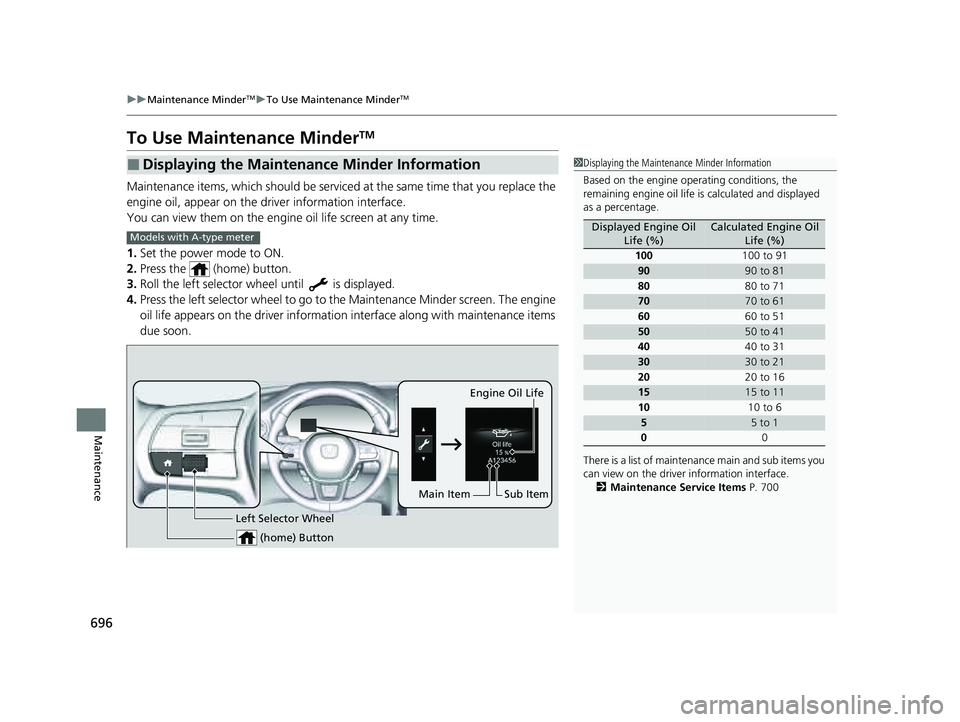
Maintenance items, which should be serviced at the same time that you replace the
engine oil, appear on the driver information interface.
You can view them on the engine oil life screen at any time.
1. Set the power mode to ON.
2. Press the (home) button.
3. Roll the left selector wheel until is displayed.
4. Press the left selector wheel to go to the Maintenance Minder screen. The engine
oil life appears on the driver information interface along with maintenance items
due soon.
■Displaying the Maintenance Minder Information1 Displaying the Maintena nce Minder Information
Based on the engine ope rating conditions, the
remaining engine oi l life is calculated and displayed
as a percentage.
There is a list of maintena nce main and sub items you
can view on the driver information interface.
2 Maintenance Service Items P. 700
Displayed Engine Oil
Life (%)Calculated Engine Oil Life (%)
100 100 to 91
9090 to 81
80 80 to 71
7070 to 61
60 60 to 51
5050 to 41
40 40 to 31
3030 to 21
20 20 to 16
1515 to 11
10 10 to 6
55 to 1
0 0
Models with A-type meter
(home) Button
Engine Oil Life
Sub Item
Left Selector Wheel
Main Item
23 PILOT-31T906000_03.book 696 ページ 2022年10月31日 月曜日 午前10時26分