transmission HONDA PILOT 2023 Service Manual
[x] Cancel search | Manufacturer: HONDA, Model Year: 2023, Model line: PILOT, Model: HONDA PILOT 2023Pages: 814, PDF Size: 29.02 MB
Page 547 of 814
uuWhen Driving uAuto Idle Stop
546
Driving
• The brake pedal is released (without the automatic brake hold system activated).
• The accelerator pedal is depressed (with the automatic brake hold system
activated).
2 Automatic Brake Hold P. 656
■The engine restarts even if the brake pedal is depressed*1 when:
• The Auto Idle Stop OFF button is pressed.
• The steering wheel is operated.
• The transmission is put into
(R or (S, or when it is set from (N to (D.
u If you put the transmission into
(P after the Auto Idle Stop activates, the Auto
Idle Stop continues to operate. In this case, the engine restarts when you
depress the brake pedal.
• The pressure on the brake pedal is redu ced and the vehicle starts moving while
stopped on an incline.
• The brake pedal is released slightly during a stop.
• The battery charge becomes low.
• The accelerator pedal is depressed.
• The driver’s seat belt is unlatched.
• is ON (indicator on).
• The climate control system is in us e, and the difference between the set
temperature and actual interior temperature becomes significant.
• The climate control system is bein g used to dehumidify the interior.
• The vehicle ahead of you starts again when your vehicle stops automatically with
ACC with Low Speed Follow.
• The Drive Mode is changed to SNOW, TOW , SPORT
*, TRAIL*, or SAND* mode.
■The Engine Automatically Restarts When:1The Engine Automatically Restarts When:
If you are using an electroni c device during Auto Idle
Stop, the device may tempor arily be turned off when
the engine restarts.
1 The engine restarts even if the brake pedal is depressed*1 when:
*1: With the automatic brake hold system activated,
you can release the brake pedal while Auto Idle Stop
is in operation.
If the automatic brake hold system has been turned
off, or if there is a problem with the system, the
engine will restart automatically when you release
the brake pedal. 2 Automatic Brake Hold P. 656
* Not available on all models
23 PILOT-31T906000_03.book 546 ページ 2022年10月31日 月曜日 午前10時26分
Page 559 of 814
558
uuWhen Driving uIntelligent Variable Torque Management (i-VTM4TM) AWD System*
Driving
Intelligent Variable Torque Management (i-VTM4TM) AWD System*
The intelligent variable torque management (i-VTM4TM) AWD system is a full time all
wheel drive system that automatically c ontrols and transfers varying amount of
engine torque to all wheels independently according to the driving conditions.
You still need to exercise the same care when accelerating, steering, and braking
that you would in a tw o-wheel drive vehicle.
Avoid continuously driving on slippery surfa ces where a wheel is likely to spin out,
and do not drive if the AWD temperature too hot. Do not drive. Idle engine to
allow system to cool. message appears. Driving continuously under such
conditions can damage the system’s torque distribution unit.
If AWD temperature too hot. Do not drive. Idle engine to allow system to
cool. message appears on the driver informati on interface while driving, it indicates
the differential temperature is too high. If this happens, pull to the side of the road
when it is safe, change the shift position to
(P, and idle the engine until the
message disappears. If the me ssage does not disappear, take your vehicle to a dealer
to have it checked.
1Intelligent Variable Torque Management (i-VTM4TM) AWD System*
NOTICE
Do not continuously spin the front tires of your
vehicle. Continuously spinning the front tires can
cause transmission or re ar differential damage.
The intelligent variable torque management
(i-VTM4
TM) AWD system may not function properly if
tire type and size are mixed. Make sure to use the
same size and type of tire , and the air pressures as
specified. 2 Tire and Wheel Replacement P. 734
* Not available on all models
23 PILOT-31T906000_03.book 558 ページ 2022年10月31日 月曜日 午前10時26分
Page 586 of 814
Continued585
uuHonda Sensing ®u Low Speed Braking Control*
Driving
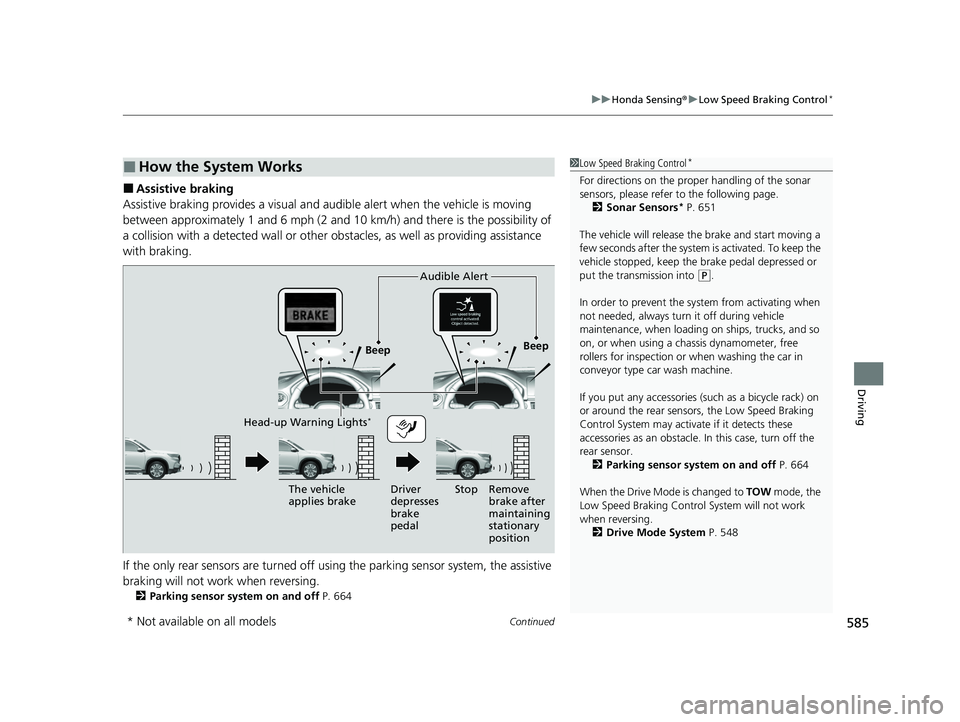
■Assistive braking
Assistive braking provides a visual and audible alert when the vehicle is moving
between approximately 1 and 6 mph (2 and 10 km/h) and there is the possibility of
a collision with a detected wall or other ob stacles, as well as providing assistance
with braking.
If the only rear sensors are turned off usi ng the parking sensor system, the assistive
braking will not work when reversing.
2 Parking sensor system on and off P. 664
■How the System Works1Low Speed Braking Control*
For directions on the prop er handling of the sonar
sensors, please refer to the following page.
2 Sonar Sensors
* P. 651
The vehicle will release the brake and start moving a
few seconds after the system is activated. To keep the
vehicle stopped, keep the brake pedal depressed or
put the transmission into
( P.
In order to prevent the sy stem from activating when
not needed, always turn it off during vehicle
maintenance, when loading on ships, trucks, and so
on, or when using a chassis dynamometer, free
rollers for inspection or when washing the car in
conveyor type car wash machine.
If you put any accessories (such as a bicycle rack) on
or around the rear sensors, the Low Speed Braking
Control System may activate if it detects these
accessories as an obstacle. In this case, turn off the
rear sensor.
2 Parking sensor system on and off P. 664
When the Drive Mode is changed to TOW mode, the
Low Speed Braking Control System will not work
when reversing. 2 Drive Mode System P. 548
Beep Beep
The vehicle
applies brake Driver
depresses
brake
pedalRemove
brake after
maintaining
stationary
position
Stop
Audible Alert
Head-up Warning Lights*
* Not available on all models
23 PILOT-31T906000_03.book 585 ページ 2022年10月31日 月曜日 午前10時26分
Page 654 of 814
Continued653
uuBraking uBrake System
Driving
■Automatic parking brake feature operation
If the automatic parking brake feature has been activated:
• The parking brake is applied automatically when you set the power mode to
VEHICLE OFF.
• To confirm that the parking brake is applied, check if the parking brake and brake
system indicator (red) is on.
2 Activating and deactivating the automatic parking brake feature P. 654
■To release automatically
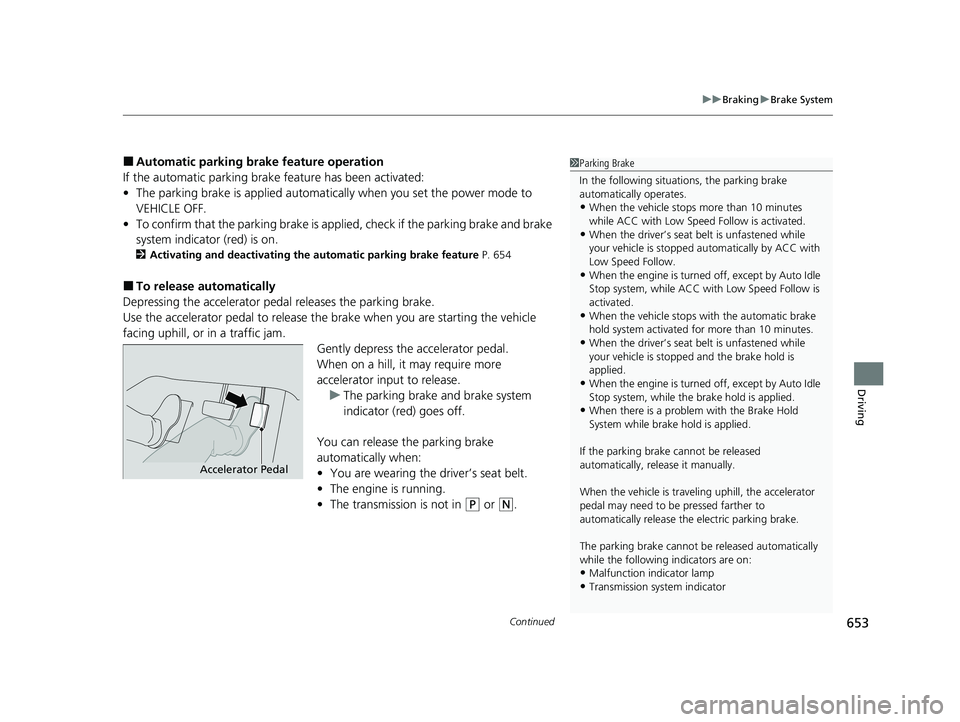
Depressing the accelerator pedal releases the parking brake.
Use the accelerator pedal to release the brake when you are starting the vehicle
facing uphill, or in a traffic jam. Gently depress the accelerator pedal.
When on a hill, it may require more
accelerator input to release.u The parking brake and brake system
indicator (red) goes off.
You can release the parking brake
automatically when:
• You are wearing the driver’s seat belt.
• The engine is running.
• The transmission is not in
(P or (N.
1Parking Brake
In the following situations, the parking brake
automatically operates.
•When the vehicle stops more than 10 minutes
while ACC with Low Speed Follow is activated.
•When the driver’s seat belt is unfastened while
your vehicle is stopped au tomatically by ACC with
Low Speed Follow.
•When the engine is turned off, except by Auto Idle
Stop system, while ACC with Low Speed Follow is
activated.
•When the vehicle stops with the automatic brake
hold system activated for more than 10 minutes.
•When the driver’s seat belt is unfastened while
your vehicle is stopped and the brake hold is
applied.
•When the engine is turned off, except by Auto Idle
Stop system, while the brake hold is applied.
•When there is a problem with the Brake Hold
System while brake hold is applied.
If the parking brake cannot be released
automatically, release it manually.
When the vehicle is travel ing uphill, the accelerator
pedal may need to be pressed farther to
automatically release the electric parking brake.
The parking brake cannot be released automatically
while the following indicators are on:
•Malfunction indicator lamp
•Transmission system indicator
Accelerator Pedal
23 PILOT-31T906000_03.book 653 ページ 2022年10月31日 月曜日 午前10時26分
Page 655 of 814
uuBraking uBrake System
654
Driving
■Activating and deactivating the au tomatic parking brake feature
With the power mode is in ON, carry out th e following steps to either activate or
deactivate the automatic parking brake feature.
1. Put the transmission into
(P.
2. Without depressing the brake pedal, pull up the electric parking brake switch.
u Check that the parking brake and brake system indicator (red) has come on.
3. Pull up and hold the electric parking br ake switch. When you hear a beeping sound,
release the switch and within three se conds pull up and hold the switch again.
4. When you hear a sound indicating that the procedure is completed, release the
switch.
u Two beeps indicates that the feature has been activated.
u One beep indicates that the feature has been deactivated.
u When you have completed activating the feature, the parking brake will
remain applied after you turn off the engine.
u To confirm that the parking brake is ap plied, check if the parking brake and
brake system indicator (red) is on.
If you need to temporarily deactivate the feature while putting your vehicle through
a conveyor type car wash or when having your vehicle towed, follow the procedure
explained below.
1. Depress the brake pedal and bring the vehicle to a stop.
2. Set the power mode to VEHICLE OFF and then within two seconds push down the
electric parking brake switch.
u Activation and deactivation settings fo r the feature will not be affected.
u Before temporarily deactivating the feat ure, make sure to first turn off both
Adaptive Cruise Control (ACC) with Low Speed Follow and the automatic
brake hold system.
u To confirm that the parking brake is ap plied, check if the parking brake and
brake system indicator (red) is on.
1 Parking Brake
The parking brake may not be released automatically
while the following indicators are on:
•Parking brake and brake sy stem indicator (amber)
•VSA® system indicator•ABS indicator
•Supplemental restraint system indicator
In cold climates, the parking brake may freeze in
place if applied.
When parking the vehicle, chock the wheels and
make sure the automatic parking brake feature is
deactivated.
Also, when putting your vehicle through a conveyor-
type car wash or when ha ving your vehicle towed,
deactivate the automatic parking brake feature and
leave the parking brake released.
23 PILOT-31T906000_03.book 654 ページ 2022年10月31日 月曜日 午前10時26分
Page 657 of 814
uuBraking uBrake System
656
Driving
Keeps the brake applied after releasing the brake pedal until the accelerator pedal is
pressed. You can use this system while the vehicle is temporarily stopped, like at
traffic lights and in heavy traffic.
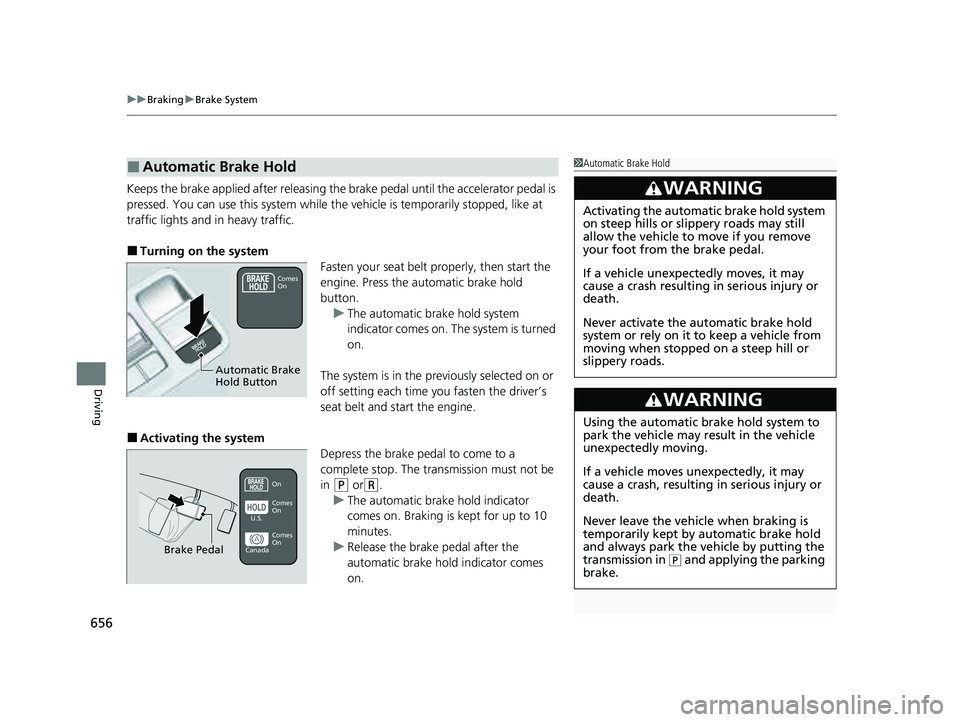
■Turning on the system
Fasten your seat belt properly, then start the
engine. Press the automatic brake hold
button.u The automatic brake hold system
indicator comes on. The system is turned
on.
The system is in the previously selected on or
off setting each time you fasten the driver’s
seat belt and start the engine.
■Activating the system Depress the brake pedal to come to a
complete stop. The transmission must not be
in
(P or(R.
u The automatic brake hold indicator
comes on. Braking is kept for up to 10
minutes.
u Release the brake pedal after the
automatic brake hold indicator comes
on.
■Automatic Brake Hold1Automatic Brake Hold
3WARNING
Activating the automatic brake hold system
on steep hills or slippery roads may still
allow the vehicle to move if you remove
your foot from the brake pedal.
If a vehicle unexpectedly moves, it may
cause a crash resulting in serious injury or
death.
Never activate the automatic brake hold
system or rely on it to keep a vehicle from
moving when stopped on a steep hill or
slippery roads.
3WARNING
Using the automatic brake hold system to
park the vehicle may result in the vehicle
unexpectedly moving.
If a vehicle moves unexpectedly, it may
cause a crash, resulting in serious injury or
death.
Never leave the vehicle when braking is
temporarily kept by automatic brake hold
and always park the vehicle by putting the
transmission in
( P and applying the parking
brake.
Comes
On
Automatic Brake
Hold Button
On
Brake Pedal
Comes
On Comes
On
U.S.
Canada
23 PILOT-31T906000_03.book 656 ページ 2022年10月31日 月曜日 午前10時26分
Page 658 of 814
Continued657
uuBraking uBrake System
Driving
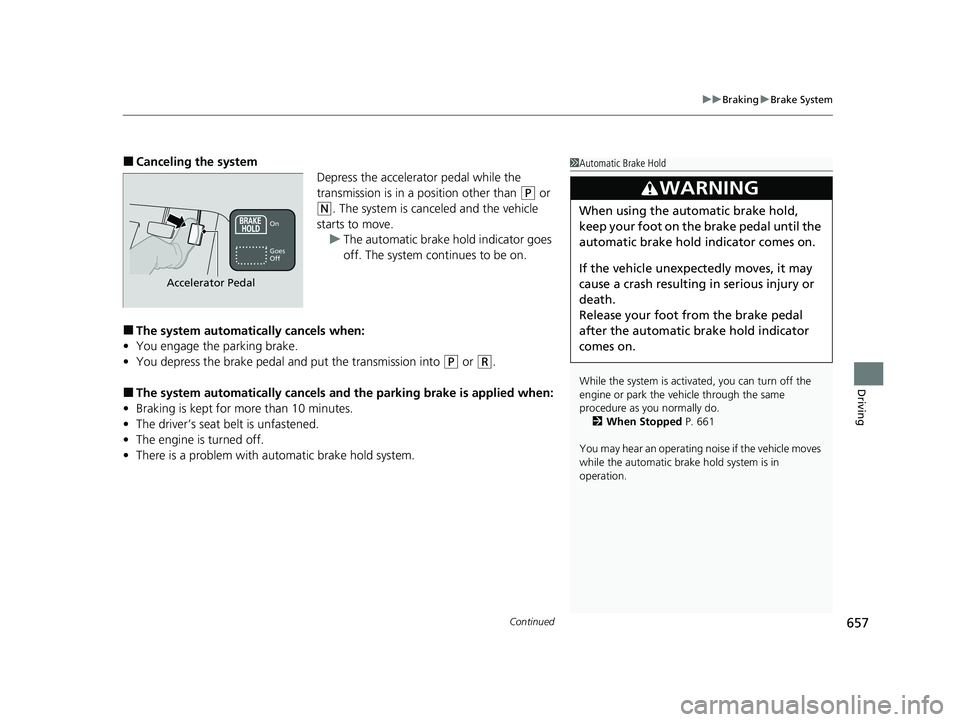
■Canceling the system
Depress the accelerator pedal while the
transmission is in a position other than
(P or
(N. The system is canceled and the vehicle
starts to move. u The automatic brake hold indicator goes
off. The system continues to be on.
■The system automatically cancels when:
• You engage the parking brake.
• You depress the brake pedal a nd put the transmission into
(P or (R.
■The system automatically cancels and the parking brake is applied when:
• Braking is kept for more than 10 minutes.
• The driver’s seat belt is unfastened.
• The engine is turned off.
• There is a problem with automatic brake hold system.
1Automatic Brake Hold
While the system is activated, you can turn off the
engine or park the ve hicle through the same
procedure as you normally do.
2 When Stopped P. 661
You may hear an operating noi se if the vehicle moves
while the automatic brake hold system is in
operation.
3WARNING
When using the automatic brake hold,
keep your foot on the brake pedal until the
automatic brake hold indicator comes on.
If the vehicle unexpectedly moves, it may
cause a crash resulting in serious injury or
death.
Release your foot from the brake pedal
after the automatic brake hold indicator
comes on.On
Accelerator Pedal
Goes
Off
23 PILOT-31T906000_03.book 657 ページ 2022年10月31日 月曜日 午前10時26分
Page 662 of 814
661Continued
Driving
Parking Your Vehicle
When Stopped
1.Depress the brake pedal firmly and come to a complete stop.
2. With the brake pedal depressed, pull up th e electric parking brake switch slowly,
but fully.
3. Change the shift position to
(P.
u Do not release the brake pedal until you have confirmed that
(P is shown on
the shift position indicator.
4. Turn off the engine.
u The parking brake and brake system indicator goes off in about 15 seconds.
Always set the parking brake, especially if you are parked on an incline.
1When Stopped
Do not park your vehicle near flammable objects,
such as dry grass, oil, or timber.
Heat from the exhaust can cause a fire.
NOTICE
The following can dama ge the transmission:
•Depressing the accelerator and brake pedals
simultaneously.
•Holding the vehicle in place when facing uphill by
depressing the accelerator pedal.
•Changing into ( P before the vehicle stops
completely.
3WARNING
The vehicle can roll aw ay if left unattended
without confirming that Park is engaged.
A vehicle that rolls away could cause a crash
resulting in seriou s injury or death.
Always keep your foot on the brake pedal
until you have confirmed that
( P is shown
on the gear position Indicator.
23 PILOT-31T906000_03.book 661 ページ 2022年10月31日 月曜日 午前10時26分
Page 665 of 814
uuParking Your Vehicle uParking Sensor System*
664
Driving
■Parking sensor system on and off
You can turn the system on and off us ing the driver information interface.
2Switching the Display P. 125, 154
2 Safety Support P. 136, 164
The front corner, rear corner and rear center sensors start to detect an obstacle
when the transmission is in
(R, and the vehicle speed is less than 5 mph (8 km/h).
The front corner and front center sensor s start to detect an obstacle when the
transmission is in any position other than
(P or (R, and the vehicle speed is less
than 5 mph (8 km/h).
1 Parking sensor system on and off
When you set the power mode to ON, the system will
be in the previously selected condition.
You can turn the rear park ing sensor system on and
off using the audio/information screen. 2 Customized Features P. 429
When the Drive Mode is in TOW mode, the rear
parking sensor system will turn off.
2 Drive Mode System P. 548
23 PILOT-31T906000_03.book 664 ページ 2022年10月31日 月曜日 午前10時26分
Page 670 of 814
Continued669
uuParking Your Vehicle uCross Traffic Monitor*
Driving
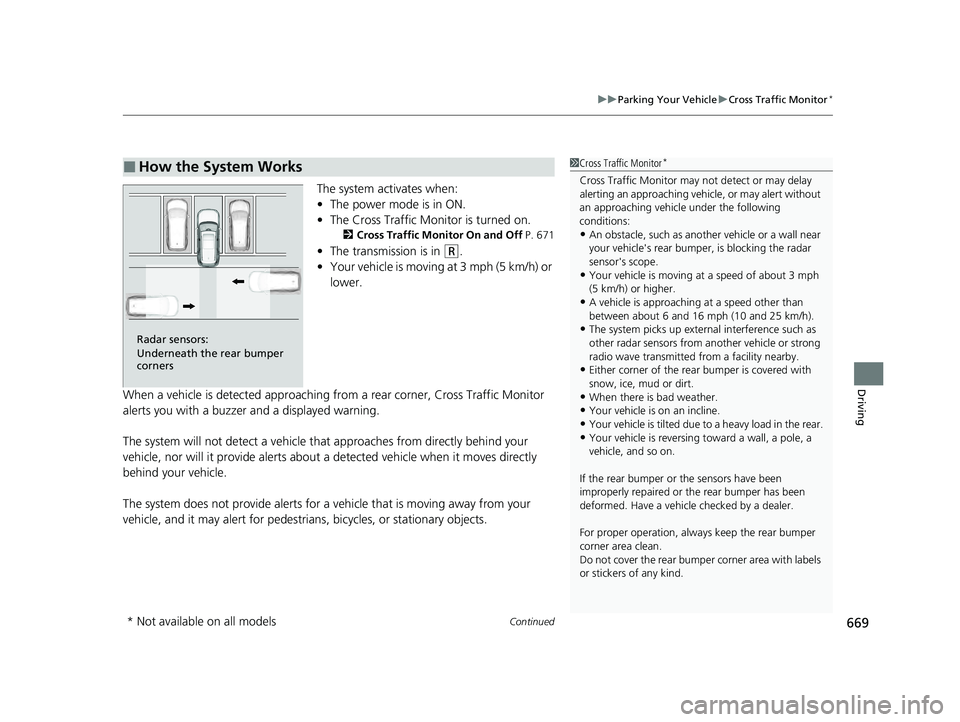
The system activates when:
• The power mode is in ON.
• The Cross Traffic Monitor is turned on.
2 Cross Traffic Monitor On and Off P. 671
•The transmission is in (R.
• Your vehicle is moving at 3 mph (5 km/h) or
lower.
When a vehicle is detected approaching from a rear corner, Cross Traffic Monitor
alerts you with a buzzer and a displayed warning.
The system will not detect a vehicle that approaches from directly behind your
vehicle, nor will it provide alerts about a detected vehicle when it moves directly
behind your vehicle.
The system does not provide alerts for a vehicle that is moving away from your
vehicle, and it may alert for pedestrians, bicycles, or stationary objects.
■How the System Works1 Cross Traffic Monitor*
Cross Traffic Monitor may not detect or may delay
alerting an approach ing vehicle, or may alert without
an approaching vehicle under the following
conditions:
•An obstacle, such as anothe r vehicle or a wall near
your vehicle's rear bumpe r, is blocking the radar
sensor's scope.
•Your vehicle is moving at a speed of about 3 mph
(5 km/h) or higher.
•A vehicle is approaching at a speed other than
between about 6 and 16 mph (10 and 25 km/h).
•The system picks up external interference such as
other radar sensors from an other vehicle or strong
radio wave transmitted fr om a facility nearby.
•Either corner of the rear bumper is covered with
snow, ice, mud or dirt.
•When there is bad weather.
•Your vehicle is on an incline.
•Your vehicle is tilted due to a heavy load in the rear.
•Your vehicle is reversing toward a wall, a pole, a
vehicle, and so on.
If the rear bumper or the sensors have been
improperly repaired or the rear bumper has been
deformed. Have a vehicle checked by a dealer.
For proper operation, always keep the rear bumper
corner area clean.
Do not cover the rear bumper corner area with labels
or stickers of any kind.
Radar sensors:
Underneath the rear bumper
corners
* Not available on all models
23 PILOT-31T906000_03.book 669 ページ 2022年10月31日 月曜日 午前10時26分