brake HONDA PILOT 2023 Workshop Manual
[x] Cancel search | Manufacturer: HONDA, Model Year: 2023, Model line: PILOT, Model: HONDA PILOT 2023Pages: 814, PDF Size: 29.02 MB
Page 547 of 814
uuWhen Driving uAuto Idle Stop
546
Driving
• The brake pedal is released (without the automatic brake hold system activated).
• The accelerator pedal is depressed (with the automatic brake hold system
activated).
2 Automatic Brake Hold P. 656
■The engine restarts even if the brake pedal is depressed*1 when:
• The Auto Idle Stop OFF button is pressed.
• The steering wheel is operated.
• The transmission is put into
(R or (S, or when it is set from (N to (D.
u If you put the transmission into
(P after the Auto Idle Stop activates, the Auto
Idle Stop continues to operate. In this case, the engine restarts when you
depress the brake pedal.
• The pressure on the brake pedal is redu ced and the vehicle starts moving while
stopped on an incline.
• The brake pedal is released slightly during a stop.
• The battery charge becomes low.
• The accelerator pedal is depressed.
• The driver’s seat belt is unlatched.
• is ON (indicator on).
• The climate control system is in us e, and the difference between the set
temperature and actual interior temperature becomes significant.
• The climate control system is bein g used to dehumidify the interior.
• The vehicle ahead of you starts again when your vehicle stops automatically with
ACC with Low Speed Follow.
• The Drive Mode is changed to SNOW, TOW , SPORT
*, TRAIL*, or SAND* mode.
■The Engine Automatically Restarts When:1The Engine Automatically Restarts When:
If you are using an electroni c device during Auto Idle
Stop, the device may tempor arily be turned off when
the engine restarts.
1 The engine restarts even if the brake pedal is depressed*1 when:
*1: With the automatic brake hold system activated,
you can release the brake pedal while Auto Idle Stop
is in operation.
If the automatic brake hold system has been turned
off, or if there is a problem with the system, the
engine will restart automatically when you release
the brake pedal. 2 Automatic Brake Hold P. 656
* Not available on all models
23 PILOT-31T906000_03.book 546 ページ 2022年10月31日 月曜日 午前10時26分
Page 548 of 814
547
uuWhen Driving uAuto Idle Stop
Driving
Briefly keeps the brake applied after releasin g the brake pedal to restart the engine.
This can keep your vehicle from unexpe ctedly moving while on an incline.
■Starting Assist Brake Function
23 PILOT-31T906000_03.book 547 ページ 2022年10月31日 月曜日 午前10時26分
Page 554 of 814
553
uuWhen Driving uHill Descent Control System
Continued
Driving
Hill Descent Control System
When driving down hills where engine braking is not enough to decelerate the
vehicle, this system helps maintain a constant vehicle speed without needing to
depress the brake pedal.
The system operates under the following conditions.
• Driving at a speed between about 2-12 mph (3-20 km/h).
• Driving downhill.
• Accelerator pedal and brake pedal are not depressed.
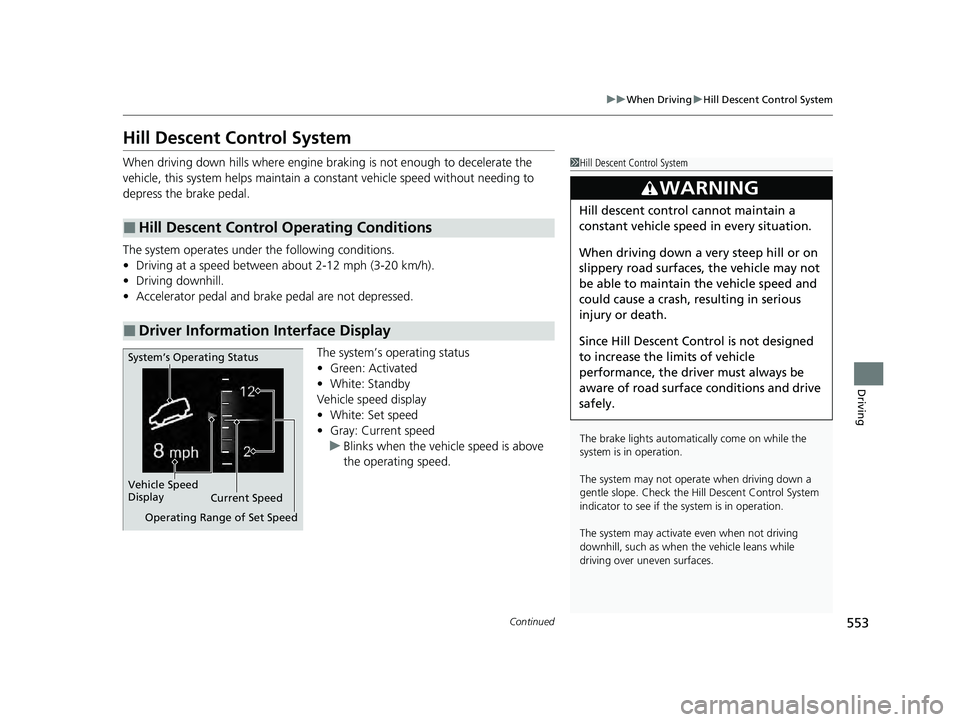
The system’s operating status
•Green: Activated
• White: Standby
Vehicle speed display
• White: Set speed
• Gray: Current speed
u Blinks when the vehi cle speed is above
the operating speed.
■Hill Descent Control Operating Conditions
■Driver Information Interface Display
1 Hill Descent Control System
The brake lights automati cally come on while the
system is in operation.
The system may not operate when driving down a
gentle slope. Check the Hill Descent Control System
indicator to see if the system is in operation.
The system may activate even when not driving
downhill, such as when the vehicle leans while
driving over uneven surfaces.
3WARNING
Hill descent control cannot maintain a
constant vehicle speed in every situation.
When driving down a very steep hill or on
slippery road surfaces, the vehicle may not
be able to maintain the vehicle speed and
could cause a crash, resulting in serious
injury or death.
Since Hill Descent Control is not designed
to increase the limits of vehicle
performance, the driver must always be
aware of road surface conditions and drive
safely.
System’s Operating Status
Vehicle Speed
Display Current Speed
Operating Range of Set Speed
23 PILOT-31T906000_03.book 553 ページ 2022年10月31日 月曜日 午前10時26分
Page 555 of 814
uuWhen Driving uHill Descent Control System
554
Driving
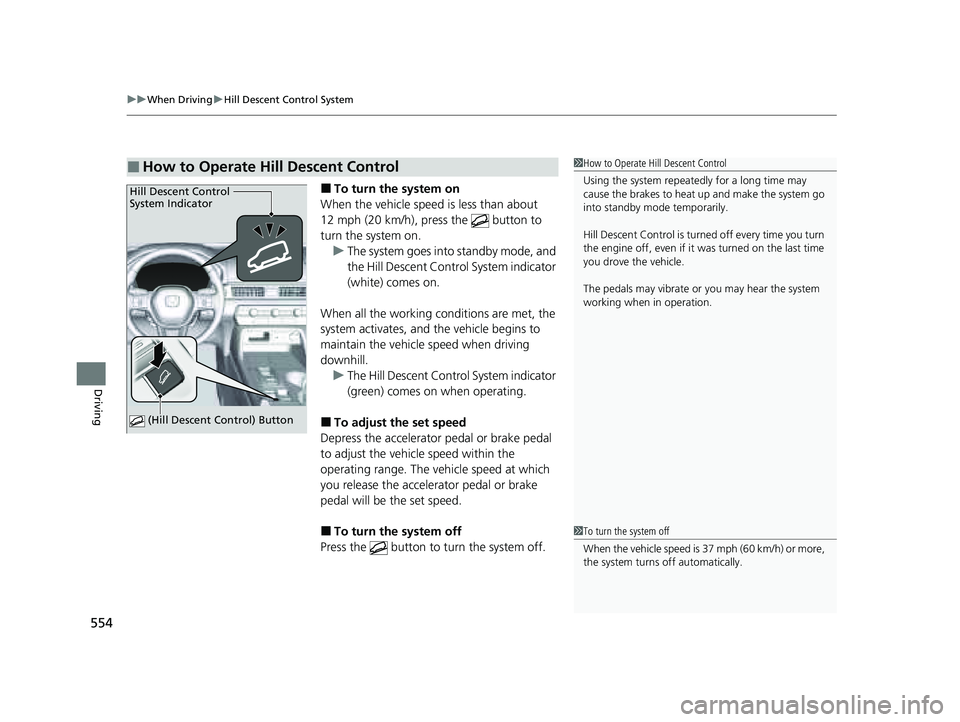
■To turn the system on
When the vehicle speed is less than about
12 mph (20 km/h), press the button to
turn the system on. u The system goes into standby mode, and
the Hill Descent Control System indicator
(white) comes on.
When all the working conditions are met, the
system activates, and the vehicle begins to
maintain the vehicle speed when driving
downhill. u The Hill Descent Control System indicator
(green) comes on when operating.
■To adjust the set speed
Depress the accelerator pedal or brake pedal
to adjust the vehicle speed within the
operating range. The vehicle speed at which
you release the accelerator pedal or brake
pedal will be the set speed.
■To turn the system off
Press the button to turn the system off.
■How to Operate Hill Descent Control1 How to Operate Hill Descent Control
Using the system repeated ly for a long time may
cause the brakes to heat up and make the system go
into standby mode temporarily.
Hill Descent Control is turned off every time you turn
the engine off, even if it was turned on the last time
you drove the vehicle.
The pedals may vibrate or you may hear the system
working when in operation.
Hill Descent Control
System Indicator
(Hill Descent Control) Button
1To turn the system off
When the vehicle speed is 37 mph (60 km/h) or more,
the system turns off automatically.
23 PILOT-31T906000_03.book 554 ページ 2022年10月31日 月曜日 午前10時26分
Page 556 of 814
555
uuWhen Driving uVehicle Stability AssistTM (VSA ®), aka Electronic Stability Control (ESC), System
Continued
Driving
Vehicle Stability AssistTM (VSA ®), aka Electronic
Stability Control (ESC), System
VSA ® helps stabilize the vehicle during cornering if the vehicle turns more or less
than what was intended. It also assists in maintaining traction on slippery surfaces.
It does so by regulating engine ou tput and selectively applying the brakes.
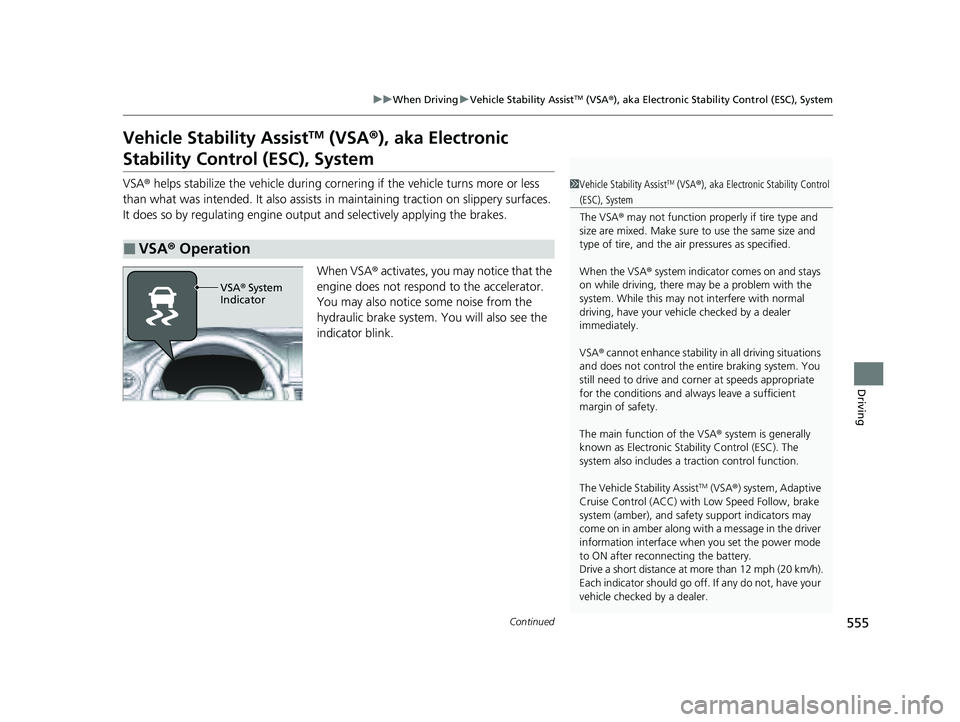
When VSA ® activates, you may notice that the
engine does not respond to the accelerator.
You may also notice some noise from the
hydraulic brake system. You will also see the
indicator blink.
■VSA ® Operation
1 Vehicle Stability AssistTM (VSA® ), aka Electronic Stability Control
(ESC), System
The VSA ® may not function properl y if tire type and
size are mixed. Make sure to use the same size and
type of tire, and the air pressures as specified.
When the VSA ® system indicator comes on and stays
on while driving, there ma y be a problem with the
system. While this may not interfere with normal
driving, have your vehi cle checked by a dealer
immediately.
VSA ® cannot enhance stability in all driving situations
and does not control the entire braking system. You
still need to drive and corner at speeds appropriate
for the conditions and always leave a sufficient
margin of safety.
The main function of the VSA ® system is generally
known as Electronic Stability Control (ESC). The
system also includes a traction control function.
The Vehicle Stability Assist
TM (VSA ®) system, Adaptive
Cruise Control (ACC) with Low Speed Follow, brake
system (amber), and safety support indicators may
come on in amber along with a message in the driver
information interface when you set the power mode
to ON after reconnecting the battery.
Drive a short distance at more than 12 mph (20 km/h).
Each indicator should go off. If any do not, have your
vehicle checked by a dealer.
VSA ® System
Indicator
23 PILOT-31T906000_03.book 555 ページ 2022年10月31日 月曜日 午前10時26分
Page 558 of 814
557
uuWhen Driving uAgile Handling Assist
Driving
Agile Handling Assist
Lightly brakes each of the front and rear wheels, as needed, when you turn the
steering wheel, and helps support the vehicle’s stability and performance during
cornering.1 Agile Handling Assist
The agile handling assist ca nnot enhance stability in
all driving situations. You still need to drive and
corner at speeds appropriate for the conditions and
always leave a sufficient margin of safety.
When the VSA ® system indicator comes on and stays
on while driving, the agil e handling assist does not
activate.
You may hear a sound coming from the engine
compartment while the agile handling assist is
activated. This is normal.
23 PILOT-31T906000_03.book 557 ページ 2022年10月31日 月曜日 午前10時26分
Page 565 of 814
uuWhen Driving uBlind Spot Information System*
564
Driving
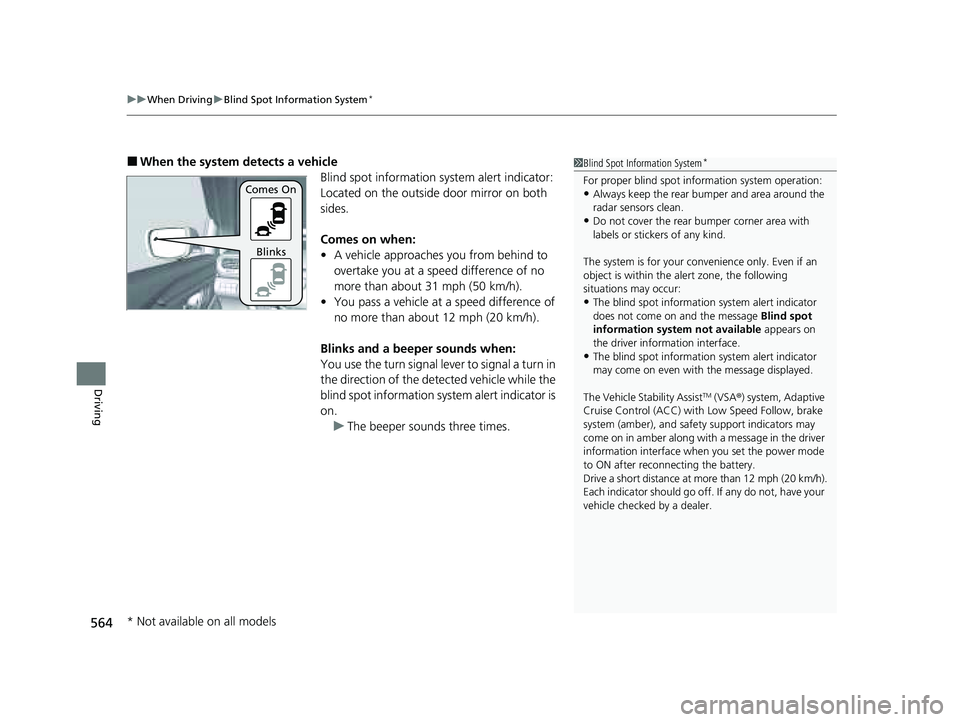
■When the system detects a vehicle
Blind spot information system alert indicator:
Located on the outside door mirror on both
sides.
Comes on when:
• A vehicle approaches you from behind to
overtake you at a speed difference of no
more than about 31 mph (50 km/h).
• You pass a vehicle at a speed difference of
no more than about 12 mph (20 km/h).
Blinks and a beeper sounds when:
You use the turn signal lever to signal a turn in
the direction of the detected vehicle while the
blind spot information system alert indicator is
on. u The beeper sounds three times.1Blind Spot Information System*
For proper blind spot information system operation:•Always keep the rear bumper and area around the
radar sensors clean.
•Do not cover the rear bumper corner area with
labels or sticke rs of any kind.
The system is for your convenience only. Even if an
object is within the alert zone, the following
situations may occur:
•The blind spot informatio n system alert indicator
does not come on and the message Blind spot
information system not available appears on
the driver information interface.
•The blind spot informatio n system alert indicator
may come on even with the message displayed.
The Vehicle Stability Assist
TM (VSA ®) system, Adaptive
Cruise Control (ACC) with Low Speed Follow, brake
system (amber), and safety support indicators may
come on in amber along with a message in the driver
information interface when you set the power mode
to ON after reconnecting the battery.
Drive a short distance at more than 12 mph (20 km/h).
Each indicator should go off. If any do not, have your
vehicle checked by a dealer.
Comes On
Blinks
* Not available on all models
23 PILOT-31T906000_03.book 564 ページ 2022年10月31日 月曜日 午前10時26分
Page 573 of 814
572
uuHonda Sensing ®u Collision Mitigation Braking SystemTM (CMBSTM)
Driving
Collision Mitigati on Braking SystemTM (CMBSTM)
The system can assist you when it determine s there is a possibility of your vehicle
colliding with a vehicle (including motorcycles) ahead from behind, an oncoming
vehicle in front, a pedestrian, or someone riding a bicycle (moving bicycle).
The CMBS
TM is designed to alert you when the potential for a collision is determined,
as well as assist in reducing speed, avoiding collisions, and reducing collision
severity.
1 Collision Mitigation Braking SystemTM (CMBSTM)
Important Safety Reminder
The CMBS
TM is designed to reduce the severity of an
unavoidable collision. It does not prevent collisions
nor stop the vehicle automati cally. It is still your
responsibility to operate th e brake pedal and steering
wheel appropriately acco rding to the driving
conditions.
The CMBS
TM may not activate or may not detect a
vehicle in front of y our vehicle under certain
conditions:
2 CMBS
TM Conditions and Limitations P. 577
For directions on the prop er handling of the radar
sensor, refer to the following page. 2 Radar Sensor P. 650
You can read about handling information for the
camera equipped with this system. 2 Front Sensor Camera P. 648
23 PILOT-31T906000_03.book 572 ページ 2022年10月31日 月曜日 午前10時26分
Page 574 of 814
Continued573
uuHonda Sensing ®u Collision Mitigation Braking SystemTM (CMBSTM)
Driving
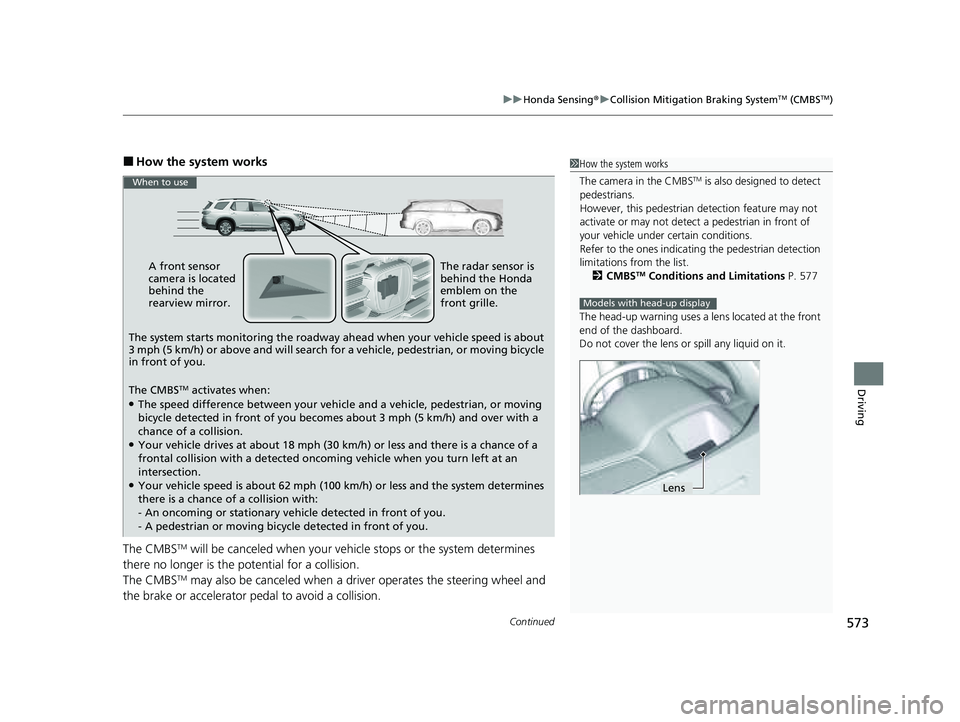
■How the system works
The CMBS
TM will be canceled when your vehicle stops or the system determines
there no longer is the potential for a collision.
The CMBS
TM may also be canceled when a dr iver operates the steering wheel and
the brake or accelerator pe dal to avoid a collision.
1How the system works
The camera in the CMBS
TM is also designed to detect
pedestrians.
However, this pedestrian detection feature may not
activate or may not detect a pedestrian in front of
your vehicle under certain conditions.
Refer to the ones indicating the pedestrian detection
limitations from the list. 2 CMBS
TM Conditions and Limitations P. 577
The head-up warning uses a lens located at the front
end of the dashboard.
Do not cover the lens or spill any liquid on it.
Models with head-up display
Lens
A front sensor
camera is located
behind the
rearview mirror.
The system starts monitoring the roadway ahead when your vehicle speed is about
3 mph (5 km/h) or above and will search for a vehicle, pedestrian, or moving bicycle
in front of you.
The CMBS
TM activates when:●The speed difference between your vehicl e and a vehicle, pedestrian, or moving
bicycle detected in front of you becomes about 3 mph (5 km/h) and over with a
chance of a collision.
●Your vehicle drives at about 18 mph (30 km/h) or less and there is a chance of a
frontal collision with a detected oncoming vehicle when you turn left at an
intersection.
●Your vehicle speed is about 62 mph (100 km /h) or less and the system determines
there is a chance of a collision with:
- An oncoming or stationary vehicle detected in front of you.
- A pedestrian or moving bicycle detected in front of you.
When to use
The radar sensor is
behind the Honda
emblem on the
front grille.
23 PILOT-31T906000_03.book 573 ページ 2022年10月31日 月曜日 午前10時26分
Page 575 of 814
574
uuHonda Sensing ®u Collision Mitigation Braking SystemTM (CMBSTM)
Driving
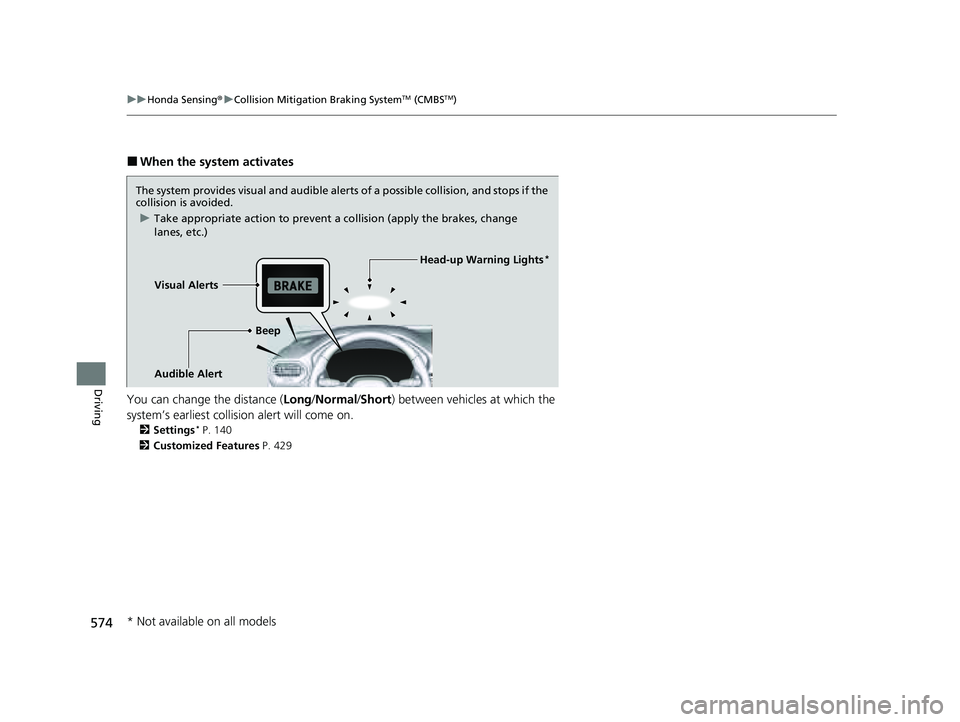
■When the system activates
You can change the distance ( Long/Normal /Short ) between vehicles at which the
system’s earliest collision alert will come on.
2 Settings* P. 140
2 Customized Features P. 429
The system provides visual and audible alerts of a possible collisi on, and stops if the
collision is avoided.
u Take appropriate action to prevent a collision (apply the brakes, change
lanes, etc.)
Visual Alerts Beep
Audible Alert
Head-up Warning Lights*
* Not available on all models
23 PILOT-31T906000_03.book 574 ページ 2022年10月31日 月曜日 午前10時26分