phone HONDA PILOT 2023 Repair Manual
[x] Cancel search | Manufacturer: HONDA, Model Year: 2023, Model line: PILOT, Model: HONDA PILOT 2023Pages: 814, PDF Size: 29.02 MB
Page 425 of 814
424
uuCustomized Features u
Features
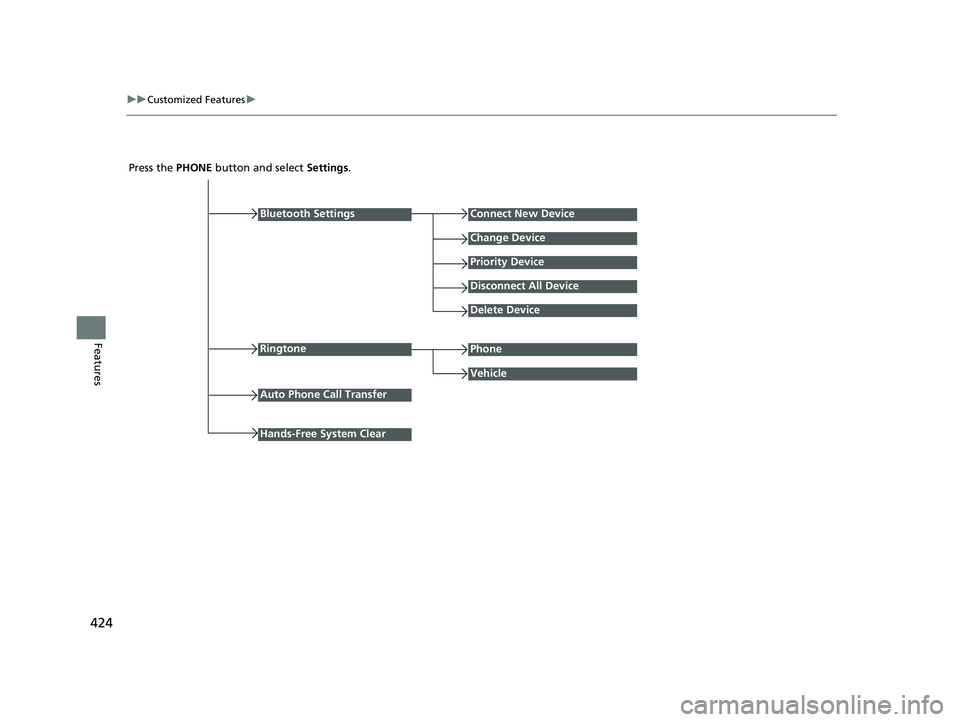
Press the PHONE button and select Settings.
Bluetooth Settings
Ringtone
Connect New Device
Change Device
Priority Device
Disconnect All Device
Delete Device
Vehicle
Auto Phone Call Transfer
Phone
Hands-Free System Clear
23 PILOT-31T906000_03.book 424 ページ 2022年10月31日 月曜日 午前10時26分
Page 426 of 814
425
uuCustomized Features u
Continued
Features
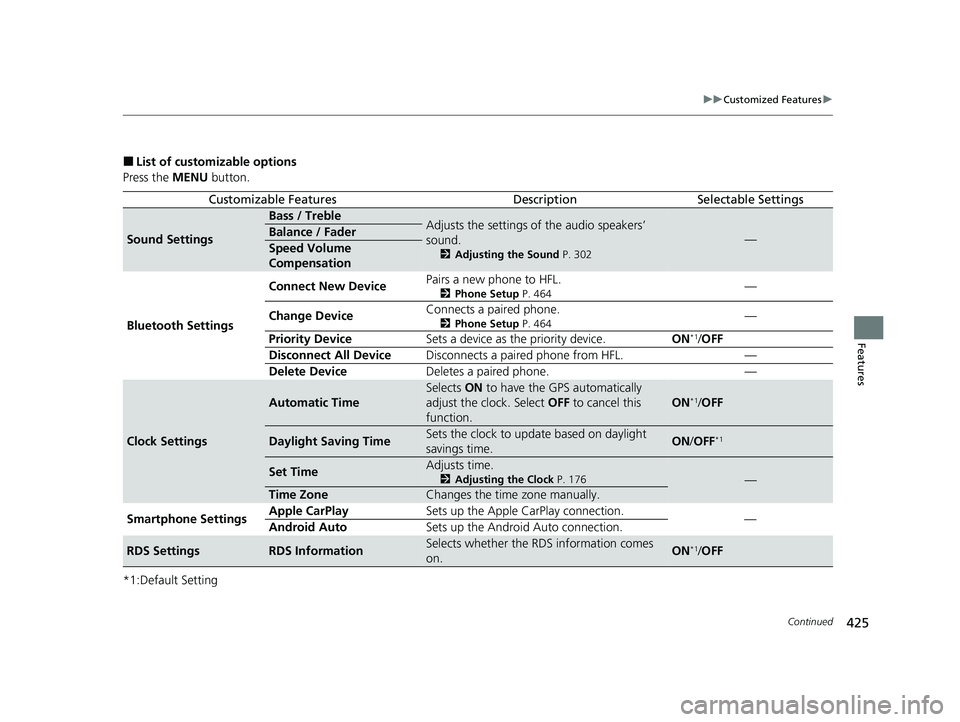
■List of customizable options
Press the MENU button.
*1:Default Setting
Customizable FeaturesDescriptionSelectable Settings
Sound Settings
Bass / TrebleAdjusts the settings of the audio speakers’
sound.
2 Adjusting the Sound P. 302
—Balance / Fader
Speed Volume
Compensation
Bluetooth Settings Connect New Device
Pairs a new phone to HFL.
2
Phone Setup P. 464—
Change Device Connects a paired phone.
2
Phone Setup P. 464—
Priority Device Sets a device as the priority device. ON
*1/OFF
Disconnect All Device Disconnects a paired phone from HFL. —
Delete Device Deletes a paired phone. —
Clock Settings
Automatic Time
Selects ON to have the GPS automatically
adjust the clock. Select OFF to cancel this
function.
ON*1/ OFF
Daylight Saving TimeSets the clock to update based on daylight
savings time.ON /OFF*1
Set TimeAdjusts time.
2 Adjusting the Clock P. 176—
Time ZoneChanges the time zone manually.
Smartphone Settings Apple CarPlay
Sets up the Apple CarPlay connection.
—
Android Auto Sets up the Android Auto connection.
RDS SettingsRDS InformationSelects whether the RDS information comes
on.ON*1/OFF
23 PILOT-31T906000_03.book 425 ページ 2022年10月31日 月曜日 午前10時26分
Page 428 of 814
427
uuCustomized Features u
Features
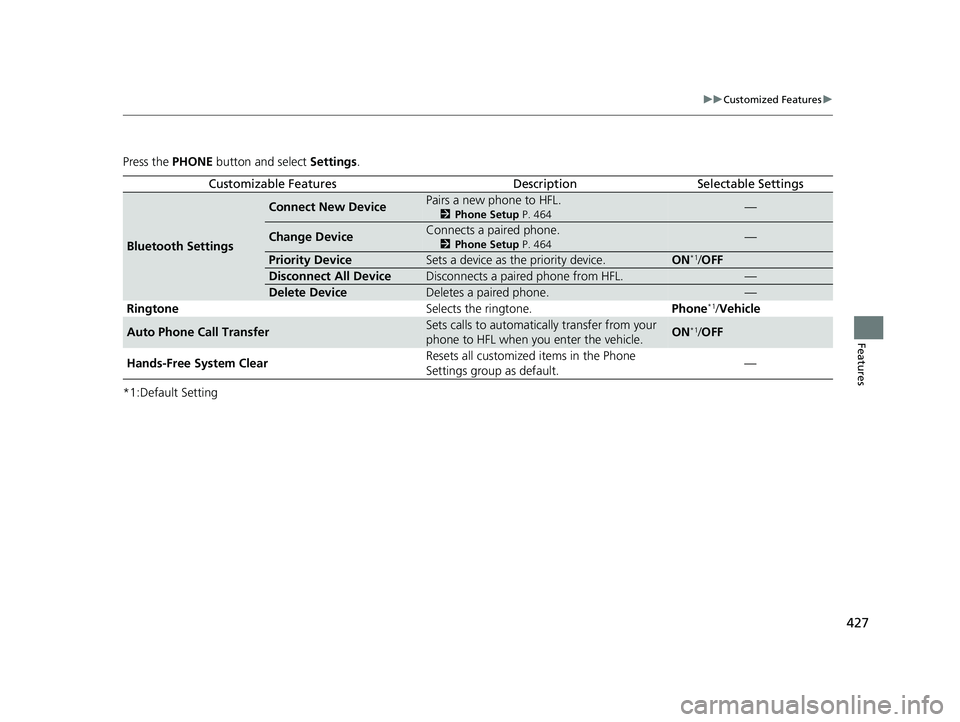
Press the PHONE button and select Settings.
*1:Default Setting
Customizable FeaturesDescriptionSelectable Settings
Bluetooth Settings
Connect New DevicePairs a new phone to HFL.
2 Phone Setup P. 464—
Change DeviceConnects a paired phone.
2Phone Setup P. 464—
Priority DeviceSets a device as the priority device.ON*1/OFF
Disconnect All DeviceDisconnects a paired phone from HFL.—
Delete DeviceDeletes a paired phone.—
Ringtone Selects the ringtone.Phone*1/Vehicle
Auto Phone Call TransferSets calls to automatically transfer from your
phone to HFL when you enter the vehicle.ON*1/OFF
Hands-Free System Clear Resets all customized items in the Phone
Settings group as default.
—
23 PILOT-31T906000_03.book 427 ページ 2022年10月31日 月曜日 午前10時26分
Page 430 of 814
429Continued
Features
Customized Features
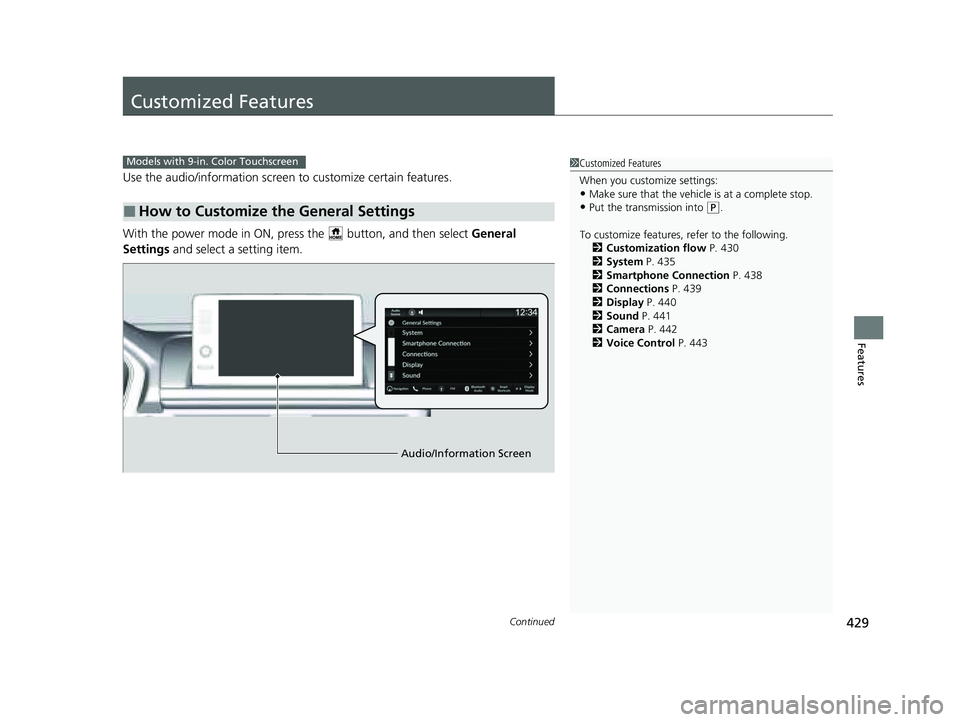
Use the audio/information screen to customize certain features.
With the power mode in ON, pre ss the button, and then select General
Settings and select a setting item.
■How to Customize the General Settings
1Customized Features
When you customize settings:
•Make sure that the vehicle is at a complete stop.
•Put the transmission into (P.
To customize features, refer to the following. 2 Customization flow P. 430
2 System P. 435
2 Smartphone Connection P. 438
2 Connections P. 439
2 Display P. 440
2 Sound P. 441
2 Camera P. 442
2 Voice Control P. 443
Models with 9-in. Color Touchscreen
Audio/Information Screen
23 PILOT-31T906000_03.book 429 ページ 2022年10月31日 月曜日 午前10時26分
Page 431 of 814
430
uuCustomized Features u
Features
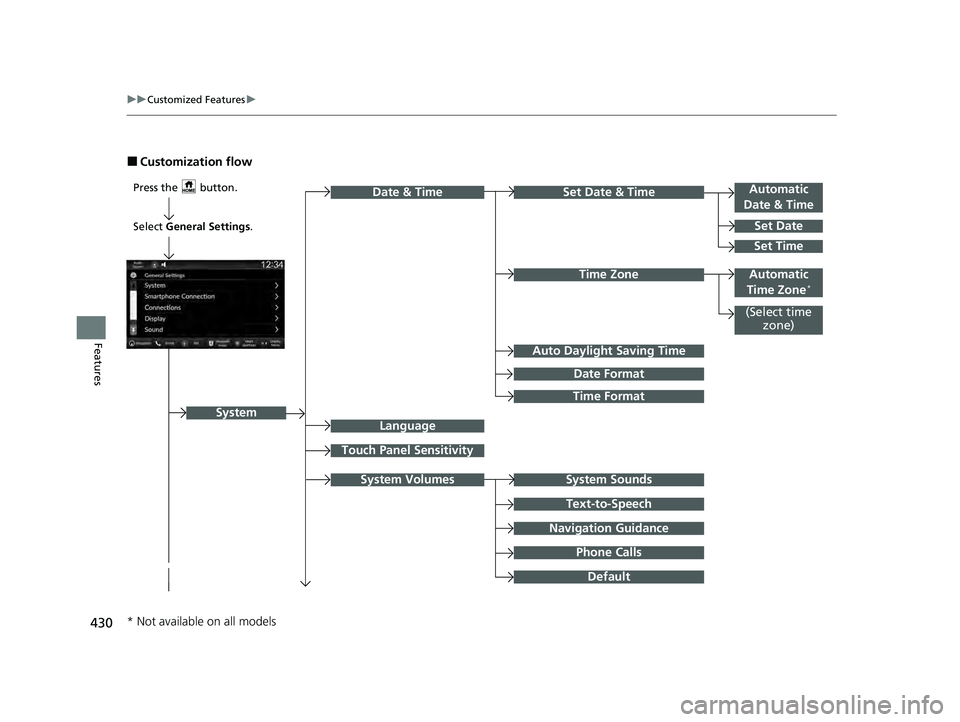
■Customization flow
Press the button.Automatic
Date & Time
Set Date
Touch Panel Sensitivity
Set Date & Time
System Sounds
Date & Time
System
Auto Daylight Saving Time
Date Format
Time Format
Text-to-Speech
Navigation Guidance
Phone Calls
Set Time
(Select time
zone)
System Volumes
Language
Default
Select General Settings .
Automatic
Time Zone*Time Zone
* Not available on all models
23 PILOT-31T906000_03.book 430 ページ 2022年10月31日 月曜日 午前10時26分
Page 432 of 814
431
uuCustomized Features u
Continued
Features
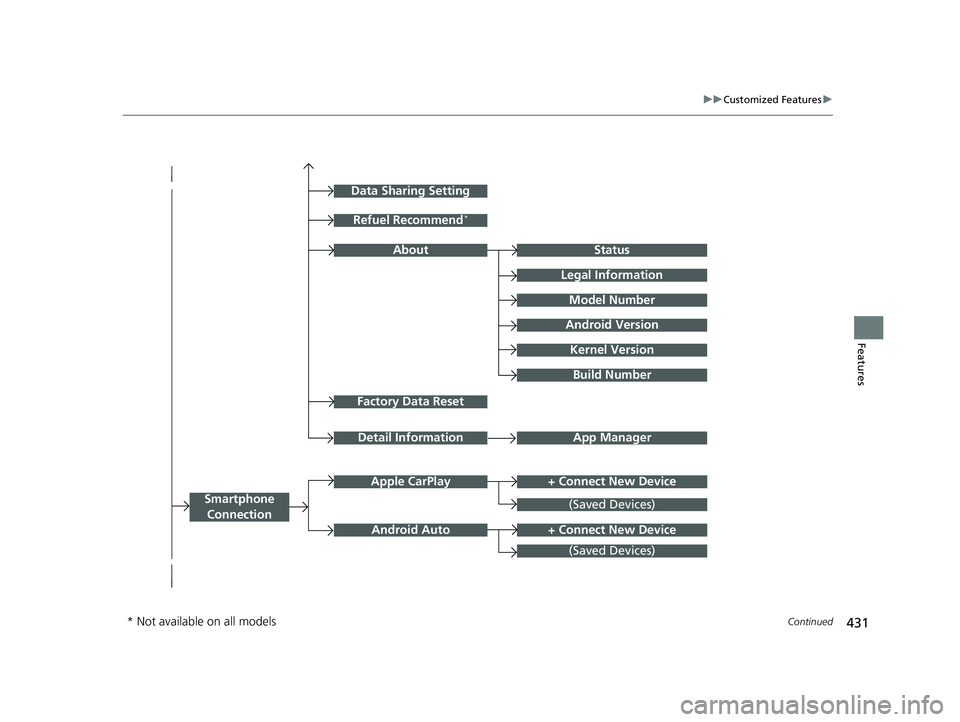
Factory Data Reset
Status
Legal Information
Build Number
Data Sharing Setting
Model Number
Android Version
Kernel Version
App ManagerDetail Information
Refuel Recommend*
About
+ Connect New DeviceApple CarPlay
Smartphone
Connection
Android Auto
(Saved Devices)
+ Connect New Device
(Saved Devices)
* Not available on all models
23 PILOT-31T906000_03.book 431 ページ 2022年10月31日 月曜日 午前10時26分
Page 437 of 814
436
uuCustomized Features u
Features
*1:Default SettingCustomizable Features
Description Selectable Settings
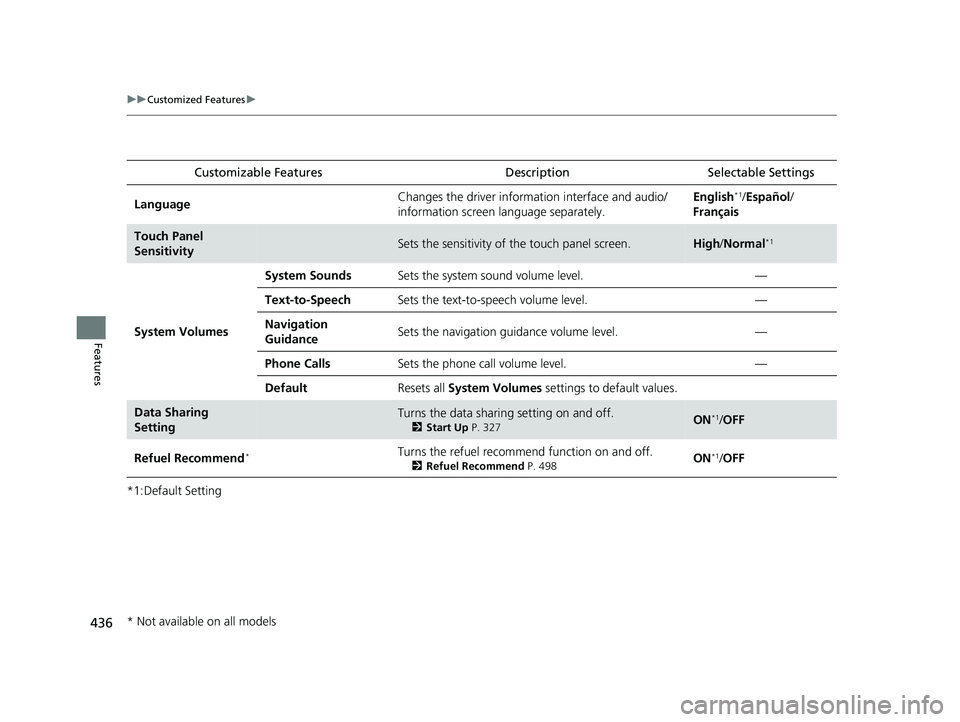
LanguageChanges the driver information interface and audio/
information screen language separately.English*1/Español /
Français
Touch Panel
SensitivitySets the sensitivity of the touch panel screen.High /Normal*1
System Volumes
System SoundsSets the system sound volume level.—
Text-to-SpeechSets the text-to-speech volume level.—
Navigation
GuidanceSets the navigation guidance volume level.—
Phone CallsSets the phone call volume level.—
DefaultResets all System Volumes settings to default values.
Data Sharing
SettingTurns the data sharing setting on and off.
2Start Up P. 327ON*1/OFF
Refuel Recommend*Turns the refuel recommend function on and off.
2 Refuel Recommend P. 498ON*1/OFF
* Not available on all models
23 PILOT-31T906000_03.book 436 ページ 2022年10月31日 月曜日 午前10時26分
Page 439 of 814
438
uuCustomized Features u
Features
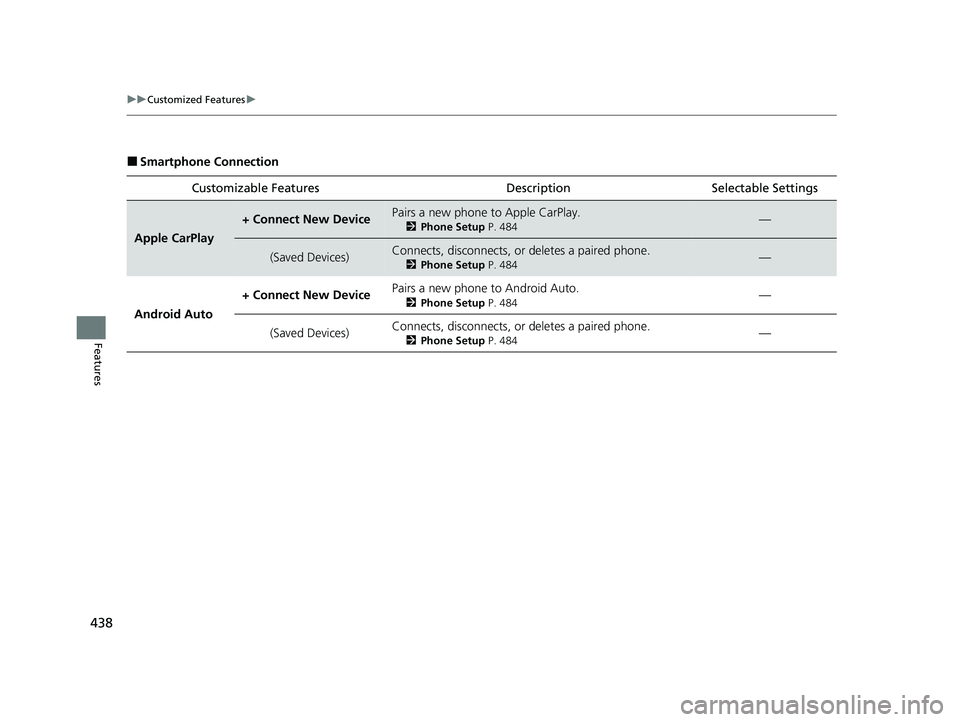
■Smartphone Connection
Customizable Features Desc ription Selectable Settings
Apple CarPlay
+ Connect New DevicePairs a new phone to Apple CarPlay.
2Phone Setup P. 484—
(Saved Devices)Connects, disconnects, or deletes a paired phone.
2Phone Setup P. 484—
Android Auto + Connect New Device
Pairs a new phone to Android Auto.
2
Phone Setup P. 484—
(Saved Devices) Connects, disconnects, or deletes a paired phone.
2
Phone Setup P. 484—
23 PILOT-31T906000_03.book 438 ページ 2022年10月31日 月曜日 午前10時26分
Page 440 of 814
439
uuCustomized Features u
Continued
Features
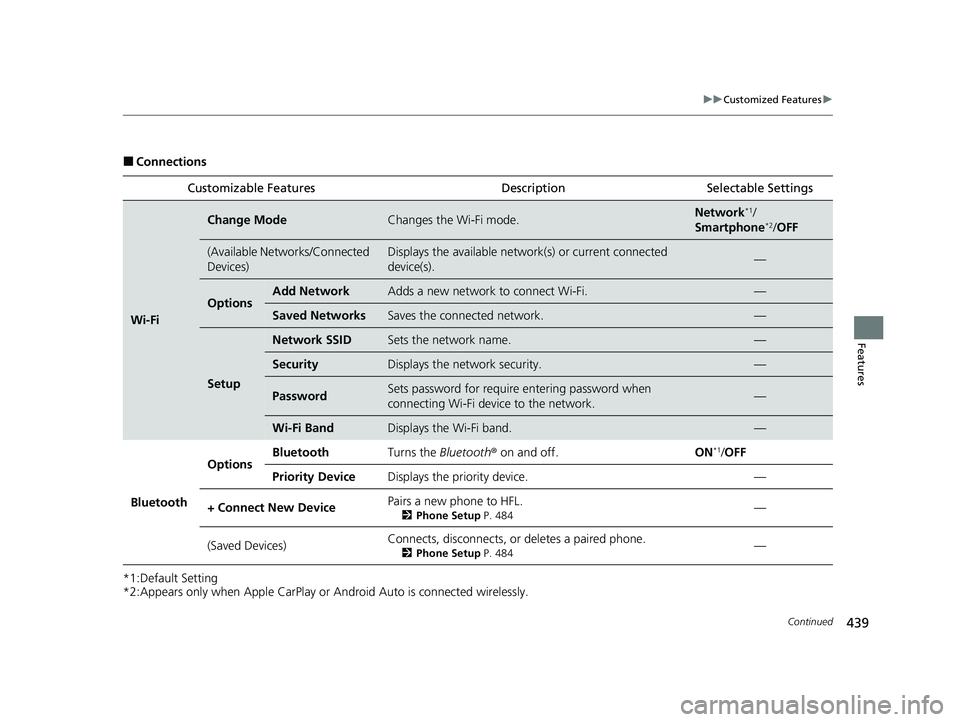
■Connections
*1:Default Setting
*2:Appears only when Apple CarPlay or Android Auto is connected wirelessly. Customizable Features Description Selectable Settings
Wi-Fi
Change ModeChanges the Wi-Fi mode.Network*1/
Smartphone*2/ OFF
(Available Networks/Connected
Devices)Displays the available networ k(s) or current connected
device(s).—
OptionsAdd NetworkAdds a new network to connect Wi-Fi.—
Saved NetworksSaves the connected network.—
Setup
Network SSIDSets the network name.—
SecurityDisplays the network security.—
PasswordSets password for require entering password when
connecting Wi-Fi device to the network.—
Wi-Fi BandDisplays the Wi-Fi band.—
Bluetooth
OptionsBluetoothTurns the Bluetooth ® on and off.ON*1/OFF
Priority DeviceDisplays the priority device.—
+ Connect New DevicePairs a new phone to HFL.
2 Phone Setup P. 484—
(Saved Devices)Connects, disconnects, or deletes a paired phone.
2Phone Setup P. 484—
23 PILOT-31T906000_03.book 439 ページ 2022年10月31日 月曜日 午前10時26分
Page 460 of 814
459Continued
Features
Bluetooth® HandsFreeLink ®
Bluetooth® HandsFreeLink ® (HFL) allows you to place and receive phone calls using
your vehicle’s audio system, without handling your cell phone.
Using HFL
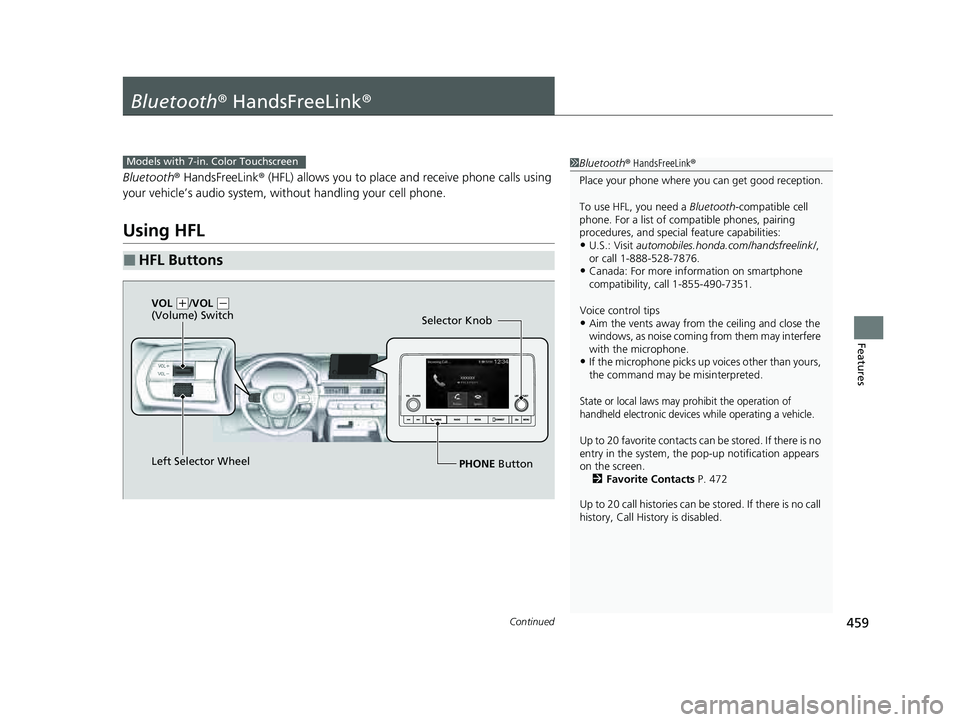
■HFL Buttons
1 Bluetooth ® HandsFreeLink ®
Place your phone where y ou can get good reception.
To use HFL, you need a Bluetooth-compatible cell
phone. For a list of compatible phones, pairing
procedures, and special feature capabilities:
•U.S.: Visit automobiles.honda.com/handsfreelink/ ,
or call 1-888-528-7876.
•Canada: For more info rmation on smartphone
compatibility, call 1-855-490-7351.
Voice control tips
•Aim the vents away from the ceiling and close the
windows, as noise coming from them may interfere
with the microphone.
•If the microphone picks up vo ices other than yours,
the command may be misinterpreted.
State or local laws may pr ohibit the operation of
handheld electronic devices while operating a vehicle.
Up to 20 favorite contacts ca n be stored. If there is no
entry in the system, the pop-up notification appears
on the screen. 2 Favorite Contacts P. 472
Up to 20 call histories can be stored. If there is no call
history, Call History is disabled.
Models with 7-in. Color Touchscreen
Selector Knob
Left Selector Wheel PHONE Button
VOL
(
+/VOL (-
(Volume) Switch
23 PILOT-31T906000_03.book 459 ページ 2022年10月31日 月曜日 午前10時26分