park assist HONDA PILOT 2023 Owners Manual
[x] Cancel search | Manufacturer: HONDA, Model Year: 2023, Model line: PILOT, Model: HONDA PILOT 2023Pages: 814, PDF Size: 29.02 MB
Page 9 of 814
8
Quick Reference Guide
Quick Reference Guide
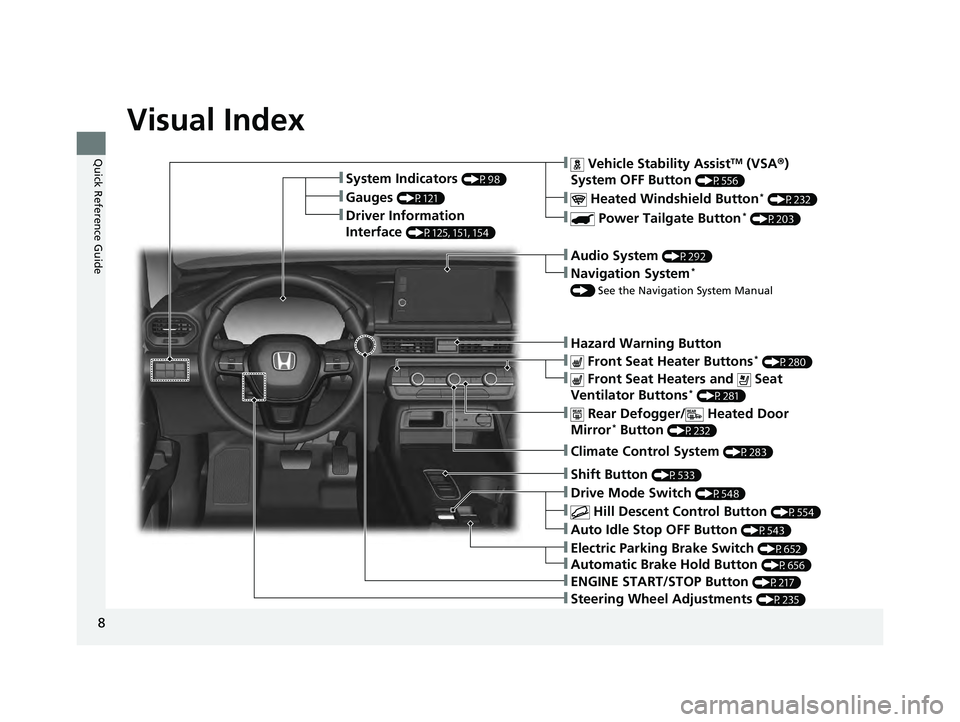
Visual Index
❚Gauges (P121)
❚Driver Information
Interface
(P125, 151, 154)
❚System Indicators (P98)
❚ Vehicle Stability AssistTM (VSA®)
System OFF Button
(P556)
❚ Heated Windshield Button* (P232)
❚ Power Tailgate Button* (P203)
❚Audio System (P292)
❚Navigation System*
() See the Navigation System Manual
❚Hazard Warning Button
❚ Rear Defogger/ Heated Door
Mirror* Button (P232)
❚ Front Seat Heater Buttons* (P280)
❚ Front Seat Heaters and Seat
Ventilator Buttons* (P281)
❚Climate Control System (P283)
❚Shift Button (P533)
❚Auto Idle Stop OFF Button (P543)
❚ Hill Descent Control Button (P554)
❚Drive Mode Switch (P548)
❚ENGINE START/STOP Button (P217)
❚Steering Wheel Adjustments (P235)
❚Electric Parking Brake Switch (P652)
❚Automatic Brake Hold Button (P656)
23 PILOT-31T906000_03.book 8 ページ 2022年10月31日 月曜日 午前10時26分
Page 99 of 814
98
Instrument Panel
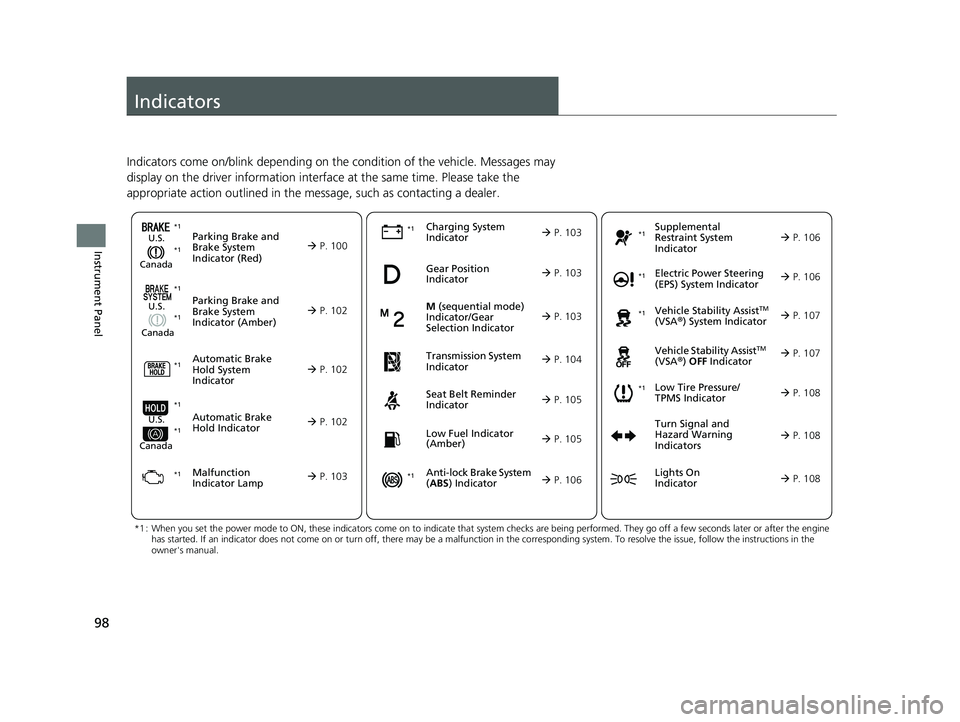
Indicators
Indicators come on/blink depending on the condition of the vehicle. Messages may
display on the driver information interface at the same time. Please take the
appropriate action outlined in the message, such as contacting a dealer.
Parking Brake and
Brake System
Indicator (Red)U.S.
Canada P. 100*1
M (sequential mode)
Indicator/Gear
Selection Indicator
P. 103Parking Brake and
Brake System
Indicator (Amber)U.S.
Canada
Automatic Brake
Hold System
Indicator
Automatic Brake
Hold IndicatorU.S.
Canada
*1 : When you set the power mode to ON, these indicators come on to indicate that system checks are being performed. They go off a few seconds later or after the engine
has started. If an indicator does not come on or turn off, ther e may be a malfunction in the corresponding system. To resolve the issue, follow the instructions in the
owner's manual.
Malfunction
Indicator Lamp Charging System
Indicator
Seat Belt Reminder
Indicator
Low Fuel Indicator
(Amber)
P. 102
P. 10
2
P. 102
P. 103
P. 103*1
*1 *1
Gear Position
Indicator
P. 103
Tr
ansmission System
Indica
tor
P. 104
P. 105
P. 105
*1
*1
Anti-lock Brake System
(ABS ) Indicator
Vehicle Stability AssistTM
(VSA®) System Indicator
Vehicle Stability Assist
TM
(VSA®) OFF Indicator
Supplemental
Restraint System
Indicator
Electric Power Steering
(EPS) System Indicator
*1
P. 106
P. 106
P. 107*1 *1
P. 107
*1 P. 106
*1
*1
*1
Low Tire Pressure/
TPMS Indicator
Turn Signal and
Hazard Warning
Indicators
Lights On
Indicator
P. 108
*1
P. 108
P. 108
23 PILOT-31T906000_03.book 98 ページ 2022年10月31日 月曜日 午前10時26分
Page 109 of 814
108
uuIndicators u
Instrument Panel
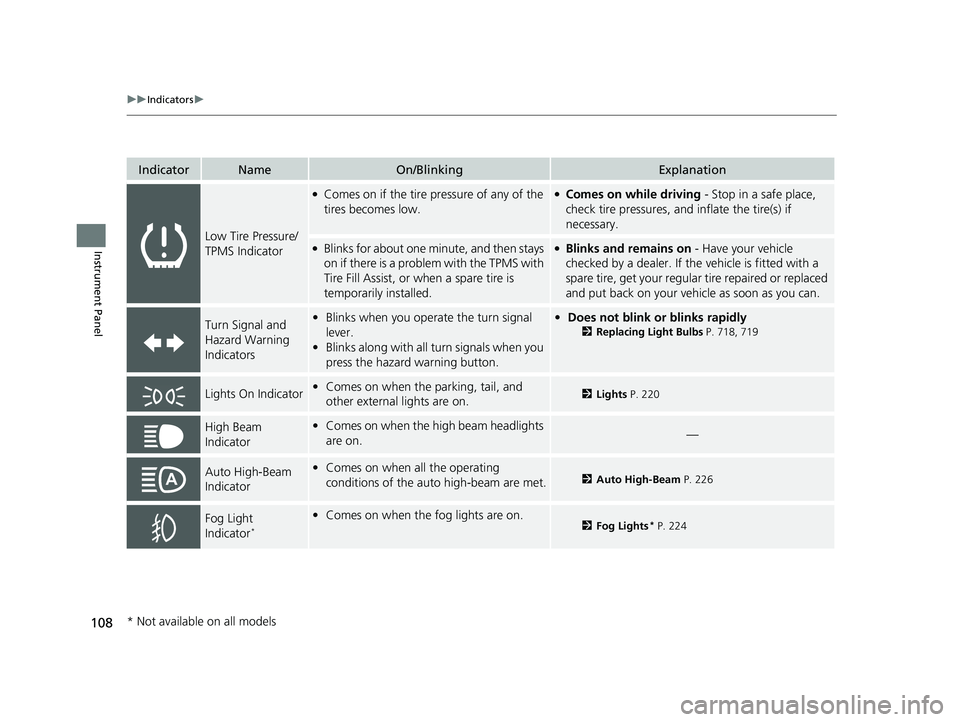
IndicatorNameOn/BlinkingExplanation
Low Tire Pressure/
TPMS Indicator
●Comes on if the tire pressure of any of the
tires becomes low.●Comes on while driving - Stop in a safe place,
check tire pressures, a nd inflate the tire(s) if
necessary.
●Blinks for about one minute, and then stays
on if there is a problem with the TPMS with
Tire Fill Assist, or when a spare tire is
temporarily installed.●Blinks and remains on - Have your vehicle
checked by a dealer. If the vehicle is fitted with a
spare tire, get your regular tire repaired or replaced
and put back on your vehicle as soon as you can.
Turn Signal and
Hazard Warning
Indicators• Blinks when you oper ate the turn signal
lever.
• Blinks along with all turn signals when you
press the hazard warning button.•Does not blink or blinks rapidly
2 Replacing Light Bulbs P. 718, 719
Lights On Indicator•Comes on when the parking, tail, and
other external lights are on.2 Lights P. 220
High Beam
Indicator•Comes on when the high beam headlights
are on.—
Auto High-Beam
Indicator•Comes on when all the operating
conditions of the auto high-beam are met.2 Auto High-Beam P. 226
Fog Light
Indicator*
•Comes on when the fog lights are on.2 Fog Lights* P. 224
* Not available on all models
23 PILOT-31T906000_03.book 108 ページ 2022年10月31日 月曜日 午前10時26分
Page 137 of 814
uuGauges and Displays uDriver Information Interface (A-type Meter)
136
Instrument Panel
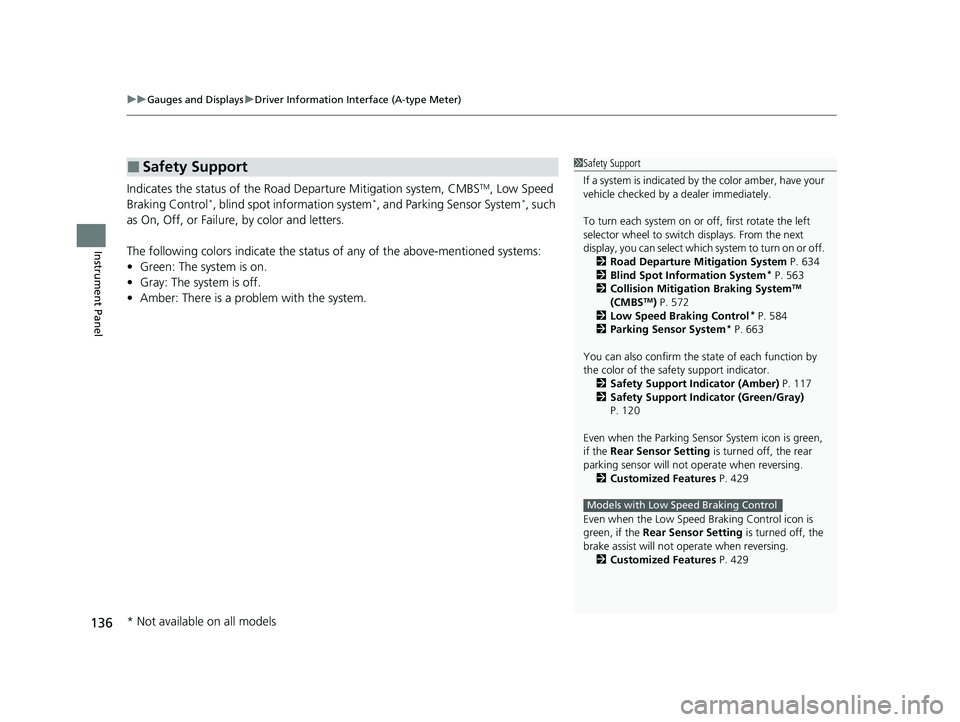
Indicates the status of the Road Departure Mitigation system, CMBSTM, Low Speed
Braking Control*, blind spot information system*, and Parking Sensor System*, such
as On, Off, or Failure, by color and letters.
The following colors indica te the status of any of the above-mentioned systems:
• Green: The system is on.
• Gray: The system is off.
• Amber: There is a probl em with the system.
■Safety Support1Safety Support
If a system is indicated by the color amber, have your
vehicle checked by a dealer immediately.
To turn each system on or off, first rotate the left
selector wheel to switch displays. From the next
display, you can select which system to turn on or off. 2 Road Departure Mitigation System P. 634
2 Blind Spot Information System
* P. 563
2 Collision Mitigation Braking SystemTM
(CMBSTM) P. 572
2 Low Speed Braking Control* P. 584
2 Parking Sensor System* P. 663
You can also confirm the st ate of each function by
the color of the safe ty support indicator.
2 Safety Support Indicator (Amber) P. 117
2 Safety Support Indicator (Green/Gray)
P. 120
Even when the Parking Sensor System icon is green,
if the Rear Sensor Setting is turned off, the rear
parking sensor will not operate when reversing. 2 Customized Features P. 429
Even when the Low Speed Braking Control icon is
green, if the Rear Sensor Setting is turned off, the
brake assist will not operate when reversing.
2 Customized Features P. 429
Models with Low Speed Braking Control
* Not available on all models
23 PILOT-31T906000_03.book 136 ページ 2022年10月31日 月曜日 午前10時26分
Page 165 of 814
uuGauges and Displays uDriver Information Interface Ri ght Side Area (B-type-Meter)
164
Instrument Panel
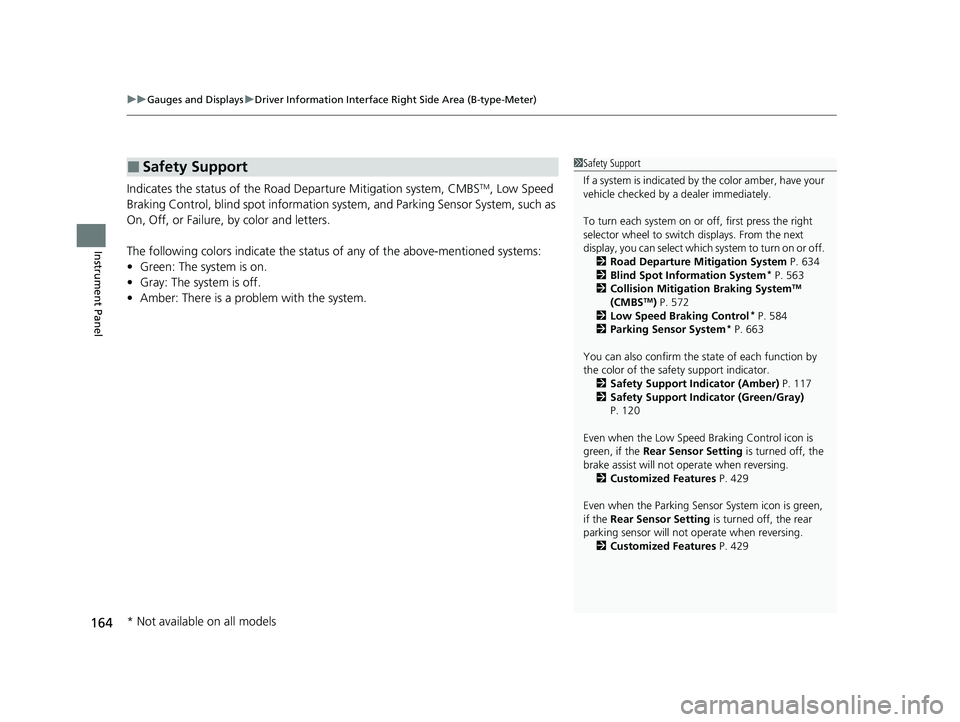
Indicates the status of the Road Departure Mitigation system, CMBSTM, Low Speed
Braking Control, blind spot information sy stem, and Parking Sensor System, such as
On, Off, or Failure, by color and letters.
The following colors indica te the status of any of the above-mentioned systems:
• Green: The system is on.
• Gray: The system is off.
• Amber: There is a probl em with the system.
■Safety Support1Safety Support
If a system is indicated by the color amber, have your
vehicle checked by a dealer immediately.
To turn each system on or off, first press the right
selector wheel to switch displays. From the next
display, you can select which system to turn on or off. 2 Road Departure Mitigation System P. 634
2 Blind Spot Information System
* P. 563
2 Collision Mitigation Braking SystemTM
(CMBSTM) P. 572
2 Low Speed Braking Control* P. 584
2 Parking Sensor System* P. 663
You can also confirm the st ate of each function by
the color of the safe ty support indicator.
2 Safety Support Indicator (Amber) P. 117
2 Safety Support Indicator (Green/Gray)
P. 120
Even when the Low Speed Braking Control icon is
green, if the Rear Sensor Setting is turned off, the
brake assist will not operate when reversing.
2 Customized Features P. 429
Even when the Parking Sensor System icon is green,
if the Rear Sensor Setting is turned off, the rear
parking sensor will not operate when reversing.
2 Customized Features P. 429
* Not available on all models
23 PILOT-31T906000_03.book 164 ページ 2022年10月31日 月曜日 午前10時26分
Page 229 of 814
uuOperating the Switches Around the Steering Wheel uAuto High-Beam
228
Controls
■Manual switching between high-beam and low-beam
If you want to manually switch the headlights between high beam and low beam,
follow either of the proced ures below. Note that when you do this, the auto high-
beam indicator will turn off and the auto high-beam will be deactivated.
Using the lever:
Pull the lever toward you for flashi ng the high beams then release it.
u To reactivate the auto high-beam, follo w either of the procedures below and
the auto high-beam indicator will come on.
• Pull the lever toward you and release it.
• Turn the light switch to and then to AUTO when the lever is in the low beam
position.
Using the light switch:
Turn the light switch to . u To reactivate the auto high-be am, turn the light switch to AUTO when the
lever is in the low beam position and the auto high-beam indicator will come
on.1 How to Use the Auto High-Beam
How to turn off the Auto High-Beam System
You can turn the auto high- beam system on and off.
2 Settings
* P. 140
2 How to Customize the Vehicle Settings
P. 444
If the Some driver assist systems cannot operate:
Camera temperature too high message appears:
•Use the climate control system to cool down the
interior and, if necessary, also use defroster mode
with the airflow directed toward the camera.
•Start driving the vehicle to lower the windshield
temperature, which cool s down the area around
the camera.
If the Some driver assist systems cannot operate:
Clean front windshield or poor viewing
condition. message appears:
•Park your vehicle in a sa fe place, and clean the
windshield. If the message does not disappear after
you have cleaned the windshield and driven for a
while, have your vehicle checked by a dealer.
Models with 7-in. Color Touchscreen
Models with 9-in. Color Touchscreen
* Not available on all models
23 PILOT-31T906000_03.book 228 ページ 2022年10月31日 月曜日 午前10時26分
Page 395 of 814
uuAudio System Basic Operation uAndroid AutoTM
394
Features
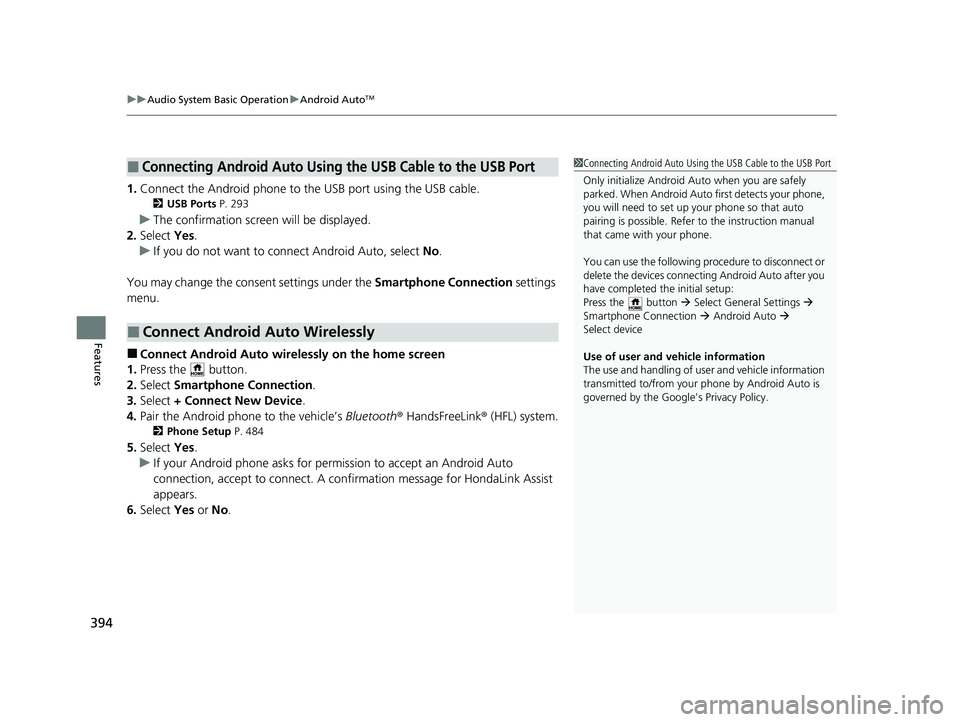
1. Connect the Android phone to the USB port using the USB cable.
2 USB Ports P. 293
uThe confirmation screen will be displayed.
2. Select Yes.
u If you do not want to connect Android Auto, select No.
You may change the consent settings under the Smartphone Connection settings
menu.
■Connect Android Auto wirelessly on the home screen
1. Press the button.
2. Select Smartphone Connection .
3. Select + Connect New Device.
4. Pair the Android phone to the vehicle’s Bluetooth® HandsFreeLink ® (HFL) system.
2Phone Setup P. 484
5.Select Yes.
u If your Android phone asks for permission to accept an Android Auto
connection, accept to connect. A confir mation message for HondaLink Assist
appears.
6. Select Yes or No.
■Connecting Android Auto Using the USB Cable to the USB Port
■Connect Android Auto Wirelessly
1Connecting Android Auto Using the USB Cable to the USB Port
Only initialize Android Auto when you are safely
parked. When Android Auto first detects your phone,
you will need to set up your phone so that auto
pairing is possibl e. Refer to the instruction manual
that came with your phone.
You can use the following procedure to disconnect or
delete the devices connecting Android Auto after you
have completed the initial setup:
Press the button Select General Settings
Smartphone Connection Android Auto
Select device
Use of user and vehicle information
The use and handling of user and vehicle information
transmitted to/from your phone by Android Auto is
governed by the Google’s Privacy Policy.
23 PILOT-31T906000_03.book 394 ページ 2022年10月31日 月曜日 午前10時26分
Page 483 of 814
482
uuBluetooth ® HandsFreeLink ®u HFL Menus
Features
HFL Menus
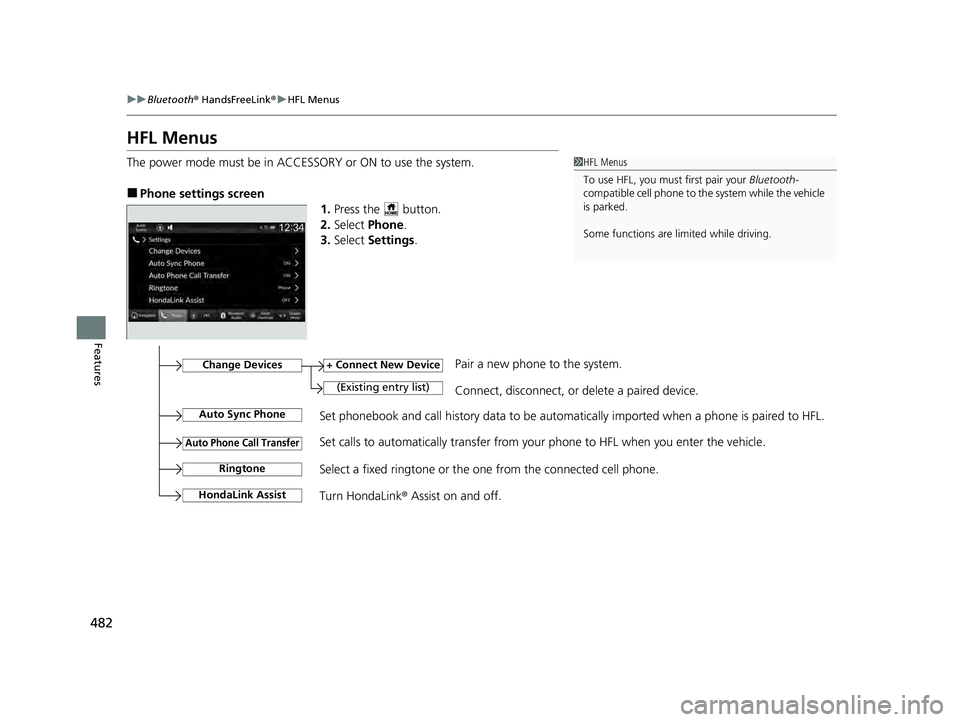
The power mode must be in ACCESSORY or ON to use the system.
■Phone settings screen
1.Press the button.
2. Select Phone .
3. Select Settings .
1HFL Menus
To use HFL, you must first pair your Bluetooth-
compatible cell phone to th e system while the vehicle
is parked.
Some functions are li mited while driving.
Set phonebook and call history data to be automatically imported when a phone is paired to HFL.
+ Connect New Device
(Existing entry list)Connect, disconnect, or delete a paired device.
Change DevicesPair a new phone to the system.
Auto Sync Phone
Auto Phone Call Transfer
Ringtone
HondaLink Assist
Set calls to automatically transfer from your phone to HFL when you enter the vehicle.
Select a fixed ringtone or the one from the connected cell phone.
Turn HondaLink ® Assist on and off.
23 PILOT-31T906000_03.book 482 ページ 2022年10月31日 月曜日 午前10時26分
Page 502 of 814
501
Driving
This chapter discusses driving and refueling.
Before Driving....................................... 502
Towing a Trailer .................................... 508
Off-Highway Driving Guidelines ......... 519
When Driving
Starting the Engine .......................... 524
Precautions While Driving................. 531
Automatic Transmission ................... 532
Shifting ............................................ 533
Auto Idle Stop .................................. 542
Drive Mode System .......................... 548
Hill Descent Control System ............. 553
Vehicle Stability AssistTM (VSA ®), aka Electronic
Stability Control (ESC), System ..............555
Agile Handling Assist ....................... 557 Intelligent Variable To
rque Management (i-
VTM4
TM) AWD System*.................. 558
Tire Pressure Monitoring System (TPMS) with Tire Fill Assist .......................... 559
Tire Pressure Monitoring System (TPMS) -
Required Federal Explanation ......... 561
Blind Spot Information System
*....... 563Honda Sensing ®.................................... 567Collision Mitigation Braking SystemTM (CMBSTM) ....572Low Speed Braking Control*............ 584Adaptive Cruise Control (ACC) with Low Speed Follow.. 590Lane Keeping Assist System (LKAS) .. 612
Traffic Jam Assist ............................. 625
Road Departure Mitigation System .. 634
Traffic Sign Recognition System.... 642
Front Sensor Camera ....................... 648
Radar Sensor ................................... 650
Sonar Sensors*............................. 651BrakingBrake System ................................... 652
Anti-lock Brake System (ABS) ........... 659
Brake Assist System ......................... 660
Parking Your VehicleWhen Stopped ................................ 661
Parking Sensor System*................... 663
Cross Traffic Monitor*..................... 668Multi-View Rear Camera*..................... 672
Surround View Camera System*.......... 674Refueling ........................................... 686
Fuel Economy and CO
2 Emissions .... 689
* Not available on all models
23 PILOT-31T906000_03.book 501 ページ 2022年10月31日 月曜日 午前10時26分
Page 531 of 814
uuWhen Driving uStarting the Engine
530
Driving
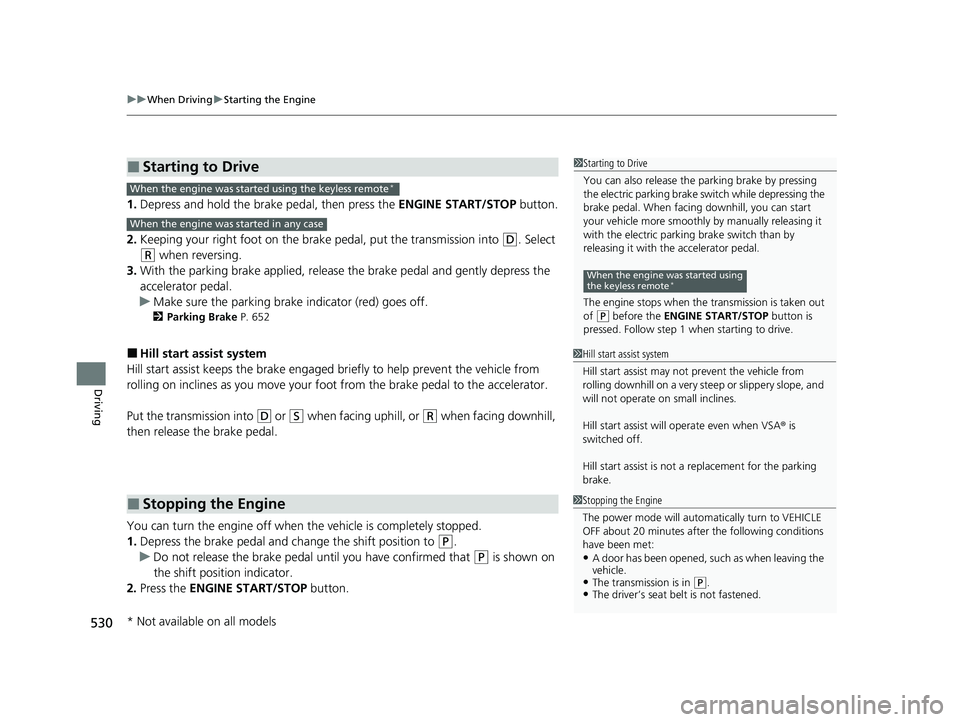
1. Depress and hold the brake pedal, then press the ENGINE START/STOP button.
2. Keeping your right foot on the brake pedal, put the transmission into
(D. Select
(R when reversing.
3. With the parking brake applied, release the brake pedal and gently depress the
accelerator pedal.
u Make sure the parking brake indicator (red) goes off.
2 Parking Brake P. 652
■Hill start assist system
Hill start assist keeps the brake engaged br iefly to help prevent the vehicle from
rolling on inclines as you move your fo ot from the brake pedal to the accelerator.
Put the transmission into
(D or (S when facing uphill, or (R when facing downhill,
then release the brake pedal.
You can turn the engine off when the vehicle is completely stopped.
1. Depress the brake pedal and change the shift position to
(P.
u Do not release the brake pedal until you have confirmed that
(P is shown on
the shift position indicator.
2. Press the ENGINE START/STOP button.
■Starting to Drive
■Stopping the Engine
1Starting to Drive
You can also release the parking brake by pressing
the electric parking brake sw itch while depressing the
brake pedal. When facing downhill, you can start
your vehicle more smoothly by manually releasing it
with the electric parki ng brake switch than by
releasing it with th e accelerator pedal.
The engine stops when th e transmission is taken out
of
( P before the ENGINE START/STOP button is
pressed. Follow step 1 when starting to drive.
When the engine was started using
the keyless remote*
When the engine was started using the keyless remote*
When the engine was started in any case
1 Hill start assist system
Hill start assist may not prevent the vehicle from
rolling downhill on a very st eep or slippery slope, and
will not operate on small inclines.
Hill start assist will operate even when VSA ® is
switched off.
Hill start assist is not a replacement for the parking
brake.
1 Stopping the Engine
The power mode will automatically turn to VEHICLE
OFF about 20 minutes afte r the following conditions
have been met:
•A door has been opened, such as when leaving the
vehicle.
•The transmission is in ( P.•The driver’s seat belt is not fastened.
* Not available on all models
23 PILOT-31T906000_03.book 530 ページ 2022年10月31日 月曜日 午前10時26分