belt HONDA PRELUDE 1992 Owner's Manual
[x] Cancel search | Manufacturer: HONDA, Model Year: 1992, Model line: PRELUDE, Model: HONDA PRELUDE 1992Pages: 225, PDF Size: 2.1 MB
Page 52 of 225
Seat Adjustments
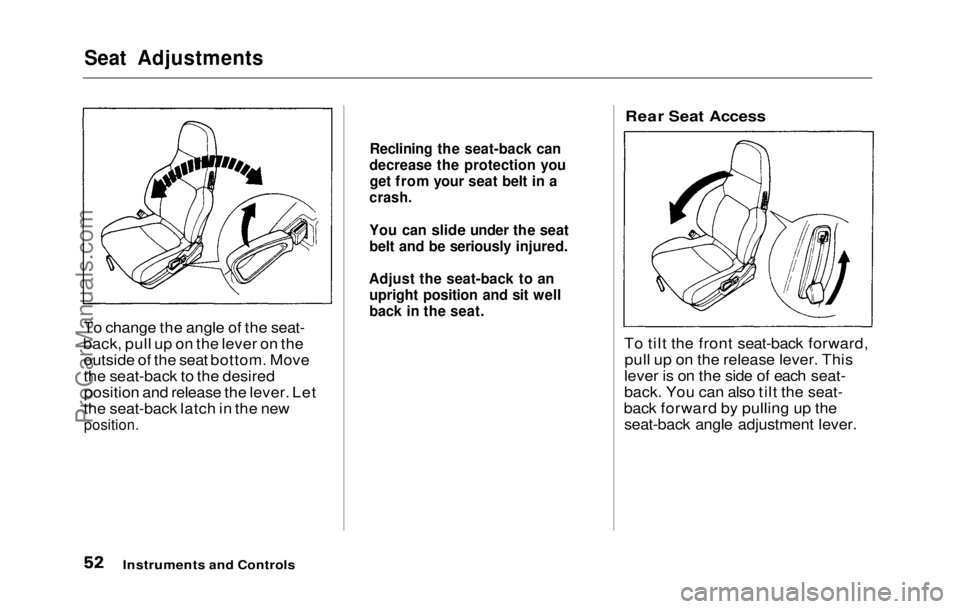
To change the angle of the seat-
back, pull up on the lever on the outside of the seat bottom. Move
the seat-back to the desiredposition and release the lever. Let
the seat-back latch in the new
position.
Rear Seat Access
To tilt the front seat-back forward, pull up on the release lever. This
lever is on the side of each seat-
back. You can also tilt the seat-
back forward by pulling up the seat-back angle adjustment lever.
Instruments and Controls
Reclining the seat-back can
decrease the protection you get from your seat belt in a
crash.
You can slide under the seat
belt an d
be seriously injured.
Adjust the seat-back to an upright position and sit well
back in the seat.ProCarManuals.comMain Menu Table of Contents s t
Page 62 of 225
Glove Box
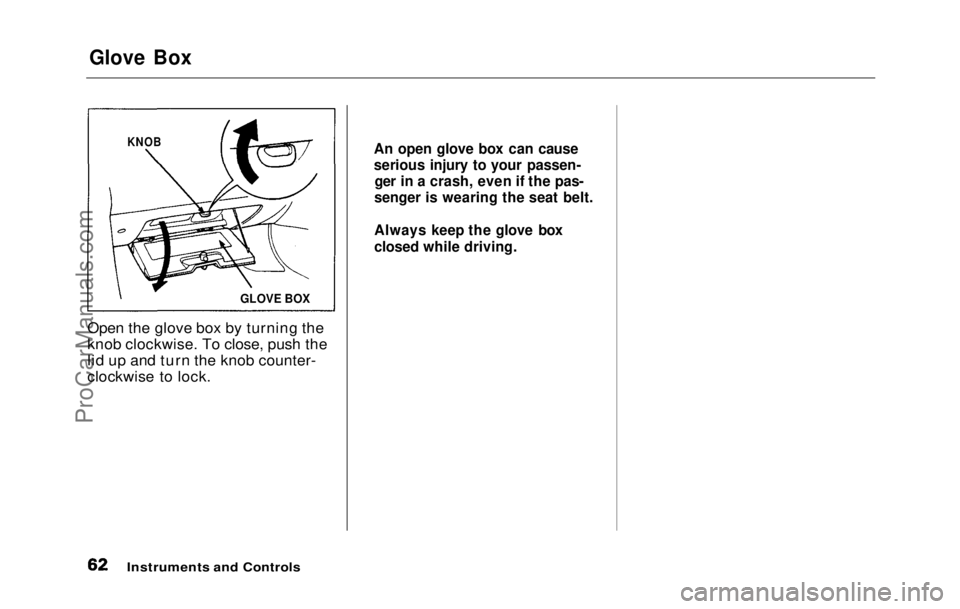
Open the glove box by turning the
knob clockwise. To close, push the
lid up and turn the knob counter-
clockwise to lock.
Instruments and Controls
KNOB
GLOVE BOX An open glove box can cause
serious injury to your passen-
ger in a crash, even if the pas-
senger is wearing the seat belt.
Always keep the glove box
closed while driving.ProCarManuals.comMain Menu Table of Contents s t
Page 107 of 225
Preparing to Drive
You should do the following checks and adjustments every day before
you drive your car.
1. Make sure all windows, mirrors, and outside lights are clean and
unobstructed. Remove frost,
snow, or ice.
2. Check that the hood and trunk are fully closed.
3. Check that any items you may be carrying with you inside are
stored properly or fastened down
securely. 4. Check the adjustment of the seat
(see page 51 ).
5. Check the adjustment of the
inside and outside mirrors (see
page 59 ).
6. Chec k
the adjustment of the
steering wheel (see page 43 ).
7. Make sure the doors are securely
closed and locked.
8. Fasten your seat belt. Check that your passengers have fastened
their seat belts (see page 7 ). 9. Turn the ignition ON (II). Check
the indicator lights in the instru-
ment panel.
10.Start th
e
engine.
11.Check the gauges and indicator
lights in the instrument panel
(see page 31 ).
Driving
ProCarManuals.comMain Menu Table of Contents s t
Page 125 of 225
Maintenance
Regularly maintaining your Honda
is the best way to protect your investment. You will be rewarded
with safer, more economical,
trouble-free driving. This section
lists items that need to be checked
regularly and explains how to check them. It also details some
simple maintenance tasks you can
do yourself. The maintenance
schedules for normal and severe
driving conditions show you when
these things need to be done.
If you are interested in how to per-
form more complex maintenance
on your Honda, you can purchase
the Service Manual. See page 221 for information on how to
obtain a copy, or see your Honda
dealer.
Maintenance Schedule................ 128
Maintenance Record................ 131
Periodic Checks............................ 133
Fluid Locations............................. 134
Engine Oil...................................... 135
Checking Engine Oil................ 135
Adding........................................ 135
Recommended Oil.................... 136
Additives.................................... 136 Oil and Filter Changes ............ 137
Cooling System............................. 139 Checking the Coolant Level... 139
Adding Radiator Coolant........ 139
Replacing Coolant.................... 140
Windshield Washers.................... 143
Transmission Oil.......................... 144
Automatic Transmission........ 144
5-speed Transmission.............. 145
Brake and Clutch Fluid............... 146
Brake System............................ 146
Anti-lock Brake System ......... 147 Clutch System........................... 147
Power Steering............................. 148
Air Filter....................................... 149
Fuel Filter..................................... 150
Spark Plugs.................................. .
150
Replacement.............................. 150
Specification.............................. 152
Battery............................................ 152
Windshield Wipers....................... 155
Air Conditioner............................. 157 Engine Belts.................................. 158
Tires................................................ 158 Inflation...................................... 158
Inspection................................... 159
Maintenance.............................. 160
Tire Rotation............................ 160
Replacing Tires ........................ 161
Wheels and Tires...................... 161
DOT Tire Quality Grading..... 161 Treadwear............................. 161
Traction................................. 162
Temperature......................... 162
Winter Driving.......................... 163 Snow Tires............................ 163
Tire Chains............................ 163
Lights.............................................. 164
Replacing Bulbs........................ 164
Storing Your Car.......................... 173
MaintenanceProCarManuals.comMain Menu s t
Page 156 of 225
Engine Belts, Tires
Engine Belts
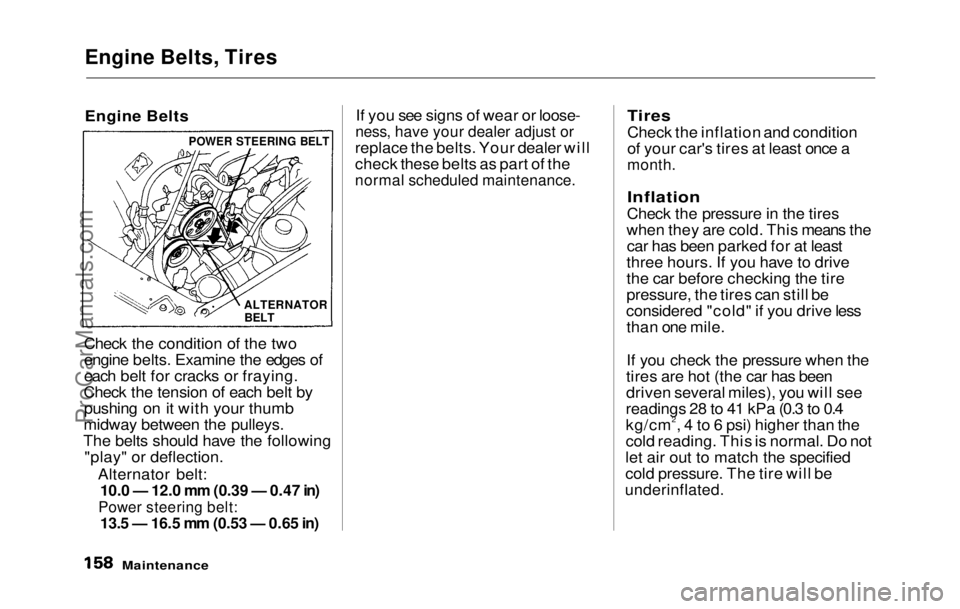
Check the condition of the two
engine belts. Examine the edges of
each belt for cracks or fraying.
Check the tension of each belt by pushing on it with your thumb
midway between the pulleys.
The belts should have the following "play" or deflection.
Alternator belt:
10.0 — 12.0 mm (0.39 — 0.47 in)
Power steering belt:
13.5 — 16.5
mm
(0.53
—
0.65 in)
If you see signs of wear or loose-
ness, have your dealer adjust or
replace the belts. Your dealer will
check these belts as part of the
normal scheduled maintenance.
Tires
Check the inflation and condition
of your car's tires at least once a
month.
Inflation
Check the pressure in the tires
when they are cold. This means the car has been parked for at least
three hours. If you have to drive
the car before checking the tire
pressure, the tires can still be
considered "cold" if you drive less than one mile.
If you check the pressure when the
tires are hot (the car has been
driven several miles), you will see
readings 28 to 41 kPa (0.3 to 0.4
kg/cm2, 4 to 6 psi) higher than the
cold reading. This is normal. Do not
let air out to match the specified
cold pressure. The tire will be
underinflated.
Maintenance
POWER STEERING BELT
ALTERNATOR
BELTProCarManuals.comMain Menu Table of Contents s t
Page 159 of 225

Tires
Replacing Tires
The tires that came with your Honda were selected to match the
performance capabilities of the car
and provide the best combination of
handling, ride comfort, and long life.
You should replace them with
radial tires of the same size, load
range, and speed rating. Mixing
radial and bias-ply or bias-belted tires on your car can reduce its
braking ability, traction, and
steering accuracy.
It is best to replace all four tires at
the same time. If that is not possi-
ble or necessary, then replace the two front tires or the two rear tires
as a pair. Replacing just one tire
can seriously affect your car's han-
dling.
If you ever need to replace a wheel,
make sure you use the same wheel
that originally came on your Honda.
Replacement wheels are available
at your Honda dealer. Wheels and Tires
Wheel:
(US: S, Canada: S)
14 x 5.5 JJ
(US: Si, Si 4WS, Canada: SR, SR 4WS)
15
x
6.5 JJ
Tire:
(US: S, Canada: S)
185/70R14 87H
(US: Si, Si 4WS, Canada: SR, SR 4WS)
205/55R15 87V
DOT Tire Quality Grading
(US Cars)
The tires on your car meet all U.S.
Federal Safety Requirements. All
tires are also graded for treadwear,
traction, and temperature perform-
ance according to Department of
Transportation (DOT) standards.
The following explains these
gradings.
Treadwear
The treadwear grade is a compara-
tive rating based on the wear rate
of the tire when tested under con-
trolled conditions on a specified
government test course. For exam-
ple, a tire graded 150 would wear
one and one half (1-1/2) times as
well on the government course as a
tire graded 100. The relative per-
formance of tires depends upon the
actual conditions of their use, how-
ever, and may depart significantly
from the norm due to variations in
driving habits, service practices
and differences in road character-
istics and climate.
CONTINUED
MaintenanceProCarManuals.comMain Menu Table of Contents s t
Page 172 of 225

Appearance Care
Regular cleaning and polishing of
your Honda helps to keep it "new"
looking. This section gives you
hints on how to clean and preserve
your car's appearance: the paint,
brightwork, wheels and interior. Also included are several things
you can do to help prevent corro-
sion.
Exterior Care................................ 176 Washing..................................... 176
Waxing....................................... 177
Aluminum Wheels................... 177
Paint Touch-up......................... 178
Interior Care.................................. 179 Carpeting................................... 179
Fabric........................................ 179
Vinyl........................................... 179
Seat Belts.................................. 179
Windows..................................... 180
Air Fresheners.......................... 180
Corrosion Protection................... 180
Body Repairs................................. 181
Appearance CareProCarManuals.comMain Menu s t
Page 176 of 225
Interior Care
Carpeting
Vacuum the carpeting frequentlyto remove dirt. Ground-in dirt will
make the carpet wear
out faster.
Periodically shampoo the carpet to
keep it looking new. Use one of the
foam-type carpet cleaners on the
market. Follow the instructions
that come with the cleaner, apply-
ing it with a sponge or soft brush.
Keep the carpeting as dry as possi-
ble by not adding water to the foam.
Fabric
Vacuum dirt and dust out of the material frequently. For general
cleaning, use a solution of mild soap and lukewarm water, letting it air
dry. To clean off stubborn spots,
use a commercially-available fabric
cleaner. Test it on a hidden area of
the fabric first, to make sure it does
not bleach or stain the fabric.
Follow the instructions that come
with the cleaner.
Vinyl
Remove dirt and dust with a
vacuum cleaner. Wipe the vinyl
with a soft cloth dampened in a solution of mild soap and water.
Use the same solution with a soft-
bristle brush on more difficult spots.
You can also use commercially- available spray or foam-type vinyl
cleaners.
Seat Belts
If your seat belts get dirty, you can
use a soft brush to clean them with
a mixture of mild soap and warm
water. Do not use bleach, dye, or
cleaning solvents. They can
weaken the belt material. Let the
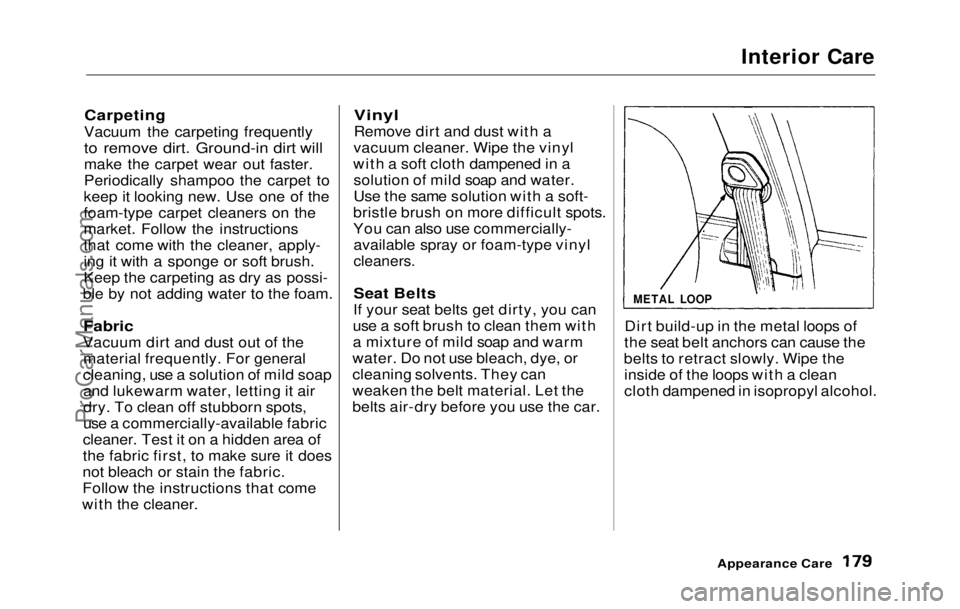
belts air-dry before you use the car. Dirt build-up in the metal loops of
the seat belt anchors can cause the
belts to retract slowly. Wipe the inside of the loops with a clean
cloth dampened in isopropyl alcohol.
Appearance Care
METAL LOOPProCarManuals.comMain Menu Table of Contents s t
Page 211 of 225

Warranty Coverages
U.S. Cars
Your new Honda is covered by
these warranties:
New Car Limited Warranty
—
provides coverage for defects in materials and workmanship for 3
years or 57,600 km (36,000 miles).
Emission Control Systems De-
fects Warranty and Emissions
Performance Warranty — these
two warranties cover your car's
emission control systems. Time,
mileage, and coverage are condi-
tional. Please read the warranty
manual for exact information.
Original Equipment Battery
Limited Warranty —
provides
coverage fo r
36 months, with 100%
coverage for the first 24 months. Seat Belt Limited Warranty — a
seat belt that fails to function
properly is covered for the useful
life of the car.
Rust Perforation Limited Warranty — body panels that rust
through from the inside will be
repaired or replaced for up to 36
months. There is no mileage limit.
Accessory Limited Warranty —
Genuine Honda Accessories are
covered under this warranty. Time
and mileage limits depend on the
type of accessory and other factors.
Please read your warranty manual
for details.
Replacement Parts Limited Warranty — provides coverage for
defects in materials and workman-
ship for 12 months or 19,200 km
(12,000 miles).
Replacement Battery Limited
Warranty — provides coverage for
up to 36 months, with 100% cover- age for the first 12 months.
Replacement Muffler Lifetime
Limited Warranty — provides
coverage for as long as the pur-
chaser of the muffler owns the car.
There are restrictions and exclu-
sions which apply to all these war-
ranties. Please read the 1992 Honda
Warranties bookle t
that came with
your car for precise information on
warranty coverages. Your Honda's original tires are covered by their
manufacturer. Tire warranty infor-
mation is in a separate booklet.
Canada Cars
Please refer to the 1992 Warranty
and Maintenance Guide that came
with your car.
Warranty and Customer RelationsProCarManuals.comMain Menu Table of Contents s t
Page 217 of 225
Index
Accessories
Installation................................. 105
ACCESSORY
(Ignition Key Position).............. 48
Adding
Automatic Transmission
Fluid........................................ 144
Brake Fluid............................... 146 Clutch Fluid.............................. 147
Engine Oil...:.............................. 135
Manual Transmission Fluid... 145
Power Steering Fluid.............. 148
Radiator Coolant...................... 139
Windshield Washer fluid ........ 143
Additional Safety Information .... 16
Door Locks.................................. 16
Driving with Pets....................... 17
Seat-back Position..................... 16
Storing Cargo Safely................. 17
Additives, Engine Oil................... 136
Adjustments
Mirrors....................................... .
59
Seats............................................. 51
Steering Wheel..........................
43
Airbag (SRS).................................. 1
0
Air Conditioning............................. 68
Maintenance..............................
157
Usage............................................ 6 8
Ai
r Filter........................................
149
Air Outlet
s
(Vents)......................... 68
Air Pressure, Tires ......................
159
Alcohol an d
Drugs.......................... 24
Alcohol in Gasoline........................ 98
Antifreeze......................................
139
Anti-lock Brake s
(ABS)
Description................................
208
Indicator Light.................. .
34,
118
Operation................................... 117
Anti-theft Steerin
g
Column
Lock.............................................. 48
Appearance Care..........................
175
Ashtray............................................. 65
Audio System................................. .
75
Automatic Speed Control............. 44
Automatic Transmission............ 112
Capacity, Fluid........................
.
206
Checking Fluid Level.............. 144
Shifting
...................................... 113
Shift Leve r
Positions...............
112
Shift Lock Release................... 115
Battery
Charging System Light............. 33
Jump Starting............................ 191
Maintenance.............................. 152
Specifications............................ 207
Before Driving
................................ 97
Belts, Seat ......................................... 4
Body Repair
...................................
181
Brakes
Anti-lock Syste
m (ABS)..........
117
Break-in, Ne
w
Linings.............. 98
Fluid............................................
146
Light, Burned-out................... .
169
Parking......................................... 61
System Light.............................. .
33
Wear Indicators.....................
116
Brakes, AB S
Description...............................
.
208
Operation................................... 117
System Indicator...............
.
34,
118
Braking System...........................
.
116
Break-in, Ne
w
Car ......................... 98
CONTINUEDProCarManuals.comMain Menu s t