brake light HONDA PRELUDE 1998 User Guide
[x] Cancel search | Manufacturer: HONDA, Model Year: 1998, Model line: PRELUDE, Model: HONDA PRELUDE 1998Pages: 278, PDF Size: 2.61 MB
Page 120 of 278
Break-in Period, Gasoline
Break-in Period
Help assure your vehicle's future
reliability and performance by paying
extra attention to how you drive
during the first 600 miles (1,000 km).
During this period: Avoid full-throttle starts and rapid
acceleration.
Avoid hard braking. New brakes need to be broken-in by moderate
use for the first 200 miles (300
km).
You should follow these same re- commendations with an overhauled
or exchanged engine, or when the
brakes are relined.
Gasoline
Your Honda is designed to operate on premium unleaded gasoline with a
pump octane number of 91 or higher.
If you are unable to find premium
unleaded gasoline, you may substi-
tute an unleaded regular gasoline.
The engine will compensate for the lower octane, but you may notice aslight decrease in power as a result.
We recommend gasolines containing detergent additives that help prevent
fuel system and engine deposits.
Using gasoline containing lead willdamage your vehicle's emission
controls. This contributes to air
pollution. In Canada, some gasolines contain
an octane-enhancing additive called
MMT. If you use such gasolines,
your emission control system performance may deteriorate and
the Malfunction Indicator Lamp on
your instrument panel may turn on. If this happens, contact your
authorized Honda dealer for service.
Before DrivingProCarManuals.comMain Menu Table of Contents s t
Page 122 of 278
Service Station Procedures
Opening the Hood
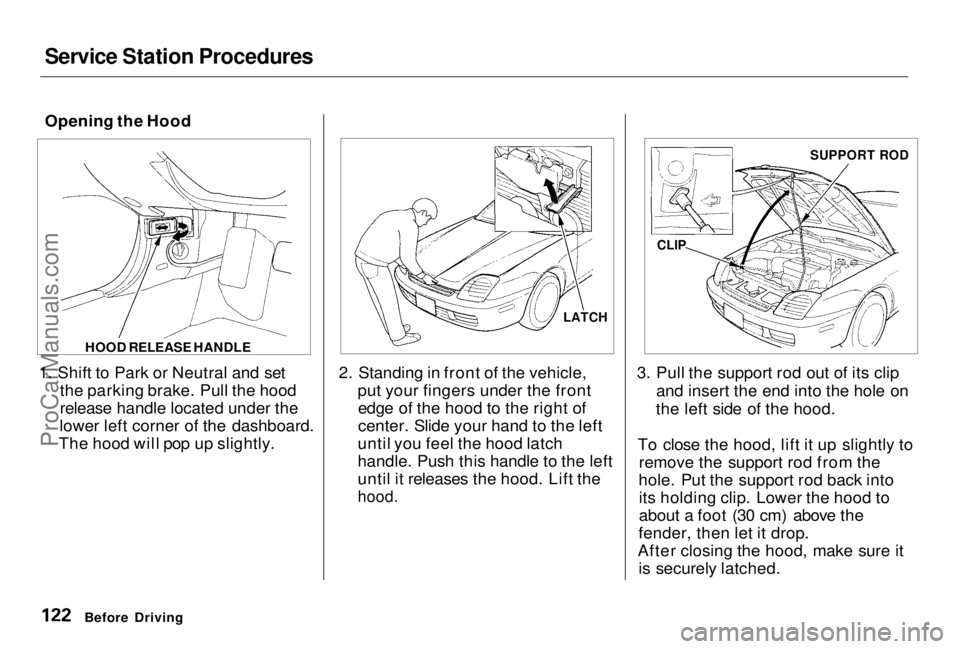
1. Shift to Park or Neutral and set the parking brake. Pull the hood
release handle located under the
lower left corner of the dashboard.
The hood will pop up slightly. 2. Standing in front of the vehicle,
put your fingers under the frontedge of the hood to the right of
center. Slide your hand to the left
until you feel the hood latch
handle. Push this handle to the left
until it releases the hood. Lift the
hood.
3. Pull the support rod out of its clip
and insert the end into the hole on
the left side of the hood.
To close the hood, lift it up slightly to remove the support rod from the
hole. Put the support rod back into its holding clip. Lower the hood to
about a foot (30 cm) above the
fender, then let it drop.
After closing the hood, make sure it is securely latched.
Before Driving HOOD RELEASE HANDLE
LATCHCLIP SUPPORT RODProCarManuals.comMain Menu Table of Contents s t
Page 126 of 278
Accessories and Modifications
Modifying your vehicle, or installingsome non-Honda accessories, can
make your vehicle unsafe. Before
you make any modifications or add any accessories, be sure to read the
following information.
Accessories
Your dealer has Genuine Honda accessories that allow you to
personalize your vehicle. These accessories have been designed and
approved for your vehicle, and are
covered by warranty.
Non-Honda accessories are usually designed for universal applications.
Although aftermarket accessories may fit on your vehicle, they may not
meet factory specifications, and
could adversely affect your vehicle's
handling and stability. (See "Modifications" on the page 127 for
additional information.) When properly installed, car phones,
alarms, two-way radios, and low-
powered audio systems should notinterfere with your vehicle's
computer-controlled systems, such
as the SRS and anti-lock brake
system.
However, if electronic accessories
are improperly installed, or exceed
your vehicle's electrical system capacity, they can interfere with the operation of your vehicle, or even
cause the airbags to deploy.
Before installing any accessory:
Make sure the accessory does not
obscure any lights, or interfere
with proper vehicle operation or performance. Be sure electronic accessories do
not overload electrical circuits (see page 248 ). Have the installer contact your
Honda dealer for assistance before
installing any electronic accessory.
If possible, have your dealer inspect
the final installation.
Before Driving
Improper accessories or
modifications can affect your
vehicle's handling, stability and performance, and cause a
crash in which you can be hurt
or killed.
Follow all instructions in this
owner's manual regarding
accessories and modifications.ProCarManuals.comMain Menu Table of Contents s t
Page 144 of 278
Parking
Always use the parking brake when
you park your vehicle. The indicator on the instrument panel shows that
the parking brake is not fully
released; it does not indicate that the
parking brake is firmly set. Make sure the parking brake is set firmly
or your vehicle may roll if it is
parked on an incline.
If your vehicle has an automatic
transmission, set the parking brake
before you put the transmission in Park. This keeps the vehicle from
moving and putting pressure on the
parking mechanism in the
transmission — making it easier to move the shift lever out of Park
when you want to drive away. If the vehicle is facing uphill, turn
the front wheels away from the curb. If you have a manual transmission,
put it in first gear.
If the vehicle is facing downhill, turn
the front wheels toward the curb. If
you have a manual transmission, put it in reverse gear.
Make sure the parking brake is fully
released before driving away. Driving with the parking brake
partially set can overheat or damage
the rear brakes. Parking Tips
Make sure the moonroof and the
windows are closed.
Turn off the lights. Place any packages, valuables, etc.,
in the trunk or take them with you.
Lock the doors.
Never park over dry leaves, tall
grass, or other flammable
materials. The three way catalytic
converter gets very hot, and could
cause these materials to catch on
fire.
DrivingProCarManuals.comMain Menu Table of Contents s t
Page 145 of 278
The Braking System
Your Honda is equipped with disc brakes at all four wheels. A power
assist helps reduce the effort neededon the brake pedal. The ABS helps
you retain steering control when
braking very hard.
Put your foot on the brake pedal only
when you intend to brake. Resting
your foot on the pedal keeps the
brakes applied lightly, causing them
to build up heat. Heat build-up can
reduce how well your brakes work. It also keeps your brake lights on all
the time, confusing drivers behind
you.
Constant application of the brakes
when going down a long hill builds up heat and reduces their effective-
ness. Use the engine to assist the
brakes by downshifting to a lower
gear and taking your foot off theaccelerator pedal.
Check your brakes after driving
through deep water. Apply the
brakes moderately to see if they feel normal. If not, apply them gently and
frequently until they do. Since a
longer distance is needed to stop
with wet brakes, be extra cautious and alert in your driving.
Brake Wear Indicators
All four brakes have audible brake wear indicators.
When the brake pads need replacing, you will hear a distinctive metallic "screeching" sound when you apply
the brakes. If you do not have the
brake pads replaced, they will begin screeching all the time.
Your brakes may sometimes squeal or squeak when you apply them
lightly. Do not confuse this with the
brake wear indicators. They make a
very audible "screeching."
DrivingProCarManuals.comMain Menu Table of Contents s t
Page 150 of 278
Driving in Bad Weather
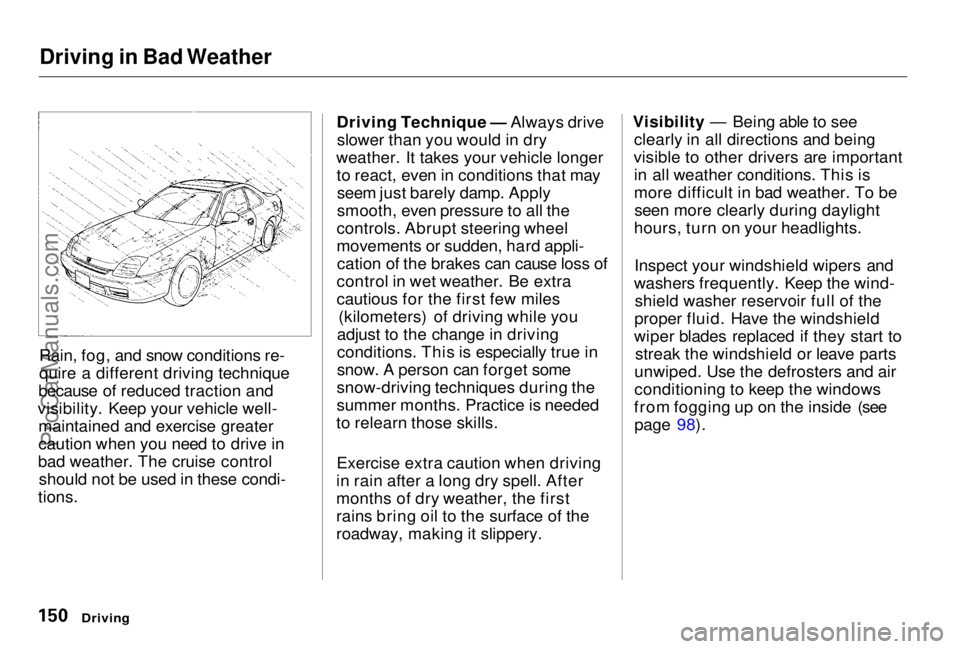
Rain, fog, and snow conditions re-
quire a different driving technique
because of reduced traction and
visibility. Keep your vehicle well- maintained and exercise greater
caution when you need to drive in
bad weather. The cruise control should not be used in these condi-
tions. Driving Technique — Always drive
slower than you would in dry
weather. It takes your vehicle longer to react, even in conditions that mayseem just barely damp. Apply
smooth, even pressure to all the
controls. Abrupt steering wheel
movements or sudden, hard appli- cation of the brakes can cause loss of
control in wet weather. Be extra
cautious for the first few miles (kilometers) of driving while you
adjust to the change in driving
conditions. This is especially true in
snow. A person can forget some
snow-driving techniques during the
summer months. Practice is needed
to relearn those skills.
Exercise extra caution when driving
in rain after a long dry spell. After
months of dry weather, the first
rains bring oil to the surface of the
roadway, making it slippery. Visibility — Being able to see
clearly in all directions and being
visible to other drivers are important in all weather conditions. This is
more difficult in bad weather. To beseen more clearly during daylight
hours, turn on your headlights.
Inspect your windshield wipers and
washers frequently. Keep the wind- shield washer reservoir full of the
proper fluid. Have the windshield
wiper blades replaced if they start to streak the windshield or leave parts
unwiped. Use the defrosters and air
conditioning to keep the windows
from fogging up on the inside (see page 98).
DrivingProCarManuals.comMain Menu Table of Contents s t
Page 155 of 278
Towing a Trailer
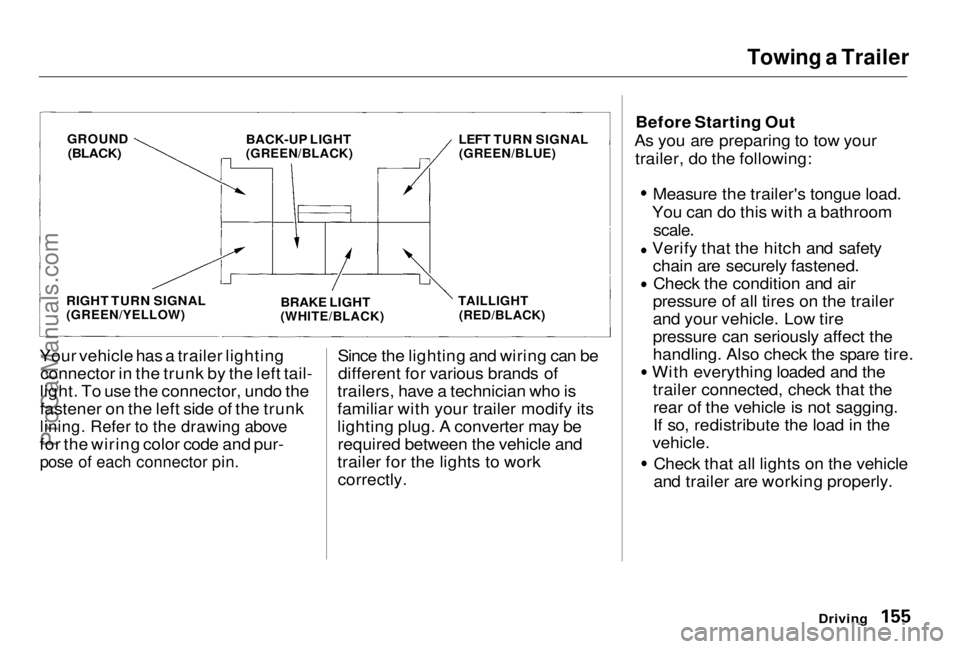
Your vehicle has a trailer lighting connector in the trunk by the left tail-
light. To use the connector, undo the
fastener on the left side of the trunk
lining. Refer to the drawing above
for the wiring color code and pur-
pose of each connector pin.
Since the lighting and wiring can be
different for various brands of
trailers, have a technician who is
familiar with your trailer modify its
lighting plug. A converter may be required between the vehicle and
trailer for the lights to work correctly. Before Starting Out
As you are preparing to tow your trailer, do the following: Measure the trailer's tongue load.
You can do this with a bathroom
scale.
Verify that the hitch and safety
chain are securely fastened. Check the condition and air
pressure of all tires on the trailer
and your vehicle. Low tire
pressure can seriously affect the
handling. Also check the spare tire. With everything loaded and the
trailer connected, check that therear of the vehicle is not sagging.
If so, redistribute the load in the
vehicle. Check that all lights on the vehicle
and trailer are working properly.
Driving
GROUND
(BLACK)
BACK-UP LIGHT
(GREEN/BLACK)
RIGHT TURN SIGNAL
(GREEN/YELLOW)
LEFT TURN SIGNAL
(GREEN/BLUE)
BRAKE LIGHT
(WHITE/BLACK) TAILLIGHT
(RED/BLACK)ProCarManuals.comMain Menu Table of Contents s t
Page 158 of 278
Maintenance
This section explains why it is important to keep your vehicle wellmaintained and to follow basic
maintenance safety precautions.
This section also includes Maintenance Schedules for normaldriving and severe driving conditions,
a Maintenance Record, and instruc-
tions for simple maintenance tasks
you may want to take care of
yourself.
If you have the skills and tools to per-
form more complex maintenance
tasks on your Honda, you may want to purchase the Service Manual. See
page 271 for information on how toobtain a copy, or see your Honda
dealer.
Maintenance Safety....................... 160
Important Safety Precautions ..161
Maintenance Schedule.................. 162
Required Maintenance Record.... 169 Owner Maintenance Checks........ 171
Fluid Locations............................... 172
Engine Oil.......................................173
Adding Oil................................... 173Recommended Oil..................... 173Synthetic Oil............................... 174
Additives..................................... 174
Changing the Oil and Filter...... 175
Cooling System.............................. 177
Adding Engine Coolant............. 177Replacing Engine Coolant........ 179
Windshield Washers..................... 182
Transmission Fluid........................ 183 AutomaticTransmission.......................... 183
5-speed Manual Transmission.......................... 184
Brake and Clutch Fluid................. 185 Brake System............................. 185
Clutch System............................ 186
Power Steering............................... 186
Air Cleaner Element...................... 187 Spark Plugs..................................... 188
Replacement............................... 188
Specifications............................. 190
Battery............................................ 190
Wiper Blades.................................. 193
Air Conditioning System............... 195 Drive Belts...................................... 196
Timing Belt..................................... 196
Tires................................................ 197
Inflation....................................... 197
Inspection................................... 198
Maintenance............................... 199
Tire Rotation.............................. 200 Replacing Tires and Wheels .... 200
Wheels and Tires....................... 201
Winter Driving...........................201
Snow Tires.............................. 202
Tire Chains............................. 202
Lights.............................................. 203
Headlight Aimimg..................... 205
Replacing Bulbs......................... 206
Storing Your Vehicle..................... 217
MaintenanceProCarManuals.comMain Menu s t
Page 170 of 278
Owner Maintenance Checks
You should check the following items at the specified intervals. If
you are unsure of how to perform any check, turn to the page given. Engine oil level — Check every
time you fill the fuel tank. See page 123. Engine coolant level — Check the
radiator reserve tank every time
you fill the fuel tank. See page 124.
Windshield washer fluid — Check
the level in the reservoir monthly.If weather conditions cause you to
use the washers frequently, check
the reservoir each time you stop
for fuel. See page 182. Automatic transmission — Check
the fluid level monthly. See page
183.
Brakes — Check the fluid level
monthly. See page 185. Tires — Check the tire pressure
monthly. Examine the tread for
wear and foreign objects. See page
197.
Lights — Check the operation of
the headlights, parking lights,
taillights, high-mount brake light,
turn signals, brake lights, and
license plate lights monthly. See
page 203.
MaintenanceProCarManuals.comMain Menu Table of Contents s t
Page 203 of 278
Lights
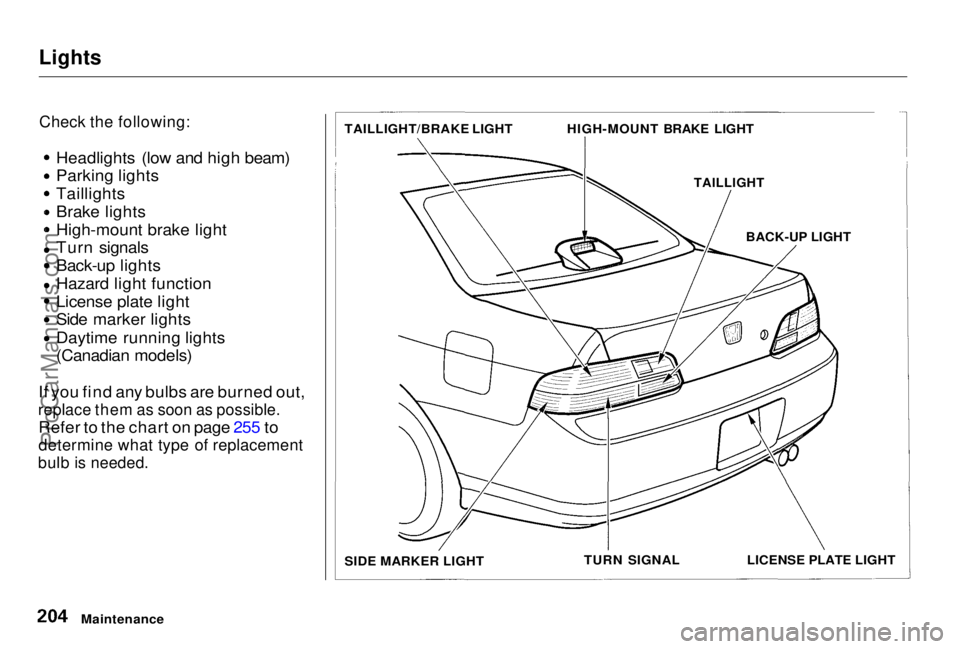
Check the following:
Headlights (low and high beam)
Parking lights Taillights
Brake lights
High-mount brake light
Turn signals
Back-up lights
Hazard light function
License plate light
Side marker lights
Daytime running lights
(Canadian models)
If you find any bulbs are burned out,
replace them as soon as possible.
Refer to the chart on page 255 to
determine what type of replacement
bulb is needed.
Maintenance TAILLIGHT/BRAKE LIGHT
HIGH-MOUNT BRAKE LIGHT
TAILLIGHT
BACK-UP LIGHT
LICENSE PLATE LIGHT
TURN SIGNAL
SIDE MARKER LIGHTProCarManuals.comMain Menu Table of Contents s t