trunk HONDA PRELUDE 1998 User Guide
[x] Cancel search | Manufacturer: HONDA, Model Year: 1998, Model line: PRELUDE, Model: HONDA PRELUDE 1998Pages: 278, PDF Size: 2.61 MB
Page 81 of 278
Folding Rear Seat, Power Windows
Make sure both rear shoulder belts are positioned in front of the rear
seat-back whenever the seat-back is
in its upright position.
Make sure all items in the trunk, or
items extending through the opening
into the back seat, are tied down.
Loose items can fly if you have to
brake hard. See Carrying Cargo on
page 128.
Never drive with the seat-back
folded down and the trunk lid open.
See Carbon Monoxide Hazard on
page 47. Power Windows
Your vehicle's windows are electri- cally-powered. Turn the ignitionswitch to ON (II) to raise or lower
any window.
Each door has a switch that controls
its window. To open the window,
push the switch down and hold it.
Release the switch when you want
the window to stop. Close the
window by pulling back on the switch and holding it.
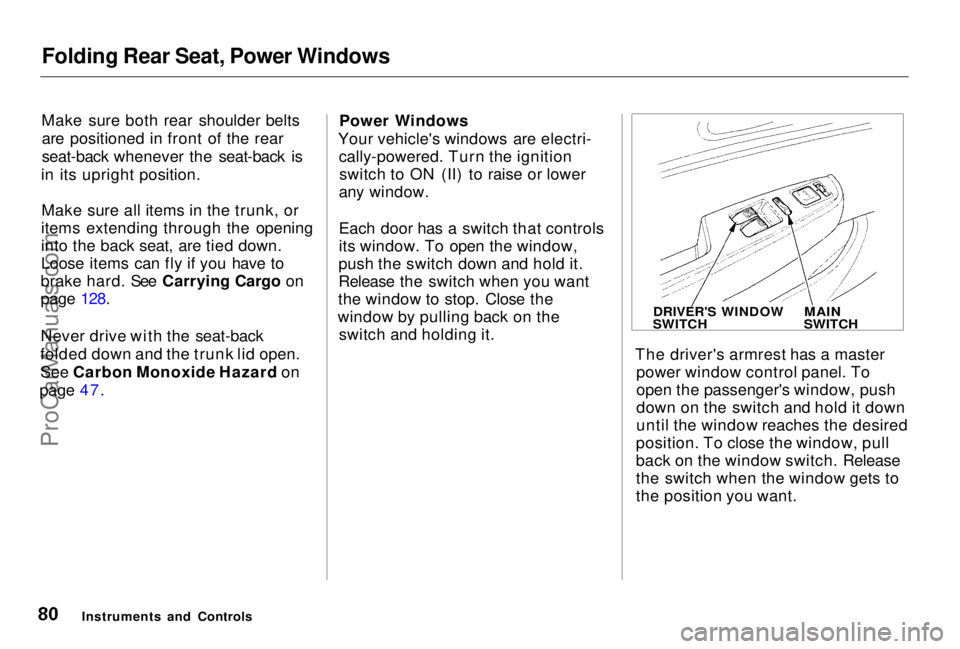
The driver's armrest has a masterpower window control panel. To
open the passenger's window, push
down on the switch and hold it down
until the window reaches the desired
position. To close the window, pull
back on the window switch. Release
the switch when the window gets to
the position you want.
Instruments and Controls
DRIVER'S WINDOW
SWITCH
MAIN
SWITCHProCarManuals.comMain Menu Table of Contents s t
Page 110 of 278

Audio System
Operating the CD Changer
(Optional)
A trunk-mounted Compact Disc changer is available for your vehicle.
It holds up to six discs, providing
several hours of continuous
entertainment. You operate this CD
changer with the same controls used
for the in-dash CD player.
Load the desired CD's in the
magazine and load the magazine in
the changer according to the instructions that came with the unit.
Play only standard round discs. Odd-shaped CDs may jam in the drive or
cause other problems.
To select the CD changer, press the CD button. The disc and track
numbers will be displayed. A "0" will
flash for the track number as the CD is loaded, then it will change to a
non-flashing "1".
To select
a different disc, press the
appropriate preset button (1 — 6). If
you select an empty slot in the magazine, the changer will, after
finding that slot empty, try to load the CD in the next slot. Thiscontinues until it finds a CD to load
and play.
If you load a CD in the in-dash player
while the changer is playing a CD, the system will stop the changer and
begin playing the in-dash CD. To select the changer again, press the
CD button. Play will begin where it
left off. Use the CD button to switch between the player and the changer.
If you eject the in-dash CD while it is
playing, the system will automaticallyswitch to the CD changer and begin
play where it left off. If there are no CDs in the changer, the display will
flash. You will have to select another mode (AM or FM) with the button. When you switch back to CD mode,
the system selects the same unit (in-dash or changer) that was playing
when you switched out of CD mode.
To use the SKIP, REPEAT, and RANDOM functions, refer to the in-dash player operating instructions.
Comfort and Convenience FeaturesProCarManuals.comMain Menu Table of Contents s t
Page 119 of 278
Before Driving
Before you begin driving your Honda,
you should know what gasoline to use, and how to check the levels of
important fluids. You also need to
know how to properly store luggage or packages. The information in this
section will help you. If you plan to
add any accessories to your vehicle,
please read the information in this section first. Break-in Period.............................. 120
Gasoline.......................................... 120
Service Station Procedures .......... 121 Filling the Fuel Tank................. 121
Opening the Hood..................... 122 Oil Check................................ 123
Engine Coolant Check.......... 124
Fuel Economy................................ 125
Vehicle Condition...................... 125Driving Habits............................ 125
Accessories and Modifications.... 126 Accessories................................. 126
Modifications............................. 127
Additional Safety Precaution.... 127
Carrying Cargo.............................. 128 Load Limit.................................. 129Carrying Items in the Passenger Compartment......................... 129
Carrying Cargo in the Trunk or on a Roof Rack....................... 130
Before DrivingProCarManuals.comMain Menu s t
Page 128 of 278
Carrying Cargo
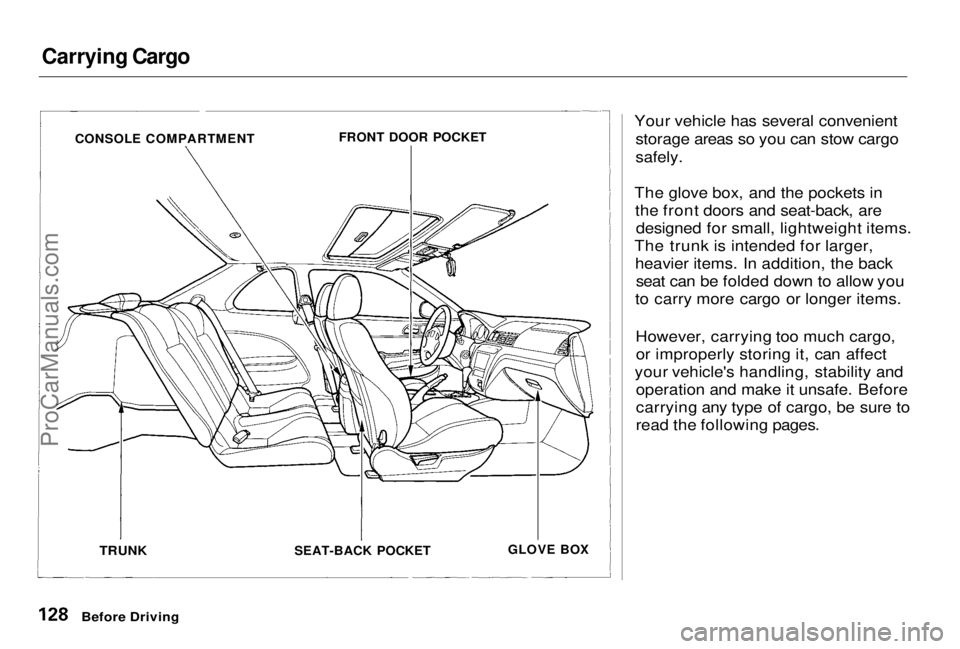
Your vehicle has several convenientstorage areas so you can stow cargo
safely.
The glove box, and the pockets in the front doors and seat-back, aredesigned for small, lightweight items.
The trunk is intended for larger, heavier items. In addition, the backseat can be folded down to allow you
to carry more cargo or longer items.
However, carrying too much cargo,or improperly storing it, can affect
your vehicle's handling, stability and operation and make it unsafe. Before
carrying any type of cargo, be sure to
read the following pages.
Before Driving
CONSOLE COMPARTMENT
FRONT DOOR POCKET
TRUNK
SEAT-BACK POCKET
GLOVE BOXProCarManuals.comMain Menu Table of Contents s t
Page 130 of 278
Carrying Cargo
Carrying Cargo in the Trunk or on
a Roof Rack Distribute cargo evenly on the
floor of the trunk, placing the
heaviest items on the bottom and as far forward as possible. If you fold down the back seat, tie
down items that could be thrown
about the vehicle during a crash or
sudden stop.
If you carry large items that
prevent you from closing the trunk, exhaust gas can enter the
passenger area. To avoid the
possibility of carbon monoxide
poisoning, follow the instructionson page 47. If you can carry any items on a
roof rack, be sure the total weight of the rack and the items does not
exceed the maximum allowable
weight. Please contact your Honda dealer for further information.
Before DrivingProCarManuals.comMain Menu Table of Contents s t
Page 132 of 278
Preparing to Drive
You should do the following checks and adjustments every day before
you drive your vehicle.
1. Make sure all windows, mirrors, and outside lights are clean and
unobstructed. Remove frost, snow, or ice.
2. Check that the hood and trunk are fully closed.
3. Visually check the tires. If a tire looks low, use a gauge to check its
pressure.
4. Check that any items you may be carrying with you inside are stored
properly or fastened down securely. 5. Check the adjustment of the seat
(see page 75).
6. Check the adjustment of the inside and outside mirrors (see
page 83).
7. Check the adjustment of the steering wheel (see page 64).
8. Make sure the doors are securely closed and locked.
9. Fasten your seat belt. Check that your passengers have fastenedtheir seat belts (see page 14). 10. Turn the ignition switch ON (II).
Check the indicator lights in the
instrument panel.
11. Start the engine (see page 133).
12. Check the gauges and indicator lights in the instrument panel (see
page 51).
DrivingProCarManuals.comMain Menu Table of Contents s t
Page 144 of 278
Parking
Always use the parking brake when
you park your vehicle. The indicator on the instrument panel shows that
the parking brake is not fully
released; it does not indicate that the
parking brake is firmly set. Make sure the parking brake is set firmly
or your vehicle may roll if it is
parked on an incline.
If your vehicle has an automatic
transmission, set the parking brake
before you put the transmission in Park. This keeps the vehicle from
moving and putting pressure on the
parking mechanism in the
transmission — making it easier to move the shift lever out of Park
when you want to drive away. If the vehicle is facing uphill, turn
the front wheels away from the curb. If you have a manual transmission,
put it in first gear.
If the vehicle is facing downhill, turn
the front wheels toward the curb. If
you have a manual transmission, put it in reverse gear.
Make sure the parking brake is fully
released before driving away. Driving with the parking brake
partially set can overheat or damage
the rear brakes. Parking Tips
Make sure the moonroof and the
windows are closed.
Turn off the lights. Place any packages, valuables, etc.,
in the trunk or take them with you.
Lock the doors.
Never park over dry leaves, tall
grass, or other flammable
materials. The three way catalytic
converter gets very hot, and could
cause these materials to catch on
fire.
DrivingProCarManuals.comMain Menu Table of Contents s t
Page 152 of 278
Towing a Trailer
Your Honda is designed primarily to carry passengers and their cargo.
You can use it to tow a trailer if you carefully observe some general rules. The total weight of the trailer and
everything loaded in it must not
exceed 1,000 Ibs (450 kg). The "tongue load" should never
exceed 110 Ibs (50 kg). This is the
amount of weight the trailer puts
on the hitch when it is fully-loaded.
As a rule of thumb, the tongue load should be 10 percent of the
total trailer package. For example,
if the trailer and its load weigh 500
Ibs (225 kg), the tongue load should be 50 Ibs (22.5 kg). Adjust
the trailer's cargo to change the
tongue load. Start by putting approximately 60 percent of the
cargo toward the front and 40
percent toward the rear. Never
load the trailer so the back is
heavier than the front. This takes
weight off your vehicle's rear axle and reduces traction.
The combined weight of the
vehicle, all passengers and theirluggage, and tongue load must notexceed the Gross Vehicle Weight
Rating. The GVWR is printed on
the Certification label attached to
the driver's doorjamb (see page
252).
The combined weight of the
vehicle, all passengers and theirluggage, and tongue load also
must not exceed the Gross Axle
Weight Rating. The GAWR is also shown on the Certification label. It
tells you the maximum load for the
front and rear axles. It is possible
that your towing package does not exceed the GVWR but does
exceed the GAWR. Improper
trailer loading, and/or too much
luggage in the trunk can overload
the rear axle. Redistribute the load and check the axle weights again.
DrivingProCarManuals.comMain Menu Table of Contents s t
Page 155 of 278
Towing a Trailer
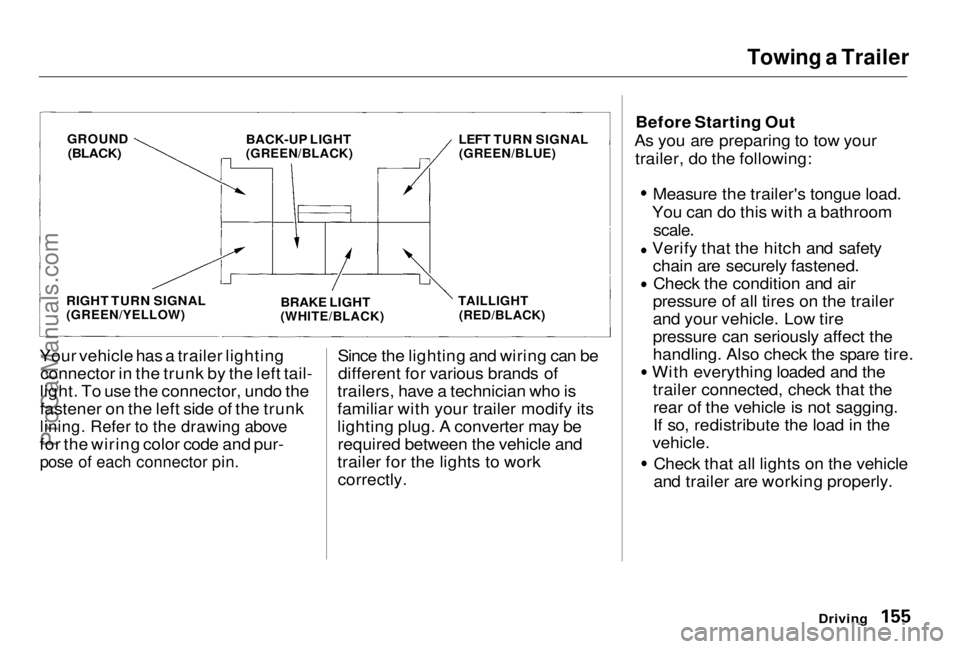
Your vehicle has a trailer lighting connector in the trunk by the left tail-
light. To use the connector, undo the
fastener on the left side of the trunk
lining. Refer to the drawing above
for the wiring color code and pur-
pose of each connector pin.
Since the lighting and wiring can be
different for various brands of
trailers, have a technician who is
familiar with your trailer modify its
lighting plug. A converter may be required between the vehicle and
trailer for the lights to work correctly. Before Starting Out
As you are preparing to tow your trailer, do the following: Measure the trailer's tongue load.
You can do this with a bathroom
scale.
Verify that the hitch and safety
chain are securely fastened. Check the condition and air
pressure of all tires on the trailer
and your vehicle. Low tire
pressure can seriously affect the
handling. Also check the spare tire. With everything loaded and the
trailer connected, check that therear of the vehicle is not sagging.
If so, redistribute the load in the
vehicle. Check that all lights on the vehicle
and trailer are working properly.
Driving
GROUND
(BLACK)
BACK-UP LIGHT
(GREEN/BLACK)
RIGHT TURN SIGNAL
(GREEN/YELLOW)
LEFT TURN SIGNAL
(GREEN/BLUE)
BRAKE LIGHT
(WHITE/BLACK) TAILLIGHT
(RED/BLACK)ProCarManuals.comMain Menu Table of Contents s t
Page 204 of 278
Lights
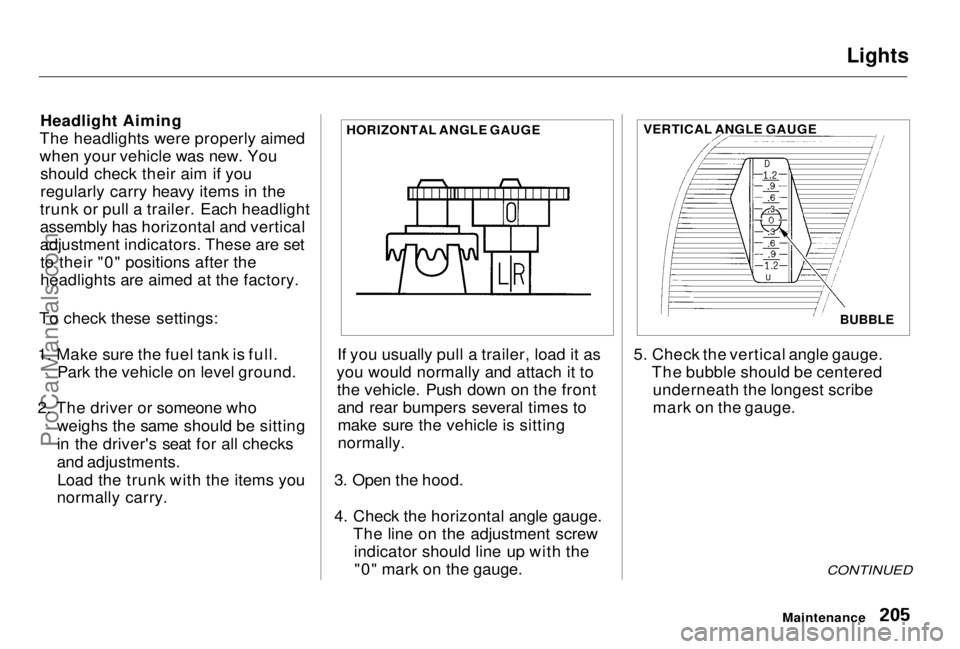
Headlight Aiming
The headlights were properly aimed
when your vehicle was new. You should check their aim if you
regularly carry heavy items in the
trunk or pull a trailer. Each headlight
assembly has horizontal and vertical
adjustment indicators. These are set to their "0" positions after the
headlights are aimed at the factory.
To check these settings:
1. Make sure the fuel tank is full. Park the vehicle on level ground.
2. The driver or someone who weighs the same should be sitting
in the driver's seat for all checks
and adjustments.Load the trunk with the items you
normally carry. If you usually pull a trailer, load it as
you would normally and attach it to the vehicle. Push down on the frontand rear bumpers several times tomake sure the vehicle is sitting
normally.
3. Open the hood.
4. Check the horizontal angle gauge. The line on the adjustment screwindicator should line up with the"0" mark on the gauge. 5. Check the vertical angle gauge.
The bubble should be centeredunderneath the longest scribe
mark on the gauge.
CONTINUED
Maintenance
HORIZONTAL ANGLE GAUGE
BUBBLE
VERTICAL ANGLE GAUGEProCarManuals.comMain Menu Table of Contents s t