maintenance HONDA PRELUDE 2000 (in English) Owner's Guide
[x] Cancel search | Manufacturer: HONDA, Model Year: 2000, Model line: PRELUDE, Model: HONDA PRELUDE 2000Pages: 293, PDF Size: 3.43 MB
Page 186 of 293
Engin
e Oi l
Changin g th e Oi l an d Filte r
Always change the oil and filter according to the time and distance (miles/kilometers) recommenda-
tions in the maintenance schedule.
The oil and filter collect contami- nants that can damage your engine if
they are not removed regularly.
Changing the oil and filter requires
special tools and access from
underneath the car. The car should
be raised on a service station-type
hydraulic lift for this service. Unless
you have the knowledge and proper equipment, you should have this
maintenance done by a skilled
mechanic.
1. Run the engine until it reaches normal operating temperature,
then shut it off.
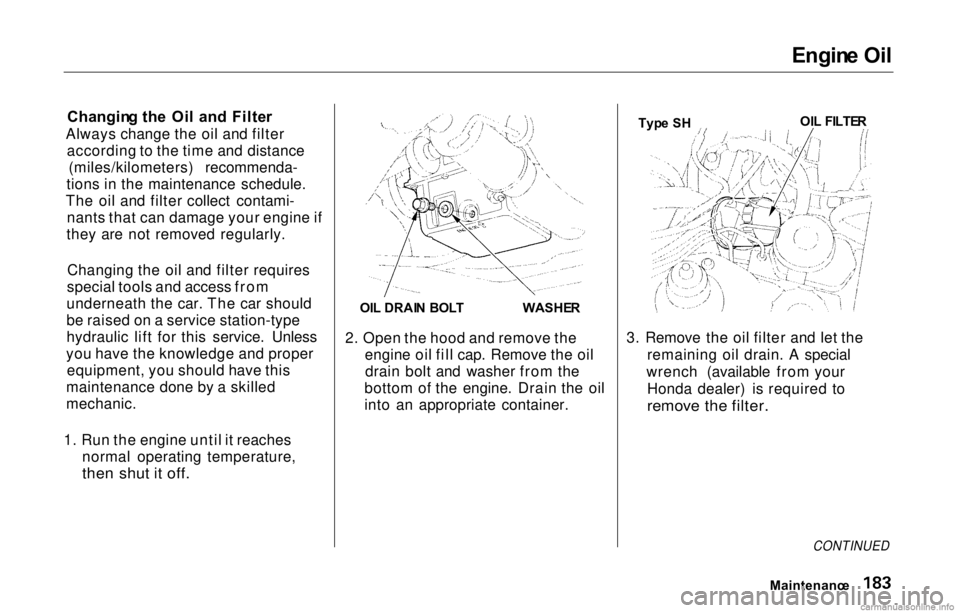
2. Open the hood and remove the
engine oil fill cap. Remove the oildrain bolt and washer from the
bottom of the engine. Drain the oil
into an appropriate container. 3. Remove the oil filter and let the
remaining oil drain. A special
wrench (available from your Honda dealer) is required to
remove the filter.
Maintenance
Typ
e S H OI
L FILTE R
OI L DRAI N BOL T
WASHER
CONTINUED
Page 190 of 293
Coolin
g Syste m
Do not add any rust inhibitors or other additives to your car's coolingsystem. They may not be compatible
with the coolant or engine compo-
nents.
Replacin g Engin e Coolan t
The cooling system should be completely drained and refilled with
new coolant according to the time
and distance recommendations in
the maintenance schedule. Only use Genuine Honda Antifreeze/Coolant.
Draining the coolant requires access
to the underside of the car. Unless
you have the tools and knowledge,
you should have this maintenance done by a skilled mechanic. 1. Turn the ignition ON (II). Slide
the heater temperature controllever to maximum heat. Turn offthe ignition. Open the hood. Makesure the engine and radiator are
cool to the touch.
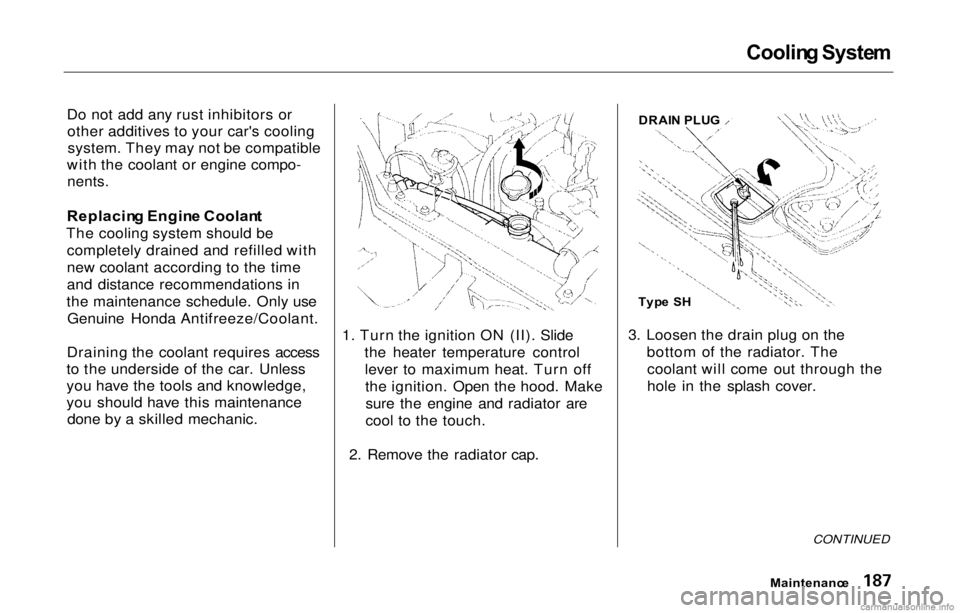
2. Remove the radiator cap. 3. Loosen the drain plug on the
bottom of the radiator. Thecoolant will come out through the
hole in the splash cover.
CONTINUED
Maintenanc e
DRAI
N PLU G
Typ e S H
Page 192 of 293
Cooling
System
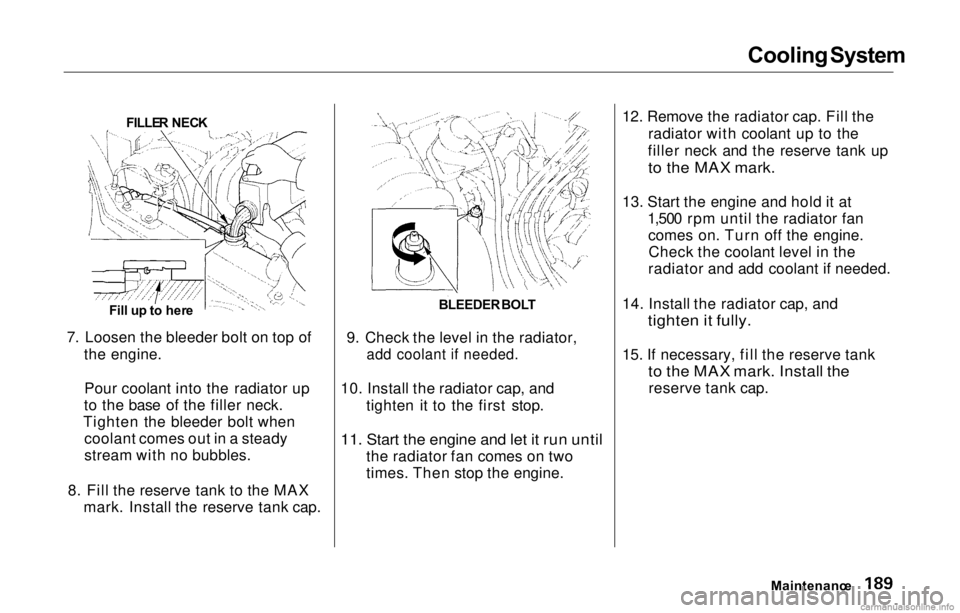
7. Loosen the bleeder bolt on top of the engine.
Pour coolant into the radiator up
to the base of the filler neck.
Tighten the bleeder bolt when coolant comes out in a steady
stream with no bubbles.
8. Fill the reserve tank to the MAX mark. Install the reserve tank cap. 9. Check the level in the radiator,
add coolant if needed.
10. Install the radiator cap, and tighten it to the first stop.
11. Start the engine and let it run until
the radiator fan comes on two
times. Then stop the engine. 12. Remove the radiator cap. Fill the
radiator with coolant up to the
filler neck and the reserve tank up
to the MAX mark.
13. Start the engine and hold it at 1,500 rpm until the radiator fancomes on. Turn off the engine.Check the coolant level in the
radiator and add coolant if needed.
14. Install the radiator cap, and
tighten it fully.
15. If necessary, fill the reserve tank
to the MAX mark. Install the
reserve tank cap.
Maintenance
FILLE
R NEC K
Fill u p to her e BLEEDER
BOL T
Page 194 of 293
Transmissio
n Flui d
Automati c Transmissio n
Check the fluid level with the engine
at normal operating temperature.
1. Park the car on level ground. Shut off the engine.
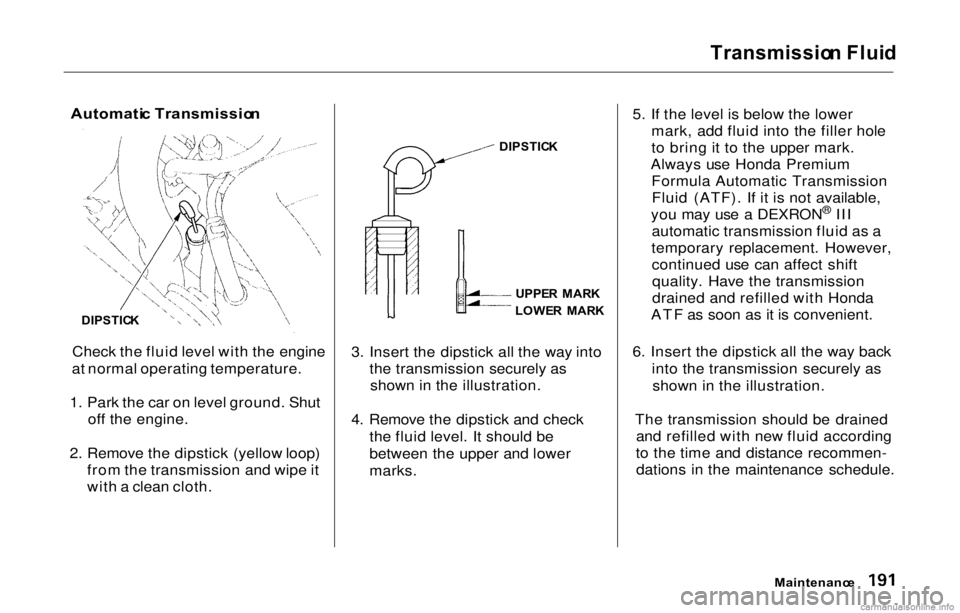
2. Remove the dipstick (yellow loop) from the transmission and wipe it
with a clean cloth. 3. Insert the dipstick all the way into
the transmission securely asshown in the illustration.
4. Remove the dipstick and check the fluid level. It should be
between the upper and lower
marks. 5. If the level is below the lower
mark, add fluid into the filler hole
to bring it to the upper mark.
Always use Honda Premium Formula Automatic TransmissionFluid (ATF). If it is not available,
you may use a DEXRON ®
III
automatic transmission fluid as a
temporary replacement. However, continued use can affect shiftquality. Have the transmission
drained and refilled with Honda
ATF as soon as it is convenient.
6. Insert the dipstick all the way back into the transmission securely asshown in the illustration.
The transmission should be drained and refilled with new fluid according
to the time and distance recommen- dations in the maintenance schedule.
Maintenance
DIPSTIC
K
UPPE
R MAR K
LOWE R MAR K
DIPSTIC
K
Page 195 of 293
Transmissio
n Flui d
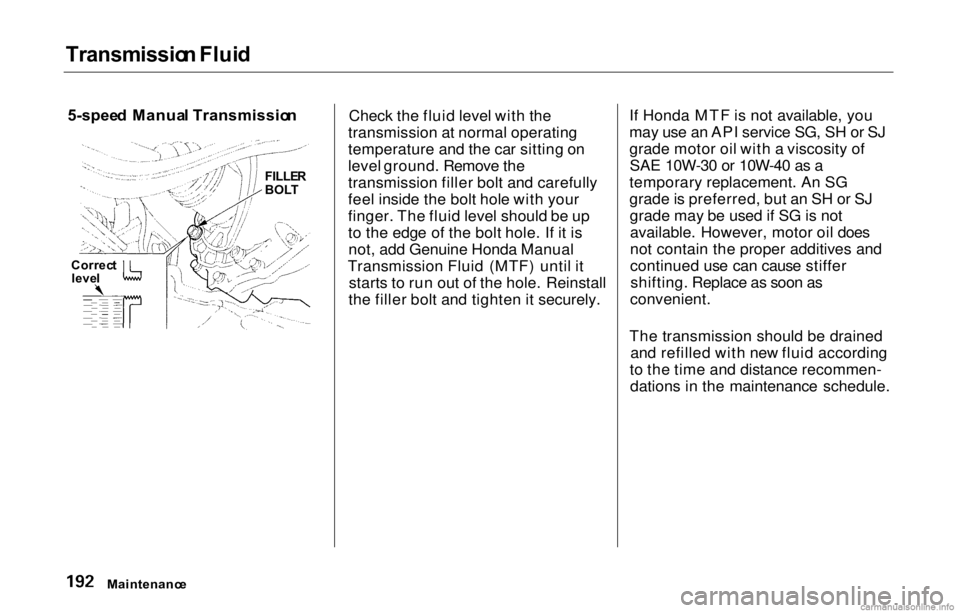
5-spee d Manua l Transmissio n
Check the fluid level with the
transmission at normal operating
temperature and the car sitting on
level ground. Remove the
transmission filler bolt and carefully
feel inside the bolt hole with your
finger. The fluid level should be up
to the edge of the bolt hole. If it is not, add Genuine Honda Manual
Transmission Fluid (MTF) until it starts to run out of the hole. Reinstall
the filler bolt and tighten it securely. If Honda MTF is not available, you
may use an API service SG, SH or SJ
grade motor oil with a viscosity of
SAE 10W-30 or 10W-40 as a
temporary replacement. An SG
grade is preferred, but an SH or SJ grade may be used if SG is notavailable. However, motor oil does
not contain the proper additives and
continued use can cause stiffershifting. Replace as soon as
convenient.
The transmission should be drained and refilled with new fluid according
to the time and distance recommen- dations in the maintenance schedule.
Maintenanc e
FILLE
R
BOL T
Correc t
leve l
Page 196 of 293
Brak
e an d Clutc h Flui d
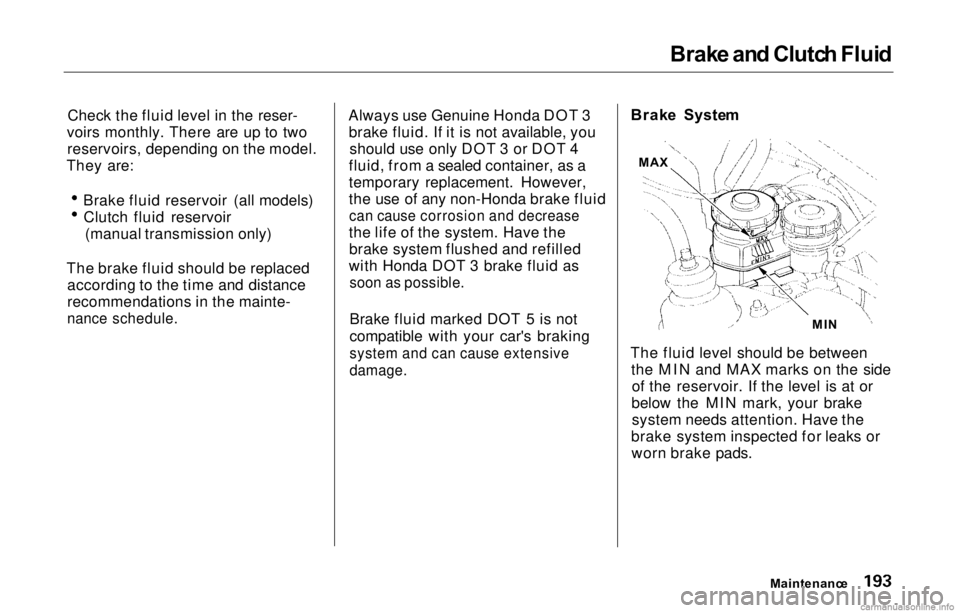
Check the fluid level in the reser-
voirs monthly. There are up to two reservoirs, depending on the model.
They are: Brake fluid reservoir (all models)
Clutch fluid reservoir (manual transmission only)
The brake fluid should be replaced according to the time and distance
recommendations in the mainte-
nance schedule.
Always use Genuine Honda DOT 3
brake fluid. If it is not available, you should use only DOT 3 or DOT 4
fluid, from a sealed container, as a
temporary replacement. However,
the use of any non-Honda brake fluid
can cause corrosion and decrease
the life of the system. Have the brake system flushed and refilled
with Honda DOT 3 brake fluid as
soon as possible.
Brake fluid marked DOT 5 is not
compatible with your car's braking
system and can cause extensive
damage.
Brak
e Syste m
The fluid level should be between the MIN and MAX marks on the sideof the reservoir. If the level is at or
below the MIN mark, your brake system needs attention. Have the
brake system inspected for leaks or worn brake pads.
Maintenance
MI
N
MA
X
Page 198 of 293
Ai
r Cleane r Elemen t
The air cleaner element should be cleaned or replaced according to the
time and distance recommendations in the maintenance schedule.
Cleanin g (Sever e Conditions )
Clean the air cleaner element by
blowing compressed air through it in
the opposite direction to normal air
flow. If you do not have access to compressed air (such as a servicestation), ask your Honda dealer to do
this service.
Follow the replacement procedure
for removal and reinstallation. Replacemen
t
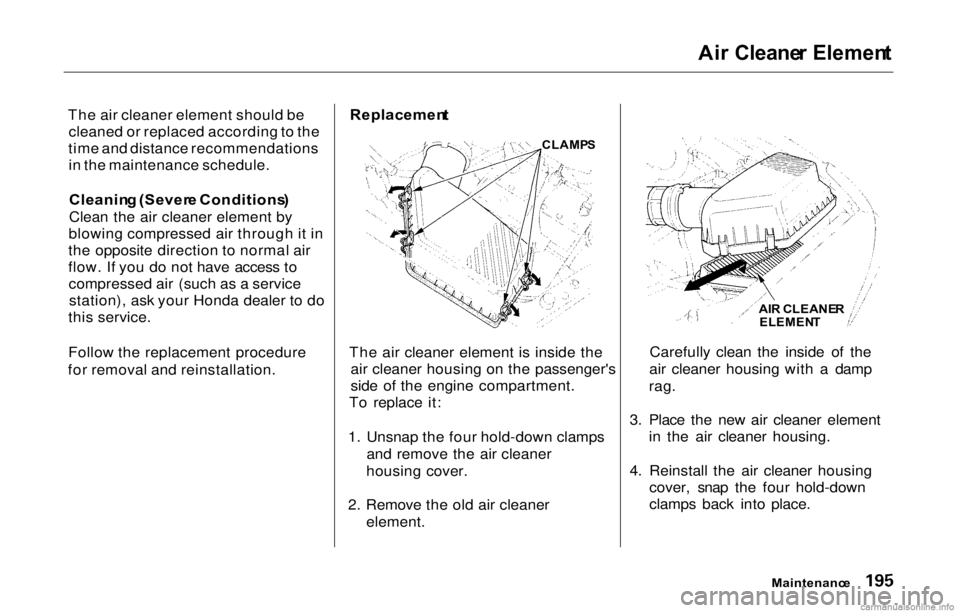
The air cleaner element is inside the air cleaner housing on the passenger's
side of the engine compartment.
To replace it:
1. Unsnap the four hold-down clamps and remove the air cleaner
housing cover.
2. Remove the old air cleaner element. Carefully clean the inside of the
air cleaner housing with a damp
rag.
3. Place the new air cleaner element in the air cleaner housing.
4. Reinstall the air cleaner housing cover, snap the four hold-down
clamps back into place.
Maintenance
CLAMP
S
AIR CLEANE R
ELEMEN T
Page 199 of 293
Hoo
d Latch , Spar k Plug s
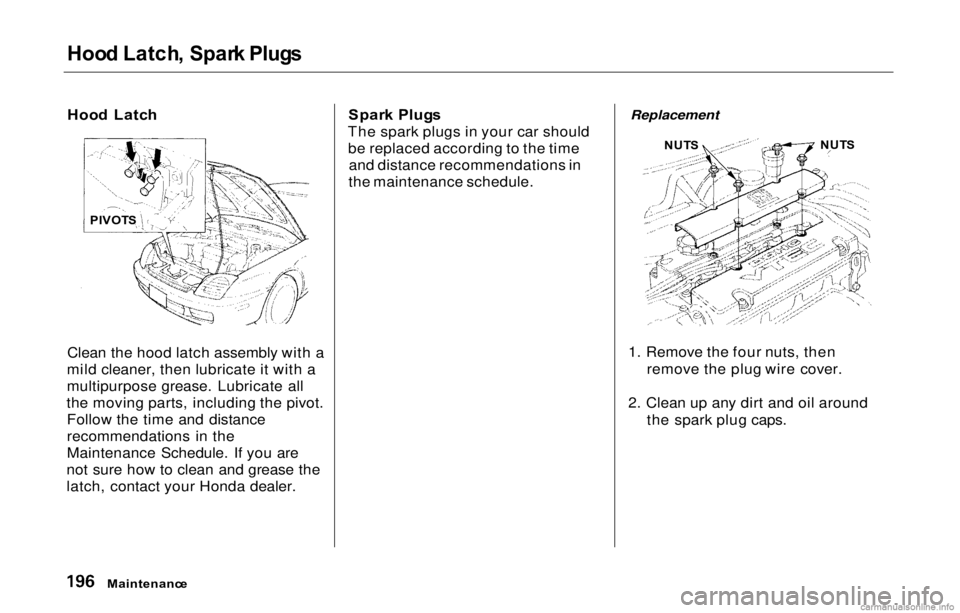
Hoo d Latc h
Clean the hood latch assembly with a
mild cleaner, then lubricate it with a
multipurpose grease. Lubricate all
the moving parts, including the pivot. Follow the time and distance
recommendations in the
Maintenance Schedule. If you are
not sure how to clean and grease the
latch, contact your Honda dealer. Spar
k Plug s
The spark plugs in your car should be replaced according to the time and distance recommendations in
the maintenance schedule.
Replacement
1. Remove the four nuts, then remove the plug wire cover.
2. Clean up any dirt and oil around the spark plug caps.
Maintenanc e
PIVOT
S NUT
S NUT
S
Page 202 of 293
Batter
y
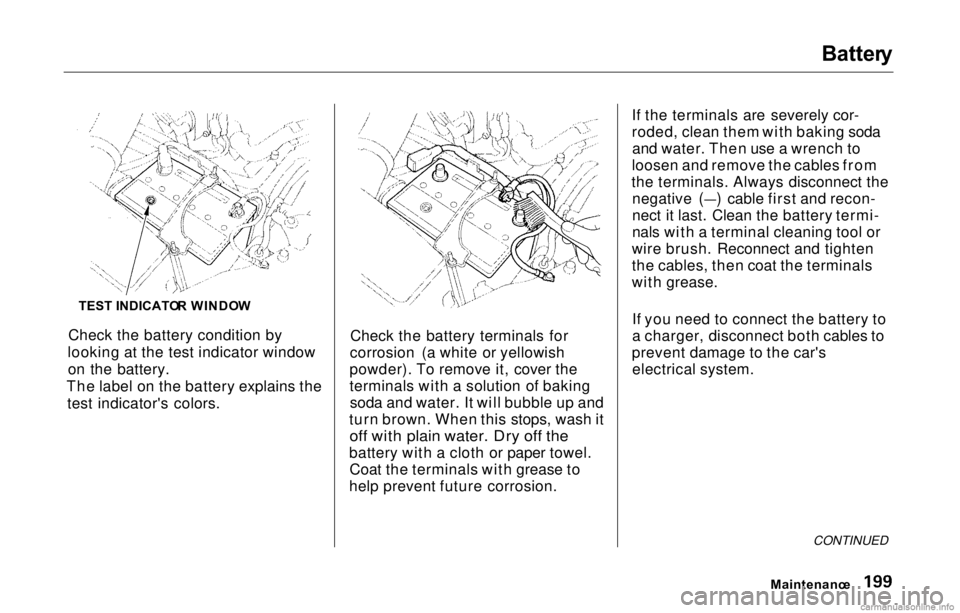
Check the battery condition by
looking at the test indicator window on the battery.
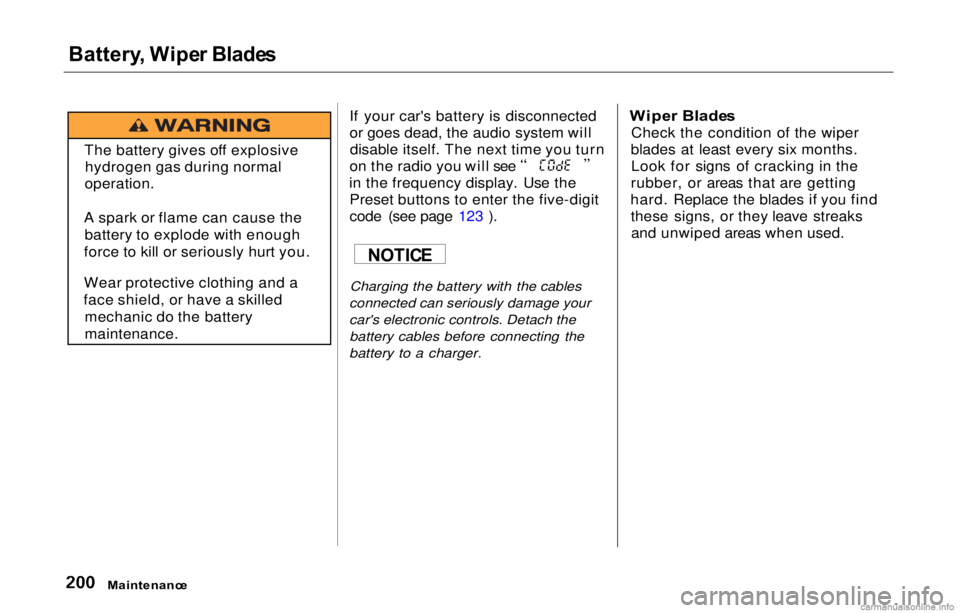
The label on the battery explains the test indicator's colors. Check the battery terminals for
corrosion (a white or yellowish
powder). To remove it, cover the
terminals with a solution of baking soda and water. It will bubble up and
turn brown. When this stops, wash it
off with plain water. Dry off the
battery with a cloth or paper towel. Coat the terminals with grease to
help prevent future corrosion. If the terminals are severely cor-
roded, clean them with baking soda
and water. Then use a wrench to
loosen and remove the cables from
the terminals. Always disconnect the negative (—) cable first and recon-
nect it last. Clean th
e battery termi-
nals with a terminal cleaning tool or
wire brush. Reconnect and tighten
the cables, then coat the terminals
with grease.
If you need to connect the battery to
a charger, disconnect both cables to
prevent damage to the car's electrical system.
Maintenance
CONTINUED
TES
T INDICATO R WINDO W
Page 203 of 293
Battery
, Wipe r Blade s
If your car's battery is disconnected
or goes dead, the audio system willdisable itself. The next time you turn on the radio you will see
in the frequency display. Use the Preset buttons to enter the five-digit
code (see page 123 ).
Charging the battery with the cables
connected can seriously damage your
car's electronic controls. Detach the
battery cables before connecting the
battery to a charger.
Wipe
r Blade s
Check the condition of the wiper
blades at least every six months. Look for signs of cracking in the
rubber, or areas that are getting
hard. Replace the blades if you find these signs, or they leave streaksand unwiped areas when used.
Maintenanc e
The battery gives off explosive
hydrogen gas during normal
operation.
A spark or flame can cause the battery to explode with enough
force to kill or seriously hurt you.
Wear protective clothing and a
face shield, or have a skilled mechanic do the battery
maintenance.
NOTIC
E