CD changer HONDA RIDGELINE 2007 1.G User Guide
[x] Cancel search | Manufacturer: HONDA, Model Year: 2007, Model line: RIDGELINE, Model: HONDA RIDGELINE 2007 1.GPages: 331, PDF Size: 5.45 MB
Page 161 of 331

When you press the RDM button or
touch the TRACK RANDOM icon on
the screen, the system plays the
tracks of the current disc in random
order. You will see RDM (TRACK
RANDOM) in the display. To turn
this feature off, press the RDM
button (touch TRACK RANDOM)
again.Operation of DISC SCAN and DISC
REPEAT on the screen is possible
only when the screen is in the
upright position.
When you press and release the RPT
button or touch the TRACK
REPEAT icon on the screen, the
system continuously replays the
current track. As a reminder, you
will see RPT (TRACK REPEAT) in
the display. To turn this feature off,
press the RPT button, or touch the
TRACK REPEAT icon again.
WhenyoupressandholdtheRPT
button until D-RPT (DISC REPEAT)
is in the display, or when you touch
the DISC REPEAT icon on the
screen, the system continuously
replays the current disc. As a
reminder, you will see D-RPT in the
display.
On vehicles with navigation system
On vehicles with navigation systemT rack Repeat Random Play within a Disc
Disc Repeat
Playing a CD, CD Changer
Features
157
Page 162 of 331

To take the system out of CD mode,
press the AM/FM button (AM or
FM button) or XM button (U.S.
models). Each time you press the
AM/FM button (AM or FM button),
the system changes to the next
mode (AM, FM1, or FM2). When
you return to CD mode by pressing
the CD button, play will continue
where it lef t of f .
If you turn the system of f while a CD
is playing, either with the PWR
button or the ignition switch, play
will continue at the same point when
youturnitbackon.When you press the eject button
while listening to the radio, or with
the audio system turned of f , the disc
that was last selected is ejected.
Af ter that disc is ejected, pressing
the eject button again will eject the
next disc in numerical order. By
doing this six times, you can remove
all the discs f rom the changer.
You can also eject discs when the
ignition switch is on or of f :
To eject one disc, press and release
the eject button.
To eject all discs, press and hold the
eject button until the LOAD
indicator begins to blink.
To remove the disc f rom the
changer,firstselectitbypressing
the appropriate preset bar or
corresponding number on the screen.
When that disc begins playing, press
the eject button. To remove the disc that is currently
playing, press the eject button. You
will see ‘‘EJECT’’ in the display.
When you remove the disc f rom the
slot, the system begins the load
sequence so you can load another
disc in that position. If you do not
load another CD within 10 seconds,
the system selects the previous
mode [AM, FM1, FM2, or XM Radio
(U.S. models)].
If you do not remove the CD f rom
the slot, the system will reload the
CD af ter 10 seconds and put the CD
changer in pause mode. To begin
playing the CD, press the CD button.
To Stop Playing a Disc Removing CDs f rom the In-dash
CD Changer
Playing a CD, CD Changer
158
Page 163 of 331
When a CD is not being played, store
it in its case to protect it f rom dust
and other contamination. To prevent
warpage, keep CDs out of direct
sunlight and extreme heat.
To clean a CD, use a clean sof t cloth.
Wipe across the CD f rom the center
to the outside edge.
AnewCDmayberoughonthe
inner and outer edges. The small
plastic pieces causing this roughness
can f lake of f and f all on the re-
cording surf ace of the CD, causing
skipping or other problems. Remove
these pieces by rubbing the inner
and outer edges with the side of a
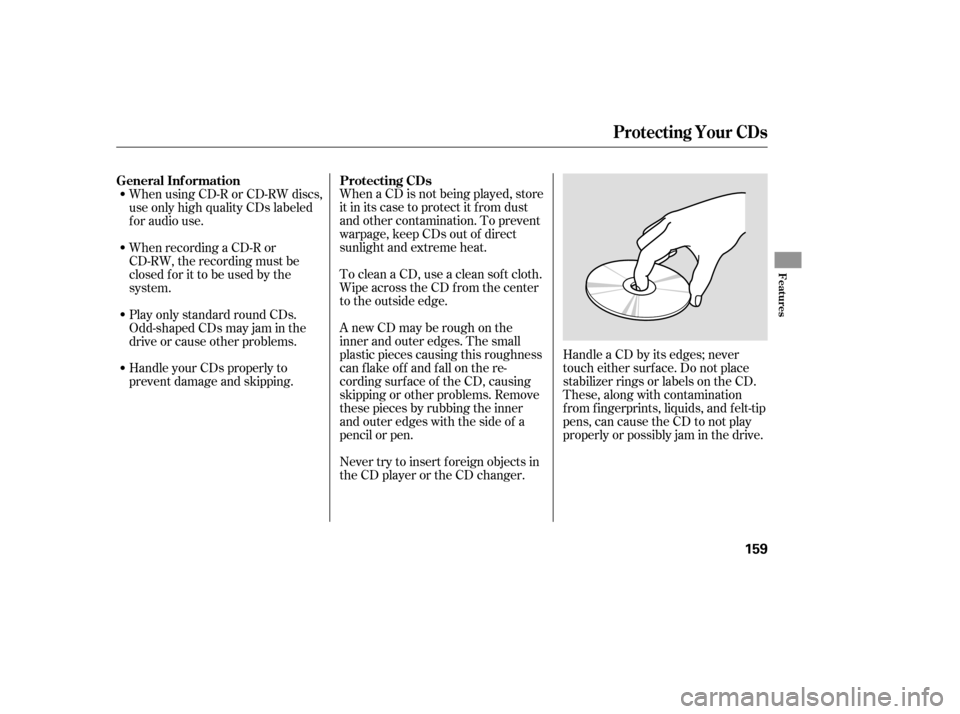
pencil or pen.Handle a CD by its edges; never
touch either surf ace. Do not place
stabilizer rings or labels on the CD.
These, along with contamination
f rom f ingerprints, liquids, and f elt-tip
pens, can cause the CD to not play
properly or possibly jam in the drive.
Never try to insert f oreign objects in
the CD player or the CD changer.
When using CD-R or CD-RW discs,
use only high quality CDs labeled
f or audio use.
When recording a CD-R or
CD-RW, the recording must be
closedforittobeusedbythe
system.
Play only standard round CDs.
Odd-shaped CDs may jam in the
driveorcauseotherproblems.
Handle your CDs properly to
prevent damage and skipping.
General Inf ormation
Protecting CDs
Protecting Your CDs
Features
159
Page 164 of 331

MessageSolution
CauseIf you see an error message in the
display while playing a CD, f ind the
cause in the chart to the right. If you
cannot clear the error message, take
the vehicle to your dealer.
Press the disc eject button, and remove the
disc(s). Check for an error indication. Insert
the disc(s) again. If the code does not disappear
orthedisc(s)cannotberemoved,consultyour
dealer.
Press the disc eject button, and remove the
disc(s). Check for an error indication. Insert
the disc(s) again. If the code does not disappear
orthedisc(s)cannotberemoved,consultyour
dealer.
Will disappear when the temperature returns to
normal.
Focus Error
Mechanical Error
High Temperature
CD Player/Changer Error Messages
160
Page 322 of 331
...............
DANGER, Explanation of .iii
...................................
Dashboard . 3, 58
Bulb Replacement
..........................
Back-up Lights .257
..............................
Brake Lights .257
.................................
Bed Lights .260
Front Turn Signal /Parking/
.......................
Hazard Lights .256
.................................
Headlights .255
.........
High-mount Brake Light .258
.................
License Plate Lights .259
Rear Bulbs (Brake/Taillights,
Turn Signal/Hazard Lights, ................
Back-up Lights) .257
............................
Specif ications .303
..............................
Bulbs, Halogen .255
............................
Capacities Chart .302
.............
Carbon Monoxide Hazard .53
...........................
Cargo Hooks . 97, 114
.............................
Carrying Cargo .186
.............
CAUTION, Explanation of .iii
.........................................
CD Care .161
..........................
CD Changer . 152, 153
CD Player/Changer Error ...................................
Messages .162 .......................................
CD Player .151
........................
Certif ication Label .300
....................................
Chains, tire .269
Change Oil
........................................
How to .247
......................................
When to .235
....................
Changing a Flat Tire .275
...
Charging System Indicator . 62, 288
............
Checklist, Bef ore Driving .195
..................
Childproof Door Locks .84
.....................................
Child Saf ety .32
..............................
Booster Seats .50
...................................
Child Seats .39
.....
Important Saf ety Reminders .32
..........................................
Inf ants .37
..........................
Larger Children .49
.........................................
LATCH .41
......................
Risks with Airbags .33
.............................
Small Children .38
....................................
Tether . 41, 46
.........
Where Should a Child Sit? .33
.......................................
Child Seats .39
.........................................
LATCH .41
..........
Tether Anchorage Points .46
...............
Climate Control System .122
..............................................
Clock .163 ....................................
Coat Hooks .115
.....................
Code, Audio System .162
........................
CO in the Exhaust .307
......................
Compact Spare Tire .274
.........................................
Compass .168
.................
Console Compartment . 113
.................
Consumer Inf ormation . 312
.............
Controls, Instruments and . 57
Coolant ........................................
Adding .249
....................................
Checking .182
.........................
Proper Solution .249
...................
Temperature Gauge . 72
..............................
Courtesy Light .118
Crankcase Emissions Control ........................................
System .307
Cruise Control .......................................
Indicator .65
...................................
Operation .165
...................................
Cup Holders .114
.............
Customer Service Of f ice . 312
Index
C
D
II