change time HONDA RIDGELINE 2013 1.G Navigation Manual
[x] Cancel search | Manufacturer: HONDA, Model Year: 2013, Model line: RIDGELINE, Model: HONDA RIDGELINE 2013 1.GPages: 152, PDF Size: 4.14 MB
Page 66 of 152
Navigation System65
RIDGELINE KA 31SJC860
Changing the Route
While en route, you may wish to alter
your route, add an interim “Waypoint”
(pit stop), choose a different destination,
or cancel your current destination.
To change your present route, you can
do any of the following:
Say “Menu,” or press the MENU button
to view the Change route by screen:
• Search waypoint (page 65)
• Delete waypoint (page 67)
• Avoid streets (page 67)
• Detour (page 67)
• Change routing method (page 67)
• Cancel the current route (page 68)
• Back to the current route (page 68) Choose a different
destination (other
methods) by:
• Saying “Find nearest...” to find a POI (page 68).
• Saying “Go home” (page 68).
• Using the joystick to select a different POI or address on the map (page 68).
• Pressing the MENU button twice to
get to the Enter destination by
screen (page 70).
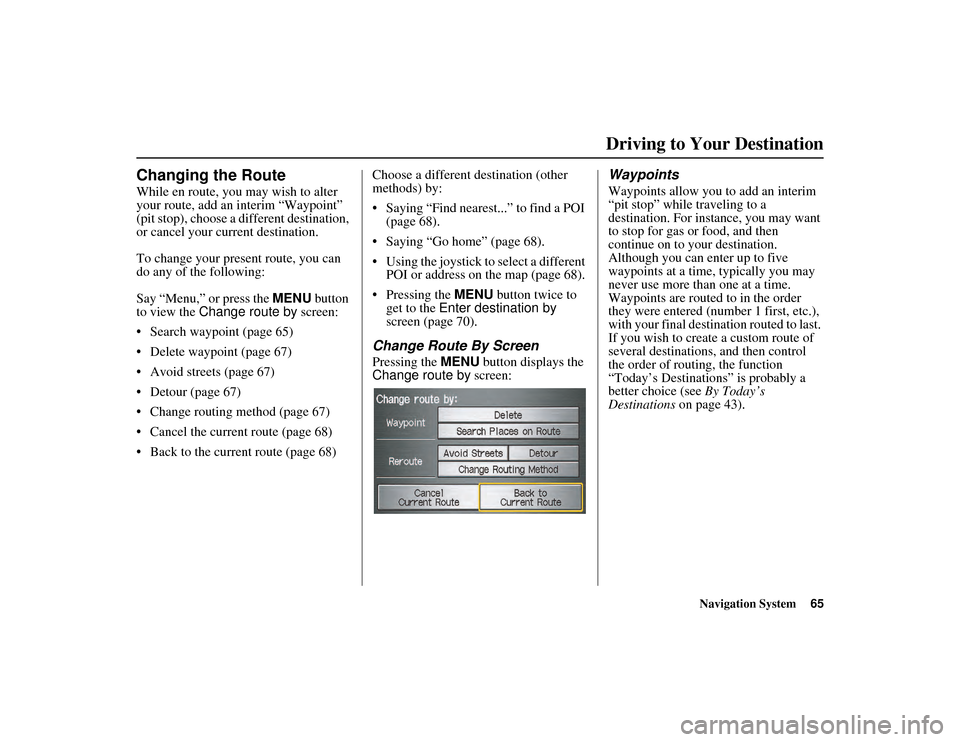
Change Route By Screen
Pressing the MENU button displays the
Change route by screen:
Waypoints
Waypoints allow you to add an interim
“pit stop” while traveling to a
destination. For inst ance, you may want
to stop for gas or food, and then
continue on to yo ur destination.
Although you can enter up to five
waypoints at a time, typically you may
never use more than one at a time.
Waypoints are routed to in the order
they were entered (num ber 1 first, etc.),
with your final destination routed to last.
If you wish to create a custom route of
several destinations, and then control
the order of routing, the function
“Today’s Destinations” is probably a
better choice (see By Today’s
Destinations on page 43).
Driving to Your Destination
Page 73 of 152
72Navigation System
RIDGELINE KA 31SJC860
Information Features
Calendar
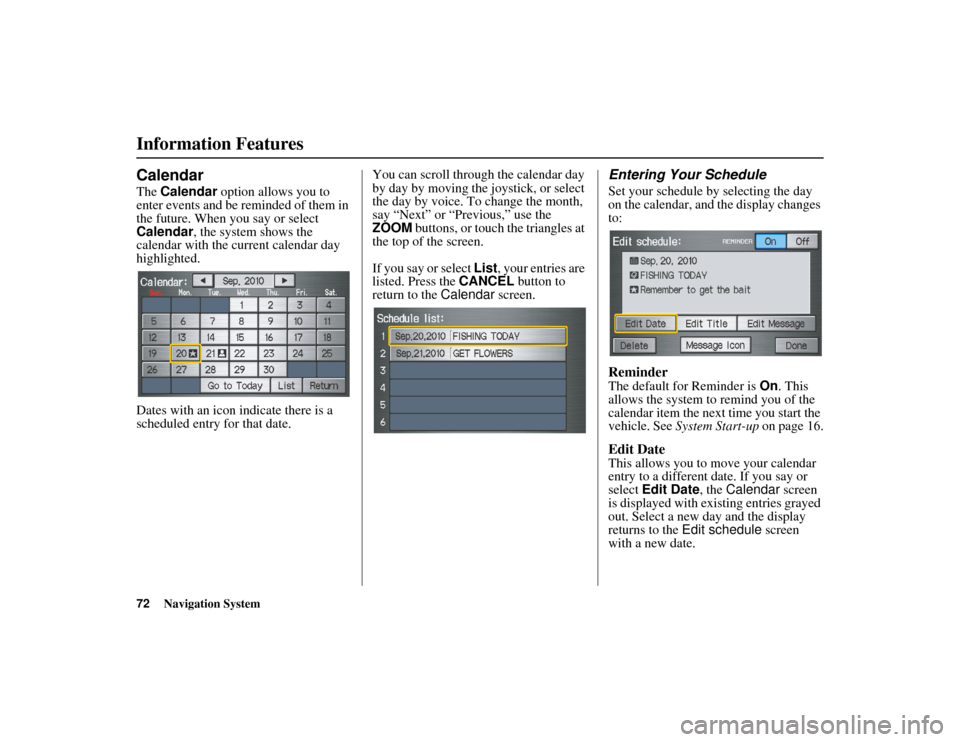
The Calendar option allows you to
enter events and be reminded of them in
the future. When you say or select
Calendar , the system shows the
calendar with the current calendar day
highlighted.
Dates with an icon indicate there is a
scheduled entry for that date. You can scroll through the calendar day
by day by moving the joystick, or select
the day by voice. To change the month,
say “Next” or “Previous,” use the
ZOOM buttons, or touch the triangles at
the top of the screen.
If you say or select
List, your entries are
listed. Press the CANCEL button to
return to the Calendar screen.
Entering Your Schedule
Set your schedule by selecting the day
on the calendar, and the display changes
to:
Reminder
The default for Reminder is On. This
allows the system to remind you of the
calendar item the next time you start the
vehicle. See System Start-up on page 16.
Edit Date
This allows you to move your calendar
entry to a different date. If you say or
select Edit Date , the Calendar screen
is displayed with existing entries grayed
out. Select a new day and the display
returns to the Edit schedule screen
with a new date.
Page 78 of 152
Navigation System77
RIDGELINE KA 31SJC860
System Setup
Setup Mode
The Setup function consists of two
different screens that allow you to
change and update information in the
system. To display the Setup screens,
use the voice contro l system and say
“Setup,” or press the INFO button and
select Setup. To change to another
Setup screen, say or select More in the
upper right corner of the screen.
On any of the Setup screens, you can
use the voice control system to select
any item on the screen.
NOTE:
• If some items appear to be grayed out and cannot be selected, it is because
you did not select OK on the initial
Disclaimer screen. See System Start-
up on page 16.
• For information on the available voice commands, see Voice
Command Index on page 138.
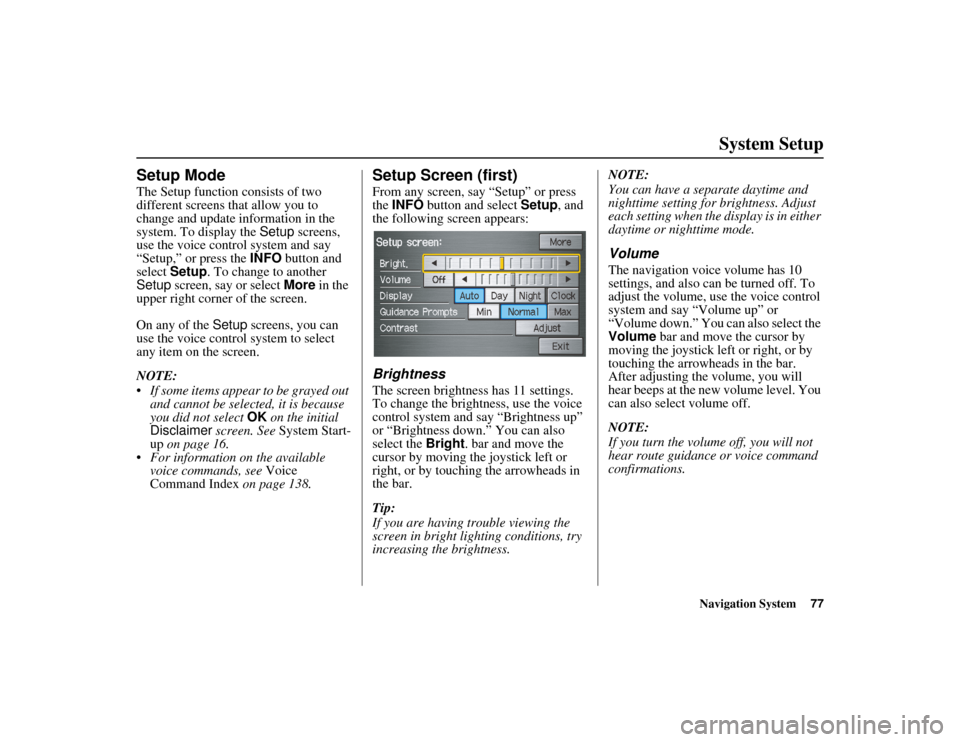
Setup Screen (first)
From any screen, say “Setup” or press
the INFO button and select Setup, and
the following screen appears:
Brightness
The screen brightness has 11 settings.
To change the brightness, use the voice
control system and say “Brightness up”
or “Brightness down.” You can also
select the Bright. bar and move the
cursor by moving the joystick left or
right, or by touching the arrowheads in
the bar.
Tip:
If you are having trouble viewing the
screen in bright lig hting conditions, try
increasing the brightness. NOTE:
You can have a separate daytime and
nighttime setting for brightness. Adjust
each setting when the
display is in either
daytime or nighttime mode.
Volume
The navigation voice volume has 10
settings, and also can be turned off. To
adjust the volume, use the voice control
system and say “Volume up” or
“Volume down.” You can also select the
Volume bar and move the cursor by
moving the joystick left or right, or by
touching the arrowheads in the bar.
After adjusting the volume, you will
hear beeps at the new volume level. You
can also select volume off.
NOTE:
If you turn the volume off, you will not
hear route guidance or voice command
confirmations.
Page 80 of 152
Navigation System79
RIDGELINE KA 31SJC860
System Setup
When you select Clock in Setup or the
Disclaimer screen times out, the clock
screen is displayed (see page 17).
DISPLAY OFF
When you touch the DISPLAY OFF
button, the screen is turned off. Voice
guidance will continue to work in this
mode. To turn on the screen, press any
navigation or voice control button.
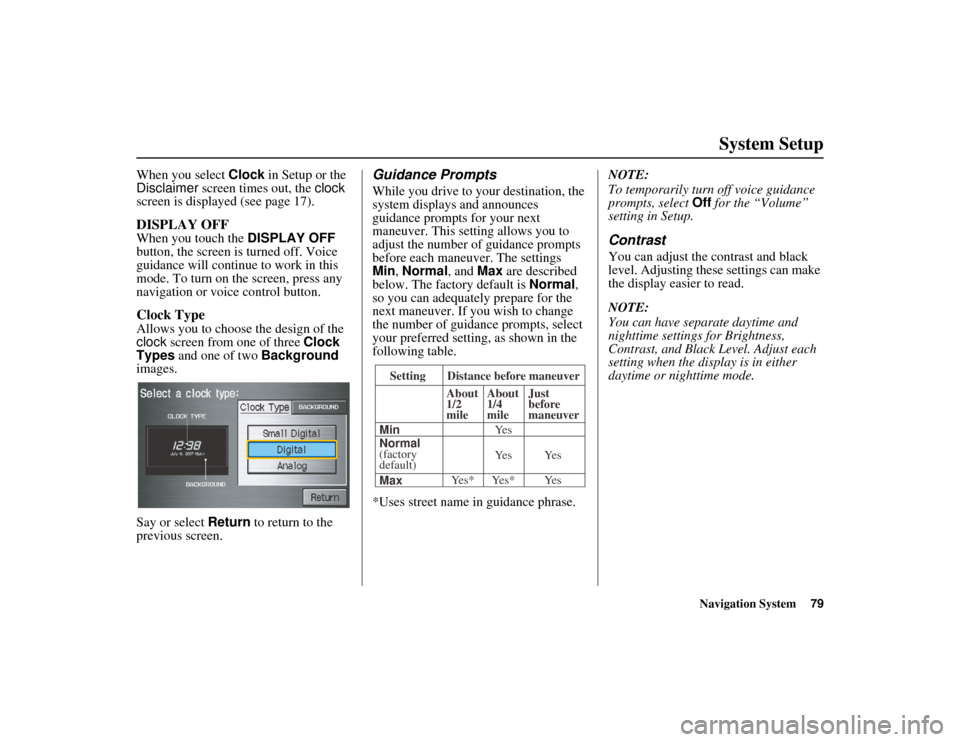
Clock Type
Allows you to choose the design of the
clock screen from one of three Clock
Types and one of two Background
images.
Say or select Return to return to the
previous screen.
Guidance Prompts
While you drive to yo ur destination, the
system displays and announces
guidance prompts for your next
maneuver. This settin g allows you to
adjust the number of guidance prompts
before each maneuver. The settings
Min , Normal , and Max are described
below. The factory default is Normal,
so you can adequately prepare for the
next maneuver. If you wish to change
the number of guidance prompts, select
your preferred setting, as shown in the
following table.
*Uses street name in guidance phrase. NOTE:
To temporarily turn
off voice guidance
prompts, select Off for the “Volume”
setting in Setup.
Contrast
You can adjust the contrast and black
level. Adjusting these settings can make
the display easier to read.
NOTE:
You can have separate daytime and
nighttime settings for Brightness,
Contrast, and Black Level. Adjust each
setting when the display is in either
daytime or nighttime mode.
Setting Distance before maneuver
About
1/2
mile
Max Normal
(factory
default) Min About
1/4
mile
Just
before
maneuver
Yes* Yes* Yes Ye s Ye s Ye s
Page 83 of 152
82Navigation System
RIDGELINE KA 31SJC860
System Setup
Edit Address
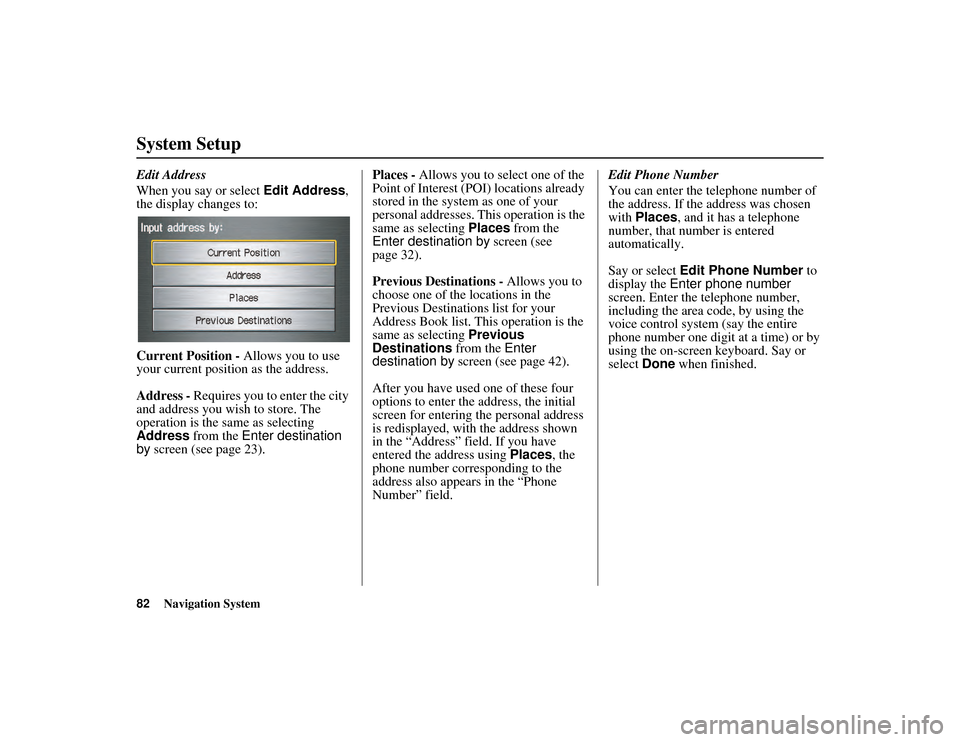
When you say or select Edit Address,
the display changes to:
Current Position - Allows you to use
your current position as the address.
Address - Requires you to enter the city
and address you wish to store. The
operation is the same as selecting
Address from the Enter destination
by screen (see page 23). Places -
Allows you to select one of the
Point of Interest (POI) locations already
stored in the system as one of your
personal addresses. This operation is the
same as selecting Places from the
Enter destination by screen (see
page 32).
Previous Destinations - Allows you to
choose one of the locations in the
Previous Destinations list for your
Address Book list. This operation is the
same as selecting Previous
Destinations from the Enter
destination by screen (see page 42).
After you have used one of these four
options to enter the address, the initial
screen for entering the personal address
is redisplayed, with the address shown
in the “Address” field. If you have
entered the address using Places, the
phone number corresponding to the
address also appears in the “Phone
Number” field. Edit Phone Number
You can enter the telephone number of
the address. If the address was chosen
with
Places, and it has a telephone
number, that number is entered
automatically.
Say or select Edit Phone Number to
display the Enter phone number
screen. Enter the telephone number,
including the area code, by using the
voice control system (say the entire
phone number one digit at a time) or by
using the on-screen keyboard. Say or
select Done when finished.
Page 85 of 152
84Navigation System
RIDGELINE KA 31SJC860
System Setup
Home Address
This feature lets you return “Home”
from any location simply by saying “Go
home” at the map screen. Alternatively,
you can select Go Home on the Enter
destination by screen (see By Go Home
on page 46).
Enter the name, address, and phone
number in the same way as entering a
personal address, then say or select
Done. To leave the screen, press the
CANCEL button.
NOTE:
If your Home address cannot be found
in the system, while located on the street
close to your home, select “Current
Position” when entering the “Edit
Address” field.
PIN Number
You can set a four-digit PIN (Personal
Identification Number) for accessing
and changing personal addresses and
your home address if desired. Once you
set the PIN on this screen, the system
asks you to enter the PIN when you
access a personal address or your home
address.
NOTE:
PINs are optional. If you choose to use a
PIN, make sure you remember it. If you
forget your PIN, the dealer will have to
reset it for you.
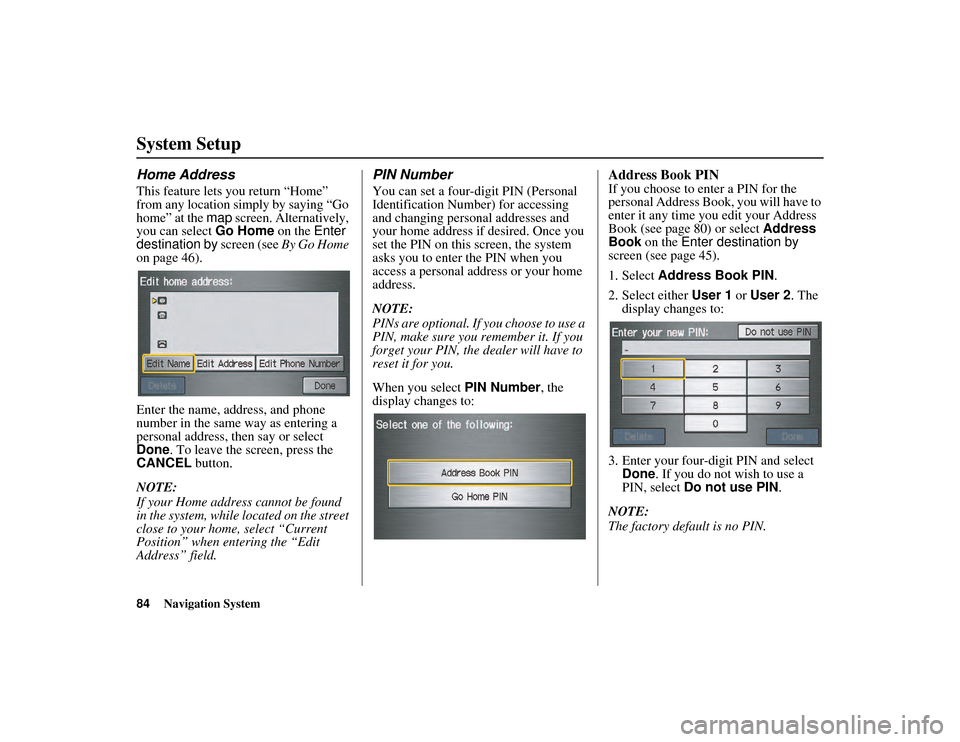
When you select PIN Number, the
display changes to:
Address Book PIN
If you choose to enter a PIN for the
personal Address Book , you will have to
enter it any time you edit your Address
Book (see page 80) or select Address
Book on the Enter destination by
screen (see page 45).
1. Select Address Book PIN .
2. Select either User 1 or User 2 . The
display changes to:
3. Enter your four-digit PIN and select Done. If you do not wish to use a
PIN, select Do not use PIN .
NOTE:
The factory default is no PIN.
Page 86 of 152
Navigation System85
RIDGELINE KA 31SJC860
System Setup
4. If you have entered the PIN correctly,
the display changes to the Please re-
enter new PIN screen. Enter the
same number, then touch Done to
validate the number you have
selected.
5. If you have entered the same number both times, the display returns to the
Edit personal information screen. If
not, “incorrect PIN” appears in the
upper right corner of the screen. Enter
your PIN again.
NOTE:
If you wish to remove your PIN, return
to the same screen an d, after entering
your PIN, touch the Do not use PIN
button.Go Home PIN
1. Select Go Home PIN , and the
system displays the Enter your new
PIN screen.
2. Enter your PIN in the same way as entering the Address Book PIN.
NOTE:
The factory default is no PIN. If you
choose to use a PIN, you will have to
enter it whenever you say “Go Home”
at the map screen or select Go Home
on the Enter destination by screen.
User Name
You can change User 1 and User 2 to
a desired name. Choose either User 1 or
User 2 on the Select the user name to
edit screen. Enter the name, and say or
select Done to leave the screen.
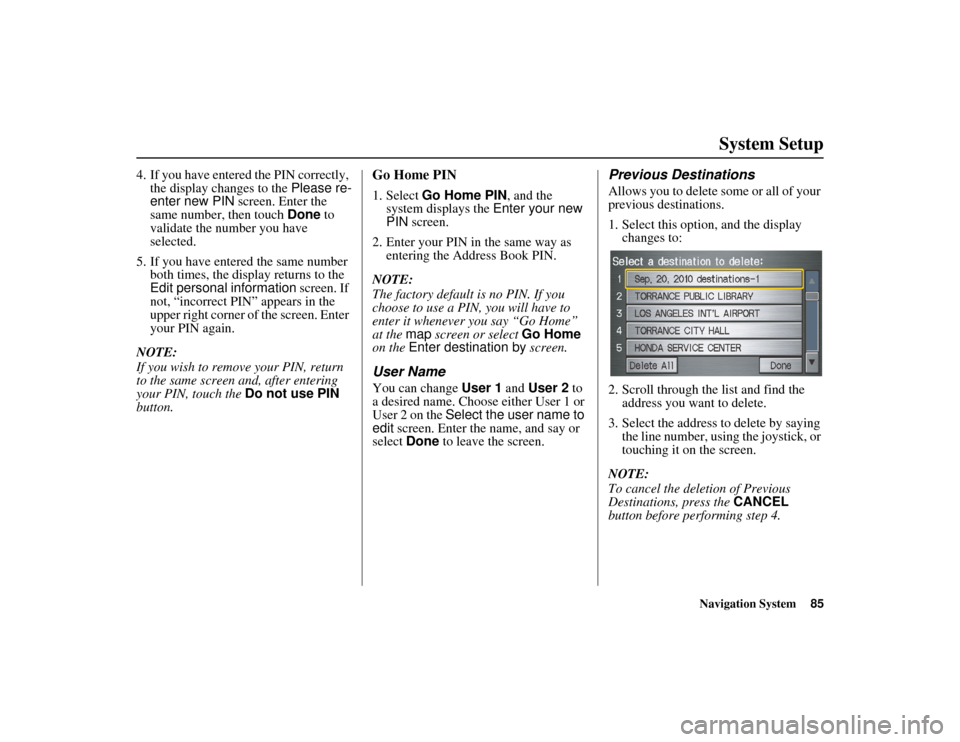
Previous Destinations
Allows you to delete some or all of your
previous destinations.
1. Select this option, and the display changes to:
2. Scroll through the list and find the address you want to delete.
3. Select the address to delete by saying the line number, using the joystick, or
touching it on the screen.
NOTE:
To cancel the deletion of Previous
Destinations, press the CANCEL
button before performing step 4.
Page 96 of 152
Navigation System95
RIDGELINE KA 31SJC860
System Setup
After you have traveled approximately
1/2 mile away from a mapped road, the
system will display a series of white
dots on the map screen to show the path
you have traveled. This is provided so
you can follow the dots to backtrack to
the mapped road you originally left.
Tracking continues until you reach a
mapped road. See Off-road Tracking on
page 62.
Tracking is shown only in the 1/20, 1/8,
1/4, and 1/2 mile scales, or the 80, 200,
400, and 800 meter scales. Use the
ZOOM buttons to change the scales if
necessary.
NOTE:
To clear existing dots, turn this feature
off and exit Setup. To re-enable this
feature, return to Setup and turn it on
again.Correct Vehicle Position
The system relies on satellites for
positioning information. Buildings,
tunnels, and other objects can block or
reflect these signals, requiring the
system to use “dead reckoning” to
determine your loca tion and direction.
This can sometimes lead to small errors
in positioning, such as showing you on
an adjacent street.
NOTE:
Using this function to adjust vehicle
position is not recommended. When the
system acquires a GPS signal, it will
automatically place the vehicle in the
correct location. If you choose to do this, follow these
steps:
1. Stop the vehicle.
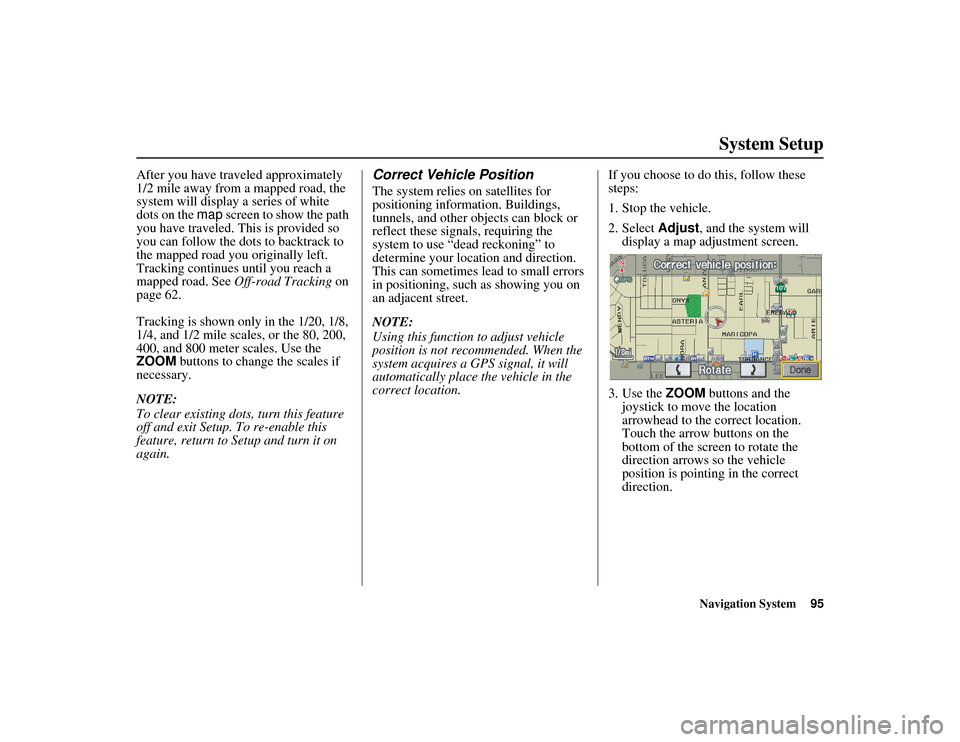
2. Select
Adjust, and the system will
display a map adjustment screen.
3. Use the ZOOM buttons and the
joystick to move the location
arrowhead to the correct location.
Touch the arrow buttons on the
bottom of the screen to rotate the
direction arrows so the vehicle
position is pointin g in the correct
direction.
Page 98 of 152
Navigation System97
RIDGELINE KA 31SJC860
System Setup
Clock Adjustment
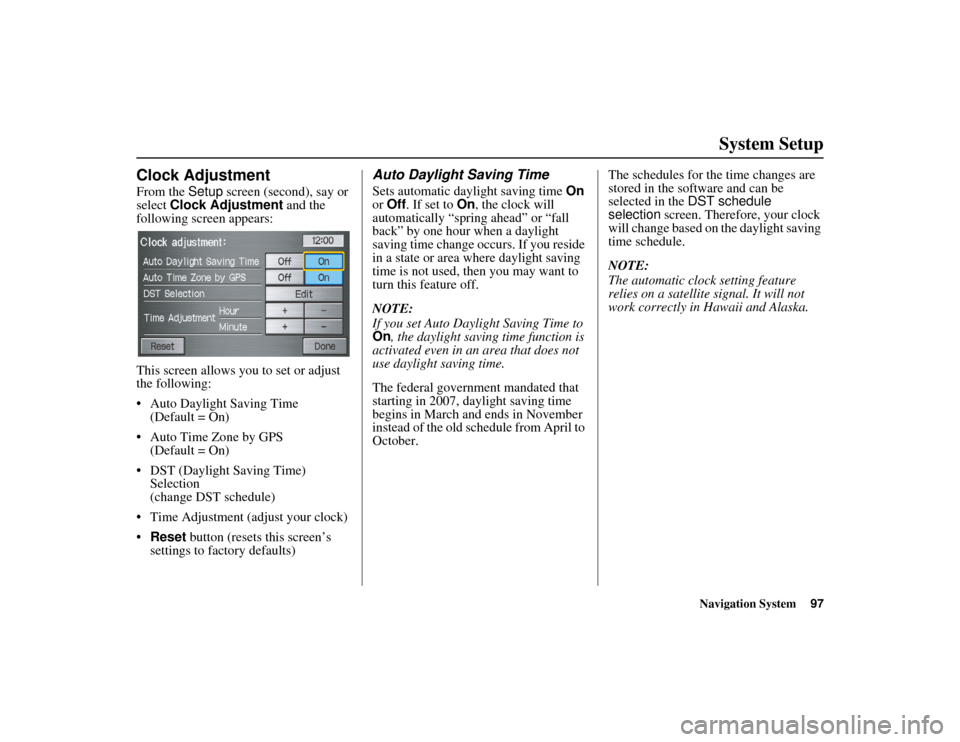
From the Setup screen (second), say or
select Clock Adjustment and the
following screen appears:
This screen allows you to set or adjust
the following:
• Auto Daylight Saving Time (Default = On)
• Auto Time Zone by GPS (Default = On)
• DST (Daylight Saving Time) Selection
(change DST schedule)
• Time Adjustment (adjust your clock)
• Reset button (resets this screen’s
settings to factory defaults)
Auto Daylight Saving Time
Sets automatic daylight saving time On
or Off . If set to On , the clock will
automatically “spring ahead” or “fall
back” by one hour when a daylight
saving time change occurs. If you reside
in a state or area where daylight saving
time is not used, then you may want to
turn this feature off.
NOTE:
If you set Auto Daylight Saving Time to
On , the daylight saving time function is
activated even in an area that does not
use daylight saving time.
The federal government mandated that
starting in 2007, daylight saving time
begins in March and ends in November
instead of the old schedule from April to
October. The schedules for the time changes are
stored in the software and can be
selected in the
DST schedule
selection screen. Therefore, your clock
will change based on the daylight saving
time schedule.
NOTE:
The automatic clock setting feature
relies on a satellite signal. It will not
work correctly in Hawaii and Alaska.
Page 99 of 152
98Navigation System
RIDGELINE KA 31SJC860
System Setup
Auto Time Zone by GPS
Sets automatic time zone selection by
GPS to On or Off . If you are driving
across the country and passing through
time zones, then this feature will
automatically set the time to the time
zone you are traveling through.
However, if you live and work in two
different time zones, you may want to
turn this feature off.
NOTE:
When driving near a time zone
boundary, the displayed time zone may
fluctuate between the two zone times.
Daylight Saving Time (DST)
Selection (Change DST
Schedule)
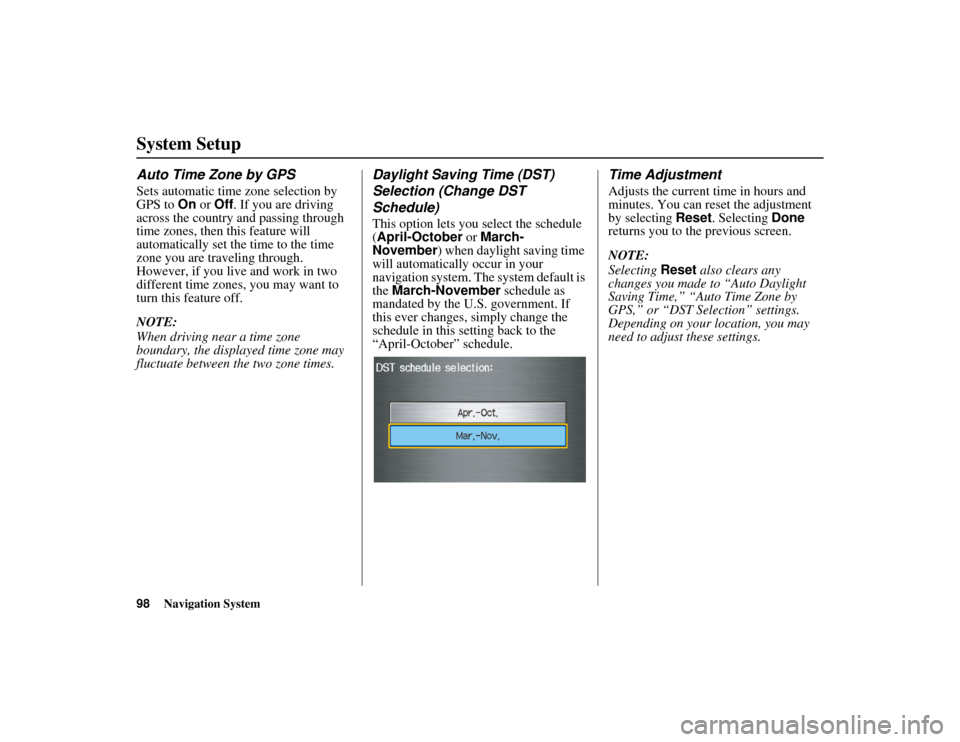
This option lets you select the schedule
(April-October or March-
November ) when daylight saving time
will automatically occur in your
navigation system. The system default is
the March-November schedule as
mandated by the U.S. government. If
this ever changes, simply change the
schedule in this setting back to the
“April-October” schedule.
Time Adjustment
Adjusts the current time in hours and
minutes. You can reset the adjustment
by selecting Reset. Selecting Done
returns you to the previous screen.
NOTE:
Selecting Reset also clears any
changes you made to “Auto Daylight
Saving Time,” “Auto Time Zone by
GPS,” or “DST Selection” settings.
Depending on your location, you may
need to adjust these settings.